service NISSAN TEANA 2014 Service Manual
[x] Cancel search | Manufacturer: NISSAN, Model Year: 2014, Model line: TEANA, Model: NISSAN TEANA 2014Pages: 4801, PDF Size: 51.2 MB
Page 3383 of 4801
![NISSAN TEANA 2014 Service Manual
PCS-34
< PREPARATION >[POWER DISTRIBUTION SYSTEM]
PREPARATION
PREPARATION
PREPARATION
Special Service ToolINFOID:0000000009461622
The actual shapes of the tools may
differ from those illustrated her](/img/5/57390/w960_57390-3382.png "NISSAN TEANA 2014 Service Manual
PCS-34
< PREPARATION >[POWER DISTRIBUTION SYSTEM]
PREPARATION
PREPARATION
PREPARATION
Special Service ToolINFOID:0000000009461622
The actual shapes of the tools may
differ from those illustrated her")
PCS-34
< PREPARATION >[POWER DISTRIBUTION SYSTEM]
PREPARATION
PREPARATION
PREPARATION
Special Service ToolINFOID:0000000009461622
The actual shapes of the tools may
differ from those illustrated here.
Tool number
(TechMate No.)
Tool name Description
—
(J-46534)
Trim Tool Set Removing trim components
AWJIA0483ZZ
Revision: November 20132014 Altima NAMRevision: November 20132014 Altima NAM
Page 3403 of 4801
![NISSAN TEANA 2014 Service Manual
PCS-54
< BASIC INSPECTION >[POWER DISTRIBUTION SYSTEM]
DIAGNOSIS AND REPAIR WORKFLOW
1.GET INFORMATION FOR SYMPTOM
1. Get detailed information from the customer about the symptom (the condition and](/img/5/57390/w960_57390-3402.png "NISSAN TEANA 2014 Service Manual
PCS-54
< BASIC INSPECTION >[POWER DISTRIBUTION SYSTEM]
DIAGNOSIS AND REPAIR WORKFLOW
1.GET INFORMATION FOR SYMPTOM
1. Get detailed information from the customer about the symptom (the condition and")
PCS-54
< BASIC INSPECTION >[POWER DISTRIBUTION SYSTEM]
DIAGNOSIS AND REPAIR WORKFLOW
1.GET INFORMATION FOR SYMPTOM
1. Get detailed information from the customer about the symptom (the condition and the environment when
the incident/malfunction occurs).
2. Check operation condition of the com ponent or system that is malfunctioning.
>> GO TO 2.
2.CHECK DTC
1. Check DTC.
2. Perform the following procedure if DTC is detected.
- Record DTC and freeze frame data (P rint them out using CONSULT).
- Erase DTC.
- Study the relationship between the cause detected by DTC and the symptom described by the customer.
3. Check related service bulletins for information.
Are any symptoms described and any DTC detected?
Symptom is described, DTC is detected>>GO TO 3.
Symptom is described, DTC is not detected>>GO TO 4.
Symptom is not described, DTC is detected>>GO TO 5.
3.CONFIRM THE SYMPTOM
Try to confirm the symptom described by the customer.
Also study the normal operation and fail-safe related to the symptom.
Verify relation between the symptom and the condition when the symptom is detected.
>> GO TO 5.
4.CONFIRM THE SYMPTOM
Try to confirm the symptom described by the customer.
Verify relation between the symptom and the condition when the symptom is detected.
NOTE:
Freeze frame data is useful if the DTC is not detected.
>> GO TO 6.
5.PERFORM DTC CONFIRMATION PROCEDURE
Perform DTC CONFIRMATION PROCEDURE for the det ected DTC, and then check that DTC is detected
again. At this time, always connect CONSULT to the v ehicle, and check self diagnostic results in real time.
If two or more DTCs are detected, refer to BCS-50, "DTC Inspection Priority Chart"
, and determine trouble
diagnosis order.
Is DTC detected?
YES >> GO TO 7.
NO >> Refer to GI-43, "Intermittent Incident"
.
6.DETECT MALFUNCTIONING SYSTEM BY SYMPTOM DIAGNOSIS
Detect malfunctioning system according to SYMPTOM DIAGNOSIS based on the confirmed symptom in step
4, and determine the trouble diagnosis order based on possible causes and symptom.
Is the symptom described?
YES >> GO TO 7.
NO >> Monitor input data from related sensors or check voltage of related module terminals using CON- SULT.
7.DETECT MALFUNCTIONING PART BY DIAGNOSIS PROCEDURE
Inspect according to Diagnos is Procedure of the system.
Is malfunctioning part detected?
YES >> GO TO 8.
NO >> Refer to GI-43, "Intermittent Incident"
.
Revision: November 20132014 Altima NAMRevision: November 20132014 Altima NAM
Page 3433 of 4801

PG
PG-1
ELECTRICAL & POWER CONTROL
C
D E
F
G H
I
J
K L
B
SECTION PG
A
O P
N
CONTENTS
POWER SUPPLY, GROUND & CIRCUIT ELEMENTS
PRECAUTION ................
...............................2
PRECAUTIONS .............................................. .....2
Precaution for Supplemental Restraint System
(SRS) "AIR BAG" and "SEAT BELT PRE-TEN-
SIONER" ............................................................. ......
2
PREPARATION ............................................3
PREPARATION .............................................. .....3
Special Service Tool ........................................... ......3
Commercial Service Tool ..........................................3
BASIC INSPECTION ....................................4
BATTERY ....................................................... .....4
How to Handle Battery ........................................ ......4
Work Flow ........................................................... ......4
INSPECTION AND ADJUSTMENT .....................7
ADDITIONAL SERVICE WHEN REMOVING BAT-
TERY NEGATIVE TERMINAL ............................... ......
7
ADDITIONAL SERVICE WHEN REMOVING
BATTERY NEGATIVE TERMINAL : Special Re-
pair Requirement ................................................. ......
7
DTC/CIRCUIT DIAGNOSIS ..........................8
POWER SUPPLY ROUTING CIRCUIT .......... .....8
Wiring Diagram — Battery Power Supply — ....... ......8
Wiring Diagram — Accessory Power Supply — .....15
Wiring Diagram — Ignition Power Supply — ..........19
Fuse ........................................................................28
Fusible Link .............................................................28
GROUND ...........................................................29
Ground Distribution .............................................. ....29
HARNESS .........................................................39
Harness Layout ................................................... ....39
ELECTRICAL UNITS LOCATION ....................61
Electrical Units Location ..........................................61
HARNESS CONNECTOR .................................65
Description ...............................................................65
STANDARDIZED RELAY .................................68
Description ...............................................................68
FUSE BLOCK - JUNCTION BOX (J/B) ............70
Terminal Arrangement .............................................70
FUSE, FUSIBLE LINK AND RELAY BOX ........71
Terminal Arrangement .............................................71
IPDM E/R (INTELLIGENT POWER DISTRI-
BUTION MODULE ENGINE ROOM) ................
72
Fuse, Connector and Terminal Arrangement ...... ....72
REMOVAL AND INSTALLATION ...............73
BATTERY ..........................................................73
Exploded View ..................................................... ....73
Removal and Installation (Battery) ..........................73
Removal and Installation (Battery Tray) ..................74
SERVICE DATA AND SPECIFICATIONS
(SDS) ............... .............................................
75
BATTERY ..........................................................75
Battery ................................................................. ....75
Revision: November 20132014 Altima NAM
Page 3434 of 4801

PG-2
< PRECAUTION >
PRECAUTIONS
PRECAUTION
PRECAUTIONS
Precaution for Supplemental Restraint System (SRS) "AIR BAG" and "SEAT BELT
PRE-TENSIONER"
INFOID:0000000009951599
The Supplemental Restraint System such as “A IR BAG” and “SEAT BELT PRE-TENSIONER”, used along
with a front seat belt, helps to reduce the risk or severi ty of injury to the driver and front passenger for certain
types of collision. Information necessary to service the system safely is included in the SR and SB section of
this Service Manual.
WARNING:
• To avoid rendering the SRS inopera tive, which could increase the risk of personal injury or death in
the event of a collision which would result in air bag inflation, all maintenance must be performed by
an authorized NISS AN/INFINITI dealer.
• Improper maintenance, including in correct removal and installation of the SRS, can lead to personal
injury caused by unintent ional activation of the system. For re moval of Spiral Cable and Air Bag
Module, see the SR section.
• Do not use electrical test equipmen t on any circuit related to the SRS unless instructed to in this
Service Manual. SRS wiring harn esses can be identified by yellow and/or orange harnesses or har-
ness connectors.
PRECAUTIONS WHEN USING POWER TOOLS (AIR OR ELECTRIC) AND HAMMERS
WARNING:
• When working near the Airbag Diagnosis Sensor Unit or other Airbag System sensors with the Igni-
tion ON or engine running, DO NOT use air or electri c power tools or strike near the sensor(s) with a
hammer. Heavy vibration could activate the sensor( s) and deploy the air bag(s), possibly causing
serious injury.
• When using air or electric power tools or hammers , always switch the Ignition OFF, disconnect the
battery and wait at least three minutes before performing any service.
Revision: November 20132014 Altima NAM
Page 3435 of 4801
PG
PREPARATIONPG-3
< PREPARATION >
C
D E
F
G H
I
J
K L
B
A
O P
N
PREPARATION
PREPARATION
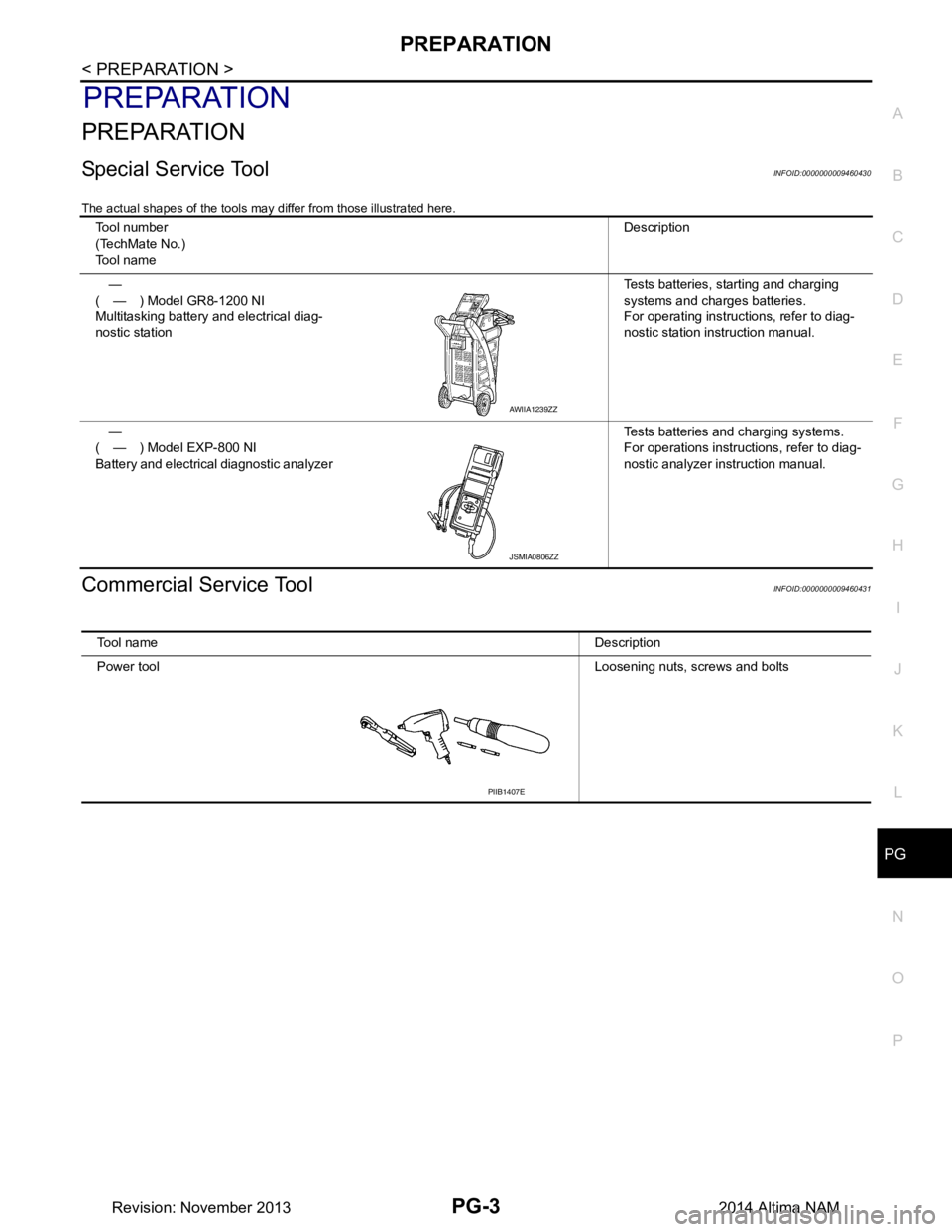
Special Service ToolINFOID:0000000009460430
The actual shapes of the tools may differ from those illustrated here.
Commercial Service ToolINFOID:0000000009460431
Tool number
(TechMate No.)
Tool name Description
—
( — ) Model GR8-1200 NI
Multitasking battery and electrical diag-
nostic station Tests batteries, starting and charging
systems and charges batteries.
For operating instruct ions, refer to diag-
nostic station instruction manual.
—
( — ) Model EXP-800 NI
Battery and electrical diagnostic analyzer Tests batteries and charging systems.
For operations instructions, refer to diag-
nostic analyzer instruction manual.
AWIIA1239ZZ
JSMIA0806ZZ
Tool name Description
Power tool Loosening nuts, screws and bolts
PIIB1407E
Revision: November 20132014 Altima NAM
Page 3436 of 4801
PG-4
< BASIC INSPECTION >
BATTERY
BASIC INSPECTION
BATTERY
How to Handle BatteryINFOID:0000000009460432
CAUTION:
• If it becomes necessary to start the engine with a booster battery and jumper cables, use a 12-volt
booster battery.
• After connecting battery cables, ensure that they are tightly clamped to battery terminals for good
contact.
• Never add distilled water through the hole used to check specific gravity.
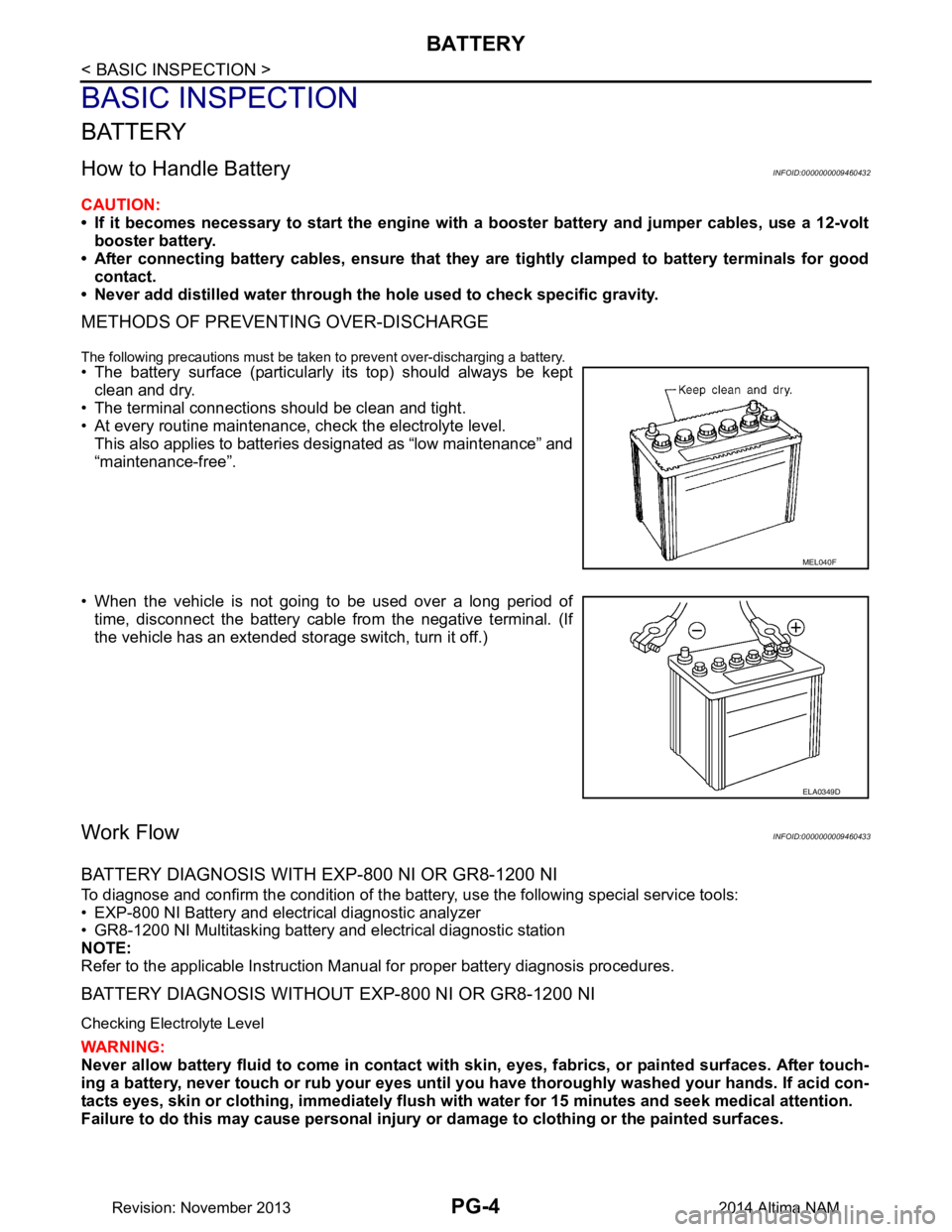
METHODS OF PREVENTING OVER-DISCHARGE
The following precautions must be taken to prevent over-discharging a battery.
• The battery surface (particularly its top) should always be kept
clean and dry.
• The terminal connections should be clean and tight.
• At every routine maintenance, check the electrolyte level. This also applies to batteries designated as “low maintenance” and
“maintenance-free”.
• When the vehicle is not going to be used over a long period of time, disconnect the battery cable from the negative terminal. (If
the vehicle has an extended storage switch, turn it off.)
Work FlowINFOID:0000000009460433
BATTERY DIAGNOSIS WITH EXP-800 NI OR GR8-1200 NI
To diagnose and confirm the condition of the batte ry, use the following special service tools:
• EXP-800 NI Battery and electrical diagnostic analyzer
• GR8-1200 NI Multitasking battery and electrical diagnostic station
NOTE:
Refer to the applicable Instruction Manual for proper battery diagnosis procedures.
BATTERY DIAGNOSIS WITHOUT EXP-800 NI OR GR8-1200 NI
Checking Electrolyte Level
WARNING:
Never allow battery fluid to come in contact with skin, eyes, fabrics, or painted surfaces. After touch-
ing a battery, never touch or rub your eyes until you have thoroughly washed your hands. If acid con-
tacts eyes, skin or clothing, immediately flush wit h water for 15 minutes and seek medical attention.
Failure to do this may cause personal injury or damage to clothing or the painted surfaces.
MEL040F
ELA0349D
Revision: November 20132014 Altima NAM
Page 3439 of 4801
PG
INSPECTION AND ADJUSTMENTPG-7
< BASIC INSPECTION >
C
D E
F
G H
I
J
K L
B
A
O P
N
INSPECTION AND ADJUSTMENT
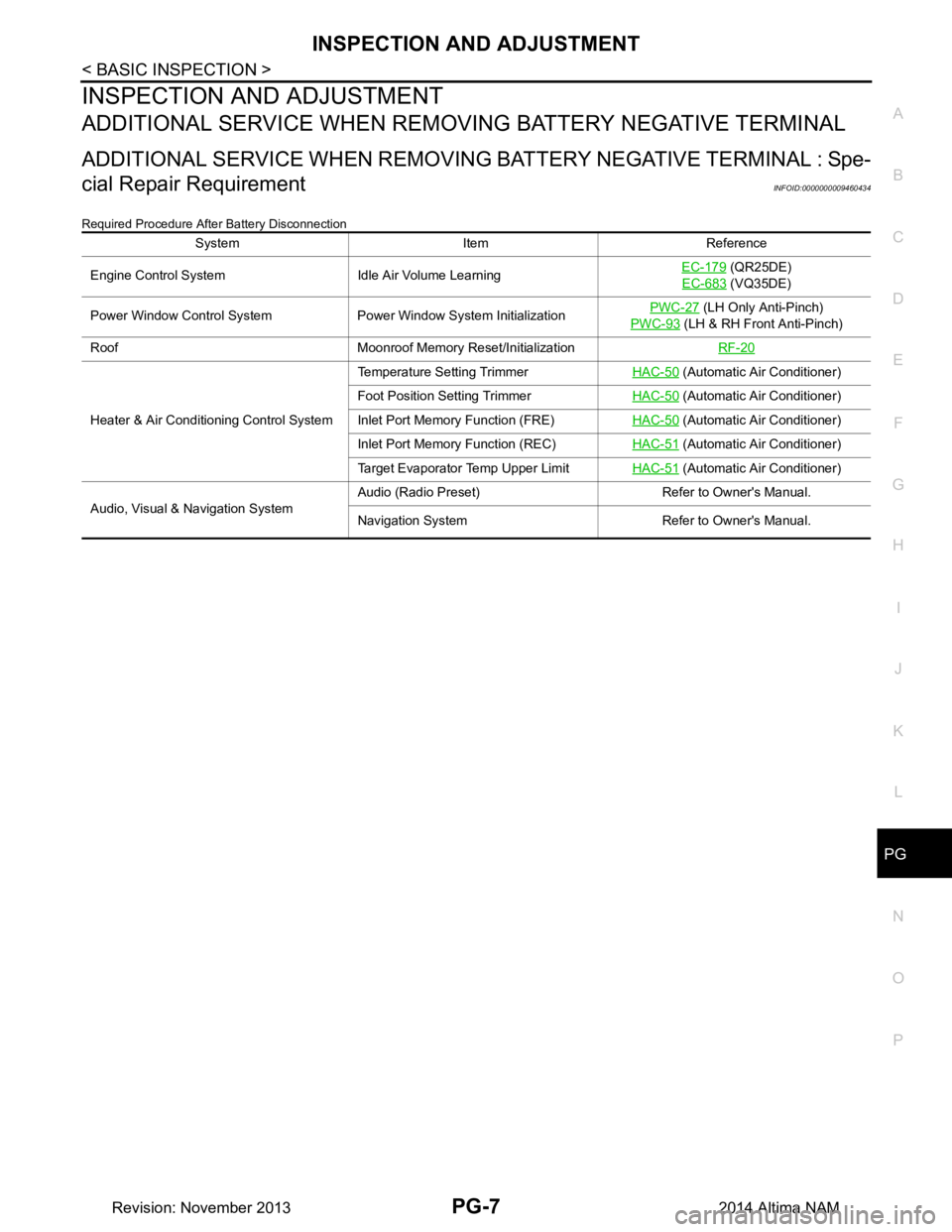
ADDITIONAL SERVICE WHEN REMOVI
NG BATTERY NEGATIVE TERMINAL
ADDITIONAL SERVICE WHEN REMOVING BATTERY NEGATIVE TERMINAL : Spe-
cial Repair Requirement
INFOID:0000000009460434
Required Procedure After Battery Disconnection
System Item Reference
Engine Control System Idle Air Volume Learning EC-179
(QR25DE)
EC-683
(VQ35DE)
Power Window Control System Power Window System Initialization PWC-27
(LH Only Anti-Pinch)
PWC-93
(LH & RH Front Anti-Pinch)
Roof Moonroof Memory Reset/Initialization RF-20
Heater & Air Conditioning Control SystemTemperature Setting Trimmer
HAC-50
(Automatic Air Conditioner)
Foot Position Setting Trimmer HAC-50
(Automatic Air Conditioner)
Inlet Port Memory Function (FRE) HAC-50
(Automatic Air Conditioner)
Inlet Port Memory Function (REC) HAC-51
(Automatic Air Conditioner)
Target Evaporator Temp Upper Limit HAC-51
(Automatic Air Conditioner)
Audio, Visual & Navigation System Audio (Radio Preset) Refer to Owner's Manual.
Navigation System Refer to Owner's Manual.
Revision: November 20132014 Altima NAM
Page 3506 of 4801
PG-74
< REMOVAL AND INSTALLATION >
BATTERY
Reset electronic systems as necessary. Refer to PG-7, "ADDITIONAL SERVICE WHEN REMOVING BAT-
TERY NEGATIVE TERMINAL : Special Repair Requirement".
Removal and Installation (Battery Tray)INFOID:0000000009460450
REMOVAL
1. Remove battery and battery tray liner. Refer to PG-73, "Removal and Installation (Battery)".
2. Remove front air duct and air cleaner case assembly. Refer to EM-29, "Removal and Installation"
(QR25DE models) or EM-144, "Removal and Installation" (VQ35DE models).
3. Disconnect transmission control module (TCM). Refer to TM-183, "Exploded View"
(RE0F10D) TM-384,
"Exploded View"or (RE0F10E).
4. Remove the ECM bracket.
5. Remove the battery tray bolts and battery tray.
6. Remove the battery tray support bolts and battery tray support.
INSTALLATION
Installation is in the reverse order of removal.
Reset electronic systems as necessary. Refer to PG-7, "ADDITIONAL SERVICE WHEN REMOVING BAT-
TERY NEGATIVE TERMINAL : Special Repair Requirement".
Revision: November 20132014 Altima NAM
Page 3507 of 4801
PG
BATTERYPG-75
< SERVICE DATA AND SPECIFICATIONS (SDS)
C
D E
F
G H
I
J
K L
B
A
O P
N
SERVICE DATA AND SPECIFICATIONS (SDS)
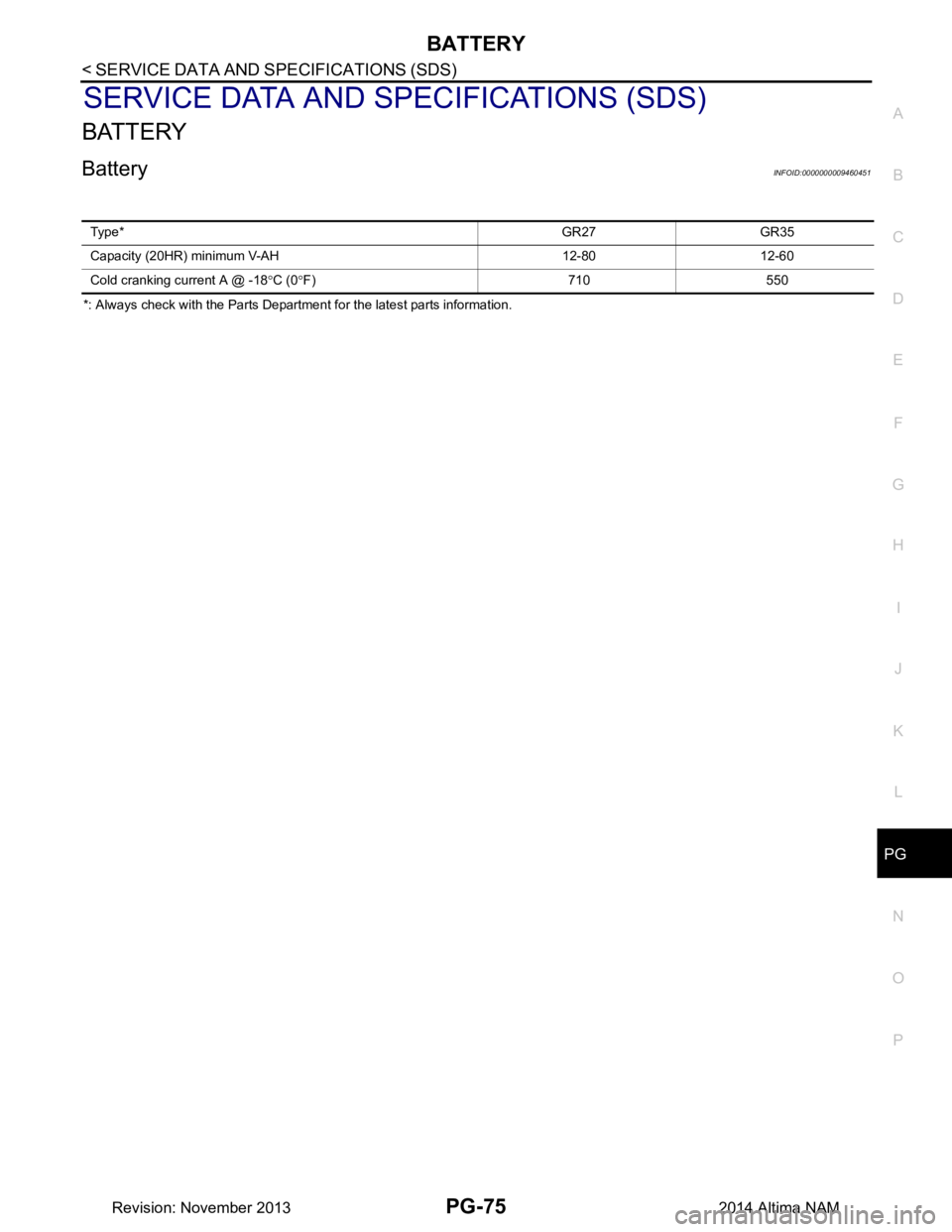
BATTERY
BatteryINFOID:0000000009460451
*: Always check with the Parts Department for the latest parts information.
Typ e*
GR27 GR35
Capacity (20HR) minimum V-AH 12-80 12-60
Cold cranking current A @ -18 °C (0 °F) 710 550
Revision: November 20132014 Altima NAM
Page 3508 of 4801

PWC-1
BODY EXTERIOR, DOORS, ROOF & VEHICLE SECURITY
C
D E
F
G H
I
J
L
M
SECTION PWC
A
B
PWC
N
O P
CONTENTS
POWER WINDOW CONTROL SYSTEM
LH FRONT ONLY ANTI-PINCH
PRECAUTION ................ ...............................
6
PRECAUTIONS .............................................. .....6
Precaution for Supplemental Restraint System
(SRS) "AIR BAG" and "SEAT BELT PRE-TEN-
SIONER" ............................................................. ......
6
Precaution for Work ..................................................6
PREPARATION ............................................7
PREPARATION .............................................. .....7
Special Service Tool ........................................... ......7
SYSTEM DESCRIPTION ..............................8
COMPONENT PARTS ................................... .....8
Component Parts Location ................................ ......8
Component Description .............................................8
SYSTEM .............................................................10
System Diagram ................................................. ....10
System Description .................................................10
Fail-safe ..................................................................11
DIAGNOSIS SYSTEM (BCM) ............................13
COMMON ITEM ..................................................... ....13
COMMON ITEM : CONSULT Function (BCM -
COMMON ITEM) ................................................. ....
13
RETAINED PWR ................................................... ....14
RETAINED PWR : CONSULT Function (BCM -
RETAINED PWR) ............................................... ....
14
ECU DIAGNOSIS INFORMATION ..............15
BCM (BODY CONTROL MODULE) ............... ....15
List of ECU Reference ........................................ ....15
POWER WINDOW MAIN SWITCH ....................16
Reference Value ................................................. ....16
WIRING DIAGRAM ......................................18
POWER WINDOW SYSTEM .............................18
Wiring Diagram - With Left Front Only Power Win-
dow Anti- Pinch .................................................... ....
18
BASIC INSPECTION ...................................25
DIAGNOSIS AND REPAIR WORKFLOW ........25
Work Flow ............................................................ ....25
INSPECTION AND ADJUSTMENT ..................27
ADDITIONAL SERVICE WHEN REMOVING BAT-
TERY NEGATIVE TERMINAL ............................... ....
27
ADDITIONAL SERVICE WHEN REMOVING
BATTERY NEGATIVE TERMINAL : Description . ....
27
ADDITIONAL SERVICE WHEN REMOVING
BATTERY NEGATIVE TERMINAL : Special Re-
pair Requirement ................................................. ....
27
ADDITIONAL SERVICE WHEN REPLACING
CONTROL UNIT .................................................... ....
27
ADDITIONAL SERVICE WHEN REPLACING
CONTROL UNIT : Description ............................. ....
27
ADDITIONAL SERVICE WHEN REPLACING
CONTROL UNIT : Special Repair Requirement .. ....
27
DTC/CIRCUIT DIAGNOSIS .........................29
POWER SUPPLY AND GROUND CIRCUIT ....29
BCM ....................................................................... ....29
BCM : Diagnosis Procedure ....................................29
POWER WINDOW MAIN SWITCH ........................ ....29
POWER WINDOW MAIN SWITCH : Description ....29
POWER WINDOW MAIN SWITCH : Component
Function Check .................................................... ....
30
POWER WINDOW MAIN SWITCH : Diagnosis
Procedure ............................................................ ....
30
POWER WINDOW MAIN SWITCH : Component
Inspection ............................................................ ....
33
Revision: November 20132014 Altima NAMRevision: November 20132014 Altima NAM