service NISSAN TEANA 2014 Service Manual
[x] Cancel search | Manufacturer: NISSAN, Model Year: 2014, Model line: TEANA, Model: NISSAN TEANA 2014Pages: 4801, PDF Size: 51.2 MB
Page 3669 of 4801
RF-4
< PREPARATION >
PREPARATION
PREPARATION
PREPARATION
Special Service ToolsINFOID:0000000009461289
The actual shapes of the tools may differ from those illustrated here.
Commercial Service ToolsINFOID:0000000009461290
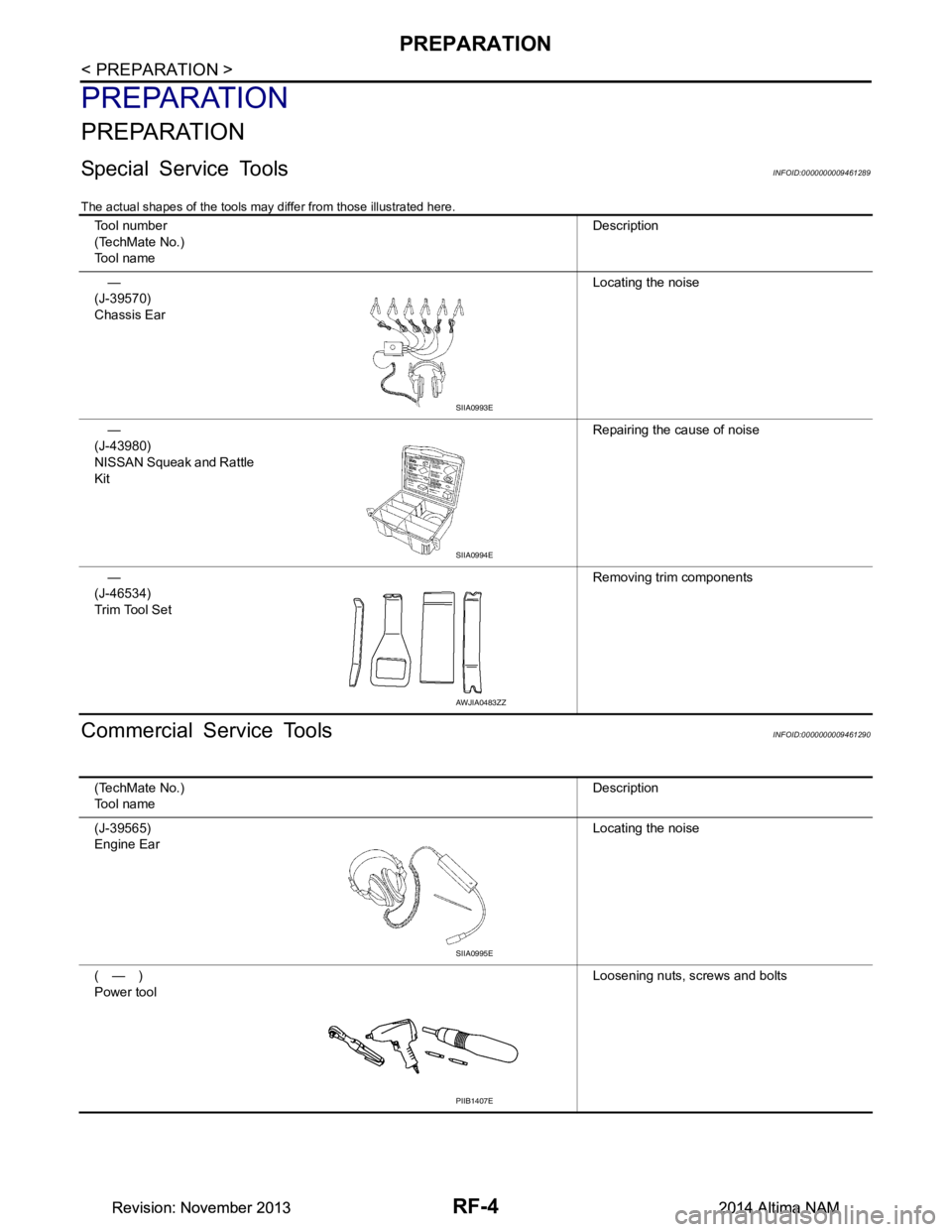
Tool number
(TechMate No.)
Tool name Description
—
(J-39570)
Chassis Ear Locating the noise
—
(J-43980)
NISSAN Squeak and Rattle
Kit Repairing the cause of noise
—
(J-46534)
Trim Tool Set Removing trim components
SIIA0993E
SIIA0994E
AWJIA0483ZZ
(TechMate No.)
Tool name Description
(J-39565)
Engine Ear Locating the noise
(—)
Power tool Loosening nuts, screws and bolts
SIIA0995E
PIIB1407E
Revision: November 20132014 Altima NAMRevision: November 20132014 Altima NAM
Page 3685 of 4801

RF-20
< BASIC INSPECTION >
INSPECTION AND ADJUSTMENT
INSPECTION AND ADJUSTMENT
ADDITIONAL SERVICE WHEN REPLACING CONTROL UNIT
ADDITIONAL SERVICE WHEN REPL ACING CONTROL UNIT : Description
INFOID:0000000009461301
MEMORY RESET PROCEDURE
1. Please observe the following instructi ons at confirming the moonroof operation.
NOTE:
Do not disconnect the electronic power while the moonroof is operating or within 5 seconds after the
moonroof stops. (to wipe-out the memory of lid position and operating friction.)
2. Initialization of system should be conducted after the following conditions. • When the moonroof motor is changed.
• When the moonroof does not operate normally. (Incomplete initialization conditions)
ADDITIONAL SERVICE WHEN REPLACING CONTROL UNIT : Special Repair Re-
quirement
INFOID:0000000009461302
INITIALIZATION PROCEDURE
If the moonroof does not open or clos e automatically, use the following procedure to return moonroof opera-
tion to normal.
NOTE:
If the moonroof switch is released at any time duri ng step 4, the procedure must be started over again. Leave
the ignition switch ON for at least 2 seconds after this procedure.
1. Push the ignition switch to the ON position.
2. Hold the moonroof switch in the tilt up position. Release the switch when the moonroof has reached the
full tilt up position.
3. Hold the moonroof switch in the tilt up position agai n. After a delay, the moonroof will backup. Release the
switch.
4. Within 4 seconds of releasing the switch in step 3, hold the moonroof switch in the tilt up position again.
The moonroof will move from the full tilt-up → slide-close → slide-open → slide-close → tilt-up → slide-
close. Release the switch, initialization is complete if the moonroof operates normally.
ANTI-PINCH FUNCTION
1. Fully open the moonroof to the full open position.
2. Place a piece of wood at the fully closed position.
3. Close the moonroof completely with auto-slide close function.
4. Moonroof should make contact and then tilt up in reverse for 100mm (3.94 in.) (approx.).
CAUTION:
• Do not test the anti-pinch functi on with your hands or other part of body parts because they may be
pinched.
• Depending on environment and drivin g conditions, if a similar impact or load is applied to the moon-
roof it may lower.
• Test the auto-slide operation before inspectio n when the system initialization is performed.
• Perform the initialization proced ure when the auto-slide operation or anti-pinch function does not
operate normally.
Revision: November 20132014 Altima NAMRevision: November 20132014 Altima NAM
Page 3689 of 4801
RF-24
< DTC/CIRCUIT DIAGNOSIS >
POWER SUPPLY AND GROUND CIRCUIT
Is the inspection result normal?
YES >> Refer to RF-24, "MOONROOF MOTOR ASSEMBLY : Component Inspection".
NO >> Repair or replace the harness or connectors.
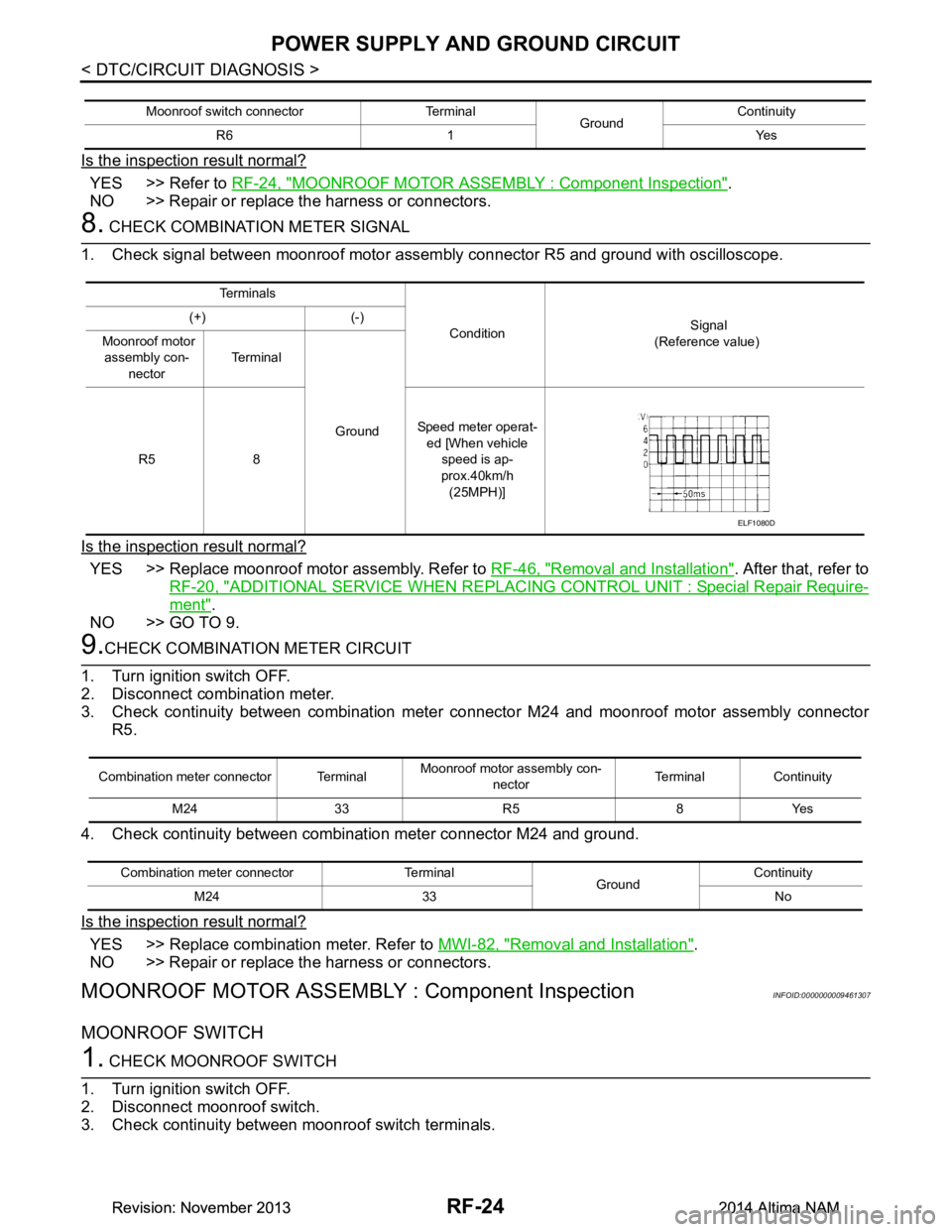
8. CHECK COMBINATION METER SIGNAL
1. Check signal between moonroof motor assembly connector R5 and ground with oscilloscope.
Is the inspection result normal?
YES >> Replace moonroof motor assembly. Refer to RF-46, "Removal and Installation". After that, refer to
RF-20, "ADDITIONAL SERVICE WHEN REPLACING CONTROL UNIT : Special Repair Require-
ment".
NO >> GO TO 9.
9.CHECK COMBINATION METER CIRCUIT
1. Turn ignition switch OFF.
2. Disconnect combination meter.
3. Check continuity between combination meter c onnector M24 and moonroof motor assembly connector
R5.
4. Check continuity between combination meter connector M24 and ground.
Is the inspection result normal?
YES >> Replace combination meter. Refer to MWI-82, "Removal and Installation".
NO >> Repair or replace the harness or connectors.
MOONROOF MOTOR ASSEMBLY : Component InspectionINFOID:0000000009461307
MOONROOF SWITCH
1. CHECK MOONROOF SWITCH
1. Turn ignition switch OFF.
2. Disconnect moonroof switch.
3. Check continuity between moonroof switch terminals.
Moonroof switch connector Terminal GroundContinuity
R6 1 Yes
Te r m i n a l s
Condition Signal
(Reference value)
(+) (-)
Moonroof motor assembly con-
nector Te r m i n a l
Ground
R5 8 Speed meter operat-
ed [When vehicle
speed is ap-
prox.40km/h (25MPH)]
ELF1080D
Combination meter connector Terminal Moonroof motor
assembly con-
nector Terminal Continuity
M24 33 R5 8 Yes
Combination meter connector Terminal GroundContinuity
M24 33 No
Revision: November 20132014 Altima NAMRevision: November 20132014 Altima NAM
Page 3690 of 4801
POWER SUPPLY AND GROUND CIRCUITRF-25
< DTC/CIRCUIT DIAGNOSIS >
C
D E
F
G H
I
J
L
M A
B
RF
N
O P
Is the inspection result normal?
YES >> Moonroof switch is OK.
NO >> Replace moonroof switch (map lamp assembly). Refer to INL-63, "Removal and Installation"
.
MOONROOF MOTOR ASSEMBLY : Special Repair RequirementINFOID:0000000009461308
1. PERFORM INITIALIZATION PROCEDURE
Perform initialization procedure.
Refer to RF-20, "ADDITIONAL SERVICE WHEN REPLACIN G CONTROL UNIT : Special Repair Require-
ment".
>> GO TO 2.
2. CHECK ANTI-PINCH OPERATION
Check anti-pinch operation.
Refer to RF-20, "ADDITIONAL SERVICE WHEN REPLACIN G CONTROL UNIT : Special Repair Require-
ment".
Is the inspection result normal?
YES >> Inspection End.
NO >> Check fitting adjustment. Refer to RF-43, "Inspection"
.
Terminals Condition Continuity
3 1Moonroof switch is operated
TILT DOWN or SLIDE OPEN Ye s
Other than above No
4 Moonroof switch is operated
TILT UP or SLIDE CLOSE Ye s
Other than above No
Revision: November 20132014 Altima NAMRevision: November 20132014 Altima NAM
Page 3696 of 4801
AUTO OPERATION DOES NOT OPERATERF-31
< SYMPTOM DIAGNOSIS >
C
D E
F
G H
I
J
L
M A
B
RF
N
O P
AUTO OPERATION DOES NOT OPERATE
Diagnosis ProcedureINFOID:0000000009461317
1. PERFORM INITIALIZATION PROCEDURE
Perform initialization procedure.
Refer to RF-20, "ADDITIONAL SERVICE WHEN REPLACIN G CONTROL UNIT : Special Repair Require-
ment".
Is the inspection result normal?
YES >> Inspection End.
NO >> Perform basic inspection. Refer to RF-18, "Work Flow"
.
Revision: November 20132014 Altima NAMRevision: November 20132014 Altima NAM
Page 3697 of 4801

RF-32
< SYMPTOM DIAGNOSIS >
MOONROOF DOES NOT OPERATE ANTI-PINCH FUNCTION
MOONROOF DOES NOT OPERATE ANTI-PINCH FUNCTION
Diagnosis ProcedureINFOID:0000000009461318
1. PERFORM INITIALIZATION PROCEDURE
Perform initialization procedure.
Refer to RF-20, "ADDITIONAL SERVICE WHEN REPLACIN G CONTROL UNIT : Special Repair Require-
ment".
Is the inspection result normal?
YES >> Inspection End.
NO >> Perform basic inspection. Refer to RF-18, "Work Flow"
.
Revision: November 20132014 Altima NAMRevision: November 20132014 Altima NAM
Page 3698 of 4801
DOES NOT STOP FULLY-OPEN OR FULLY-CLOSED POSITION
RF-33
< SYMPTOM DIAGNOSIS >
C
D E
F
G H
I
J
L
M A
B
RF
N
O P
DOES NOT STOP FULLY-OPEN OR FULLY-CLOSED POSITION
Diagnosis ProcedureINFOID:0000000009461319
1. PERFORM INITIALIZATION PROCEDURE
Perform initialization procedure.
Refer to RF-20, "ADDITIONAL SERVICE WHEN REPLACIN G CONTROL UNIT : Special Repair Require-
ment".
Is the inspection result normal?
YES >> Inspection End.
NO >> Perform basic inspection. Refer to RF-18, "Work Flow"
.
Revision: November 20132014 Altima NAMRevision: November 20132014 Altima NAM
Page 3700 of 4801
SQUEAK AND RATTLE TROUBLE DIAGNOSESRF-35
< SYMPTOM DIAGNOSIS >
C
D E
F
G H
I
J
L
M A
B
RF
N
O P
SQUEAK AND RATTLE TROUBLE DIAGNOSES
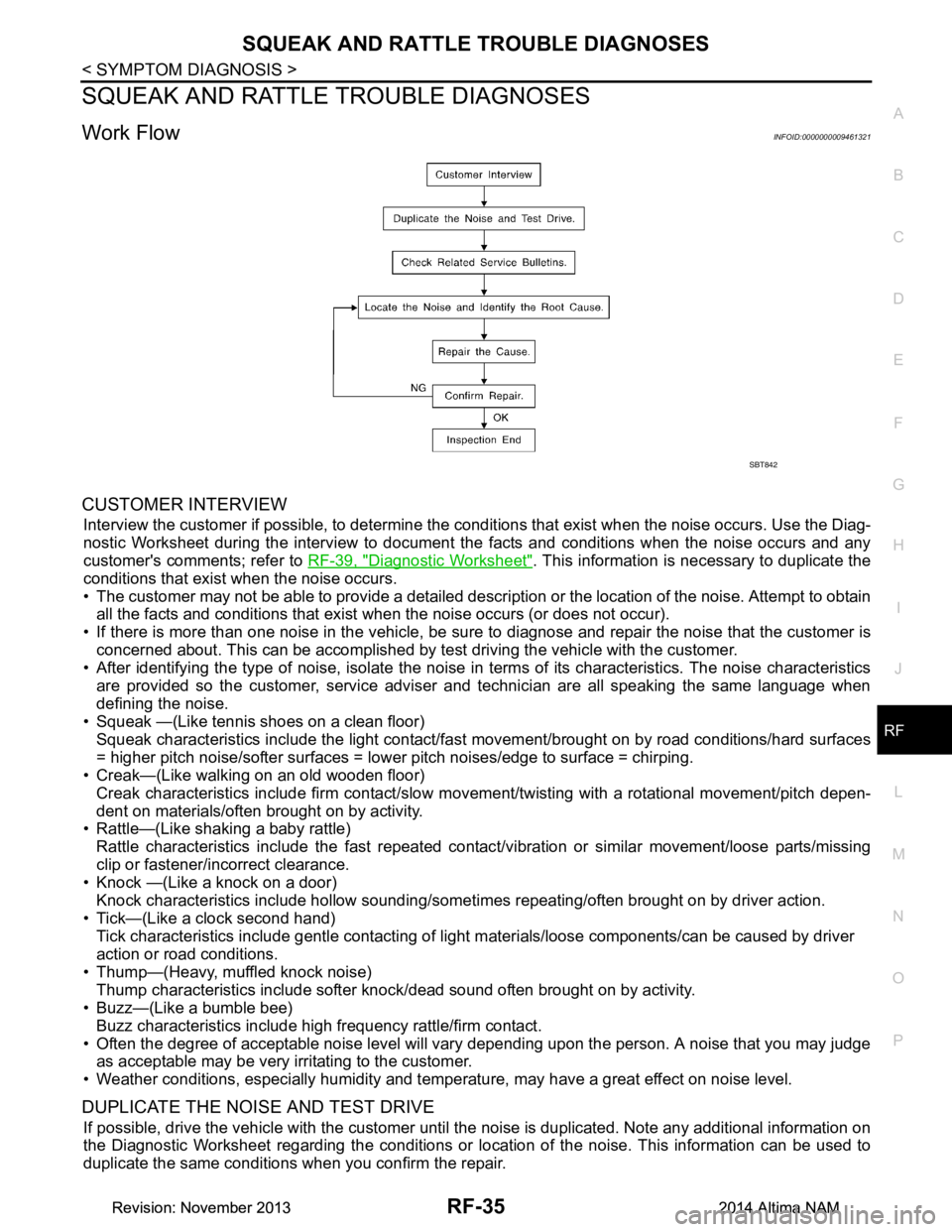
Work FlowINFOID:0000000009461321
CUSTOMER INTERVIEW
Interview the customer if possible, to determine the c onditions that exist when the noise occurs. Use the Diag-
nostic Worksheet during the interv iew to document the facts and conditions when the noise occurs and any
customer's comments; refer to RF-39, "Diagnostic Worksheet"
. This information is necessary to duplicate the
conditions that exist when the noise occurs.
• The customer may not be able to provide a detailed descr iption or the location of the noise. Attempt to obtain
all the facts and conditions that exist when the noise occurs (or does not occur).
• If there is more than one noise in the vehicle, be sure to diagnose and repair the noise that the customer is
concerned about. This can be accomplished by test driving the vehicle with the customer.
• After identifying the type of noise, isolate the noise in terms of its characteristics. The noise characteristics
are provided so the customer, service adviser and technician are all speaking the same language when
defining the noise.
• Squeak —(Like tennis shoes on a clean floor)
Squeak characteristics include the light contact/fast movement/brought on by road conditions/hard surfaces
= higher pitch noise/softer surfaces = lower pitch noises/edge to surface = chirping.
• Creak—(Like walking on an old wooden floor)
Creak characteristics include firm contact/slow mo vement/twisting with a rotational movement/pitch depen-
dent on materials/often brought on by activity.
• Rattle—(Like shaking a baby rattle)
Rattle characteristics include the fast repeated contac t/vibration or similar movement/loose parts/missing
clip or fastener/incorrect clearance.
• Knock —(Like a knock on a door)
Knock characteristics include hollow sounding/someti mes repeating/often brought on by driver action.
• Tick—(Like a clock second hand) Tick characteristics include gentle contacting of li ght materials/loose components/can be caused by driver
action or road conditions.
• Thump—(Heavy, muffled knock noise) Thump characteristics include softer k nock/dead sound often brought on by activity.
• Buzz—(Like a bumble bee)
Buzz characteristics include high frequency rattle/firm contact.
• Often the degree of acceptable noise level will vary depending upon the person. A noise that you may judge as acceptable may be very irritating to the customer.
• Weather conditions, especially humidity and temperature, may have a great effect on noise level.
DUPLICATE THE NOISE AND TEST DRIVE
If possible, drive the vehicle with the customer until the noise is duplicated. Note any additional information on
the Diagnostic Worksheet regarding the conditions or lo cation of the noise. This information can be used to
duplicate the same conditions when you confirm the repair.
SBT842
Revision: November 20132014 Altima NAMRevision: November 20132014 Altima NAM
Page 3701 of 4801

RF-36
< SYMPTOM DIAGNOSIS >
SQUEAK AND RATTLE TROUBLE DIAGNOSES
If the noise can be duplicated easily during the test drive, to help identify the source of the noise, try to dupli-
cate the noise with the vehicle stopped by doing one or all of the following:
1) Close a door.
2) Tap or push/pull around the area where the noise appears to be coming from.
3) Rev the engine.
4) Use a floor jack to recreate vehicle “twist”.
5) At idle, apply engine load (electrical load, half-clutch on M/T model, drive position on CVT and A/T models).
6) Raise the vehicle on a hoist and hit a tire with a rubber hammer.
• Drive the vehicle and attempt to duplicate the conditions the customer states exist when the noise occurs.
• If it is difficult to duplicate the noise, drive the v ehicle slowly on an undulating or rough road to stress the
vehicle body.
CHECK RELATED SERVICE BULLETINS
After verifying the customer concern or symptom, chec k ASIST for Technical Service Bulletins (TSBs) related
to that concern or symptom.
If a TSB relates to the symptom, follo w the procedure to repair the noise.
LOCATE THE NOISE AND IDENTIFY THE ROOT CAUSE
1. Narrow down the noise to a general area. To help pi npoint the source of the noise, use a listening tool
(Chassis Ear: J-39570, Engine Ear: J-39565 and mechanic's stethoscope).
2. Narrow down the noise to a more specific area and identify the cause of the noise by:
• removing the components in the area that you suspect the noise is coming from.
Do not use too much force when removing clips and fasteners, otherwise clips and fasteners can be
broken or lost during the repair, resulting in the creation of new noise.
• tapping or pushing/pulling the component that you suspect is causing the noise. Do not tap or push/pull the component with excessive force, otherwise the noise will be eliminated only
temporarily.
• feeling for a vibration with your hand by touching the component(s) that you suspect is (are) causing the
noise.
• placing a piece of paper between components that you suspect are causing the noise.
• looking for loose components and contact marks. Refer to RF-37, "Generic Squeak and Rattle Troubleshooting"
.
REPAIR THE CAUSE
• If the cause is a loose component, tighten the component securely.
• If the cause is insufficient clearance between components:
- separate components by repositioning or loos ening and retightening the component, if possible.
- insulate components with a suitable insulator such as urethane pads, foam blocks, felt cloth tape or urethane
tape. A NISSAN Squeak and Rattle Kit (J-43980) is av ailable through your authorized NISSAN Parts Depart-
ment.
CAUTION:
Do not use excessive force as many components are constructed of plastic and may be damaged.
Always check with the Parts Department for the latest parts information.
The following materials are contained in the NISS AN Squeak and Rattle Kit (J-43980). Each item can be
ordered separately as needed.
URETHANE PADS [1.5 mm (0.059 in) thick]
Insulates connectors, harness, etc.
76268-9E005: 100 ×135 mm (3.94 ×5.31 in)/76884-71L01: 60 ×85 mm (2.36 ×3.35 in)/76884-71L02: 15 ×25
mm (0.59 ×0.98 in)
INSULATOR (Foam blocks)
Insulates components from contact. Can be used to fill space behind a panel.
73982-9E000: 45 mm (1.77 in) thick, 50 ×50 mm (1.97 ×1.97 in)/73982-50Y00: 10 mm (0.39 in) thick,
50 ×50 mm (1.97 ×1.97 in)
INSULATOR (Light foam block)
80845-71L00: 30 mm (1.18 in) thick, 30 ×50 mm (1.18 ×1.97 in)
FELT CLOTH TAPE
Used to insulate where movemen t does not occur. Ideal for instrument panel applications.
68370-4B000: 15 ×25 mm (0.59 ×0.98 in) pad/68239-13E00: 5 mm (0.20 in ) wide tape roll. The following
materials not found in the kit can also be used to repair squeaks and rattles.
UHMW (TEFLON) TAPE
Insulates where slight movemen t is present. Ideal for instrument panel applications.
SILICONE GREASE
Revision: November 20132014 Altima NAMRevision: November 20132014 Altima NAM
Page 3707 of 4801
RF-42
< REMOVAL AND INSTALLATION >
MOONROOF MOTOR ASSEMBLY
MOONROOF MOTOR ASSEMBLY
Removal and InstallationINFOID:0000000009461325
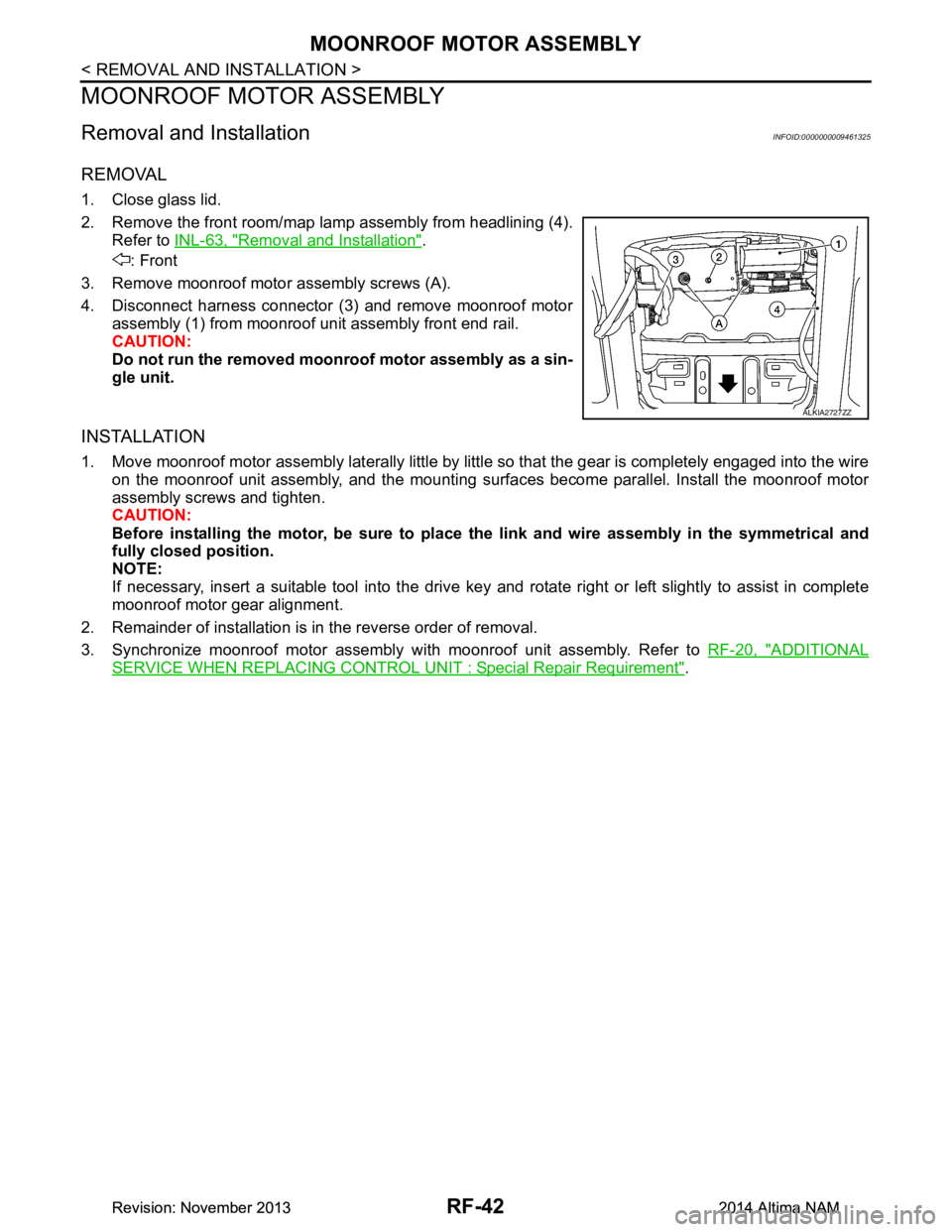
REMOVAL
1. Close glass lid.
2. Remove the front room/map lamp assembly from headlining (4). Refer to INL-63, "Removal and Installation"
.
: Front
3. Remove moonroof motor assembly screws (A).
4. Disconnect harness connector (3) and remove moonroof motor assembly (1) from moonroof unit assembly front end rail.
CAUTION:
Do not run the removed mo onroof motor assembly as a sin-
gle unit.
INSTALLATION
1. Move moonroof motor assembly laterally little by little so that the gear is completely engaged into the wire
on the moonroof unit assembly, and the mounting surfaces become parallel. Install the moonroof motor
assembly screws and tighten.
CAUTION:
Before installing the motor, be sure to place the link and wire assembly in the symmetrical and
fully closed position.
NOTE:
If necessary, insert a suitable tool into the drive key and rotate right or left slightly to assist in complete
moonroof motor gear alignment.
2. Remainder of installation is in the reverse order of removal.
3. Synchronize moonroof motor assembly with moonroof unit assembly. Refer to RF-20, "ADDITIONAL
SERVICE WHEN REPLACING CONTROL UNIT : Special Repair Requirement".
ALKIA2727ZZ
Revision: November 20132014 Altima NAMRevision: November 20132014 Altima NAM