cooling NISSAN TEANA 2014 Manual Online
[x] Cancel search | Manufacturer: NISSAN, Model Year: 2014, Model line: TEANA, Model: NISSAN TEANA 2014Pages: 4801, PDF Size: 51.2 MB
Page 2173 of 4801
![NISSAN TEANA 2014 Manual Online
FRONT TIMING CHAIN CASEEM-175
< REMOVAL AND INSTALLATION > [VQ35DE]
C
D E
F
G H
I
J
K L
M A
EM
NP
O
REMOVAL
1. Remove engine under cover. Refer to
EXT-28, "Removal and Installation".
2. Drain the](/img/5/57390/w960_57390-2172.png "NISSAN TEANA 2014 Manual Online
FRONT TIMING CHAIN CASEEM-175
< REMOVAL AND INSTALLATION > [VQ35DE]
C
D E
F
G H
I
J
K L
M A
EM
NP
O
REMOVAL
1. Remove engine under cover. Refer to
EXT-28, \"Removal and Installation\".
2. Drain the")
FRONT TIMING CHAIN CASEEM-175
< REMOVAL AND INSTALLATION > [VQ35DE]
C
D E
F
G H
I
J
K L
M A
EM
NP
O
REMOVAL
1. Remove engine under cover. Refer to
EXT-28, "Removal and Installation".
2. Drain the engine coolant from the radiator. Refer to MA-23, "ENGINE COOLANT : Changing Engine Cool-
ant".
3. Drain the engine oil. Refer to MA-27, "ENGINE OIL : Changing Engine Oil"
.
4. Drain the power steering fluid. Refer to ST-30, "Draining and Refilling"
.
5. Remove engine room cover. Refer to EM-143, "Removal and Installation"
.
6. Remove front air duct. Refer to EM-144, "Removal and Installation"
.
7. Remove battery tray. Refer to PG-74, "Removal and Installation (Battery Tray)"
.
8. Remove the hood ledge covers (LH/RH).
9. Remove cowl top and cowl top extension. Refer to EXT-24, "Removal and Installation"
.
10. Remove upper radiator hose.
11. Disconnect engine coolant reservoir hose from t he radiator and remove engine coolant reservoir.
12. Remove cooling fan assembly. Refer to CO-42, "Removal and Installation"
.
13. Disconnect lower radiator hose from engine.
14. Remove the radiator. Refer to CO-41, "Removal and Installation"
.
15. Disconnect the power steering fluid reservoir tank hose from the power steering pump and fluid cooler and
remove the power steering fluid reservoir tank. Refer to ST-38, "Exploded View"
.
16. Remove the front RH wheel and tire. Refer to MA-39, "WHEELS : Adjustment"
.
17. Remove the fender protector side cover (RH). Refer to EXT-26, "FENDER PROTECTOR : Removal and
Installation".
18. Remove the drive belt. Refer to EM-134, "Removal and Installation"
.
19. Remove the rocker covers, if necessary. Refer to EM-168, "Removal and Installation LH"
and EM-169,
"Removal and Installation RH".
NOTE:
Necessary only when removing timing chains.
20. If removing the timing chains, obtain compression TDC of No. 1 cylinder as follows:
a. Rotate crankshaft pulley clockwise to align timing mark (grooved line without color) with timing indicator.
b. Check that intake and exhaust camshaft lobes on No. 1 cylinder (right bank of engine) are located as shown.
• If not, turn the crankshaft one revolution (360 °) and align as
shown.
21. Remove the access plate and lock the ring gear using Tool. CAUTION:
JMBIA1135GB
SEM418G
Tool number : — (J-50288)
Revision: November 20132014 Altima NAM
Page 2179 of 4801
![NISSAN TEANA 2014 Manual Online
FRONT TIMING CHAIN CASEEM-181
< REMOVAL AND INSTALLATION > [VQ35DE]
C
D E
F
G H
I
J
K L
M A
EM
NP
O
• Before starting engine, check oil/fluid levels incl
uding engine coolant and engine oil. If le](/img/5/57390/w960_57390-2178.png "NISSAN TEANA 2014 Manual Online
FRONT TIMING CHAIN CASEEM-181
< REMOVAL AND INSTALLATION > [VQ35DE]
C
D E
F
G H
I
J
K L
M A
EM
NP
O
• Before starting engine, check oil/fluid levels incl
uding engine coolant and engine oil. If le")
FRONT TIMING CHAIN CASEEM-181
< REMOVAL AND INSTALLATION > [VQ35DE]
C
D E
F
G H
I
J
K L
M A
EM
NP
O
• Before starting engine, check oil/fluid levels incl
uding engine coolant and engine oil. If less than required
quantity, fill to the specified level. Refer to MA-11, "FOR USA AND CANADA : Fluids and Lubricants"
.
• Use procedure below to check for fuel leakage.
• Turn ignition switch ON (with engine stopped). With fuel pressure applied to fuel piping, check for fuel leak-
age at connection points.
• Start engine. With engine speed increased, check again for fuel leakage at connection points.
• Run engine to check for unusual noise and vibration. NOTE:
If hydraulic pressure inside timing chain tensioner dr ops after removal and installation, slack in the guide
may generate a pounding noise during and just after engine start. However, this is normal. Noise will stop
after hydraulic pressure rises.
• Warm up engine thoroughly to make sure there is no leak age of fuel, exhaust gas, or any oils/fluids including
engine oil and engine coolant.
• Bleed air from passages in lines and hoses, such as in cooling system.
• After cooling down engine, again check oil/fluid levels including engine oil and engine coolant. Refill to spec- ified level, if necessary.
• Summary of the inspection items:
*Power steering fluid, brake fluid, etc. Item Before starting engine Engine running After engine stopped
Engine coolant Level Leakage Level
Engine oil Level Leakage Level
Transmission/
transaxle fluid CVT Models Leakage Level/Leakage Leakage
Other oils and fluids* Level Leakage Level
Fuel Leakage Leakage Leakage
Exhaust gas — Leakage —
Revision: November 20132014 Altima NAM
Page 2201 of 4801
![NISSAN TEANA 2014 Manual Online
OIL SEALEM-203
< REMOVAL AND INSTALLATION > [VQ35DE]
C
D E
F
G H
I
J
K L
M A
EM
NP
O
OIL SEAL
Removal and Installation of Valve Oil SealINFOID:0000000009460571
REMOVAL
1. Turn crankshaft until the c](/img/5/57390/w960_57390-2200.png "NISSAN TEANA 2014 Manual Online
OIL SEALEM-203
< REMOVAL AND INSTALLATION > [VQ35DE]
C
D E
F
G H
I
J
K L
M A
EM
NP
O
OIL SEAL
Removal and Installation of Valve Oil SealINFOID:0000000009460571
REMOVAL
1. Turn crankshaft until the c")
OIL SEALEM-203
< REMOVAL AND INSTALLATION > [VQ35DE]
C
D E
F
G H
I
J
K L
M A
EM
NP
O
OIL SEAL
Removal and Installation of Valve Oil SealINFOID:0000000009460571
REMOVAL
1. Turn crankshaft until the cylinder requiring new oil seal
s is at TDC. This will prevent valve from dropping
into cylinder.
CAUTION:
When rotating crankshaft, be careful to avoid scarring the front cover with the timing chain.
2. Remove camshaft relating to valve oil seal to be removed. Refer to EM-194, "Removal and Installation"
.
3. Remove valve lifters. Refer to EM-210, "Disassembly and Assembly"
.
4. Remove valve collet, valve spring retainer and valve spring using Tool.
CAUTION:
When working, take care not to damage valve lifter holes.
• Compress valve spring using Tool attachment, adapter. Remove valve collet with magnet hand.
5. Remove valve oil seal using Tool.
INSTALLATION
1. Apply new engine oil to new valve oil seal joint surface and seal lip.
2. Press in valve oil seal using Tool to specified height (H).
NOTE:
Height (H): height measured before valve spring seat installa-
tion.
3. Installation of the remaining components is in the reverse order of removal.
Removal and Installati on of Front Oil SealINFOID:0000000009460572
REMOVAL
1. Remove the following parts:
• Engine under cover. Refer to EXT-17, "Removal and Installation"
.
• Drive belts. Refer to EM-134, "Removal and Installation"
.
• Cooling fan. Refer to CO-42, "Removal and Installation"
.
Tool numbers : KV10116200 (J-26336-A)
: KV10115900 (J-26336-20)
: KV10109230 ( — )
WBIA0578E
Tool number : KV10107902 (J-38959)
WBIA0489E
Tool number : — (J-39386)
Intake and exhaust : 14.3 - 14.9 mm (0.563 - 0.587 in)
WBIA0490E
Revision: November 20132014 Altima NAM
Page 2215 of 4801
![NISSAN TEANA 2014 Manual Online
ENGINE MOUNTEM-217
< REMOVAL AND INSTALLATION > [VQ35DE]
C
D E
F
G H
I
J
K L
M A
EM
NP
O
ENGINE MOUNT
ENGINE MOUNT (FRONT)
ENGINE MOUNT (FRONT) : Removal and InstallationINFOID:0000000009460578
WARN](/img/5/57390/w960_57390-2214.png "NISSAN TEANA 2014 Manual Online
ENGINE MOUNTEM-217
< REMOVAL AND INSTALLATION > [VQ35DE]
C
D E
F
G H
I
J
K L
M A
EM
NP
O
ENGINE MOUNT
ENGINE MOUNT (FRONT)
ENGINE MOUNT (FRONT) : Removal and InstallationINFOID:0000000009460578
WARN")
ENGINE MOUNTEM-217
< REMOVAL AND INSTALLATION > [VQ35DE]
C
D E
F
G H
I
J
K L
M A
EM
NP
O
ENGINE MOUNT
ENGINE MOUNT (FRONT)
ENGINE MOUNT (FRONT) : Removal and InstallationINFOID:0000000009460578
WARNING:
• Situate the vehicle on a flat and solid surface.
• Place chocks at front and back of rear wheels.
• Always work safely.
• Do not start work until the engine an d exhaust system are cooled completely.
CAUTION:
Do not damage or spill oil on the engine mount insulator (front).
NOTE:
When removing components such as hoses, tubes/lines, etc. , cap or plug openings to prevent fluid from spill-
ing.
REMOVAL
1. Remove the air cleaner assembly, front air duct, and air duct hose and resonator assembly. Refer to EM-
144, "Removal and Installation".
2. Remove the battery and battery tray assembly. Refer to PG-74, "Removal and Installation (Battery Tray)"
.
3. Remove the engine under cover. Refer to EXT-28, "Removal and Installation"
.
4. Remove the fender protector side covers (RH/LH). Refer to EXT-26, "FENDER PROTECTOR : Removal
and Installation".
5. Partially remove the fender protectors (RH/LH). Refer to EXT-26, "FENDER PROTECTOR : Removal and
Installation".
6. Remove the radiator. Refer to CO-41, "Removal and Installation"
.
7. Remove the cooling fan shroud and motor assembly. Refer to CO-42, "Removal and Installation"
.
8. Remove the exhaust manifold heat shield (LH). Refer to EM-153, "Removal and Installation (RH)"
.
9. Support the engine (1) and transaxle (2) using a suitable jack (A) as shown.
CAUTION:
• Position a suitable jack under the engine and transaxle
assembly as shown.
• Do not damage the front exhau st tube or transaxle oil pan
with the jack.
10. Disconnect the engine mounting insulator (front) vacuum hose.
11. Remove the engine mounting insulator (front) nut (A).
ALBIA0894GB
AWBIA1241GB
Revision: November 20132014 Altima NAM
Page 2221 of 4801
![NISSAN TEANA 2014 Manual Online
ENGINE ASSEMBLYEM-223
< UNIT REMOVAL AND INSTALLATION > [VQ35DE]
C
D E
F
G H
I
J
K L
M A
EM
NP
O
• Start engine. With engine speed increased, check again for fuel leakage at connection points.
â€](/img/5/57390/w960_57390-2220.png "NISSAN TEANA 2014 Manual Online
ENGINE ASSEMBLYEM-223
< UNIT REMOVAL AND INSTALLATION > [VQ35DE]
C
D E
F
G H
I
J
K L
M A
EM
NP
O
• Start engine. With engine speed increased, check again for fuel leakage at connection points.
â€")
ENGINE ASSEMBLYEM-223
< UNIT REMOVAL AND INSTALLATION > [VQ35DE]
C
D E
F
G H
I
J
K L
M A
EM
NP
O
• Start engine. With engine speed increased, check again for fuel leakage at connection points.
• Run engine to check for unusual noise and vibration. NOTE:
If hydraulic pressure inside timing chain tensioner dr ops after removal and installation, slack in the guide
may generate a pounding noise during and just after engine start. However, this is normal. Noise will stop
after hydraulic pressure rises.
• Warm up engine thoroughly to make sure there is no leak age of fuel, exhaust gas, or any oils/fluids including
engine oil and engine coolant.
• Bleed air from passages in lines and hoses, such as in cooling system.
• After cooling down engine, again check oil/fluid levels including engine oil and engine coolant. Refill to spec- ified level, if necessary.
• Summary of the inspection items:
*Power steering fluid, brake fluid, etc. Item Before starting engine Engine running After engine stopped
Engine coolant Level Leakage Level
Engine oil Level Leakage Level
Transmission/
transaxle fluid CVT Models Leakage Level/Leakage Leakage
Other oils and fluids* Level Leakage Level
Fuel Leakage Leakage Leakage
Exhaust gas — Leakage —
Revision: November 20132014 Altima NAM
Page 2288 of 4801
EXL-22
< SYSTEM DESCRIPTION >
DIAGNOSIS SYSTEM (IPDM E/R)
DIAGNOSIS SYSTEM (IPDM E/R)
Diagnosis DescriptionINFOID:0000000009956487
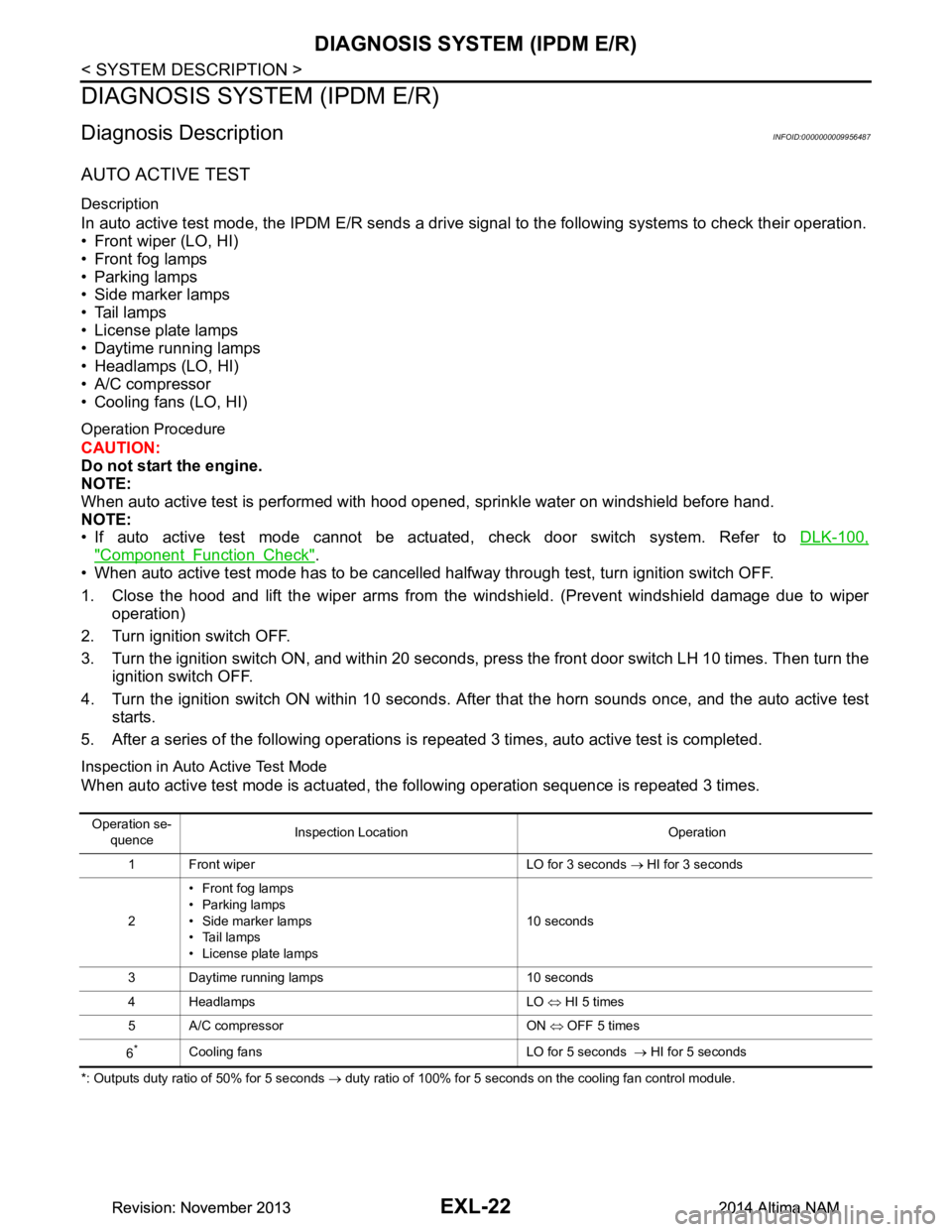
AUTO ACTIVE TEST
Description
In auto active test mode, the IPDM E/R sends a drive signal to the follo wing systems to check their operation.
• Front wiper (LO, HI)
• Front fog lamps
• Parking lamps
• Side marker lamps
• Tail lamps
• License plate lamps
• Daytime running lamps
• Headlamps (LO, HI)
• A/C compressor
• Cooling fans (LO, HI)
Operation Procedure
CAUTION:
Do not start the engine.
NOTE:
When auto active test is performed with hood opened, sprinkle water on windshield before hand.
NOTE:
• If auto active test mode cannot be actuat ed, check door switch system. Refer to DLK-100,
"Component Function Check".
• When auto active test mode has to be cancelled halfway through test, turn ignition switch OFF.
1. Close the hood and lift the wiper arms from the windshield. (Prevent windshield damage due to wiper
operation)
2. Turn ignition switch OFF.
3. Turn the ignition switch ON, and within 20 seconds, press the front door switch LH 10 times. Then turn the ignition switch OFF.
4. Turn the ignition switch ON within 10 seconds. Af ter that the horn sounds once, and the auto active test
starts.
5. After a series of the following operations is repeated 3 times, auto active test is completed.
Inspection in Auto Active Test Mode
When auto active test mode is actuated, the following operation sequence is repeated 3 times.
*: Outputs duty ratio of 50% for 5 seconds → duty ratio of 100% for 5 seconds on the cooling fan control module.
Operation se-
quence Inspection Location Operation
1 Front wiper LO for 3 seconds → HI for 3 seconds
2 •Front fog lamps
• Parking lamps
• Side marker lamps
•Tail lamps
• License plate lamps 10 seconds
3 Daytime running lamps 10 seconds
4 Headlamps LO ⇔ HI 5 times
5 A/C compressor ON ⇔ OFF 5 times
6
*Cooling fans LO for 5 seconds → HI for 5 seconds
Revision: November 20132014 Altima NAMRevision: November 20132014 Altima NAM
Page 2289 of 4801
DIAGNOSIS SYSTEM (IPDM E/R)EXL-23
< SYSTEM DESCRIPTION >
C
D E
F
G H
I
J
K
M A
B
EXL
N
O P
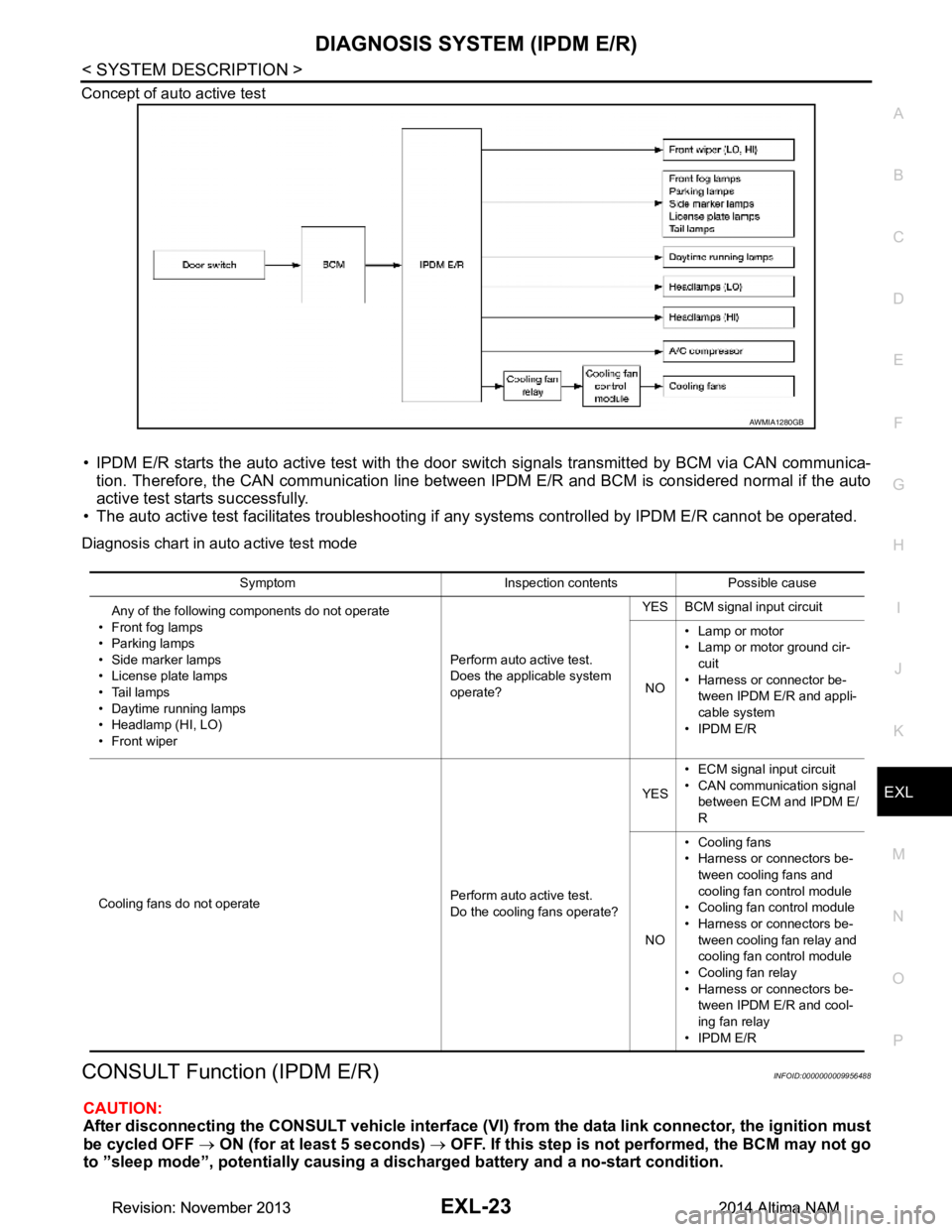
Concept of auto active test
• IPDM E/R starts the auto active test with the door
switch signals transmitted by BCM via CAN communica-
tion. Therefore, the CAN communication line between IPDM E/R and BCM is considered normal if the auto
active test starts successfully.
• The auto active test facilitates troubleshooting if any systems controlled by IPDM E/R cannot be operated.
Diagnosis chart in auto active test mode
CONSULT Function (IPDM E/R)INFOID:0000000009956488
CAUTION:
After disconnecting the CONSULT vehicle interface (VI) from the data link connector, the ignition must
be cycled OFF → ON (for at least 5 seconds) → OFF. If this step is not performed, the BCM may not go
to ”sleep mode”, potentiall y causing a discharged battery and a no-start condition.
AWMIA1280GB
Symptom Inspection contents Possible cause
Any of the following components do not operate
• Front fog lamps
•Parking lamps
• Side marker lamps
• License plate lamps
•Tail lamps
• Daytime running lamps
• Headlamp (HI, LO)
• Front wiper Perform auto active test.
Does the applicable system
operate? YES BCM signal input circuit
NO • Lamp or motor
• Lamp or motor ground cir-
cuit
• Harness or connector be- tween IPDM E/R and appli-
cable system
• IPDM E/R
Cooling fans do not operate Perform auto active test.
Do the cooling fans operate? YES
• ECM signal input circuit
• CAN communication signal between ECM and IPDM E/
R
NO • Cooling fans
• Harness or connectors be-
tween cooling fans and
cooling fan control module
• Cooling fan control module
• Harness or connectors be- tween cooling fan relay and
cooling fan control module
• Cooling fan relay
• Harness or connectors be- tween IPDM E/R and cool-
ing fan relay
• IPDM E/R
Revision: November 20132014 Altima NAMRevision: November 20132014 Altima NAM
Page 2290 of 4801

EXL-24
< SYSTEM DESCRIPTION >
DIAGNOSIS SYSTEM (IPDM E/R)
APPLICATION ITEM
CONSULT performs the following functions via CAN communication with IPDM E/R.
ECU IDENTIFICATION
The IPDM E/R part number is displayed.
SELF DIAGNOSTIC RESULT
Refer to PCS-20, "DTC Index".
DATA MONITOR
Direct Diagnostic Mode Description
Ecu Identification The IPDM E/R part number is displayed.
Self Diagnostic Result The IPDM E/R self diagnostic results are displayed.
Data Monitor The IPDM E/R input/output data is displayed in real time.
Active Test The IPDM E/R activates outputs to test components.
CAN Diag Support Mntr The result of transmit/receive diagnosis of CAN communication is displayed.
Monitor Item [Unit] Main
Signals Description
MOTOR FAN REQ [%] ×Indicates cooling fan speed signal received from ECM on CAN communication
line
AC COMP REQ [On/Off] ×Indicates A/C compressor request signal received from ECM on CAN commu-
nication line
TAIL&CLR REQ [On/Off] ×Indicates position light request signal received from BCM on CAN communica-
tion line
HL LO REQ [On/Off] ×Indicates low beam request signal received from BCM on CAN communication
line
HL HI REQ [On/Off] ×Indicates high beam request signal received from BCM on CAN communication
line
FR FOG REQ [On/Off] ×Indicates front fog light request signal received from BCM on CAN communica-
tion line
FR WIP REQ [Stop/1LOW/Low/Hi] ×Indicates front wiper request signal received from BCM on CAN communication
line
WIP AUTO STOP [STOP P/ACT P] ×Indicates condition of front wiper auto stop signal
WIP PROT [Off/BLOCK] ×Indicates condition of front wiper fail-safe operation
IGN RLY1 -REQ [On/Off] Indicates ignition switch ON signal received from BCM on CAN communication
line
IGN RLY [On/Off] ×Indicates condition of ignition relay
PUSH SW [On/Off] Indicates condition of push-button ignition switch
INTER/NP SW [On/Off] Indicates condition of CVT shift position
ST RLY CONT [On/Off] Indicates starter relay status signal received from BCM on CAN communication
line
IHBT RLY -REQ [On/Off] Indicates starter control relay signal received from BCM on CAN communication
line
ST/INHI RLY [Off/ ST /INHI] Indicates condition of starter relay and starter control relay
DETENT SW [On/Off] Indicates condition of CVT shift selector (park position switch)
DTRL REQ [Off] Indicates daytime light request signal received from BCM on CAN communica-
tion line
HOOD SW [On/Off] Indicates condition of hood switch
THFT HRN REQ [On/Off] Indicates theft warning horn request signal received from BCM on CAN commu-
nication line
Revision: November 20132014 Altima NAMRevision: November 20132014 Altima NAM
Page 2291 of 4801
![NISSAN TEANA 2014 Manual Online
DIAGNOSIS SYSTEM (IPDM E/R)EXL-25
< SYSTEM DESCRIPTION >
C
D E
F
G H
I
J
K
M A
B
EXL
N
O P
ACTIVE TEST
CAN DIAG SUPPORT MNTR
Refer to LAN-15, "CAN Diagnostic Support Monitor".
HORN CHIRP [On/Off]](/img/5/57390/w960_57390-2290.png "NISSAN TEANA 2014 Manual Online
DIAGNOSIS SYSTEM (IPDM E/R)EXL-25
< SYSTEM DESCRIPTION >
C
D E
F
G H
I
J
K
M A
B
EXL
N
O P
ACTIVE TEST
CAN DIAG SUPPORT MNTR
Refer to LAN-15, \"CAN Diagnostic Support Monitor\".
HORN CHIRP [On/Off]")
DIAGNOSIS SYSTEM (IPDM E/R)EXL-25
< SYSTEM DESCRIPTION >
C
D E
F
G H
I
J
K
M A
B
EXL
N
O P
ACTIVE TEST
CAN DIAG SUPPORT MNTR
Refer to LAN-15, "CAN Diagnostic Support Monitor".
HORN CHIRP [On/Off] Indicates horn reminder signal received from BCM on CAN communication line
HOOD SW 2 [On/Off] Indicates condition of hood switch 2 Monitor Item [Unit]
Main
Signals Description
Test item Description
HORN This test is able to check horn operation [On].
FRONT WIPER This test is able to check wiper motor operation [Hi/Lo/Off].
MOTOR FAN This test is able to check cooling fan operation [4/3/2/1].
EXTERNAL LAMPS This test is able to check external lamp operation [Fog/Hi/Lo/TAIL/Off].
Revision: November 20132014 Altima NAMRevision: November 20132014 Altima NAM
Page 2564 of 4801
GI-36
< PRECAUTION >
TOW TRUCK TOWING
TOW TRUCK TOWING
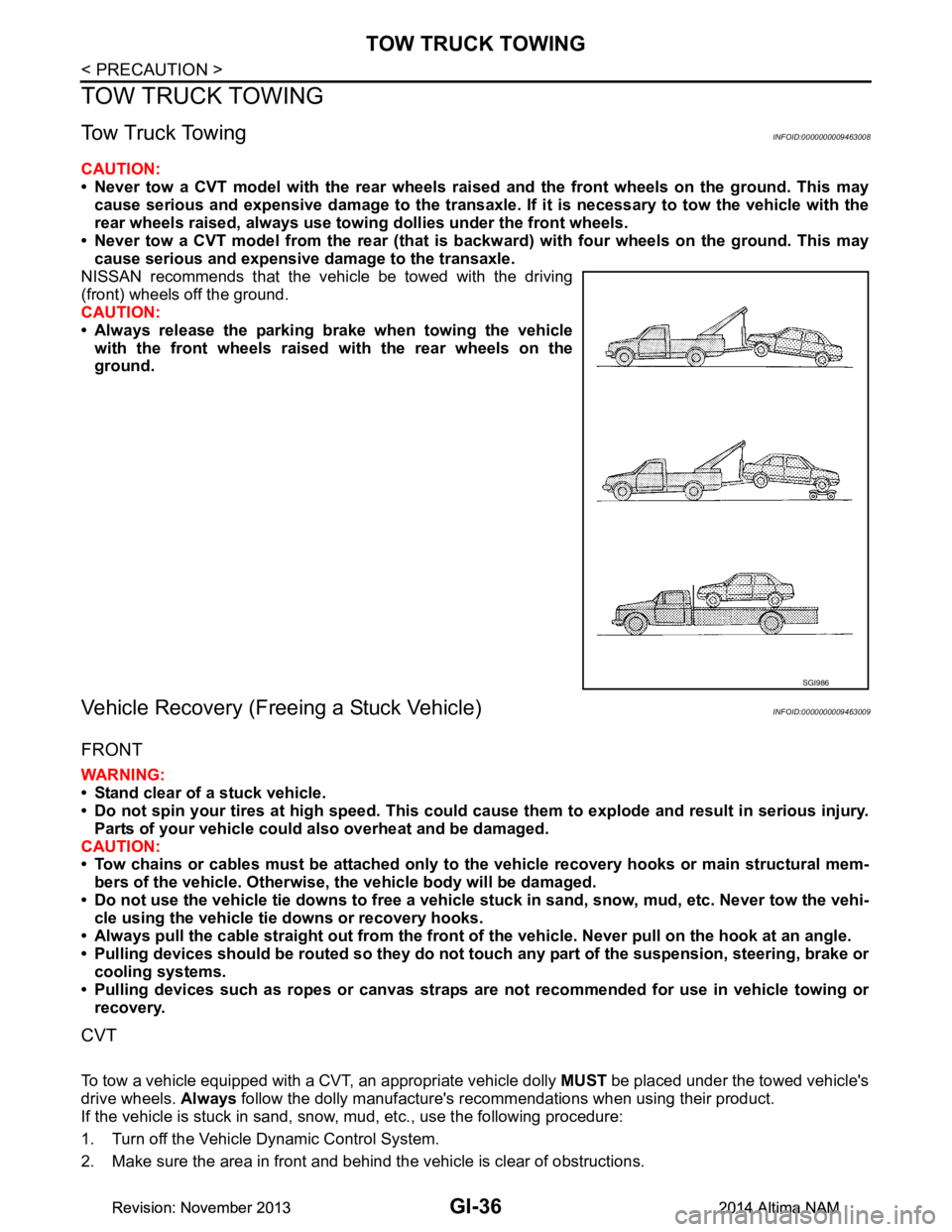
Tow Truck TowingINFOID:0000000009463008
CAUTION:
• Never tow a CVT model with the rear wheels raised and the front wheels on the ground. This may
cause serious and expensive damage to the transaxle. If it is necessary to tow the vehicle with the
rear wheels raised, always use towi ng dollies under the front wheels.
• Never tow a CVT model from the rear (that is backw ard) with four wheels on the ground. This may
cause serious and expensive damage to the transaxle.
NISSAN recommends that the vehicle be towed with the driving
(front) wheels off the ground.
CAUTION:
• Always release the parking brake when towing the vehicle with the front wheels raised with the rear wheels on the
ground.
Vehicle Recovery (Freeing a Stuck Vehicle)INFOID:0000000009463009
FRONT
WARNING:
• Stand clear of a stuck vehicle.
• Do not spin your tires at high speed. This could cause them to explode and result in serious injury.
Parts of your vehicle could also overheat and be damaged.
CAUTION:
• Tow chains or cables must be attached only to the vehicle recovery hooks or main structural mem-
bers of the vehicle. Otherwise, the vehicle body will be damaged.
• Do not use the vehicle tie downs to free a vehicle stuck in sand, snow, mud, etc. Never tow the vehi-
cle using the vehicle tie downs or recovery hooks.
• Always pull the cable straight out from the front of the vehicle. Never pull on the hook at an angle.
• Pulling devices should be routed so they do not touch any part of the suspension, steering, brake or
cooling systems.
• Pulling devices such as ropes or canvas straps ar e not recommended for use in vehicle towing or
recovery.
CVT
To tow a vehicle equipped with a CVT, an appropriate vehicle dolly MUST be placed under the towed vehicle's
drive wheels. Always follow the dolly manufacture's recommendations when using their product.
If the vehicle is stuck in sand, snow , mud, etc., use the following procedure:
1. Turn off the Vehicle Dynamic Control System.
2. Make sure the area in front and behind the vehicle is clear of obstructions.
SGI986
Revision: November 20132014 Altima NAMRevision: November 20132014 Altima NAM