Start NISSAN TERRANO 2002 Service Repair Manual
[x] Cancel search | Manufacturer: NISSAN, Model Year: 2002, Model line: TERRANO, Model: NISSAN TERRANO 2002Pages: 1767, PDF Size: 41.51 MB
Page 1496 of 1767
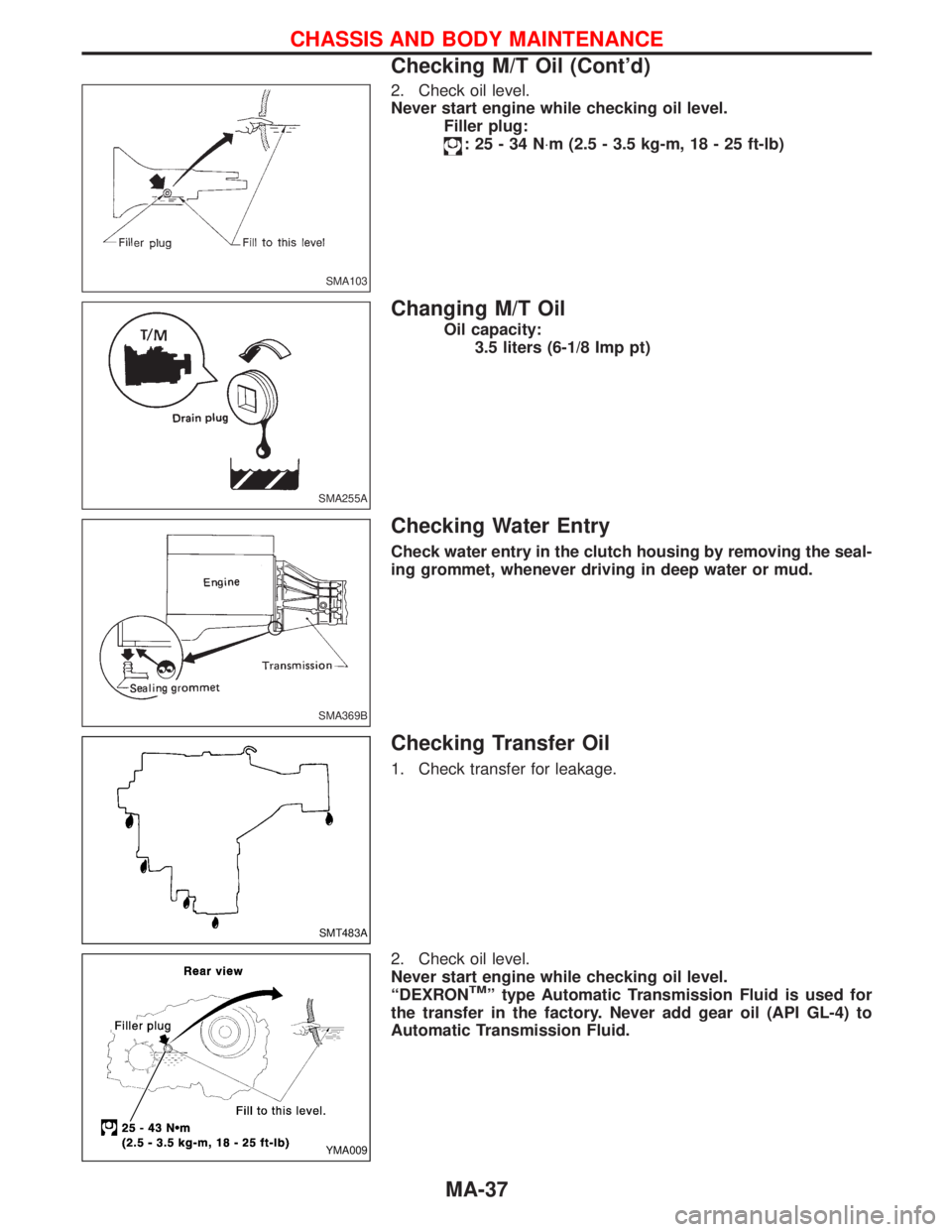
2. Check oil level.
Never start engine while checking oil level.
Filler plug:
:25-34N×m (2.5 - 3.5 kg-m, 18 - 25 ft-lb)
Changing M/T Oil
Oil capacity:
3.5 liters (6-1/8 Imp pt)
Checking Water Entry
Check water entry in the clutch housing by removing the seal-
ing grommet, whenever driving in deep water or mud.
Checking Transfer Oil
1. Check transfer for leakage.
2. Check oil level.
Never start engine while checking oil level.
ªDEXRON
TMº type Automatic Transmission Fluid is used for
the transfer in the factory. Never add gear oil (API GL-4) to
Automatic Transmission Fluid.
SMA103
SMA255A
SMA369B
SMT483A
YMA009
CHASSIS AND BODY MAINTENANCE
Checking M/T Oil (Cont'd)
MA-37
Page 1516 of 1767
Removal
Transmission has to be removed as a unit together with transfer
box.
Remove transmission assembly as follows:
IDisconnect negative battery terminal.
IRemove shift levers of transmission and transfer.
IRemove front and rear propeller shafts. Ð Refer to PD section.
IInsert plug into rear oil seal after removing propeller shaft.
IRemove RPM-sensor from transmission upper side.
CAUTION:
Be careful not to damage spline, sleeve yoke and rear oil seal,
when removing propeller shaft.
IRemove torsion bar spring. Ð Refer to FA Section.
IRemove third crossmember (the one supporting front differen-
tial).
IRemove fifth crossmember (the one situated at the rear of
transfer).
ISupport transmission and transfer with a suitable transmission
jack.
WARNING:
Support transmission and transfer with suitable jacks, while
removing them.
IRemove fourth crossmember (the one supporting transmis-
sion).
IRemove clutch operating cylinder.
IRemove starter motor.
IRemove exhaust tube bracket from transmission.
IDisconnect electrical connectors.
IRemove transmission from engine.
REMOVAL AND INSTALLATIONFS5R30A
MT-7
Page 1518 of 1767
IRaise the unit with a hoist.
IPosition the transmission assembly on a portable jack and
secure it with a suitable tool.
Lift the assembly until the gearbox input shaft faces its hous-
ing.
Move the assembly towards the engine. The assembly must be
rotated slightly so that the starter motor housing clears the
projection on the companion floor. Insert input shaft into its
housing (slightly raising the rear of the transfer box may facili-
tate the introduction of the shaft into its housing).
ITighten the screws securing the gearbox to the engine.
:39-49N×m (4.0 - 5.0 kg-m, 29 - 36 ft-lb)
IConnect the electrical wiring. Secure with the respective clips.
IFit the RPM-sensor to the transmission upper side.
IFit the exhaust pipe support bracket to the transfer box.
:13-16N×m (1.3 - 1.6 kg-m,9-12ft-lb)
IFit the starter motor. Secure the earth wire to the starter motor
lower screw.
:31-41N×m (3.2 - 4.2 kg-m, 23 - 30 ft-lb)
IFit the clutch slave cylinder.
:30-40N×m (3.1 - 4.1 kg-m, 22 - 30 ft-lb)
IInstall fourth crossmember (Note the ªfrontº mark).
Crossmember fixing bolts to chassis:
:41-52N×m (4.2 - 5.3 kg-m, 30 - 38 ft-lb)
Crossmember fixing bolts to transmission:
:68-87N×m (6.9 - 8.9 kg-m, 50 - 64 ft-lb)
ITake away the portable jack holding boxes assembly.
IInstall fifth crossmember.
:59-78N×m (6.0 - 8.0 kg-m, 43 - 58 ft-lb)
IInstall third crossmember.
: Screws: 41 - 52 N×m (4.2 - 5.3 kg-m,
30 - 38 ft-lb)
Nuts: 68 - 87 N×m (6.9 - 8.9 kg-m,
50 - 64 ft-lb)
IInstall torsion bar springs. Ð Refer to FA section.
IInstall front and rear propeller shafts. Ð Refer to PD section.
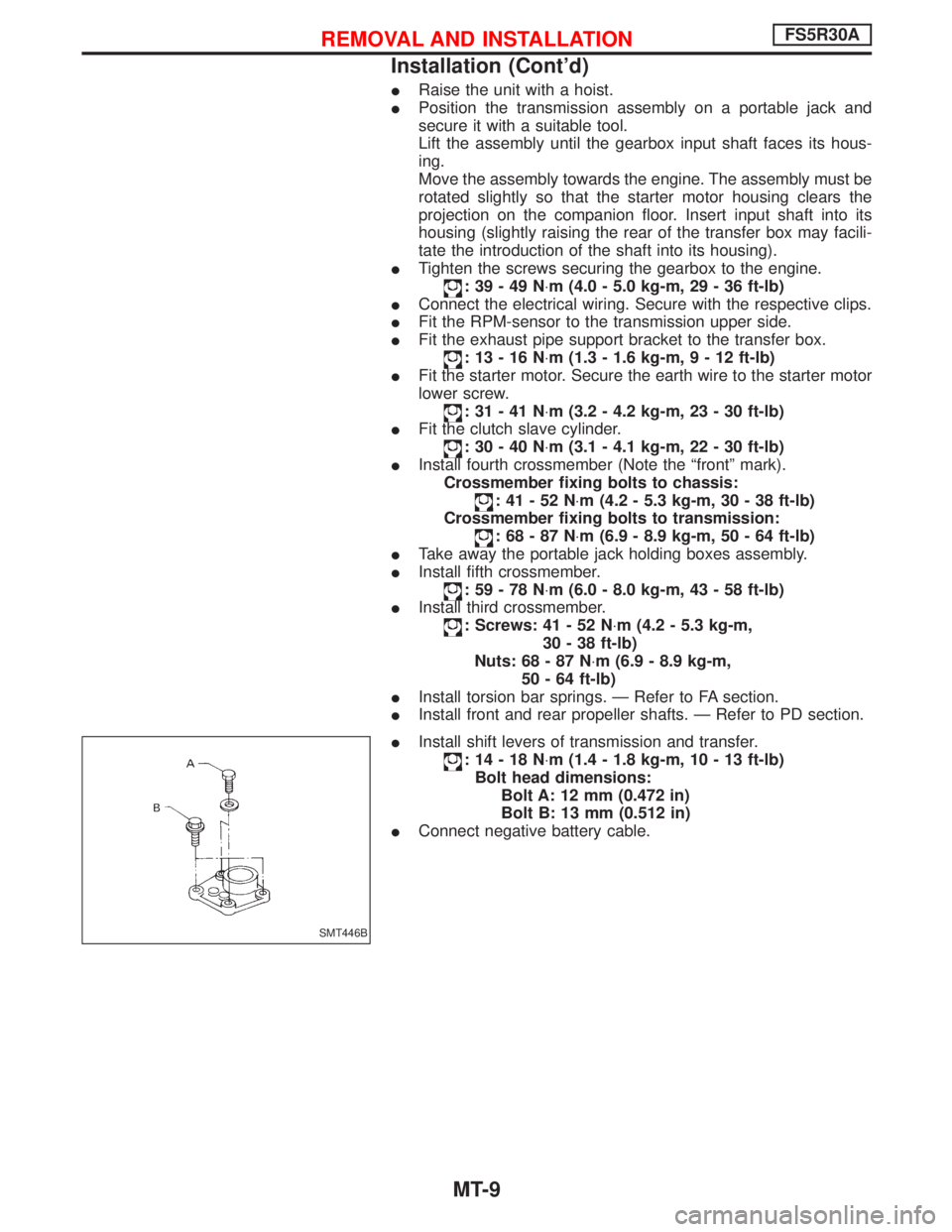
IInstall shift levers of transmission and transfer.
:14-18N×m (1.4 - 1.8 kg-m, 10 - 13 ft-lb)
Bolt head dimensions:
Bolt A: 12 mm (0.472 in)
Bolt B: 13 mm (0.512 in)
IConnect negative battery cable.
SMT446B
REMOVAL AND INSTALLATIONFS5R30A
Installation (Cont'd)
MT-9
Page 1629 of 1767
COMMERCIAL SERVICE TOOL
Tool name Description
Tamper resistant torx
socket
NT757
Size: T30
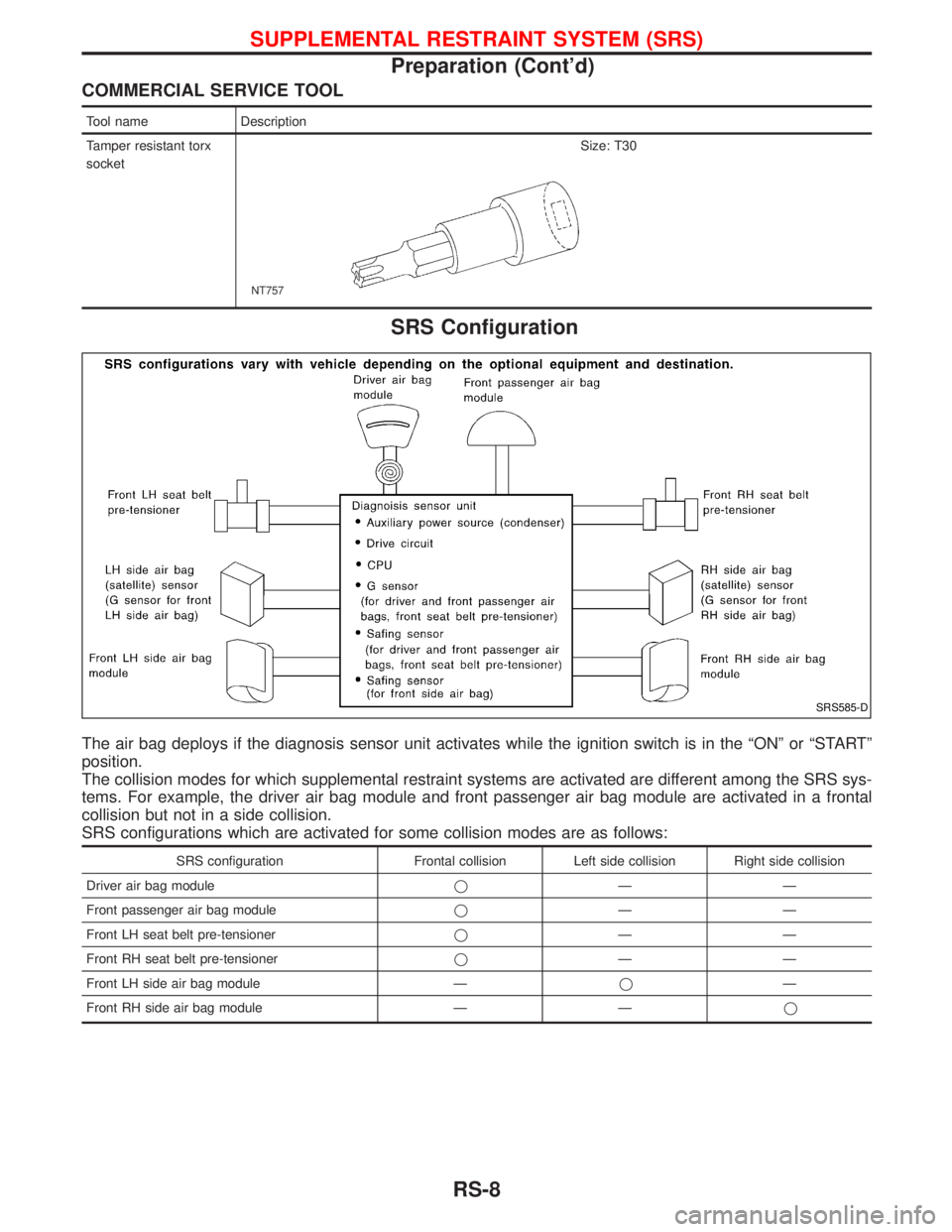
SRS Configuration
The air bag deploys if the diagnosis sensor unit activates while the ignition switch is in the ªONº or ªSTARTº
position.
The collision modes for which supplemental restraint systems are activated are different among the SRS sys-
tems. For example, the driver air bag module and front passenger air bag module are activated in a frontal
collision but not in a side collision.
SRS configurations which are activated for some collision modes are as follows:
SRS configuration Frontal collision Left side collision Right side collision
Driver air bag moduleqÐÐ
Front passenger air bag moduleqÐÐ
Front LH seat belt pre-tensionerqÐÐ
Front RH seat belt pre-tensionerqÐÐ
Front LH side air bag module ÐqÐ
Front RH side air bag module Ð Ðq
SRS585-D
SUPPLEMENTAL RESTRAINT SYSTEM (SRS)
Preparation (Cont'd)
RS-8
Page 1658 of 1767
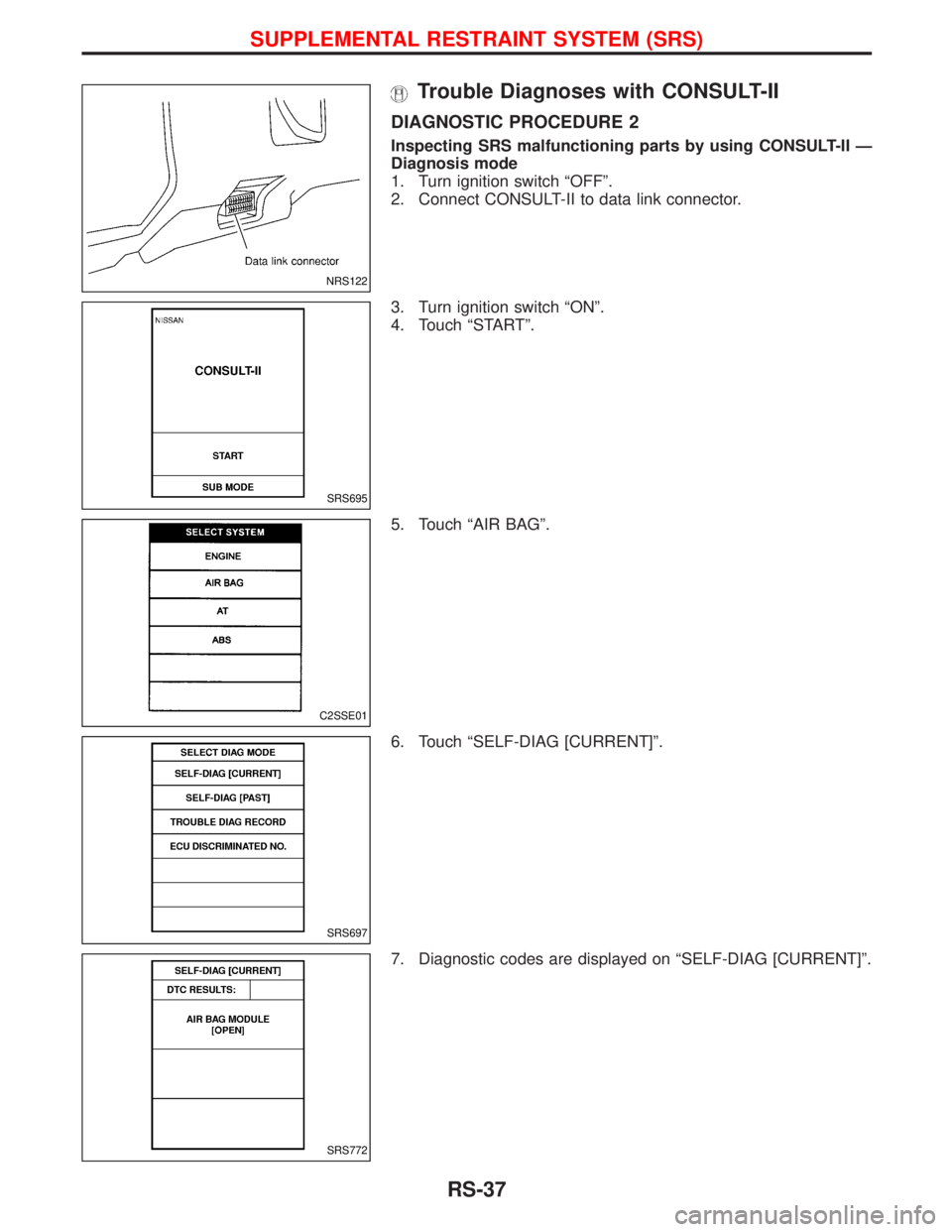
Trouble Diagnoses with CONSULT-II
DIAGNOSTIC PROCEDURE 2
Inspecting SRS malfunctioning parts by using CONSULT-II Ð
Diagnosis mode
1. Turn ignition switch ªOFFº.
2. Connect CONSULT-II to data link connector.
3. Turn ignition switch ªONº.
4. Touch ªSTARTº.
5. Touch ªAIR BAGº.
6. Touch ªSELF-DIAG [CURRENT]º.
7. Diagnostic codes are displayed on ªSELF-DIAG [CURRENT]º.
NRS122
SRS695
C2SSE01
SRS697
SRS772
SUPPLEMENTAL RESTRAINT SYSTEM (SRS)
RS-37
Page 1662 of 1767
![NISSAN TERRANO 2002 Service Repair Manual 4. Touch ªSTARTº.
5. Touch ªAIR BAGº.
6. Touch ªSELF-DIAG [CURRENT]º.
7. If no malfunction is detected on ªSELF-DIAG [CURRENT]º,
repair of SRS is completed. Go to step 8.
If any malfunction is](/img/5/57393/w960_57393-1661.png "NISSAN TERRANO 2002 Service Repair Manual 4. Touch ªSTARTº.
5. Touch ªAIR BAGº.
6. Touch ªSELF-DIAG [CURRENT]º.
7. If no malfunction is detected on ªSELF-DIAG [CURRENT]º,
repair of SRS is completed. Go to step 8.
If any malfunction is")
4. Touch ªSTARTº.
5. Touch ªAIR BAGº.
6. Touch ªSELF-DIAG [CURRENT]º.
7. If no malfunction is detected on ªSELF-DIAG [CURRENT]º,
repair of SRS is completed. Go to step 8.
If any malfunction is displayed on ªSELF-DIAG [CURRENT]º,
the malfunctioning part is not repaired completely or another
malfunctioning part is detected. Go to DIAGNOSTIC PROCE-
DURE 2, page RS-37, and repair malfunctioning part com-
pletely.
8. Touch ªERASEº.
NOTE:
Touch ªERASEº to clear the memory of the malfunction
(ªSELF-DIAG [PAST]º).
If the memory of the malfunction in ªSELF-DIAG [PAST]º is not
erased, the User mode shows the system malfunction by the opera-
tion of the warning lamp even if the malfunction is repaired com-
pletely.
SRS695
C2SSE01
SRS697
SRS701
SRS773
SUPPLEMENTAL RESTRAINT SYSTEM (SRS)
Trouble Diagnoses with CONSULT-II (Cont'd)
RS-41
Page 1664 of 1767
![NISSAN TERRANO 2002 Service Repair Manual 3. Turn ignition switch ªONº.
4. Touch ªSTARTº.
5. Touch ªAIR BAGº.
6. Touch ªSELF-DIAG [PAST]º.
7. If diagnostic codes are displayed on ªSELF-DIAG [PAST]º, go
to step 10.
If no malfunction](/img/5/57393/w960_57393-1663.png "NISSAN TERRANO 2002 Service Repair Manual 3. Turn ignition switch ªONº.
4. Touch ªSTARTº.
5. Touch ªAIR BAGº.
6. Touch ªSELF-DIAG [PAST]º.
7. If diagnostic codes are displayed on ªSELF-DIAG [PAST]º, go
to step 10.
If no malfunction")
3. Turn ignition switch ªONº.
4. Touch ªSTARTº.
5. Touch ªAIR BAGº.
6. Touch ªSELF-DIAG [PAST]º.
7. If diagnostic codes are displayed on ªSELF-DIAG [PAST]º, go
to step 10.
If no malfunction is detected on ªSELF-DIAG [PAST]º, touch
ªBACKº and go back to ªSELECT DIAG MODEº.
SRS695
C2SSE01
SRS697
SRS700
SRS702
SUPPLEMENTAL RESTRAINT SYSTEM (SRS)
Trouble Diagnoses with CONSULT-II (Cont'd)
RS-43
Page 1676 of 1767
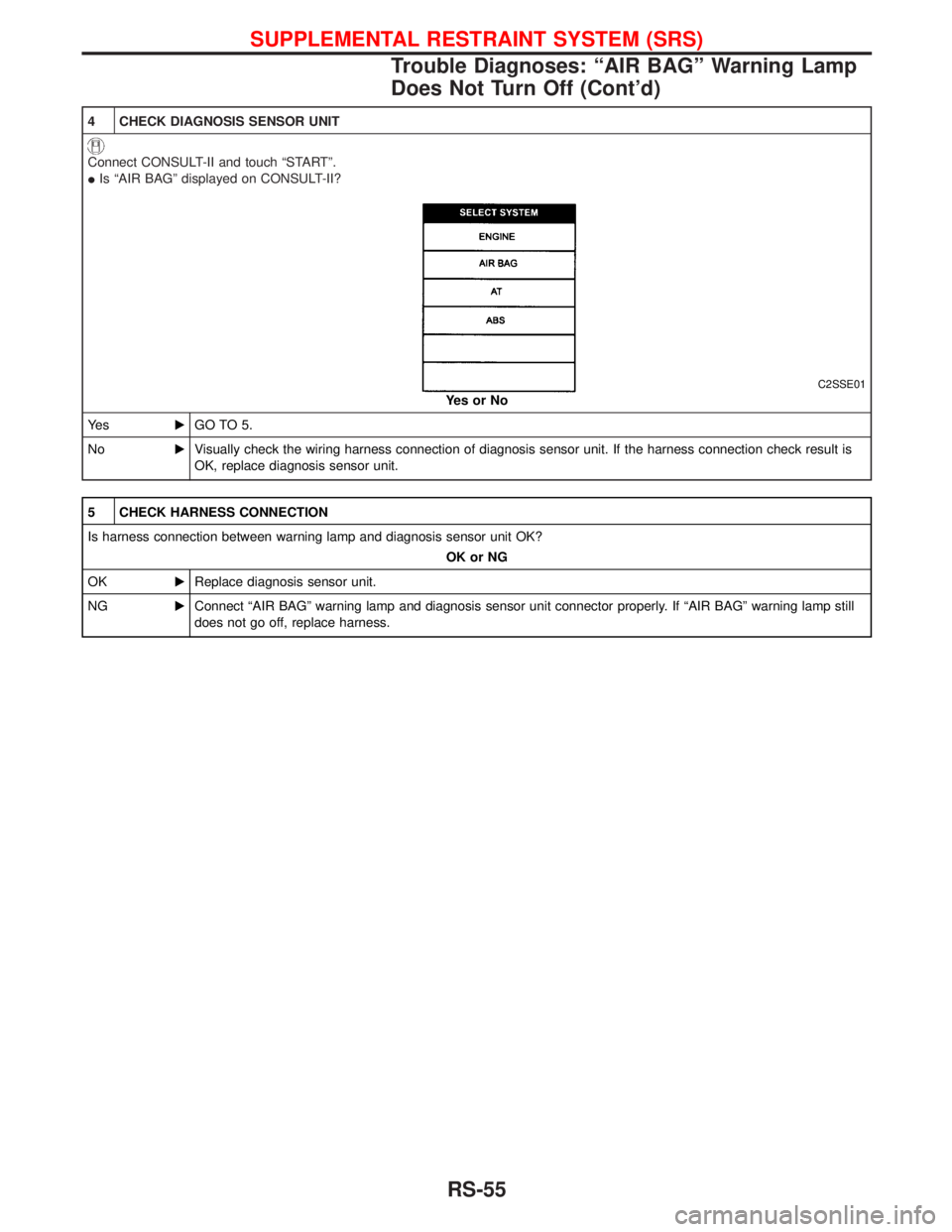
4 CHECK DIAGNOSIS SENSOR UNIT
Connect CONSULT-II and touch ªSTARTº.
IIs ªAIR BAGº displayed on CONSULT-II?
C2SSE01
YesorNo
Ye sEGO TO 5.
NoEVisually check the wiring harness connection of diagnosis sensor unit. If the harness connection check result is
OK, replace diagnosis sensor unit.
5 CHECK HARNESS CONNECTION
Is harness connection between warning lamp and diagnosis sensor unit OK?
OK or NG
OKEReplace diagnosis sensor unit.
NGEConnect ªAIR BAGº warning lamp and diagnosis sensor unit connector properly. If ªAIR BAGº warning lamp still
does not go off, replace harness.
SUPPLEMENTAL RESTRAINT SYSTEM (SRS)
Trouble Diagnoses: ªAIR BAGº Warning Lamp
Does Not Turn Off (Cont'd)
RS-55
Page 1682 of 1767
STARTING & CHARGING SYSTEMS
SECTION
SC
CONTENTS
PRECAUTIONS...............................................................2
Supplemental Restraint System (SRS)²AIR
BAG²and²SEAT BELT PRE-TENSIONER²...............2
Wiring Diagrams and Trouble Diagnoses....................2
BATTERY.........................................................................3
How to Handle Battery ................................................3
Battery Test and Charging Chart .................................6
STARTING SYSTEM.....................................................13
System Description ....................................................13
Wiring Diagram - START -.........................................14
Trouble Diagnoses.....................................................16
Construction ...............................................................17
Magnetic Switch Check .............................................19
Pinion/Clutch Check ..................................................19
Brush Check ..............................................................20Field Coil Check ........................................................20
Armature Check .........................................................21
Assembly ...................................................................22
CHARGING SYSTEM....................................................23
System Description ....................................................23
Wiring Diagram - CHARGE -.....................................24
Trouble Diagnoses.....................................................26
Construction ...............................................................27
Disassembly...............................................................28
Inspection...................................................................28
Assembly ...................................................................29
SERVICE DATA AND SPECIFICATIONS (SDS)..........30
Battery........................................................................30
Starter ........................................................................30
Alternator ...................................................................30
Page 1684 of 1767
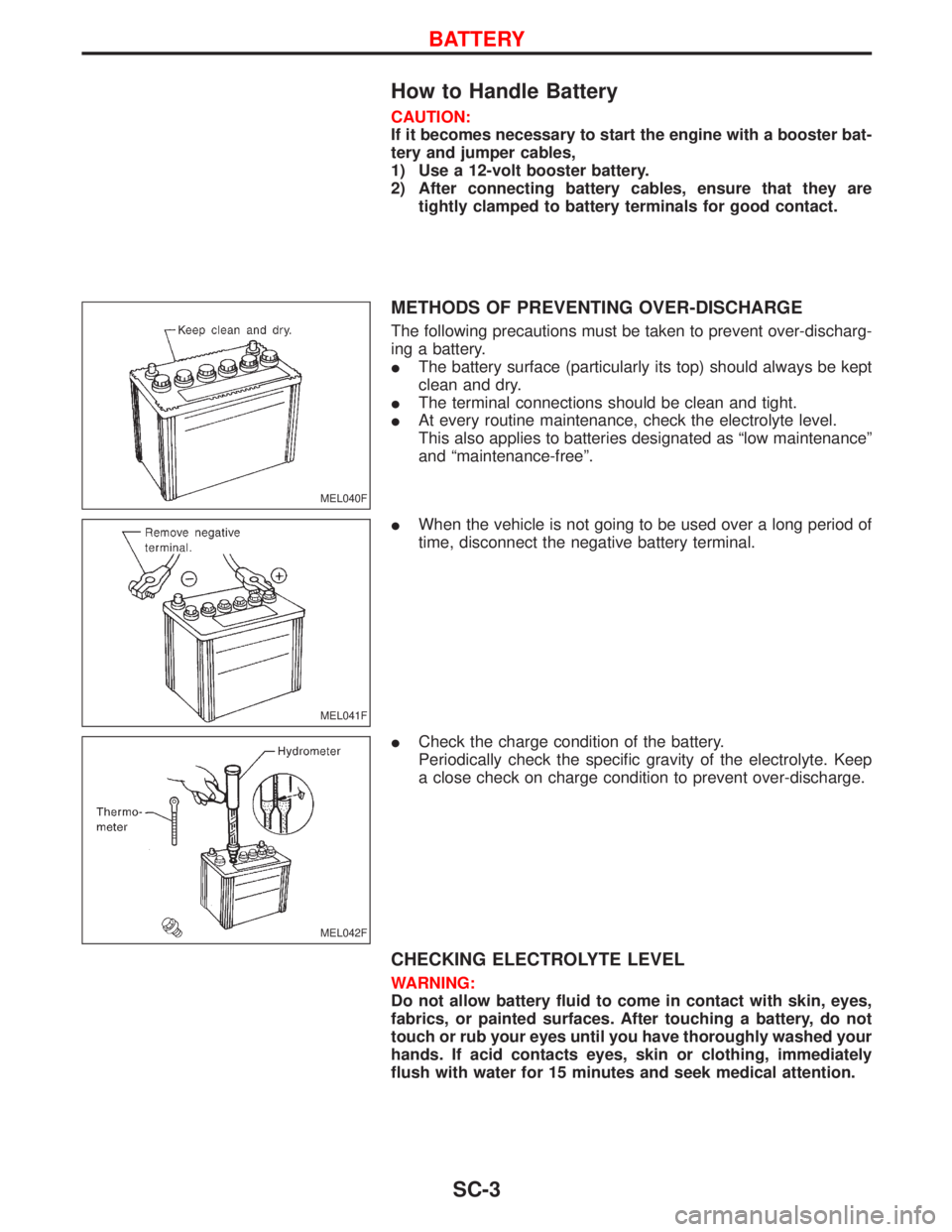
How to Handle Battery
CAUTION:
If it becomes necessary to start the engine with a booster bat-
tery and jumper cables,
1) Use a 12-volt booster battery.
2) After connecting battery cables, ensure that they are
tightly clamped to battery terminals for good contact.
METHODS OF PREVENTING OVER-DISCHARGE
The following precautions must be taken to prevent over-discharg-
ing a battery.
IThe battery surface (particularly its top) should always be kept
clean and dry.
IThe terminal connections should be clean and tight.
IAt every routine maintenance, check the electrolyte level.
This also applies to batteries designated as ªlow maintenanceº
and ªmaintenance-freeº.
IWhen the vehicle is not going to be used over a long period of
time, disconnect the negative battery terminal.
ICheck the charge condition of the battery.
Periodically check the specific gravity of the electrolyte. Keep
a close check on charge condition to prevent over-discharge.
CHECKING ELECTROLYTE LEVEL
WARNING:
Do not allow battery fluid to come in contact with skin, eyes,
fabrics, or painted surfaces. After touching a battery, do not
touch or rub your eyes until you have thoroughly washed your
hands. If acid contacts eyes, skin or clothing, immediately
flush with water for 15 minutes and seek medical attention.
MEL040F
MEL041F
MEL042F
BATTERY
SC-3