Air NISSAN TIIDA 2007 Service Repair Manual
[x] Cancel search | Manufacturer: NISSAN, Model Year: 2007, Model line: TIIDA, Model: NISSAN TIIDA 2007Pages: 2896, PDF Size: 64.73 MB
Page 2866 of 2896
WW-18
FRONT WIPER AND WASHER SYSTEM
Revision: June 20062007 Versa
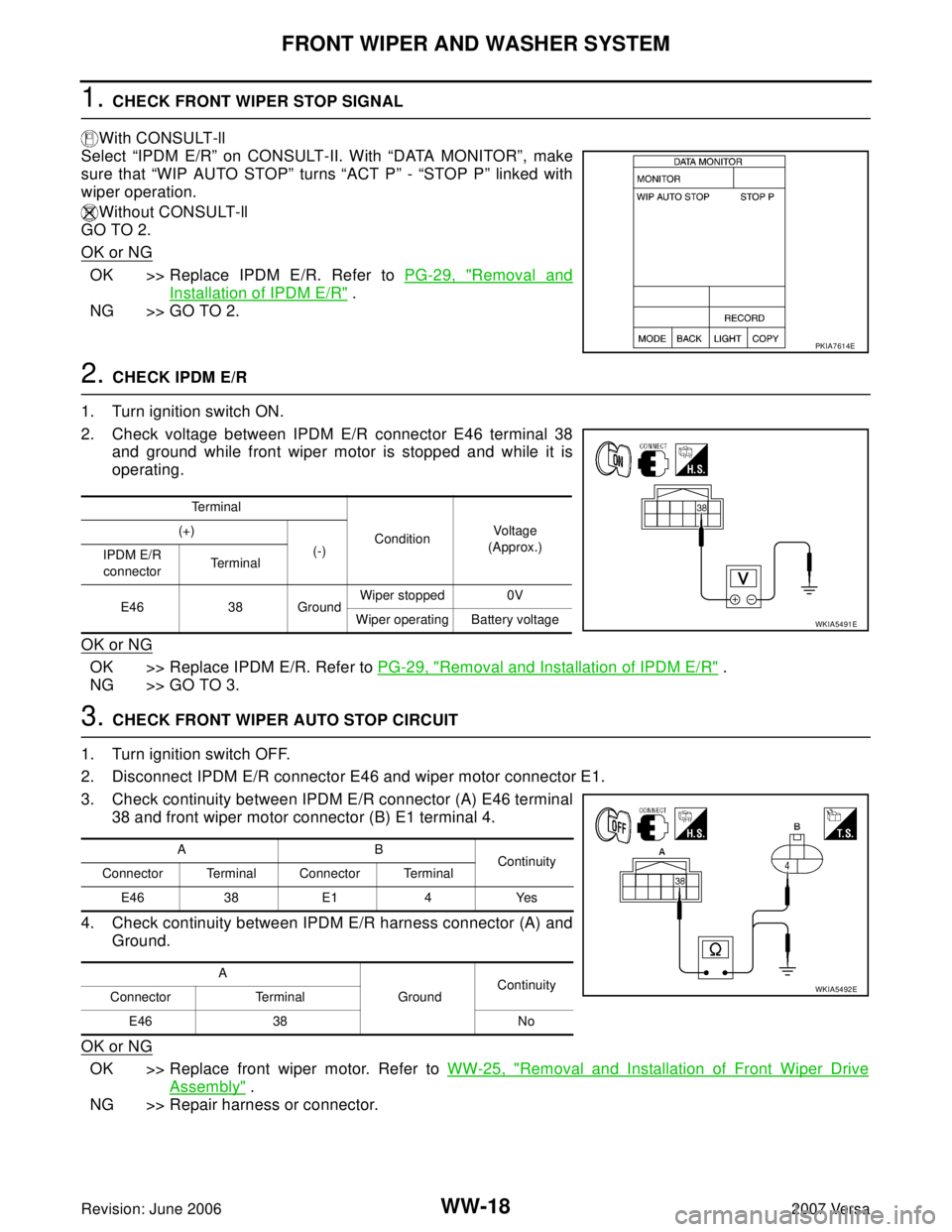
1. CHECK FRONT WIPER STOP SIGNAL
With CONSULT-ll
Select “IPDM E/R” on CONSULT-II. With “DATA MONITOR”, make
sure that “WIP AUTO STOP” turns “ACT P” - “STOP P” linked with
wiper operation.
Without CONSULT-ll
GO TO 2.
OK or NG
OK >> Replace IPDM E/R. Refer to PG-29, "Removal and
Installation of IPDM E/R" .
NG >> GO TO 2.
2. CHECK IPDM E/R
1. Turn ignition switch ON.
2. Check voltage between IPDM E/R connector E46 terminal 38
and ground while front wiper motor is stopped and while it is
operating.
OK or NG
OK >> Replace IPDM E/R. Refer to PG-29, "Removal and Installation of IPDM E/R" .
NG >> GO TO 3.
3. CHECK FRONT WIPER AUTO STOP CIRCUIT
1. Turn ignition switch OFF.
2. Disconnect IPDM E/R connector E46 and wiper motor connector E1.
3. Check continuity between IPDM E/R connector (A) E46 terminal
38 and front wiper motor connector (B) E1 terminal 4.
4. Check continuity between IPDM E/R harness connector (A) and
Ground.
OK or NG
OK >> Replace front wiper motor. Refer to WW-25, "Removal and Installation of Front Wiper Drive
Assembly" .
NG >> Repair harness or connector.
PKIA7614E
Te r m i n a l
ConditionVo ltag e
(Approx.) (+)
(-)
IPDM E/R
connectorTerminal
E46 38 GroundWiper stopped 0V
Wiper operating Battery voltage
WKIA5491E
AB
Continuity
Connector Terminal Connector Terminal
E46 38 E1 4 Yes
A
GroundContinuity
Connector Terminal
E46 38 No
WKIA5492E
Page 2867 of 2896
FRONT WIPER AND WASHER SYSTEM
WW-19
C
D
E
F
G
H
I
J
L
MA
B
WW
Revision: June 20062007 Versa
Only Front Wiper Low Does Not OperateEKS00I1V
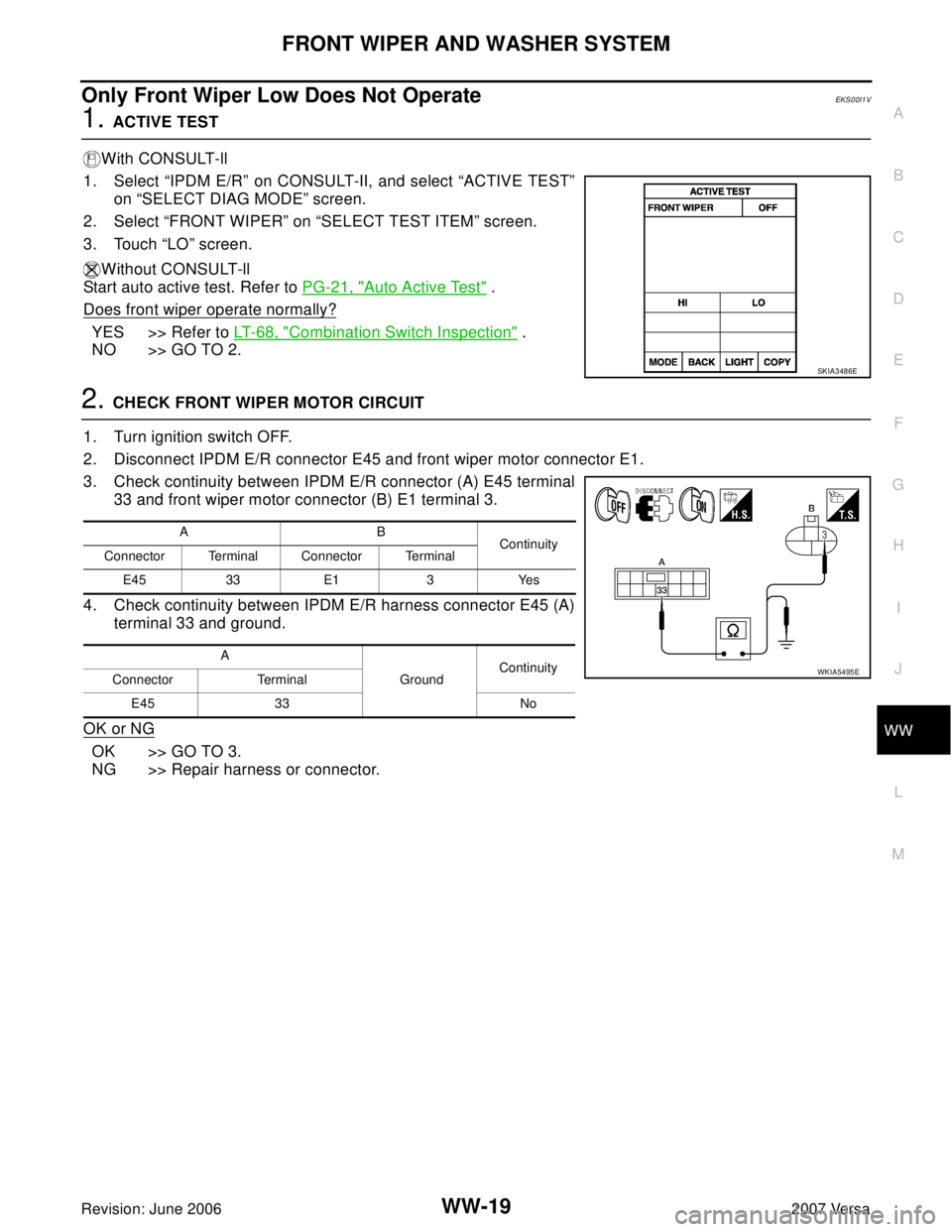
1. ACTIVE TEST
With CONSULT-ll
1. Select “IPDM E/R” on CONSULT-II, and select “ACTIVE TEST”
on “SELECT DIAG MODE” screen.
2. Select “FRONT WIPER” on “SELECT TEST ITEM” screen.
3. Touch “LO” screen.
Without CONSULT-ll
Start auto active test. Refer to PG-21, "
Auto Active Test" .
Does front wiper operate normally?
YES >> Refer to LT-68, "Combination Switch Inspection" .
NO >> GO TO 2.
2. CHECK FRONT WIPER MOTOR CIRCUIT
1. Turn ignition switch OFF.
2. Disconnect IPDM E/R connector E45 and front wiper motor connector E1.
3. Check continuity between IPDM E/R connector (A) E45 terminal
33 and front wiper motor connector (B) E1 terminal 3.
4. Check continuity between IPDM E/R harness connector E45 (A)
terminal 33 and ground.
OK or NG
OK >> GO TO 3.
NG >> Repair harness or connector.
SKIA3486E
AB
Continuity
Connector Terminal Connector Terminal
E45 33 E1 3 Yes
A
GroundContinuity
Connector Terminal
E45 33 No
WKIA5495E
Page 2869 of 2896
FRONT WIPER AND WASHER SYSTEM
WW-21
C
D
E
F
G
H
I
J
L
MA
B
WW
Revision: June 20062007 Versa
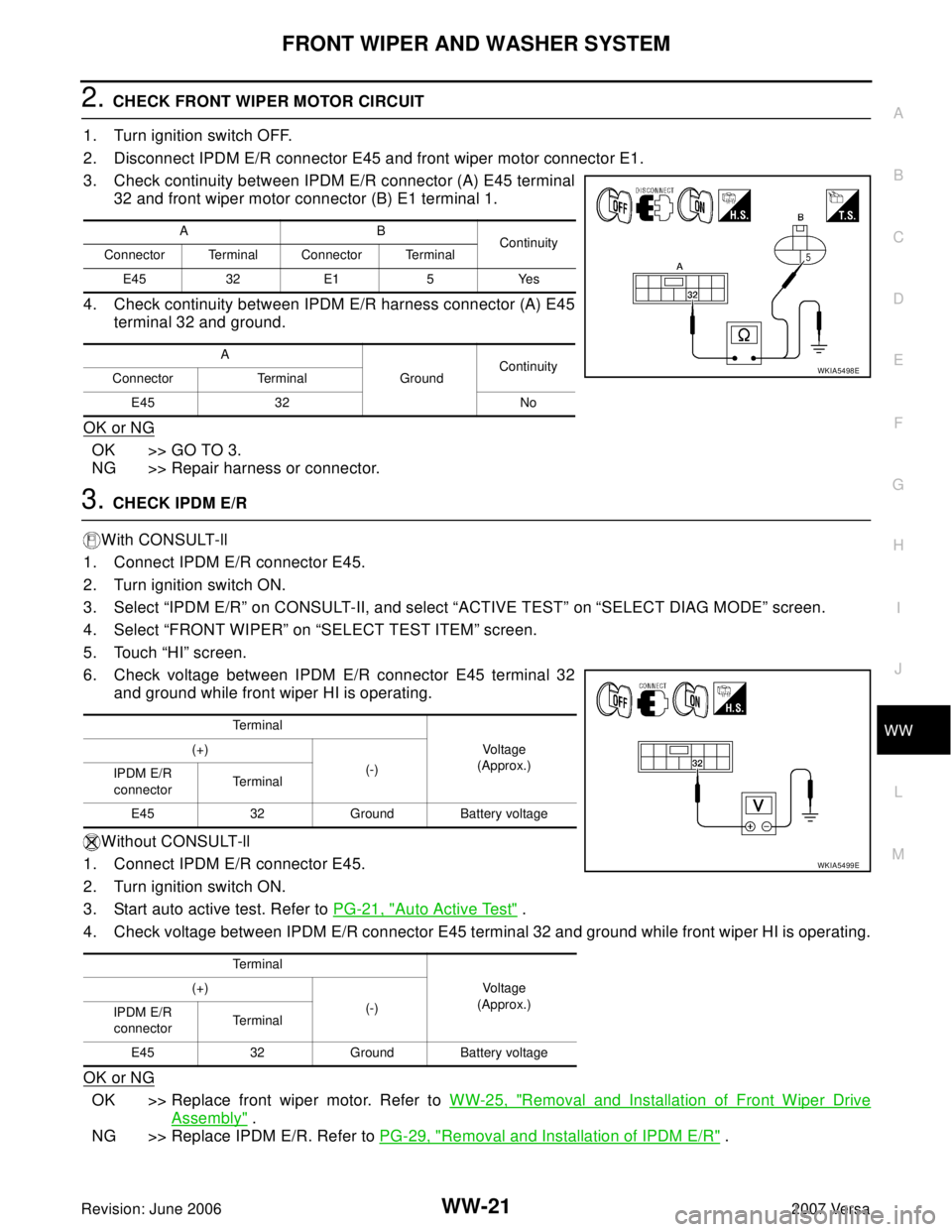
2. CHECK FRONT WIPER MOTOR CIRCUIT
1. Turn ignition switch OFF.
2. Disconnect IPDM E/R connector E45 and front wiper motor connector E1.
3. Check continuity between IPDM E/R connector (A) E45 terminal
32 and front wiper motor connector (B) E1 terminal 1.
4. Check continuity between IPDM E/R harness connector (A) E45
terminal 32 and ground.
OK or NG
OK >> GO TO 3.
NG >> Repair harness or connector.
3. CHECK IPDM E/R
With CONSULT-ll
1. Connect IPDM E/R connector E45.
2. Turn ignition switch ON.
3. Select “IPDM E/R” on CONSULT-II, and select “ACTIVE TEST” on “SELECT DIAG MODE” screen.
4. Select “FRONT WIPER” on “SELECT TEST ITEM” screen.
5. Touch “HI” screen.
6. Check voltage between IPDM E/R connector E45 terminal 32
and ground while front wiper HI is operating.
Without CONSULT-ll
1. Connect IPDM E/R connector E45.
2. Turn ignition switch ON.
3. Start auto active test. Refer to PG-21, "
Auto Active Test" .
4. Check voltage between IPDM E/R connector E45 terminal 32 and ground while front wiper HI is operating.
OK or NG
OK >> Replace front wiper motor. Refer to WW-25, "Removal and Installation of Front Wiper Drive
Assembly" .
NG >> Replace IPDM E/R. Refer to PG-29, "
Removal and Installation of IPDM E/R" .
AB
Continuity
Connector Terminal Connector Terminal
E45 32 E1 5 Yes
A
GroundContinuity
Connector Terminal
E45 32 No
WKIA5498E
Te r m i n a l
Vo l ta g e
(Approx.) (+)
(-)
IPDM E/R
connectorTe r m i n a l
E45 32 Ground Battery voltage
Te r m i n a l
Vo l ta g e
(Approx.) (+)
(-)
IPDM E/R
connectorTe r m i n a l
E45 32 Ground Battery voltage
WKIA5499E
Page 2874 of 2896
WW-26
FRONT WIPER AND WASHER SYSTEM
Revision: June 20062007 Versa
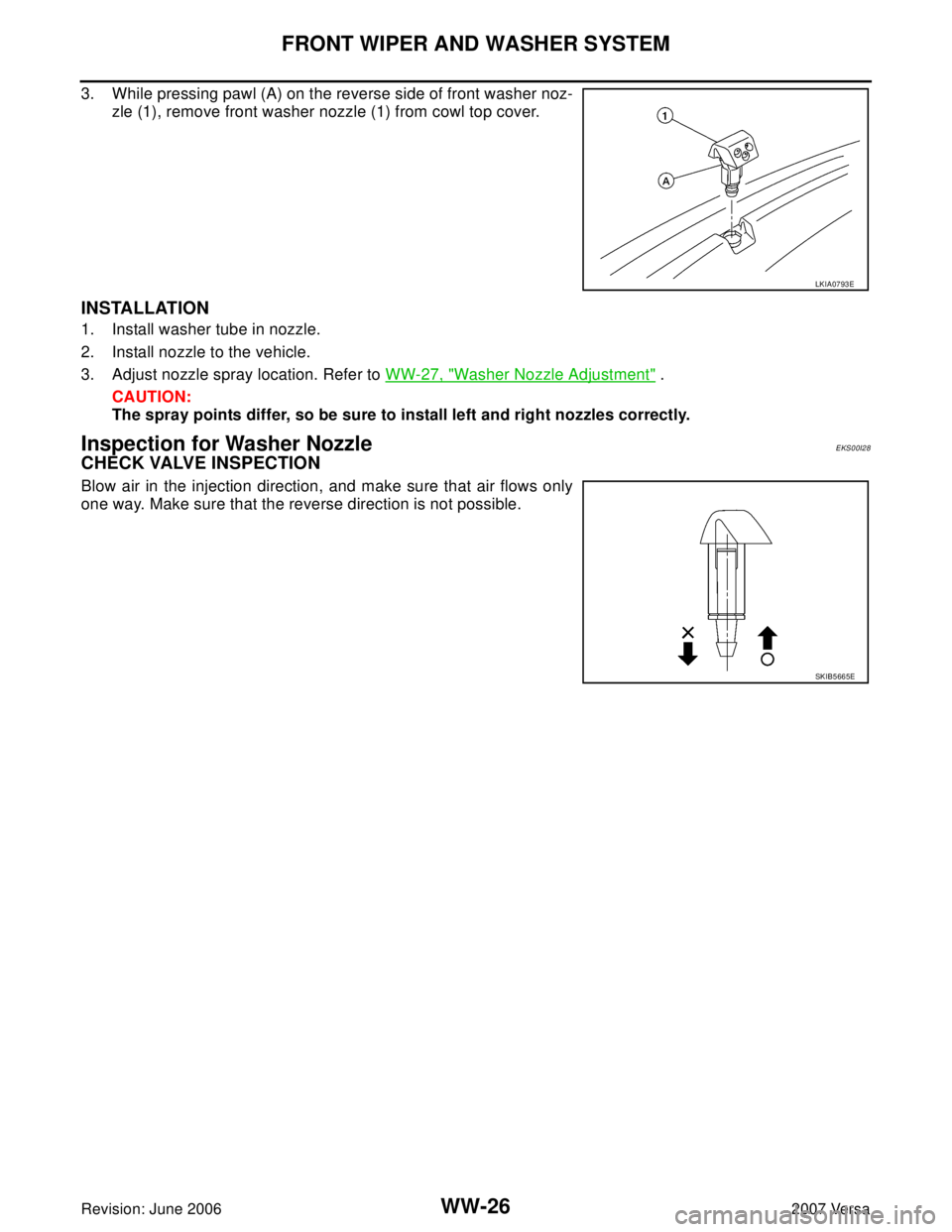
3. While pressing pawl (A) on the reverse side of front washer noz-
zle (1), remove front washer nozzle (1) from cowl top cover.
INSTALLATION
1. Install washer tube in nozzle.
2. Install nozzle to the vehicle.
3. Adjust nozzle spray location. Refer to WW-27, "
Washer Nozzle Adjustment" .
CAUTION:
The spray points differ, so be sure to install left and right nozzles correctly.
Inspection for Washer Nozzle EKS00I28
CHECK VALVE INSPECTION
Blow air in the injection direction, and make sure that air flows only
one way. Make sure that the reverse direction is not possible.
LKIA0793E
SKIB5665E
Page 2883 of 2896
REAR WIPER AND WASHER SYSTEM
WW-35
C
D
E
F
G
H
I
J
L
MA
B
WW
Revision: June 20062007 Versa
Terminals and Reference Values for BCMEKS00ILK
Refer to BCS-12, "Terminals and Reference Values for BCM" .
How to Proceed With Trouble DiagnosisEKS00ILL
1. Confirm the symptoms and customer complaint.
2. Understand operation description and function description. Refer to WW-30, "
System Description" .
3. Perform the Preliminary Check. Refer to WW-35, "
Preliminary Check" .
4. Check symptom and repair or replace the cause of malfunction.
5. Does the rear wiper operate normally? If YES: GO TO 6. If NO: GO TO 4.
6. Inspection End.
Preliminary CheckEKS00ILM
CHECK POWER SUPPLY AND GROUND CIRCUIT FOR BCM
Refer to BCS-16, "BCM Power Supply and Ground Circuit Check" .
CONSULT-II Function (BCM)EKS00ILN
Refer to WW-12, "CONSULT-II Functions (BCM)" .
Rear Wiper Does Not OperateEKS00ILO
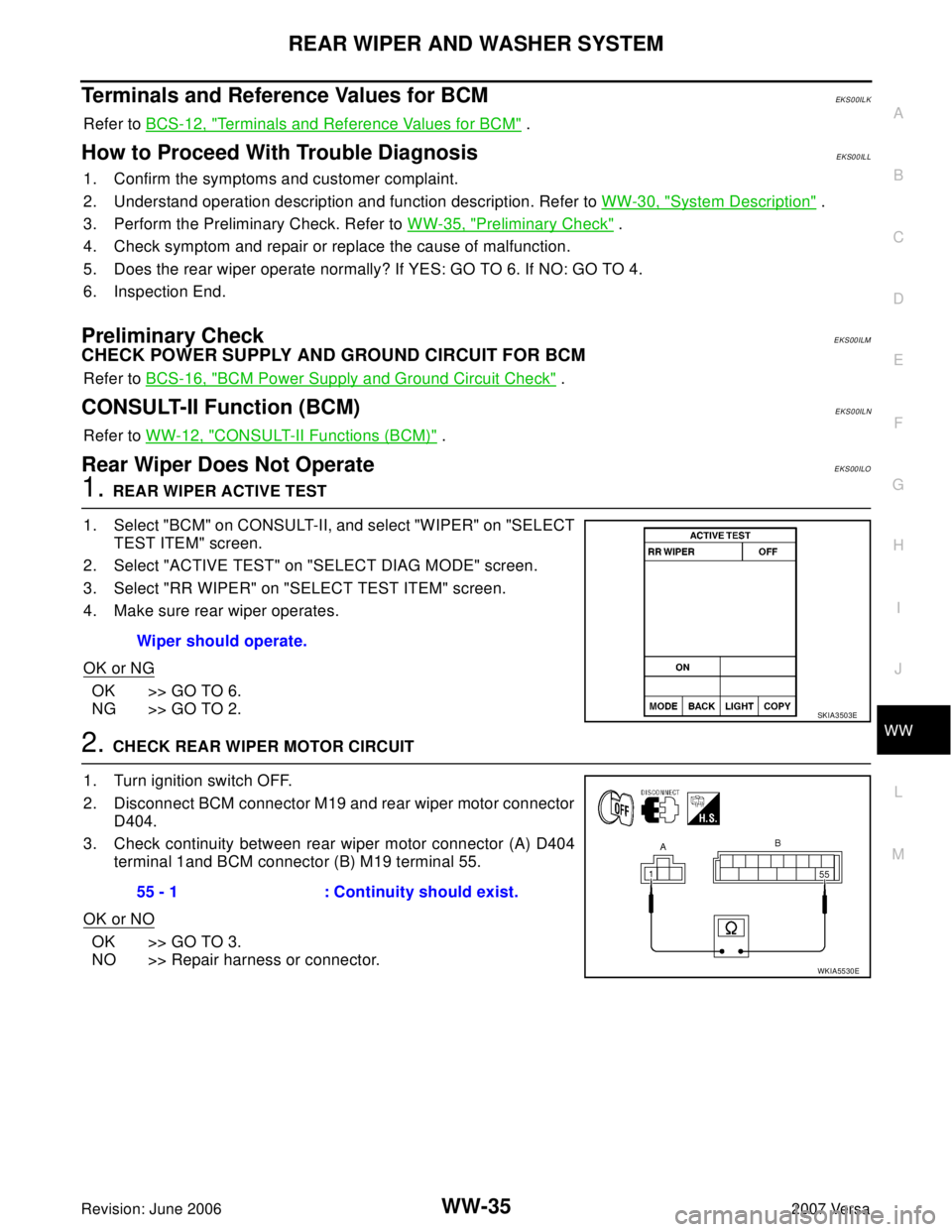
1. REAR WIPER ACTIVE TEST
1. Select "BCM" on CONSULT-II, and select "WIPER" on "SELECT
TEST ITEM" screen.
2. Select "ACTIVE TEST" on "SELECT DIAG MODE" screen.
3. Select "RR WIPER" on "SELECT TEST ITEM" screen.
4. Make sure rear wiper operates.
OK or NG
OK >> GO TO 6.
NG >> GO TO 2.
2. CHECK REAR WIPER MOTOR CIRCUIT
1. Turn ignition switch OFF.
2. Disconnect BCM connector M19 and rear wiper motor connector
D404.
3. Check continuity between rear wiper motor connector (A) D404
terminal 1and BCM connector (B) M19 terminal 55.
OK or NO
OK >> GO TO 3.
NO >> Repair harness or connector.Wiper should operate.
SKIA3503E
55 - 1 : Continuity should exist.
WKIA5530E
Page 2884 of 2896
WW-36
REAR WIPER AND WASHER SYSTEM
Revision: June 20062007 Versa
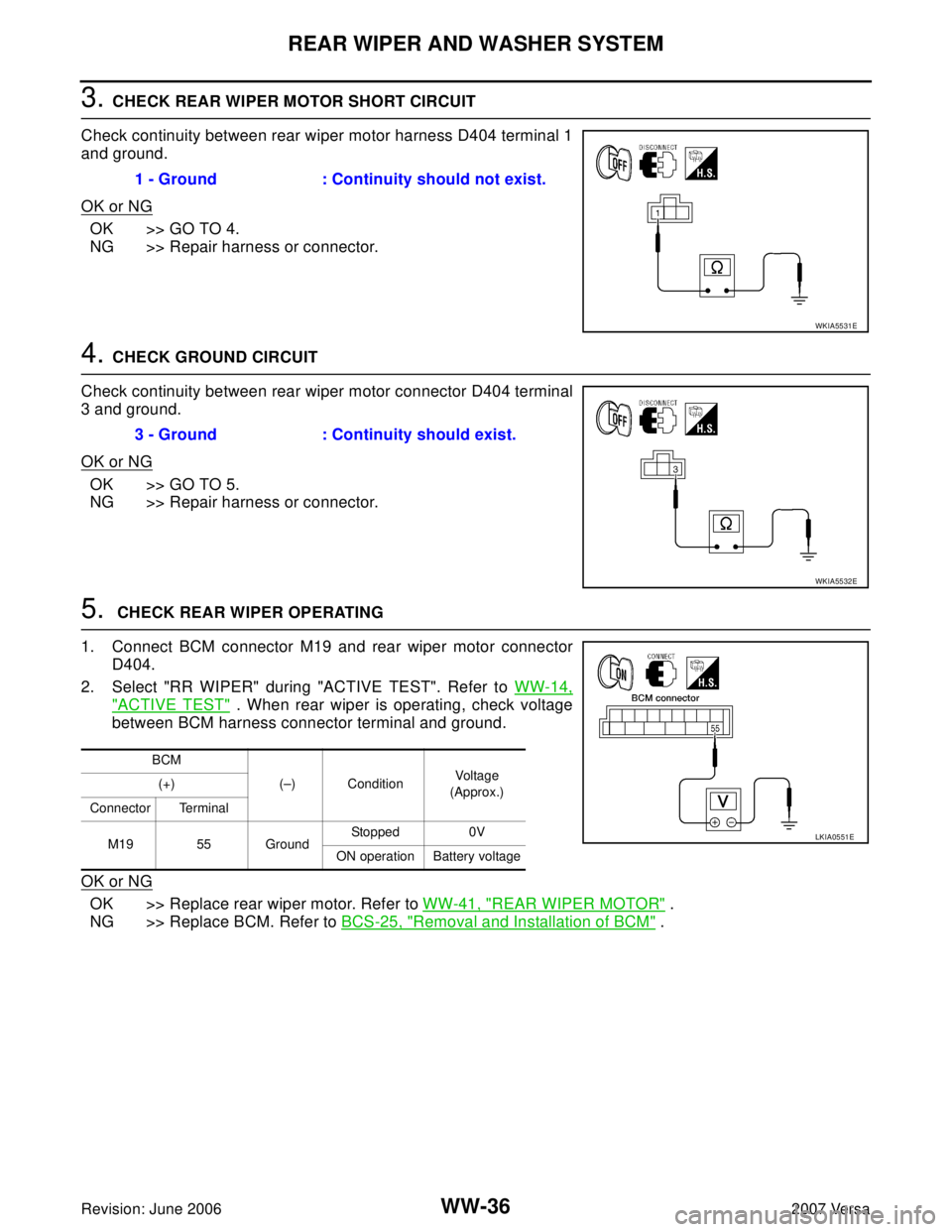
3. CHECK REAR WIPER MOTOR SHORT CIRCUIT
Check continuity between rear wiper motor harness D404 terminal 1
and ground.
OK or NG
OK >> GO TO 4.
NG >> Repair harness or connector.
4. CHECK GROUND CIRCUIT
Check continuity between rear wiper motor connector D404 terminal
3 and ground.
OK or NG
OK >> GO TO 5.
NG >> Repair harness or connector.
5. CHECK REAR WIPER OPERATING
1. Connect BCM connector M19 and rear wiper motor connector
D404.
2. Select "RR WIPER" during "ACTIVE TEST". Refer to WW-14,
"ACTIVE TEST" . When rear wiper is operating, check voltage
between BCM harness connector terminal and ground.
OK or NG
OK >> Replace rear wiper motor. Refer to WW-41, "REAR WIPER MOTOR" .
NG >> Replace BCM. Refer to BCS-25, "
Removal and Installation of BCM" . 1 - Ground : Continuity should not exist.
WKIA5531E
3 - Ground : Continuity should exist.
WKIA5532E
BCM
(–) ConditionVoltage
(Approx.) (+)
Connector Terminal
M19 55 GroundStopped 0V
ON operation Battery voltage
LKIA0551E
Page 2885 of 2896
REAR WIPER AND WASHER SYSTEM
WW-37
C
D
E
F
G
H
I
J
L
MA
B
WW
Revision: June 20062007 Versa
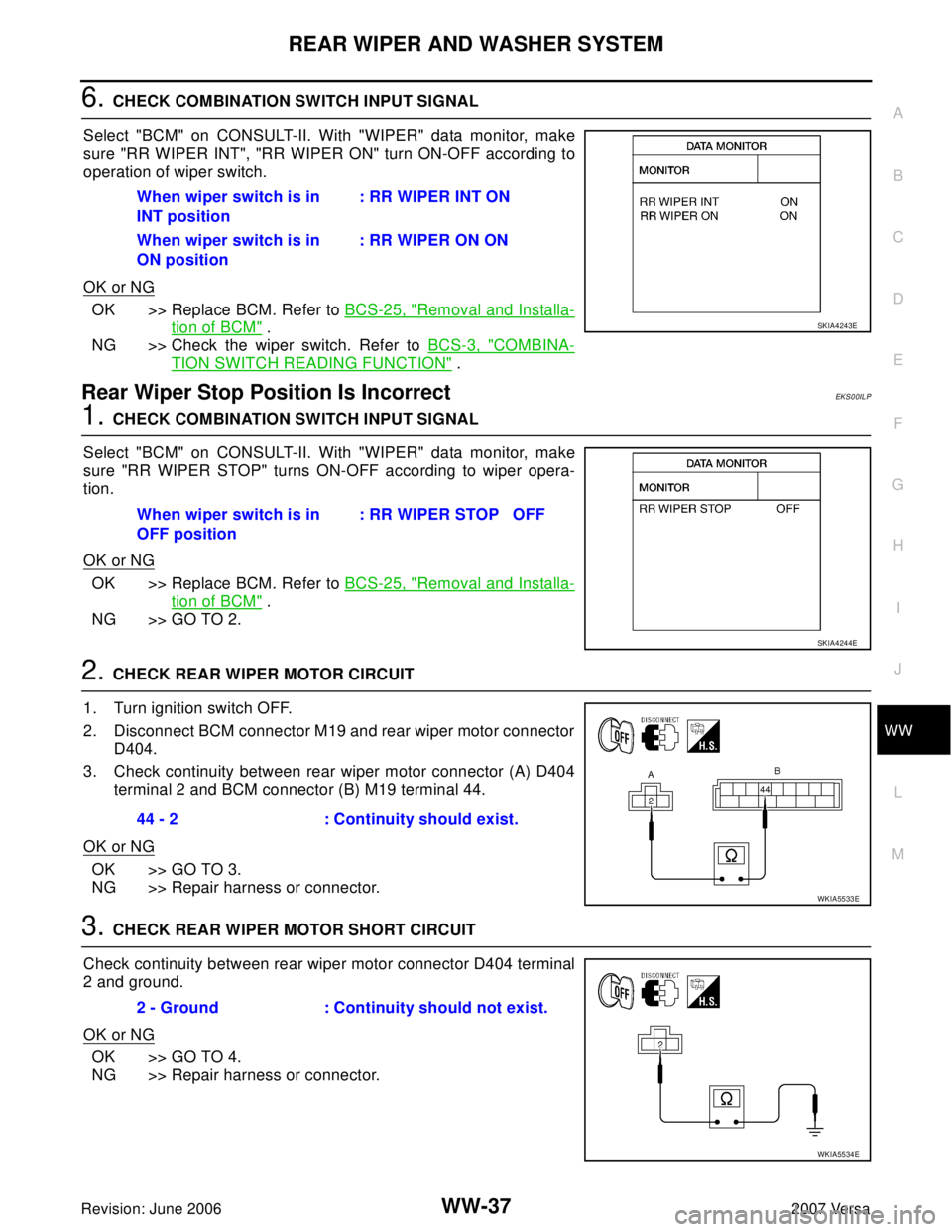
6. CHECK COMBINATION SWITCH INPUT SIGNAL
Select "BCM" on CONSULT-II. With "WIPER" data monitor, make
sure "RR WIPER INT", "RR WIPER ON" turn ON-OFF according to
operation of wiper switch.
OK or NG
OK >> Replace BCM. Refer to BCS-25, "Removal and Installa-
tion of BCM" .
NG >> Check the wiper switch. Refer to BCS-3, "
COMBINA-
TION SWITCH READING FUNCTION" .
Rear Wiper Stop Position Is IncorrectEKS00ILP
1. CHECK COMBINATION SWITCH INPUT SIGNAL
Select "BCM" on CONSULT-II. With "WIPER" data monitor, make
sure "RR WIPER STOP" turns ON-OFF according to wiper opera-
tion.
OK or NG
OK >> Replace BCM. Refer to BCS-25, "Removal and Installa-
tion of BCM" .
NG >> GO TO 2.
2. CHECK REAR WIPER MOTOR CIRCUIT
1. Turn ignition switch OFF.
2. Disconnect BCM connector M19 and rear wiper motor connector
D404.
3. Check continuity between rear wiper motor connector (A) D404
terminal 2 and BCM connector (B) M19 terminal 44.
OK or NG
OK >> GO TO 3.
NG >> Repair harness or connector.
3. CHECK REAR WIPER MOTOR SHORT CIRCUIT
Check continuity between rear wiper motor connector D404 terminal
2 and ground.
OK or NG
OK >> GO TO 4.
NG >> Repair harness or connector. When wiper switch is in
INT position: RR WIPER INT ON
When wiper switch is in
ON position: RR WIPER ON ON
SKIA4243E
When wiper switch is in
OFF position: RR WIPER STOP OFF
SKIA4244E
44 - 2 : Continuity should exist.
WKIA5533E
2 - Ground : Continuity should not exist.
WKIA5534E
Page 2886 of 2896
WW-38
REAR WIPER AND WASHER SYSTEM
Revision: June 20062007 Versa
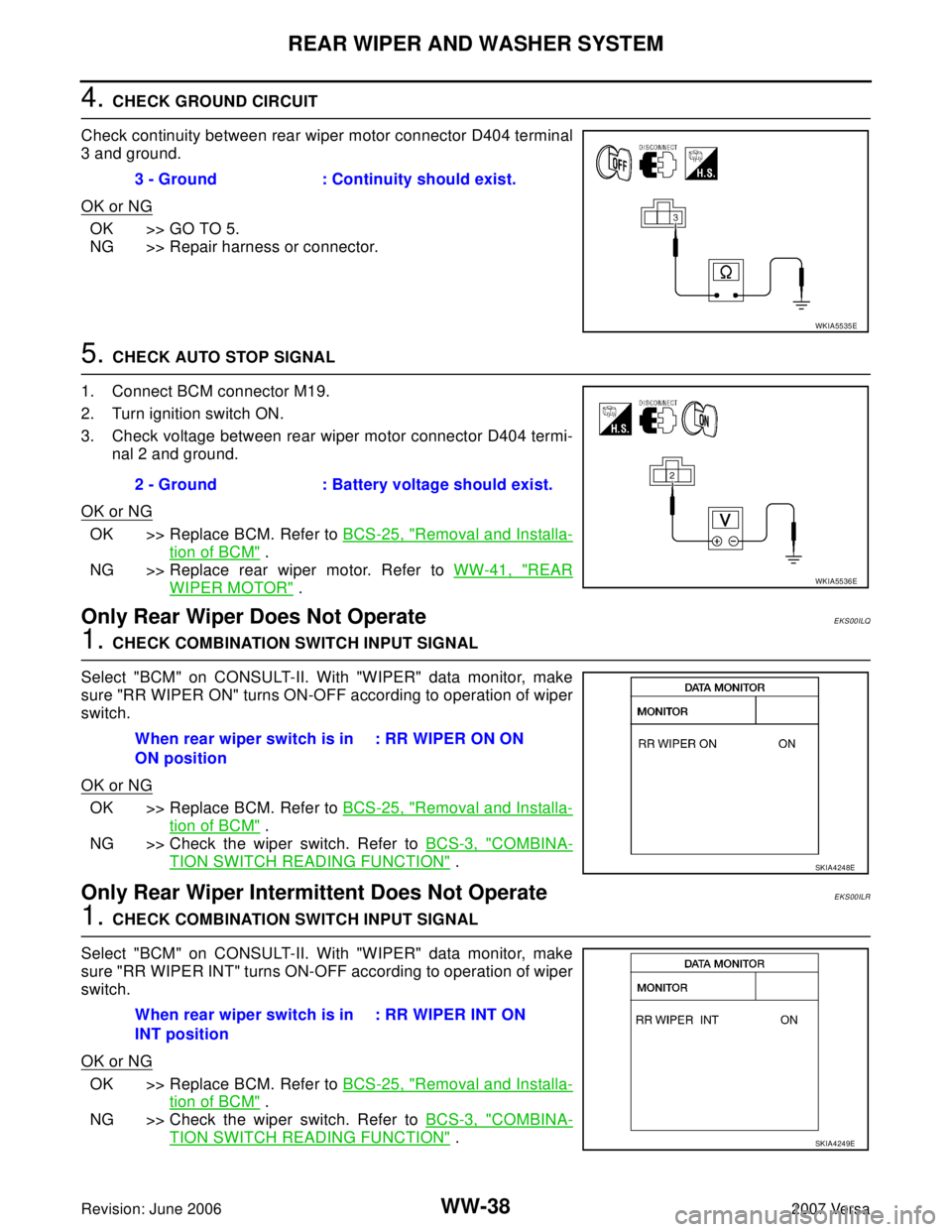
4. CHECK GROUND CIRCUIT
Check continuity between rear wiper motor connector D404 terminal
3 and ground.
OK or NG
OK >> GO TO 5.
NG >> Repair harness or connector.
5. CHECK AUTO STOP SIGNAL
1. Connect BCM connector M19.
2. Turn ignition switch ON.
3. Check voltage between rear wiper motor connector D404 termi-
nal 2 and ground.
OK or NG
OK >> Replace BCM. Refer to BCS-25, "Removal and Installa-
tion of BCM" .
NG >> Replace rear wiper motor. Refer to WW-41, "
REAR
WIPER MOTOR" .
Only Rear Wiper Does Not OperateEKS00ILQ
1. CHECK COMBINATION SWITCH INPUT SIGNAL
Select "BCM" on CONSULT-II. With "WIPER" data monitor, make
sure "RR WIPER ON" turns ON-OFF according to operation of wiper
switch.
OK or NG
OK >> Replace BCM. Refer to BCS-25, "Removal and Installa-
tion of BCM" .
NG >> Check the wiper switch. Refer to BCS-3, "
COMBINA-
TION SWITCH READING FUNCTION" .
Only Rear Wiper Intermittent Does Not OperateEKS00ILR
1. CHECK COMBINATION SWITCH INPUT SIGNAL
Select "BCM" on CONSULT-II. With "WIPER" data monitor, make
sure "RR WIPER INT" turns ON-OFF according to operation of wiper
switch.
OK or NG
OK >> Replace BCM. Refer to BCS-25, "Removal and Installa-
tion of BCM" .
NG >> Check the wiper switch. Refer to BCS-3, "
COMBINA-
TION SWITCH READING FUNCTION" . 3 - Ground : Continuity should exist.
WKIA5535E
2 - Ground : Battery voltage should exist.
WKIA5536E
When rear wiper switch is in
ON position: RR WIPER ON ON
SKIA4248E
When rear wiper switch is in
INT position: RR WIPER INT ON
SKIA4249E