Screen NISSAN TIIDA 2007 Service Repair Manual
[x] Cancel search | Manufacturer: NISSAN, Model Year: 2007, Model line: TIIDA, Model: NISSAN TIIDA 2007Pages: 5883, PDF Size: 78.95 MB
Page 3082 of 5883
HEADLAMP
EXL-81
< ON-VEHICLE MAINTENANCE >
C
D
E
F
G
H
I
J
K
MA
B
EXL
N
O
P
ON-VEHICLE MAINTENANCE
HEADLAMP
Aiming AdjustmentINFOID:0000000001529251
PREPARATION BEFORE ADJUSTING
Before performing aiming adjustment, check the following.
1. Keep all tires inflated to correct pressures.
2. Place vehicle on level surface.
3. Set that there is no-load in vehicle other than the driver (or equivalent weight placed in driver's position).
Coolant, engine oil filled up to correct level and full fuel tank.
LOW BEAM AND HIGH BEAM
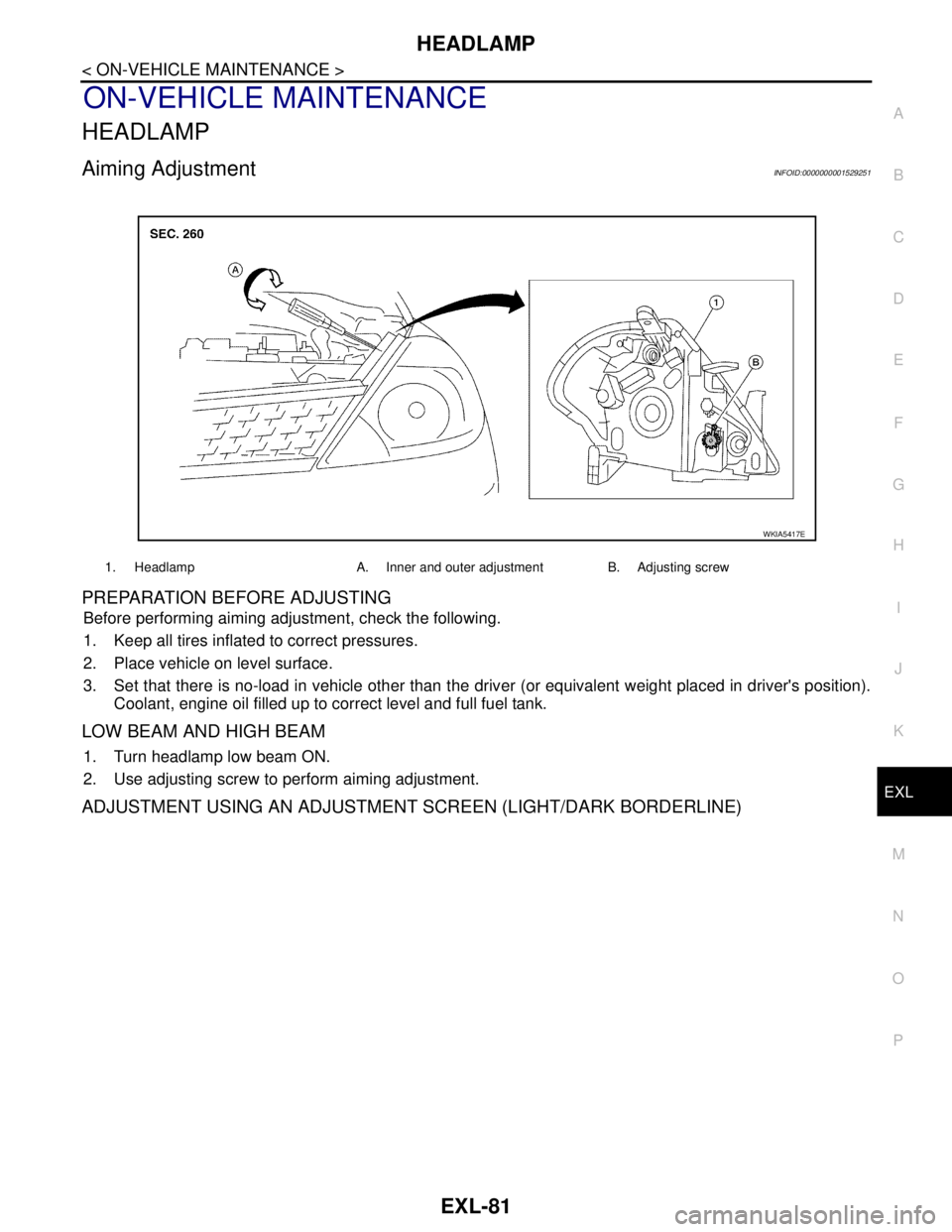
1. Turn headlamp low beam ON.
2. Use adjusting screw to perform aiming adjustment.
ADJUSTMENT USING AN ADJUSTMENT SCREEN (LIGHT/DARK BORDERLINE)
1. Headlamp A. Inner and outer adjustment B. Adjusting screw
WKIA5417E
Page 3083 of 5883
EXL-82
< ON-VEHICLE MAINTENANCE >
HEADLAMP
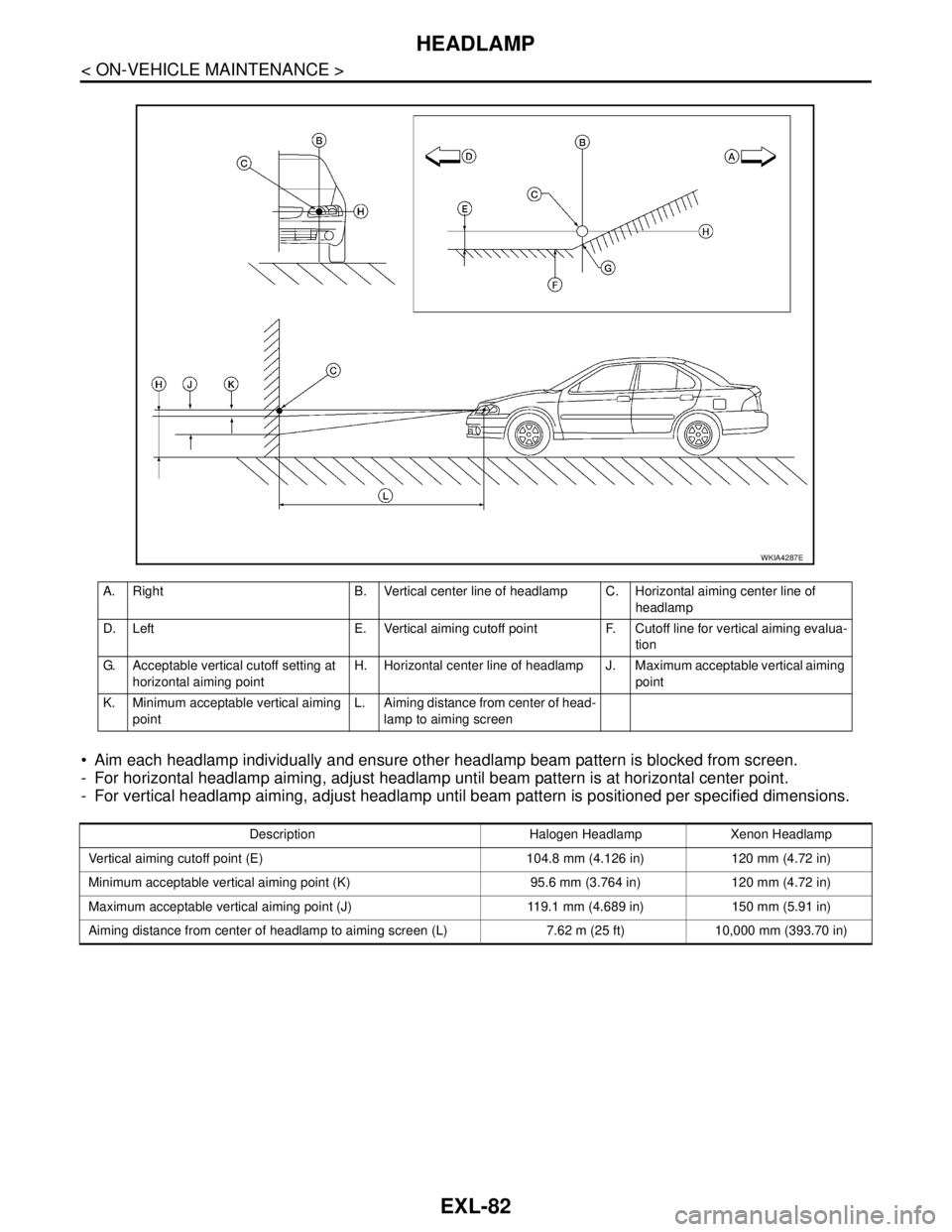
Aim each headlamp individually and ensure other headlamp beam pattern is blocked from screen.
- For horizontal headlamp aiming, adjust headlamp until beam pattern is at horizontal center point.
- For vertical headlamp aiming, adjust headlamp until beam pattern is positioned per specified dimensions.
A. Right B. Vertical center line of headlamp C. Horizontal aiming center line of
headlamp
D. Left E. Vertical aiming cutoff point F. Cutoff line for vertical aiming evalua-
tion
G. Acceptable vertical cutoff setting at
horizontal aiming pointH. Horizontal center line of headlamp J. Maximum acceptable vertical aiming
point
K. Minimum acceptable vertical aiming
pointL. Aiming distance from center of head-
lamp to aiming screen
WKIA4287E
Description Halogen Headlamp Xenon Headlamp
Vertical aiming cutoff point (E) 104.8 mm (4.126 in) 120 mm (4.72 in)
Minimum acceptable vertical aiming point (K) 95.6 mm (3.764 in) 120 mm (4.72 in)
Maximum acceptable vertical aiming point (J) 119.1 mm (4.689 in) 150 mm (5.91 in)
Aiming distance from center of headlamp to aiming screen (L) 7.62 m (25 ft) 10,000 mm (393.70 in)
Page 3084 of 5883
FRONT FOG LAMP
EXL-83
< ON-VEHICLE MAINTENANCE >
C
D
E
F
G
H
I
J
K
MA
B
EXL
N
O
P
FRONT FOG LAMP
Aiming AdjustmentINFOID:0000000001529283
The front fog lamp is a semi-sealed beam type which uses a replaceable halogen bulb. Before performing
aiming adjustment, make sure of the following.
Keep all tires inflated to correct pressure.
Place vehicle on level surface.
Set that there is no-load in vehicle other than the driver (or equivalent weight placed in driver’s position).
Coolant, engine oil filled up to correct level and full fuel tank.
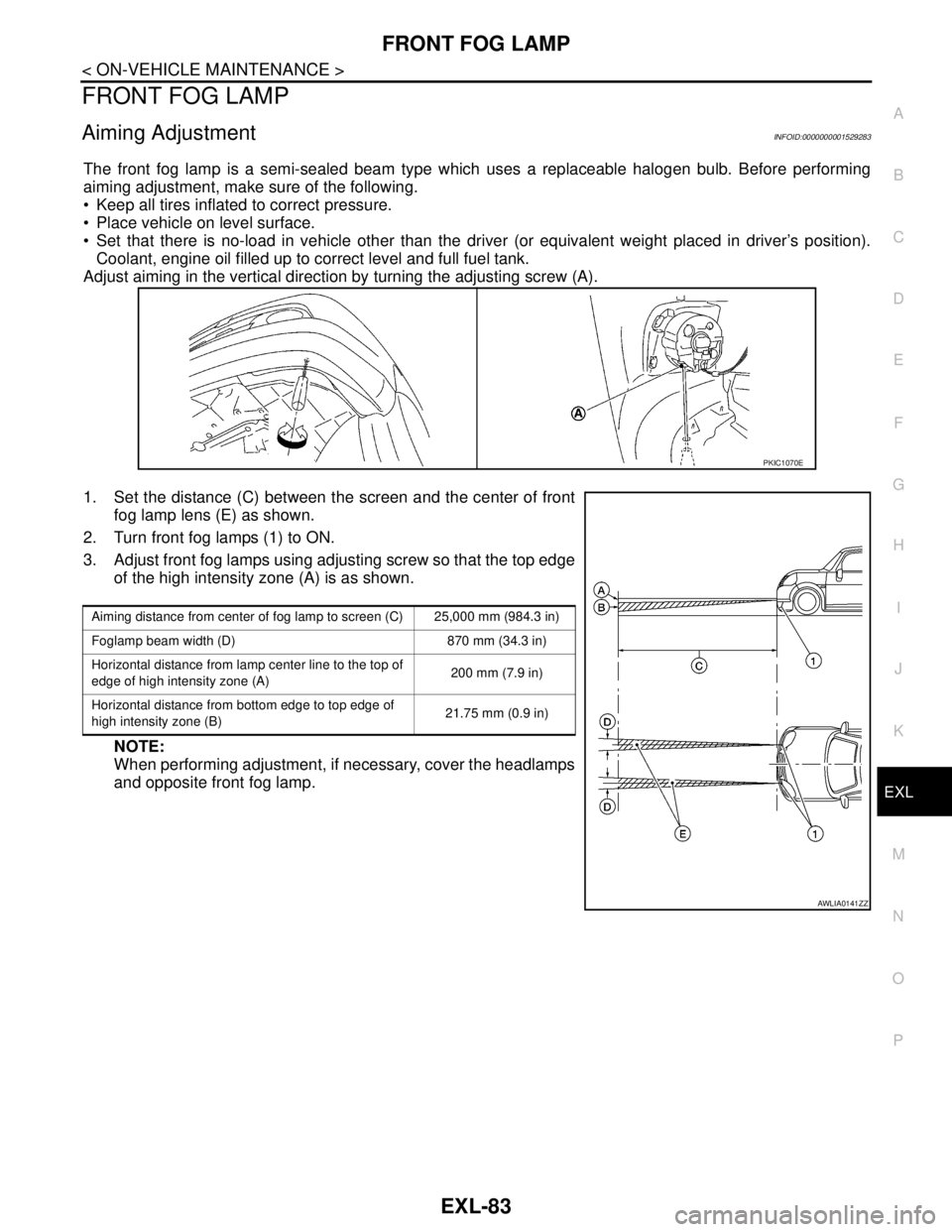
Adjust aiming in the vertical direction by turning the adjusting screw (A).
1. Set the distance (C) between the screen and the center of front
fog lamp lens (E) as shown.
2. Turn front fog lamps (1) to ON.
3. Adjust front fog lamps using adjusting screw so that the top edge
of the high intensity zone (A) is as shown.
NOTE:
When performing adjustment, if necessary, cover the headlamps
and opposite front fog lamp.
PKIC1070E
Aiming distance from center of fog lamp to screen (C) 25,000 mm (984.3 in)
Foglamp beam width (D) 870 mm (34.3 in)
Horizontal distance from lamp center line to the top of
edge of high intensity zone (A)200 mm (7.9 in)
Horizontal distance from bottom edge to top edge of
high intensity zone (B)21.75 mm (0.9 in)
AWLIA0141ZZ
Page 3273 of 5883
GW-14
< ON-VEHICLE REPAIR >
FRONT DOOR GLASS AND REGULATOR
FRONT DOOR GLASS AND REGULATOR
Removal and InstallationINFOID:0000000001716843
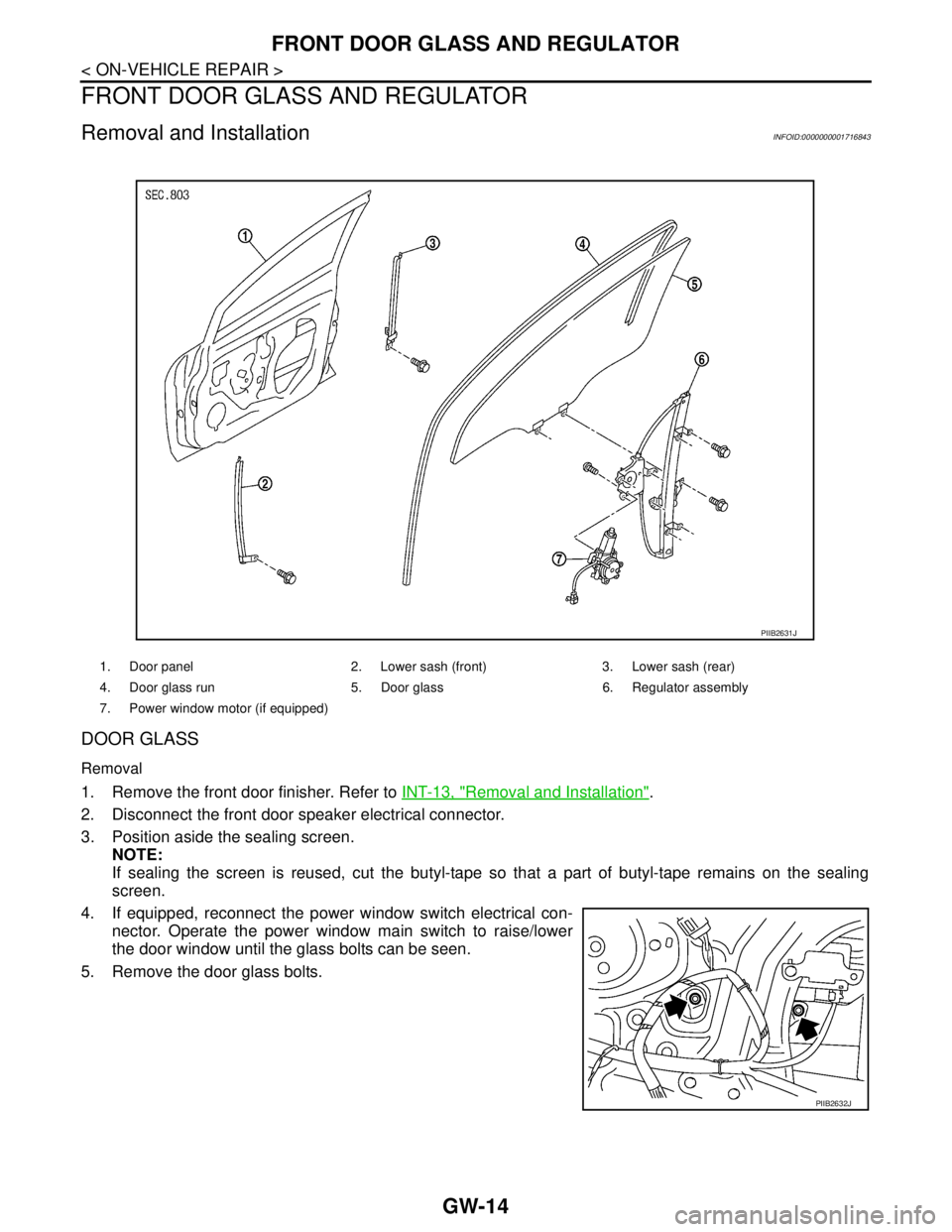
DOOR GLASS
Removal
1. Remove the front door finisher. Refer to INT-13, "Removal and Installation".
2. Disconnect the front door speaker electrical connector.
3. Position aside the sealing screen.
NOTE:
If sealing the screen is reused, cut the butyl-tape so that a part of butyl-tape remains on the sealing
screen.
4. If equipped, reconnect the power window switch electrical con-
nector. Operate the power window main switch to raise/lower
the door window until the glass bolts can be seen.
5. Remove the door glass bolts.
1. Door panel 2. Lower sash (front) 3. Lower sash (rear)
4. Door glass run 5. Door glass 6. Regulator assembly
7. Power window motor (if equipped)
PIIB2631J
PIIB2632J
Page 3274 of 5883
FRONT DOOR GLASS AND REGULATOR
GW-15
< ON-VEHICLE REPAIR >
C
D
E
F
G
H
I
J
L
MA
B
GW
N
O
P
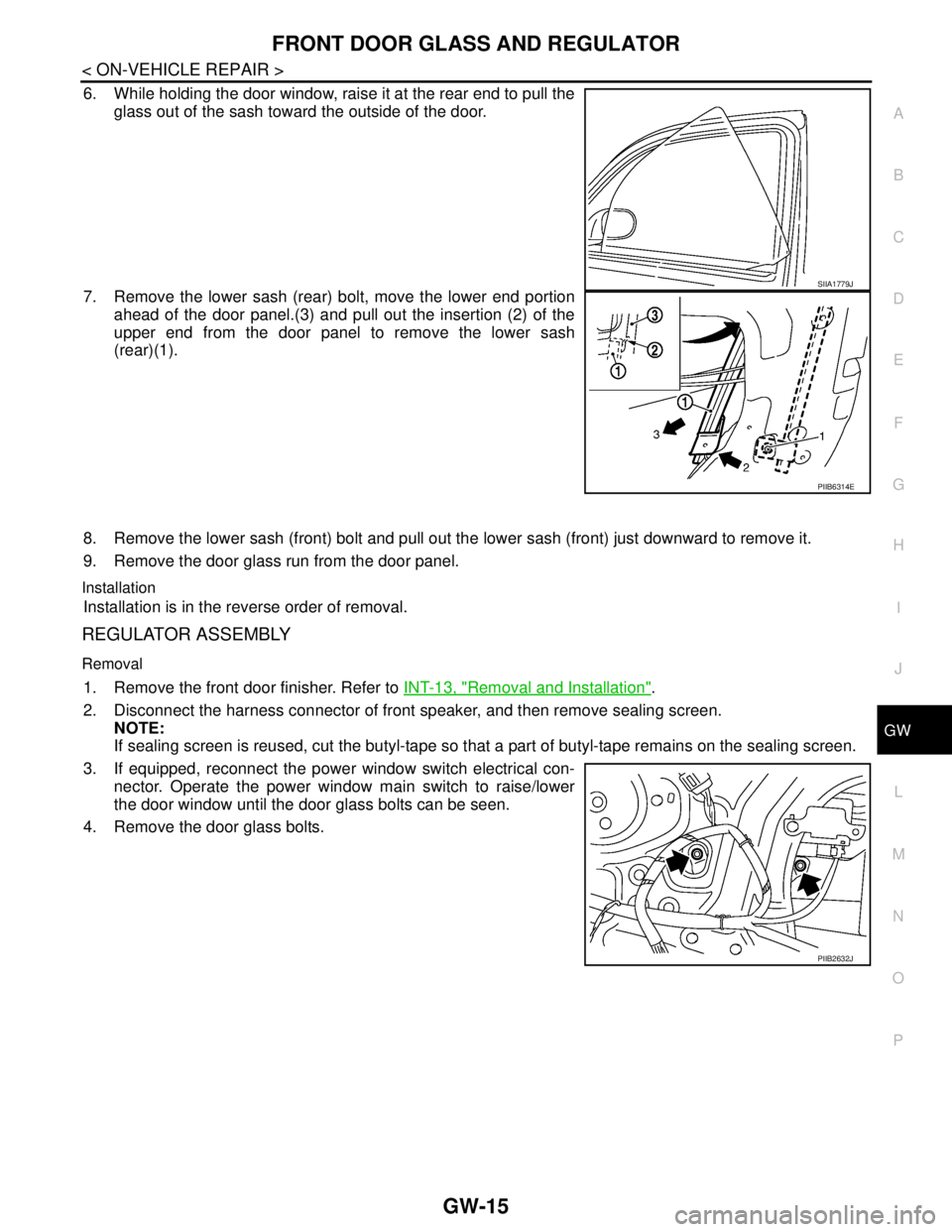
6. While holding the door window, raise it at the rear end to pull the
glass out of the sash toward the outside of the door.
7. Remove the lower sash (rear) bolt, move the lower end portion
ahead of the door panel.(3) and pull out the insertion (2) of the
upper end from the door panel to remove the lower sash
(rear)(1).
8. Remove the lower sash (front) bolt and pull out the lower sash (front) just downward to remove it.
9. Remove the door glass run from the door panel.
Installation
Installation is in the reverse order of removal.
REGULATOR ASSEMBLY
Removal
1. Remove the front door finisher. Refer to INT-13, "Removal and Installation".
2. Disconnect the harness connector of front speaker, and then remove sealing screen.
NOTE:
If sealing screen is reused, cut the butyl-tape so that a part of butyl-tape remains on the sealing screen.
3. If equipped, reconnect the power window switch electrical con-
nector. Operate the power window main switch to raise/lower
the door window until the door glass bolts can be seen.
4. Remove the door glass bolts.
SIIA1779J
PIIB6314E
PIIB2632J
Page 3280 of 5883
REAR DOOR GLASS AND REGULATOR
GW-21
< ON-VEHICLE REPAIR >
C
D
E
F
G
H
I
J
L
MA
B
GW
N
O
P
REAR DOOR GLASS AND REGULATOR
Removal and InstallationINFOID:0000000001716846
DOOR GLASS
Removal
1. Remove position aside the rear door finisher. Refer to INT-13, "Removal and Installation".
2. Disconnect the harness connector of rear door speaker.
3. Position aside the sealing screen.
NOTE:
If the sealing screen is reused, cut the butyl-tape so that a part of the butyl-tape remains on the sealing
screen.
4. Remove partition sash bolt and screw, pull the partition sash
downward and tilt the upper end of the sash forward to pull out
the sash upward.
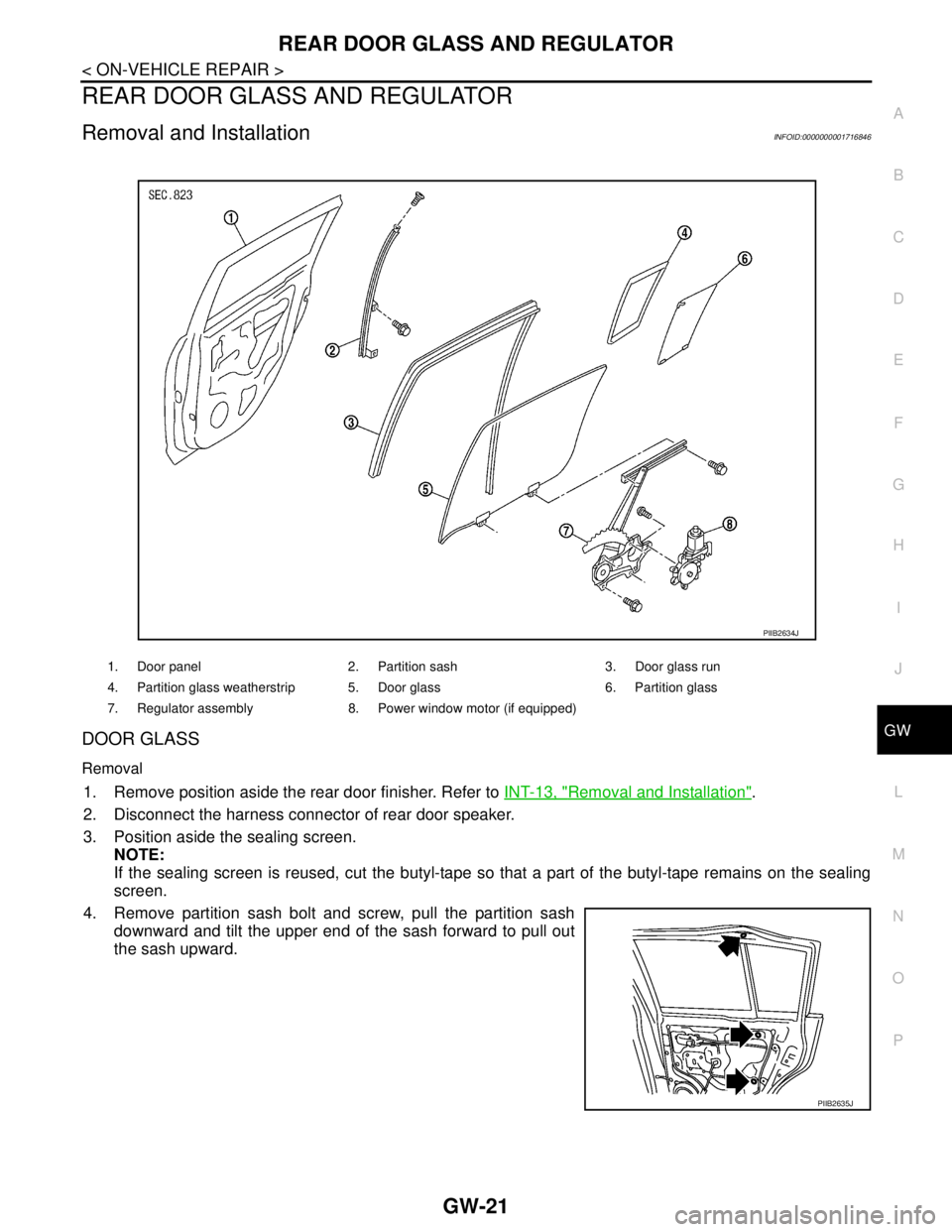
1. Door panel 2. Partition sash 3. Door glass run
4. Partition glass weatherstrip 5. Door glass 6. Partition glass
7. Regulator assembly 8. Power window motor (if equipped)
PIIB2634J
PIIB2635J
Page 3281 of 5883
GW-22
< ON-VEHICLE REPAIR >
REAR DOOR GLASS AND REGULATOR
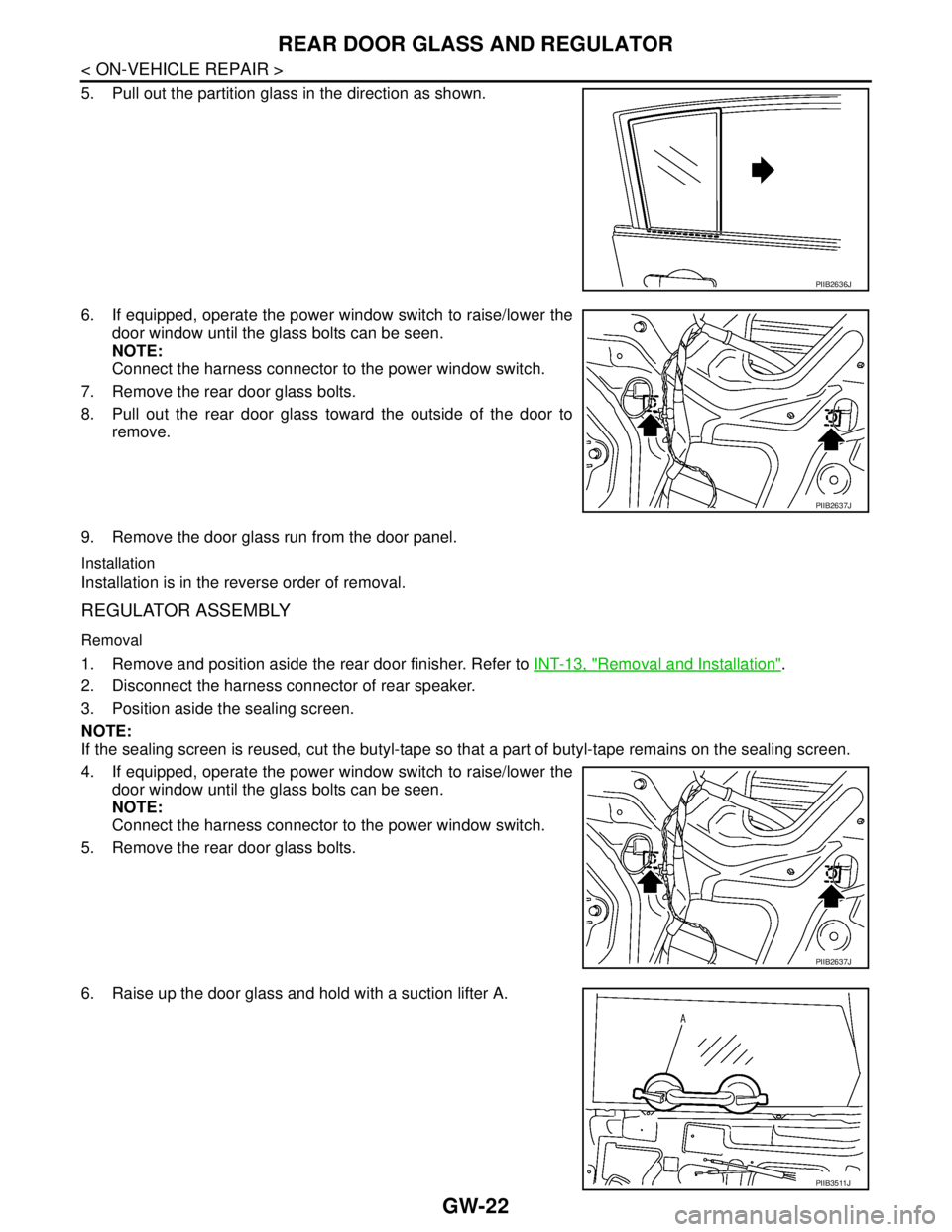
5. Pull out the partition glass in the direction as shown.
6. If equipped, operate the power window switch to raise/lower the
door window until the glass bolts can be seen.
NOTE:
Connect the harness connector to the power window switch.
7. Remove the rear door glass bolts.
8. Pull out the rear door glass toward the outside of the door to
remove.
9. Remove the door glass run from the door panel.
Installation
Installation is in the reverse order of removal.
REGULATOR ASSEMBLY
Removal
1. Remove and position aside the rear door finisher. Refer to INT-13, "Removal and Installation".
2. Disconnect the harness connector of rear speaker.
3. Position aside the sealing screen.
NOTE:
If the sealing screen is reused, cut the butyl-tape so that a part of butyl-tape remains on the sealing screen.
4. If equipped, operate the power window switch to raise/lower the
door window until the glass bolts can be seen.
NOTE:
Connect the harness connector to the power window switch.
5. Remove the rear door glass bolts.
6. Raise up the door glass and hold with a suction lifter A.
PIIB2636J
PIIB2637J
PIIB2637J
PIIB3511J
Page 3432 of 5883
![NISSAN TIIDA 2007 Service Repair Manual SELF-DIAGNOSIS FUNCTION
HAC-99
< FUNCTION DIAGNOSIS >[AUTO AIR CONDITIONER (W/O NAVI)]
C
D
E
F
G
H
J
K
L
MA
B
HAC
N
O
P
CAUTION:
If battery voltage drops below 12V during diagnosis STEP-3, door motor](/img/5/57395/w960_57395-3431.png "NISSAN TIIDA 2007 Service Repair Manual SELF-DIAGNOSIS FUNCTION
HAC-99
< FUNCTION DIAGNOSIS >[AUTO AIR CONDITIONER (W/O NAVI)]
C
D
E
F
G
H
J
K
L
MA
B
HAC
N
O
P
CAUTION:
If battery voltage drops below 12V during diagnosis STEP-3, door motor")
SELF-DIAGNOSIS FUNCTION
HAC-99
< FUNCTION DIAGNOSIS >[AUTO AIR CONDITIONER (W/O NAVI)]
C
D
E
F
G
H
J
K
L
MA
B
HAC
N
O
P
CAUTION:
If battery voltage drops below 12V during diagnosis STEP-3, door motor speed becomes slower and
as a result, the system may generate an error even when operation is usual. To avoid this, start engine
before performing this diagnosis.
>> GO TO 2.
2.STEP-1: LED AND DISPLAY ARE CHECKED
Check display screen (1) and LED illumination (2).
OK or NG
OK >> GO TO 3.
NG >> Malfunction OFF switch or AUTO switch. Refer to HAC-
311, "Self-Diagnosis".
3.CHECK TO ADVANCE SELF-DIAGNOSIS STEP-2
Press temperature control switch (UP: ).
Advance to self
-diagnosis STEP-2?
YES >> GO TO 4.
NO >> Replace front air control (temperature control switch is malfunctioning). Refer to XX.
4.CHECK TO RETURN SELF-DIAGNOSIS STEP-1
Press temperature control switch (DOWN: ).
Return to self
-diagnosis STEP-1?
YES >> GO TO 5.
NO >> Replace front air control (temperature control switch is malfunctioning). Refer to XX.
5.STEP-2: SENSOR CIRCUITS ARE CHECKED FOR OPEN OR SHORT CIRCUIT
Press temperature control switch (UP: ).
Does code No. 20 appear on the display?
YES >> GO TO 6.
NO >> GO TO 13.
6.STEP-3: AIR MIX DOOR AND MODE DOOR POSITIONS ARE CHECKED
Press temperature control switch (UP: ).
Does code No. 30 appear on the display?
YES >> GO TO 7.
NO >> GO TO 14.
AWIIA0285ZZ
SJIA0737E
SJIA0738E
Page 4782 of 5883
ON BOARD DIAGNOSTIC (OBD) SYSTEM
SRC-13
< FUNCTION DIAGNOSIS >
C
D
E
F
G
I
J
K
L
MA
B
SRC
N
O
P
Trouble Diagnosis without CONSULT-IIIINFOID:0000000001396362
DIAGNOSTIC PROCEDURE 6
Inspect SRS Malfunction Using "AIR BAG" Warning Lamp—Diagnosis Mode
NOTE:
SRS will not enter Diagnosis mode if no malfunction is detected in User mode.
1. Turn ignition switch ON.
2. After “AIR BAG” warning lamp lights for 7 seconds, turn ignition switch OFF within 1 second.
3. Wait more than 3 seconds.
4. Repeat steps 1 to 3 two more times (3 times total).
5. Turn ignition switch ON.
SRS is now in Diagnosis mode. Refer to SRC-13, "
Trouble Diagnosis without CONSULT-III".
CONSULT-III Function (AIR BAG)INFOID:0000000001396363
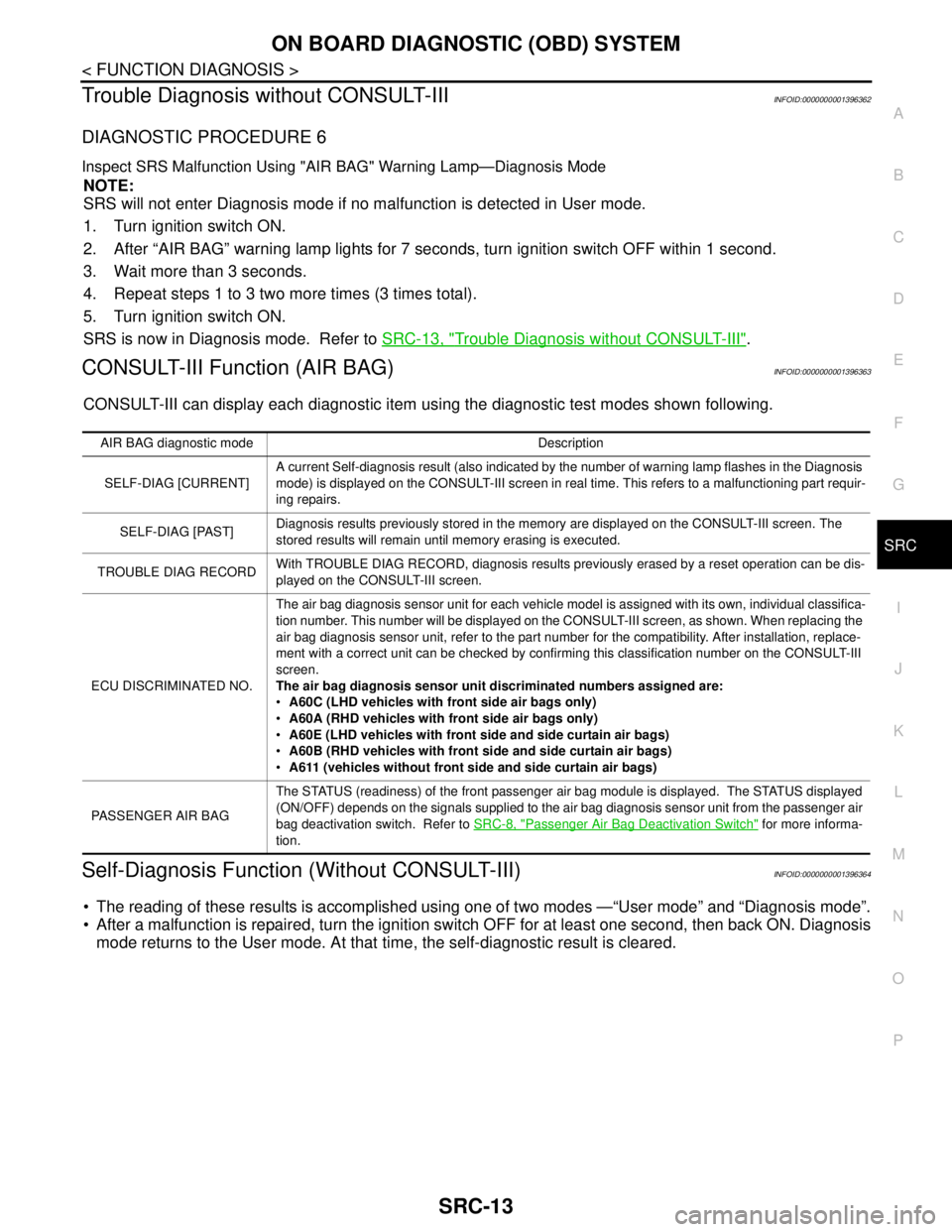
CONSULT-III can display each diagnostic item using the diagnostic test modes shown following.
Self-Diagnosis Function (Without CONSULT-III)INFOID:0000000001396364
The reading of these results is accomplished using one of two modes —“User mode” and “Diagnosis mode”.
After a malfunction is repaired, turn the ignition switch OFF for at least one second, then back ON. Diagnosis
mode returns to the User mode. At that time, the self-diagnostic result is cleared.
AIR BAG diagnostic mode Description
SELF-DIAG [CURRENT]A current Self-diagnosis result (also indicated by the number of warning lamp flashes in the Diagnosis
mode) is displayed on the CONSULT-III screen in real time. This refers to a malfunctioning part requir-
ing repairs.
SELF-DIAG [PAST]Diagnosis results previously stored in the memory are displayed on the CONSULT-III screen. The
stored results will remain until memory erasing is executed.
TROUBLE DIAG RECORDWith TROUBLE DIAG RECORD, diagnosis results previously erased by a reset operation can be dis-
played on the CONSULT-III screen.
ECU DISCRIMINATED NO.The air bag diagnosis sensor unit for each vehicle model is assigned with its own, individual classifica-
tion number. This number will be displayed on the CONSULT-III screen, as shown. When replacing the
air bag diagnosis sensor unit, refer to the part number for the compatibility. After installation, replace-
ment with a correct unit can be checked by confirming this classification number on the CONSULT-III
screen.
The air bag diagnosis sensor unit discriminated numbers assigned are:
A60C (LHD vehicles with front side air bags only)
A60A (RHD vehicles with front side air bags only)
A60E (LHD vehicles with front side and side curtain air bags)
A60B (RHD vehicles with front side and side curtain air bags)
A611 (vehicles without front side and side curtain air bags)
PASSENGER AIR BAGThe STATUS (readiness) of the front passenger air bag module is displayed. The STATUS displayed
(ON/OFF) depends on the signals supplied to the air bag diagnosis sensor unit from the passenger air
bag deactivation switch. Refer to SRC-8, "
Passenger Air Bag Deactivation Switch" for more informa-
tion.
Page 4881 of 5883
![NISSAN TIIDA 2007 Service Repair Manual DIAGNOSIS SYSTEM (EPS CONTROL UNIT)
STC-7
< FUNCTION DIAGNOSIS >[EPS]
C
D
E
F
H
I
J
K
L
MA
B
STC
N
O
P
DIAGNOSIS SYSTEM (EPS CONTROL UNIT)
CONSULT-III Function (EPS)INFOID:0000000001697722
FUNCTION
CO](/img/5/57395/w960_57395-4880.png "NISSAN TIIDA 2007 Service Repair Manual DIAGNOSIS SYSTEM (EPS CONTROL UNIT)
STC-7
< FUNCTION DIAGNOSIS >[EPS]
C
D
E
F
H
I
J
K
L
MA
B
STC
N
O
P
DIAGNOSIS SYSTEM (EPS CONTROL UNIT)
CONSULT-III Function (EPS)INFOID:0000000001697722
FUNCTION
CO")
DIAGNOSIS SYSTEM (EPS CONTROL UNIT)
STC-7
< FUNCTION DIAGNOSIS >[EPS]
C
D
E
F
H
I
J
K
L
MA
B
STC
N
O
P
DIAGNOSIS SYSTEM (EPS CONTROL UNIT)
CONSULT-III Function (EPS)INFOID:0000000001697722
FUNCTION
CONSULT-III can display each diagnostic item using the diagnostic test modes shown following.
SELF-DIAG RESULTS MODE
Display Item List
CAUTION:
If “CAN COMM CIRCUIT [U1000]” is displayed with other DTCs, first perform the trouble diagnosis for CAN communication
line.
How to Erase Self-Diagnostic Results
1. Perform applicable inspection of malfunctioning item and then repair or replace.
2. Turn ignition switch “OFF” to erase memory.
3. Turn ignition switch “ON” and select “SELF-DIAG RESULTS” mode with CONSULT-III.
4. Touch “ERASE” on CONSULT-III screen to erase DTC memory.
CAUTION:
If memory cannot be erased, perform diagnosis.
DATA MONITOR
Display Item List
EPS diagnostic mode Description
SELF-DIAG RESULTS Displays EPS self-diagnosis results.
DATA MONITOR Displays EPS input/output data in real time.
CAN DIAG SUPPORT MNTR The result of transmit/receive diagnosis of CAN communication can be read.
ECU PART NUMBER EPS control unit part number can be read.
Item
(CONSULT-III screen terms)Diagnostic item is detected when.... Check item
BATTERY VOLT
[C1601]When the power supply malfunction supplied to EPS control unit is
detected.STC-9
TORQUE SENSOR
[C1604]When the torque sensor malfunction assembled in steering column
assembly is detected. STC-11
EPS MOTOR
[C1606]When the motor driver malfunction of EPS control unit or EPS motor
malfunction is detected.STC-13
EEPROM
[C1607]When the memory (EEPROM) system malfunction is detected in
EPS control unit.STC-15
CONTROL UNIT
[C1608]When the internal malfunction is detected in EPS control unit.STC-16
CAN VHCL SPEED
[C1609]When the malfunction is detected in vehicle speed signal received
with CAN communication.STC-17
CAN ENG RPM
[C1610]When the malfunction is detected in engine status signal received
with CAN communication.STC-19
CAN COMM CIRCUIT
[U1000]When EPS control unit is not transmitting or receiving CAN commu-
nication signal 2 seconds or more.STC-21
NO DTC IS DETECTED.
FURTHER TESTING MAY BE RE-
QUIRED.No NG item has been detected. —