eco mode NISSAN TIIDA 2007 Service User Guide
[x] Cancel search | Manufacturer: NISSAN, Model Year: 2007, Model line: TIIDA, Model: NISSAN TIIDA 2007Pages: 5883, PDF Size: 78.95 MB
Page 150 of 5883
BCS
POWER CONSUMPTION CONTROL SYSTEM
BCS-15
< FUNCTION DIAGNOSIS >
C
D
E
F
G
H
I
J
K
L B A
O
P N
Sleep condition
Wake-up operation
BCM transmits sleep wake up signal (wake up) to each unit when any condition listed below is established,
and then goes into normal mode from low power consumption mode.
Each unit starts transmissions with CAN communication by receiving sleep wake up signals. Each unit trans-
mits wake up signals to BCM with CAN communication to convey the start of CAN communication.
Wake-up condition
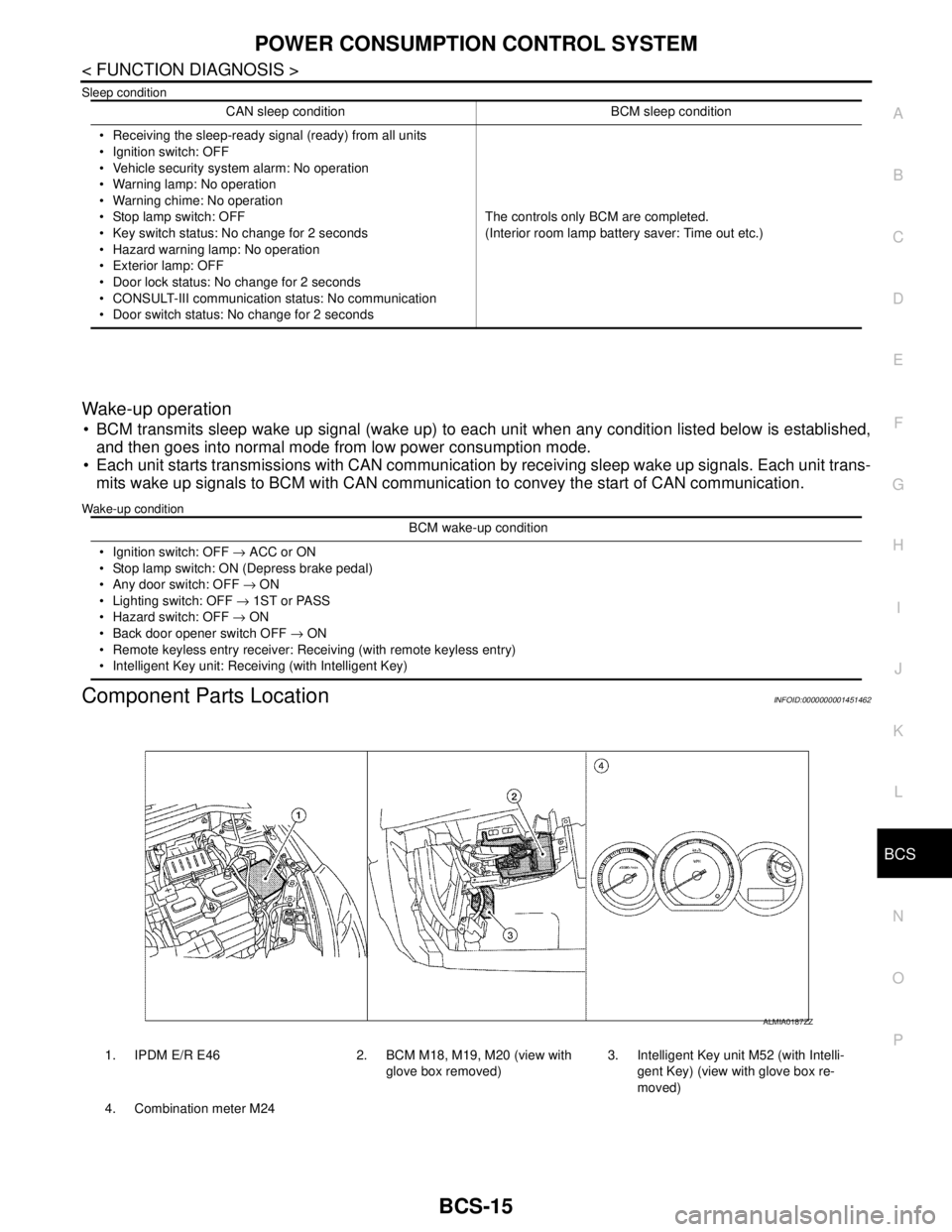
Component Parts LocationINFOID:0000000001451462
CAN sleep condition BCM sleep condition
Receiving the sleep-ready signal (ready) from all units
Ignition switch: OFF
Vehicle security system alarm: No operation
Warning lamp: No operation
Warning chime: No operation
Stop lamp switch: OFF
Key switch status: No change for 2 seconds
Hazard warning lamp: No operation
Exterior lamp: OFF
Door lock status: No change for 2 seconds
CONSULT-III communication status: No communication
Door switch status: No change for 2 secondsThe controls only BCM are completed.
(Interior room lamp battery saver: Time out etc.)
BCM wake-up condition
Ignition switch: OFF → ACC or ON
Stop lamp switch: ON (Depress brake pedal)
Any door switch: OFF → ON
Lighting switch: OFF → 1ST or PASS
Hazard switch: OFF → ON
Back door opener switch OFF → ON
Remote keyless entry receiver: Receiving (with remote keyless entry)
Intelligent Key unit: Receiving (with Intelligent Key)
1. IPDM E/R E46 2. BCM M18, M19, M20 (view with
glove box removed)3. Intelligent Key unit M52 (with Intelli-
gent Key) (view with glove box re-
moved)
4. Combination meter M24
ALMIA0187ZZ
Page 232 of 5883

BR-40
< SERVICE DATA AND SPECIFICATIONS (SDS)
SERVICE DATA AND SPECIFICATIONS (SDS)
SERVICE DATA AND SPECIFICATIONS (SDS)
SERVICE DATA AND SPECIFICATIONS (SDS)
General SpecificationINFOID:0000000001716911
Brake PedalINFOID:0000000001716912
Unit: mm (in)
Check ValveINFOID:0000000001716913
Brake BoosterINFOID:0000000001716914
Vacuum type
Front Disc BrakeINFOID:0000000001716915
Unit: mm (in)
Front brake Brake model CLZ25VA
Cylinder bore diameter 57.2 mm (2.252 in)
Pad
Length × width × thickness125.6 mm × 46.0 mm × 9.5 mm
(4.945 in × 1.811 in × 0.374 in)
Rotor outer diameter × thickness 280 mm × 24.0 mm (11.02 in × 0.945 in)
Rear brake Brake model —
Cylinder bore diameter 34.93 mm (1.375 in)
Pad thickness 8.5 mm (0.335 in)
Rotor outer diameter × thickness292 mm × 9.0 mm
(11.50 in × 0.354 in)
Master cylinder Cylinder bore diameter 22.22 mm (0.875 in)
Control valve Valve model Electric brake force distribution
Brake booster Booster model C255
Diaphragm diameter 255 mm (10.04 in)
Recommended brake fluid Refer to MA-19
.
Brake pedal free height (from dash panel top surface)A/T model 172.4 - 182.4 (6.79 - 7.18)
M/T models 162.3 - 172.3 (6.39 - 6.78)
Brake pedal depressed height
[under a force of 490 N (50 kg-f, 110 lb-f) with the engine running]A/T model 98 (3.86) or more
M/T models 90 (3.54) or more
Clearance between brake pedal lever and the threaded end of stop lamp switch 0.74 - 1.96 (0.0291 - 0.0772)
Pedal play3 - 11 (0.12 - 0.43)
Vacuum leakage
[at vacuum of – 66.7 kPa (– 500 mmHg, – 19.69 inHg]Within 1.3 kPa (10 mmHg, 0.39 inHg) of vacuum for 15 seconds
Vacuum leakage
[at vacuum of – 66.7 kPa (– 500 mmHg, –19.69 inHg)]Within 3.3 kPa (25 mmHg, 0.98 inHg) of vacuum for 15 seconds
Input rod installation standard dimension 154 - 161 mm (6.06 - 6.34 in)
Brake modelCLZ25VA
Brake padStandard thickness (new) 9.5 (0.374)
Repair limit thickness 2.0 (0.079)
Page 261 of 5883
![NISSAN TIIDA 2007 Service User Guide BRC-28
< FUNCTION DIAGNOSIS >[ABS]
DIAGNOSIS SYSTEM [ABS ACTUATOR AND ELECTRIC UNIT (CONTROL
UNIT)]
×: Applicable
–: Not applicable
ACTIVE TEST MODE
CAUTION:
• Do not perform active test while d](/img/5/57395/w960_57395-260.png "NISSAN TIIDA 2007 Service User Guide BRC-28
< FUNCTION DIAGNOSIS >[ABS]
DIAGNOSIS SYSTEM [ABS ACTUATOR AND ELECTRIC UNIT (CONTROL
UNIT)]
×: Applicable
–: Not applicable
ACTIVE TEST MODE
CAUTION:
• Do not perform active test while d")
BRC-28
< FUNCTION DIAGNOSIS >[ABS]
DIAGNOSIS SYSTEM [ABS ACTUATOR AND ELECTRIC UNIT (CONTROL
UNIT)]
×: Applicable
–: Not applicable
ACTIVE TEST MODE
CAUTION:
• Do not perform active test while driving vehicle.
Make sure to completely bleed air from brake system.
The active test cannot be performed with the ABS warning lamp, VDC OFF indicator lamp, SLIP indi-
cator lamp or brake warning lamp on.
ABS warning lamp, VDC OFF indicator lamp, SLIP indicator lamp and brake warning lamp are on
during active test.
NOTE:
When active test is performed while depressing the pedal, the pedal depression amount will change. This is
normal. (Only solenoid valve and ABS motor.)
“TEST IS STOPPED” is displayed 10 seconds after operation start.
After “TEST IS STOPPED” is displayed, to perform test again, touch BACK.
Test Item
SOLENOID VALVE When performing an active test of the ABS function, select the “MAIN SIGNALS” for each test item. In addi-
tion, when performing an active test of the VDC/TCS function, select the item menu for each test item.
For ABS solenoid valve, touch “UP”, “KEEP”, and “DOWN” on the display screen. For ABS solenoid valve
(ACT), touch “UP”, “ACT UP”, “ACT KEEP” and confirm that solenoid valves operate as shown in the table
below.
RELEASE SW NO – –×Release switch signal (ON/OFF)
status is displayed. “ON” indicates
that the brake pedal is depressed.
“OFF”“ is that the brake pedal is re-
leased.
RELEASE SW NC – –×Release switch signal (ON/OFF)
status is displayed. “OFF” indicates
that the brake pedal is depressed
on. “ON” is that the brake pedal is
released.
OHB FAIL – –×OHB fail status is displayed.
HBA FAIL – –×HBA fail status is displayed.
OHB SIG – –×OHB operation (ON/OFF) status is
displayed.
HBA SIG – –×HBA operation (ON/OFF) status is
displayed.
PRES CTRL ACC – –×This item is not used for this model.
PRES FAIL ACC – –×This item is not used for this model.
STP OFF RLY – –×Stop lamp relay signal (ON/OFF)
status is displayed. Item
(Unit)Data monitor item selection
Remarks
ECU INPUT
SIGNALSMAIN
SIGNALSSELECTION
FROM MENU
OperationABS solenoid valve ABS solenoid valve (ACT)
UP KEEP DOWN UPACTUA-
TOR UPACTUA-
TOR KEEP
FR RH SOL
FR RH ABS SOLE-
NOID (ACT)FR RH IN SOL OFF ON ON OFF OFF OFF
FR RH OUT SOL OFF OFF ON* OFF OFF OFF
FR LH SOL
FR LH ABS SOLE-
NOID (ACT)FR LH IN SOL OFF ON ON OFF OFF OFF
FR LH OUT SOL OFF OFF ON* OFF OFF OFF
Page 341 of 5883
![NISSAN TIIDA 2007 Service User Guide BRC-108
< FUNCTION DIAGNOSIS >[ESP/TCS/ABS]
DIAGNOSIS SYSTEM [ABS ACTUATOR AND ELECTRIC UNIT (CONTROL
UNIT)]
×: Applicable
–: Not applicable
ACTIVE TEST MODE
CAUTION:
Do not perform active test](/img/5/57395/w960_57395-340.png "NISSAN TIIDA 2007 Service User Guide BRC-108
< FUNCTION DIAGNOSIS >[ESP/TCS/ABS]
DIAGNOSIS SYSTEM [ABS ACTUATOR AND ELECTRIC UNIT (CONTROL
UNIT)]
×: Applicable
–: Not applicable
ACTIVE TEST MODE
CAUTION:
Do not perform active test")
BRC-108
< FUNCTION DIAGNOSIS >[ESP/TCS/ABS]
DIAGNOSIS SYSTEM [ABS ACTUATOR AND ELECTRIC UNIT (CONTROL
UNIT)]
×: Applicable
–: Not applicable
ACTIVE TEST MODE
CAUTION:
Do not perform active test while driving vehicle.
Make sure to completely bleed air from brake system.
The active test cannot be performed with the ABS warning lamp, VDC OFF indicator lamp, SLIP indi-
cator lamp or brake warning lamp on.
ABS warning lamp, VDC OFF indicator lamp, SLIP indicator lamp and brake warning lamp are on
during active test.
NOTE:
When active test is performed while depressing the pedal, the pedal depression amount will change. This is
normal. (Only solenoid valve and ABS motor.)
“TEST IS STOPPED” is displayed 10 seconds after operation start.
After “TEST IS STOPPED” is displayed, to perform test again, touch BACK.
Test Item
SOLENOID VALVE When performing an active test of the ABS function, select the “MAIN SIGNALS” for each test item. In addi-
tion, when performing an active test of the VDC/TCS function, select the item menu for each test item.
For ABS solenoid valve, touch “UP”, “KEEP”, and “DOWN” on the display screen. For ABS solenoid valve
(ACT), touch “UP”, “ACT UP”, “ACT KEEP” and confirm that solenoid valves operate as shown in the table
below.
RELEASE SW NO – –×Release switch signal (ON/OFF)
status is displayed. “ON” indicates
that the brake pedal is depressed.
“OFF”“ is that the brake pedal is re-
leased.
RELEASE SW NC – –×Release switch signal (ON/OFF)
status is displayed. “OFF” indicates
that the brake pedal is depressed
on. “ON” is that the brake pedal is
released.
OHB FAIL – –×OHB fail status is displayed.
HBA FAIL – –×HBA fail status is displayed.
OHB SIG – –×OHB operation (ON/OFF) status is
displayed.
HBA SIG – –×HBA operation (ON/OFF) status is
displayed.
PRES CTRL ACC – –×This item is not used for this model.
PRES FAIL ACC – –×This item is not used for this model.
STP OFF RLY – –×Stop lamp relay signal (ON/OFF)
status is displayed. Item
(Unit)Data monitor item selection
Remarks
ECU INPUT
SIGNALSMAIN
SIGNALSSELECTION
FROM MENU
OperationABS solenoid valve ABS solenoid valve (ACT)
UP KEEP DOWN UPACTUA-
TOR UPACTUA-
TOR KEEP
FR RH SOL
FR RH ABS SOLE-
NOID (ACT)FR RH IN SOL OFF ON ON OFF OFF OFF
FR RH OUT SOL OFF OFF ON* OFF OFF OFF
FR LH SOL
FR LH ABS SOLE-
NOID (ACT)FR LH IN SOL OFF ON ON OFF OFF OFF
FR LH OUT SOL OFF OFF ON* OFF OFF OFF
Page 375 of 5883
![NISSAN TIIDA 2007 Service User Guide BRC-142
< COMPONENT DIAGNOSIS >[ESP/TCS/ABS]
C1143, C1144 STEERING ANGLE SENSOR
C1143, C1144 STEERING ANGLE SENSOR
DescriptionINFOID:0000000001731142
The steering angle sensor detects the rotation amo](/img/5/57395/w960_57395-374.png "NISSAN TIIDA 2007 Service User Guide BRC-142
< COMPONENT DIAGNOSIS >[ESP/TCS/ABS]
C1143, C1144 STEERING ANGLE SENSOR
C1143, C1144 STEERING ANGLE SENSOR
DescriptionINFOID:0000000001731142
The steering angle sensor detects the rotation amo")
BRC-142
< COMPONENT DIAGNOSIS >[ESP/TCS/ABS]
C1143, C1144 STEERING ANGLE SENSOR
C1143, C1144 STEERING ANGLE SENSOR
DescriptionINFOID:0000000001731142
The steering angle sensor detects the rotation amount, angular velocity and direction of the steering wheel,
and transmits the data to the ABS actuator and electric unit (control unit) via CAN communication.
DTC LogicINFOID:0000000001731143
DTC DETECTION LOGIC
DTC CONFIRMATION PROCEDURE
1.CHECK SELF-DIAGNOSIS RESULTS
Check the self-diagnosis results.
Is above displayed on the self-diagnosis display?
YES >> Proceed to diagnosis procedure. Refer to BRC-142, "Diagnosis Procedure".
NO >> INSPECTION END
Diagnosis ProcedureINFOID:0000000001731144
INSPECTION PROCEDURE
1.CHECK CONNECTOR
1. Turn ignition switch OFF.
2. Disconnect ABS actuator and electric unit (control unit) connector.
3. Disconnect steering angle sensor connector.
4. Check terminal for deformation, disconnection, looseness, and so on. If any malfunction is found, repair or
replace terminal.
5. Reconnect connectors and then perform the self-diagnosis. Refer to BRC-25, "
CONSULT-III Function
(ABS)"
Is any item indicated on the self-diagnosis display?
YES >> GO TO 2
NO >> Poor connection of connector terminal. Repair or replace connector.
2.CHECK STEERING ANGLE SENSOR HARNESS
1. Turn ignition switch OFF.
2. Disconnect steering angle sensor connector.
DTC Display item Malfunction detected condition Possible cause
C1143 ST ANG SEN CIRCUITNeutral position of steering angle sensor is dislocated, or
the steering angle sensor is malfunctioning. Harness or connector
Steering angle sensor
4WAS control unit (4WAS
models)
ABS actuator and electric unit
(control unit) C1144 ST ANG SEN SIGNAL Neutral position of steering angle sensor is not finished.
Self-diagnosis results
ST ANG SEN CIRCUIT
ST ANG SEN SIGNAL
Page 489 of 5883
![NISSAN TIIDA 2007 Service User Guide CO-8
< PRECAUTION >[HR16DE]
PRECAUTIONS
PRECAUTION
PRECAUTIONS
Precaution for Supplemental Restraint System (SRS) "AIR BAG" and "SEAT BELT
PRE-TENSIONER"
INFOID:0000000001534589
The Supplemental Rest](/img/5/57395/w960_57395-488.png "NISSAN TIIDA 2007 Service User Guide CO-8
< PRECAUTION >[HR16DE]
PRECAUTIONS
PRECAUTION
PRECAUTIONS
Precaution for Supplemental Restraint System (SRS) \"AIR BAG\" and \"SEAT BELT
PRE-TENSIONER\"
INFOID:0000000001534589
The Supplemental Rest")
CO-8
< PRECAUTION >[HR16DE]
PRECAUTIONS
PRECAUTION
PRECAUTIONS
Precaution for Supplemental Restraint System (SRS) "AIR BAG" and "SEAT BELT
PRE-TENSIONER"
INFOID:0000000001534589
The Supplemental Restraint System such as “AIR BAG” and “SEAT BELT PRE-TENSIONER”, used along
with a front seat belt, helps to reduce the risk or severity of injury to the driver and front passenger for certain
types of collision. Information necessary to service the system safely is included in the SR and SB section of
this Service Manual.
WARNING:
• To avoid rendering the SRS inoperative, which could increase the risk of personal injury or death in
the event of a collision which would result in air bag inflation, all maintenance must be performed by
an authorized NISSAN/INFINITI dealer.
Improper maintenance, including incorrect removal and installation of the SRS, can lead to personal
injury caused by unintentional activation of the system. For removal of Spiral Cable and Air Bag
Module, see the SR section.
Do not use electrical test equipment on any circuit related to the SRS unless instructed to in this
Service Manual. SRS wiring harnesses can be identified by yellow and/or orange harnesses or har-
ness connectors.
Precaution Necessary for Steering Wheel Rotation After Battery Disconnect
INFOID:0000000001534590
NOTE:
This Procedure is applied only to models with Intelligent Key system and NATS (NISSAN ANTI-THEFT SYS-
TEM).
Remove and install all control units after disconnecting both battery cables with the ignition knob in the
″LOCK″ position.
Always use CONSULT-II to perform self-diagnosis as a part of each function inspection after finishing work.
If DTC is detected, perform trouble diagnosis according to self-diagnostic results.
For models equipped with the Intelligent Key system and NATS, an electrically controlled steering lock mech-
anism is adopted on the key cylinder.
For this reason, if the battery is disconnected or if the battery is discharged, the steering wheel will lock and
steering wheel rotation will become impossible.
If steering wheel rotation is required when battery power is interrupted, follow the procedure below before
starting the repair operation.
OPERATION PROCEDURE
1. Connect both battery cables.
NOTE:
Supply power using jumper cables if battery is discharged.
2. Use the Intelligent Key or mechanical key to turn the ignition switch to the ″ACC″ position. At this time, the
steering lock will be released.
3. Disconnect both battery cables. The steering lock will remain released and the steering wheel can be
rotated.
4. Perform the necessary repair operation.
5. When the repair work is completed, return the ignition switch to the ″LOCK″ position before connecting
the battery cables. (At this time, the steering lock mechanism will engage.)
6. Perform a self-diagnosis check of all control units using CONSULT-II.
Precaution for Liquid GasketINFOID:0000000001534591
REMOVAL OF LIQUID GASKET SEALING
After removing nuts and bolts, separate the mating surface, using Tool and remove old liquid gasket sealing.
Page 513 of 5883
![NISSAN TIIDA 2007 Service User Guide CO-32
< PRECAUTION >[MR18DE]
PRECAUTIONS
PRECAUTION
PRECAUTIONS
Precaution for Supplemental Restraint System (SRS) "AIR BAG" and "SEAT BELT
PRE-TENSIONER"
INFOID:0000000001516585
The Supplemental Res](/img/5/57395/w960_57395-512.png "NISSAN TIIDA 2007 Service User Guide CO-32
< PRECAUTION >[MR18DE]
PRECAUTIONS
PRECAUTION
PRECAUTIONS
Precaution for Supplemental Restraint System (SRS) \"AIR BAG\" and \"SEAT BELT
PRE-TENSIONER\"
INFOID:0000000001516585
The Supplemental Res")
CO-32
< PRECAUTION >[MR18DE]
PRECAUTIONS
PRECAUTION
PRECAUTIONS
Precaution for Supplemental Restraint System (SRS) "AIR BAG" and "SEAT BELT
PRE-TENSIONER"
INFOID:0000000001516585
The Supplemental Restraint System such as “AIR BAG” and “SEAT BELT PRE-TENSIONER”, used along
with a front seat belt, helps to reduce the risk or severity of injury to the driver and front passenger for certain
types of collision. Information necessary to service the system safely is included in the SR and SB section of
this Service Manual.
WARNING:
To avoid rendering the SRS inoperative, which could increase the risk of personal injury or death in
the event of a collision which would result in air bag inflation, all maintenance must be performed by
an authorized NISSAN/INFINITI dealer.
Improper maintenance, including incorrect removal and installation of the SRS, can lead to personal
injury caused by unintentional activation of the system. For removal of Spiral Cable and Air Bag
Module, see the SR section.
Do not use electrical test equipment on any circuit related to the SRS unless instructed to in this
Service Manual. SRS wiring harnesses can be identified by yellow and/or orange harnesses or har-
ness connectors.
Precaution Necessary for Steering Wheel Rotation After Battery Disconnect
INFOID:0000000001337832
NOTE:
This Procedure is applied only to models with Intelligent Key system and NATS (NISSAN ANTI-THEFT SYS-
TEM).
Remove and install all control units after disconnecting both battery cables with the ignition knob in the
″LOCK″ position.
Always use CONSULT-II to perform self-diagnosis as a part of each function inspection after finishing work.
If DTC is detected, perform trouble diagnosis according to self-diagnostic results.
For models equipped with the Intelligent Key system and NATS, an electrically controlled steering lock mech-
anism is adopted on the key cylinder.
For this reason, if the battery is disconnected or if the battery is discharged, the steering wheel will lock and
steering wheel rotation will become impossible.
If steering wheel rotation is required when battery power is interrupted, follow the procedure below before
starting the repair operation.
OPERATION PROCEDURE
1. Connect both battery cables.
NOTE:
Supply power using jumper cables if battery is discharged.
2. Use the Intelligent Key or mechanical key to turn the ignition switch to the ″ACC″ position. At this time, the
steering lock will be released.
3. Disconnect both battery cables. The steering lock will remain released and the steering wheel can be
rotated.
4. Perform the necessary repair operation.
5. When the repair work is completed, return the ignition switch to the ″LOCK″ position before connecting
the battery cables. (At this time, the steering lock mechanism will engage.)
6. Perform a self-diagnosis check of all control units using CONSULT-II.
Precaution for Liquid GasketINFOID:0000000001337833
REMOVAL OF LIQUID GASKET SEALING
After removing nuts and bolts, separate the mating surface, using Tool and remove old liquid gasket sealing.
Page 536 of 5883
![NISSAN TIIDA 2007 Service User Guide PRECAUTIONS
CO-55
< PRECAUTION >[K9K]
C
D
E
F
G
H
I
J
K
L
MA
CO
N
P O
PRECAUTION
PRECAUTIONS
Precaution for Supplemental Restraint System (SRS) "AIR BAG" and "SEAT BELT
PRE-TENSIONER"
INFOID:00000000](/img/5/57395/w960_57395-535.png "NISSAN TIIDA 2007 Service User Guide PRECAUTIONS
CO-55
< PRECAUTION >[K9K]
C
D
E
F
G
H
I
J
K
L
MA
CO
N
P O
PRECAUTION
PRECAUTIONS
Precaution for Supplemental Restraint System (SRS) \"AIR BAG\" and \"SEAT BELT
PRE-TENSIONER\"
INFOID:00000000")
PRECAUTIONS
CO-55
< PRECAUTION >[K9K]
C
D
E
F
G
H
I
J
K
L
MA
CO
N
P O
PRECAUTION
PRECAUTIONS
Precaution for Supplemental Restraint System (SRS) "AIR BAG" and "SEAT BELT
PRE-TENSIONER"
INFOID:0000000001534592
The Supplemental Restraint System such as “AIR BAG” and “SEAT BELT PRE-TENSIONER”, used along
with a front seat belt, helps to reduce the risk or severity of injury to the driver and front passenger for certain
types of collision. Information necessary to service the system safely is included in the SR and SB section of
this Service Manual.
WARNING:
To avoid rendering the SRS inoperative, which could increase the risk of personal injury or death in
the event of a collision which would result in air bag inflation, all maintenance must be performed by
an authorized NISSAN/INFINITI dealer.
Improper maintenance, including incorrect removal and installation of the SRS, can lead to personal
injury caused by unintentional activation of the system. For removal of Spiral Cable and Air Bag
Module, see the SR section.
Do not use electrical test equipment on any circuit related to the SRS unless instructed to in this
Service Manual. SRS wiring harnesses can be identified by yellow and/or orange harnesses or har-
ness connectors.
Precaution Necessary for Steering Wheel Rotation After Battery Disconnect
INFOID:0000000001534593
NOTE:
This Procedure is applied only to models with Intelligent Key system and NATS (NISSAN ANTI-THEFT SYS-
TEM).
Remove and install all control units after disconnecting both battery cables with the ignition knob in the
″LOCK″ position.
Always use CONSULT-II to perform self-diagnosis as a part of each function inspection after finishing work.
If DTC is detected, perform trouble diagnosis according to self-diagnostic results.
For models equipped with the Intelligent Key system and NATS, an electrically controlled steering lock mech-
anism is adopted on the key cylinder.
For this reason, if the battery is disconnected or if the battery is discharged, the steering wheel will lock and
steering wheel rotation will become impossible.
If steering wheel rotation is required when battery power is interrupted, follow the procedure below before
starting the repair operation.
OPERATION PROCEDURE
1. Connect both battery cables.
NOTE:
Supply power using jumper cables if battery is discharged.
2. Use the Intelligent Key or mechanical key to turn the ignition switch to the ″ACC″ position. At this time, the
steering lock will be released.
3. Disconnect both battery cables. The steering lock will remain released and the steering wheel can be
rotated.
4. Perform the necessary repair operation.
5. When the repair work is completed, return the ignition switch to the ″LOCK″ position before connecting
the battery cables. (At this time, the steering lock mechanism will engage.)
6. Perform a self-diagnosis check of all control units using CONSULT-II.
Precaution for Liquid GasketINFOID:0000000001534594
REMOVAL OF LIQUID GASKET SEALING
After removing nuts and bolts, separate the mating surface, using Tool and remove old liquid gasket sealing.
Page 555 of 5883
DEF-4
< BASIC INSPECTION >
DIAGNOSIS AND REPAIR WORKFLOW
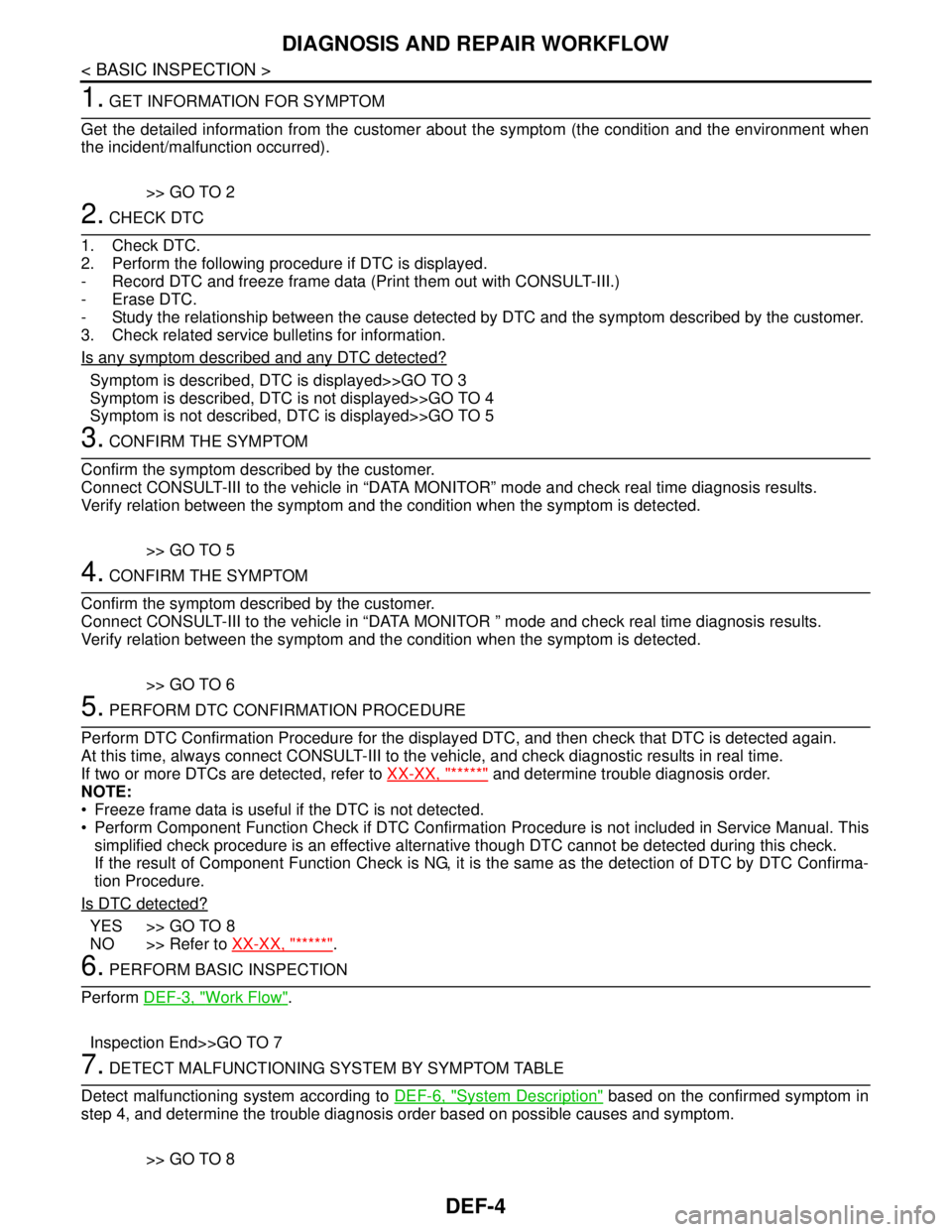
1. GET INFORMATION FOR SYMPTOM
Get the detailed information from the customer about the symptom (the condition and the environment when
the incident/malfunction occurred).
>> GO TO 2
2. CHECK DTC
1. Check DTC.
2. Perform the following procedure if DTC is displayed.
- Record DTC and freeze frame data (Print them out with CONSULT-III.)
- Erase DTC.
- Study the relationship between the cause detected by DTC and the symptom described by the customer.
3. Check related service bulletins for information.
Is any symptom described and any DTC detected?
Symptom is described, DTC is displayed>>GO TO 3
Symptom is described, DTC is not displayed>>GO TO 4
Symptom is not described, DTC is displayed>>GO TO 5
3. CONFIRM THE SYMPTOM
Confirm the symptom described by the customer.
Connect CONSULT-III to the vehicle in “DATA MONITOR” mode and check real time diagnosis results.
Verify relation between the symptom and the condition when the symptom is detected.
>> GO TO 5
4. CONFIRM THE SYMPTOM
Confirm the symptom described by the customer.
Connect CONSULT-III to the vehicle in “DATA MONITOR ” mode and check real time diagnosis results.
Verify relation between the symptom and the condition when the symptom is detected.
>> GO TO 6
5. PERFORM DTC CONFIRMATION PROCEDURE
Perform DTC Confirmation Procedure for the displayed DTC, and then check that DTC is detected again.
At this time, always connect CONSULT-III to the vehicle, and check diagnostic results in real time.
If two or more DTCs are detected, refer to XX-XX, "*****"
and determine trouble diagnosis order.
NOTE:
Freeze frame data is useful if the DTC is not detected.
Perform Component Function Check if DTC Confirmation Procedure is not included in Service Manual. This
simplified check procedure is an effective alternative though DTC cannot be detected during this check.
If the result of Component Function Check is NG, it is the same as the detection of DTC by DTC Confirma-
tion Procedure.
Is DTC detected?
YES >> GO TO 8
NO >> Refer to XX-XX, "*****"
.
6. PERFORM BASIC INSPECTION
Perform DEF-3, "
Work Flow".
Inspection End>>GO TO 7
7. DETECT MALFUNCTIONING SYSTEM BY SYMPTOM TABLE
Detect malfunctioning system according to DEF-6, "
System Description" based on the confirmed symptom in
step 4, and determine the trouble diagnosis order based on possible causes and symptom.
>> GO TO 8
Page 613 of 5883
![NISSAN TIIDA 2007 Service User Guide DLK-24
< FUNCTION DIAGNOSIS >[WITH I-KEY, WITHOUT SUPER LOCK]
DOOR LOCK FUNCTION
ANTI-HIJACK MODE
When door lock is unlocked, pressing LOCK buttons on Intelligent Key once will lock all doors. When do](/img/5/57395/w960_57395-612.png "NISSAN TIIDA 2007 Service User Guide DLK-24
< FUNCTION DIAGNOSIS >[WITH I-KEY, WITHOUT SUPER LOCK]
DOOR LOCK FUNCTION
ANTI-HIJACK MODE
When door lock is unlocked, pressing LOCK buttons on Intelligent Key once will lock all doors. When do")
DLK-24
< FUNCTION DIAGNOSIS >[WITH I-KEY, WITHOUT SUPER LOCK]
DOOR LOCK FUNCTION
ANTI-HIJACK MODE
When door lock is unlocked, pressing LOCK buttons on Intelligent Key once will lock all doors. When door lock
is locked, pressing UNLOCK button on Intelligent Key once will unlock driver door. Pressing UNLOCK button
on Intelligent Key a second time within 5 seconds from the first time will unlock all doors and back door (hatch-
back) can be opened with back door opener switch or trunk (sedan) can be opened with trunk lid opener
switch.
CONVENIENCE MODE
When door lock is unlocked, pressing LOCK buttons on Intelligent Key once will lock all doors. When door lock
is locked, pressing UNLOCK button on Intelligent Key once will unlock all doors and back door (hatchback)
can be opened with back door opener switch or trunk (sedan) can be opened with trunk lid opener switch.
NOTE:
Anti-hijack mode can be set to ON or OFF with CONSULT-III. Once OFF, the convenience mode will be active.
For setting information with CONSULT-III, refer to DLK-53, "
CONSULT-III Function (INTELLIGENT KEY)". For
setting information without CONSULT-III, refer to Owner's Manual.