tires NISSAN TIIDA 2007 Service User Guide
[x] Cancel search | Manufacturer: NISSAN, Model Year: 2007, Model line: TIIDA, Model: NISSAN TIIDA 2007Pages: 5883, PDF Size: 78.95 MB
Page 220 of 5883
BR-28
< ON-VEHICLE REPAIR >
REAR DISC BRAKE
Removal and Installation of Brake Pad
INFOID:0000000001724667
REMOVAL
1. Remove master cylinder reservoir cap.
2. Remove tires from vehicle with power tool.
3. Remove bottom sliding pin bolt.
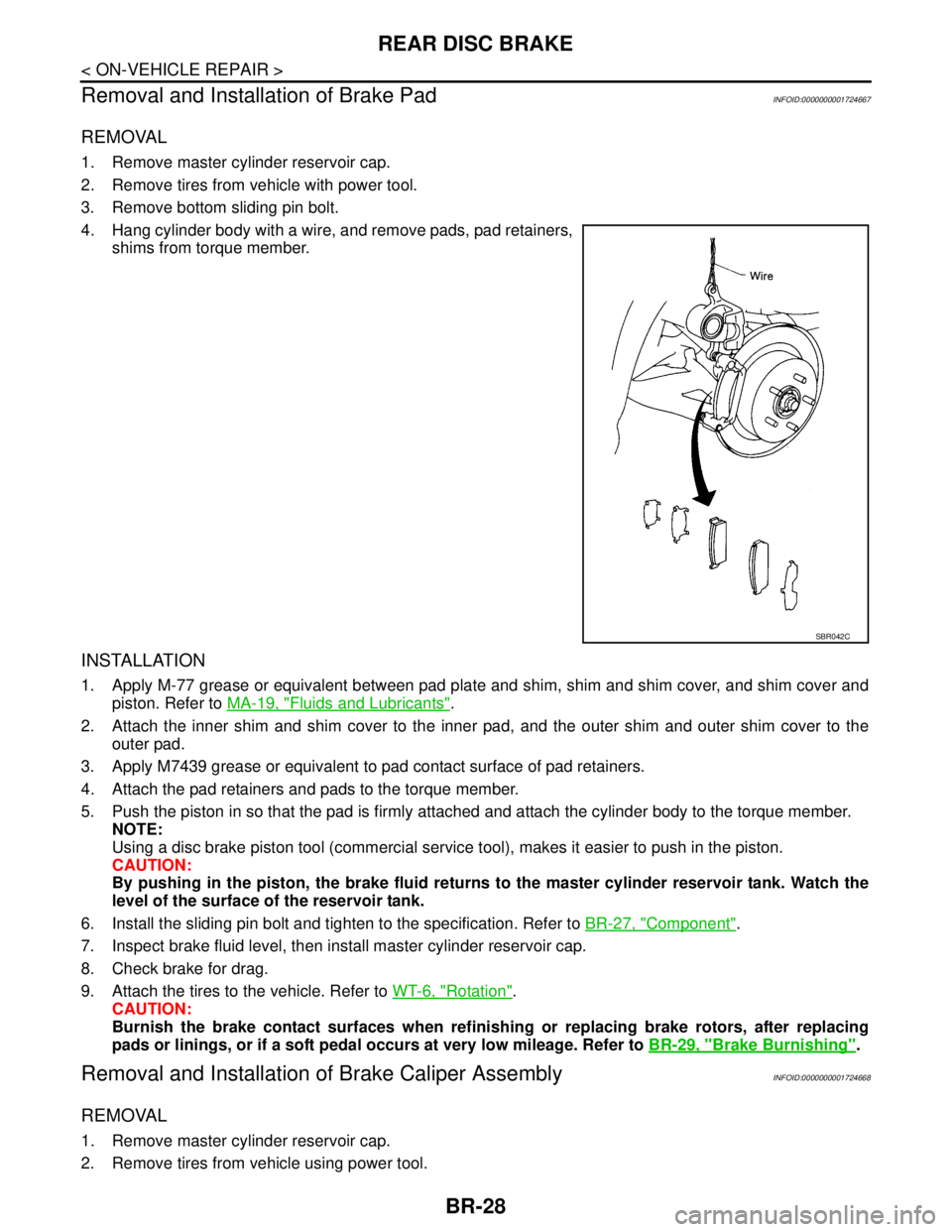
4. Hang cylinder body with a wire, and remove pads, pad retainers,
shims from torque member.
INSTALLATION
1. Apply M-77 grease or equivalent between pad plate and shim, shim and shim cover, and shim cover and
piston. Refer to MA-19, "
Fluids and Lubricants".
2. Attach the inner shim and shim cover to the inner pad, and the outer shim and outer shim cover to the
outer pad.
3. Apply M7439 grease or equivalent to pad contact surface of pad retainers.
4. Attach the pad retainers and pads to the torque member.
5. Push the piston in so that the pad is firmly attached and attach the cylinder body to the torque member.
NOTE:
Using a disc brake piston tool (commercial service tool), makes it easier to push in the piston.
CAUTION:
By pushing in the piston, the brake fluid returns to the master cylinder reservoir tank. Watch the
level of the surface of the reservoir tank.
6. Install the sliding pin bolt and tighten to the specification. Refer to BR-27, "
Component".
7. Inspect brake fluid level, then install master cylinder reservoir cap.
8. Check brake for drag.
9. Attach the tires to the vehicle. Refer to WT-6, "
Rotation".
CAUTION:
Burnish the brake contact surfaces when refinishing or replacing brake rotors, after replacing
pads or linings, or if a soft pedal occurs at very low mileage. Refer to BR-29, "
Brake Burnishing".
Removal and Installation of Brake Caliper AssemblyINFOID:0000000001724668
REMOVAL
1. Remove master cylinder reservoir cap.
2. Remove tires from vehicle using power tool.
SBR042C
Page 221 of 5883
REAR DISC BRAKE
BR-29
< ON-VEHICLE REPAIR >
C
D
E
G
H
I
J
K
L
MA
B
BR
N
O
P
3. Drain brake fluid. Refer to BR-8, "Bleeding Brake System".
4. Remove connecting bolt and torque member bolts using power tool, and remove cylinder body.
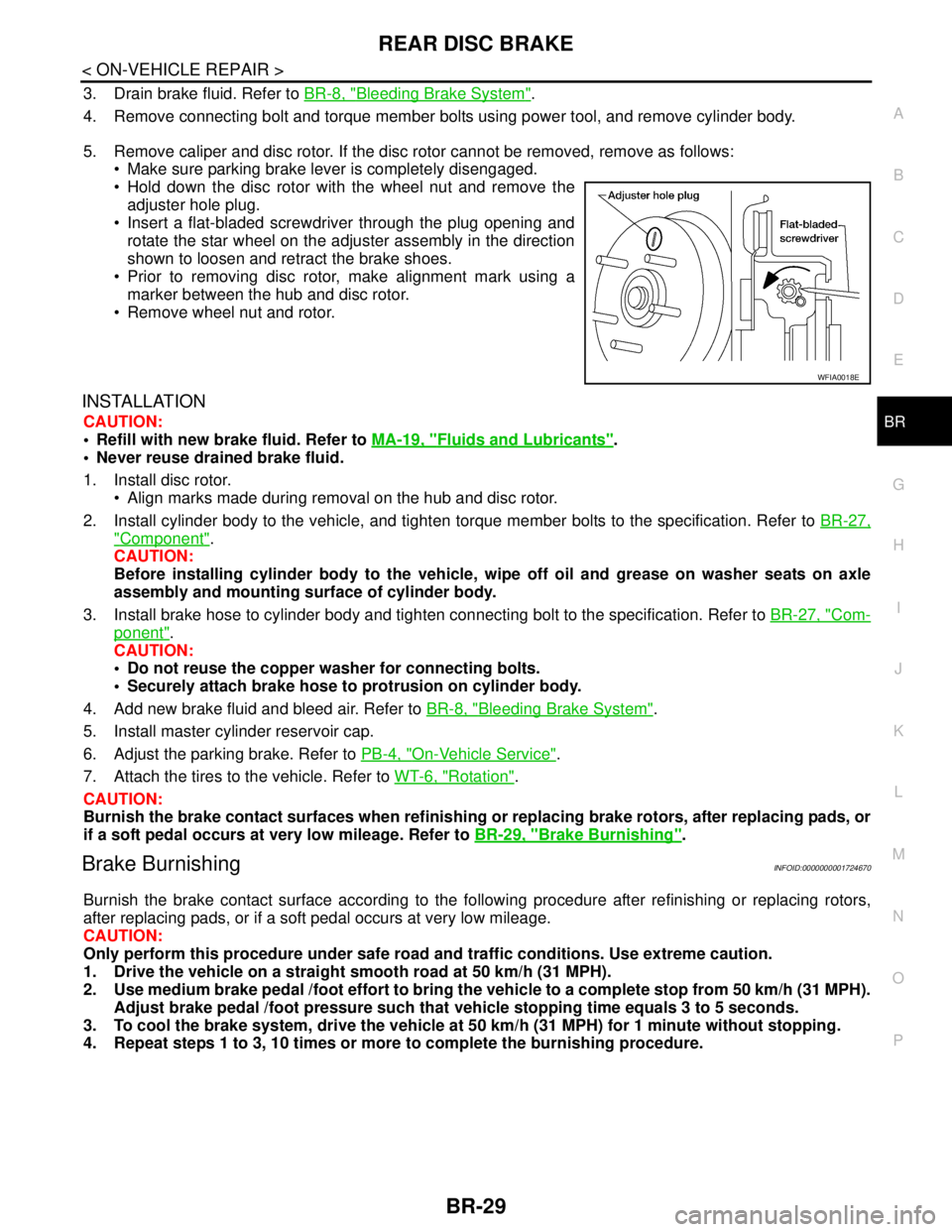
5. Remove caliper and disc rotor. If the disc rotor cannot be removed, remove as follows:
Make sure parking brake lever is completely disengaged.
Hold down the disc rotor with the wheel nut and remove the
adjuster hole plug.
Insert a flat-bladed screwdriver through the plug opening and
rotate the star wheel on the adjuster assembly in the direction
shown to loosen and retract the brake shoes.
Prior to removing disc rotor, make alignment mark using a
marker between the hub and disc rotor.
Remove wheel nut and rotor.
INSTALLATION
CAUTION:
Refill with new brake fluid. Refer to MA-19, "
Fluids and Lubricants".
Never reuse drained brake fluid.
1. Install disc rotor.
Align marks made during removal on the hub and disc rotor.
2. Install cylinder body to the vehicle, and tighten torque member bolts to the specification. Refer to BR-27,
"Component".
CAUTION:
Before installing cylinder body to the vehicle, wipe off oil and grease on washer seats on axle
assembly and mounting surface of cylinder body.
3. Install brake hose to cylinder body and tighten connecting bolt to the specification. Refer to BR-27, "
Com-
ponent".
CAUTION:
Do not reuse the copper washer for connecting bolts.
Securely attach brake hose to protrusion on cylinder body.
4. Add new brake fluid and bleed air. Refer to BR-8, "
Bleeding Brake System".
5. Install master cylinder reservoir cap.
6. Adjust the parking brake. Refer to PB-4, "
On-Vehicle Service".
7. Attach the tires to the vehicle. Refer to WT-6, "
Rotation".
CAUTION:
Burnish the brake contact surfaces when refinishing or replacing brake rotors, after replacing pads, or
if a soft pedal occurs at very low mileage. Refer to BR-29, "
Brake Burnishing".
Brake BurnishingINFOID:0000000001724670
Burnish the brake contact surface according to the following procedure after refinishing or replacing rotors,
after replacing pads, or if a soft pedal occurs at very low mileage.
CAUTION:
Only perform this procedure under safe road and traffic conditions. Use extreme caution.
1. Drive the vehicle on a straight smooth road at 50 km/h (31 MPH).
2. Use medium brake pedal /foot effort to bring the vehicle to a complete stop from 50 km/h (31 MPH).
Adjust brake pedal /foot pressure such that vehicle stopping time equals 3 to 5 seconds.
3. To cool the brake system, drive the vehicle at 50 km/h (31 MPH) for 1 minute without stopping.
4. Repeat steps 1 to 3, 10 times or more to complete the burnishing procedure.
WFIA0018E
Page 239 of 5883
![NISSAN TIIDA 2007 Service User Guide BRC-6
< BASIC INSPECTION >[ABS]
DIAGNOSIS AND REPAIR WORKFLOW
BASIC INSPECTION
DIAGNOSIS AND REPAIR WORKFLOW
Work FlowINFOID:0000000001731351
PRECAUTIONS FOR DIAGNOSIS
If steering angle sensor, steeri](/img/5/57395/w960_57395-238.png "NISSAN TIIDA 2007 Service User Guide BRC-6
< BASIC INSPECTION >[ABS]
DIAGNOSIS AND REPAIR WORKFLOW
BASIC INSPECTION
DIAGNOSIS AND REPAIR WORKFLOW
Work FlowINFOID:0000000001731351
PRECAUTIONS FOR DIAGNOSIS
If steering angle sensor, steeri")
BRC-6
< BASIC INSPECTION >[ABS]
DIAGNOSIS AND REPAIR WORKFLOW
BASIC INSPECTION
DIAGNOSIS AND REPAIR WORKFLOW
Work FlowINFOID:0000000001731351
PRECAUTIONS FOR DIAGNOSIS
If steering angle sensor, steering system parts, suspension system parts, ABS actuator and electric unit (con-
trol unit) or tires have been replaced, or if wheel alignment has been adjusted, be sure to adjust neutral posi-
tion of steering angle sensor before driving. Refer to BRC-90, "
ADJUSTMENT OF STEERING ANGLE
SENSOR NEUTRAL POSITION : Description".
Page 243 of 5883
![NISSAN TIIDA 2007 Service User Guide BRC-10
< BASIC INSPECTION >[ABS]
INSPECTION AND ADJUSTMENT
INSPECTION AND ADJUSTMENT
ADDITIONAL SERVICE WHEN REPLACING CONTROL UNIT
ADDITIONAL SERVICE WHEN REPLACING CONTROL UNIT : Description
INFOID:](/img/5/57395/w960_57395-242.png "NISSAN TIIDA 2007 Service User Guide BRC-10
< BASIC INSPECTION >[ABS]
INSPECTION AND ADJUSTMENT
INSPECTION AND ADJUSTMENT
ADDITIONAL SERVICE WHEN REPLACING CONTROL UNIT
ADDITIONAL SERVICE WHEN REPLACING CONTROL UNIT : Description
INFOID:")
BRC-10
< BASIC INSPECTION >[ABS]
INSPECTION AND ADJUSTMENT
INSPECTION AND ADJUSTMENT
ADDITIONAL SERVICE WHEN REPLACING CONTROL UNIT
ADDITIONAL SERVICE WHEN REPLACING CONTROL UNIT : Description
INFOID:0000000001731353
After replacing the ABS actuator and electric unit (control unit), perform the following procedures:
Neutral position adjustment for the steering angle sensor
Calibration of the decel G sensor
ADDITIONAL SERVICE WHEN REPLACING CONTROL UNIT : Special Repair Re-
quirement
INFOID:0000000001731354
1.PERFORM THE NEUTRAL POSITION ADJUSTMENT FOR THE STEERING ANGLE SENSOR
Perform the neutral position adjustment for the steering angle sensor.
>> Refer to BRC-90, "
ADJUSTMENT OF STEERING ANGLE SENSOR NEUTRAL POSITION : Spe-
cial Repair Requirement", GO TO 2
2.PERFORM CALIBRATION OF THE DECEL G SENSOR
Perform calibration of the decel G sensor.
>> Refer to BRC-92, "
CALIBRATION OF DECEL G SENSOR : Special Repair Requirement".
ADJUSTMENT OF STEERING ANGLE SENSOR NEUTRAL POSITION
ADJUSTMENT OF STEERING ANGLE SENSOR NEUTRAL POSITION : Description
INFOID:0000000001731355
Refer to the table below to determine if adjustment of steering angle sensor neutral position is required.
×: Required –: Not required
ADJUSTMENT OF STEERING ANGLE SENSOR NEUTRAL POSITION : Special Re-
pair Requirement
INFOID:0000000001731356
ADJUSTMENT OF STEERING ANGLE SENSOR NEUTRAL POSITION
CAUTION:
To adjust neutral position of steering angle sensor, make sure to use CONSULT-III
(Adjustment cannot be done without CONSULT-III)
1.ALIGN THE VEHICLE STATUS
Stop vehicle with front wheels in straight-ahead position.
Situation Adjustment of steering angle sensor neutral position
Removing/Installing ABS actuator and electric unit (control unit) —
Replacing ABS actuator and electric unit (control unit)×
Removing/Installing steering angle sensor×
Replacing steering angle sensor×
Removing/Installing steering components×
Replacing steering components×
Removing/Installing suspension components×
Replacing suspension components×
Change tires to new ones—
Tire rotation—
Adjusting wheel alignment×
Page 244 of 5883
![NISSAN TIIDA 2007 Service User Guide INSPECTION AND ADJUSTMENT
BRC-11
< BASIC INSPECTION >[ABS]
C
D
E
G
H
I
J
K
L
MA
B
BRC
N
O
P
>> GO TO 2
2.PERFORM THE NEUTRAL POSITION ADJUSTMENT FOR THE STEERING ANGLE SENSOR
1. On the CONSULT-III scr](/img/5/57395/w960_57395-243.png "NISSAN TIIDA 2007 Service User Guide INSPECTION AND ADJUSTMENT
BRC-11
< BASIC INSPECTION >[ABS]
C
D
E
G
H
I
J
K
L
MA
B
BRC
N
O
P
>> GO TO 2
2.PERFORM THE NEUTRAL POSITION ADJUSTMENT FOR THE STEERING ANGLE SENSOR
1. On the CONSULT-III scr")
INSPECTION AND ADJUSTMENT
BRC-11
< BASIC INSPECTION >[ABS]
C
D
E
G
H
I
J
K
L
MA
B
BRC
N
O
P
>> GO TO 2
2.PERFORM THE NEUTRAL POSITION ADJUSTMENT FOR THE STEERING ANGLE SENSOR
1. On the CONSULT-III screen, touch “WORK SUPPORT” and “ST ANG SEN ADJUSTMENT” in order.
2. Touch “START”.
CAUTION:
Do not touch steering wheel while adjusting steering angle sensor.
3. After approximately 10 seconds, touch “END”.
NOTE:
After approximately 60 seconds, it ends automatically.
4. Turn ignition switch OFF, then turn it ON again.
CAUTION:
Be sure to perform above operation.
>> GO TO 3
3.CHECK DATA MONITOR
1. Run vehicle with front wheels in straight-ahead position, then stop.
2. Select “DATA MONITOR”. Then make sure “STR ANGLE SIG” is within 0±2.5°.
Is the steering angle within the specified range?
YES >> GO TO 4
NO >> Perform the neutral position adjustment for the steering angle sensor again, GO TO 1
4.ERASE THE SELF-DIAGNOSIS MEMORY
Erase the self-diagnosis memory of the ABS actuator and electric unit (control unit) and ECM.
ABS actuator and electric unit (control unit): Refer to BRC-25, "
CONSULT-III Function (ABS)".
ECM, refer to:
-EC-107, "
CONSULT-III Function" (HR16DE with EURO-OBD)
-EC-462, "
CONSULT-III Function" (HR16DE without EURO-OBD)
-EC-772, "
CONSULT-III Function" (MR18DE)
-EC-1104, "
Diagnosis Description" (K9K)
Are the memories erased?
YES >> INSPECTION END
NO >> Check the items indicated by the self-diagnosis.
CALIBRATION OF DECEL G SENSOR
CALIBRATION OF DECEL G SENSOR : DescriptionINFOID:0000000001731357
Refer to the table below to determine if calibration of the decel G sensor is required.
×: Required –: Not required
Situation Calibration of decel G sensor
Removing/Installing ABS actuator and electric unit (control unit) —
Replacing ABS actuator and electric unit (control unit)×
Removing/Installing steering angle sensor×
Replacing steering angle sensor×
Removing/Installing steering components×
Replacing steering components×
Removing/Installing suspension components×
Replacing suspension components×
Change tires to new ones—
Tire rotation—
Adjusting wheel alignment×
Page 264 of 5883
![NISSAN TIIDA 2007 Service User Guide C1101, C1102, C1103, C1104 WHEEL SENSOR-1
BRC-31
< COMPONENT DIAGNOSIS >[ABS]
C
D
E
G
H
I
J
K
L
MA
B
BRC
N
O
P
3. Spin the wheel of the vehicle by hand and observe the red SENSOR indicator on the ABS](/img/5/57395/w960_57395-263.png "NISSAN TIIDA 2007 Service User Guide C1101, C1102, C1103, C1104 WHEEL SENSOR-1
BRC-31
< COMPONENT DIAGNOSIS >[ABS]
C
D
E
G
H
I
J
K
L
MA
B
BRC
N
O
P
3. Spin the wheel of the vehicle by hand and observe the red SENSOR indicator on the ABS")
C1101, C1102, C1103, C1104 WHEEL SENSOR-1
BRC-31
< COMPONENT DIAGNOSIS >[ABS]
C
D
E
G
H
I
J
K
L
MA
B
BRC
N
O
P
3. Spin the wheel of the vehicle by hand and observe the red SENSOR indicator on the ABS active wheel
sensor tester. The red SENSOR indicator should flash on and off to indicate an output signal.
NOTE:
If the red SENSOR indicator illuminates but does not flash, reverse the polarity of the tester leads and
retest.
Does the ABS active wheel sensor tester detect a signal?
YES >> GO TO 3
NO >> Replace the wheel sensor. Refer to BRC-83, "
Removal and Installation".
3.CHECK TIRES
Check for inflation pressure, wear and size of each tire.
Are tire pressure and size correct and is tire wear within specifications?
YES >> GO TO 4
NO >> Adjust tire pressure or replace tire(s).
4.CHECK WHEEL BEARINGS
Check wheel bearing axial end play. Refer to FA X - 6 , "
On-Vehicle Inspection and Service" (front) or RAX-5,
"On-Vehicle Inspection and Service" (rear).
Is the inspection result normal?
YES >> GO TO 5
NO >> Repair or replace as necessary. Refer to FAX-7, "
Removal and Installation" (front) or RAX-6,
"Removal and Installation" (rear).
5.CHECK WIRING HARNESS FOR SHORT CIRCUIT
1. Disconnect ABS actuator and electric unit (control unit) connec-
tor and wheel sensor connector of malfunction code No.
2. Check continuity between wheel sensor harness connector ter-
minals and ground.
Is the inspection result normal?
YES >> GO TO 6
NO >> Repair the circuit.
6.CHECK WIRING HARNESS FOR OPEN CIRCUIT
1. Check continuity between ABS actuator and electric unit (control unit) harness connector E125 and the
malfunctioning wheel sensor harness connector E18, E117, C10, or C11.
Is the inspection result normal?
YES >> Replace the ABS actuator and electric unit (control unit). Refer to BRC-85, "Removal and Installa-
tion".
NO >> Repair the circuit.Continuity should not exist.
WFIA0343E
Wheel sensorABS actuator and
electric unit (control unit)Wheel sensor
Continuity
Connector Terminal Connector Terminal
Front LH
E12545
E181
Ye s 46 2
Front RH34
E1171
33 2
Rear LH37
C112
36 1
Rear RH42
C102
43 1
Page 267 of 5883
![NISSAN TIIDA 2007 Service User Guide BRC-34
< COMPONENT DIAGNOSIS >[ABS]
C1105, C1106, C1107, C1108 WHEEL SENSOR-2
2.CHECK WHEEL SENSOR OUTPUT SIGNAL
1. Connect ABS active wheel sensor tester (J-45741) to wheel sensor using appropriate a](/img/5/57395/w960_57395-266.png "NISSAN TIIDA 2007 Service User Guide BRC-34
< COMPONENT DIAGNOSIS >[ABS]
C1105, C1106, C1107, C1108 WHEEL SENSOR-2
2.CHECK WHEEL SENSOR OUTPUT SIGNAL
1. Connect ABS active wheel sensor tester (J-45741) to wheel sensor using appropriate a")
BRC-34
< COMPONENT DIAGNOSIS >[ABS]
C1105, C1106, C1107, C1108 WHEEL SENSOR-2
2.CHECK WHEEL SENSOR OUTPUT SIGNAL
1. Connect ABS active wheel sensor tester (J-45741) to wheel sensor using appropriate adapter.
2. Turn on the ABS active wheel sensor tester power switch.
NOTE:
The green POWER indicator should illuminate. If the POWER indicator does not illuminate, replace the
battery in the ABS active wheel sensor tester before proceeding.
3. Spin the wheel of the vehicle by hand and observe the red SENSOR indicator on the ABS active wheel
sensor tester. The red SENSOR indicator should flash on and off to indicate an output signal.
NOTE:
If the red SENSOR indicator illuminates but does not flash, reverse the polarity of the tester leads and
retest.
Does the ABS active wheel sensor tester detect a signal?
YES >> GO TO 3
NO >> Replace the wheel sensor. Refer to BRC-83, "
Removal and Installation".
3.CHECK TIRES
Check for inflation pressure, wear and size of each tire.
Are tire pressure and size correct and is tire wear within specifications?
YES >> GO TO 4
NO >> Adjust tire pressure or replace tire(s).
4.CHECK WHEEL BEARINGS
Check wheel bearing axial end play. Refer to FAX-5, "
On-Vehicle Inspection and Service" (front) or RAX-5,
"On-Vehicle Inspection and Service" (rear).
Is the inspection result normal?
YES >> GO TO 5
NO >> Repair or replace as necessary. Refer to FA X - 7 , "
Removal and Installation" (front) or RAX-6,
"Removal and Installation" (rear).
5.CHECK WIRING HARNESS FOR SHORT CIRCUIT
1. Disconnect ABS actuator and electric unit (control unit) connec-
tor and wheel sensor connector of malfunction code No.
2. Check continuity between wheel sensor harness connector ter-
minals and ground.
Is the inspection result normal?
YES >> GO TO 6
NO >> Repair the circuit.
6.CHECK WIRING HARNESS FOR OPEN CIRCUIT
1. Check continuity between ABS actuator and electric unit (control unit) harness connector E125 and the
malfunctioning wheel sensor harness connector E18, E117, C10, or C11. Continuity should not exist.
WFIA0343E
Page 274 of 5883
![NISSAN TIIDA 2007 Service User Guide C1115 WHEEL SENSOR
BRC-41
< COMPONENT DIAGNOSIS >[ABS]
C
D
E
G
H
I
J
K
L
MA
B
BRC
N
O
P
C1115 WHEEL SENSOR
DescriptionINFOID:0000000001731252
When the sensor rotor rotates, the magnetic field changes.](/img/5/57395/w960_57395-273.png "NISSAN TIIDA 2007 Service User Guide C1115 WHEEL SENSOR
BRC-41
< COMPONENT DIAGNOSIS >[ABS]
C
D
E
G
H
I
J
K
L
MA
B
BRC
N
O
P
C1115 WHEEL SENSOR
DescriptionINFOID:0000000001731252
When the sensor rotor rotates, the magnetic field changes.")
C1115 WHEEL SENSOR
BRC-41
< COMPONENT DIAGNOSIS >[ABS]
C
D
E
G
H
I
J
K
L
MA
B
BRC
N
O
P
C1115 WHEEL SENSOR
DescriptionINFOID:0000000001731252
When the sensor rotor rotates, the magnetic field changes. It converts the magnetic field changes to current
signals (rectangular wave) and transmits them to the ABS actuator and electric unit (control unit).
DTC LogicINFOID:0000000001731253
DTC DETECTION LOGIC
DTC CONFIRMATION PROCEDURE
1.CHECK SELF-DIAGNOSIS RESULTS
Check the self-diagnosis results.
Is above displayed on the self-diagnosis display?
YES >> Proceed to diagnosis procedure. Refer to BRC-41, "Diagnosis Procedure".
NO >> INSPECTION END
Diagnosis ProcedureINFOID:0000000001731254
CAUTION:
Do not check between wheel sensor terminals.
INSPECTION PROCEDURE
1.CONNECTOR INSPECTION
Disconnect the ABS actuator and electric unit (control unit) connector E125 and wheel sensor of malfunction-
ing code.
Check the terminals for deformation, disconnection, looseness or damage.
Is the inspection result normal?
YES >> GO TO 2
NO >> Repair or replace as necessary.
2.CHECK WHEEL SENSOR OUTPUT SIGNAL
1. Connect ABS active wheel sensor tester (J-45741) to wheel sensor using appropriate adapter.
2. Turn on the ABS active wheel sensor tester power switch.
NOTE:
The green POWER indicator should illuminate. If the POWER indicator does not illuminate, replace the
battery in the ABS active wheel sensor tester before proceeding.
3. Spin the wheel of the vehicle by hand and observe the red SENSOR indicator on the ABS active wheel
sensor tester. The red SENSOR indicator should flash on and off to indicate an output signal.
NOTE:
If the red SENSOR indicator illuminates but does not flash, reverse the polarity of the tester leads and
retest.
Does the ABS active wheel sensor tester detect a signal?
YES >> GO TO 3
NO >> Replace the wheel sensor. Refer to BRC-83, "
Removal and Installation".
3.CHECK TIRES
DTC Display item Malfunction detected condition Possible cause
C 111 5ABS SENSOR
[ABNORMAL SIGNAL]When wheel sensor input signal is malfunctioning. Harness or connector
Wheel sensor
ABS actuator and electric unit
(control unit)
Self-diagnosis results
ABS SENSOR [ABNORMAL SIGNAL]
Page 319 of 5883
![NISSAN TIIDA 2007 Service User Guide BRC-86
< BASIC INSPECTION >[ESP/TCS/ABS]
DIAGNOSIS AND REPAIR WORKFLOW
BASIC INSPECTION
DIAGNOSIS AND REPAIR WORKFLOW
Work FlowINFOID:0000000001731359
PRECAUTIONS FOR DIAGNOSIS
If steering angle senso](/img/5/57395/w960_57395-318.png "NISSAN TIIDA 2007 Service User Guide BRC-86
< BASIC INSPECTION >[ESP/TCS/ABS]
DIAGNOSIS AND REPAIR WORKFLOW
BASIC INSPECTION
DIAGNOSIS AND REPAIR WORKFLOW
Work FlowINFOID:0000000001731359
PRECAUTIONS FOR DIAGNOSIS
If steering angle senso")
BRC-86
< BASIC INSPECTION >[ESP/TCS/ABS]
DIAGNOSIS AND REPAIR WORKFLOW
BASIC INSPECTION
DIAGNOSIS AND REPAIR WORKFLOW
Work FlowINFOID:0000000001731359
PRECAUTIONS FOR DIAGNOSIS
If steering angle sensor, steering system parts, suspension system parts, ABS actuator and electric unit (con-
trol unit) or tires have been replaced, or if wheel alignment has been adjusted, be sure to adjust neutral posi-
tion of steering angle sensor before driving. Refer to BRC-90, "
ADJUSTMENT OF STEERING ANGLE
SENSOR NEUTRAL POSITION : Description".
Page 323 of 5883
![NISSAN TIIDA 2007 Service User Guide BRC-90
< BASIC INSPECTION >[ESP/TCS/ABS]
INSPECTION AND ADJUSTMENT
INSPECTION AND ADJUSTMENT
ADDITIONAL SERVICE WHEN REPLACING CONTROL UNIT
ADDITIONAL SERVICE WHEN REPLACING CONTROL UNIT : Description](/img/5/57395/w960_57395-322.png "NISSAN TIIDA 2007 Service User Guide BRC-90
< BASIC INSPECTION >[ESP/TCS/ABS]
INSPECTION AND ADJUSTMENT
INSPECTION AND ADJUSTMENT
ADDITIONAL SERVICE WHEN REPLACING CONTROL UNIT
ADDITIONAL SERVICE WHEN REPLACING CONTROL UNIT : Description")
BRC-90
< BASIC INSPECTION >[ESP/TCS/ABS]
INSPECTION AND ADJUSTMENT
INSPECTION AND ADJUSTMENT
ADDITIONAL SERVICE WHEN REPLACING CONTROL UNIT
ADDITIONAL SERVICE WHEN REPLACING CONTROL UNIT : Description
INFOID:0000000001731361
After replacing the ABS actuator and electric unit (control unit), perform the following procedures:
Neutral position adjustment for the steering angle sensor
Calibration of the decel G sensor
ADDITIONAL SERVICE WHEN REPLACING CONTROL UNIT : Special Repair Re-
quirement
INFOID:0000000001731362
1.PERFORM THE NEUTRAL POSITION ADJUSTMENT FOR THE STEERING ANGLE SENSOR
Perform the neutral position adjustment for the steering angle sensor.
>> Refer to BRC-90, "
ADJUSTMENT OF STEERING ANGLE SENSOR NEUTRAL POSITION : Spe-
cial Repair Requirement", GO TO 2
2.PERFORM CALIBRATION OF THE DECEL G SENSOR
Perform calibration of the decel G sensor.
>> Refer to BRC-92, "
CALIBRATION OF DECEL G SENSOR : Special Repair Requirement".
ADJUSTMENT OF STEERING ANGLE SENSOR NEUTRAL POSITION
ADJUSTMENT OF STEERING ANGLE SENSOR NEUTRAL POSITION : Description
INFOID:0000000001731363
Refer to the table below to determine if adjustment of steering angle sensor neutral position is required.
×: Required –: Not required
ADJUSTMENT OF STEERING ANGLE SENSOR NEUTRAL POSITION : Special Re-
pair Requirement
INFOID:0000000001731364
ADJUSTMENT OF STEERING ANGLE SENSOR NEUTRAL POSITION
CAUTION:
To adjust neutral position of steering angle sensor, make sure to use CONSULT-III
(Adjustment cannot be done without CONSULT-III)
1.ALIGN THE VEHICLE STATUS
Stop vehicle with front wheels in straight-ahead position.
Situation Adjustment of steering angle sensor neutral position
Removing/Installing ABS actuator and electric unit (control unit) —
Replacing ABS actuator and electric unit (control unit)×
Removing/Installing steering angle sensor×
Replacing steering angle sensor×
Removing/Installing steering components×
Replacing steering components×
Removing/Installing suspension components×
Replacing suspension components×
Change tires to new ones—
Tire rotation—
Adjusting wheel alignment×