ECU NISSAN TIIDA 2007 Service Owner's Manual
[x] Cancel search | Manufacturer: NISSAN, Model Year: 2007, Model line: TIIDA, Model: NISSAN TIIDA 2007Pages: 5883, PDF Size: 78.95 MB
Page 107 of 5883
![NISSAN TIIDA 2007 Service Owners Manual AV-102
< ECU DIAGNOSIS >[AUDIO WITH NAVIGATION]
NAVI CONTROL UNIT
48
(B)Ground RGB synchronizing signal OutputIgnition
switch
ON—
49 Ground Shield — — — —
50
(G)Ground RGB area (YS) signal](/img/5/57395/w960_57395-106.png "NISSAN TIIDA 2007 Service Owners Manual AV-102
< ECU DIAGNOSIS >[AUDIO WITH NAVIGATION]
NAVI CONTROL UNIT
48
(B)Ground RGB synchronizing signal OutputIgnition
switch
ON—
49 Ground Shield — — — —
50
(G)Ground RGB area (YS) signal")
AV-102
< ECU DIAGNOSIS >[AUDIO WITH NAVIGATION]
NAVI CONTROL UNIT
48
(B)Ground RGB synchronizing signal OutputIgnition
switch
ON—
49 Ground Shield — — — —
50
(G)Ground RGB area (YS) signal OutputIgnition
switch
ONAt RGB image displayed 5 V
At rear view camera image
displayed
51
(R)GroundHorizontal synchronizing
(HP) signalInputIgnition
switch
ON—
52
(W)GroundVertical synchronizing (VP)
signalInputIgnition
switch
ON—
53
(W)GroundCommunication signal
(CONT→DISP)OutputIgnition
switch
ONWhen adjusting display-
brightness.
54
(O)GroundCommunication signal
(DISP→CONT)InputIgnition
switch
ONWhen adjusting display-
brightness.
55 — Shield — — — —
61
(R/L)Ground Illumination signal Input OFFLighting switch is OFF. 0 V
Lighting switch is ON. 12 V Terminal
(Wire color)Description
ConditionReference value
(Approx.)
+ – Signal nameInput/
Output
SKIB0825E
PKIB4948J
SKIB0825E
SKIB0823E
PKIB5039J
PKIB5039J
Page 108 of 5883
![NISSAN TIIDA 2007 Service Owners Manual AV
NAVI CONTROL UNIT
AV-103
< ECU DIAGNOSIS >[AUDIO WITH NAVIGATION]
C
D
E
F
G
H
I
J
K
L
MB A
O
P
DTC IndexINFOID:0000000001728760
Self-diagnosis results display item
63
(W)Ground Ignition signal Inpu](/img/5/57395/w960_57395-107.png "NISSAN TIIDA 2007 Service Owners Manual AV
NAVI CONTROL UNIT
AV-103
< ECU DIAGNOSIS >[AUDIO WITH NAVIGATION]
C
D
E
F
G
H
I
J
K
L
MB A
O
P
DTC IndexINFOID:0000000001728760
Self-diagnosis results display item
63
(W)Ground Ignition signal Inpu")
AV
NAVI CONTROL UNIT
AV-103
< ECU DIAGNOSIS >[AUDIO WITH NAVIGATION]
C
D
E
F
G
H
I
J
K
L
MB A
O
P
DTC IndexINFOID:0000000001728760
Self-diagnosis results display item
63
(W)Ground Ignition signal InputIgnition
switch
ON— Battery voltage
64
(V)Ground Parking brake signal InputIgnition
switch
ONParking brake ON 0 V
Parking brake OFF 12 V
65
(Y/G)Ground Reverse signal InputIgnition
switch
ONR position 12 V
Other than R position 0 V
66
(Y)GroundVehicle speed signal (8-
pulse) InputIgnition
switch
ONWhen vehicle speed is ap-
prox. 40 km/h (25MPH)
67
(Y)GroundCamera-connection recog-
nition signal InputIgnition
switch
ONConnected to camera con-
trol unit connector0 V
Not connected to camera
control unit connector5 V
69
(L)—AV communication signal
(H)Input/
Output—— —
70
(P)—AV communication signal
(L)Input/
Output—— —
71
(L)—CAN–HInput/
Output—— —
72
(P)—CAN–LInput/
Output—— —
73 Ground GPS antenna signal InputIgnition
switch
ACCNot connected to GPS an-
tenna connector5 V
74 — Shield — — — —Te r m i n a l
(Wire color)Description
ConditionReference value
(Approx.)
+ – Signal nameInput/
Output
SKIA6649J
DTC Error item Refer to
U1000 CAN COMM CIRCUIT [U1000]AV- 5 2 , "
DiagnosisProcedure"
U1010 CONTROL UNIT (CAN) [U1010] AV- 5 3 , "Diagnosis Procedure"
U1310 CONTROL UNIT (AV) [U1310]AV- 5 4 , "DTC Logic"
U1300
U1240
U1249
U124E
U124FAV COMM CIRCUIT [U1300]
SWITCH CONN [U1240]
AUDIO H/U CONN [U1249]
AMP CONN [U124E]
RDS CONN [U124F]AV- 7 9 , "
Description"
U1243 FRONT DISP CONN [U1243]AV- 7 6 , "Diagnosis Procedure"
U1244 GPS ANTENNA CONN [U1244]AV- 7 8 , "Diagnosis Procedure"
U1200 Control Unit FLASH-ROM [U1200]AV- 5 5 , "DTC Logic"
U1201 Gyro NO CONN [U1201]AV- 5 6 , "DTC Logic"
Page 109 of 5883
![NISSAN TIIDA 2007 Service Owners Manual AV-104
< ECU DIAGNOSIS >[AUDIO WITH NAVIGATION]
NAVI CONTROL UNIT
U1204 GPS COMM [U1204]AV- 5 9 , "Diagnosis Procedure"
U1205 GPS ROM [U1205]AV- 6 0 , "Diagnosis Procedure"
U1206 GPS RAM [U1206]AV-](/img/5/57395/w960_57395-108.png "NISSAN TIIDA 2007 Service Owners Manual AV-104
< ECU DIAGNOSIS >[AUDIO WITH NAVIGATION]
NAVI CONTROL UNIT
U1204 GPS COMM [U1204]AV- 5 9 , \"Diagnosis Procedure\"
U1205 GPS ROM [U1205]AV- 6 0 , \"Diagnosis Procedure\"
U1206 GPS RAM [U1206]AV-")
AV-104
< ECU DIAGNOSIS >[AUDIO WITH NAVIGATION]
NAVI CONTROL UNIT
U1204 GPS COMM [U1204]AV- 5 9 , "Diagnosis Procedure"
U1205 GPS ROM [U1205]AV- 6 0 , "Diagnosis Procedure"
U1206 GPS RAM [U1206]AV- 6 1 , "Diagnosis Procedure"
U1207 GPS RTC [U1207]AV- 6 2 , "Diagnosis Procedure"
U1208 DVD-ROM COMM [U1208]AV- 6 3 , "Diagnosis Procedure"
U1209 DVD-ROM READ [U1209]AV- 6 4 , "Diagnosis Procedure"
U120A DVD-ROM DISC [U120A]AV- 6 5 , "Diagnosis Procedure"
U120C DVD-ROM MECHA DETECT [U120C]AV- 6 6 , "Diagnosis Procedure"
U120D DVD-ROM DRIVE MECHA [U120D]AV- 6 7 , "Diagnosis Procedure"
U120E DVD-ROM FOCUS [U120E]AV- 6 8 , "Diagnosis Procedure"
U120F DVD-ROM TOC [U120F]AV- 6 9 , "Diagnosis Procedure"
U1210 DVD-ROM SEEK [U1210]AV- 7 0 , "Diagnosis Procedure"
U1211 DVD-ROM ERR CORRECTION [U1211]AV- 7 1 , "Diagnosis Procedure"
U1212 DVD-ROM DATA FORWARD [U1212]AV- 7 2 , "Diagnosis Procedure"
U1213 DVD-ROM DATA [U1213]AV- 7 3 , "Diagnosis Procedure"
U1214 DVD-ROM TIMEOUT [U1214]AV- 7 4 , "Diagnosis Procedure"
U1215 DVD-ROM LOAD [U1215]AV- 7 5 , "Diagnosis Procedure"
U1216 CAN CONT [U1216]AV- 5 7 , "DTC Logic"
U1217 BLUETOOTH CONN [U1217]AV- 5 8 , "DTC Logic"
DTC Error item Refer to
Page 110 of 5883
![NISSAN TIIDA 2007 Service Owners Manual AV
DISPLAY UNIT
AV-105
< ECU DIAGNOSIS >[AUDIO WITH NAVIGATION]
C
D
E
F
G
H
I
J
K
L
MB A
O
P
DISPLAY UNIT
Reference ValueINFOID:0000000001728763
TERMINAL LAYOUT
PHYSICAL VALUES
JPNIA0228ZZ
Te r m i n](/img/5/57395/w960_57395-109.png "NISSAN TIIDA 2007 Service Owners Manual AV
DISPLAY UNIT
AV-105
< ECU DIAGNOSIS >[AUDIO WITH NAVIGATION]
C
D
E
F
G
H
I
J
K
L
MB A
O
P
DISPLAY UNIT
Reference ValueINFOID:0000000001728763
TERMINAL LAYOUT
PHYSICAL VALUES
JPNIA0228ZZ
Te r m i n")
AV
DISPLAY UNIT
AV-105
< ECU DIAGNOSIS >[AUDIO WITH NAVIGATION]
C
D
E
F
G
H
I
J
K
L
MB A
O
P
DISPLAY UNIT
Reference ValueINFOID:0000000001728763
TERMINAL LAYOUT
PHYSICAL VALUES
JPNIA0228ZZ
Te r m i n a l
(Wire color)Description
ConditionReference value
(Approx.)
+ – Signal nameInput/
Output
1
(G)8
(B)RGB signal (R: red) InputIgnition
switch
ONStart “Confirmation / Adjust-
ment Mode”, and then dis-
play color bar by
selecting“Color Spectrum
Bar” on DISPLAY DIAGNO-
SIS screen.
2
(G)Ground RGB area (YS) signal InputIgnition
switch
ONAt RGB image displayed 5 V
At rear view camera image
displayed
3
(R)8
(B)RGB signal (G: green) InputIgnition
switch
ONStart “Confirmation / Adjust-
ment Mode”, and then dis-
play color bar by
selecting“Color Spectrum
Bar” on DISPLAY DIAGNO-
SIS screen.
4
(R)GroundHorizontal synchronizing
(HP) signalOutputIgnition
switch
ON—
JPNIA0221ZZ
PKIB4948J
JPNIA0222ZZ
SKIB0825E
Page 111 of 5883
![NISSAN TIIDA 2007 Service Owners Manual AV-106
< ECU DIAGNOSIS >[AUDIO WITH NAVIGATION]
DISPLAY UNIT
5
(W)8
(B)RGB signal (B: blue) InputIgnition
switch
ONStart “Confirmation / Adjust-
ment Mode”, and then dis-
play color bar by
sele](/img/5/57395/w960_57395-110.png "NISSAN TIIDA 2007 Service Owners Manual AV-106
< ECU DIAGNOSIS >[AUDIO WITH NAVIGATION]
DISPLAY UNIT
5
(W)8
(B)RGB signal (B: blue) InputIgnition
switch
ONStart “Confirmation / Adjust-
ment Mode”, and then dis-
play color bar by
sele")
AV-106
< ECU DIAGNOSIS >[AUDIO WITH NAVIGATION]
DISPLAY UNIT
5
(W)8
(B)RGB signal (B: blue) InputIgnition
switch
ONStart “Confirmation / Adjust-
ment Mode”, and then dis-
play color bar by
selecting“Color Spectrum
Bar” on DISPLAY DIAGNO-
SIS screen.
6
(W)GroundVertical synchronizing (VP)
signalOutputIgnition
switch
ON—
7
(B)Ground RGB synchronizing signal InputIgnition
switch
ON—
8
(B)Ground RGB ground —Ignition
switch
ON —0 V
10 Ground Shield —Ignition
switch
ON—0 V
11
(R)Ground Camera image signal InputIgnition
switch
ONAt rear view camera image
displayed
12 — Shield — — — —
17
(O)GroundCommunication signal
(DISP→CONT)OutputIgnition
switch
ONWhen adjusting display-
brightness.
18 — Shield — — — —Terminal
(Wire color)Description
ConditionReference value
(Approx.)
+ – Signal nameInput/
Output
JPNIA0223ZZ
SKIB0823E
SKIB0825E
SKIB0827E
PKIB5039J
Page 112 of 5883
![NISSAN TIIDA 2007 Service Owners Manual AV
DISPLAY UNIT
AV-107
< ECU DIAGNOSIS >[AUDIO WITH NAVIGATION]
C
D
E
F
G
H
I
J
K
L
MB A
O
P19
(W)GroundCommunication signal
(CONT→DISP)InputIgnition
switch
ONWhen adjusting display-
brightness.
2](/img/5/57395/w960_57395-111.png "NISSAN TIIDA 2007 Service Owners Manual AV
DISPLAY UNIT
AV-107
< ECU DIAGNOSIS >[AUDIO WITH NAVIGATION]
C
D
E
F
G
H
I
J
K
L
MB A
O
P19
(W)GroundCommunication signal
(CONT→DISP)InputIgnition
switch
ONWhen adjusting display-
brightness.
2")
AV
DISPLAY UNIT
AV-107
< ECU DIAGNOSIS >[AUDIO WITH NAVIGATION]
C
D
E
F
G
H
I
J
K
L
MB A
O
P19
(W)GroundCommunication signal
(CONT→DISP)InputIgnition
switch
ONWhen adjusting display-
brightness.
20
(R)Ground ACC power supply InputIgnition
switch
ACC— Battery voltage
21
(LG)Ground Battery power supply InputIgnition
switch
OFF— Battery voltage
23
(B)Ground GND —Ignition
switch
ON —0 V Te r m i n a l
(Wire color)Description
ConditionReference value
(Approx.)
+ – Signal nameInput/
Output
PKIB5039J
Page 137 of 5883

BCS-2
COMB SW : CONSULT-III Function (BCM -
COMB SW) .............................................................
24
IMMU .........................................................................24
IMMU : CONSULT-III Function (BCM - IMMU) .......24
BATTERY SAVER ....................................................25
BATTERY SAVER : CONSULT-III Function (BCM
- BATTERY SAVER) ..............................................
25
THEFT ALM ..............................................................26
THEFT ALM : CONSULT-III Function (BCM -
THEFT ALM) ..........................................................
26
SIGNAL BUFFER ......................................................26
SIGNAL BUFFER : CONSULT-III Function (BCM
- SIGNAL BUFFER) ................................................
26
PTC HEATER ............................................................26
PTC HEATER : CONSULT-III Function (BCM -
PTC HEATER) ........................................................
26
COMPONENT DIAGNOSIS ........................28
U1000 CAN COMM CIRCUIT ............................28
Description ..............................................................28
DTC Logic ...............................................................28
Diagnosis Procedure ..............................................28
U1010 CONTROL UNIT (CAN) .........................29
DTC Logic ...............................................................29
Diagnosis Procedure ..............................................29
Special Repair Requirement ...................................29
POWER SUPPLY AND GROUND CIRCUIT .....30
Diagnosis Procedure ..............................................30
COMBINATION SWITCH INPUT CIRCUIT .......31
Diagnosis Procedure ..............................................31
Special Repair Requirement ...................................32
COMBINATION SWITCH OUTPUT CIRCUIT ...33
Diagnosis Procedure ...............................................33
Special Repair Requirement ...................................33
COMBINATION SWITCH ..................................34
Description ..............................................................34
Diagnosis Procedure ...............................................34
ECU DIAGNOSIS .......................................35
BCM (BODY CONTROL MODULE) ..................35
Reference Value .....................................................35
Terminal Layout ......................................................38
Physical Values .......................................................39
Wiring Diagram .......................................................50
DTC Inspection Priority Chart ...............................53
DTC Index ..............................................................54
SYMPTOM DIAGNOSIS ............................55
COMBINATION SWITCH SYSTEM SYMP-
TOMS .................................................................
55
Symptom Table .......................................................55
PRECAUTION ............................................56
PRECAUTIONS .................................................56
Precaution for Supplemental Restraint System
(SRS) "AIR BAG" and "SEAT BELT PRE-TEN-
SIONER" .................................................................
56
ON-VEHICLE REPAIR ...............................57
BCM (BODY CONTROL MODULE) ..................57
Removal and Installation of BCM ............................57
Page 150 of 5883
BCS
POWER CONSUMPTION CONTROL SYSTEM
BCS-15
< FUNCTION DIAGNOSIS >
C
D
E
F
G
H
I
J
K
L B A
O
P N
Sleep condition
Wake-up operation
BCM transmits sleep wake up signal (wake up) to each unit when any condition listed below is established,
and then goes into normal mode from low power consumption mode.
Each unit starts transmissions with CAN communication by receiving sleep wake up signals. Each unit trans-
mits wake up signals to BCM with CAN communication to convey the start of CAN communication.
Wake-up condition
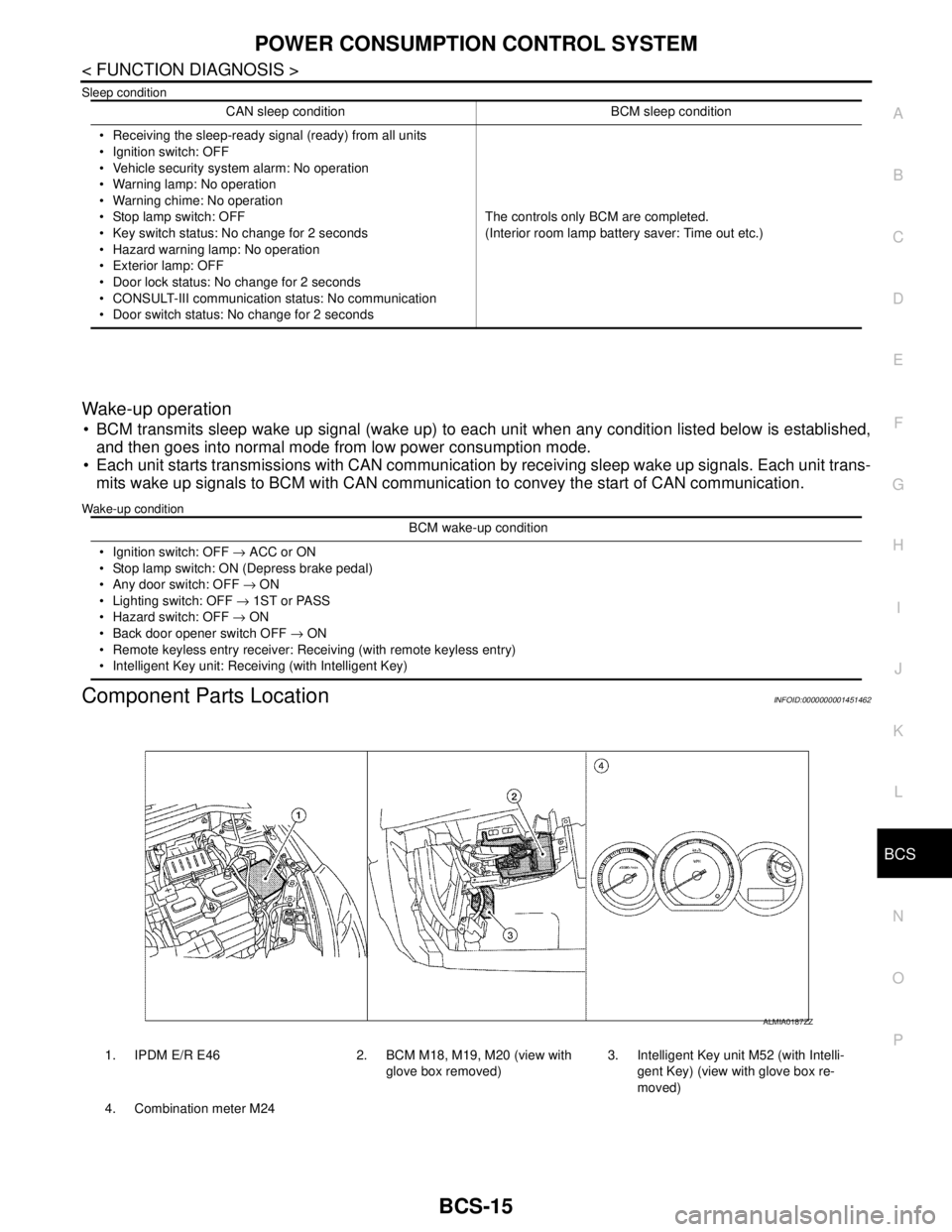
Component Parts LocationINFOID:0000000001451462
CAN sleep condition BCM sleep condition
Receiving the sleep-ready signal (ready) from all units
Ignition switch: OFF
Vehicle security system alarm: No operation
Warning lamp: No operation
Warning chime: No operation
Stop lamp switch: OFF
Key switch status: No change for 2 seconds
Hazard warning lamp: No operation
Exterior lamp: OFF
Door lock status: No change for 2 seconds
CONSULT-III communication status: No communication
Door switch status: No change for 2 secondsThe controls only BCM are completed.
(Interior room lamp battery saver: Time out etc.)
BCM wake-up condition
Ignition switch: OFF → ACC or ON
Stop lamp switch: ON (Depress brake pedal)
Any door switch: OFF → ON
Lighting switch: OFF → 1ST or PASS
Hazard switch: OFF → ON
Back door opener switch OFF → ON
Remote keyless entry receiver: Receiving (with remote keyless entry)
Intelligent Key unit: Receiving (with Intelligent Key)
1. IPDM E/R E46 2. BCM M18, M19, M20 (view with
glove box removed)3. Intelligent Key unit M52 (with Intelli-
gent Key) (view with glove box re-
moved)
4. Combination meter M24
ALMIA0187ZZ
Page 151 of 5883

BCS-16
< FUNCTION DIAGNOSIS >
DIAGNOSIS SYSTEM (BCM)
DIAGNOSIS SYSTEM (BCM)
COMMON ITEM
COMMON ITEM : CONSULT-III Function (BCM - COMMON ITEM)INFOID:0000000001451463
APPLICATION ITEM
CONSULT-III performs the following functions via CAN communication with BCM.
SYSTEM APPLICATION
BCM can perform the following functions for each system.
NOTE:
It can perform the diagnosis modes except the following for all sub system selection items.
1: With remote keyless entry system
2: With Intelligent Key
BCM
Diagnosis mode Function Description
WORK SUPPORT Changes the setting for each system function.
SELF-DIAG RESULTS Displays the diagnosis results judged by BCM. Refer to BCS-54, "
DTCIndex".
CAN DIAG SUPPORT MNTR Monitors the reception status of CAN communication viewed from BCM.
DATA MONITOR The BCM input/output signals are displayed.
ACTIVE TEST The signals used to activate each device are forcibly supplied from BCM.
ECU IDENTIFICATION The BCM part number is displayed.
CONFIGURATION Enables to read and save the vehicle specification.
Enables to write the vehicle specification when replacing BCM.
System Sub system selection itemDiagnosis mode
WORK SUPPORT DATA MONITOR ACTIVE TEST
BCM BCM×
Door lock DOOR LOCK×××
Rear window defogger REAR DEFOGGER××
Warning chime BUZZER××
Interior room lamp timer INT LAMP×××
Remote keyless entry system
1MULTI REMOTE ENT×××
Exterior lamp HEAD LAMP×××
Wiper and washer WIPER×××
Turn signal and hazard warning lamps FLASHER××
Air conditioner AIR CONDITONER×
Intelligent Key system
2INTELLIGENT KEY×
Combination switch COMB SW×
Immobilizer IMMU××
Interior room lamp battery saver BATTERY SAVER×××
Trunk open (sedan)/Back door open
(hatch back)DOOR LOCK××
Vehicle security system THEFT ALM×××
Signal buffer system SIGNAL BUFFER××
PTC heater system PTC HEATER××
Page 152 of 5883

BCS
DIAGNOSIS SYSTEM (BCM)
BCS-17
< FUNCTION DIAGNOSIS >
C
D
E
F
G
H
I
J
K
L B A
O
P N
BCM : CONSULT-III Function (BCM - BCM)INFOID:0000000001451464
WORK SUPPORT
DOOR LOCK
DOOR LOCK : CONSULT-III Function (BCM - DOOR LOCK)INFOID:0000000001451465
WORK SUPPORT
DATA MONITOR
1: With Intelligent Key
2: With remote keyless entry system
ACTIVE TEST
Item Description
RESET SETTING VALUE Return a value set with WORK SUPPORT of each system to a default value in factory shipment.
Work Item Description
SECURITY DOOR LOCK SETAnti hijack function mode can be changed in this mode.
ON: Anti hijack mode is active.
OFF: Anti hijack mode is inactive.
AUTO LOCK SETAuto door lock time can be changed in this mode.
MODE 1: 1 minute
MODE 2: 2 minutes
MODE 3: 3 minutes
MODE 4: 4 minutes
MODE 5: 5 minutes
Monitor Item
[Unit}Description
IGN ON SW [ON/OFF] Indicates condition of ignition switch in ON position.
PUSH SW
1 [ON/OFF]Indicates condition of ignition knob switch.
KEY SW
2 [ON/OFF]Indicates condition of key switch.
CDL LOCK SW [ON/OFF] Indicates condition of door lock and unlock switch.
CDL UNLOCK SW [ON/OFF] Indicates condition of door lock and unlock switch.
DOOR SW-DR [ON/OFF] Indicates condition of front door switch (driver side).
DOOR SW-AS [ON/OFF] Indicates condition of front door switch (passenger side).
DOOR SW-RR [ON/OFF] Indicates condition of rear door switch RH.
DOOR SW-RL [ON/OFF] Indicates condition of rear door switch LH.
TRNK OPNR SW [ON/OFF] Indicates condition of back door switch.
BACK DOOR SW [ON/OFF] Indicates condition of back door switch.
KEYLESS LOCK
2 [ON/OFF]Indicates condition of lock signal from key fob.
KEYLESS UNLOCK
2 [ON/OFF]Indicates condition of unlock signal from key fob.
I-KEY LOCK
1 [ON/OFF]Indicates condition of lock signal from Intelligent Key.
I-KEY UNLOCK
1 [ON/OFF]Indicates condition of unlock signal from Intelligent Key.
Test item Description
DOOR LOCKThis test is able to check door lock operation [ALL LOCK/ALL UNLOCK/DR UNLOCK/
OTHER UNLOCK].
SUPER LOCK
*This test is able to check super lock operation [LOCK (SET)/UNLOCK (RELEASE)].