hood open NISSAN TIIDA 2007 Service Owner's Manual
[x] Cancel search | Manufacturer: NISSAN, Model Year: 2007, Model line: TIIDA, Model: NISSAN TIIDA 2007Pages: 5883, PDF Size: 78.95 MB
Page 3636 of 5883
![NISSAN TIIDA 2007 Service Owners Manual INSUFFICIENT COOLING
HAC-303
< SYMPTOM DIAGNOSIS >[AUTO AIR CONDITIONER (W/NAVI)]
C
D
E
F
G
H
J
K
L
MA
B
HAC
N
O
P
Testing must be performed as follows:
Test ReadingINFOID:0000000001547377
TEST READIN](/img/5/57395/w960_57395-3635.png "NISSAN TIIDA 2007 Service Owners Manual INSUFFICIENT COOLING
HAC-303
< SYMPTOM DIAGNOSIS >[AUTO AIR CONDITIONER (W/NAVI)]
C
D
E
F
G
H
J
K
L
MA
B
HAC
N
O
P
Testing must be performed as follows:
Test ReadingINFOID:0000000001547377
TEST READIN")
INSUFFICIENT COOLING
HAC-303
< SYMPTOM DIAGNOSIS >[AUTO AIR CONDITIONER (W/NAVI)]
C
D
E
F
G
H
J
K
L
MA
B
HAC
N
O
P
Testing must be performed as follows:
Test ReadingINFOID:0000000001547377
TEST READING
Recirculating-to-discharge Air Temperature Table
Ambient Air Temperature-to-operating Pressure Table
*1: In the blower motor low-speed control
*2: In the blower motor high-speed control
Trouble Diagnoses for Unusual PressureINFOID:0000000001547378
TROUBLE DIAGNOSIS FOR UNUSUAL PRESSURE
Vehicle condition Indoors or in the shade (in a well-ventilated place)
Doors Closed
Door window Open
Hood Open
TEMP. Max. COLD
Mode control dial
(Ventilation) set
Intake switch
(Recirculation) set
Blower speedMax. speed set
Engine speed Idle speed
Operate the air conditioning system for 10 minutes before taking measurements.
Inside air (Recirculating air) at blower assembly inlet
Discharge air temperature at center ventilator
°C (°F) Relative humidity
%Air temperature
°C (°F)
50 - 6020 (68) 7.2 - 9.1 (45 - 48)
25 (77) 11.4 - 13.8 (53 - 57)
30 (86) 15.5 - 18.4 (60 - 65)
35 (95) 20.3 - 23.7 (69 - 75)
60 - 7020 (68) 9.1 - 10.9 (48 - 52)
25 (77) 13.8 - 16.2 (57 - 61)
30 (86) 18.4 - 21.3 (65 - 70)
35 (95) 23.7 - 27.1 (75 - 81)
Ambient air
High-pressure (Discharge side)
kPa (bar, kg/cm
2, psi)Low-pressure (Suction side)
kPa (bar, kg/cm2, psi) Relative humidity
%Air temperature
°C (°F)
50 - 7020 (68)843 - 1,036 *1
(11.08 - 13.63, 8.6 - 10.6, 122 - 150)159.0 - 194.0
(1.59 - 1.94, 1.62 - 1.98, 23.1 - 28.1)
25 (77)1,094 - 1,338 *1
(10.94 - 13.38, 11.2 - 13.6, 159 - 194)196.3 - 240.0
(1.96 - 2.40, 2.00 - 2.45, 28.5 - 34.8)
30 (86)1,298 - 1,590 *1
(12.98 - 15.90, 13.2 - 16.2, 188 - 231)248.0 - 302.7
(2.48 - 3.03, 2.53 - 3.09, 36.0 - 43.9)
35 (95)1,383 - 1,688 *2
(13.83 - 16.88, 14.1 - 17.2, 201 - 245)308.8 - 377.4
(3.09 - 3.77, 3.15 - 3.85, 44.8 - 54.7)
40 (104)1,628 - 1,988 *2
(16.28 - 19.88, 16.6 - 20.3, 236 - 288)377.4 - 461.2
(3.77 - 4.61, 3.85 - 4.70, 54.7 - 66.8)
Page 3731 of 5883
IP-16
< SERVICE INFORMATION >
INSTRUMENT PANEL ASSEMBLY
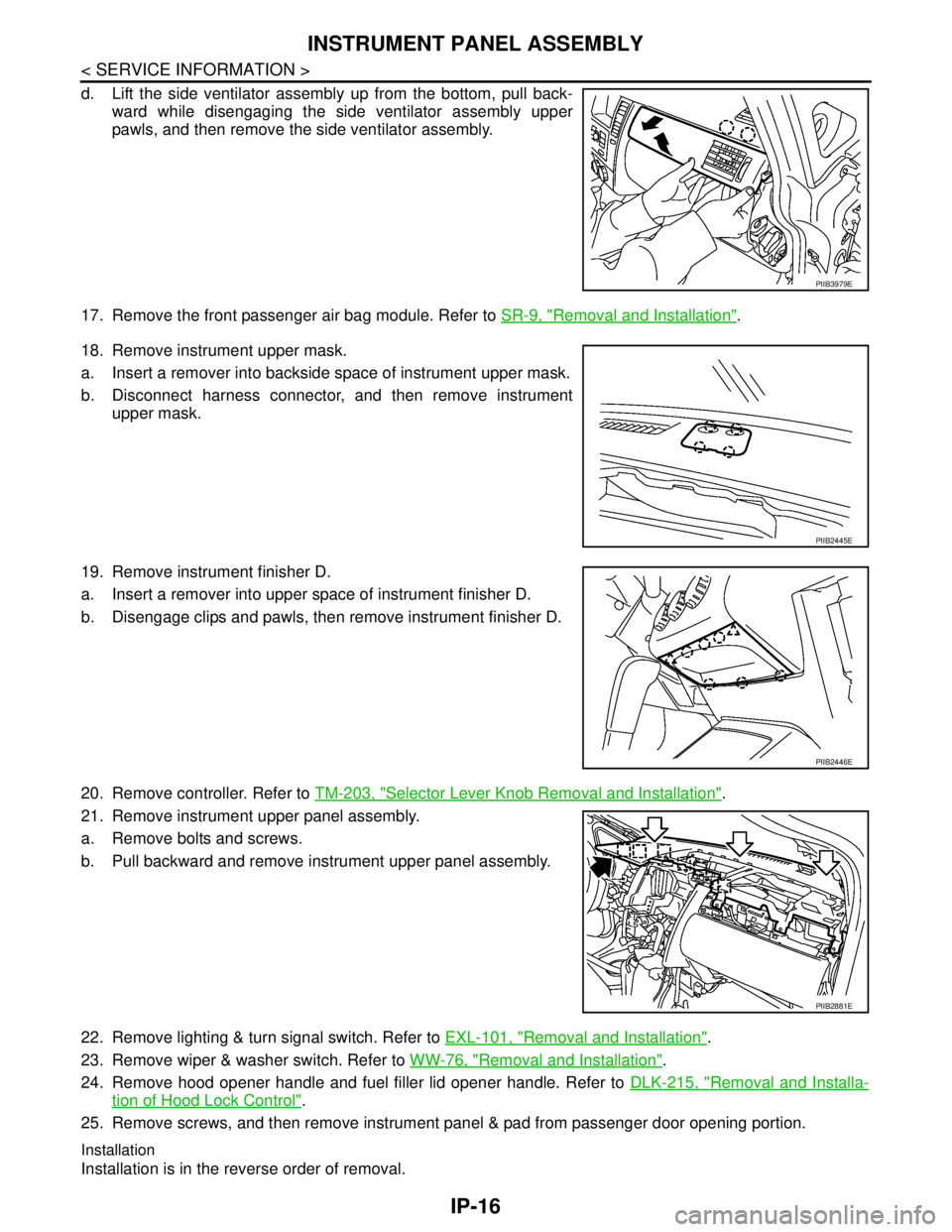
d. Lift the side ventilator assembly up from the bottom, pull back-
ward while disengaging the side ventilator assembly upper
pawls, and then remove the side ventilator assembly.
17. Remove the front passenger air bag module. Refer to SR-9, "
Removal and Installation".
18. Remove instrument upper mask.
a. Insert a remover into backside space of instrument upper mask.
b. Disconnect harness connector, and then remove instrument
upper mask.
19. Remove instrument finisher D.
a. Insert a remover into upper space of instrument finisher D.
b. Disengage clips and pawls, then remove instrument finisher D.
20. Remove controller. Refer to TM-203, "
Selector Lever Knob Removal and Installation".
21. Remove instrument upper panel assembly.
a. Remove bolts and screws.
b. Pull backward and remove instrument upper panel assembly.
22. Remove lighting & turn signal switch. Refer to EXL-101, "
Removal and Installation".
23. Remove wiper & washer switch. Refer to WW-76, "
Removal and Installation".
24. Remove hood opener handle and fuel filler lid opener handle. Refer to DLK-215, "
Removal and Installa-
tion of Hood Lock Control".
25. Remove screws, and then remove instrument panel & pad from passenger door opening portion.
Installation
Installation is in the reverse order of removal.
PIIB3979E
PIIB2445E
PIIB2446E
PIIB2881E
Page 4246 of 5883
MA-6
< ON-VEHICLE MAINTENANCE >
GENERAL MAINTENANCE
ON-VEHICLE MAINTENANCE
GENERAL MAINTENANCE
General MaintenanceINFOID:0000000001277597
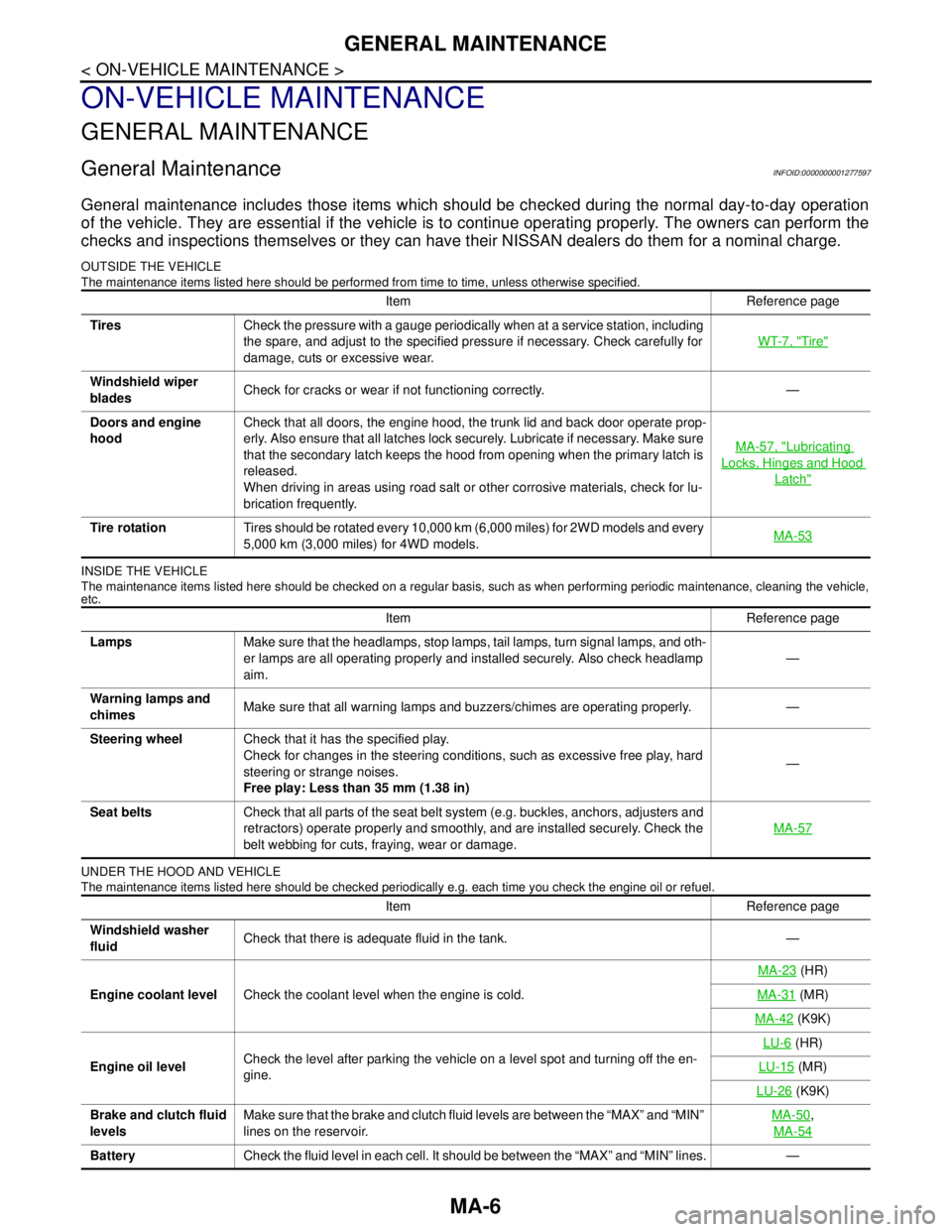
General maintenance includes those items which should be checked during the normal day-to-day operation
of the vehicle. They are essential if the vehicle is to continue operating properly. The owners can perform the
checks and inspections themselves or they can have their NISSAN dealers do them for a nominal charge.
OUTSIDE THE VEHICLE
The maintenance items listed here should be performed from time to time, unless otherwise specified.
INSIDE THE VEHICLE
The maintenance items listed here should be checked on a regular basis, such as when performing periodic maintenance, cleaning the vehicle,
etc.
UNDER THE HOOD AND VEHICLE
The maintenance items listed here should be checked periodically e.g. each time you check the engine oil or refuel.
Item Reference page
TiresCheck the pressure with a gauge periodically when at a service station, including
the spare, and adjust to the specified pressure if necessary. Check carefully for
damage, cuts or excessive wear.WT-7, "
Tire"
Windshield wiper
bladesCheck for cracks or wear if not functioning correctly. —
Doors and engine
hoodCheck that all doors, the engine hood, the trunk lid and back door operate prop-
erly. Also ensure that all latches lock securely. Lubricate if necessary. Make sure
that the secondary latch keeps the hood from opening when the primary latch is
released.
When driving in areas using road salt or other corrosive materials, check for lu-
brication frequently.MA-57, "
Lubricating
Locks, Hinges and Hood
Latch"
Tire rotationTires should be rotated every 10,000 km (6,000 miles) for 2WD models and every
5,000 km (3,000 miles) for 4WD models.MA-53
Item Reference page
LampsMake sure that the headlamps, stop lamps, tail lamps, turn signal lamps, and oth-
er lamps are all operating properly and installed securely. Also check headlamp
aim.—
Warning lamps and
chimesMake sure that all warning lamps and buzzers/chimes are operating properly. —
Steering wheelCheck that it has the specified play.
Check for changes in the steering conditions, such as excessive free play, hard
steering or strange noises.
Free play: Less than 35 mm (1.38 in)—
Seat beltsCheck that all parts of the seat belt system (e.g. buckles, anchors, adjusters and
retractors) operate properly and smoothly, and are installed securely. Check the
belt webbing for cuts, fraying, wear or damage.MA-57
Item Reference page
Windshield washer
fluidCheck that there is adequate fluid in the tank. —
Engine coolant levelCheck the coolant level when the engine is cold.MA-23
(HR)
MA-31
(MR)
MA-42
(K9K)
Engine oil levelCheck the level after parking the vehicle on a level spot and turning off the en-
gine.LU-6
(HR)
LU-15
(MR)
LU-26
(K9K)
Brake and clutch fluid
levelsMake sure that the brake and clutch fluid levels are between the “MAX” and “MIN”
lines on the reservoir.MA-50
,
MA-54
BatteryCheck the fluid level in each cell. It should be between the “MAX” and “MIN” lines. —
Page 4363 of 5883

MWI-56
< ECU DIAGNOSIS >
BCM (BODY CONTROL MODULE)
ENGINE RUNEngine stopped OFF
Engine running ON
ENGINE STATUS
NOTE:
Diesel engine models
onlyEngine stopped STOP
While the engine stalls STALL
Engine running RUN
At engine cranking CRA
FA N O N S I GFan switch OFF OFF
Fan switch ON ON
FR FOG SWFront fog lamp switch OFF OFF
Front fog lamp switch ON ON
FR WASHER SWFront washer switch OFF OFF
Front washer switch ON ON
FR WIPER LOWFront wiper switch OFF OFF
Front wiper switch LO ON
FR WIPER HIFront wiper switch OFF OFF
Front wiper switch HI ON
FR WIPER INTFront wiper switch OFF OFF
Front wiper switch INT ON
FR WIPER STOPAny position other than front wiper stop position OFF
Front wiper stop position ON
HAZARD SWWhen hazard switch is not pressed OFF
When hazard switch is pressed ON
LIGHT SW 1STLighting switch OFF OFF
Lighting switch 1st ON
H/L SW POSHeadlamp switch OFF OFF
Headlamp switch 1st ON
HI BEAM SWHigh beam switch OFF OFF
High beam switch HI ON
HOOD SWClose the hood
NOTE:
Vehicles without theft warning system are OFF-fixedOFF
Open the hood ON
H/L WASH SWNOTE:
The item is indicated, but not monitoredOFF
IGN ON SWIgnition switch OFF or ACC OFF
Ignition switch ON ON
IGN SW CANIgnition switch OFF or ACC OFF
Ignition switch ON ON
INT VOLUME Wiper intermittent dial is in a dial position 1 - 7 1 - 7
I-KEY LOCK
1LOCK button of Intelligent Key is not pressed OFF
LOCK button of Intelligent Key is pressed ON
I-KEY UNLOCK
1UNLOCK button of Intelligent Key is not pressed OFF
UNLOCK button of Intelligent Key is pressed ON
KEY SW
2Mechanical key is removed from key cylinder OFF
Mechanical key is inserted to key cylinder ON Monitor Item Condition Value/Status
Page 4382 of 5883

MWI
IPDM E/R (INTELLIGENT POWER DISTRIBUTION MODULE ENGINE ROOM)
MWI-75
< ECU DIAGNOSIS >
C
D
E
F
G
H
I
J
K
L
MB A
O
P
IPDM E/R (INTELLIGENT POWER DISTRIBUTION MODULE ENGINE
ROOM)
Reference ValueINFOID:0000000001713125
VALUES ON THE DIAGNOSIS TOOL
Monitor Item Condition Value/Status
MOTOR FAN REQ Engine idle speedChanges depending on engine
coolant temperature, air conditioner
operation status, vehicle speed,
etc.0 - 100 %
A/C COMP REQA/C switch OFF OFF
A/C switch ON ON
TA I L & C L R R E QLighting switch OFF OFF
Lighting switch 1ST, 2ND, HI or AUTO (Light is illuminated) ON
HL LO REQLighting switch OFF OFF
Lighting switch 2ND HI or AUTO (Light is illuminated) ON
HL HI REQLighting switch OFF OFF
Lighting switch HI ON
FR FOG REQLighting switch 2ND or AUTO (Light
is illuminated)Front fog lamp switch OFF OFF
Front fog lamp switch ON
Daytime light activated ON
HL WASHER REQNOTE:
This item is displayed, but cannot be monitored.OFF
FR WIP REQ Ignition switch ONFront wiper switch OFF STOP
Front wiper switch INT 1LOW
Front wiper switch LO LOW
Front wiper switch HI HI
WIP AUTO STOP Ignition switch ONFront wiper stop position STOP P
Any position other than front wiper
stop positionACT P
WIP PROT Ignition switch ONFront wiper operates normally OFF
Front wiper stops at fail-safe opera-
tionBLOCK
ST RLY REQIgnition switch OFF or ACC OFF
Ignition switch START ON
IGN RLYIgnition switch OFF or ACC OFF
Ignition switch ON ON
RR DEF REQRear defogger switch OFF OFF
Rear defogger switch ON ON
OIL P SWIgnition switch OFF, ACC or engine running OPEN
Ignition switch ON CLOSE
DTRL REQNOTE:
This item is displayed, but cannot be monitored.OFF
HOOD SWNOTE:
This item is displayed, but cannot be monitored.OFF
Page 4424 of 5883
![NISSAN TIIDA 2007 Service Owners Manual PCS-10
< FUNCTION DIAGNOSIS >[IPDM E/R]
DIAGNOSIS SYSTEM (IPDM E/R)
DIAGNOSIS SYSTEM (IPDM E/R)
Diagnosis DescriptionINFOID:0000000001697589
AUTO ACTIVE TEST
Description
In auto active test mode, the](/img/5/57395/w960_57395-4423.png "NISSAN TIIDA 2007 Service Owners Manual PCS-10
< FUNCTION DIAGNOSIS >[IPDM E/R]
DIAGNOSIS SYSTEM (IPDM E/R)
DIAGNOSIS SYSTEM (IPDM E/R)
Diagnosis DescriptionINFOID:0000000001697589
AUTO ACTIVE TEST
Description
In auto active test mode, the")
PCS-10
< FUNCTION DIAGNOSIS >[IPDM E/R]
DIAGNOSIS SYSTEM (IPDM E/R)
DIAGNOSIS SYSTEM (IPDM E/R)
Diagnosis DescriptionINFOID:0000000001697589
AUTO ACTIVE TEST
Description
In auto active test mode, the IPDM E/R sends a drive signal to the following systems to check their operation.
Oil pressure low/coolant pressure high warning indicator
Oil pressure gauge
Rear window defogger
Front wipers
Tail, license and parking lamps
Front fog lamps
Headlamps (Hi, Lo)
A/C compressor (magnetic clutch)
Cooling fan
Operation Procedure
1. Close the hood and front door RH, and lift the wiper arms from the windshield (to prevent windshield dam-
age due to wiper operation).
NOTE:
When auto active test is performed with hood opened, sprinkle water on windshield before hand.
2. Turn ignition switch OFF.
3. Turn the ignition switch ON and, within 20 seconds, press the front door switch LH 10 times. Then turn the
ignition switch OFF.
4. Turn the ignition switch ON within 10 seconds. After that the horn sounds once and the auto active test
starts.
5. After a series of the following operations is repeated 3 times, auto active test is completed.
NOTE:
When auto active test mode has to be cancelled halfway through test, turn ignition switch OFF.
CAUTION:
• If auto active test mode cannot be actuated, check door switch system. Refer to DLK-65, "
DRIVER
SIDE : Description" (with Intelligent Key system), DLK-499, "DRIVER SIDE : Description" (without
Intelligent Key system).
Do not start the engine.
Inspection in Auto Active Test Mode
Page 4427 of 5883
![NISSAN TIIDA 2007 Service Owners Manual PCS
DIAGNOSIS SYSTEM (IPDM E/R)
PCS-13
< FUNCTION DIAGNOSIS >[IPDM E/R]
C
D
E
F
G
H
I
J
K
L B A
O
P N
CONSULT - III Function (IPDM E/R)INFOID:0000000001697590
APPLICATION ITEM
CONSULT-III performs the](/img/5/57395/w960_57395-4426.png "NISSAN TIIDA 2007 Service Owners Manual PCS
DIAGNOSIS SYSTEM (IPDM E/R)
PCS-13
< FUNCTION DIAGNOSIS >[IPDM E/R]
C
D
E
F
G
H
I
J
K
L B A
O
P N
CONSULT - III Function (IPDM E/R)INFOID:0000000001697590
APPLICATION ITEM
CONSULT-III performs the")
PCS
DIAGNOSIS SYSTEM (IPDM E/R)
PCS-13
< FUNCTION DIAGNOSIS >[IPDM E/R]
C
D
E
F
G
H
I
J
K
L B A
O
P N
CONSULT - III Function (IPDM E/R)INFOID:0000000001697590
APPLICATION ITEM
CONSULT-III performs the following functions via CAN communication with IPDM E/R.
SELF DIAGNOSTIC
Refer to PCS-28, "DTCIndex".
DATA MONITOR
Monitor item
Diagnosis mode Description
ECU Identification Allows confirmation of IPDM E/R part number.
Self Diagnostic Result Displays the diagnosis results judged by IPDM E/R.
Data Monitor Displays the real-time input/output data from IPDM E/R input/output data.
Active Test IPDM E/R can provide a drive signal to electronic components to check their operations.
CAN Diag Support Monitor The results of transmit/receive diagnosis of CAN communication can be read.
Monitor Item
[Unit]MAIN SIG-
NALSDescription
MOTOR FAN REQ
[1/2/3/4]×Displays the status of the cooling fan speed request signal received from ECM via
CAN communication.
A/C COMP REQ
[OFF/ON]×Displays the status of the A/C request signal received from AV control unit via
CAN communication.
TAIL&CLR REQ
[OFF/ON]×Displays the status of the position light request signal received from BCM via CAN
communication.
HL LO REQ
[OFF/ON]×Displays the status of the low beam request signal received from BCM via CAN
communication.
HL HI REQ
[OFF/ON]×Displays the status of the high beam request signal received from BCM via CAN
communication.
FR FOG REQ
[OFF/ON]×Displays the status of the front fog lamp request signal received from BCM via
CAN communication.
HL WASHER REQ
[OFF/ON]NOTE:
This item is displayed, but cannot be monitored.
FR WIP REQ
[STOP/1LOW/LOW/HI]×Displays the status of the front wiper request signal received from BCM via CAN
communication.
WIP AUTO STOP
[STOP P/ACT P]×Displays the status of the front wiper auto stop signal judged by IPDM E/R.
WIP PROT
[OFF/Block]×Displays the status of the front wiper fail-safe operation judged by IPDM E/R.
ST RLY REQ
[OFF/ON]Displays the status of the starter request signal received from ECM via CAN com-
munication.
IGN RLY
[OFF/ON]×Displays the status of the ignition relay judged by IPDM E/R.
RR DEF REQ
[OFF/ON]×Displays the status of the rear defogger request signal received from AV control
unit via CAN communication.
OIL P SW
[OPEN/CLOSE]Displays the status of the oil pressure switch judged by IPDM E/R.
DTRL REQ
[OFF]NOTE:
This item is displayed, but cannot be monitored.
HOOD SW
[OPEN/CLOSE]NOTE:
This item is displayed, but cannot be monitored.
Page 4431 of 5883
![NISSAN TIIDA 2007 Service Owners Manual PCS
IPDM E/R (INTELLIGENT POWER DISTRIBUTION MODULE ENGINE ROOM)
PCS-17
< ECU DIAGNOSIS >[IPDM E/R]
C
D
E
F
G
H
I
J
K
L B A
O
P N
ECU DIAGNOSIS
IPDM E/R (INTELLIGENT POWER DISTRIBUTION MODULE ENGINE
R](/img/5/57395/w960_57395-4430.png "NISSAN TIIDA 2007 Service Owners Manual PCS
IPDM E/R (INTELLIGENT POWER DISTRIBUTION MODULE ENGINE ROOM)
PCS-17
< ECU DIAGNOSIS >[IPDM E/R]
C
D
E
F
G
H
I
J
K
L B A
O
P N
ECU DIAGNOSIS
IPDM E/R (INTELLIGENT POWER DISTRIBUTION MODULE ENGINE
R")
PCS
IPDM E/R (INTELLIGENT POWER DISTRIBUTION MODULE ENGINE ROOM)
PCS-17
< ECU DIAGNOSIS >[IPDM E/R]
C
D
E
F
G
H
I
J
K
L B A
O
P N
ECU DIAGNOSIS
IPDM E/R (INTELLIGENT POWER DISTRIBUTION MODULE ENGINE
ROOM)
Reference ValueINFOID:0000000001697595
VALUES ON THE DIAGNOSIS TOOL
Monitor Item Condition Value/Status
MOTOR FAN REQ Engine idle speedChanges depending on engine
coolant temperature, air conditioner
operation status, vehicle speed,
etc.0 - 100 %
A/C COMP REQA/C switch OFF OFF
A/C switch ON ON
TA I L & C L R R E QLighting switch OFF OFF
Lighting switch 1ST, 2ND, HI or AUTO (Light is illuminated) ON
HL LO REQLighting switch OFF OFF
Lighting switch 2ND HI or AUTO (Light is illuminated) ON
HL HI REQLighting switch OFF OFF
Lighting switch HI ON
FR FOG REQLighting switch 2ND or AUTO (Light
is illuminated)Front fog lamp switch OFF OFF
Front fog lamp switch ON
Daytime light activated ON
HL WASHER REQNOTE:
This item is displayed, but cannot be monitored.OFF
FR WIP REQ Ignition switch ONFront wiper switch OFF STOP
Front wiper switch INT 1LOW
Front wiper switch LO LOW
Front wiper switch HI HI
WIP AUTO STOP Ignition switch ONFront wiper stop position STOP P
Any position other than front wiper
stop positionACT P
WIP PROT Ignition switch ONFront wiper operates normally OFF
Front wiper stops at fail-safe opera-
tionBLOCK
ST RLY REQIgnition switch OFF or ACC OFF
Ignition switch START ON
IGN RLYIgnition switch OFF or ACC OFF
Ignition switch ON ON
RR DEF REQRear defogger switch OFF OFF
Rear defogger switch ON ON
OIL P SWIgnition switch OFF, ACC or engine running OPEN
Ignition switch ON CLOSE
DTRL REQNOTE:
This item is displayed, but cannot be monitored.OFF
HOOD SWNOTE:
This item is displayed, but cannot be monitored.OFF
Page 4703 of 5883
![NISSAN TIIDA 2007 Service Owners Manual SEC-78
< ON-VEHICLE MAINTENANCE >[WITH INTELLIGENT KEY SYSTEM]
PRE-INSPECTION FOR DIAGNOSTIC
NG >> Perform diagnosis and repair. Refer to XX-XX, "*****".
3.CHECK ALARM FUNCTION
1. After 30 seconds, se](/img/5/57395/w960_57395-4702.png "NISSAN TIIDA 2007 Service Owners Manual SEC-78
< ON-VEHICLE MAINTENANCE >[WITH INTELLIGENT KEY SYSTEM]
PRE-INSPECTION FOR DIAGNOSTIC
NG >> Perform diagnosis and repair. Refer to XX-XX, \"*****\".
3.CHECK ALARM FUNCTION
1. After 30 seconds, se")
SEC-78
< ON-VEHICLE MAINTENANCE >[WITH INTELLIGENT KEY SYSTEM]
PRE-INSPECTION FOR DIAGNOSTIC
NG >> Perform diagnosis and repair. Refer to XX-XX, "*****".
3.CHECK ALARM FUNCTION
1. After 30 seconds, security indicator lamp will start to blink.
2. Open any door or hood before unlocking with Intelligent Key or open back door without Intelligent Key.
Does alarm function properly.
OK >> GO TO 4.
NG >> Check the following.
The vehicle security system does not phase in alarm mode. Refer to XX-XX, "*****"
.
Alarm does not operate. Refer to XX-XX, "*****"
.
4.CHECK ALARM CANCEL OPERATION
Unlock any door or open back door using Intelligent Key.
Alarm (horn and headlamp) should stop.
OK >> INSPECTION END.
NG >> Check door lock function. Refer to XX-XX, "*****"
.
Page 4741 of 5883
![NISSAN TIIDA 2007 Service Owners Manual SEC-116
< SYMPTOM DIAGNOSIS >[WITHOUT INTELLIGENT KEY SYSTEM]
VEHICLE SECURITY SYSTEM SYMPTOMS
SYMPTOM DIAGNOSIS
VEHICLE SECURITY SYSTEM SYMPTOMS
Symptom TableINFOID:0000000001404231
*: Check the syst](/img/5/57395/w960_57395-4740.png "NISSAN TIIDA 2007 Service Owners Manual SEC-116
< SYMPTOM DIAGNOSIS >[WITHOUT INTELLIGENT KEY SYSTEM]
VEHICLE SECURITY SYSTEM SYMPTOMS
SYMPTOM DIAGNOSIS
VEHICLE SECURITY SYSTEM SYMPTOMS
Symptom TableINFOID:0000000001404231
*: Check the syst")
SEC-116
< SYMPTOM DIAGNOSIS >[WITHOUT INTELLIGENT KEY SYSTEM]
VEHICLE SECURITY SYSTEM SYMPTOMS
SYMPTOM DIAGNOSIS
VEHICLE SECURITY SYSTEM SYMPTOMS
Symptom TableINFOID:0000000001404231
*: Check the system is in the armed phase.Procedure
Diagnostic procedure Refer to page
Symptom
1Vehicle security sys-
tem cannot be set by
····Door switch Check door switch XX-XX, "*****"
Hood switch Check hood switchXX-XX, "*****"
Back door switch Check back door switchXX-XX, "*****"
Keyfob Check keyfob.XX-XX, "*****"
— Check Intermittent IncidentXX-XX, "*****"
Security indicator does not turn ON.Check vehicle security indicatorXX-XX, "*****"Check Intermittent IncidentXX-XX, "*****"
2* Vehicle security
system does not
sound alarm when ····Any door is opened.Check door switchXX-XX, "*****"Check Intermittent IncidentXX-XX, "*****"
3Vehicle security
alarm does not acti-
vate.Horn alarmCheck horn switch —
Check Intermittent IncidentXX-XX, "*****"
Siren control unit alarmCheck siren control unit power supply and ground circuitXX-XX, "*****"Check siren power supply and ground circuitXX-XX, "*****"
Check siren control unitXX-XX, "*****"
Check Intermittent IncidentXX-XX, "*****"
4Vehicle security sys-
tem cannot be can-
celed by ····KeyfobCheck multi remote control system.XX-XX, "*****"Check Intermittent IncidentXX-XX, "*****"