time NISSAN TIIDA 2007 Service Owner's Guide
[x] Cancel search | Manufacturer: NISSAN, Model Year: 2007, Model line: TIIDA, Model: NISSAN TIIDA 2007Pages: 5883, PDF Size: 78.95 MB
Page 211 of 5883
BRAKE BOOSTER
BR-19
< ON-VEHICLE REPAIR >
C
D
E
G
H
I
J
K
L
MA
B
BR
N
O
P
BRAKE BOOSTER
On Board InspectionINFOID:0000000001716999
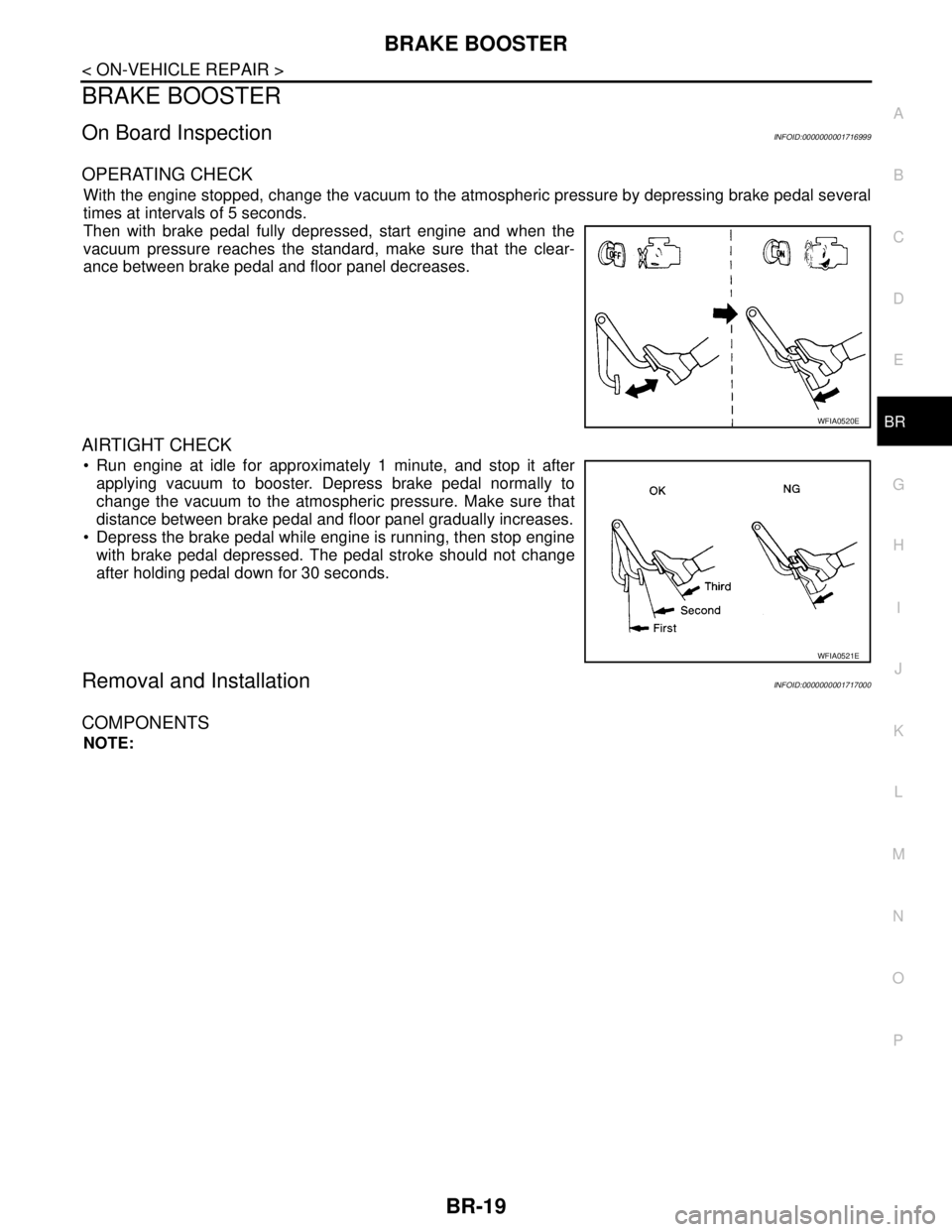
OPERATING CHECK
With the engine stopped, change the vacuum to the atmospheric pressure by depressing brake pedal several
times at intervals of 5 seconds.
Then with brake pedal fully depressed, start engine and when the
vacuum pressure reaches the standard, make sure that the clear-
ance between brake pedal and floor panel decreases.
AIRTIGHT CHECK
Run engine at idle for approximately 1 minute, and stop it after
applying vacuum to booster. Depress brake pedal normally to
change the vacuum to the atmospheric pressure. Make sure that
distance between brake pedal and floor panel gradually increases.
Depress the brake pedal while engine is running, then stop engine
with brake pedal depressed. The pedal stroke should not change
after holding pedal down for 30 seconds.
Removal and InstallationINFOID:0000000001717000
COMPONENTS
NOTE:
WFIA0520E
WFIA0521E
Page 213 of 5883
BRAKE BOOSTER
BR-21
< ON-VEHICLE REPAIR >
C
D
E
G
H
I
J
K
L
MA
B
BR
N
O
P
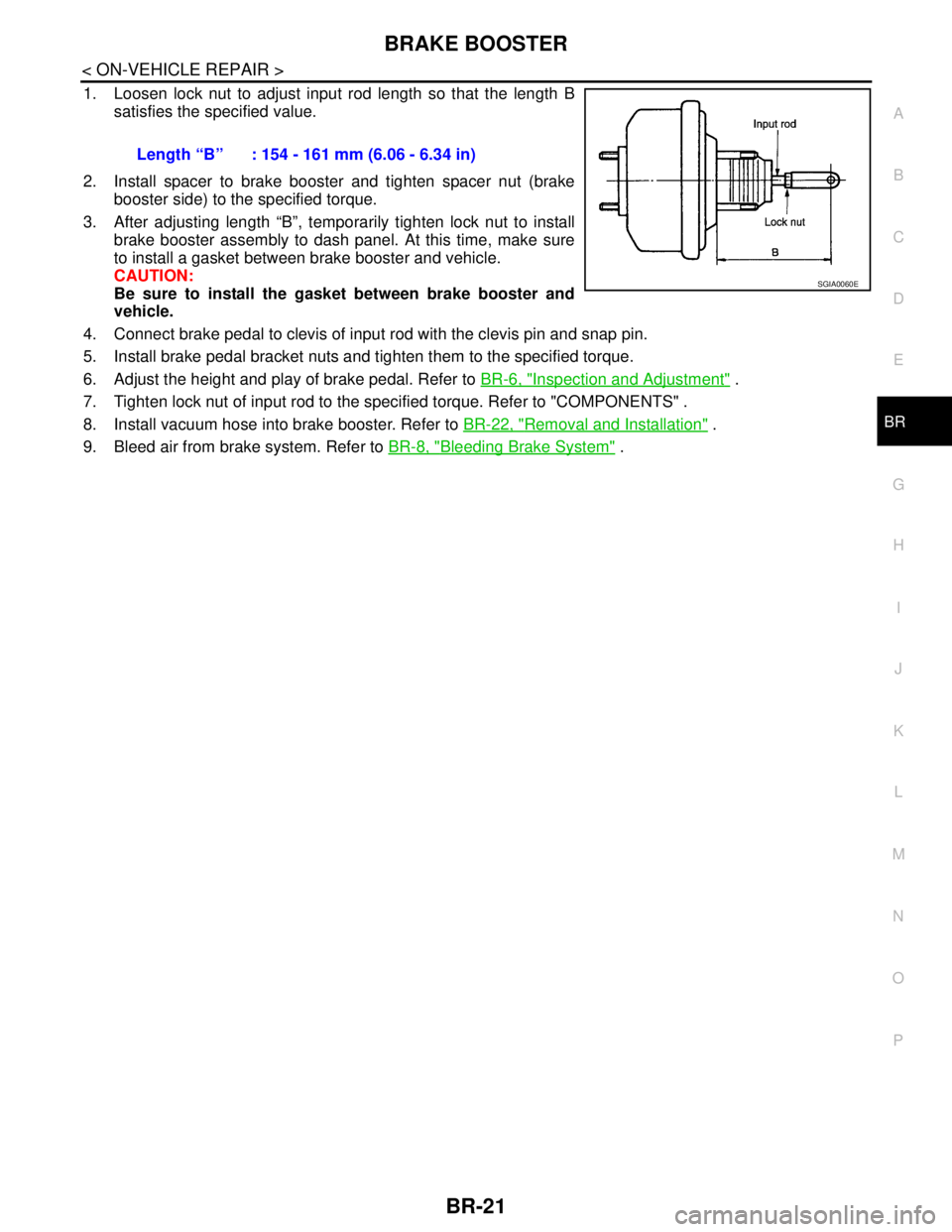
1. Loosen lock nut to adjust input rod length so that the length B
satisfies the specified value.
2. Install spacer to brake booster and tighten spacer nut (brake
booster side) to the specified torque.
3. After adjusting length “B”, temporarily tighten lock nut to install
brake booster assembly to dash panel. At this time, make sure
to install a gasket between brake booster and vehicle.
CAUTION:
Be sure to install the gasket between brake booster and
vehicle.
4. Connect brake pedal to clevis of input rod with the clevis pin and snap pin.
5. Install brake pedal bracket nuts and tighten them to the specified torque.
6. Adjust the height and play of brake pedal. Refer to BR-6, "
Inspection and Adjustment" .
7. Tighten lock nut of input rod to the specified torque. Refer to "COMPONENTS" .
8. Install vacuum hose into brake booster. Refer to BR-22, "
Removal and Installation" .
9. Bleed air from brake system. Refer to BR-8, "
Bleeding Brake System" . Length “B” : 154 - 161 mm (6.06 - 6.34 in)
SGIA0060E
Page 221 of 5883
REAR DISC BRAKE
BR-29
< ON-VEHICLE REPAIR >
C
D
E
G
H
I
J
K
L
MA
B
BR
N
O
P
3. Drain brake fluid. Refer to BR-8, "Bleeding Brake System".
4. Remove connecting bolt and torque member bolts using power tool, and remove cylinder body.
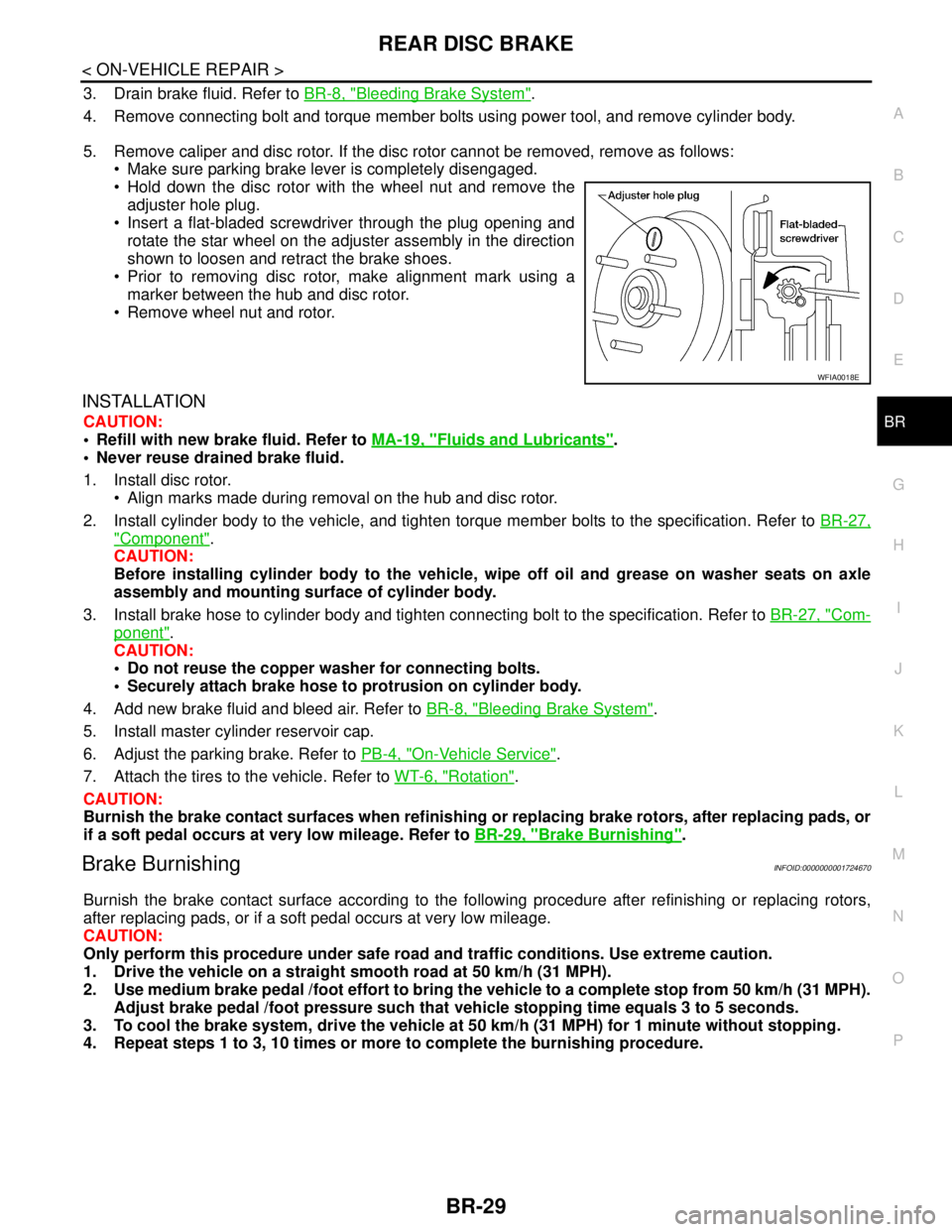
5. Remove caliper and disc rotor. If the disc rotor cannot be removed, remove as follows:
Make sure parking brake lever is completely disengaged.
Hold down the disc rotor with the wheel nut and remove the
adjuster hole plug.
Insert a flat-bladed screwdriver through the plug opening and
rotate the star wheel on the adjuster assembly in the direction
shown to loosen and retract the brake shoes.
Prior to removing disc rotor, make alignment mark using a
marker between the hub and disc rotor.
Remove wheel nut and rotor.
INSTALLATION
CAUTION:
Refill with new brake fluid. Refer to MA-19, "
Fluids and Lubricants".
Never reuse drained brake fluid.
1. Install disc rotor.
Align marks made during removal on the hub and disc rotor.
2. Install cylinder body to the vehicle, and tighten torque member bolts to the specification. Refer to BR-27,
"Component".
CAUTION:
Before installing cylinder body to the vehicle, wipe off oil and grease on washer seats on axle
assembly and mounting surface of cylinder body.
3. Install brake hose to cylinder body and tighten connecting bolt to the specification. Refer to BR-27, "
Com-
ponent".
CAUTION:
Do not reuse the copper washer for connecting bolts.
Securely attach brake hose to protrusion on cylinder body.
4. Add new brake fluid and bleed air. Refer to BR-8, "
Bleeding Brake System".
5. Install master cylinder reservoir cap.
6. Adjust the parking brake. Refer to PB-4, "
On-Vehicle Service".
7. Attach the tires to the vehicle. Refer to WT-6, "
Rotation".
CAUTION:
Burnish the brake contact surfaces when refinishing or replacing brake rotors, after replacing pads, or
if a soft pedal occurs at very low mileage. Refer to BR-29, "
Brake Burnishing".
Brake BurnishingINFOID:0000000001724670
Burnish the brake contact surface according to the following procedure after refinishing or replacing rotors,
after replacing pads, or if a soft pedal occurs at very low mileage.
CAUTION:
Only perform this procedure under safe road and traffic conditions. Use extreme caution.
1. Drive the vehicle on a straight smooth road at 50 km/h (31 MPH).
2. Use medium brake pedal /foot effort to bring the vehicle to a complete stop from 50 km/h (31 MPH).
Adjust brake pedal /foot pressure such that vehicle stopping time equals 3 to 5 seconds.
3. To cool the brake system, drive the vehicle at 50 km/h (31 MPH) for 1 minute without stopping.
4. Repeat steps 1 to 3, 10 times or more to complete the burnishing procedure.
WFIA0018E
Page 249 of 5883
![NISSAN TIIDA 2007 Service Owners Guide BRC-16
< FUNCTION DIAGNOSIS >[ABS]
TCS
TCS
System DiagramINFOID:0000000001731212
System DescriptionINFOID:0000000001731213
Traction Control System is a function that electronically controls engine t](/img/5/57395/w960_57395-248.png "NISSAN TIIDA 2007 Service Owners Guide BRC-16
< FUNCTION DIAGNOSIS >[ABS]
TCS
TCS
System DiagramINFOID:0000000001731212
System DescriptionINFOID:0000000001731213
Traction Control System is a function that electronically controls engine t")
BRC-16
< FUNCTION DIAGNOSIS >[ABS]
TCS
TCS
System DiagramINFOID:0000000001731212
System DescriptionINFOID:0000000001731213
Traction Control System is a function that electronically controls engine torque, brake fluid pressure and A/T
gear position to ensure the optimum slippage ratio at drive wheels by computing wheel speed signals from 4
wheel sensors. When ABS actuator and electric unit (control unit) detects a spin at drive wheels (rear
wheels), it compares wheel speed signals from all 4 wheels. At this time, LH and RH rear brake fluid pres-
sure are controlled, while fuel being cut to engine and throttle valve being closed to reduce engine torque by
the control unit. Further more, throttle position is continuously controlled to ensure the optimum engine
torque at all times.
During TCS operation, it informs driver of system operation by flashing SLIP indicator lamp.
Electrical system diagnosis by CONSULT-III is available.
AWFIA0012GB
Page 292 of 5883
![NISSAN TIIDA 2007 Service Owners Guide U1000 CAN COMM CIRCUIT
BRC-59
< COMPONENT DIAGNOSIS >[ABS]
C
D
E
G
H
I
J
K
L
MA
B
BRC
N
O
P
U1000 CAN COMM CIRCUIT
DescriptionINFOID:0000000001731319
CAN (Controller Area Network) is a serial communic](/img/5/57395/w960_57395-291.png "NISSAN TIIDA 2007 Service Owners Guide U1000 CAN COMM CIRCUIT
BRC-59
< COMPONENT DIAGNOSIS >[ABS]
C
D
E
G
H
I
J
K
L
MA
B
BRC
N
O
P
U1000 CAN COMM CIRCUIT
DescriptionINFOID:0000000001731319
CAN (Controller Area Network) is a serial communic")
U1000 CAN COMM CIRCUIT
BRC-59
< COMPONENT DIAGNOSIS >[ABS]
C
D
E
G
H
I
J
K
L
MA
B
BRC
N
O
P
U1000 CAN COMM CIRCUIT
DescriptionINFOID:0000000001731319
CAN (Controller Area Network) is a serial communication line for real time application. It is an on-vehicle mul-
tiplex communication line with high data communication speed and excellent error detection ability. Many elec-
tronic control units are equipped onto a vehicle, and each control unit shares information and links with other
control units during operation (not independent). In CAN communication, control units are connected with 2
communication lines (CAN H line, CAN L line) allowing a high rate of information transmission with less wiring.
Each control unit transmits/receives data but selectively reads required data only.
DTC LogicINFOID:0000000001731320
DTC DETECTION LOGIC
Diagnosis ProcedureINFOID:0000000001731321
INSPECTION PROCEDURE
1.CHECK CONNECTOR
1. Turn ignition switch OFF, disconnect the ABS actuator and electric unit (control unit) connector, and check
the terminals for deformation, disconnection, looseness, and so on. If there is a malfunction, repair or
replace the terminal.
2. Reconnect connector and perform self-diagnosis.
Is
“CAN COMM CIRCUIT” displayed in self-diagnosis display items?
YES >> Print out the self-diagnostic results, and refer to LAN-22, "Trouble Diagnosis Flow Chart".
NO >> Connector terminal is loose, damaged, open, or shorted.
Special Repair RequirementINFOID:0000000001731322
1.ADJUSTMENT OF STEERING ANGLE SENSOR NEUTRAL POSITION
Always perform neutral position adjustment for the steering angle sensor when replacing the ABS actuator
and electric unit (control unit). Refer to BRC-90, "
ADJUSTMENT OF STEERING ANGLE SENSOR NEUTRAL
POSITION : Description".
>> GO TO 2
2.CALIBRATION OF DECEL G SENSOR
Always perform calibration of decel G sensor when replacing the ABS actuator and electric unit (control unit).
Refer to BRC-91, "
CALIBRATION OF DECEL G SENSOR : Description".
>> END
DTC Display item Malfunction detected condition Possible cause
U1000 CAN COMM CIRCUITWhen ABS actuator and electric unit (control unit) is not
transmitting or receiving CAN communication signal for 2
seconds or more. CAN communication line
ABS actuator and electric unit
(control unit)
Page 312 of 5883
![NISSAN TIIDA 2007 Service Owners Guide NORMAL OPERATING CONDITION
BRC-79
< SYMPTOM DIAGNOSIS >[ABS]
C
D
E
G
H
I
J
K
L
MA
B
BRC
N
O
P
NORMAL OPERATING CONDITION
DescriptionINFOID:0000000001731350
Symptom Result
Slight vibrations are felt on](/img/5/57395/w960_57395-311.png "NISSAN TIIDA 2007 Service Owners Guide NORMAL OPERATING CONDITION
BRC-79
< SYMPTOM DIAGNOSIS >[ABS]
C
D
E
G
H
I
J
K
L
MA
B
BRC
N
O
P
NORMAL OPERATING CONDITION
DescriptionINFOID:0000000001731350
Symptom Result
Slight vibrations are felt on")
NORMAL OPERATING CONDITION
BRC-79
< SYMPTOM DIAGNOSIS >[ABS]
C
D
E
G
H
I
J
K
L
MA
B
BRC
N
O
P
NORMAL OPERATING CONDITION
DescriptionINFOID:0000000001731350
Symptom Result
Slight vibrations are felt on the brake pedal and the operation noises occur, when VDC, TCS or ABS is acti-
vated.
This is a normal condi-
tion due to the VDC,
TCS or ABS activation. Stopping distance is longer than that of vehicles without ABS when the vehicle drives on rough, gravel, or
snow-covered (fresh, deep snow) roads.
The brake pedal moves and generates noises, when TCS or VDC is activated due to rapid acceleration or
sharp turn.
The brake pedal vibrates and motor operation noises occur from the engine room, after the engine starts and
just after the vehicle starts.This is normal, and it is
caused by the ABS op-
eration check.
Depending on the road conditions, the driver may experience a sluggish feel. This is normal, because
TCS places the highest
priority on the optimum
traction (stability). TCS may activate momentarily if wheel speed changes when driving over location where friction coefficient
varies, when downshifting, or when fully depressing accelerator pedal.
The ABS warning lamp, VDC OFF indicator lamp and SLIP indicator lamp may turn ON when the vehicle is
subject to strong shaking or large vibration, such as when the vehicle is rotating on a turntable or located on
a ship while the engine is running. In this case, restart the
engine on a normal
road. If the normal con-
dition is restored, there
is no malfunction. At
that time, erase the self-
diagnosis memory. VDC may not operate normally or the ABS warning lamp, VDC OFF indicator lamp, and SLIP indicator lamp
may illuminate, when running on a special road that is extremely slanted (e.g. bank in a circuit course).
A malfunction may occur in the yaw rate/side/decel G sensor system, when the vehicle turns sharply, such
as during a spin turn, axle turn, or drift driving, while the VDC function is off (VDC OFF indicator lamp illumi-
nated).
The vehicle speed will not increase even though the accelerator pedal is depressed, when inspecting the
speedometer on a 2-wheel chassis dynamometer. Normal (Deactivate the
VDC/TCS function be-
fore performing an in-
spection on a chassis
dynamometer.)
VDC OFF indicator lamp and SLIP indicator lamp may simultaneously turn on when low tire pressure warn-
ing lamp turns on.This is not a VDC sys-
tem error but results
from characteristic
change of tire.
Page 329 of 5883
![NISSAN TIIDA 2007 Service Owners Guide BRC-96
< FUNCTION DIAGNOSIS >[ESP/TCS/ABS]
TCS
TCS
System DiagramINFOID:0000000001731069
System DescriptionINFOID:0000000001731070
Traction Control System is a function that electronically controls](/img/5/57395/w960_57395-328.png "NISSAN TIIDA 2007 Service Owners Guide BRC-96
< FUNCTION DIAGNOSIS >[ESP/TCS/ABS]
TCS
TCS
System DiagramINFOID:0000000001731069
System DescriptionINFOID:0000000001731070
Traction Control System is a function that electronically controls")
BRC-96
< FUNCTION DIAGNOSIS >[ESP/TCS/ABS]
TCS
TCS
System DiagramINFOID:0000000001731069
System DescriptionINFOID:0000000001731070
Traction Control System is a function that electronically controls engine torque, brake fluid pressure and A/T
gear position to ensure the optimum slippage ratio at drive wheels by computing wheel speed signals from 4
wheel sensors. When ABS actuator and electric unit (control unit) detects a spin at drive wheels (rear
wheels), it compares wheel speed signals from all 4 wheels. At this time, LH and RH rear brake fluid pres-
sure are controlled, while fuel being cut to engine and throttle valve being closed to reduce engine torque by
the control unit. Further more, throttle position is continuously controlled to ensure the optimum engine
torque at all times.
During TCS operation, it informs driver of system operation by flashing SLIP indicator lamp.
Electrical system diagnosis by CONSULT-III is available.
AWFIA0012GB
Page 381 of 5883
![NISSAN TIIDA 2007 Service Owners Guide BRC-148
< COMPONENT DIAGNOSIS >[ESP/TCS/ABS]
C1156 ST ANG SEN COM CIR
C1156 ST ANG SEN COM CIR
DescriptionINFOID:0000000001731152
The steering angle sensor is connected to the ABS actuator and electri](/img/5/57395/w960_57395-380.png "NISSAN TIIDA 2007 Service Owners Guide BRC-148
< COMPONENT DIAGNOSIS >[ESP/TCS/ABS]
C1156 ST ANG SEN COM CIR
C1156 ST ANG SEN COM CIR
DescriptionINFOID:0000000001731152
The steering angle sensor is connected to the ABS actuator and electri")
BRC-148
< COMPONENT DIAGNOSIS >[ESP/TCS/ABS]
C1156 ST ANG SEN COM CIR
C1156 ST ANG SEN COM CIR
DescriptionINFOID:0000000001731152
The steering angle sensor is connected to the ABS actuator and electric unit (control unit) in addition to CAN
lines. CAN (Controller Area Network) is a serial communication line for real time application. It is an on-vehicle
multiplex communication line with high data communication speed and excellent error detection ability. Many
electronic control units are equipped onto a vehicle, and each control unit shares information and links with
other control units during operation (not independent). In CAN communication, control units are connected
with 2 communication lines (CAN H line, CAN L line) allowing a high rate of information transmission with less
wiring. Each control unit transmits/receives data but selectively reads required data only.
DTC LogicINFOID:0000000001731153
DTC DETECTION LOGIC
DTC CONFIRMATION PROCEDURE
1.CHECK SELF-DIAGNOSIS RESULTS
Check the self-diagnosis results.
Is above displayed on the self-diagnosis display?
YES >> Proceed to diagnosis procedure. Refer to BRC-148, "Diagnosis Procedure".
NO >> INSPECTION END
Diagnosis ProcedureINFOID:0000000001731154
INSPECTION PROCEDURE
1.CHECK CONNECTOR
1. Turn ignition switch OFF and disconnect ABS actuator and electric unit (control unit) connector E125,
check terminal for deformation, disconnection, looseness, and so on. If any malfunction is found, repair or
replace terminal.
2. Reconnect connector and perform self-diagnosis.
Is above displayed on the self-diagnosis display?
YES >> Refer to BRC-86, "Work Flow".
NO >> INSPECTION END
DTC Display item Malfunction detected condition Possible cause
C1156 ST ANG SEN COM CIRWhen steering angle sensor is not transmitting CAN
communication signal to the ABS actuator and electric
unit (control unit). Harness or connector
CAN communication line
Steering angle sensor
ABS actuator and electric unit
(control unit)
Self-diagnosis results
ST ANG SEN COM CIR
Self-diagnosis results
CAN COMM CIRCUIT
ST ANG SEN COM CIR
Page 386 of 5883
![NISSAN TIIDA 2007 Service Owners Guide U1000 CAN COMM CIRCUIT
BRC-153
< COMPONENT DIAGNOSIS >[ESP/TCS/ABS]
C
D
E
G
H
I
J
K
L
MA
B
BRC
N
O
P
U1000 CAN COMM CIRCUIT
DescriptionINFOID:0000000001731176
CAN (Controller Area Network) is a serial](/img/5/57395/w960_57395-385.png "NISSAN TIIDA 2007 Service Owners Guide U1000 CAN COMM CIRCUIT
BRC-153
< COMPONENT DIAGNOSIS >[ESP/TCS/ABS]
C
D
E
G
H
I
J
K
L
MA
B
BRC
N
O
P
U1000 CAN COMM CIRCUIT
DescriptionINFOID:0000000001731176
CAN (Controller Area Network) is a serial")
U1000 CAN COMM CIRCUIT
BRC-153
< COMPONENT DIAGNOSIS >[ESP/TCS/ABS]
C
D
E
G
H
I
J
K
L
MA
B
BRC
N
O
P
U1000 CAN COMM CIRCUIT
DescriptionINFOID:0000000001731176
CAN (Controller Area Network) is a serial communication line for real time application. It is an on-vehicle mul-
tiplex communication line with high data communication speed and excellent error detection ability. Many elec-
tronic control units are equipped onto a vehicle, and each control unit shares information and links with other
control units during operation (not independent). In CAN communication, control units are connected with 2
communication lines (CAN H line, CAN L line) allowing a high rate of information transmission with less wiring.
Each control unit transmits/receives data but selectively reads required data only.
DTC LogicINFOID:0000000001731177
DTC DETECTION LOGIC
Diagnosis ProcedureINFOID:0000000001731178
INSPECTION PROCEDURE
1.CHECK CONNECTOR
1. Turn ignition switch OFF, disconnect the ABS actuator and electric unit (control unit) connector, and check
the terminals for deformation, disconnection, looseness, and so on. If there is a malfunction, repair or
replace the terminal.
2. Reconnect connector and perform self-diagnosis.
Is
“CAN COMM CIRCUIT” displayed in self-diagnosis display items?
YES >> Print out the self-diagnostic results, and refer to BRC-86, "Work Flow".
NO >> Connector terminal is loose, damaged, open, or shorted.
Special Repair RequirementINFOID:0000000001731179
1.ADJUSTMENT OF STEERING ANGLE SENSOR NEUTRAL POSITION
Always perform neutral position adjustment for the steering angle sensor when replacing the ABS actuator
and electric unit (control unit). Refer to BRC-90, "
ADJUSTMENT OF STEERING ANGLE SENSOR NEUTRAL
POSITION : Description".
>> GO TO 2
2.CALIBRATION OF DECEL G SENSOR
Always perform calibration of decel G sensor when replacing the ABS actuator and electric unit (control unit).
Refer to BRC-91, "
CALIBRATION OF DECEL G SENSOR : Description".
>> END
DTC Display item Malfunction detected condition Possible cause
U1000 CAN COMM CIRCUITWhen ABS actuator and electric unit (control unit) is not
transmitting or receiving CAN communication signal for 2
seconds or more. CAN communication line
ABS actuator and electric unit
(control unit)
Page 411 of 5883
![NISSAN TIIDA 2007 Service Owners Guide BRC-178
< SYMPTOM DIAGNOSIS >[ESP/TCS/ABS]
NORMAL OPERATING CONDITION
NORMAL OPERATING CONDITION
DescriptionINFOID:0000000001731207
Symptom Result
Slight vibrations are felt on the brake pedal and the](/img/5/57395/w960_57395-410.png "NISSAN TIIDA 2007 Service Owners Guide BRC-178
< SYMPTOM DIAGNOSIS >[ESP/TCS/ABS]
NORMAL OPERATING CONDITION
NORMAL OPERATING CONDITION
DescriptionINFOID:0000000001731207
Symptom Result
Slight vibrations are felt on the brake pedal and the")
BRC-178
< SYMPTOM DIAGNOSIS >[ESP/TCS/ABS]
NORMAL OPERATING CONDITION
NORMAL OPERATING CONDITION
DescriptionINFOID:0000000001731207
Symptom Result
Slight vibrations are felt on the brake pedal and the operation noises occur, when VDC, TCS or ABS is acti-
vated.
This is a normal condi-
tion due to the VDC,
TCS or ABS activation. Stopping distance is longer than that of vehicles without ABS when the vehicle drives on rough, gravel, or
snow-covered (fresh, deep snow) roads.
The brake pedal moves and generates noises, when TCS or VDC is activated due to rapid acceleration or
sharp turn.
The brake pedal vibrates and motor operation noises occur from the engine room, after the engine starts and
just after the vehicle starts.This is normal, and it is
caused by the ABS op-
eration check.
Depending on the road conditions, the driver may experience a sluggish feel. This is normal, because
TCS places the highest
priority on the optimum
traction (stability). TCS may activate momentarily if wheel speed changes when driving over location where friction coefficient
varies, when downshifting, or when fully depressing accelerator pedal.
The ABS warning lamp, VDC OFF indicator lamp and SLIP indicator lamp may turn ON when the vehicle is
subject to strong shaking or large vibration, such as when the vehicle is rotating on a turntable or located on
a ship while the engine is running. In this case, restart the
engine on a normal
road. If the normal con-
dition is restored, there
is no malfunction. At
that time, erase the self-
diagnosis memory. VDC may not operate normally or the ABS warning lamp, VDC OFF indicator lamp, and SLIP indicator lamp
may illuminate, when running on a special road that is extremely slanted (e.g. bank in a circuit course).
A malfunction may occur in the yaw rate/side/decel G sensor system, when the vehicle turns sharply, such
as during a spin turn, axle turn, or drift driving, while the VDC function is off (VDC OFF indicator lamp illumi-
nated).
The vehicle speed will not increase even though the accelerator pedal is depressed, when inspecting the
speedometer on a 2-wheel chassis dynamometer. Normal (Deactivate the
VDC/TCS function be-
fore performing an in-
spection on a chassis
dynamometer.)
VDC OFF indicator lamp and SLIP indicator lamp may simultaneously turn on when low tire pressure warn-
ing lamp turns on.This is not a VDC sys-
tem error but results
from characteristic
change of tire.