time NISSAN TIIDA 2007 Service Workshop Manual
[x] Cancel search | Manufacturer: NISSAN, Model Year: 2007, Model line: TIIDA, Model: NISSAN TIIDA 2007Pages: 5883, PDF Size: 78.95 MB
Page 535 of 5883
![NISSAN TIIDA 2007 Service Workshop Manual CO-54
< SYMPTOM DIAGNOSIS >[K9K]
OVERHEATING CAUSE ANALYSIS
Except cool-
ing system
parts mal-
function— Overload on engineAbusive drivingHigh engine rpm under no
load
Driving in low gear for ex-](/img/5/57395/w960_57395-534.png "NISSAN TIIDA 2007 Service Workshop Manual CO-54
< SYMPTOM DIAGNOSIS >[K9K]
OVERHEATING CAUSE ANALYSIS
Except cool-
ing system
parts mal-
function— Overload on engineAbusive drivingHigh engine rpm under no
load
Driving in low gear for ex-")
CO-54
< SYMPTOM DIAGNOSIS >[K9K]
OVERHEATING CAUSE ANALYSIS
Except cool-
ing system
parts mal-
function— Overload on engineAbusive drivingHigh engine rpm under no
load
Driving in low gear for ex-
tended time
Driving at extremely high
speed
Powertrain system malfunc-
tion
— Installed improper size
wheels and tires
Dragging brakes
Improper ignition timing
Blocked or restricted air
flowBlocked bumper —
— Blocked radiator grilleInstalled car brassiere
Mud contamination or paper
clogging
Blocked radiator —
Blocked condenser
—
Installed large fog lamp Symptom Check items
Page 536 of 5883
![NISSAN TIIDA 2007 Service Workshop Manual PRECAUTIONS
CO-55
< PRECAUTION >[K9K]
C
D
E
F
G
H
I
J
K
L
MA
CO
N
P O
PRECAUTION
PRECAUTIONS
Precaution for Supplemental Restraint System (SRS) "AIR BAG" and "SEAT BELT
PRE-TENSIONER"
INFOID:00000000](/img/5/57395/w960_57395-535.png "NISSAN TIIDA 2007 Service Workshop Manual PRECAUTIONS
CO-55
< PRECAUTION >[K9K]
C
D
E
F
G
H
I
J
K
L
MA
CO
N
P O
PRECAUTION
PRECAUTIONS
Precaution for Supplemental Restraint System (SRS) \"AIR BAG\" and \"SEAT BELT
PRE-TENSIONER\"
INFOID:00000000")
PRECAUTIONS
CO-55
< PRECAUTION >[K9K]
C
D
E
F
G
H
I
J
K
L
MA
CO
N
P O
PRECAUTION
PRECAUTIONS
Precaution for Supplemental Restraint System (SRS) "AIR BAG" and "SEAT BELT
PRE-TENSIONER"
INFOID:0000000001534592
The Supplemental Restraint System such as “AIR BAG” and “SEAT BELT PRE-TENSIONER”, used along
with a front seat belt, helps to reduce the risk or severity of injury to the driver and front passenger for certain
types of collision. Information necessary to service the system safely is included in the SR and SB section of
this Service Manual.
WARNING:
To avoid rendering the SRS inoperative, which could increase the risk of personal injury or death in
the event of a collision which would result in air bag inflation, all maintenance must be performed by
an authorized NISSAN/INFINITI dealer.
Improper maintenance, including incorrect removal and installation of the SRS, can lead to personal
injury caused by unintentional activation of the system. For removal of Spiral Cable and Air Bag
Module, see the SR section.
Do not use electrical test equipment on any circuit related to the SRS unless instructed to in this
Service Manual. SRS wiring harnesses can be identified by yellow and/or orange harnesses or har-
ness connectors.
Precaution Necessary for Steering Wheel Rotation After Battery Disconnect
INFOID:0000000001534593
NOTE:
This Procedure is applied only to models with Intelligent Key system and NATS (NISSAN ANTI-THEFT SYS-
TEM).
Remove and install all control units after disconnecting both battery cables with the ignition knob in the
″LOCK″ position.
Always use CONSULT-II to perform self-diagnosis as a part of each function inspection after finishing work.
If DTC is detected, perform trouble diagnosis according to self-diagnostic results.
For models equipped with the Intelligent Key system and NATS, an electrically controlled steering lock mech-
anism is adopted on the key cylinder.
For this reason, if the battery is disconnected or if the battery is discharged, the steering wheel will lock and
steering wheel rotation will become impossible.
If steering wheel rotation is required when battery power is interrupted, follow the procedure below before
starting the repair operation.
OPERATION PROCEDURE
1. Connect both battery cables.
NOTE:
Supply power using jumper cables if battery is discharged.
2. Use the Intelligent Key or mechanical key to turn the ignition switch to the ″ACC″ position. At this time, the
steering lock will be released.
3. Disconnect both battery cables. The steering lock will remain released and the steering wheel can be
rotated.
4. Perform the necessary repair operation.
5. When the repair work is completed, return the ignition switch to the ″LOCK″ position before connecting
the battery cables. (At this time, the steering lock mechanism will engage.)
6. Perform a self-diagnosis check of all control units using CONSULT-II.
Precaution for Liquid GasketINFOID:0000000001534594
REMOVAL OF LIQUID GASKET SEALING
After removing nuts and bolts, separate the mating surface, using Tool and remove old liquid gasket sealing.
Page 540 of 5883
![NISSAN TIIDA 2007 Service Workshop Manual ENGINE COOLANT
CO-59
< ON-VEHICLE MAINTENANCE >[K9K]
C
D
E
F
G
H
I
J
K
L
MA
CO
N
P O
Put a cloth under the air relief plug to prevent engine coolant from dampening the crankshaft
position sensor.
Po](/img/5/57395/w960_57395-539.png "NISSAN TIIDA 2007 Service Workshop Manual ENGINE COOLANT
CO-59
< ON-VEHICLE MAINTENANCE >[K9K]
C
D
E
F
G
H
I
J
K
L
MA
CO
N
P O
Put a cloth under the air relief plug to prevent engine coolant from dampening the crankshaft
position sensor.
Po")
ENGINE COOLANT
CO-59
< ON-VEHICLE MAINTENANCE >[K9K]
C
D
E
F
G
H
I
J
K
L
MA
CO
N
P O
Put a cloth under the air relief plug to prevent engine coolant from dampening the crankshaft
position sensor.
Pour coolant to the MAX level line of the reservoir tank at
a rate of 2 liter (1-3/4 lamp qt.)/min. or lower.
3. Close the air relief plug.
CAUTION:
If the filling rate is too fast, this could lead to air being
mixed in the coolant. Be sure to fill the coolant slowly
according to the rate indicated above.
Use Insane Genuine Engine Coolant or equivalent mixed
with water (distilled or demineralized). Refer to MA-21,
"Engine Coolant Mixture Ratio".
4. Start engine without closing reservoir tank cap and keep engine racing at 1,500 rpm for about 2-3 minutes.
If necessary, pour engine coolant up to MAX level.
If coolant overflows reservoir tank hole, install filler cap.
Watch engine coolant temperature gauge so as not overheat the engine.
WARNING:
Be careful not to be scaled with hot engine coolant or vacuum pump when operating.
Radiator fan blade can start at any time and cause personal injuries.
5. Turn off the engine and loosen air relief plug until coolant spills from air relief hole.
6. Close the air relief plug and run the engine at 2,000 rpm until the upper hose becomes hot and radiator
fan operates. Leave the engine running approximately 5 minutes at idle speed and check for sound of
coolant flow while running engine from idle up to 3,000 rpm.
Sound may be noticeable at heater water cock.
7. If sound is heard, bleed air from cooling system by repeating steps 4 to 6 until coolant level no longer
drops.
Check the radiator lower hose for any signs of leakage.
8. Turn off the engine and let it cool down.
Cool down using a fan to reduce the time.
9. After cooling period, loosen the air relief plug and check if coolant spills from the air relief hole. if not,
remove the air relief plug until the coolant spills, and then close the relief air plug. Bleed air from cooling
system by repeating steps 6 to 10 until the coolant spills immediately.
10. Check the engine coolant level when engine is cool and refill to MAX level line if the level is lower.
Clean excess coolant from engine.
11. Check that the reservoir tank cap is tightened.
FlushingINFOID:0000000001381588
1. Install reservoir tank if removed.
If water drain plug on cylinder block is removed, close and tighten it. Refer to EM-314, "
Exploded
View".
2. Fill reservoir tank with water until water spills from the air relief hole, then close air relief plug. Reinstall
reservoir tank cap.
3. Run engine and warm it up to normal operating temperature.
4. Rev engine two or three times under no-load.
5. Stop engine and wait until it cools down.
6. Drain water.
7. Repeat steps 1 through 6 until clear water begins to drain from radiator.
8. Blow compressed air into cooling circuit through the reservoir tank valve hole to drain all the water.
JPBIA0306ZZ
Engine coolant capacity
(With reservoir tank at MAX): Refer to MA-19, "Fluids and Lubricants".
Reservoir tank capacity : Refer to MA-19, "
Fluids and Lubricants".
Page 555 of 5883
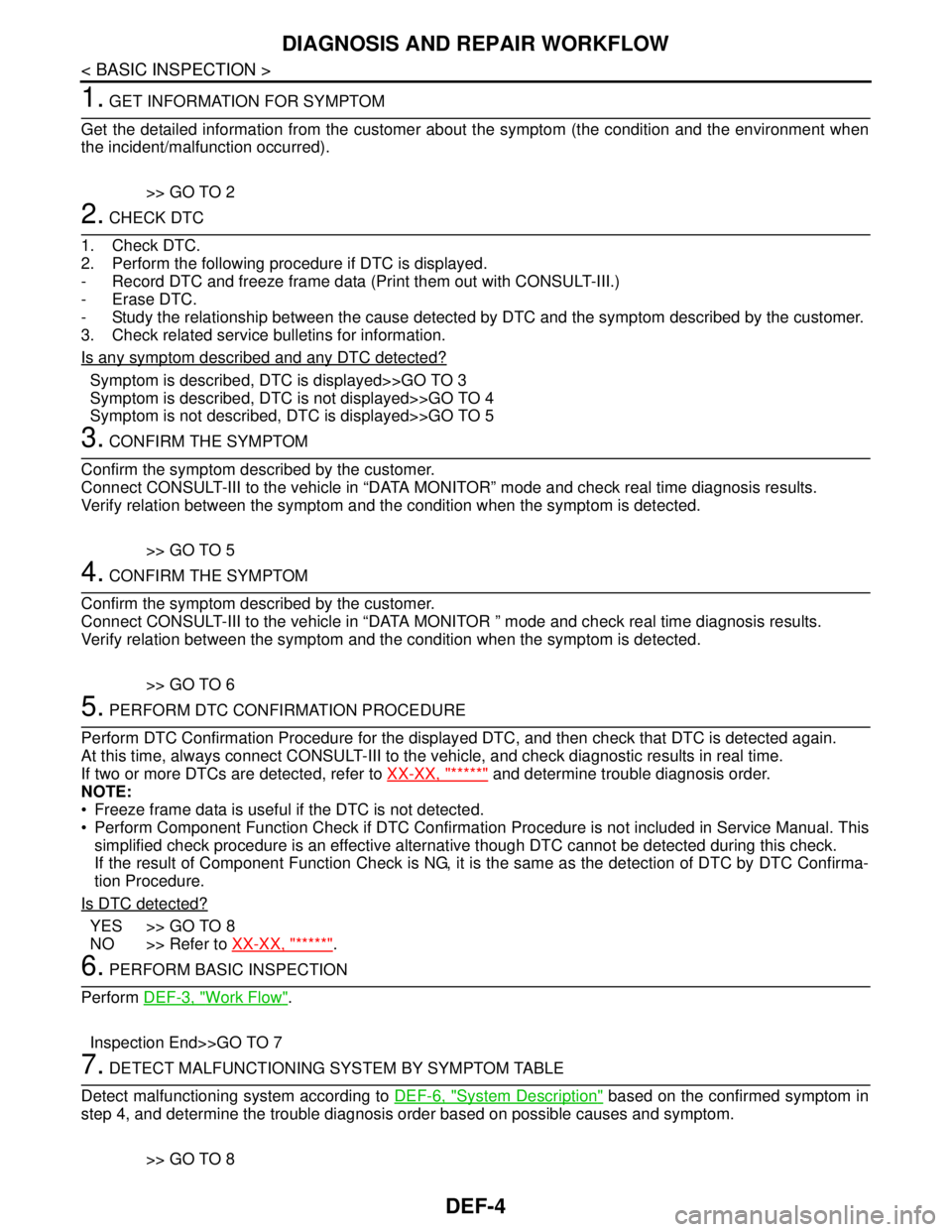
DEF-4
< BASIC INSPECTION >
DIAGNOSIS AND REPAIR WORKFLOW
1. GET INFORMATION FOR SYMPTOM
Get the detailed information from the customer about the symptom (the condition and the environment when
the incident/malfunction occurred).
>> GO TO 2
2. CHECK DTC
1. Check DTC.
2. Perform the following procedure if DTC is displayed.
- Record DTC and freeze frame data (Print them out with CONSULT-III.)
- Erase DTC.
- Study the relationship between the cause detected by DTC and the symptom described by the customer.
3. Check related service bulletins for information.
Is any symptom described and any DTC detected?
Symptom is described, DTC is displayed>>GO TO 3
Symptom is described, DTC is not displayed>>GO TO 4
Symptom is not described, DTC is displayed>>GO TO 5
3. CONFIRM THE SYMPTOM
Confirm the symptom described by the customer.
Connect CONSULT-III to the vehicle in “DATA MONITOR” mode and check real time diagnosis results.
Verify relation between the symptom and the condition when the symptom is detected.
>> GO TO 5
4. CONFIRM THE SYMPTOM
Confirm the symptom described by the customer.
Connect CONSULT-III to the vehicle in “DATA MONITOR ” mode and check real time diagnosis results.
Verify relation between the symptom and the condition when the symptom is detected.
>> GO TO 6
5. PERFORM DTC CONFIRMATION PROCEDURE
Perform DTC Confirmation Procedure for the displayed DTC, and then check that DTC is detected again.
At this time, always connect CONSULT-III to the vehicle, and check diagnostic results in real time.
If two or more DTCs are detected, refer to XX-XX, "*****"
and determine trouble diagnosis order.
NOTE:
Freeze frame data is useful if the DTC is not detected.
Perform Component Function Check if DTC Confirmation Procedure is not included in Service Manual. This
simplified check procedure is an effective alternative though DTC cannot be detected during this check.
If the result of Component Function Check is NG, it is the same as the detection of DTC by DTC Confirma-
tion Procedure.
Is DTC detected?
YES >> GO TO 8
NO >> Refer to XX-XX, "*****"
.
6. PERFORM BASIC INSPECTION
Perform DEF-3, "
Work Flow".
Inspection End>>GO TO 7
7. DETECT MALFUNCTIONING SYSTEM BY SYMPTOM TABLE
Detect malfunctioning system according to DEF-6, "
System Description" based on the confirmed symptom in
step 4, and determine the trouble diagnosis order based on possible causes and symptom.
>> GO TO 8
Page 557 of 5883
DEF-6
< FUNCTION DIAGNOSIS >
REAR WINDOW DEFOGGER SYSTEM
FUNCTION DIAGNOSIS
REAR WINDOW DEFOGGER SYSTEM
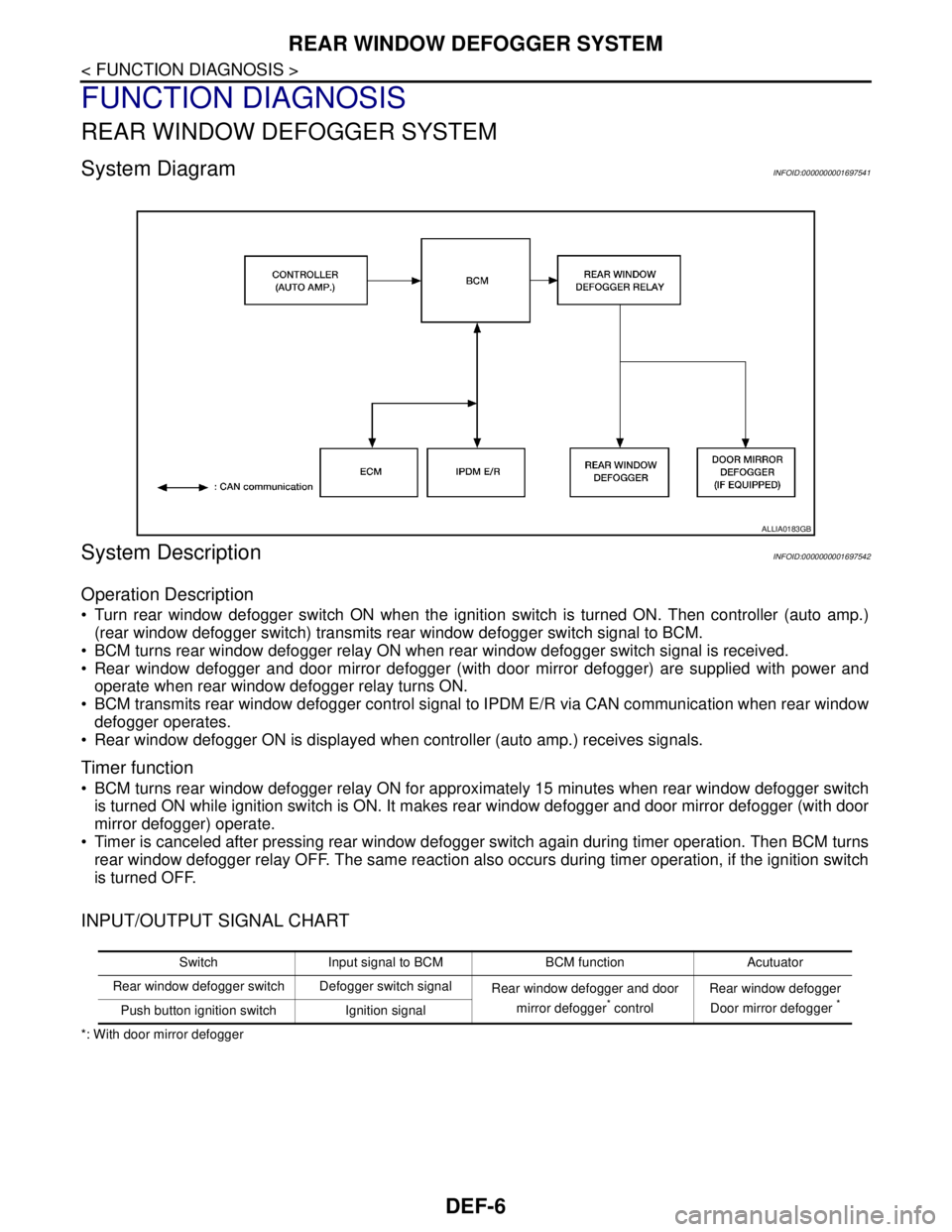
System DiagramINFOID:0000000001697541
System DescriptionINFOID:0000000001697542
Operation Description
Turn rear window defogger switch ON when the ignition switch is turned ON. Then controller (auto amp.)
(rear window defogger switch) transmits rear window defogger switch signal to BCM.
BCM turns rear window defogger relay ON when rear window defogger switch signal is received.
Rear window defogger and door mirror defogger (with door mirror defogger) are supplied with power and
operate when rear window defogger relay turns ON.
BCM transmits rear window defogger control signal to IPDM E/R via CAN communication when rear window
defogger operates.
Rear window defogger ON is displayed when controller (auto amp.) receives signals.
Timer function
BCM turns rear window defogger relay ON for approximately 15 minutes when rear window defogger switch
is turned ON while ignition switch is ON. It makes rear window defogger and door mirror defogger (with door
mirror defogger) operate.
Timer is canceled after pressing rear window defogger switch again during timer operation. Then BCM turns
rear window defogger relay OFF. The same reaction also occurs during timer operation, if the ignition switch
is turned OFF.
INPUT/OUTPUT SIGNAL CHART
*: With door mirror defogger
ALLIA0183GB
Switch Input signal to BCM BCM function Acutuator
Rear window defogger switch Defogger switch signal
Rear window defogger and door
mirror defogger
* controlRear window defogger
Door mirror defogger *Push button ignition switch Ignition signal
Page 558 of 5883
REAR WINDOW DEFOGGER SYSTEM
DEF-7
< FUNCTION DIAGNOSIS >
C
D
E
F
G
H
I
J
K
MA
B
DEF
N
O
P
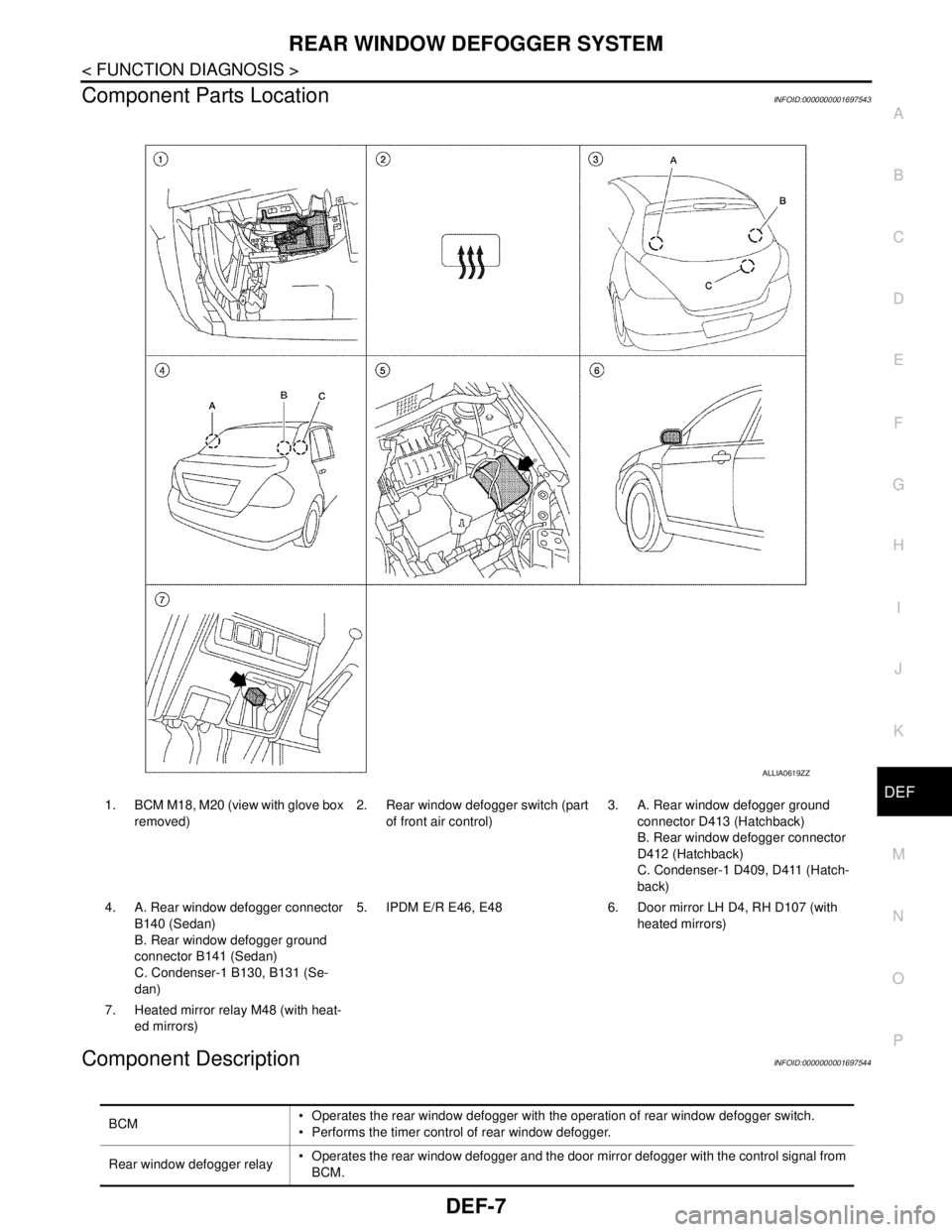
Component Parts LocationINFOID:0000000001697543
Component DescriptionINFOID:0000000001697544
ALLIA0619ZZ
1. BCM M18, M20 (view with glove box
removed)2. Rear window defogger switch (part
of front air control)3. A. Rear window defogger ground
connector D413 (Hatchback)
B. Rear window defogger connector
D412 (Hatchback)
C. Condenser-1 D409, D411 (Hatch-
back)
4. A. Rear window defogger connector
B140 (Sedan)
B. Rear window defogger ground
connector B141 (Sedan)
C. Condenser-1 B130, B131 (Se-
dan)5. IPDM E/R E46, E48 6. Door mirror LH D4, RH D107 (with
heated mirrors)
7. Heated mirror relay M48 (with heat-
ed mirrors)
BCM Operates the rear window defogger with the operation of rear window defogger switch.
Performs the timer control of rear window defogger.
Rear window defogger relay Operates the rear window defogger and the door mirror defogger with the control signal from
BCM.
Page 606 of 5883
![NISSAN TIIDA 2007 Service Workshop Manual DIAGNOSIS AND REPAIR WORKFLOW
DLK-17
< BASIC INSPECTION >[WITH I-KEY, WITHOUT SUPER LOCK]
C
D
E
F
G
H
I
J
L
MA
B
DLK
N
O
P
1.GET INFORMATION FOR SYMPTOM
Get the detailed information from the customer](/img/5/57395/w960_57395-605.png "NISSAN TIIDA 2007 Service Workshop Manual DIAGNOSIS AND REPAIR WORKFLOW
DLK-17
< BASIC INSPECTION >[WITH I-KEY, WITHOUT SUPER LOCK]
C
D
E
F
G
H
I
J
L
MA
B
DLK
N
O
P
1.GET INFORMATION FOR SYMPTOM
Get the detailed information from the customer")
DIAGNOSIS AND REPAIR WORKFLOW
DLK-17
< BASIC INSPECTION >[WITH I-KEY, WITHOUT SUPER LOCK]
C
D
E
F
G
H
I
J
L
MA
B
DLK
N
O
P
1.GET INFORMATION FOR SYMPTOM
Get the detailed information from the customer about the symptom (the condition and the environment when
the incident/malfunction occurred).
>> GO TO 2.
2.CHECK DTC
1. Check DTC for Intelligent Key unit and BCM.
2. Perform the following procedure if DTC is displayed.
- Erase DTC.
- Study the relationship between the cause detected by DTC and the symptom described by the customer.
3. Check related service bulletins for information.
Is any symptom described and any DTC detected?
Symptom is described, DTC is displayed>>GO TO 3.
Symptom is described, DTC is not displayed>>GO TO 4.
Symptom is not described, DTC is displayed>>GO TO 5.
3.CONFIRM THE SYMPTOM
Confirm the symptom described by the customer.
Connect CONSULT-III to the vehicle in “DATA MONITOR” mode and check real-time diagnosis results.
Verify relation between the symptom and the condition when the symptom is detected.
>> GO TO 5.
4.CONFIRM THE SYMPTOM
Confirm the symptom described by the customer.
Connect CONSULT-III to the vehicle in “DATA MONITOR ” mode and check real-time diagnosis results.
Verify relation between the symptom and the condition when the symptom is detected.
>> GO TO 6.
5.PERFORM DTC CONFIRMATION PROCEDURE
Perform DTC Confirmation Procedure for the displayed DTC, and then check that DTC is detected again.
If two or more DTCs are detected, refer to DLK-171, "
DTCInspectionPriorityChart" (Intelligent Key unit),
DLK-189, "
DTCInspectionPriorityChart" (BCM) and determine trouble diagnosis order.
Is DTC detected?
YES >> GO TO 8.
NO >> Refer to XX-XX, "*****"
.
6.PERFORM BASIC INSPECTION
Perform Basic Inspection. Refer to DLK-211, "
Basic Inspection".
>> GO TO 7.
7.DETECT MALFUNCTIONING SYSTEM BY SYMPTOM TABLE
Detect malfunctioning system according to Symptom Table based on the confirmed symptom in step 4.
>> GO TO 8.
8.DETECT MALFUNCTIONING PART BY DIAGNOSTIC PROCEDURE
Inspect according to Diagnostic Procedure of the system.
NOTE:
The Diagnostic Procedure is described based on open circuit inspection. A short circuit inspection is also
required for the circuit check in the Diagnostic Procedure.
>> GO TO 9.
Page 610 of 5883
![NISSAN TIIDA 2007 Service Workshop Manual DOOR LOCK FUNCTION
DLK-21
< FUNCTION DIAGNOSIS >[WITH I-KEY, WITHOUT SUPER LOCK]
C
D
E
F
G
H
I
J
L
MA
B
DLK
N
O
P
NOTE:
When the door lock is locked with Intelligent Key or door request switch, door l](/img/5/57395/w960_57395-609.png "NISSAN TIIDA 2007 Service Workshop Manual DOOR LOCK FUNCTION
DLK-21
< FUNCTION DIAGNOSIS >[WITH I-KEY, WITHOUT SUPER LOCK]
C
D
E
F
G
H
I
J
L
MA
B
DLK
N
O
P
NOTE:
When the door lock is locked with Intelligent Key or door request switch, door l")
DOOR LOCK FUNCTION
DLK-21
< FUNCTION DIAGNOSIS >[WITH I-KEY, WITHOUT SUPER LOCK]
C
D
E
F
G
H
I
J
L
MA
B
DLK
N
O
P
NOTE:
When the door lock is locked with Intelligent Key or door request switch, door lock and unlock switch operation
will be invalid until either of the following conditions is satisfied.
Turn ignition switch ON.
Unlock with Intelligent Key or door request switch.
DOOR LOCK AND UNLOCK SWITCH INDICATOR OPERATION
Door lock and unlock switch indicator indicates door lock status. The indicator turns ON while ignition switch is
ON and each door lock is locked. If any door is opened, the indicator will turn OFF.
1 Minute Timer
A timer must be running to turn OFF the indicator. The timer will run for 1 minute after locking with Intelligent
Key, door request switch or auto door lock.
30 Minutes Timer
A timer must be running to turn OFF the indicator. The timer will run for 30 minutes after locking with door lock
and unlock switch.
NOTE:
1 minute timer condition is satisfied while the 30 minutes timer is active, however the 30 minutes timer does
not change to 1 minute timer condition.
Door lock and unlock switch Operation condition
Lock operationAll of the following conditions are satisfied.
Except driver side doors are closed.
Doors are not locked with Intelligent Key or door request switch.
Unlock operationAll of the following conditions are satisfied.
Doors are not locked with Intelligent Key or door request switch.
Page 613 of 5883
![NISSAN TIIDA 2007 Service Workshop Manual DLK-24
< FUNCTION DIAGNOSIS >[WITH I-KEY, WITHOUT SUPER LOCK]
DOOR LOCK FUNCTION
ANTI-HIJACK MODE
When door lock is unlocked, pressing LOCK buttons on Intelligent Key once will lock all doors. When do](/img/5/57395/w960_57395-612.png "NISSAN TIIDA 2007 Service Workshop Manual DLK-24
< FUNCTION DIAGNOSIS >[WITH I-KEY, WITHOUT SUPER LOCK]
DOOR LOCK FUNCTION
ANTI-HIJACK MODE
When door lock is unlocked, pressing LOCK buttons on Intelligent Key once will lock all doors. When do")
DLK-24
< FUNCTION DIAGNOSIS >[WITH I-KEY, WITHOUT SUPER LOCK]
DOOR LOCK FUNCTION
ANTI-HIJACK MODE
When door lock is unlocked, pressing LOCK buttons on Intelligent Key once will lock all doors. When door lock
is locked, pressing UNLOCK button on Intelligent Key once will unlock driver door. Pressing UNLOCK button
on Intelligent Key a second time within 5 seconds from the first time will unlock all doors and back door (hatch-
back) can be opened with back door opener switch or trunk (sedan) can be opened with trunk lid opener
switch.
CONVENIENCE MODE
When door lock is unlocked, pressing LOCK buttons on Intelligent Key once will lock all doors. When door lock
is locked, pressing UNLOCK button on Intelligent Key once will unlock all doors and back door (hatchback)
can be opened with back door opener switch or trunk (sedan) can be opened with trunk lid opener switch.
NOTE:
Anti-hijack mode can be set to ON or OFF with CONSULT-III. Once OFF, the convenience mode will be active.
For setting information with CONSULT-III, refer to DLK-53, "
CONSULT-III Function (INTELLIGENT KEY)". For
setting information without CONSULT-III, refer to Owner's Manual.
Page 617 of 5883
![NISSAN TIIDA 2007 Service Workshop Manual DLK-28
< FUNCTION DIAGNOSIS >[WITH I-KEY, WITHOUT SUPER LOCK]
DOOR LOCK FUNCTION
If the following conditions are not satisfied, door lock and unlock operation is not performed even if the request
swit](/img/5/57395/w960_57395-616.png "NISSAN TIIDA 2007 Service Workshop Manual DLK-28
< FUNCTION DIAGNOSIS >[WITH I-KEY, WITHOUT SUPER LOCK]
DOOR LOCK FUNCTION
If the following conditions are not satisfied, door lock and unlock operation is not performed even if the request
swit")
DLK-28
< FUNCTION DIAGNOSIS >[WITH I-KEY, WITHOUT SUPER LOCK]
DOOR LOCK FUNCTION
If the following conditions are not satisfied, door lock and unlock operation is not performed even if the request
switch is operated.
*: Even with a registered Intelligent Key remaining inside the vehicle, door locks can be unlocked from outside of the vehicle with a spare
Intelligent Key as long as key IDs are different.
OUTSIDE KEY ANTENNA DETECTION AREA
The outside key antenna detection area of door lock and unlock
function is in the range of approximately 80 cm (31.50 in) surround-
ing the driver and passenger door handles (1) and the back door
(hatchback) or trunk (sedan) request switch. However, this operating
range depends on the ambient conditions.
DOOR LOCK AND UNLOCK CONTROL
When the Intelligent Key detects that door request switch is pressed, it starts corresponding with outside key
antenna (door of request switch pressed side). Then, the Intelligent Key is checked to be near the door.
If the Intelligent Key is within the outside key antenna detection area, it receives the request signal and trans-
mits the key ID signal to the Intelligent Key unit. Intelligent Key unit receives the key ID signal and compares it
with the registered key ID. Intelligent Key unit sends the door lock and unlock signal to BCM via CAN commu-
nication.
ANTI-HIJACK MODE
When door lock is unlocked, pressing LOCK buttons on Intelligent Key once will lock all doors. When door lock
is locked, pressing UNLOCK button on Intelligent Key once will unlock driver door. Pressing UNLOCK button
on Intelligent Key a second time within 5 seconds from the first time will unlock all doors and back door (hatch-
back) can be opened with back door opener switch or trunk (sedan) can be opened with trunk lid opener
switch.
CONVENIENCE MODE
When door lock is unlocked, pressing LOCK buttons on Intelligent Key once will lock all doors. When door lock
is locked, pressing UNLOCK button on Intelligent Key once will unlock all doors and back door (hatchback)
can be opened with back door opener switch or trunk (sedan) can be opened with trunk lid opener switch.
NOTE:
Anti-hijack mode can be set to ON or OFF with CONSULT-III. Once OFF, the convenience mode will be active.
For setting information with CONSULT-III, refer to DLK-53, "
CONSULT-III Function (INTELLIGENT KEY)". For
setting information without CONSULT-III, refer to Owner's Manual.
Each request switch operation Operation condition
Lock operation All doors are closed.
Key switch is OFF. (Key is removed from ignition key cylinder.)
Ignition knob switch is OFF. (Ignition switch is not pushed.)
Any Intelligent Key is not inside the vehicle
Intelligent Key is within outside key antenna detection area
Unlock Operation Key switch is OFF. (Key is removed from ignition key cylinder.)
Ignition knob switch is OFF. (Ignition switch is not pushed.)
Intelligent Key is not inside the vehicle.*
Intelligent Key is within outside key antenna detection area.
PIIB4602E