Instrument panel NISSAN TIIDA 2007 Service Manual PDF
[x] Cancel search | Manufacturer: NISSAN, Model Year: 2007, Model line: TIIDA, Model: NISSAN TIIDA 2007Pages: 5883, PDF Size: 78.95 MB
Page 1809 of 5883
![NISSAN TIIDA 2007 Service Manual PDF EC-460
< FUNCTION DIAGNOSIS >[HR16DE (WITHOUT EURO-OBD)]
DIAGNOSIS SYSTEM (ECM)
ECM has entered to Diagnostic Test Mode II (Self-diagnostic results).
NOTE:
Wait until the same DTC (or 1st trip DTC) ap](/img/5/57395/w960_57395-1808.png "NISSAN TIIDA 2007 Service Manual PDF EC-460
< FUNCTION DIAGNOSIS >[HR16DE (WITHOUT EURO-OBD)]
DIAGNOSIS SYSTEM (ECM)
ECM has entered to Diagnostic Test Mode II (Self-diagnostic results).
NOTE:
Wait until the same DTC (or 1st trip DTC) ap")
EC-460
< FUNCTION DIAGNOSIS >[HR16DE (WITHOUT EURO-OBD)]
DIAGNOSIS SYSTEM (ECM)
ECM has entered to Diagnostic Test Mode II (Self-diagnostic results).
NOTE:
Wait until the same DTC (or 1st trip DTC) appears to confirm all DTCs certainly.
HOW TO SET DIAGNOSTIC TEST MODE II (HEATE OXYGEN SENSOR 1 MONITOR)
1. Set ECM in Diagnostic Test Mode II (Self-diagnostic results).
Refer to “How to Set Diagnostic Test Mode II (Self-diagnostic Results)”.
2. Start Engine.
ECM has entered to Diagnostic Test Mode II (Heated oxygen sensor 1 monitor).
HOW TO ERASE DIAGNOSTIC TEST MODE II (SELF-DIAGNOSTIC RESULTS)
1. Set ECM in Diagnostic Test Mode II (Self-diagnostic results). Refer to “How to Set Diagnostic Test Mode II
(Self-diagnostic Results)”.
2. Fully depress the accelerator pedal and keep it for more than 10 seconds.
The emission-related diagnostic information has been erased from the backup memory in the ECM.
3. Fully release the accelerator pedal, and confirm the DTC 0000 is displayed.
How to Erase Diagnostic Test Mode II (Self-diagnostic Results)
The DTC can be erased from the back up memory in the ECM by depressing accelerator pedal. Refer to “How
to Erase Diagnostic Test Mode II (Self-diagnostic Results)”.
If the battery is disconnected, the DTC will be lost from the backup memory within 24 hours.
Be careful not to erase the stored memory before starting trouble diagnoses.
Diagnostic Test Mode I — Bulb Check
In this mode, the MI on the instrument panel should stay ON. If it remains OFF, check the bulb. Refer to EC-
630, "Component Function Check".
Diagnostic Test Mode I — Malfunction Warning
This DTC number is clarified in Diagnostic Test Mode II (SELF-DIAGNOSTIC RESULTS)
Diagnostic Test Mode II — Self-diagnostic Results
In this mode, the DTC and 1st trip DTC are indicated by the number of blinks of the MI as shown below.
The DTC and 1st trip DTC are displayed at the same time. If the MI does not illuminate in diagnostic test mode
I (Malfunction warning), all displayed items are 1st trip DTCs. If only one code is displayed when the MI illumi-
nates in diagnostic test mode II (SELF-DIAGNOSTIC RESULTS), it is a DTC; if two or more codes are dis-
PBIB0092E
MI Condition
ON When the malfunction is detected.
OFF No malfunction.
Page 2109 of 5883
![NISSAN TIIDA 2007 Service Manual PDF EC-760
< FUNCTION DIAGNOSIS >[MR18DE]
ON BOARD DIAGNOSTIC (OBD) SYSTEM
ON BOARD DIAGNOSTIC (OBD) SYSTEM
Diagnosis DescriptionINFOID:0000000001161752
INTRODUCTION
The ECM has an on board diagnostic sys](/img/5/57395/w960_57395-2108.png "NISSAN TIIDA 2007 Service Manual PDF EC-760
< FUNCTION DIAGNOSIS >[MR18DE]
ON BOARD DIAGNOSTIC (OBD) SYSTEM
ON BOARD DIAGNOSTIC (OBD) SYSTEM
Diagnosis DescriptionINFOID:0000000001161752
INTRODUCTION
The ECM has an on board diagnostic sys")
EC-760
< FUNCTION DIAGNOSIS >[MR18DE]
ON BOARD DIAGNOSTIC (OBD) SYSTEM
ON BOARD DIAGNOSTIC (OBD) SYSTEM
Diagnosis DescriptionINFOID:0000000001161752
INTRODUCTION
The ECM has an on board diagnostic system, which detects malfunctions related to engine sensors or actua-
tors. The ECM also records various emission-related diagnostic information including:
The above information can be checked using procedures listed in the table below.
×: Applicable —: Not applicable
*: When DTC and 1st trip DTC simultaneously appear on the display, they cannot be clearly distinguished from each other.
The malfunction indicator (MI) on the instrument panel lights up when the same malfunction is detected in two
consecutive trips (Two trip detection logic), or when the ECM enters fail-safe mode. (Refer to EC-1017,
"FailSafe".)
TWO TRIP DETECTION LOGIC
When a malfunction is detected for the first time, 1st trip DTC and 1st trip Freeze Frame data are stored in the
ECM memory. The MI will not light up at this stage. <1st trip>
If the same malfunction is detected again during the next drive, the DTC and Freeze Frame data are stored in
the ECM memory, and the MI lights up. The MI lights up at the same time when the DTC is stored. <2nd trip>
The “trip” in the “Two Trip Detection Logic” means a driving mode in which self-diagnosis is performed during
vehicle operation. Specific on board diagnostic items will cause the ECM to light up or blink the MI, and store
DTC and Freeze Frame data, even in the 1st trip, as shown below.
×: Applicable —: Not applicable
DTC AND FREEZE FRAME DATA
DTC and 1st Trip DTC
Emission-related diagnostic information Diagnostic service
Diagnostic Trouble Code (DTC) Service $03 of ISO 15031-5
Freeze Frame data Service $02 of ISO 15031-5
System Readiness Test (SRT) code Service $01 of ISO 15031-5
1st Trip Diagnostic Trouble Code (1st Trip DTC) Service $07 of ISO 15031-5
1st Trip Freeze Frame data
Test values and Test limits Service $06 of ISO 15031-5
Calibration ID Service $09 of ISO 15031-5
DTC 1st trip DTCFreeze Frame
data1st trip Freeze
Frame dataSRT code Test value
CONSULT-III×× × × ×—
GST×× ×—××
ECM××*— — ——
ItemsMI DTC 1st trip DTC
1st trip 2nd trip
1st trip
displaying2nd trip
displaying1st trip
displaying2nd trip
display-
ing BlinkingLighting
upBlinkingLighting
up
Misfire (Possible three way catalyst
damage) — DTC: P0300 - P0304 is
being detected×———— —×—
Misfire (Possible three way catalyst
damage) — DTC: P0300 - P0304 is
being detected——×——×——
One trip detection diagnoses (Re-
fer to EC-1020, "
DTCIndex".)—×——×———
Except above — — —×—××—
Page 2114 of 5883
![NISSAN TIIDA 2007 Service Manual PDF ON BOARD DIAGNOSTIC (OBD) SYSTEM
EC-765
< FUNCTION DIAGNOSIS >[MR18DE]
C
D
E
F
G
H
I
J
K
L
MA
EC
N
P O How to Display SRT Code
WITH CONSULT-III
Selecting “SRT STATUS” in “DTC CONFIRMATION” mod](/img/5/57395/w960_57395-2113.png "NISSAN TIIDA 2007 Service Manual PDF ON BOARD DIAGNOSTIC (OBD) SYSTEM
EC-765
< FUNCTION DIAGNOSIS >[MR18DE]
C
D
E
F
G
H
I
J
K
L
MA
EC
N
P O How to Display SRT Code
WITH CONSULT-III
Selecting “SRT STATUS” in “DTC CONFIRMATION” mod")
ON BOARD DIAGNOSTIC (OBD) SYSTEM
EC-765
< FUNCTION DIAGNOSIS >[MR18DE]
C
D
E
F
G
H
I
J
K
L
MA
EC
N
P O How to Display SRT Code
WITH CONSULT-III
Selecting “SRT STATUS” in “DTC CONFIRMATION” mode with CONSULT-III.
For items whose SRT codes are set, a “CMPLT” is displayed on the CONSULT-III screen; for items whose
SRT codes are not set, “INCMP” is displayed.
WITH GST
Selecting Service $01 with GST (Generic Scan Tool)
MALFUNCTION INDICATOR (MI)
Description
The MI is located on the instrument panel.
1. The MI will light up when the ignition switch is turned ON without
the engine running. This is a bulb check.
If the MI does not light up, check MI circuit. Refer to MWI-15,
"WARNING LAMPS/INDICATOR LAMPS : System Diagram".
2. When the engine is started, the MI should go off.
If the MI remains on, the on board diagnostic system has
detected an engine system malfunction.
On Board Diagnostic System Function
The on board diagnostic system has the following four functions.
Diagnostic Test Mode I — Bulb Check
SAT652J
Diagnostic Test
ModeKEY and ENG.
Sta tusFunction Explanation of Function
Mode I Ignition switch in
ON position
Engine stoppedBULB CHECK This function checks the MI bulb for damage (blown, open
circuit, etc.).
If the MI does not come on, check MI circuit.
Engine running MALFUNCTION
WARNINGThis is a usual driving condition. When a malfunction is de-
tected twice in two consecutive driving cycles (two trip de-
tection logic), the MI will light up to inform the driver that a
malfunction has been detected.
The following malfunctions will light up or blink the MI in the
1st trip.
Misfire (Possible three way catalyst damage)
One trip detection diagnoses
Mode II Ignition switch in
ON position
Engine stoppedSELF-DIAGNOSTIC
RESULTSThis function allows DTCs and 1st trip DTCs to be read.
Engine running HEATED OXYGEN SENSOR 1
MONITORThis function allows the fuel mixture condition (lean or rich),
monitored by heated oxygen sensor 1, to be read.
Page 2115 of 5883
![NISSAN TIIDA 2007 Service Manual PDF EC-766
< FUNCTION DIAGNOSIS >[MR18DE]
ON BOARD DIAGNOSTIC (OBD) SYSTEM
In this mode, the MI on the instrument panel should stay ON. If it remains OFF, check MI circuit. Refer to MWI-
15, "WARNING LAMP](/img/5/57395/w960_57395-2114.png "NISSAN TIIDA 2007 Service Manual PDF EC-766
< FUNCTION DIAGNOSIS >[MR18DE]
ON BOARD DIAGNOSTIC (OBD) SYSTEM
In this mode, the MI on the instrument panel should stay ON. If it remains OFF, check MI circuit. Refer to MWI-
15, \"WARNING LAMP")
EC-766
< FUNCTION DIAGNOSIS >[MR18DE]
ON BOARD DIAGNOSTIC (OBD) SYSTEM
In this mode, the MI on the instrument panel should stay ON. If it remains OFF, check MI circuit. Refer to MWI-
15, "WARNING LAMPS/INDICATOR LAMPS : System Diagram".
Diagnostic Test Mode I — Malfunction Warning
This DTC number is clarified in Diagnostic Test Mode II (SELF-DIAGNOSTIC RESULTS)
Diagnostic Test Mode II — Self-diagnostic Results
In this mode, the DTC and 1st trip DTC are indicated by the number of blinks of the MI as shown below.
The DTC and 1st trip DTC are displayed at the same time. If the MI does not illuminate in diagnostic test mode
I (Malfunction warning), all displayed items are 1st trip DTCs. If only one code is displayed when the MI illumi-
nates in diagnostic test mode II (SELF-DIAGNOSTIC RESULTS), it is a DTC; if two or more codes are dis-
played, they may be either DTCs or 1st trip DTCs. DTC No. is same as that of 1st trip DTC. These unidentified
codes can be identified by using the CONSULT-III or GST. A DTC will be used as an example for how to read
a code.
A particular trouble code can be identified by the number of four-digit numeral flashes. The “zero” is indicated
by the number of ten flashes. The length of time the 1,000th-digit numeral flashes on and off is 1.2 seconds
consisting of an ON (0.6-second) - OFF (0.6-second) cycle.
The 100th-digit numeral and lower digit numerals consist of a 0.3-second ON and 0.3-second OFF cycle.
A change from one digit numeral to another occurs at an interval of 1.0-second OFF. In other words, the later
numeral appears on the display 1.3 seconds after the former numeral has disappeared.
A change from one trouble code to another occurs at an interval of 1.8-second OFF.
In this way, all the detected malfunctions are classified by their DTC numbers. The DTC 0000 refers to no mal-
function. (See EC-1020, "
DTCIndex".)
HOW TO ERASE DIAGNOSTIC TEST MODE II (SELF-DIAGNOSTIC RESULTS)
The DTC can be erased from the back up memory in the ECM by depressing accelerator pedal. Refer to
“HOW to ERASE DIAGNOSTIC TEST MODE II (SELF-DIAGNOSTIC RESULTS)”.
If the battery is disconnected, the DTC will be lost from the backup memory within 24 hours.
Be careful not to erase the stored memory before starting trouble diagnoses.
Diagnostic Test Mode II — Heated Oxygen Sensor 1 Monitor
In this mode, the MI displays the condition of the fuel mixture (lean or rich) which is monitored by the heated
oxygen sensor 1.
MI Condition
ON When the malfunction is detected.
OFF No malfunction.
PBIA3905E
MI Fuel mixture condition in the exhaust gas Air fuel ratio feedback control condition
ON Lean
Closed loop system
OFF Rich
*Remains ON or OFF Any condition Open loop system
Page 2441 of 5883
![NISSAN TIIDA 2007 Service Manual PDF EC-1092
< FUNCTION DIAGNOSIS >[K9K]
GLOW CONTROL
GLOW CONTROL
System DescriptionINFOID:0000000001162542
Glow control involves controlling the glow plugs and the glow plugs "on" indicator light on the](/img/5/57395/w960_57395-2440.png "NISSAN TIIDA 2007 Service Manual PDF EC-1092
< FUNCTION DIAGNOSIS >[K9K]
GLOW CONTROL
GLOW CONTROL
System DescriptionINFOID:0000000001162542
Glow control involves controlling the glow plugs and the glow plugs \"on\" indicator light on the")
EC-1092
< FUNCTION DIAGNOSIS >[K9K]
GLOW CONTROL
GLOW CONTROL
System DescriptionINFOID:0000000001162542
Glow control involves controlling the glow plugs and the glow plugs "on" indicator light on the instrument panel
(via the can communication). The glow plugs are activated by a relay box and the power is provided by the
battery.
After the ignition is switched on. Preheating is activated for a period of time. The indicator light comes on for
the activation period which is dependent on the battery voltage, barometric pressure and engine coolant tem-
perature. When the engine coolant temperature is below a certain threshold, a postheating function enables
combustion stability, and thereby engine operation, to be improved (reduction in unburnt fuel and pollutant
emissions).
Component Parts LocationINFOID:0000000001611149
1. Priming pump 2. Fuel pump 3. Glow plug
4. Fuel rail 5. Turbocharger boost control solenoid
valve6. Turbocharger boost sensor
ALBIA0296ZZ
Page 2453 of 5883
![NISSAN TIIDA 2007 Service Manual PDF EC-1104
< FUNCTION DIAGNOSIS >[K9K]
ON BOARD DIAGNOSTIC (OBD) SYSTEM
ON BOARD DIAGNOSTIC (OBD) SYSTEM
Diagnosis DescriptionINFOID:0000000001162547
The ECM controls the display on the instrument panel](/img/5/57395/w960_57395-2452.png "NISSAN TIIDA 2007 Service Manual PDF EC-1104
< FUNCTION DIAGNOSIS >[K9K]
ON BOARD DIAGNOSTIC (OBD) SYSTEM
ON BOARD DIAGNOSTIC (OBD) SYSTEM
Diagnosis DescriptionINFOID:0000000001162547
The ECM controls the display on the instrument panel")
EC-1104
< FUNCTION DIAGNOSIS >[K9K]
ON BOARD DIAGNOSTIC (OBD) SYSTEM
ON BOARD DIAGNOSTIC (OBD) SYSTEM
Diagnosis DescriptionINFOID:0000000001162547
The ECM controls the display on the instrument panel of certain information relating to the operation of the
engine.
Four functions are involved here: The OBD malfunction indicator [MI (Yellow)] for the EOBD (European On
Board Diagnostics), the pre/post heating, the engine coolant temperature and engine malfunction [MI (Red)].
These four functions are represented by four lights given out by the ECM
GLOW LAMP
This lamp indicates that the glow control system has been activated.
ENGINE COOLANT TEMPERATURE LIGHT
This light is used as an indicator of engine overheating.
In the event of overheating, it is up to the driver whether to stop the vehicle or not.
MALFUNCTION INDICATOR
The OBD malfunction indicator [MI (Yellow)] is used to alert the driver to the existence of engine control sys-
tem malfunctions involving excessive pollution or if the EOBD system is deactivated.
The ECM makes a request for lighting of the MI (Yellow) only where there is a malfunction present at the end
of three consecutive cycles.
The 3-second visual check upon powering up (automatic test procedure controlled by the IPDM E/R) is per-
formed by the ECM.
In the event of a confirmed OBD malfunction by lighting of the MI, no flashing of the light must be observed fol-
lowing the lighting test.
DTCs Causing MI to Light
ENGINE WARNING LIGHT
In the event of an engine malfunction, the ECM may request the display of an engine warning light [MI (Red)].
HOW TO ERASE DTC, 1ST TRIP DTC AND 2ND TRIP DTC
With CONSULT-III
The emission related diagnostic information in the ECM can be erased by selecting “ALL ERASE” in the
“Description” of “FINAL CHECK” mode with CONSULT-III.
MI OPERATION CHART
Some malfunction must switch on MI to warn driver, that his engine emissions exceed OBD thresholds (Euro 3
x 2.5).
The rule is to switch on MI after 3 consecutive driving cycles (engine start + engine stop + power latch) with a
present OBD malfunction.
To switch off the MI (without CONSULT-III), vehicle has to drive 3 consecutive cycles without present OBD
malfunction.
Ignition switch OFF → ON transition, MI remains switched on in pre-drive check mode until engine start.If MI
does not switch off whereas engine is running, there is at least one present OBD malfunction.
DTC Description Reference page
P0201 Cylinder 1 fuel injector control circuitEC-1142
P0202 Cylinder 2 fuel injector control circuitEC-1142
P0203 Cylinder 3 fuel injector control circuitEC-1142
P0204 Cylinder 4 fuel injector control circuitEC-1142
P0409 EGR Volume control valve control position sensor circuitEC-1158
P0606 ECMEC-1178
P2413 EGR volume control valveEC-1202
Page 3089 of 5883

EXL-88
< ON-VEHICLE REPAIR >
HEADLAMP AIMING CONTROL
HEADLAMP AIMING CONTROL
Removal and Installation of Headlamp Aiming SwitchINFOID:0000000001530404
REMOVAL
1. Remove the instrument lower finisher. Refer to IP-11, "Removal and Installation".
2. Spread the switch panel finisher pawls to remove the headlamp aiming switch.
INSTALLATION
Installation is in the reverse order of removal.
Page 3109 of 5883
SQUEAK AND RATTLE TROUBLE DIAGNOSIS
EXT-5
< ON-VEHICLE MAINTENANCE >
C
D
E
F
G
H
I
J
L
MA
B
EXT
N
O
P
If possible, drive the vehicle with the customer until the noise is duplicated. Note any additional information on
the Diagnostic Worksheet regarding the conditions or location of the noise. This information can be used to
duplicate the same conditions when you confirm the repair.
If the noise can be duplicated easily during the test drive, to help identify the source of the noise, try to dupli-
cate the noise with the vehicle stopped by doing one or all of the following:
Close a door.
Tap or push/pull around the area where the noise appears to be coming from.
Rev the engine.
Use a floor jack to recreate vehicle “twist”.
At idle, apply engine load (electrical load, half-clutch on M/T model, drive position on A/T model).
Raise the vehicle on a hoist and hit a tire with a rubber hammer.
Drive the vehicle and attempt to duplicate the conditions the customer states exist when the noise occurs.
If it is difficult to duplicate the noise, drive the vehicle slowly on an undulating or rough road to stress the
vehicle body.
CHECK RELATED SERVICE BULLETINS
After verifying the customer concern or symptom, check ASIST for Technical Service Bulletins (TSBs) related
to that concern or symptom.
If a TSB relates to the symptom, follow the procedure to repair the noise.
LOCATE THE NOISE AND IDENTIFY THE ROOT CAUSE
1. Narrow down the noise to a general area. To help pinpoint the source of the noise, use a listening tool
(Chassis Ear: J-39570, Engine Ear: J-39565 and mechanics stethoscope).
2. Narrow down the noise to a more specific area and identify the cause of the noise by:
Removing the components in the area that you suspect the noise is coming from.
Do not use too much force when removing clips and fasteners, otherwise clips and fasteners
can be broken or lost during the repair, resulting in the creation of new noise.
Tapping or pushing/pulling the component that you suspect is causing the noise.
Do not tap or push/pull the component with excessive force, otherwise the noise will be elimi-
nated only temporarily.
Feeling for a vibration with your hand by touching the component(s) that you suspect is (are) causing
the noise.
Placing a piece of paper between components that you suspect are causing the noise.
Looking for loose components and contact marks.
Refer to EXT-6, "
Generic Squeak and Rattle Troubleshooting".
REPAIR THE CAUSE
If the cause is a loose component, tighten the component securely.
If the cause is insufficient clearance between components:
- Separate components by repositioning or loosening and retightening the component, if possible.
- Insulate components with a suitable insulator such as urethane pads, foam blocks, felt cloth tape or ure-
thane tape. A Squeak and Rattle Kit is available through your authorized NISSAN Parts Department.
CAUTION:
Do not use excessive force as many components are constructed of plastic and may be damaged.
Always check with the Parts Department for the latest parts information.
The following materials are contained in the Squeak and Rattle Kit. Each item can be ordered separately as
needed.
URETHANE PADS [1.5 mm (0.059 in) thick]
Insulates connectors, harness, etc.
76268-9E005: 100 x 135 mm (3.94 x 5.31 in)/76884-71L01: 60 x 85 mm (2.36 x 3.35 in)/76884-71L02: 15 x 25
mm (0.59 x 0.98 in)
INSULATOR (Foam blocks)
Insulates components from contact. Can be used to fill space behind a panel.
73982-9E000: 45 mm (1.77 in) thick, 50 x 50 mm (1.97 x 1.97 in)/73982-50Y00: 10 mm (0.39 in) thick, 50 x 50
mm (1.97 x 1.97 in)
INSULATOR (Light foam block)
80845-71L00: 30 mm (1.18 in) thick, 30 x 50 mm (1.18 x 1.97 in)
FELT CLOTH TAPE
Used to insulate where movement does not occur. Ideal for instrument panel applications.
68370-4B000: 15 x 25 mm (0.59 x 0.98 in) pad/68239-13E00: 5 mm (0.20 in) wide tape roll
The following materials, not found in the kit, can also be used to repair squeaks and rattles.
Page 3110 of 5883

EXT-6
< ON-VEHICLE MAINTENANCE >
SQUEAK AND RATTLE TROUBLE DIAGNOSIS
UHMW (TEFLON) TAPE
Insulates where slight movement is present. Ideal for instrument panel applications.
SILICONE GREASE
Used in place of UHMW tape that will be visible or not fit.
Note: Will only last a few months.
SILICONE SPRAY
Use when grease cannot be applied.
DUCT TAPE
Use to eliminate movement.
CONFIRM THE REPAIR
Confirm that the cause of a noise is repaired by test driving the vehicle. Operate the vehicle under the same
conditions as when the noise originally occurred. Refer to the notes on the Diagnostic Worksheet.
Generic Squeak and Rattle TroubleshootingINFOID:0000000001568922
Refer to Table of Contents for specific component removal and installation information.
INSTRUMENT PANEL
Most incidents are caused by contact and movement between:
1. The cluster lid A and instrument panel
2. Acrylic lens and combination meter housing
3. Instrument panel to front pillar garnish
4. Instrument panel to windshield
5. Instrument panel pins
6. Wiring harnesses behind the combination meter
7. A/C defroster duct and duct joint
These incidents can usually be located by tapping or moving the components to duplicate the noise or by
pressing on the components while driving to stop the noise. Most of these incidents can be repaired by apply-
ing felt cloth tape or silicone spray (in hard to reach areas). Urethane pads can be used to insulate wiring har-
ness.
CAUTION:
Do not use silicone spray to isolate a squeak or rattle. If you saturate the area with silicone, you will
not be able to recheck the repair.
CENTER CONSOLE
Components to pay attention to include:
1. Shifter assembly cover to finisher
2. A/C control unit and cluster lid C
3. Wiring harnesses behind audio and A/C control unit
The instrument panel repair and isolation procedures also apply to the center console.
DOORS
Pay attention to the:
1. Finisher and inner panel making a slapping noise
2. Inside handle escutcheon to door finisher
3. Wiring harnesses tapping
4. Door striker out of alignment causing a popping noise on starts and stops
Tapping or moving the components or pressing on them while driving to duplicate the conditions can isolate
many of these incidents. You can usually insulate the areas with felt cloth tape or insulator foam blocks from
the Squeak and Rattle Kit to repair the noise.
TRUNK
Trunk noises are often caused by a loose jack or loose items put into the trunk by the owner.
In addition look for:
1. Trunk lid bumpers out of adjustment
2. Trunk lid striker out of adjustment
3. The trunk lid torsion bars knocking together
Page 3250 of 5883
GI-56
< BASIC INSPECTION >
SERVICE INFORMATION FOR ELECTRICAL INCIDENT
lowing section illustrates ways to simulate the conditions/environment under which the owner experiences an
electrical incident.
The section is broken into the six following topics: Vehicle vibration
Heat sensitive
Freezing
Water intrusion
Electrical load
Cold or hot start up
Get a thorough description of the incident from the customer. It is important for simulating the conditions of the
problem.
VEHICLE VIBRATION
The problem may occur or become worse while driving on a rough road or when engine is vibrating (idle with
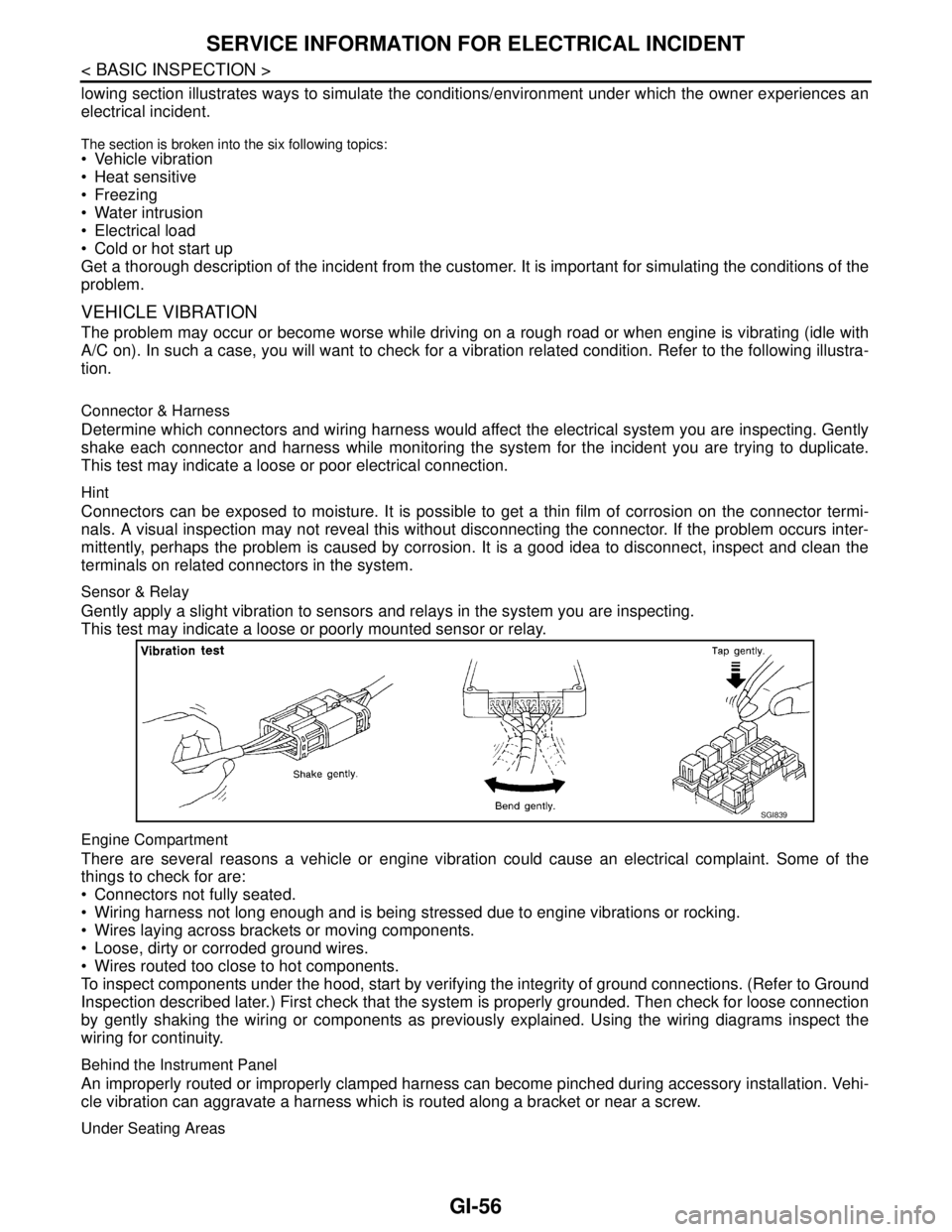
A/C on). In such a case, you will want to check for a vibration related condition. Refer to the following illustra-
tion.
Connector & Harness
Determine which connectors and wiring harness would affect the electrical system you are inspecting. Gently
shake each connector and harness while monitoring the system for the incident you are trying to duplicate.
This test may indicate a loose or poor electrical connection.
Hint
Connectors can be exposed to moisture. It is possible to get a thin film of corrosion on the connector termi-
nals. A visual inspection may not reveal this without disconnecting the connector. If the problem occurs inter-
mittently, perhaps the problem is caused by corrosion. It is a good idea to disconnect, inspect and clean the
terminals on related connectors in the system.
Sensor & Relay
Gently apply a slight vibration to sensors and relays in the system you are inspecting.
This test may indicate a loose or poorly mounted sensor or relay.
Engine Compartment
There are several reasons a vehicle or engine vibration could cause an electrical complaint. Some of the
things to check for are:
Connectors not fully seated.
Wiring harness not long enough and is being stressed due to engine vibrations or rocking.
Wires laying across brackets or moving components.
Loose, dirty or corroded ground wires.
Wires routed too close to hot components.
To inspect components under the hood, start by verifying the integrity of ground connections. (Refer to Ground
Inspection described later.) First check that the system is properly grounded. Then check for loose connection
by gently shaking the wiring or components as previously explained. Using the wiring diagrams inspect the
wiring for continuity.
Behind the Instrument Panel
An improperly routed or improperly clamped harness can become pinched during accessory installation. Vehi-
cle vibration can aggravate a harness which is routed along a bracket or near a screw.
Under Seating Areas
SGI839