reverse NISSAN TIIDA 2007 Service Repair Manual
[x] Cancel search | Manufacturer: NISSAN, Model Year: 2007, Model line: TIIDA, Model: NISSAN TIIDA 2007Pages: 5883, PDF Size: 78.95 MB
Page 5 of 5883
ACCELERATOR CONTROL SYSTEM
ACC-3
< ON-VEHICLE REPAIR >
C
D
E
F
G
H
I
J
K
L
MA
ACC
N
P O
ON-VEHICLE REPAIR
ACCELERATOR CONTROL SYSTEM
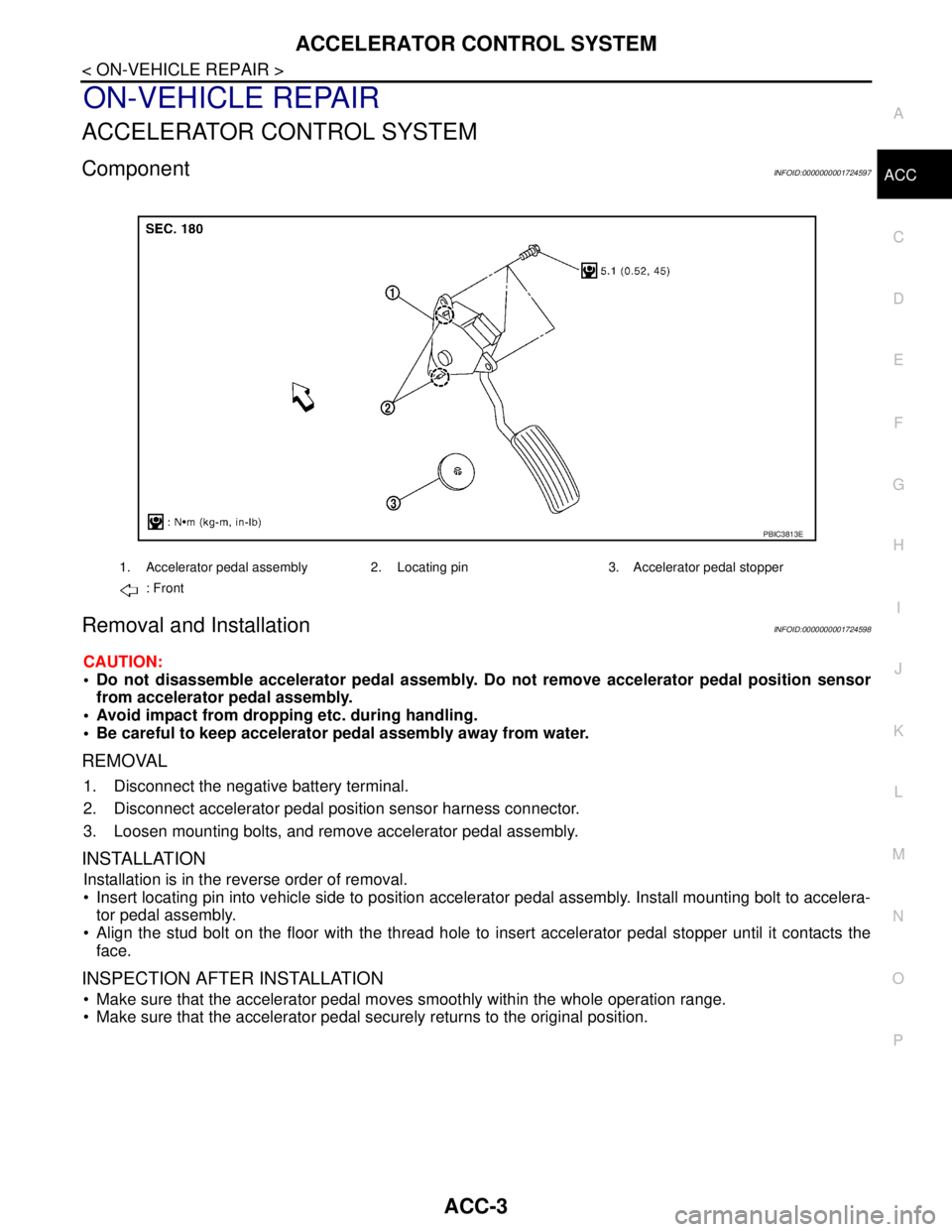
ComponentINFOID:0000000001724597
Removal and InstallationINFOID:0000000001724598
CAUTION:
Do not disassemble accelerator pedal assembly. Do not remove accelerator pedal position sensor
from accelerator pedal assembly.
Avoid impact from dropping etc. during handling.
Be careful to keep accelerator pedal assembly away from water.
REMOVAL
1. Disconnect the negative battery terminal.
2. Disconnect accelerator pedal position sensor harness connector.
3. Loosen mounting bolts, and remove accelerator pedal assembly.
INSTALLATION
Installation is in the reverse order of removal.
Insert locating pin into vehicle side to position accelerator pedal assembly. Install mounting bolt to accelera-
tor pedal assembly.
Align the stud bolt on the floor with the thread hole to insert accelerator pedal stopper until it contacts the
face.
INSPECTION AFTER INSTALLATION
Make sure that the accelerator pedal moves smoothly within the whole operation range.
Make sure that the accelerator pedal securely returns to the original position.
1. Accelerator pedal assembly 2. Locating pin 3. Accelerator pedal stopper
: Front
PBIC3813E
Page 28 of 5883
![NISSAN TIIDA 2007 Service Repair Manual AV
AUDIO UNIT
AV-23
< ON-VEHICLE REPAIR >[AUDIO WITHOUT NAVIGATION]
C
D
E
F
G
H
I
J
K
L
MB A
O
P
ON-VEHICLE REPAIR
AUDIO UNIT
Removal and InstallationINFOID:0000000001724676
AUDIO UNIT
Removal
1. Remo](/img/5/57395/w960_57395-27.png "NISSAN TIIDA 2007 Service Repair Manual AV
AUDIO UNIT
AV-23
< ON-VEHICLE REPAIR >[AUDIO WITHOUT NAVIGATION]
C
D
E
F
G
H
I
J
K
L
MB A
O
P
ON-VEHICLE REPAIR
AUDIO UNIT
Removal and InstallationINFOID:0000000001724676
AUDIO UNIT
Removal
1. Remo")
AV
AUDIO UNIT
AV-23
< ON-VEHICLE REPAIR >[AUDIO WITHOUT NAVIGATION]
C
D
E
F
G
H
I
J
K
L
MB A
O
P
ON-VEHICLE REPAIR
AUDIO UNIT
Removal and InstallationINFOID:0000000001724676
AUDIO UNIT
Removal
1. Remove cluster lid C. Refer to IP-11, "Removal and Installation".
2. Remove the audio unit screws (A), disconnect the connectors
and remove the audio unit (1).
3. Remove the audio unit bracket.
Installation
Installation is in the reverse order of removal.
SKIB4726E
Page 29 of 5883
![NISSAN TIIDA 2007 Service Repair Manual AV-24
< ON-VEHICLE REPAIR >[AUDIO WITHOUT NAVIGATION]
TWEETER
TWEETER
Removal and InstallationINFOID:0000000001724677
TWEETER
Removal
1. Remove the front pillar garnish. Refer to IP-11, "Removal and I](/img/5/57395/w960_57395-28.png "NISSAN TIIDA 2007 Service Repair Manual AV-24
< ON-VEHICLE REPAIR >[AUDIO WITHOUT NAVIGATION]
TWEETER
TWEETER
Removal and InstallationINFOID:0000000001724677
TWEETER
Removal
1. Remove the front pillar garnish. Refer to IP-11, \"Removal and I")
AV-24
< ON-VEHICLE REPAIR >[AUDIO WITHOUT NAVIGATION]
TWEETER
TWEETER
Removal and InstallationINFOID:0000000001724677
TWEETER
Removal
1. Remove the front pillar garnish. Refer to IP-11, "Removal and Installation".
2. Remove the tweeter screw (A), disconnect the connector and
remove the tweeter (1).
Installation
Installation is in the reverse order of removal.
SKIB4730E
Page 30 of 5883
![NISSAN TIIDA 2007 Service Repair Manual AV
FRONT DOOR SPEAKER
AV-25
< ON-VEHICLE REPAIR >[AUDIO WITHOUT NAVIGATION]
C
D
E
F
G
H
I
J
K
L
MB A
O
P
FRONT DOOR SPEAKER
Removal and InstallationINFOID:0000000001724678
FRONT DOOR SPEAKER
Removal
1](/img/5/57395/w960_57395-29.png "NISSAN TIIDA 2007 Service Repair Manual AV
FRONT DOOR SPEAKER
AV-25
< ON-VEHICLE REPAIR >[AUDIO WITHOUT NAVIGATION]
C
D
E
F
G
H
I
J
K
L
MB A
O
P
FRONT DOOR SPEAKER
Removal and InstallationINFOID:0000000001724678
FRONT DOOR SPEAKER
Removal
1")
AV
FRONT DOOR SPEAKER
AV-25
< ON-VEHICLE REPAIR >[AUDIO WITHOUT NAVIGATION]
C
D
E
F
G
H
I
J
K
L
MB A
O
P
FRONT DOOR SPEAKER
Removal and InstallationINFOID:0000000001724678
FRONT DOOR SPEAKER
Removal
1. Remove the front door finisher. Refer to INT-13, "Removal and Installation".
2. Remove the front door speaker screws (A), disconnect the con-
nector and remove the front door speaker (1).
Installation
Installation is in the reverse order of removal.
SKIB4728E
Page 31 of 5883
![NISSAN TIIDA 2007 Service Repair Manual AV-26
< ON-VEHICLE REPAIR >[AUDIO WITHOUT NAVIGATION]
REAR DOOR SPEAKER
REAR DOOR SPEAKER
Removal and InstallationINFOID:0000000001724679
REAR DOOR SPEAKER
Removal
1. Remove the rear door finisher. Re](/img/5/57395/w960_57395-30.png "NISSAN TIIDA 2007 Service Repair Manual AV-26
< ON-VEHICLE REPAIR >[AUDIO WITHOUT NAVIGATION]
REAR DOOR SPEAKER
REAR DOOR SPEAKER
Removal and InstallationINFOID:0000000001724679
REAR DOOR SPEAKER
Removal
1. Remove the rear door finisher. Re")
AV-26
< ON-VEHICLE REPAIR >[AUDIO WITHOUT NAVIGATION]
REAR DOOR SPEAKER
REAR DOOR SPEAKER
Removal and InstallationINFOID:0000000001724679
REAR DOOR SPEAKER
Removal
1. Remove the rear door finisher. Refer to INT-13, "Removal and Installation".
2. Remove the rear door finisher screws (A), disconnect the con-
nector and remove the rear door speaker (1).
Installation
Installation is in the reverse order of removal.
SKIB4729E
Page 32 of 5883
![NISSAN TIIDA 2007 Service Repair Manual AV
STEERING SWITCH
AV-27
< ON-VEHICLE REPAIR >[AUDIO WITHOUT NAVIGATION]
C
D
E
F
G
H
I
J
K
L
MB A
O
P
STEERING SWITCH
Removal and InstallationINFOID:0000000001724685
STEERING WHEEL BLUETOOTH CONTROL S](/img/5/57395/w960_57395-31.png "NISSAN TIIDA 2007 Service Repair Manual AV
STEERING SWITCH
AV-27
< ON-VEHICLE REPAIR >[AUDIO WITHOUT NAVIGATION]
C
D
E
F
G
H
I
J
K
L
MB A
O
P
STEERING SWITCH
Removal and InstallationINFOID:0000000001724685
STEERING WHEEL BLUETOOTH CONTROL S")
AV
STEERING SWITCH
AV-27
< ON-VEHICLE REPAIR >[AUDIO WITHOUT NAVIGATION]
C
D
E
F
G
H
I
J
K
L
MB A
O
P
STEERING SWITCH
Removal and InstallationINFOID:0000000001724685
STEERING WHEEL BLUETOOTH CONTROL SWITCH
Removal
1. Remove the steering wheel. Refer to ST-8, "Removal and Installation".
2. Remove the steering wheel finisher cover.
3. Remove the screws and the steering wheel Bluetooth control switch.
Installation
Installation is in the reverse order of removal.
1. Steering wheel finisher cover 2. Steering wheel 3. Steering wheel Bluetooth control
switch
A. Screws
AWNIA0257ZZ
Page 34 of 5883
![NISSAN TIIDA 2007 Service Repair Manual AV
AUDIO ANTENNA
AV-29
< ON-VEHICLE REPAIR >[AUDIO WITHOUT NAVIGATION]
C
D
E
F
G
H
I
J
K
L
MB A
O
P
6. Remove nut (A) and clips (B).
7. Remove the roof antenna.
INSTALLATION
Installation is in the rev](/img/5/57395/w960_57395-33.png "NISSAN TIIDA 2007 Service Repair Manual AV
AUDIO ANTENNA
AV-29
< ON-VEHICLE REPAIR >[AUDIO WITHOUT NAVIGATION]
C
D
E
F
G
H
I
J
K
L
MB A
O
P
6. Remove nut (A) and clips (B).
7. Remove the roof antenna.
INSTALLATION
Installation is in the rev")
AV
AUDIO ANTENNA
AV-29
< ON-VEHICLE REPAIR >[AUDIO WITHOUT NAVIGATION]
C
D
E
F
G
H
I
J
K
L
MB A
O
P
6. Remove nut (A) and clips (B).
7. Remove the roof antenna.
INSTALLATION
Installation is in the reverse order of removal.
SKIB4772E
Page 39 of 5883
![NISSAN TIIDA 2007 Service Repair Manual AV-34
< FUNCTION DIAGNOSIS >[AUDIO WITH NAVIGATION]
MULTI AV SYSTEM
Component Description
INFOID:0000000001728630
4. Front door speaker
Driver side D12
Passenger side D1125. Rear door speaker
LH D207](/img/5/57395/w960_57395-38.png "NISSAN TIIDA 2007 Service Repair Manual AV-34
< FUNCTION DIAGNOSIS >[AUDIO WITH NAVIGATION]
MULTI AV SYSTEM
Component Description
INFOID:0000000001728630
4. Front door speaker
Driver side D12
Passenger side D1125. Rear door speaker
LH D207")
AV-34
< FUNCTION DIAGNOSIS >[AUDIO WITH NAVIGATION]
MULTI AV SYSTEM
Component Description
INFOID:0000000001728630
4. Front door speaker
Driver side D12
Passenger side D1125. Rear door speaker
LH D207
RH D3076. Front tweeter
LH M109
RH M47
7. Steering wheel audio control switch-
es M1028. Microphone R15
Part name Description
NAVI CONTROL UNIT Map data can be read from the Map DVD-ROM by installing Map DVD-ROM.
It is the master unit of the MULTI AV system, and it is connected to each con-
trol unit by means of communication. It operates each system according to
communication signals from the NAVI control unit.
The NAVI control unit includes the audio, hands-free phone, navigation, and
vehicle information functions.
It is connected to ECM and combination meter via CAN communication to ob-
tain necessary information for the vehicle information function.
It inputs the illumination signals that are required for the display dimming con-
trol.
It inputs the signals for driving status recognition (vehicle speed, reverse and
parking brake).
MAP DVD-ROM A collection of Map data.
DISPLAY UNIT Display image is controlled by the serial communication from NAVI control
unit.
RGB image signal is input from NAVI control unit (RGB, RGB area and RGB
synchronizing). Camera image signal is input from camera control unit.
Synchronize signal (HP, VP) is output to NAVI control unit.
AV CONTROL UNIT Operational switch of MULTI AV system is integrated.
NAVI control unit and AV communication are connected with AV control unit.
Operating signals of the switch are sent to the NAVI control unit.
FRONT DOOR SPEAKER Outputs sound signal from AV control unit.
Outputs high, mid and low range sounds.
REAR DOOR SPEAKER Outputs sound signal from AV control unit.
Outputs high, mid and low range sounds.
FRONT TWEETER Outputs sound signal from AV control unit.
Outputs high range sound.
STEERING WHEEL AUDIO CONTROL SWITCH Operations for audio, hands-free phone, voice recognition and navigation,
etc. are possible.
Steering switch signal (operation signal) is output to AV control unit.
MICROPHONE Used for hands-free phone operation and voice recognition.
Mic. signal is sent to NAVI control unit.
Power (Mic. VCC) is supplied from NAVI control unit.
GPS ANTENNA GPS signal is received and sent to NAVI control unit.
RADIO ANTENNA Radio signal received by antenna is sent to AV control unit.
Page 44 of 5883
![NISSAN TIIDA 2007 Service Repair Manual AV
DIAGNOSIS SYSTEM (NAVI CONTROL UNIT)
AV-39
< FUNCTION DIAGNOSIS >[AUDIO WITH NAVIGATION]
C
D
E
F
G
H
I
J
K
L
MB A
O
P
DIAGNOSIS SYSTEM (NAVI CONTROL UNIT)
Diagnosis DescriptionINFOID:00000000017286](/img/5/57395/w960_57395-43.png "NISSAN TIIDA 2007 Service Repair Manual AV
DIAGNOSIS SYSTEM (NAVI CONTROL UNIT)
AV-39
< FUNCTION DIAGNOSIS >[AUDIO WITH NAVIGATION]
C
D
E
F
G
H
I
J
K
L
MB A
O
P
DIAGNOSIS SYSTEM (NAVI CONTROL UNIT)
Diagnosis DescriptionINFOID:00000000017286")
AV
DIAGNOSIS SYSTEM (NAVI CONTROL UNIT)
AV-39
< FUNCTION DIAGNOSIS >[AUDIO WITH NAVIGATION]
C
D
E
F
G
H
I
J
K
L
MB A
O
P
DIAGNOSIS SYSTEM (NAVI CONTROL UNIT)
Diagnosis DescriptionINFOID:0000000001728643
MULTI AV SYSTEM on board diagnosis function
The NAVI control unit diagnosis function starts up with audio switch operation and the NAVI control unit per-
forms a diagnosis for each unit in the system during the on board diagnosis.
Perform a CONSULT-III diagnosis if the on board diagnosis does not start, e.g., the screen does not display
anything, the multifunction switch does not function. etc.
On board diagnosis
Description
The trouble diagnosis function has a self-diagnosis mode for conducting trouble diagnosis automatically and
a confirmation/adjustment mode for operating manually.
The self-diagnosis mode performs diagnoses on the NAVI control unit, connections between system compo-
nents as well as connections between NAVI control unit and GPS antenna. Then it displays the diagnosis
results on the display.
The confirmation/adjustment mode allows the technician to check, modify or adjust the vehicle signals and
set values, as well as to monitor the system error records and system communication status. The check,
modify or adjust actions generally require human intervention and judgment (the system cannot make judg-
ment automatically).
On board diagnosis item
STARTING PROCEDURE
1. Start the engine.
2. Turn the audio system OFF.
Mode Description
Self Diagnosis NAVI control unit diagnosis
Diagnoses the connections across system components, between
NAVI control unit and GPS antenna.
Confirmation/
AdjustmentDisplay DiagnosisThe following check functions are available: color tone check by color
bar display, light and shade check by gray scale display.
Vehicle SignalsDiagnosis of signals can be performed for vehicle speed, parking
brake, lights, ignition switch, and reverse.
Speaker Test The connection of a speaker can be confirmed by test tone.
NavigationSteering Angle Ad-
justmentA difference can be adjusted between the actual turning angle and the
vehicle mark turning angle.
Speed CalibrationA difference can be adjusted between the current location mark and the
actual location.
Error HistoryThe system malfunction and the frequency when occurred in the past
are displayed. The time and place that the selected malfunction last oc-
curred are displayed when the malfunctioning item is selected.
Vehicle CAN Diagnosis The transmitting/receiving of CAN communication can be monitored.
AV COMM DiagnosisThe communication condition of each unit of Multi AV system can be
monitored.
Handsfree PhoneThe received volume adjustment of hands-free phone, microphone
speaker check, and erase memory can be performed.
Bluetooth The passkey and the device name can be checked and changed.
Delete Unit Connection Log Erase the connection history of unit and error history.
Feature Restriction SettingOperations of navigation system while driving can be restricted by us-
ing this function.
Page 48 of 5883
![NISSAN TIIDA 2007 Service Repair Manual AV
DIAGNOSIS SYSTEM (NAVI CONTROL UNIT)
AV-43
< FUNCTION DIAGNOSIS >[AUDIO WITH NAVIGATION]
C
D
E
F
G
H
I
J
K
L
MB A
O
P Display Diagnosis
The tint of the color bar indication is as per the following](/img/5/57395/w960_57395-47.png "NISSAN TIIDA 2007 Service Repair Manual AV
DIAGNOSIS SYSTEM (NAVI CONTROL UNIT)
AV-43
< FUNCTION DIAGNOSIS >[AUDIO WITH NAVIGATION]
C
D
E
F
G
H
I
J
K
L
MB A
O
P Display Diagnosis
The tint of the color bar indication is as per the following")
AV
DIAGNOSIS SYSTEM (NAVI CONTROL UNIT)
AV-43
< FUNCTION DIAGNOSIS >[AUDIO WITH NAVIGATION]
C
D
E
F
G
H
I
J
K
L
MB A
O
P Display Diagnosis
The tint of the color bar indication is as per the following list if RGB signal error is detected.
Vehicle Signals
A comparison check can be made of each actual vehicle signal and
the signals recognized by the system.
Sp ea ke r Tes t
JPNIA0169GB
R (red) signal error : Light blue (Cyan) tint
G (green) signal error : Purple (Magenta) tint
B (blue) signal error : Yellow tint
SKIB3663E
Diagnosis item Display Vehicle status Remarks
Vehicle speedON Vehicle speed > 0 km/h (0 MPH)
Changes in indication may be delayed by approximate-
ly 1.5 seconds. This is normal. OFF Vehicle speed = 0 km/h (0 MPH)
— Ignition switch ACC
Parking brakeON Parking brake is applied.
OFF Parking brake is released.
LightsON Light switch ON
—
OFF Light switch OFF
IgnitionON Ignition switch ON
—
OFF Ignition switch in ACC position
ReverseON Selector lever in R position
Changes in indication may be delayed by approximate-
ly 1.5 seconds. This is normal. OFFSelector lever in any position other
than R
— Ignition switch ACC