check engine NISSAN X-TRAIL 2003 Electronic Repair Manual
[x] Cancel search | Manufacturer: NISSAN, Model Year: 2003, Model line: X-TRAIL, Model: NISSAN X-TRAIL 2003Pages: 3066, PDF Size: 51.47 MB
Page 2226 of 3066
![NISSAN X-TRAIL 2003 Electronic Repair Manual FUEL TANK
FL-11
[QR20DE]
C
D
E
F
G
H
I
J
K
L
MA
FL
Inspection After InstallationEBS00BM3
Run engine and check for fuel leaks at connections.](/img/5/57402/w960_57402-2225.png "NISSAN X-TRAIL 2003 Electronic Repair Manual FUEL TANK
FL-11
[QR20DE]
C
D
E
F
G
H
I
J
K
L
MA
FL
Inspection After InstallationEBS00BM3
Run engine and check for fuel leaks at connections.")
FUEL TANK
FL-11
[QR20DE]
C
D
E
F
G
H
I
J
K
L
MA
FL
Inspection After InstallationEBS00BM3
Run engine and check for fuel leaks at connections.
Page 2229 of 3066
![NISSAN X-TRAIL 2003 Electronic Repair Manual FL-14
[YD22DDTi]
FUEL SYSTEM
FUEL SYSTEM
PFP:17503
Checking Fuel LinesEBS00BKH
Inspect fuel lines, filler cap and tank for improper attachment, leaks,
cracks, damage, loose connections, chafing or det](/img/5/57402/w960_57402-2228.png "NISSAN X-TRAIL 2003 Electronic Repair Manual FL-14
[YD22DDTi]
FUEL SYSTEM
FUEL SYSTEM
PFP:17503
Checking Fuel LinesEBS00BKH
Inspect fuel lines, filler cap and tank for improper attachment, leaks,
cracks, damage, loose connections, chafing or det")
FL-14
[YD22DDTi]
FUEL SYSTEM
FUEL SYSTEM
PFP:17503
Checking Fuel LinesEBS00BKH
Inspect fuel lines, filler cap and tank for improper attachment, leaks,
cracks, damage, loose connections, chafing or deterioration.
If necessary, repair or replace faulty parts.
General PrecautionsEBS00BKI
WAR NIN G:
When replacing fuel line parts, be sure to observe the following.
lPut a “CAUTION: FLAMMABLE” sign in workshop.
lBe sure to work in a well-ventilated area and furnish workshop with a CO2fire extinguisher.
lDo not smoke while servicing fuel system. Keep open flames and spark away from work area.
CAUTION:
lBefore removing fuel line parts, carry out the following procedures:
–a) Put drained fuel in an explosion-proof container and put the lid on securely. Keep the container
in safe area.
–b) Disconnect battery ground cable.
lAlways replace O-ring and clamps with new ones.
lDo not kink or twist tubes when they are being installed.
lDo not tighten hose clamps excessively to avoid damaging hoses.
lAfter installing tubes, run engine and check for fuel leaks at connections.
SMA803A
Page 2230 of 3066
![NISSAN X-TRAIL 2003 Electronic Repair Manual FUEL FILTER
FL-15
[YD22DDTi]
C
D
E
F
G
H
I
J
K
L
MA
FL
FUEL FILTERPFP:16400
Removal and InstallationEBS00BLA
REMOVAL
1. Remove air duct and upper air cleaner case.
2. Remove fuel filter protector.
3.](/img/5/57402/w960_57402-2229.png "NISSAN X-TRAIL 2003 Electronic Repair Manual FUEL FILTER
FL-15
[YD22DDTi]
C
D
E
F
G
H
I
J
K
L
MA
FL
FUEL FILTERPFP:16400
Removal and InstallationEBS00BLA
REMOVAL
1. Remove air duct and upper air cleaner case.
2. Remove fuel filter protector.
3.")
FUEL FILTER
FL-15
[YD22DDTi]
C
D
E
F
G
H
I
J
K
L
MA
FL
FUEL FILTERPFP:16400
Removal and InstallationEBS00BLA
REMOVAL
1. Remove air duct and upper air cleaner case.
2. Remove fuel filter protector.
3. Disconnect fuel hoses at fuel filter bracket.
CAUTION:
Plug the pipe to prevent fuel from draining.
4. Remove fuel filter with bracket.
CAUTION:
Do not splash fuel during removal. If fuel is splashed,
immediately wipe it off.
5. Using band-type filter wrench (commercial service tool), remove
fuel filter.
6. Turn fuel filter upside down to drain fuel.
7. Remove drain plug from fuel filter.
INSTALLATION
Install in reverse order of removal, paying attention to following:
lReplace O-ring on drain plug with new one.
lScrew the fuel filter by hand until packing contacts sealing surface of bracket. Then tighten it by turning
approximately 2/3 turn.
lAfter installation, bleed air from fuel path. Refer toFL-16, "Air Bleeding".
INSPECTION AFTER INSTALLATION
Run engine and check for fuel leakage at connections.
SBIA0134E
SBIA0135E
SBIA0136E
: 3.9 - 5.9 N·m (0.4 - 0.6 kg-m, 35 - 52 in-lb)
Page 2237 of 3066
![NISSAN X-TRAIL 2003 Electronic Repair Manual FL-22
[YD22DDTi]
FUEL TANK
10. Using a transmission jack, support the bottom of the rear final
drive.
11. Remove the mounting nuts on the rear suspension member, and
lower the transmission jack carefu](/img/5/57402/w960_57402-2236.png "NISSAN X-TRAIL 2003 Electronic Repair Manual FL-22
[YD22DDTi]
FUEL TANK
10. Using a transmission jack, support the bottom of the rear final
drive.
11. Remove the mounting nuts on the rear suspension member, and
lower the transmission jack carefu")
FL-22
[YD22DDTi]
FUEL TANK
10. Using a transmission jack, support the bottom of the rear final
drive.
11. Remove the mounting nuts on the rear suspension member, and
lower the transmission jack carefully until just before the rear
suspension member is removed from the stud bolts on the vehi-
cle.
12. Disconnect fuel filler hose, EVAP hose and vent hose at fuel
tank side.
For disconnection procedure of the quick connector. Refer to
FL-17, "
FUEL LEVEL SENSOR UNIT".
13. Remove fuel tank protector.
14. Remove fuel tank band mounting bolts while supporting fuel
tank.
15. Remove fuel tank.
INSTALLATION
lInstall in the reverse order of removal paying attention to the following.
lSurely clamp fuel hoses and insert hose to the length below.
lBe sure hose clamp is not positioned on swelled area of fuel tube.
lTighten fuel hose clamp so that the distance between its lugs becomes to the following.
lPush the mounting band pin to the vehicle side securely.
lBefore fixing the fuel tank, temporarily install the fuel filler tube.
CAUTION:
Use genuine fuel filler tube mounting bolts or equivalent. Make sure to tighten them to the speci-
fied torque.
lTo connect the quick connector. Refer toFL-17, "FUEL LEVEL SENSOR UNIT".
Inspection After InstallationEBS00BL4
Run engine and check for fuel leaks at connections.
KBIA0285E
KBIA0286E
KBIA0290E
Fuel filler hose : 35 mm (1.38 in)
The other hose : 25 mm (0.98 in)
Fuel tank side : 5 - 9 mm (0.20 - 0.35 in)
Fuel filler tube side : 7 - 11 mm (0.28 - 0.43 in)
Page 2241 of 3066
FSU-2
PRECAUTIONS
PRECAUTIONS
PFP:00001
CautionEES0006Z
lWhen installing rubber bushings, final tightening must be carried out under unladen conditions with tires
on flat, level ground. Oil will shorten the life of rubber bushings. Be sure to wipe off any spilled oil.
l“Unladen condition” means that fuel, coolant and lubricant are full and ready for drive. However, spare tire,
jack, and hand tools should be unloaded.
lAfter installing the removed suspension parts, always check wheel alignment and adjust if necessary.
lReplace the caulking nut with a new one. Install a new nut without wiping the oil off before tightening.
Precautions for Brake SystemEES000JA
lWhen installing rubber parts, final tightening must be carried out
under unladen condition* with tires on ground.
*: Fuel, radiator coolant and engine oil full. Spare tire, jack,
hand tools and mats in designated positions.
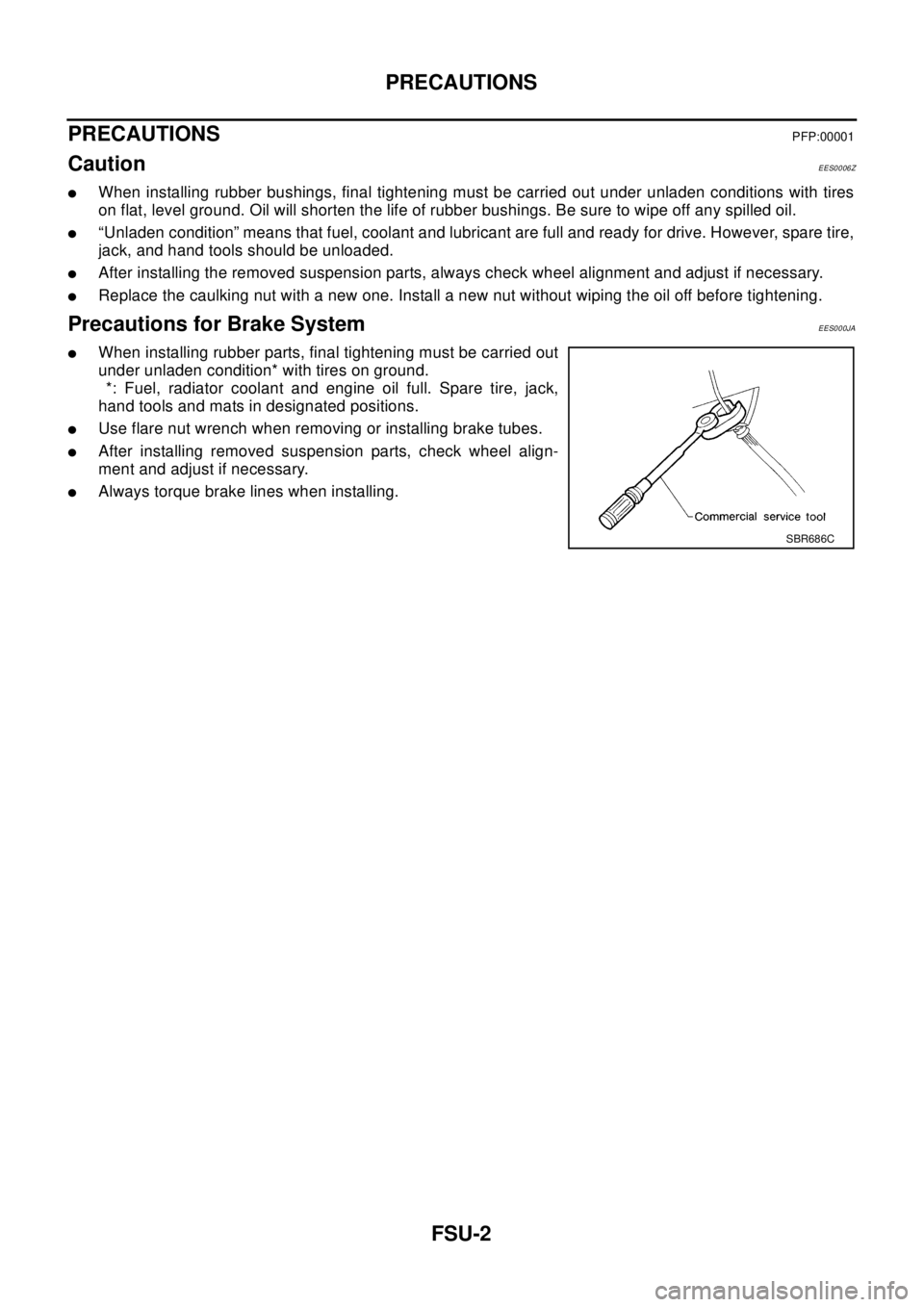
lUse flare nut wrench when removing or installing brake tubes.
lAfter installing removed suspension parts, check wheel align-
ment and adjust if necessary.
lAlways torque brake lines when installing.
SBR686C
Page 2251 of 3066
FSU-12
FRONT SUSPENSION MEMBER
FRONT SUSPENSION MEMBER
PFP:54401
Removal and InstallationEES00078
REMOVAL
1. Remove tires. Raise vehicle.
2. Remove mounting nuts on lower portion of stabilizer connecting rod from transverse link.
3. Remove transverse link from suspension member, and move the transverse link outward.
4. Remove front exhaust tube mounting rubber from suspension member.
5. Support engine or transmission with a transmission jack.
6. Remove center member from vehicle.
7. Remove steering gear mounting bolts. Remove steering gear and power steering tube bracket from sus-
pension member.
8. Hang steering gear.
9. Remove rear engine mount insulator from suspension member.
10. Remove body-side mounting bolts from member pin stay.
11. Set a transmission jack under suspension member, and remove suspension member mounting nuts.
12. Slowly lower transmission jack to remove suspension member from vehicle.
INSTALLATION
lRefer toFSU-5, "Components"for tightening torque in the reverse order of removal.
lAfter installation, perform final tightening of each part under unladen conditions with tires on ground.
Check wheel alignment. Refer toFSU-6, "
Wheel Alignment".
Page 2254 of 3066
GI-1
GENERAL INFORMATION
A GENERAL INFORMATION
CONTENTS
C
D
E
F
G
H
I
J
K
L
MB
GI
SECTION
GENERAL INFORMATION
PRECAUTIONS .......................................................... 3
Description ............................................................... 3
Precautions for Supplemental Restraint System
(SRS) “AIR BAG” and “SEAT BELT PRE-TEN-
SIONER” .................................................................. 3
Precautions for NATS (NISSAN ANTI-THEFT SYS-
TEM) ........................................................................ 3
General Precautions ................................................ 4
Precautions for All Mode 4´4 System .................... 5
Precautions for Three Way Catalyst ......................... 5
Precautions for Fuel ................................................. 5
Precautions for Multiport Fuel Injection System or
Engine Control System ............................................ 6
Precautions for Turbocharger (If Equipped) ............. 6
Precautions for Hoses .............................................. 6
HOSE REMOVAL AND INSTALLATION ............... 6
HOSE CLAMPING ................................................ 7
Precautions for Engine Oils ...................................... 7
HEALTH PROTECTION PRECAUTIONS ............. 7
ENVIRONMENTAL PROTECTION PRECAU-
TIONS ................................................................... 7
Precautions for Air Conditioning ............................... 8
HOW TO USE THIS MANUAL ................................... 9
Description ............................................................... 9
Terms ....................................................................... 9
Units ......................................................................... 9
Contents ................................................................... 9
Components ............................................................. 9
SYMBOLS ........................................................... 10
How to Follow Trouble Diagnoses .......................... 10
DESCRIPTION .................................................... 10
HOW TO FOLLOW TEST GROUPS IN TROU-
BLE DIAGNOSES ................................................11
HARNESS WIRE COLOR AND CONNECTOR
NUMBER INDICATION ....................................... 12
KEY TO SYMBOLS SIGNIFYING MEASURE-
MENTS OR PROCEDURES ............................... 13
How to Read Wiring Diagrams ............................... 14
CONNECTOR SYMBOLS ................................... 14
SAMPLE/WIRING DIAGRAM - EXAMPL - ......... 16DESCRIPTION .................................................... 17
Abbreviations .......................................................... 22
SERVICE INFORMATION FOR ELECTRICAL INCI-
DENT ......................................................................... 24
How to Perform Efficient Diagnosis for an Electrical
Incident ................................................................... 24
WORK FLOW ...................................................... 24
INCIDENT SIMULATION TESTS ........................ 24
CIRCUIT INSPECTION ....................................... 27
Control Units and Electrical Parts ........................... 32
PRECAUTIONS .................................................. 32
SMJ INSTALLATION ........................................... 34
CONSULT-II CHECKING SYSTEM .......................... 35
Description .............................................................. 35
Function and System Application ........................... 35
Nickel Metal Hydride Battery Replacement ............ 35
Checking Equipment .............................................. 35
CONSULT-II Data Link Connector (DLC) Circuit .... 36
INSPECTION PROCEDURE .............................. 36
LIFTING POINT ......................................................... 37
Special Service Tools ............................................. 37
Garage Jack and Safety Stand ............................... 37
2-pole Lift ................................................................ 38
Board-on Lift ........................................................... 39
TOW TRUCK TOWING ............................................. 40
Tow Truck Towing ................................................... 40
TOWING AN AUTOMATIC TRANSAXLE
MODELWITHFOURWHEELSONGROUND...40
TOWING THE VEHICLE WITH REAR WHEELS
RAISED (WITH FRONT WHEELS ON GROUND)
OR FRONT WHEELS RAISED ........................... 41
Vehicle Recovery (Freeing a stuck vehicle) ............ 41
TIGHTENING TORQUE OF STANDARD BOLTS .... 42
Tightening Torque Table ......................................... 42
IDENTIFICATION INFORMATION ............................ 43
Model Variation ....................................................... 43
IDENTIFICATION NUMBER ................................ 44
IDENTIFICATION PLATE .................................... 45
ENGINE SERIAL NUMBER ................................ 45
AUTOMATIC TRANSAXLE NUMBER ................. 45
Page 2258 of 3066
PRECAUTIONS
GI-5
lUse only the fluids and lubricants specified in this manual.
lUse approved bonding agent, sealants or their equivalents when required.
lUse tools and recommended special tools where specified for safe and efficient service repairs.
lWhen repairing the fuel, oil, water, vacuum or exhaust systems, check all affected lines for leaks.
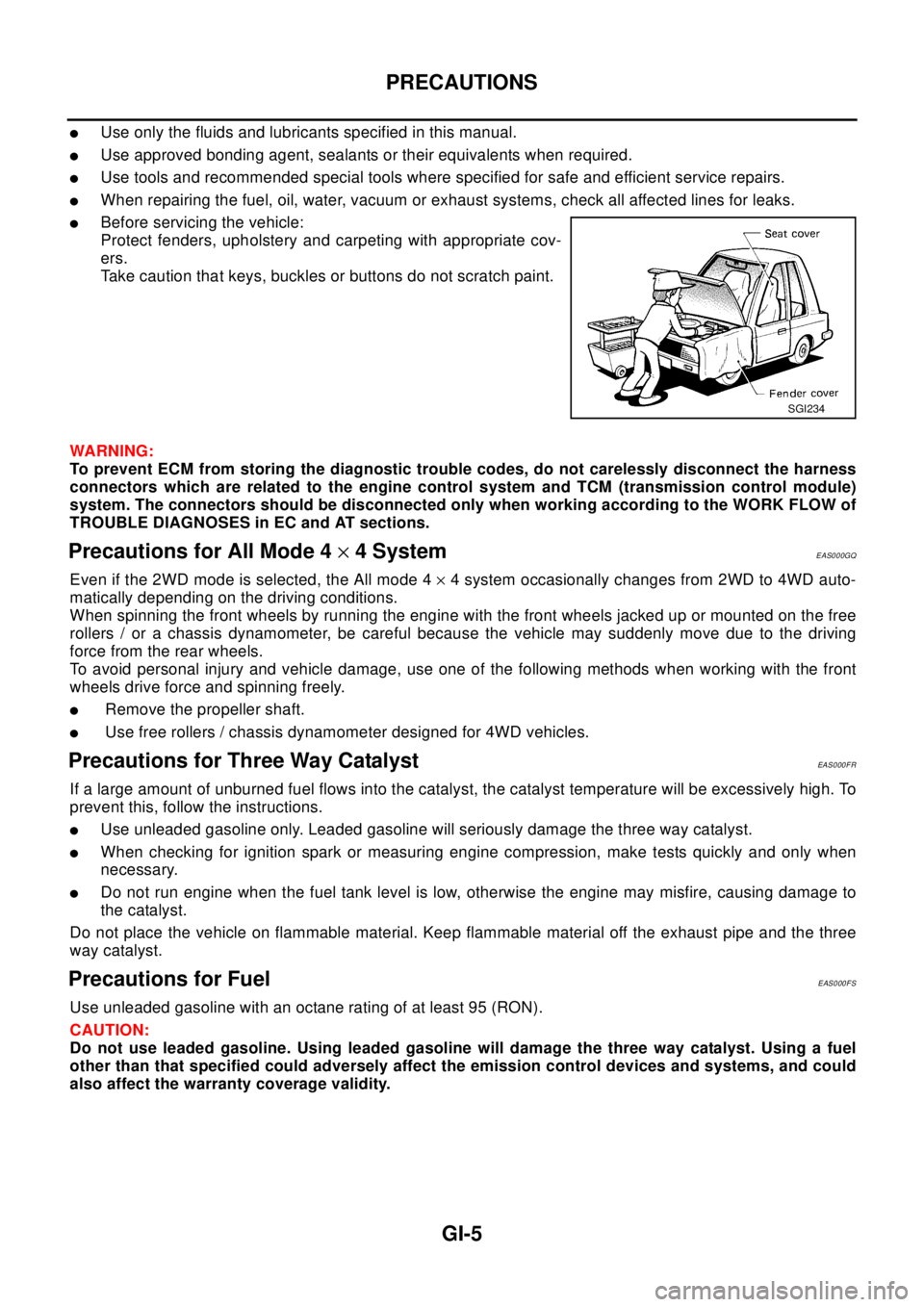
lBefore servicing the vehicle:
Protect fenders, upholstery and carpeting with appropriate cov-
ers.
Take caution that keys, buckles or buttons do not scratch paint.
WA RN ING:
To prevent ECM from storing the diagnostic trouble codes, do not carelessly disconnect the harness
connectors which are related to the engine control system and TCM (transmission control module)
system. The connectors should be disconnected only when working according to the WORK FLOW of
TROUBLE DIAGNOSES in EC and AT sections.
Precautions for All Mode 4´4 SystemEAS000GQ
Even if the 2WD mode is selected, the All mode 4´4 system occasionally changes from 2WD to 4WD auto-
matically depending on the driving conditions.
When spinning the front wheels by running the engine with the front wheels jacked up or mounted on the free
rollers / or a chassis dynamometer, be careful because the vehicle may suddenly move due to the driving
force from the rear wheels.
To avoid personal injury and vehicle damage, use one of the following methods when working with the front
wheels drive force and spinning freely.
lRemove the propeller shaft.
lUse free rollers / chassis dynamometer designed for 4WD vehicles.
Precautions for Three Way CatalystEAS000FR
If a large amount of unburned fuel flows into the catalyst, the catalyst temperature will be excessively high. To
prevent this, follow the instructions.
lUse unleaded gasoline only. Leaded gasoline will seriously damage the three way catalyst.
lWhen checking for ignition spark or measuring engine compression, make tests quickly and only when
necessary.
lDo not run engine when the fuel tank level is low, otherwise the engine may misfire, causing damage to
the catalyst.
Do not place the vehicle on flammable material. Keep flammable material off the exhaust pipe and the three
way catalyst.
Precautions for FuelEAS000FS
Use unleaded gasoline with an octane rating of at least 95 (RON).
CAUTION:
Do not use leaded gasoline. Using leaded gasoline will damage the three way catalyst. Using a fuel
other than that specified could adversely affect the emission control devices and systems, and could
also affect the warranty coverage validity.
SGI234
Page 2267 of 3066
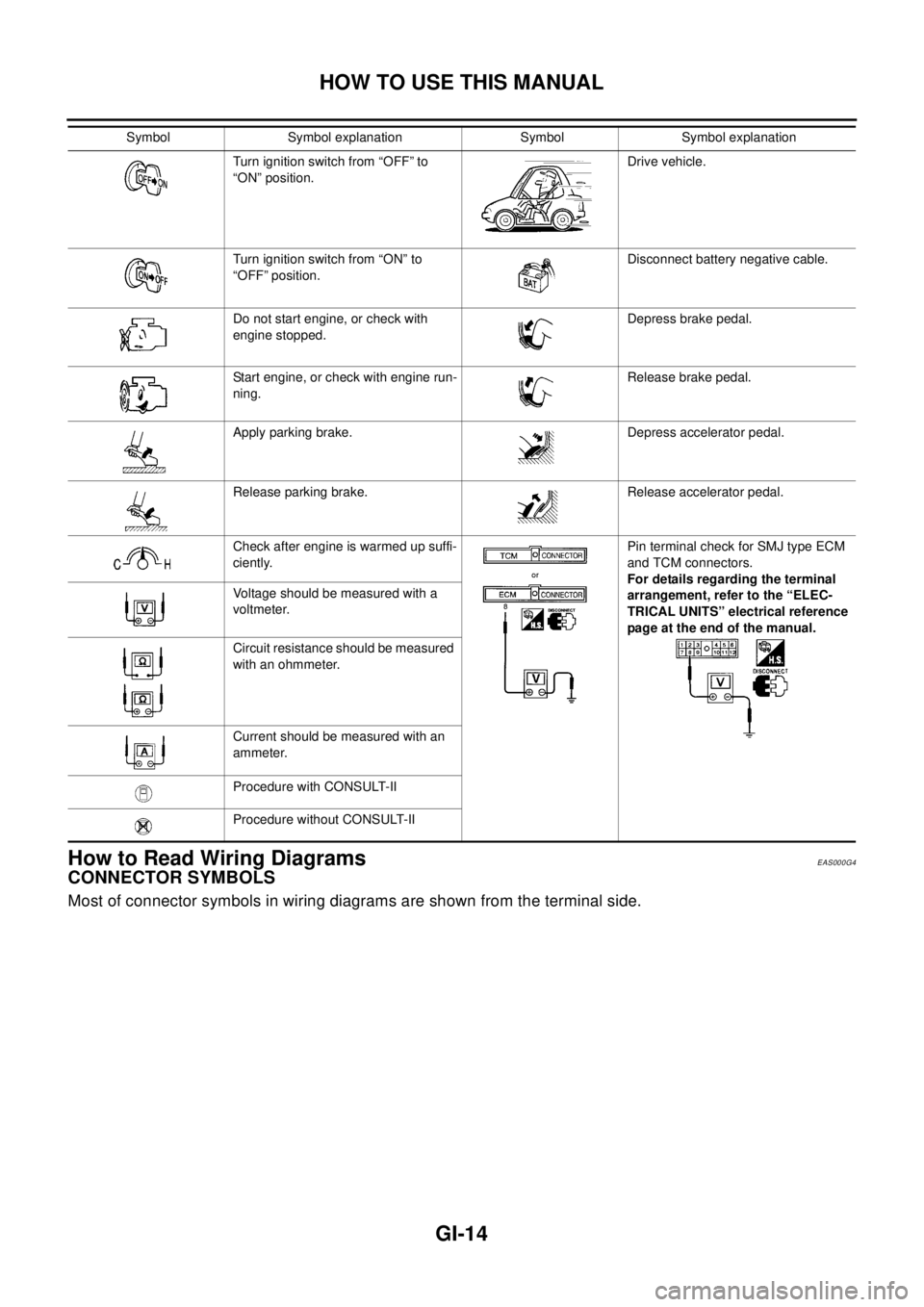
GI-14
HOW TO USE THIS MANUAL
How to Read Wiring Diagrams
EAS000G4
CONNECTOR SYMBOLS
Most of connector symbols in wiring diagrams are shown from the terminal side.
Turn ignition switch from “OFF” to
“ON” position.Drive vehicle.
Turn ignition switch from “ON” to
“OFF” position.Disconnect battery negative cable.
Do not start engine, or check with
engine stopped.Depress brake pedal.
Start engine, or check with engine run-
ning.Release brake pedal.
Apply parking brake. Depress accelerator pedal.
Release parking brake. Release accelerator pedal.
Check after engine is warmed up suffi-
ciently.Pin terminal check for SMJ type ECM
and TCM connectors.
For details regarding the terminal
arrangement, refer to the “ELEC-
TRICAL UNITS” electrical reference
page at the end of the manual. Voltage should be measured with a
voltmeter.
Circuit resistance should be measured
with an ohmmeter.
Current should be measured with an
ammeter.
Procedure with CONSULT-II
Procedure without CONSULT-II Symbol Symbol explanation Symbol Symbol explanation
Page 2277 of 3066
GI-24
SERVICE INFORMATION FOR ELECTRICAL INCIDENT
SERVICE INFORMATION FOR ELECTRICAL INCIDENT
PFP:00000
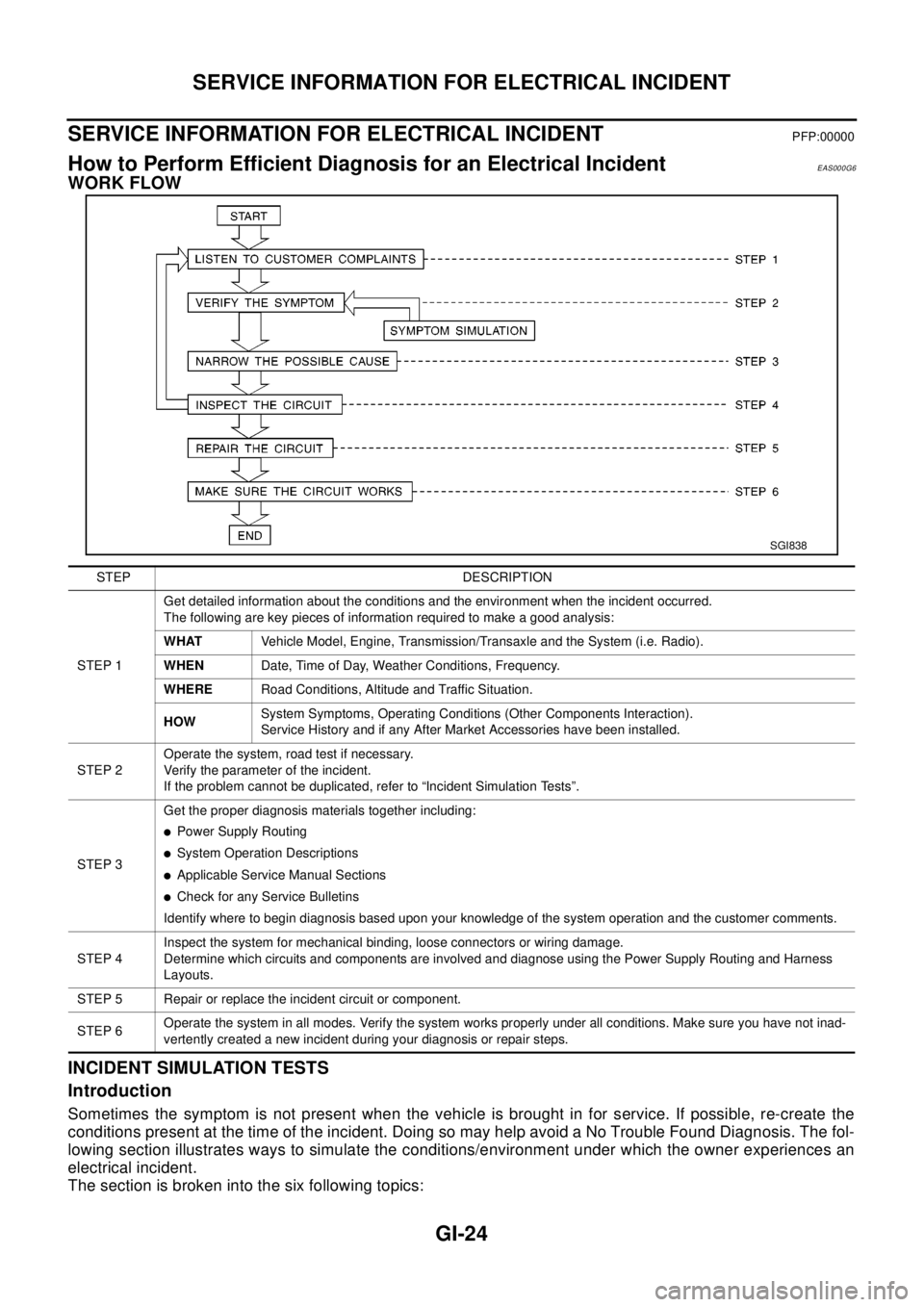
How to Perform Efficient Diagnosis for an Electrical IncidentEAS000G6
WORK FLOW
INCIDENT SIMULATION TESTS
Introduction
Sometimes the symptom is not present when the vehicle is brought in for service. If possible, re-create the
conditions present at the time of the incident. Doing so may help avoid a No Trouble Found Diagnosis. The fol-
lowing section illustrates ways to simulate the conditions/environment under which the owner experiences an
electrical incident.
The section is broken into the six following topics:
SGI838
STEP DESCRIPTION
STEP 1Get detailed information about the conditions and the environment when the incident occurred.
The following are key pieces of information required to make a good analysis:
WHATVehicle Model, Engine, Transmission/Transaxle and the System (i.e. Radio).
WHENDate, Time of Day, Weather Conditions, Frequency.
WHERERoad Conditions, Altitude and Traffic Situation.
HOWSystem Symptoms, Operating Conditions (Other Components Interaction).
Service History and if any After Market Accessories have been installed.
STEP 2Operate the system, road test if necessary.
Verify the parameter of the incident.
If the problem cannot be duplicated, refer to “Incident Simulation Tests”.
STEP 3Get the proper diagnosis materials together including:
lPower Supply Routing
lSystem Operation Descriptions
lApplicable Service Manual Sections
lCheck for any Service Bulletins
Identify where to begin diagnosis based upon your knowledge of the system operation and the customer comments.
STEP 4Inspect the system for mechanical binding, loose connectors or wiring damage.
Determine which circuits and components are involved and diagnose using the Power Supply Routing and Harness
Layouts.
STEP 5 Repair or replace the incident circuit or component.
STEP 6Operate the system in all modes. Verify the system works properly under all conditions. Make sure you have not inad-
vertently created a new incident during your diagnosis or repair steps.