secure NISSAN X-TRAIL 2003 Electronic Repair Manual
[x] Cancel search | Manufacturer: NISSAN, Model Year: 2003, Model line: X-TRAIL, Model: NISSAN X-TRAIL 2003Pages: 3066, PDF Size: 51.47 MB
Page 5 of 3066
ACCELERATOR CONTROL SYSTEM
ACC-3
C
D
E
F
G
H
I
J
K
L
MA
ACC
lDo not adjust the adjusting screw (painted white) of the accelerator work unit. (YD22DDTi)
lWhen the harness connector of the accelerator sensor is disconnected, perform²Accelerator
Pedal Released Position Learning².Referto²Basic Service Procedure²in EC section.
INSTALLATION
Install in the reverse order of removal.
INSPECTION AFTER INSTALLATION
lCheck that the accelerator pedal moves smoothly within the whole operation range.
lCheck that the accelerator pedal securely returns to the original position.
lFor the electrical inspection of the accelerator pedal assembly, refer toEC-154, "DTC P0121 APP SEN-
SOR"(WITH EURO-OBD) andEC-484, "DTC P0121 APP SENSOR"(WITHOUT EURO-OBD).
(QR20DE)
lFor the electrical inspection of the accelerator work unit, refer toEC-715, "DTC P0120 ACCELERATOR
PEDAL POSITION SENSOR"andEC-783, "DTC P1510 ACCELERATOR PEDAL RELEASED POSI-
TION SWITCH".(YD22DDTi)
lCheck that the drum of the accelerator work unit can be fully opened. (YD22DDTi)
Page 11 of 3066

PRECAUTIONS
AT-5
D
E
F
G
H
I
J
K
L
MA
B
AT
PRECAUTIONSPFP:00001
Precautions for Supplemental Restraint System (SRS) “AIR BAG” and “SEAT
BELT PRE-TENSIONER”
ECS004Q0
The Supplemental Restraint System such as “AIR BAG” and “SEAT BELT PRE-TENSIONER”, used along
with a front seat belt, helps to reduce the risk or severity of injury to the driver and front passenger for certain
types of collision. Information necessary to service the system safely is included in the SRS and SB section of
this Service Manual.
WA RN ING:
lTo avoid rendering the SRS inoperative, which could increase the risk of personal injury or death
in the event of a collision which would result in air bag inflation, all maintenance must be per-
formed by an authorized NISSAN/INFINITI dealer.
lImproper maintenance, including incorrect removal and installation of the SRS, can lead to per-
sonal injury caused by unintentional activation of the system. For removal of Spiral Cable and Air
Bag Module, see the SRS section.
lDo not use electrical test equipment on any circuit related to the SRS unless instructed to in this
Service Manual. SRS wiring harnesses can be identified by yellow harness connectors.
Precautions for On Board Diagnostic (EURO-OBD) System of A/T and Engine —
Euro-OBD —
ECS004Q1
The ECM has an on board diagnostic system. It will light up the malfunction indicator lamp (MIL) to warn the
driver of a malfunction causing emission deterioration.
CAUTION:
lBe sure to turn the ignition switch “OFF” and disconnect the negative battery terminal before any
repair or inspection work. The open/short circuit of related switches, sensors, solenoid valves,
etc. will cause the MIL to light up.
lBe sure to connect and lock the connectors securely after work. A loose (unlocked) connector will
cause the MIL to light up due to an open circuit. (Be sure the connector is free from water, grease,
dirt, bent terminals, etc.)
lBe sure to route and secure the harnesses properly after work. Interference of the harness with a
bracket, etc. may cause the MIL to light up due to a short circuit.
lBe sure to connect rubber tubes properly after work. A misconnected or disconnected rubber tube
may cause the MIL to light up due to a malfunction of the EGR system or fuel injection system, etc.
lBe sure to erase the unnecessary malfunction information (repairs completed) from the TCM and
ECM before returning the vehicle to the customer.
Precautions For Trouble DiagnosisECS004VN
CAN SYSTEM
lDo not apply voltage of 7.0V or higher to the measurement terminals.
lUse the tester with its open terminal voltage being 7.0V or less.
Precautions For Harness RepairECS004VO
CAN SYSTEM
lSolder the repaired parts, and wrap with tape. [Frays of twisted
line must be within 110 mm (4.33 in)]
PKIA0306E
Page 458 of 3066
![NISSAN X-TRAIL 2003 Electronic Repair Manual AT-452
[ALL]
KEY INTERLOCK CABLE
KEY INTERLOCK CABLE
PFP:34908
ComponentsECS00409
CAUTION:
lInstall key interlock cable in such a way that it will not be damaged by sharp bends, twists or inter-
feren](/img/5/57402/w960_57402-457.png "NISSAN X-TRAIL 2003 Electronic Repair Manual AT-452
[ALL]
KEY INTERLOCK CABLE
KEY INTERLOCK CABLE
PFP:34908
ComponentsECS00409
CAUTION:
lInstall key interlock cable in such a way that it will not be damaged by sharp bends, twists or inter-
feren")
AT-452
[ALL]
KEY INTERLOCK CABLE
KEY INTERLOCK CABLE
PFP:34908
ComponentsECS00409
CAUTION:
lInstall key interlock cable in such a way that it will not be damaged by sharp bends, twists or inter-
ference with adjacent parts.
lAfter installing key interlock cable to control device, make sure that casing cap and bracket are
firmly secured in their positions.
RemovalECS0040A
1. Unlock slider by squeezing lock tabs on slider from adjuster
holder and remove interlock rod from cable.
SAT996J
SAT853J
Page 478 of 3066
![NISSAN X-TRAIL 2003 Electronic Repair Manual AT-472
[ALL]
DISASSEMBLY
c. Remove thrust washer and bearing race from oil pump assem-
bly.
28. Remove brake band according to the following procedures.
a. Loosen lock nut, then back off anchor end pi](/img/5/57402/w960_57402-477.png "NISSAN X-TRAIL 2003 Electronic Repair Manual AT-472
[ALL]
DISASSEMBLY
c. Remove thrust washer and bearing race from oil pump assem-
bly.
28. Remove brake band according to the following procedures.
a. Loosen lock nut, then back off anchor end pi")
AT-472
[ALL]
DISASSEMBLY
c. Remove thrust washer and bearing race from oil pump assem-
bly.
28. Remove brake band according to the following procedures.
a. Loosen lock nut, then back off anchor end pin.
lDo not reuse anchor end pin.
b. Remove brake band and strut from transmission case.
lTo prevent brake linings from cracking or peeling, do not
stretch the flexible band unnecessarily. When removing
the brake band, always secure it with a clip as shown in
thefigureatleft.
Leave the clip in position after removing the brake band.
SAT013F
SAT014FA
SAT196F
SAT039D
Page 687 of 3066
BLOWER UNIT
ATC-109
C
D
E
F
G
H
I
K
L
MA
B
AT C
BLOWER UNITPFP:27200
Removal and InstallationEJS000UL
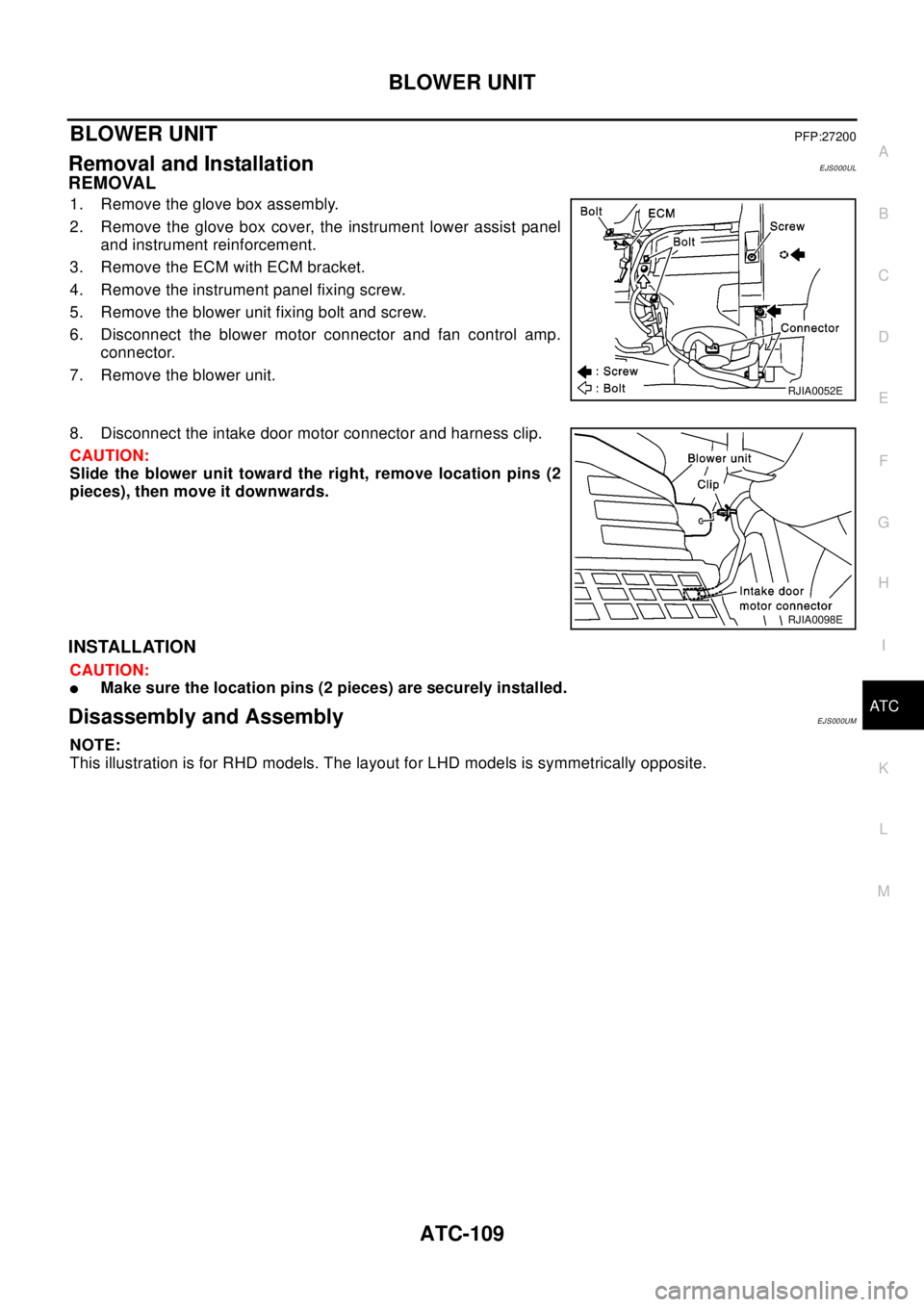
REMOVAL
1. Remove the glove box assembly.
2. Remove the glove box cover, the instrument lower assist panel
and instrument reinforcement.
3. Remove the ECM with ECM bracket.
4. Remove the instrument panel fixing screw.
5. Remove the blower unit fixing bolt and screw.
6. Disconnect the blower motor connector and fan control amp.
connector.
7. Remove the blower unit.
8. Disconnect the intake door motor connector and harness clip.
CAUTION:
Slide the blower unit toward the right, remove location pins (2
pieces), then move it downwards.
INSTALLATION
CAUTION:
lMake sure the location pins (2 pieces) are securely installed.
Disassembly and AssemblyEJS000UM
NOTE:
This illustration is for RHD models. The layout for LHD models is symmetrically opposite.
RJIA0052E
RJIA0098E
Page 718 of 3066
ATC-140
REFRIGERANT LINES
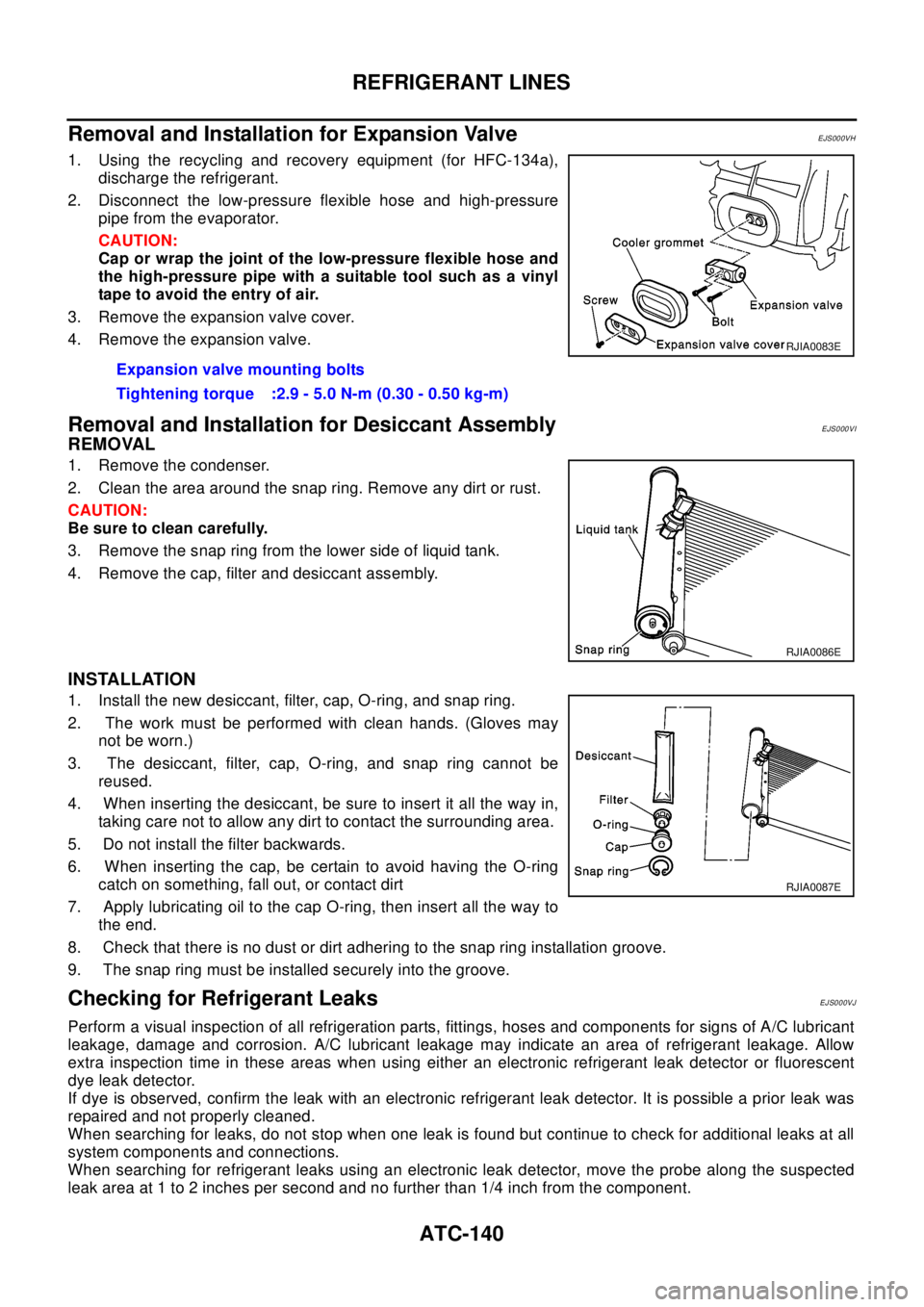
Removal and Installation for Expansion Valve
EJS000VH
1. Using the recycling and recovery equipment (for HFC-134a),
discharge the refrigerant.
2. Disconnect the low-pressure flexible hose and high-pressure
pipe from the evaporator.
CAUTION:
Cap or wrap the joint of the low-pressure flexible hose and
the high-pressure pipe with a suitable tool such as a vinyl
tape to avoid the entry of air.
3. Remove the expansion valve cover.
4. Remove the expansion valve.
Removal and Installation for Desiccant AssemblyEJS000VI
REMOVAL
1. Remove the condenser.
2. Clean the area around the snap ring. Remove any dirt or rust.
CAUTION:
Be sure to clean carefully.
3. Remove the snap ring from the lower side of liquid tank.
4. Remove the cap, filter and desiccant assembly.
INSTALLATION
1. Install the new desiccant, filter, cap, O-ring, and snap ring.
2. The work must be performed with clean hands. (Gloves may
not be worn.)
3. The desiccant, filter, cap, O-ring, and snap ring cannot be
reused.
4. When inserting the desiccant, be sure to insert it all the way in,
taking care not to allow any dirt to contact the surrounding area.
5. Do not install the filter backwards.
6. When inserting the cap, be certain to avoid having the O-ring
catch on something, fall out, or contact dirt
7. Apply lubricating oil to the cap O-ring, then insert all the way to
the end.
8. Check that there is no dust or dirt adhering to the snap ring installation groove.
9. The snap ring must be installed securely into the groove.
Checking for Refrigerant LeaksEJS000VJ
Perform a visual inspection of all refrigeration parts, fittings, hoses and components for signs of A/C lubricant
leakage, damage and corrosion. A/C lubricant leakage may indicate an area of refrigerant leakage. Allow
extra inspection time in these areas when using either an electronic refrigerant leak detector or fluorescent
dye leak detector.
If dye is observed, confirm the leak with an electronic refrigerant leak detector. It is possible a prior leak was
repaired and not properly cleaned.
When searching for leaks, do not stop when one leak is found but continue to check for additional leaks at all
system components and connections.
When searching for refrigerant leaks using an electronic leak detector, move the probe along the suspected
leak area at 1 to 2 inches per second and no further than 1/4 inch from the component.Expansion valve mounting bolts
Tightening torque :2.9 - 5.0 N-m (0.30 - 0.50 kg-m)
RJIA0083E
RJIA0086E
RJIA0087E
Page 721 of 3066
REFRIGERANT LINES
ATC-143
C
D
E
F
G
H
I
K
L
MA
B
AT C
Check all around the service valves. Ensure service valve caps are secured on the service valves (to pre-
vent leaks).
NOTE:
After removing A/C manifold gauge set from service valves, wipe any residue from valves to prevent any
false readings by leak detector.
Cooling unit (Evaporator)
With engine OFF, turn blower fan on "High" for at least 15 seconds to dissipate any refrigerant trace in the
cooling unit. Wait a minimum of 10 minutes accumulation time (refer to the manufacturer's recommended
procedure for actual wait time) before inserting the leak detector probe into the drain hose.
Keep the probe inserted for at least 10 seconds. Use caution not to contaminate the probe tip with water
or dirt that may be in the drain hose.
5. If a leak detector detects a leak, verify at least once by blowing compressed air into area of suspected
leak, then repeat check as outlined above.
6. Do not stop when one leak is found. Continue to check for additional leaks at all system components.
If no leaks are found, perform steps 7 - 10.
7. Start engine.
8. Set the heater A/C control as follows;
a. A/C switch: ON
b. Face mode
c. Intake position: Recirculation
d. Max cold temperature
e. Fan speed: High
9. Run engine at 1,500 rpm for at least 2 minutes.
10. Turn engine off and perform leak check again following steps 4 through 6 above.
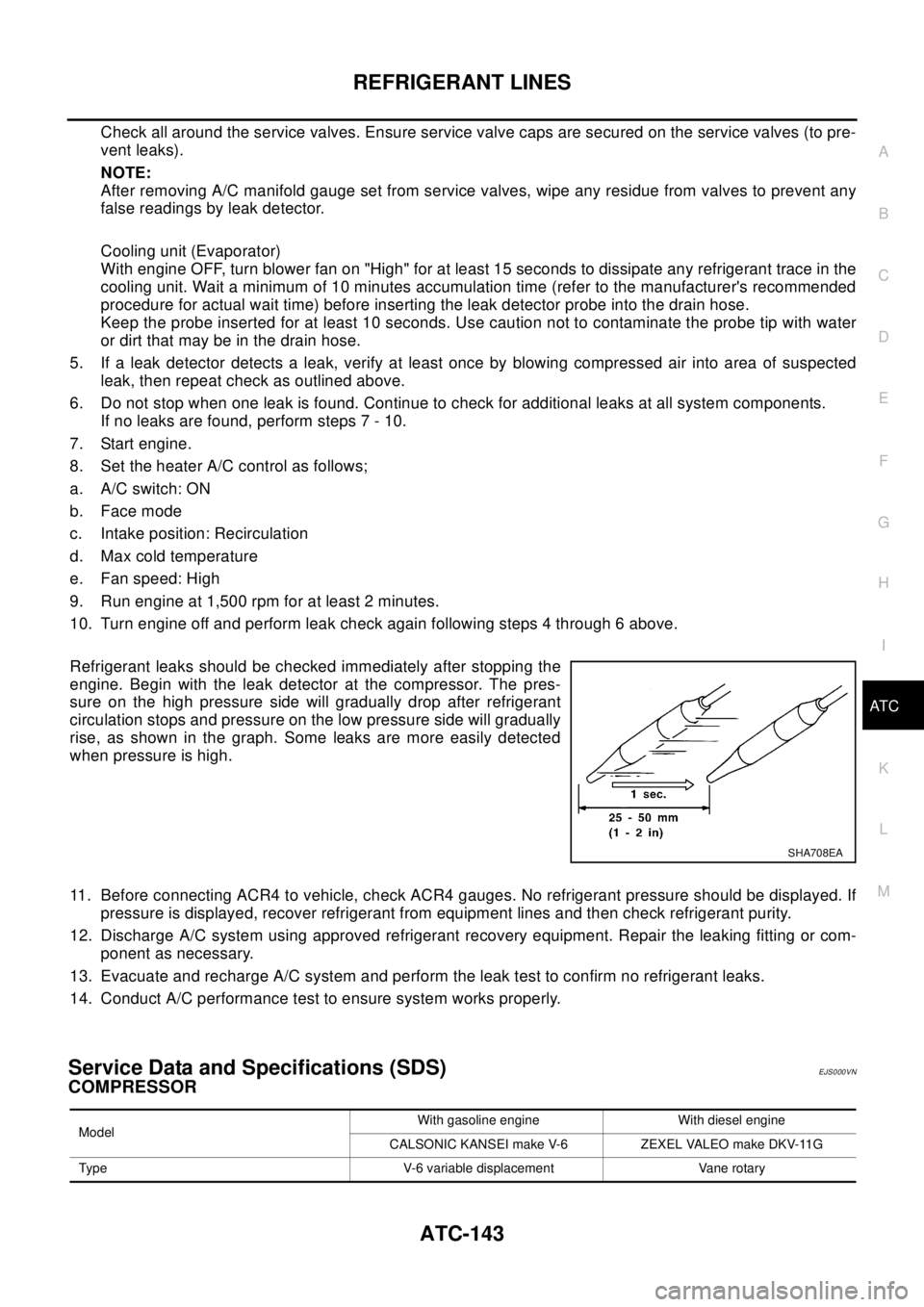
Refrigerant leaks should be checked immediately after stopping the
engine. Begin with the leak detector at the compressor. The pres-
sure on the high pressure side will gradually drop after refrigerant
circulation stops and pressure on the low pressure side will gradually
rise, as shown in the graph. Some leaks are more easily detected
when pressure is high.
11. Before connecting ACR4 to vehicle, check ACR4 gauges. No refrigerant pressure should be displayed. If
pressure is displayed, recover refrigerant from equipment lines and then check refrigerant purity.
12. Discharge A/C system using approved refrigerant recovery equipment. Repair the leaking fitting or com-
ponent as necessary.
13. Evacuate and recharge A/C system and perform the leak test to confirm no refrigerant leaks.
14. Conduct A/C performance test to ensure system works properly.
Service Data and Specifications (SDS)EJS000VN
COMPRESSOR
SHA708EA
ModelWith gasoline engine With diesel engine
CALSONIC KANSEI make V-6 ZEXEL VALEO make DKV-11G
Type V-6 variable displacement Vane rotary
Page 725 of 3066

AUDIO
AV-3
C
D
E
F
G
H
I
J
L
MA
B
AV
AUDIOP F P : 2 8 111
System DescriptionEKS002F2
Refer to Owner's Manual for audio system operating instructions.
Power is supplied at all times
lthrough 15A fuse (No. 32, located in the fusible link and fuse block)
lto audio unit terminal 3
lto CD auto changer terminal 32.
With the ignition switch in the ACC or ON position, power is supplied
lthrough 10A fuse [No. 4, located in the fuse block (J/B)]
lto audio unit terminal 6,
lto CD auto changer terminal 36
Ground is supplied through the case of the audio unit.
Audio signals are supplied
lthrough audio unit terminals 5, 7, 9, 10, 11, 13, 15, 16
lto terminals 1 and 2 of front door speaker LH and RH,
lto terminals 1 and 2 of rear door speaker LH and RH and
lto terminals 1 and 2 of tweeter LH and RH (with 6 speakers)
NATS AUDIO LINK
Description
The link with the NATS IMMU implies that the audio unit can basically only be operated if connected to the
matching NATS IMMU to which the audio unit was initially fitted on the production line.
Since radio operation is impossible after the link with the NATS is disrupted theft of the audio unit is basically
useless since special equipment is required to reset the audio unit.
Initialization process for audio units that are linked to the NATS IMMU
New audio units will be delivered to the factories in the “NEW” state, i.e. ready to be linked with the vehicle's
NATS. When the audio unit in “NEW” state is first switched on at the factory, it will start up communication with
the vehicle's immobilizer control unit (IMMU) and send a code (the “audio unit Code”) to the IMMU. The IMMU
will then store this code, which is unique to each audio unit, in its (permanent) memory.
Upon receipt of the code by the IMMU, the NATS will confirm correct receipt of the audio unit code to the audio
unit. Hereafter, the audio unit will operate as normal.
During the initialization process, “NEW” is displayed on the audio unit display. Normally though, communica-
tion between audio unit and IMMU takes such a short time (300 ms) that the audio unit seems to switch on
directly without showing “NEW” on its display.
Normal operation
Each time the audio unit is switched on afterwards, the audio unit code will be verified between the audio unit
and the NATS before the audio unit becomes operational. During the code verification process, “WAIT” is
shown on the audio unit display. Again, the communication takes such a short time (300 ms) that the audio
unit seems to switch on directly without showing “WAIT” on its display.
When the radio is locked
In case of a audio unit being linked with the vehicle's NATS (immobilizer system), disconnection of the link
between the audio unit and the IMMU will cause the audio unit to switch into the lock (“SECURE”) mode in
which the audio unit is fully inoperative. Hence, repair of the audio unit is basically impossible, unless the
audio unit is reset to the “NEW” state for which special decoding equipment is required.
Clarion has provided their authorized service representatives with so called “decoder boxes” which can bring
the audio unit back to the “NEW” state, enabling the audio unit to be switched on after which repair can be car-
ried out. Subsequently, when the repaired audio unit is delivered to the final user again, it will be in the “NEW”
state to enable re-linking the audio unit to the vehicle's immobilizer system. As a result of the above, repair of
the audio unit can only be done by an authorized Clarion representative (when the owner of the vehicle
requests repair and can show personal identification).
Page 726 of 3066

AV-4
AUDIO
Service Procedure
SPEED DEPENDENT VOLUME CONTROL
Description
If activated, the radio output volume will be automatically adjusted to compensate for increased driving noises
at higher driving speeds.
The radio receives a speed signal from the vehicle speed sensor (VSS) and selects the output volume.
PERSONAL AUDIO SETTINGS
Description
The radio is designed to store several settings (volume, bass, treble, preset stations and level of speed depen-
dent volume control) with every NATS ignition key used. Up to a maximum of 4 NATS keys can be registered.
During the communication mentioned under “Anti-Theft System”, the radio will recognize the used ignition key
and select the accompanying settings.
Item Service procedure Description
Battery disconnection No additional action required. —
Radio needs repair Repair needs to be done by authorized
representative of radio manufacturer since
radio cannot be operated unless it is reset
to NEW state, using special decoding
equipment.—
Replacement of radio by new part No additional action required. Radio is delivered in NEW state.
Transferring radio to another vehicle/
replacement of radio by an “old” partRadio needs to be reset to NEW state by
authorized representative of radio manu-
facturer.—
Replacement of IMMU Radio needs to be reset to NEW state by
authorized representative of Clarion.After switching on the radio, it will display
“SECURE” after 1 minute.
No communication from IMMU to radio 1. If NATS is malfunctioning, check NATS
system.
2. After NATS is repaired, reset radio to
NEW state by authorized representative
of Clarion.After switching on the radio, the radio will
display “SECURE” after 1 minute. Further
use of radio is impossible until communica-
tion is established again, or after radio is
reset by authorized representative of Clar-
ion.
When initialized between ECM and IMMU. Radio needs to be reset to NEW status by
authorized representative of Clarion.After switching on the radio, it will display
“SECURE” after 1 minute.
Page 749 of 3066
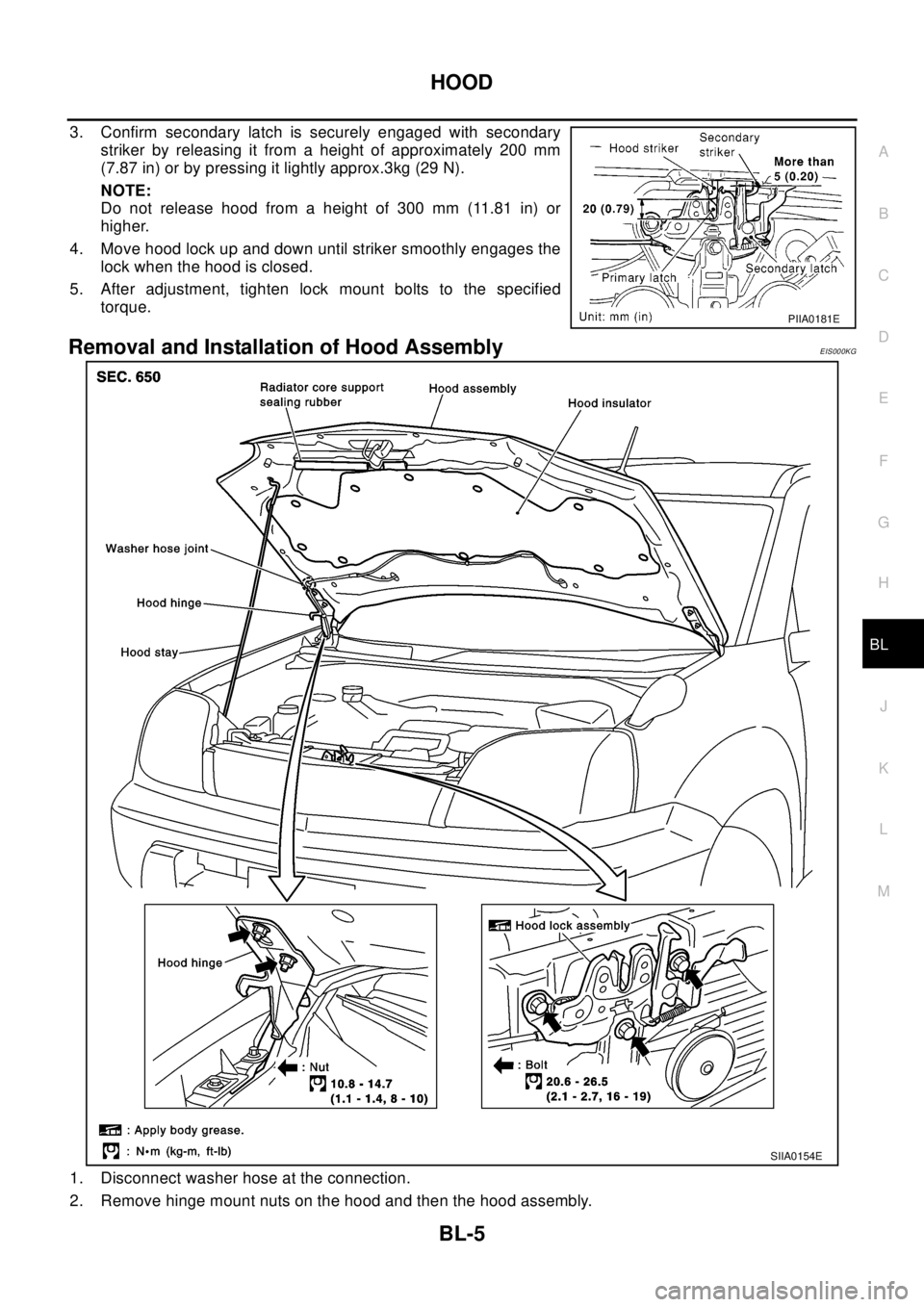
HOOD
BL-5
C
D
E
F
G
H
J
K
L
MA
B
BL
3. Confirm secondary latch is securely engaged with secondary
striker by releasing it from a height of approximately 200 mm
(7.87 in) or by pressing it lightly approx.3kg (29 N).
NOTE:
Do not release hood from a height of 300 mm (11.81 in) or
higher.
4. Move hood lock up and down until striker smoothly engages the
lock when the hood is closed.
5. After adjustment, tighten lock mount bolts to the specified
torque.
Removal and Installation of Hood AssemblyEIS000KG
1. Disconnect washer hose at the connection.
2. Remove hinge mount nuts on the hood and then the hood assembly.
PIIA0181E
SIIA0154E