Electrical OPEL FRONTERA 1998 Workshop Manual
[x] Cancel search | Manufacturer: OPEL, Model Year: 1998, Model line: FRONTERA, Model: OPEL FRONTERA 1998Pages: 6000, PDF Size: 97 MB
Page 3463 of 6000

SUPPLEMENTAL RESTRAINT SYSTEM 9J–26
Special Tools
WARNING: TO AVOID DEPLOYMENT WHEN
TROUBLESHOOTING THE SRS, DO NOT USE
ELECTRICAL TEST EQUIPMENT SUCH AS A
BATTERY–POWERED OR AC–POWERED
VOLTMETER, OHMMETER, ETC., OR ANY TYPE OF
ELECTRICAL EQUIPMENT OTHER THAN THAT
SPECIFIED IN THIS MANUAL. DO NOT USE A
NONPOWERED PROBE–TYPE TESTER.
INSTRUCTIONS IN THIS MANUAL MUST BE
FOLLOWED CAREFULLY, OTHERWISE PERSONAL
INJURY MAY RESULT.
5–8840–2421–0 SRS Driver/Passenger
Load Tool
901RS146The SRS Driver/Passenger Load Tool 5–8840–2421–0 is
used only when called for in this section. It is used as a
diagnostic aid and safety device to prevent inadvertent air
bag assembly deployment.
The load tool has three yellow connectors attached to its
case.
The three small connectors are electrically functional and
serve as resistive load substitutions.
No more than two connectors are used at any time. One
of the small connectors is used to substitute for the load of
the driver air bag assembly when it is connected at the top
of the column to the SRS coil assembly. Another small
connector is used to substitute for the load of the driver air
bag assembly and the SRS coil assembly when it is
connected at the base of the column to the SRS wiring
harness. The third small connector is used to substitute
for the load of the passenger air bag assembly and
pretensioner seat belt assembly when connected to the
passenger air bag assembly and pretensioner seat belt
assembly harness connector.
By substituting the resistance of the load tool when called
for, a determination can be made as to whether an inflator
circuit component is causing system malfunction and
which component is causing the malfunction. The loadtool should be used only when specifically called for in the
diagnostic procedures.
NOTE: If comand to use 5–8840–2421–0 load tool when
repair the pretensioner seat belt, connect load tool
connector to use for driver air bag and/or passenger air
bag connector.
5–8840–0285–0 DVM
901RS153The 5–8840–0285–0 DVM is the preferred DVM for use in
SRS diagnosis and repair. However, 5–8840–0366–0
may be used if 5–8840–0285–0 is not available. No other
DVMs are approved for SRS diagnosis and repair.
Scan Tool
901RW176The Tech 2 is used to read and clear SRS Diagnostic
Trouble Codes (DTCs). Refer to the Tech 2 Operators,
Manual for specific information on how to use the Tech 2.
Page 3489 of 6000
RESTRAINT CONTROL SYSTEM 9J1–2
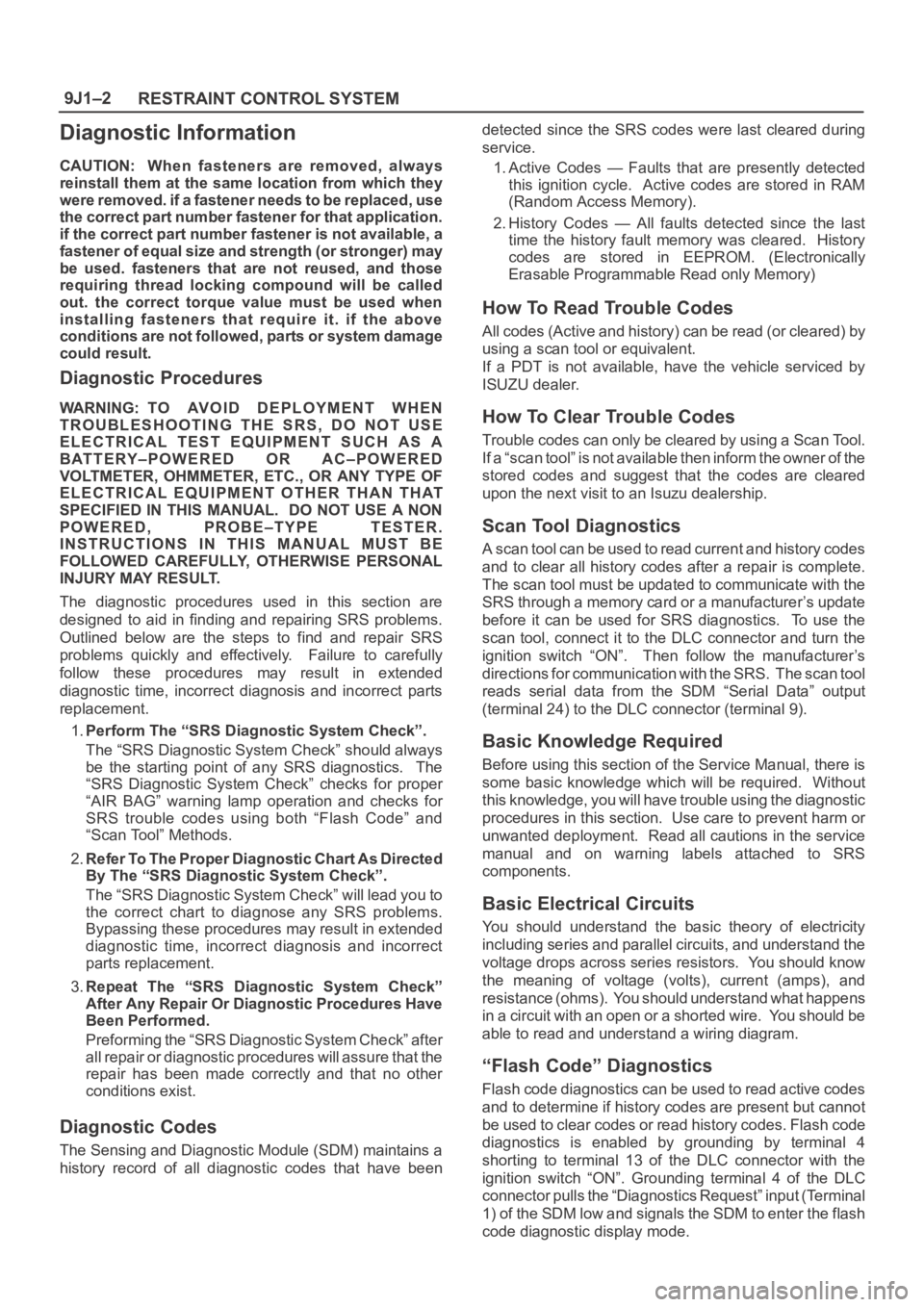
Diagnostic Information
CAUTION: When fasteners are removed, always
reinstall them at the same location from which they
were removed. if a fastener needs to be replaced, use
the correct part number fastener for that application.
if the correct part number fastener is not available, a
fastener of equal size and strength (or stronger) may
be used. fasteners that are not reused, and those
requiring thread locking compound will be called
out. the correct torque value must be used when
installing fasteners that require it. if the above
conditions are not followed, parts or system damage
could result.
Diagnostic Procedures
WARNING: TO AVOID DEPLOYMENT WHEN
TROUBLESHOOTING THE SRS, DO NOT USE
ELECTRICAL TEST EQUIPMENT SUCH AS A
BATTERY–POWERED OR AC–POWERED
VOLTMETER, OHMMETER, ETC., OR ANY TYPE OF
ELECTRICAL EQUIPMENT OTHER THAN THAT
SPECIFIED IN THIS MANUAL. DO NOT USE A NON
POWERED, PROBE–TYPE TESTER.
INSTRUCTIONS IN THIS MANUAL MUST BE
FOLLOWED CAREFULLY, OTHERWISE PERSONAL
INJURY MAY RESULT.
The diagnostic procedures used in this section are
designed to aid in finding and repairing SRS problems.
Outlined below are the steps to find and repair SRS
problems quickly and effectively. Failure to carefully
follow these procedures may result in extended
diagnostic time, incorrect diagnosis and incorrect parts
replacement.
1.Perform The “SRS Diagnostic System Check”.
The “SRS Diagnostic System Check” should always
be the starting point of any SRS diagnostics. The
“SRS Diagnostic System Check” checks for proper
“AIR BAG” warning lamp operation and checks for
SRS trouble codes using both “Flash Code” and
“Scan Tool” Methods.
2.Refer To The Proper Diagnostic Chart As Directed
By The “SRS Diagnostic System Check”.
The “SRS Diagnostic System Check” will lead you to
the correct chart to diagnose any SRS problems.
Bypassing these procedures may result in extended
diagnostic time, incorrect diagnosis and incorrect
parts replacement.
3.Repeat The “SRS Diagnostic System Check”
After Any Repair Or Diagnostic Procedures Have
Been Performed.
Preforming the “SRS Diagnostic System Check” after
all repair or diagnostic procedures will assure that the
repair has been made correctly and that no other
conditions exist.
Diagnostic Codes
The Sensing and Diagnostic Module (SDM) maintains a
history record of all diagnostic codes that have beendetected since the SRS codes were last cleared during
service.
1. Active Codes — Faults that are presently detected
this ignition cycle. Active codes are stored in RAM
(Random Access Memory).
2. History Codes — All faults detected since the last
time the history fault memory was cleared. History
codes are stored in EEPROM. (Electronically
Erasable Programmable Read only Memory)
How To Read Trouble Codes
All codes (Active and history) can be read (or cleared) by
using a scan tool or equivalent.
If a PDT is not available, have the vehicle serviced by
ISUZU dealer.
How To Clear Trouble Codes
Trouble codes can only be cleared by using a Scan Tool.
If a “scan tool” is not available then inform the owner of the
stored codes and suggest that the codes are cleared
upon the next visit to an Isuzu dealership.
Scan Tool Diagnostics
A scan tool can be used to read current and history codes
and to clear all history codes after a repair is complete.
The scan tool must be updated to communicate with the
SRS through a memory card or a manufacturer’s update
before it can be used for SRS diagnostics. To use the
scan tool, connect it to the DLC connector and turn the
ignition switch “ON”. Then follow the manufacturer’s
directions for communication with the SRS. The scan tool
reads serial data from the SDM “Serial Data” output
(terminal 24) to the DLC connector (terminal 9).
Basic Knowledge Required
Before using this section of the Service Manual, there is
some basic knowledge which will be required. Without
this knowledge, you will have trouble using the diagnostic
procedures in this section. Use care to prevent harm or
unwanted deployment. Read all cautions in the service
manual and on warning labels attached to SRS
components.
Basic Electrical Circuits
You should understand the basic theory of electricity
including series and parallel circuits, and understand the
voltage drops across series resistors. You should know
the meaning of voltage (volts), current (amps), and
resistance (ohms). You should understand what happens
in a circuit with an open or a shorted wire. You should be
able to read and understand a wiring diagram.
“Flash Code” Diagnostics
Flash code diagnostics can be used to read active codes
and to determine if history codes are present but cannot
be used to clear codes or read history codes. Flash code
diagnostics is enabled by grounding by terminal 4
shorting to terminal 13 of the DLC connector with the
ignition switch “ON”. Grounding terminal 4 of the DLC
connector pulls the “Diagnostics Request” input (Terminal
1) of the SDM low and signals the SDM to enter the flash
code diagnostic display mode.
Page 3492 of 6000
9J1–5
RESTRAINT CONTROL SYSTEM
diagnostic trouble codes in the order specified may result in extended diagnostic time, incorrect diagnosis and
incorrect parts replacement.
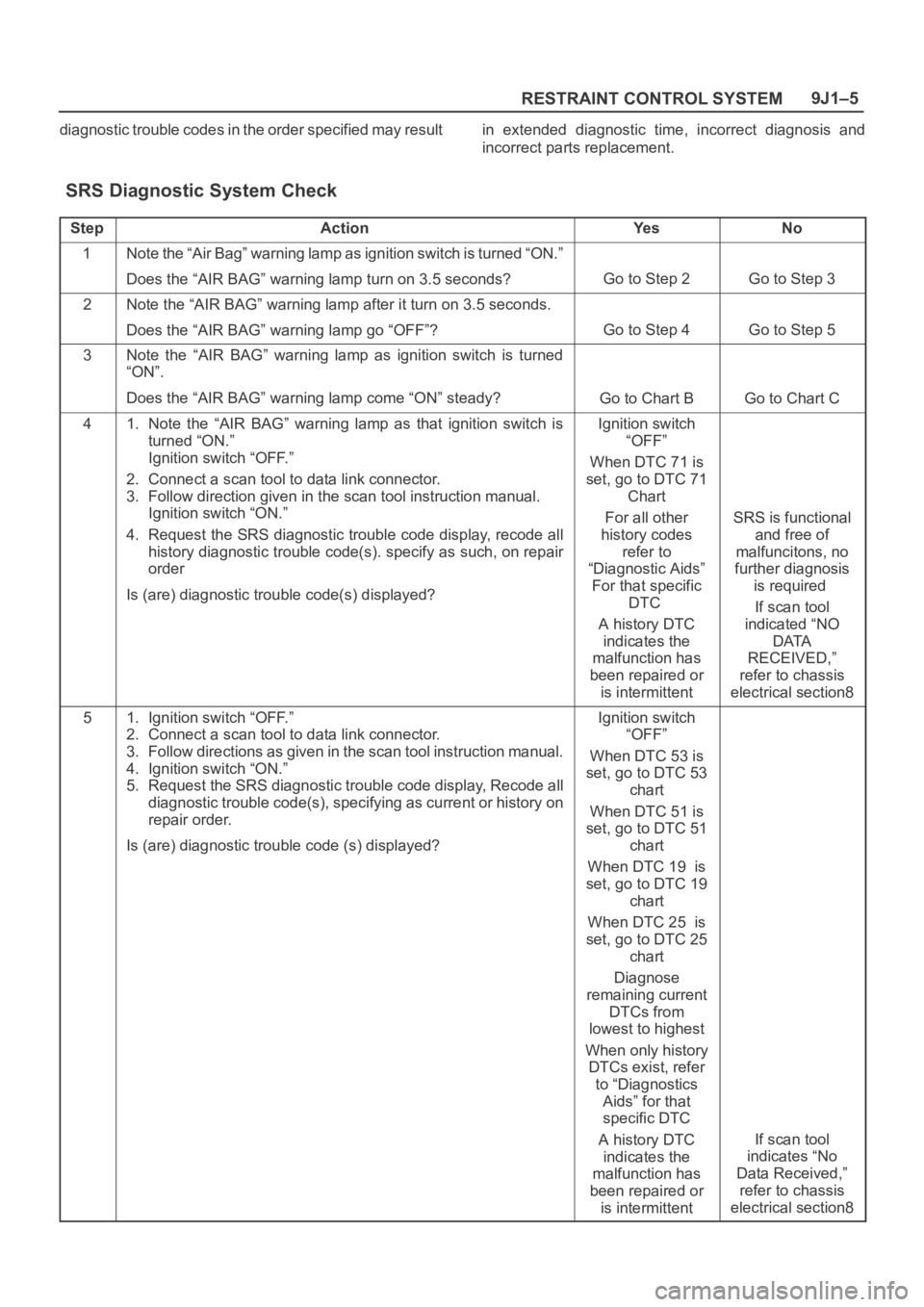
SRS Diagnostic System Check
StepActionYe sNo
1Note the “Air Bag” warning lamp as ignition switch is turned “ON.”
Does the “AIR BAG” warning lamp turn on 3.5 seconds?
Go to Step 2Go to Step 3
2Note the “AIR BAG” warning lamp after it turn on 3.5 seconds.
Does the “AIR BAG” warning lamp go “OFF”?
Go to Step 4Go to Step 5
3Note the “AIR BAG” warning lamp as ignition switch is turned
“ON”.
Does the “AIR BAG” warning lamp come “ON” steady?
Go to Chart BGo to Chart C
41. Note the “AIR BAG” warning lamp as that ignition switch is
turned “ON.”
Ignition switch “OFF.”
2. Connect a scan tool to data link connector.
3. Follow direction given in the scan tool instruction manual.
Ignition switch “ON.”
4. Request the SRS diagnostic trouble code display, recode all
history diagnostic trouble code(s). specify as such, on repair
order
Is (are) diagnostic trouble code(s) displayed?Ignition switch
“OFF”
When DTC 71 is
set, go to DTC 71
Chart
For all other
history codes
refer to
“Diagnostic Aids”
For that specific
DTC
A history DTC
indicates the
malfunction has
been repaired or
is intermittent
SRS is functional
and free of
malfuncitons, no
further diagnosis
is required
If scan tool
indicated “NO
DATA
RECEIVED,”
refer to chassis
electrical section8
51. Ignition switch “OFF.”
2. Connect a scan tool to data link connector.
3. Follow directions as given in the scan tool instruction manual.
4. Ignition switch “ON.”
5. Request the SRS diagnostic trouble code display, Recode all
diagnostic trouble code(s), specifying as current or history on
repair order.
Is (are) diagnostic trouble code (s) displayed?Ignition switch
“OFF”
When DTC 53 is
set, go to DTC 53
chart
When DTC 51 is
set, go to DTC 51
chart
When DTC 19 is
set, go to DTC 19
chart
When DTC 25 is
set, go to DTC 25
chart
Diagnose
remaining current
DTCs from
lowest to highest
When only history
DTCs exist, refer
to “Diagnostics
Aids” for that
specific DTC
A history DTC
indicates the
malfunction has
been repaired or
is intermittent
If scan tool
indicates “No
Data Received,”
refer to chassis
electrical section8
Page 3522 of 6000

9J1–35
RESTRAINT CONTROL SYSTEM
DTC 51 Air Bag Deployment Event Commanded
D09RW014
Circuit Description:
The SDM contains a sensing device which converts
vehicle velocity changes to an electrical signal. The
electrical signal generated is processed by the SDM and
then compared to a value stored in memory. When the
generated signal exceeds the stored value, the SDM will
cause current to flow through the air bag assembly
deploying the air bags and causing DTC 51 to set.
DTC Will Set When:
The SDM detects a frontal crash, up to 30 degrees off the
centerline of the vehicle, of sufficient force to warrant
deployment of the air bags.
Action Taken:
SDM turns “ON” the “AIR BAG” warning lamp records
“Crash Data”, and sets a diagnostic trouble code.
DTC Will Clear When:
The SDM is replaced.
DTC Chart Test Description:
Number(s) below refer to step number(s) on the
diagnostic chart:
2. If air bag assembly (s) has not deployed, DTC 51
may have falsely set.
3. If DTC 51 has set with no signs of frontal impact, the
diagnostic trouble code has falsely set.
Page 3524 of 6000

9J1–37
RESTRAINT CONTROL SYSTEM
DTC 53 Deployment Commanded With Deployment Loop Fault Or Energy
Reserves Out Of Range
D09RW014
Circuit Description:
The SDM contains a sensing drive which converts vehicle
velocity changes to an electrical signal. The electrical
signal generated is processed by the SDM and then
compared to a value stored in memory. When the
generated signal exceeds the stored value, the SDM will
cause current to flow through the air bag assembly
deploying the air bags. DTC 53 is set accompanying with
DTC 51 when a deployment occurs while an air bag
assembly circuit fault is present that could possible result
in a no deployment situation in one or both air bag
assemblies.
DTC Will Set When:
The SDM detects a frontal crash, up to 30 degrees off the
centerline of the vehicle, of sufficient force to warrant
deployment of the air bags and an inflator circuit fault is
present..
Action Taken:
SDM turns “ON” the “AIR BAG” warning lamp records
“Crash Data”, and sets a diagnostic trouble code.
DTC Will Clear When:
The SDM is replaced. If DTC 53 is set, one or more DTCs
will be set in addition to DTC 53. Malfunction(s) setting
DTC(s) (other than DTC 71) must be repaired so that
DTC(s) will not be set when a new SDM is installed.
DTC Chart Test Description:
Number(s) below refer to step number(s) on the
diagnostic chart:
2. If air bag assembly have not deployed, DTC 53 may
have falsely set.
3. If DTC 53 has set with no signs of frontal impact, the
diagnostic trouble code has falsely set.
Page 3550 of 6000

9J1–63
RESTRAINT CONTROL SYSTEM
DTC 52 Pretensioner Deployment Event Commanded
D09RW014
Circuit Description:
The SDM contains a sensing device which converts
vehicle velocity changes to an electrical signal. The
electrical signal generated is processed by the SDM and
then compared to a value stored in memory. When the
generated signal exceeds the stored value, the SDM will
cause current to flow through the pretensioner assembly
deploying the pretensioners and causing DTC 52 to set.
DTC Will Set When:
The SDM detects a frontal crash, up to 30 degrees off the
centerline of the vehicle, of sufficient force to warrant
deployment of the air bags and pretensioner seat belt.
Action Taken:
SDM turns “ON” the “AIR BAG” warning lamp records
“Crash Data”, and sets a diagnostic trouble code.
DTC Will Clear When:
The SDM is replaced.
DTC Chart Test Description:
Number(s) below refer to step number(s) on the
diagnostic chart:
2. If pretensioner assembly (s) has not deployed, DTC
52 may have falsely set.
3. If DTC 52 has set with no signs of frontal impact, the
diagnostic trouble code has falsely set.
Page 3566 of 6000
PAGE BACK PAGE NEXT
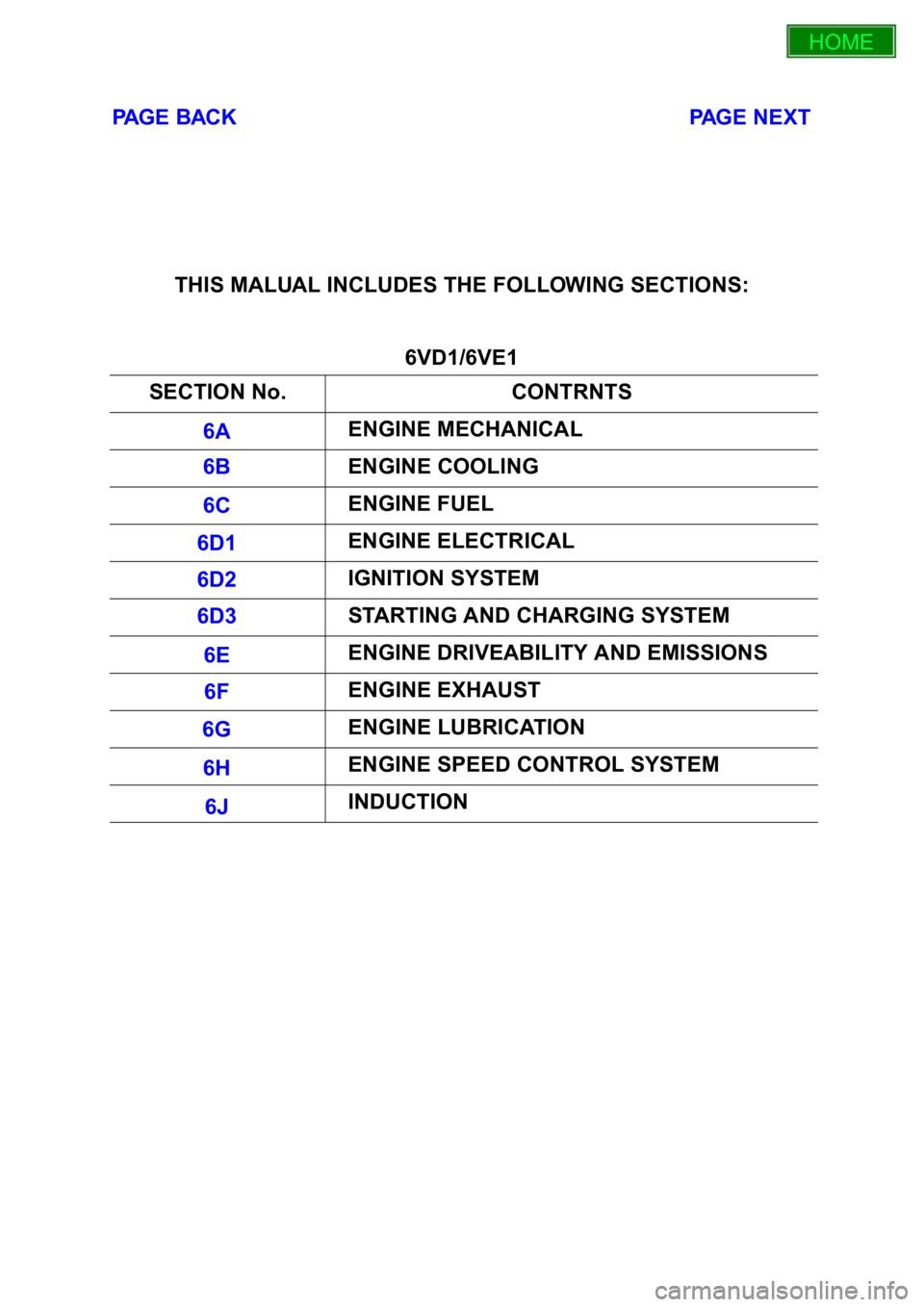
THIS MALUAL INCLUDES THE FOLLOWING SECTIONS:
6VD1/6VE1
SECTION No. CONTRNTS
6A ENGINE MECHANICAL
6B ENGINE COOLING
6C ENGINE FUEL
6D1 ENGINE ELECTRICAL
6D2 IGNITION SYSTEM
6D3 STARTING AND CHARGING SYSTEM
6E ENGINE DRIVEABILITY AND EMISSIONS
6F ENGINE EXHAUST
6G ENGINE LUBRICATION
6H ENGINE SPEED CONTROL SYSTEM
6J INDUCTION
HOME
6A
6B
6C
6D1
6D2
6D3
6E
6F
6G
6H
6J
Page 3567 of 6000
PAGE BACK PAGE NEXT
4JG2
4JX1 SECTION No. CONTRNTS
00 SERVICE INFORMATION
6A ENGINE MECHANICAL
6A2 4JG2-NA / 4JG2-TURBO ENGINE
6B ENGINE COOLING
6C FUEL SYSTEM
6D ENGINE ELECTRICAL
6E -
6F EXHAUST
6G -
SECTION No. CONTRNTS
6A ENGINE MECHANICAL
6B ENGINE COOLING
6C ENGINE FUEL
6D ENGINE ELECTRICAL
6E ENGINE DRIVEABILITY AND EMISSIONS
6F ENGINE EXHAUST
6G ENGINE LUBRICATION
6H ENGINE SPEED CONTROL
6J INDUCTION
HOME
00
6A
6A2
6B
6C
6D
6E
6F
6G
6A
6B
6C
6D
6E
6F
6G
6H
6J
Page 4052 of 6000

4B1–7 DRIVE LINE CONTROL SYSTEM (SHIFT ON THE FLY)
Shift on the Fly System (Push Button Type)
Outline of Shift on the Fly System (Push Button Type)
The shift on the fly system switches between 2 wheel
drive (2WD) and 4 wheel drive (4WD) electrically by
driver’s pressing the 4WD switch (push button type) on
instrument panel.
This system controls below operations. (Shifting between
“4H” and “4L” must be performed by transfer control lever
on the floor.)
1. Shifting the transfer front output gear (Connecting to,
and disconnecting from, front propeller shaft by motor
actuator).2. Retrial of shifting the transfer front output gear.
3. Connecting front wheels to, and disconnecting them
from, the front axles by vacuum actuator.
4. Indicator on instrument panel.
5. 4WD out signal to other Electronic Hydraulic Control
Unit (If anti–lock brake system is equipped).
System Diagrams
412RW050
Page 4355 of 6000
5A–5 BRAKE CONTROL SYSTEM
FR
Front Right
GEN
Generator
MV
Millivolts
RL
Rear Left
RR
Rear RightRPS
Revolution per Second
VDC
Vo l t s D C
VA C
Vo l t s A C
W/L
Warning Light
WSS
Wheel Speed Sensor
General Diagnosis
General Information
ABS malfunction can be classified into two types, those
which can be detected by the ABS warning light and those
which can be detected as a vehicle abnormality by the
driver.
In either case, locate the fault in accordance with the
“BASIC DIAGNOSTIC FLOWCHART” and repair.
Please refer to Section 5C for the diagnosis of
mechanical troubles such as brake noise, brake judder
(brake pedal or vehicle vibration felt when braking),
uneven braking, and parking brake trouble.
ABS Service Precautions
Required Tools and Items:
Box Wrench
Brake Fluid
Special Tool
Some diagnosis procedures in this section require the
installation of a special tool.
J-39200 High Impedance Multimeter
When circuit measurements are requested, use a circuit
tester with high impedance.
Computer System Service Precautions
The Anti-lock Brake System interfaces directly with the
Electronic Hydraulic Control Unit (EHCU) which is a
control computer that is similar in some regards to the
Powertrain Control Module. These modules are designed
to withstand normal current draws associated with
vehicle operation. However, care must be taken to avoid
overloading any of the EHCU circuits. In testing for opens
or shorts, do not ground or apply voltage to any of the
circuits unless instructed to do so by the appropriate
diagnostic procedure. These circuits should only be
tested with a high impedance multimeter (J-39200) or
special tools as described in this section. Power should
never be removed or applied to any control module with
the ignition in the “ON” position.
Before removing or connecting battery cables, fuses or
connectors, always turn the ignition switch to the “OFF”
position.
General Service Precautions
The following are general precautions which should be
observed when servicing and diagnosing the Anti-lock
Brake System and/or other vehicle systems. Failure toobserve these precautions may result in Anti-lock Brake
System damage.
If welding work is to be performed on the vehicle using
an electric arc welder, the EHCU and valve block
connectors should be disconnected before the
welding operation begins.
The EHCU and valve block connectors should never
be connected or disconnected with the ignition “ON” .
EHCU of the Anti-lock Brake System are not
separately serviceable and must be replaced as
assemblies. Do not disassemble any component
which is designated as non-serviceable in this
Section.
If only rear wheels are rotated using jacks or drum
tester, the system will diagnose a speed sensor
malfunction and the “ABS” warning light will
illuminate. But actually no trouble exists. After
inspection stop the engine once and re-start it, then
make sure that the “ABS” warning light does not
illuminate.
If the battery has been discharged
The engine may stall if the battery has been completely
discharged and the engine is started via jumper cables.
This is because the Anti-lock Brake System (ABS)
requires a large quantity of electricity. In this case, wait
until the battery is recharged, or set the ABS to a
non-operative state by removing the fuse for the ABS
(40A). After the battery has been recharged, stop the
engine and install the ABS fuse. Start the engine again,
and confirm that the ABS warning light does not light.
Note on Intermittents
As with virtually any electronic system, it is difficult to
identify an intermittent failure. In such a case duplicating
the system malfunction during a test drive or a good
description of vehicle behavior from the customer may be
helpful in locating a “most likely” failed component or
circuit. The symptom diagnosis chart may also be useful
in isolating the failure. Most intermittent problems are
caused by faulty electrical connections or wiring. When
an intermittent failure is encountered, check suspect
circuits for:
Suspected harness damage.
Poor mating of connector halves or terminals not fully
seated in the connector body (backed out).
Improperly formed or damaged terminals.