horn OPEL FRONTERA 1998 Owner's Manual
[x] Cancel search | Manufacturer: OPEL, Model Year: 1998, Model line: FRONTERA, Model: OPEL FRONTERA 1998Pages: 6000, PDF Size: 97 MB
Page 3361 of 6000

8H–22SECURITY AND LOCKS
Anti-theft System
General Description
The circuit consists of the starter switch, anti-theft &
keyless entry control unit, anti-theft horn, front door and
tailgate key switch (detect and tamper switch), door lock
(& power window) switch, door lock actuator for each
door, engine hood switch, clutch start switch (M/T),
ANTI-THEFT indicator light and mode switch (A/T).
The system operates as follows: After locking the starter
switch and removing the starter key (this sets the alarm),
if the door is unlocked in any way other than with the
proper key, the headlights start flashing, the horn sounds,
and the starter circuit is disabled. (However, the engine
hood and all the doors must be locked and closed.)
Once the system has been placed in the warning or alarm
condition, it can be released only when the starter switch
is shifted from “OFF” to “ACC” by the starter key, or when
the lock of the front door or the tailgate is released (to
activate the detect switch) by the starter key.
Anti-theft & Keyless Entry Control
Unit Removal
1. Disconnect the battery ground cable.
2. Remove the front console assembly.
Refer to the Instrument Panel Assembly in Body
Structure section.
3. Remove the lower cluster assembly.
Refer to the Instrument Panel Assembly in Body
Structure section.
4. Disconnect the connector(2).
5. Remove four screws to remove the anti-theft &
keyless entry control unit with bracket(1).
825RW029
6. Remove two nuts from the anti-theft & keyless entry
control unit with bracket(3) to remove the anti-theft &
keyless entry controller(4).
825RW028
Anti-theft & Keyless Entry Control
Unit Installation
To install, follow the removal steps in the reverse order.
Anti-theft Indicator Removal
1. Disconnect the battery ground cable.
2. Remove the front console assembly(1).
Refer to the Instrument Panel Assembly in Body
Structure section.
3. Remove the lower cluster assembly(2).
Refer to the Instrument Panel Assembly in Body
Structure section.
4. Remove the instrument panel driver lower cover
assembly(3).
Refer to the Instrument Panel Assembly in Body
Structure section.
821RW024
Page 3362 of 6000

SECURITY AND LOCKS8H–23
5. Remove the instrument panel cluster assembly(4).
Refer to the Instrument Panel Assembly in Body
Structure section.
6. Remove two screws and then remove the anti-theft
indicator(5).
821RW032
Anti-theft Indicator Installation
To install, follow the removal steps in the reverse order.
Anti-theft Horn Removal
1. Disconnect the battery ground cable.
2. Disconnect the connector and remove the fixing bolt
to remove the anti-theft horn(1).
828RS007
Anti-Theft Horn Installation
To install, follow the removal steps in the reverse order.
Engine Hood Switch Removal
1. Disconnect the battery ground cable.
2. Remove the cap(1).
3. Remove the lock nut(2).
4. Disconnect the connector(4).
5. Remove the engine hood switch(3).
828RS011
Engine Hood Switch Installation
To install, follow the removal steps in the reverse order.
Page 3365 of 6000

8H–26SECURITY AND LOCKS
StepNo Ye s Action
12The control unit makes lock/unlock response once with interval of
one second.
Is the response complete?
Finished—
13The control unit makes lock/unlock response three times with
interval of one second.
Is the response complete?
Finished—
ID Code Check
This procedure checks how many kinds of ID code are
registered.
Step
ActionYe sNo
11. Open the driver’s side door.
2. Turn the starter switch off.
Is the action complete?
Go to Step 2—
2Turn the starter switch to ACC position and then off three times
within five seconds after step 1.
Is the action complete within five seconds?
Go to Step 3Finished
3Close the door and then open it two times within ten seconds after
step 2.
Is the action complete within ten seconds?
Go to Step 4Finished
41. Turn the starter switch to ACC position and then off.
2. Close the door and then open it.
NOTE: This step must be performed within ten seconds after step
3.
Is the action complete?
Go to Step 5Finished
5The control unit makes lock/unlock response twice as many the
number of registered ID code with interval of two seconds. (In
case of no registered code, the response is made ten times.)
Is the response complete?
Finished—
Answer Back (Anti–theft Horn
Operation) Change Mode
Anti–theft horn, as an answer back function for the
transmitter operation, chages from available into
unavailing or from unavailing into available by this
procedure.
Step
ActionYe sNo
1Open the driver’s side door.
Is the action complete?
Go to Step 2—
2Lock the door and then unlock it three times within ten seconds
after step 1.
Is the action complete within five seconds?
Go to Step 3Finished
3Close the door and then open it two times within ten seconds after
step 2.
Is the action complete within ten seconds?
Go to Step 4Finished
Page 3438 of 6000

SUPPLEMENTAL RESTRAINT SYSTEM9J–1
RESTRAINTS
SUPPLEMENTAL RESTRAINT SYSTEM (SRS)
CONTENTS
Service Precaution 9J–1. . . . . . . . . . . . . . . . . . . . . .
General Description 9J–2. . . . . . . . . . . . . . . . . . . . .
SRS Component And Wiring Location View 9J–4.
Component Description 9J–4. . . . . . . . . . . . . . . . . .
Definitions 9J–7. . . . . . . . . . . . . . . . . . . . . . . . . . . . . .
Diagnosis 9J–8. . . . . . . . . . . . . . . . . . . . . . . . . . . . . .
SRS Connector Body Face Views 9J–9. . . . . . . . .
Repairs And Inspections Required After
An Accident 9J–9. . . . . . . . . . . . . . . . . . . . . . . . . . . .
On–Vehicle Service 9J–10. . . . . . . . . . . . . . . . . . . . . .
Air Bag Assembly Handling / Shipping
/ Scrapping 9J–11. . . . . . . . . . . . . . . . . . . . . . . . . . . .
Pretensioner Seat Belt Handling / Shipping
/ Scrapping. 9J–11. . . . . . . . . . . . . . . . . . . . . . . . . . . .
Special Tools 9J–26. . . . . . . . . . . . . . . . . . . . . . . . . . .
Service Precautions for SRS Component
Service 9J–30. . . . . . . . . . . . . . . . . . . . . . . . . . . . . . . .
SRS Connectors 9J–31. . . . . . . . . . . . . . . . . . . . . . . .
Sensing And Diagnostic Module (SDM) 9J–33. . . .
Service Precautions 9J–33. . . . . . . . . . . . . . . . . . .
Removal 9J–33. . . . . . . . . . . . . . . . . . . . . . . . . . . . .
Installation 9J–33. . . . . . . . . . . . . . . . . . . . . . . . . . . .
Driver Air Bag Assembly 9J–35. . . . . . . . . . . . . . . . .
Service Precautions 9J–35. . . . . . . . . . . . . . . . . . .
Removal 9J–35. . . . . . . . . . . . . . . . . . . . . . . . . . . . .
Installation 9J–36. . . . . . . . . . . . . . . . . . . . . . . . . . . .
Steering Wheel 9J–37. . . . . . . . . . . . . . . . . . . . . . . . . Service Precautions 9J–37. . . . . . . . . . . . . . . . . . .
Removal 9J–37. . . . . . . . . . . . . . . . . . . . . . . . . . . . .
Installation 9J–38. . . . . . . . . . . . . . . . . . . . . . . . . . . .
SRS Coil Assembly 9J–39. . . . . . . . . . . . . . . . . . . . . .
Service Precautions 9J–39. . . . . . . . . . . . . . . . . . .
Removal 9J–39. . . . . . . . . . . . . . . . . . . . . . . . . . . . .
Installation 9J–41. . . . . . . . . . . . . . . . . . . . . . . . . . . .
SRS Coil Replacement Procedure 9J–42. . . . . . . . .
Removal 9J–42. . . . . . . . . . . . . . . . . . . . . . . . . . . . .
How to Disconnect the horn terminal 9J–43. . . . .
How to Connect Horn Terminal 9J–43. . . . . . . . . .
Installation 9J–44. . . . . . . . . . . . . . . . . . . . . . . . . . . .
Steering Column 9J–44. . . . . . . . . . . . . . . . . . . . . . . .
Service Precautions 9J–44. . . . . . . . . . . . . . . . . . .
Removal 9J–44. . . . . . . . . . . . . . . . . . . . . . . . . . . . .
Installation 9J–46. . . . . . . . . . . . . . . . . . . . . . . . . . . .
Passenger Air Bag Assembly 9J–48. . . . . . . . . . . . .
Service Precautions 9J–48. . . . . . . . . . . . . . . . . . .
Removal 9J–48. . . . . . . . . . . . . . . . . . . . . . . . . . . . .
Installation 9J–48. . . . . . . . . . . . . . . . . . . . . . . . . . . .
Pretensioner Seat Belt (If so equipped) 9J–49. . . .
Service Precaution 9J–49. . . . . . . . . . . . . . . . . . . .
Parts Location 9J–49. . . . . . . . . . . . . . . . . . . . . . . .
Removal 9J–49. . . . . . . . . . . . . . . . . . . . . . . . . . . . .
Installation 9J–49. . . . . . . . . . . . . . . . . . . . . . . . . . . .
Main Data and Specifications 9J–50. . . . . . . . . . . . .
Service Precaution
WARNING: IF SO EQUIPPED WITH A
SUPPLEMENTAL RESTRAINT SYSTEM (SRS),
REFER TO THE SRS COMPONENT AND WIRING
LOCATION VIEW IN ORDER TO DETERMINE
WHETHER YOU ARE PERFORMING SERVICE ON OR
NEAR THE SRS COMPONENTS OR THE SRS
WIRING. WHEN YOU ARE PERFORMING SERVICE
ON OR NEAR THE SRS COMPONENTS OR THE SRS
WIRING, REFER TO THE SRS SERVICE
INFORMATION. FAILURE TO FOLLOW WARNINGS
COULD RESULT IN POSSIBLE AIR BAG
DEPLOYMENT, PERSONAL INJURY, OR
OTHERWISE UNNEEDED SRS SYSTEM REPAIRS.CAUTION: Always use the correct fastener in the
proper location. When you replace a fastener, use
ONLY the exact part number for that application.
ISUZU will call out those fasteners that require a
replacement after removal. ISUZU will also call out
the fasteners that require thread lockers or thread
sealant. UNLESS OTHERWISE SPECIFIED, do not
use supplemental coatings (Paints, greases, or other
corrosion inhibitors) on threaded fasteners or
fastener joint interfaces. Generally, such coatings
adversely affect the fastener torque and the joint
clamping force, and may damage the fastener. When
you install fasteners, use the correct tightening
sequence and specifications. Following these
instructions can help you avoid damage to parts and
systems.
Page 3474 of 6000
SUPPLEMENTAL RESTRAINT SYSTEM9J–37
Steering Wheel
Service Precautions
WARNING: SAFETY PRECAUTIONS MUST BE
FOLLOWED WHEN HANDLING A DEPLOYED AIR
BAG ASSEMBLY. AFTER DEPLOYMENT, THE AIR
BAG ASSEMBLY SURFACE MAY CONTAIN A SMALL
AMOUNT OF SODIUM HYDROXIDE, A BY–PRODUCT
OF THE DEPLOYMENT REACTION, THAT IS
IRRITATING TO THE SKIN AND EYES. MOST OF THE
POWER ON THE AIR BAG ASSEMBLY IS
HARMLESS. AS A PRECAUTION, WEAR GLOVES
AND SAFETY GLASSES WHEN HANDLING A
DEPLOYED AIR BAG ASSEMBLY, AND WASH YOUR
HANDS WITH MILD SOAP AND WATER
AFTERWARDS.
WARNING: WHEN CARRYING A LIVE AIR BAG
ASSEMBLY, MAKE SURE THE BAG AND TRIM
COVER ARE POINTED AWAY FROM YOU. NEVER
CARRY AIR BAG ASSEMBLY BY THE WIRES OR
CONNECTOR ON THE UNDERSIDE OF MODULE. IN
THE CASE OF AN ACCIDENTAL DEPLOYMENT, THE
BAG WILL THEN DEPLOY WITH MINIMAL CHANCE
OF INJURY. WHEN PLACING ALIVE AIR BAG
ASSEMBLY ON A BENCH OR OTHER SURFACE,
ALWAYS FACE BAG AND RIM COVER UP, AWAY
FROM THE SURFACE. NEVER REST A STEERING
COLUMN ASSEMBLY ON THE STEERING WHEEL
WITH THE AIR BAG ASSEMBLY FACE DOWN AND
COLUMN VERTICAL. THIS IS NECESSARY SO THAT
A FREE SPACE IS PROVIDED TO ALLOW THE AIR
BAG ASSEMBLY TO EXPAND IN THE UNLIKELY
EVENT OF ACCIDENTAL DEPLOYMENT.
OTHERWISE, PERSONAL INJURY COULD RESULT.
NOTE: In the event deployment has occurred, inspect
coil assembly wire for any signs of scorching, melting or
any other damage due to excessive heat. If the coil has
been damaged, replace it.
Removal
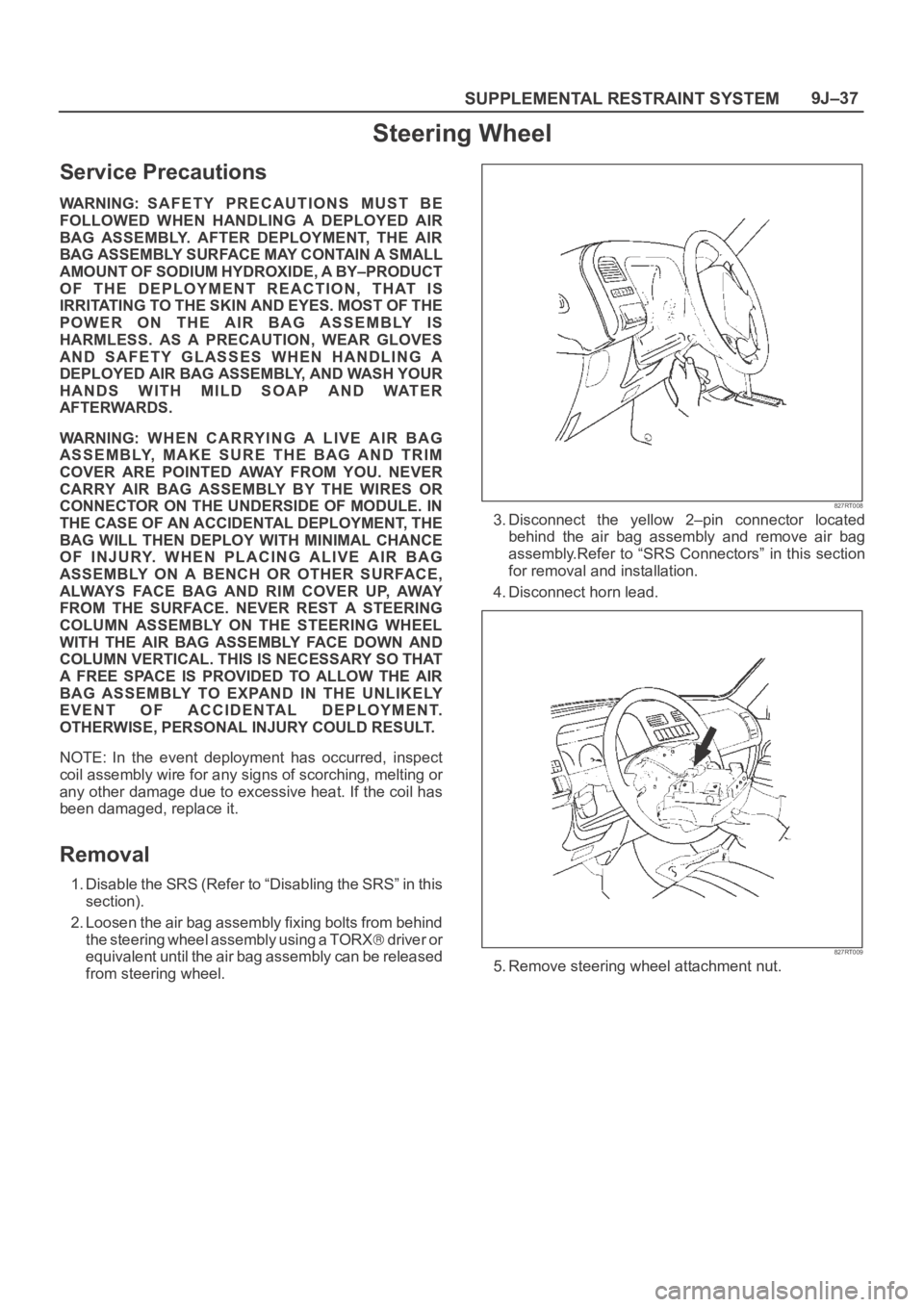
1. Disable the SRS (Refer to “Disabling the SRS” in this
section).
2. Loosen the air bag assembly fixing bolts from behind
the steering wheel assembly using a TORX
d r i v e r o r
equivalent until the air bag assembly can be released
from steering wheel.
827RT008
3. Disconnect the yellow 2–pin connector located
behind the air bag assembly and remove air bag
assembly.Refer to “SRS Connectors” in this section
for removal and installation.
4. Disconnect horn lead.
827RT009
5. Remove steering wheel attachment nut.
Page 3475 of 6000

SUPPLEMENTAL RESTRAINT SYSTEM 9J–38
6. Apply a setting mark across the steering wheel and
shaft so parts can be reassembled in their original
position.
430RS004
7. Move the tires to the straight ahead position before
removing the steering wheel. Install steering wheel
puller onto steering wheel and remove steering wheel
with 5–8521–0016–0.
430RT009
8. Feed wiring through the wheel and remove wheel.
CAUTION: Never apply force to the steering wheel
in direction of the shaft by using a hammer or other
impact tools in an attempt to remove the steering
wheel. The steering shaft is designed as an energy
absorbing unit.
Installation
1. Install the steering wheel and align the setting marks.
430RS004
2. Tighten the steering wheel fixing nut to the specified
torque.
Torque : 34 Nꞏm (3.5 Kgꞏm/25 Ib ft)
3. Connect horn lead.
4. Connect air bag to wiring harness connector.
NOTE: Pass the lead wire through the tabs on the plastic
cover (wire protector) of air bag to prevent lead wire from
being pinched.
827RT009
Page 3477 of 6000
SUPPLEMENTAL RESTRAINT SYSTEM 9J–40
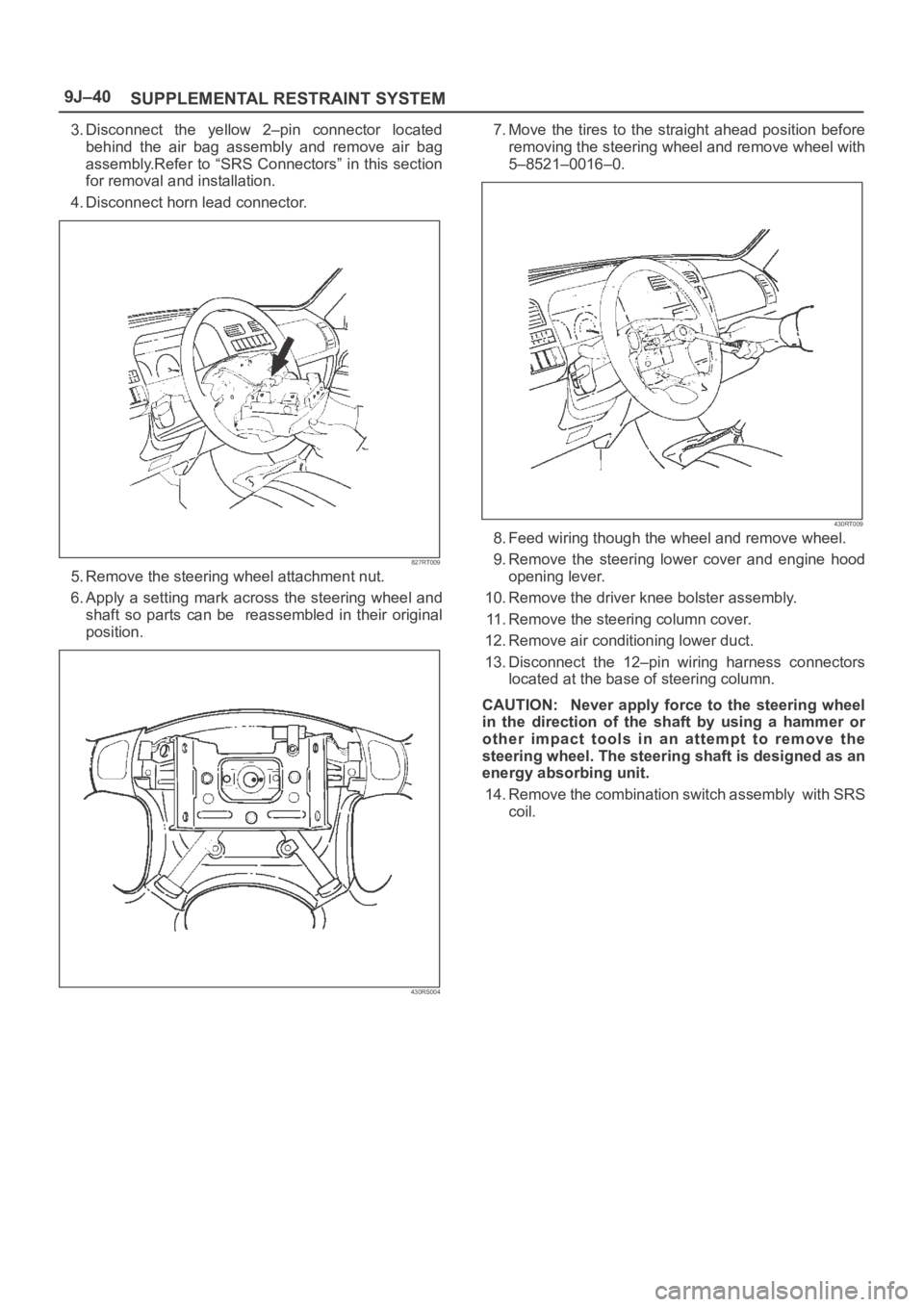
3. Disconnect the yellow 2–pin connector located
behind the air bag assembly and remove air bag
assembly.Refer to “SRS Connectors” in this section
for removal and installation.
4. Disconnect horn lead connector.
827RT009
5. Remove the steering wheel attachment nut.
6. Apply a setting mark across the steering wheel and
shaft so parts can be reassembled in their original
position.
430RS004
7. Move the tires to the straight ahead position before
removing the steering wheel and remove wheel with
5–8521–0016–0.
430RT009
8. Feed wiring though the wheel and remove wheel.
9. Remove the steering lower cover and engine hood
opening lever.
10. Remove the driver knee bolster assembly.
11. Remove the steering column cover.
12. Remove air conditioning lower duct.
13. Disconnect the 12–pin wiring harness connectors
located at the base of steering column.
CAUTION: Never apply force to the steering wheel
in the direction of the shaft by using a hammer or
other impact tools in an attempt to remove the
steering wheel. The steering shaft is designed as an
energy absorbing unit.
14. Remove the combination switch assembly with SRS
coil.
Page 3478 of 6000
SUPPLEMENTAL RESTRAINT SYSTEM9J–41
Installation
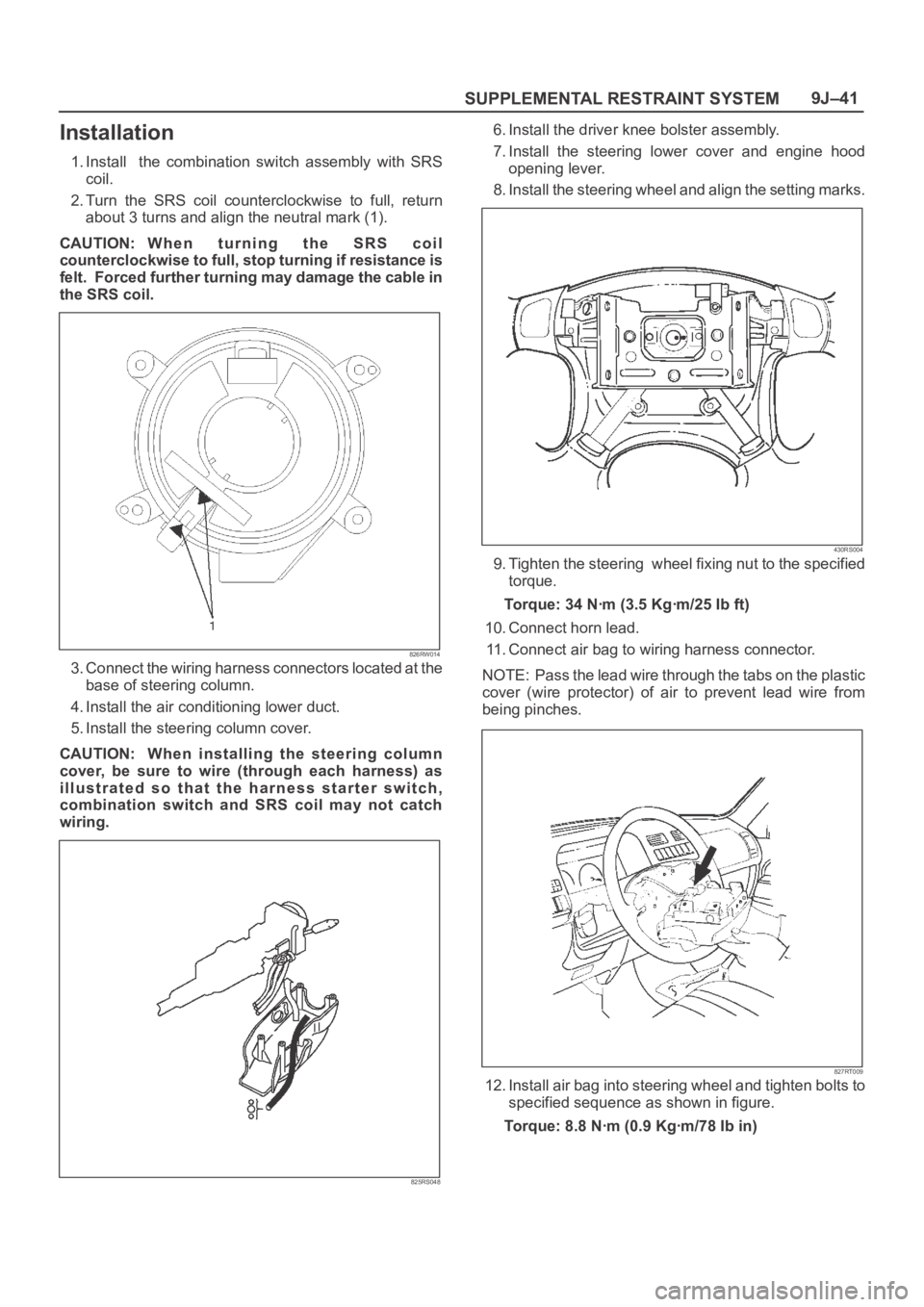
1. Install the combination switch assembly with SRS
coil.
2. Turn the SRS coil counterclockwise to full, return
about 3 turns and align the neutral mark (1).
CAUTION: W h e n t u r n i n g t h e S R S c o i l
counterclockwise to full, stop turning if resistance is
felt. Forced further turning may damage the cable in
the SRS coil.
826RW014
3. Connect the wiring harness connectors located at the
base of steering column.
4. Install the air conditioning lower duct.
5. Install the steering column cover.
CAUTION: When installing the steering column
cover, be sure to wire (through each harness) as
illustrated so that the harness starter switch,
combination switch and SRS coil may not catch
wiring.
825RS048
6. Install the driver knee bolster assembly.
7. Install the steering lower cover and engine hood
opening lever.
8. Install the steering wheel and align the setting marks.
430RS004
9. Tighten the steering wheel fixing nut to the specified
torque.
Torque: 34 Nꞏm (3.5 Kgꞏm/25 Ib ft)
10. Connect horn lead.
11. Connect air bag to wiring harness connector.
NOTE: Pass the lead wire through the tabs on the plastic
cover (wire protector) of air to prevent lead wire from
being pinches.
827RT009
12. Install air bag into steering wheel and tighten bolts to
specified sequence as shown in figure.
Torque: 8.8 Nꞏm (0.9 Kgꞏm/78 Ib in)
Page 3479 of 6000

SUPPLEMENTAL RESTRAINT SYSTEM 9J–42
CAUTION: Never use the air bag assembly from
another vehicle. Use only new air bag assembly
proper to the Trooper which is being repaired.
827RT008
13. Enable the SRS (Refer to “Enabling the SRS” in this
section).
SRS Coil Replacement Procedure
Removal
1. Same removal steps until step 13 of SRS Coil
Assembly Removal.
2. Disconnect the horn terminal NO.12 from connector
and remove the tape binding harness. (Refer to How
to Disconnect the horn terminal in this section.)
827RX029
3. Remove four bolts of SRS coil assembly and remove
the SRS coil assembly from the combination switch.
825RX033
Page 3480 of 6000

SUPPLEMENTAL RESTRAINT SYSTEM9J–43
How to Disconnect the horn terminal
1. Lift the terminal lock plate from upper portion of
connector with a minitenes screw driver (-) and
release connector terminal lock.
827RX045
Legend
(1) Minitenes screw driver (-)
(2) Connector lock knob
2. Pull out the terminal of lead wire coming to connector
NO.12 while lifting the lock part with a minitenes
screw driver (-).
827RX046
Legend
(1) Lock
(2) Minitenes screw driver (-)
(3) Terminal
How to Connect Horn Terminal
1. Insert horn terminal from behind black connector
NO.12 until connector lock works.
827RX047
Legend
(1) Terminal
(2) Connector lock knob
2. Push terminal lock plate into the connector for a duble
lock.
827RX048