radio PEUGEOT 107 2012 User Guide
[x] Cancel search | Manufacturer: PEUGEOT, Model Year: 2012, Model line: 107, Model: PEUGEOT 107 2012Pages: 140, PDF Size: 4.02 MB
Page 120 of 140
01
118
FIRST STEPS
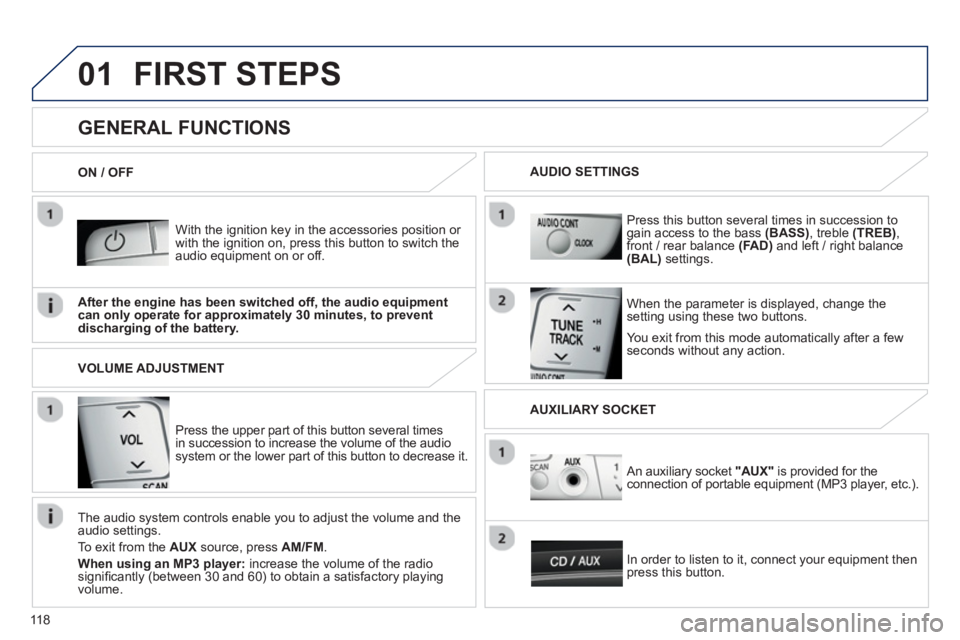
With the ignition key in the accessories position or with the ignition on, press this button to switch the
audio equipment on or off.
You exit
from this mode automatically after a fewseconds without any action.
GENERAL FUNCTIONS
When the parameter is displayed, change thesetting using these two buttons.
Pr
ess this button several times in succession togain access to the bass (BASS)
, treble (TREB)
,
front / rear balance (FA D)and left / right balance(BAL) settings.
After the en
gine has been switched off, the audio equipmentcan only operate for approximately 30 minutes, to preventdischarging of the battery.
AUDIO SETTINGS
ON / OFF
Press the upper part o
f this button several times
in succession to increase the volume of the audio system or the lower part of this button to decrease it.
VOLUME ADJUSTMENT
The audio s
ystem controls enable you to adjust the volume and the
audio settings.
T
o exit from the AUX
source, press AM/FM.
When using an MP3 player:
increase the volume of the radio signifi cantly (between 30 and 60) to obtain a satisfactory playing
volume.
In order to listen to it, connect
your equipment then press this button.
An auxiliary socket "AUX"
is provided for the connection of portable equipment (MP3 player, etc.).
AUXILIARY SOCKET
Page 121 of 140
02
119
RADIO
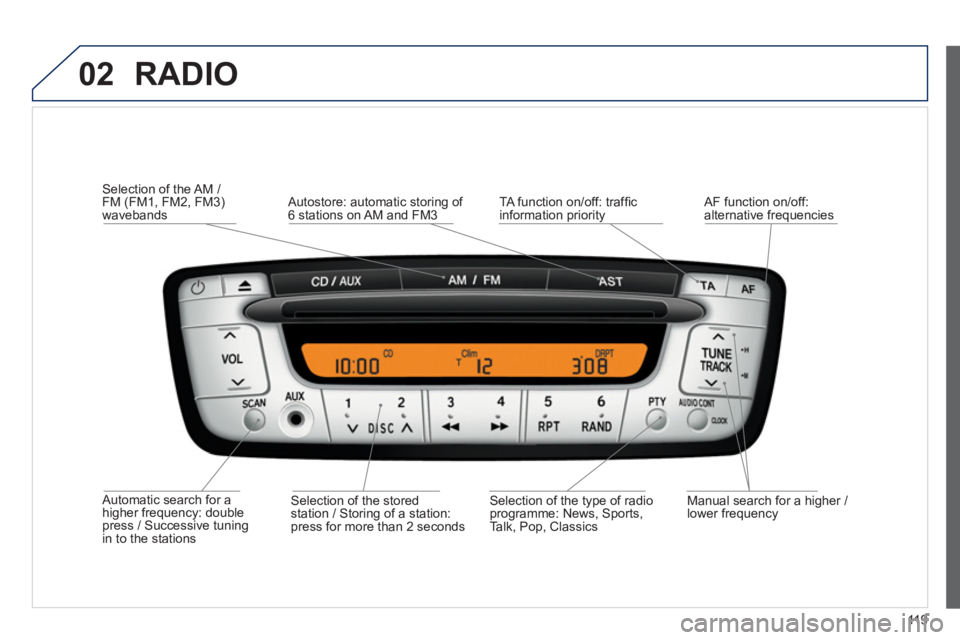
Automatic search for a higher frequency: double press / Successive tuning in to the stations
Selection of the AM / FM (FM1, FM2, FM3)
wavebands
Manual search for a hi
gher / lower frequency
Selection of the stored
station / Storing of a station:
press for more than 2 seconds
AF function on
/off: alternative frequencies
Autostore: automatic storing of 6 stations on AM and FM3
TA function on/off: traffi c
information priority
Selection of the type of radio programme: News, Sports,
Talk, Pop, Classics
Page 122 of 140
02
120
RADIO
STATIONS
When the radio receives a station broadcasting in stereo it
automatically plays in stereo and the screen displays "ST". If thereception conditions deteriorate, the radio changes to mono and "ST"is no longer displayed. STEREO RECEPTION
Pr
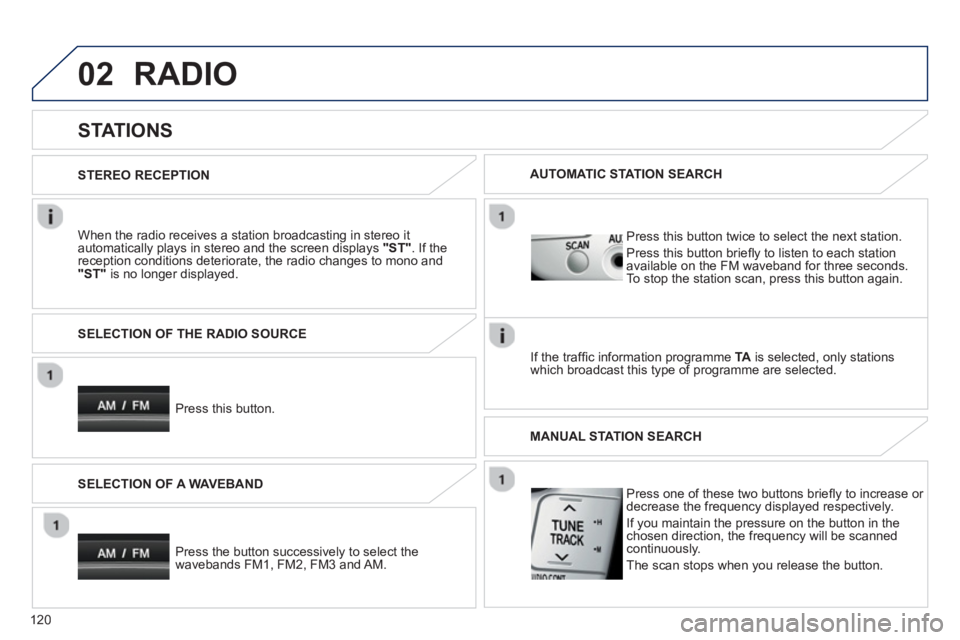
ess this button. SELECTION OF THE RADIO SOURCE
Press the button successivel
y to select thewavebands FM1, FM2, FM3 and AM. SELECTION OF A WAVEBAND
Pr
ess this button twice to select the next station.
Press this button briefl
y to listen to each stationavailable on the FM waveband for three seconds.To stop the station scan, press this button again.
AUTOMATIC STATION SEARCH
I
f the traffi c information programme TAis selected, only stationswhich broadcast this type of programme are selected.
Press one of these two buttons briefl
y to increase or
decrease the frequency displayed respectively.
I
f you maintain the pressure on the button in thechosen direction, the frequency will be scannedcontinuously.
The scan stops when
you release the button. MANUAL STATION SEARCH
Page 123 of 140
02
121
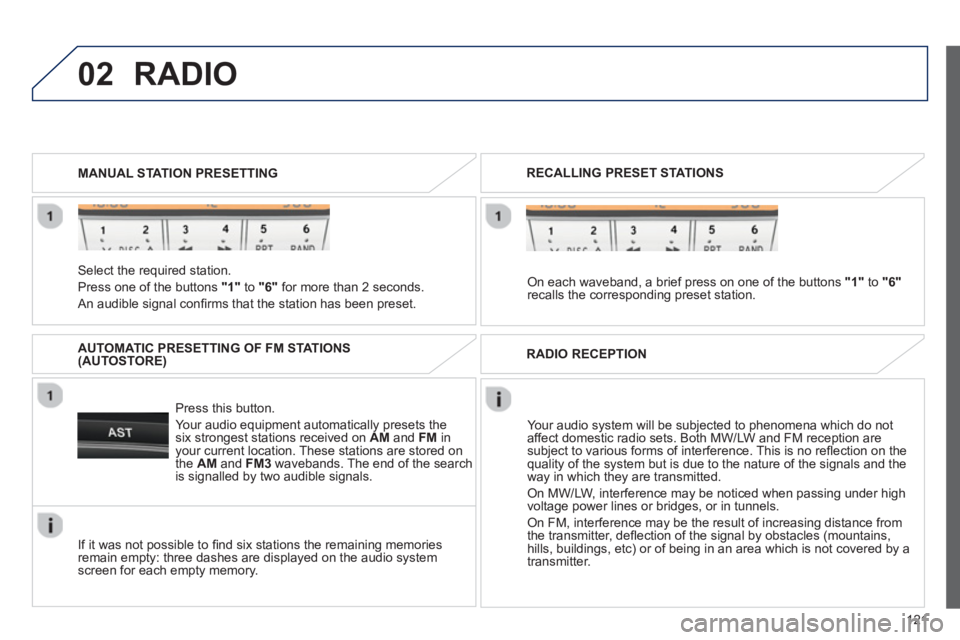
Select the required station.
Pr
ess one of the buttons "1"
to "6"for more than 2 seconds.
An audible signal confi rms that the station has been preset. MANUAL STATION PRESETTING
Press this button.
Your audio equipment automatically presets thesix strongest stations received on AM and FM
inyour current location. These stations are stored on
the AM
and FM3
wavebands. The end of the search
is signalled by two audible signals.
AUTOMATIC PRESETTING OF FM STATIONS(AUTOSTORE)
RADIO
If it was not possible to fi nd six stations the remaining memories remain empty: three dashes are displayed on the audio system screen for each empty memory.
RECALLING PRESET STATIONS
On each waveband, a brief press on one of the buttons "1"
to "6"
recalls the corresponding preset station.
RADIO RECEPTION
Your audio system will be subjected to phenomena which do not
affect domestic radio sets. Both MW/LW and FM reception are
subject to various forms of interference. This is no refl ection on the quality of the system but is due to the nature of the signals and the
way in which they are transmitted.
On MW/LW, interference may be noticed when passing under high
voltage power lines or bridges, or in tunnels.
On FM, interference may be the result of increasing distance from
the transmitter, defl ection of the signal by obstacles (mountains,
hills, buildings, etc) or of being in an area which is not covered by a
transmitter.
Page 124 of 140
02
122
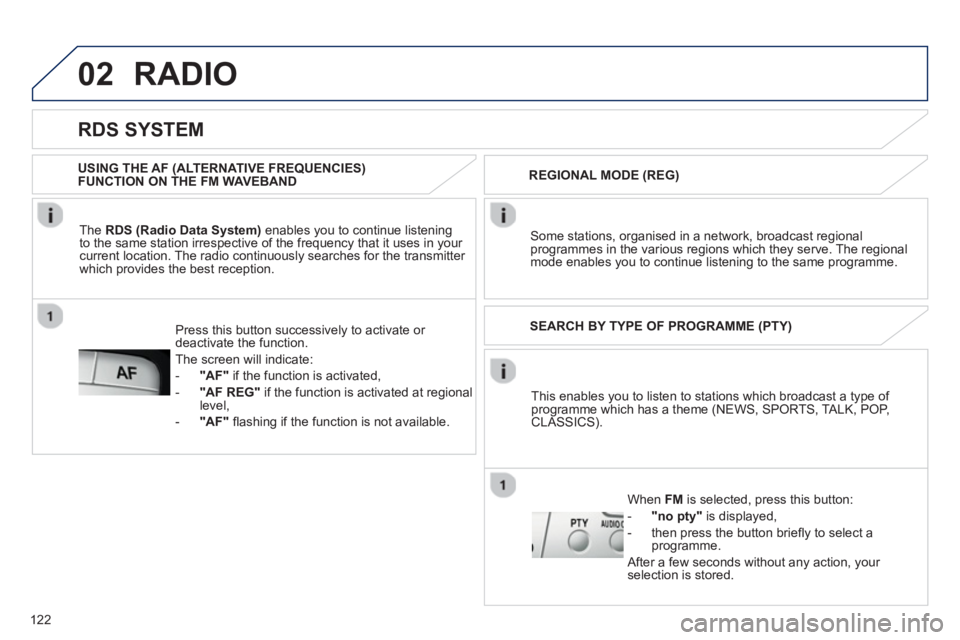
This enables you to listen to stations which broadcast a type of programme which has a theme (NEWS, SPORTS, TALK, POP,CLASSICS). SEARCH BY TYPE OF PROGRAMME
(PTY)
Wh
en FM is selected, press this button:
-"no pty"is displayed,
- then press the button brie
fl y to select a programme.
A
fter a few seconds without any action, your selection is stored.
RADIO
RDS SYSTEM
The RDS (Radio Data System)enables you to continue listening
to the same station irrespective of the frequency that it uses in your current location. The radio continuously searches for the transmitter
which provides the best reception. USING THE AF
(ALTERNATIVE FREQUENCIES)FUNCTION ON THE FM WAVEBAND
Some stations, or
ganised in a network, broadcast regionalprogrammes in the various regions which they serve. The regional mode enables you to continue listening to the same programme.
REGIONAL MODE
(REG)
Press this button successively to activate or deactivate the function.
The screen will indicate:
-"AF"if the function is activated,
-
"AF REG"
if the function is activated at regional level,
-
"AF"fl ashing if the function is not available.
Page 125 of 140
02
123
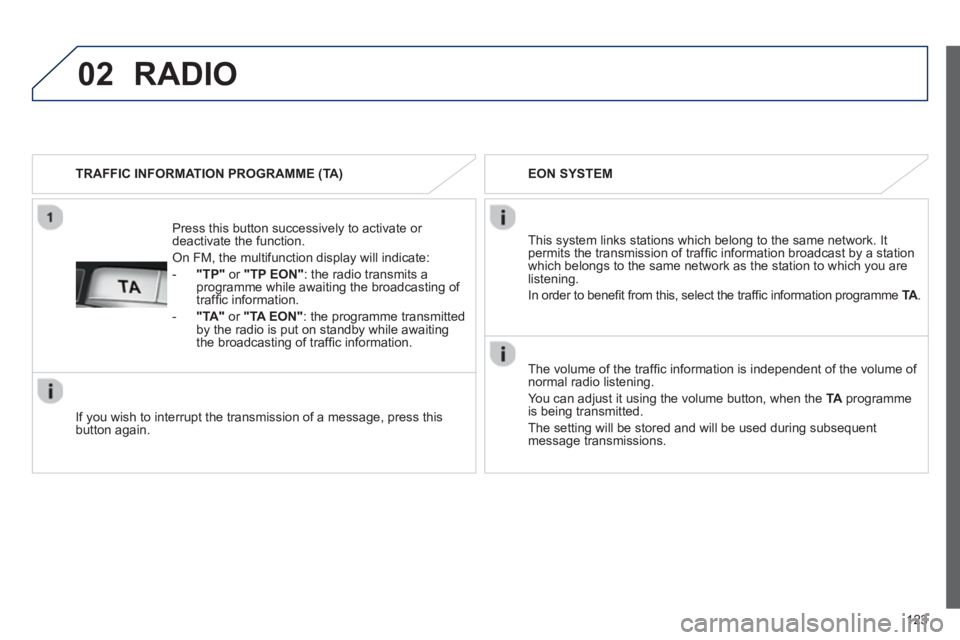
Press this button successively to activate or deactivate the function.
On FM, the multifunction display will indicate:
-
"TP"or "TP EON": the radio transmits a
programme while awaiting the broadcasting of
traffi c information.
-"TA"or "TA EON": the programme transmitted by the radio is put on standby while awaitingthe broadcasting of traffi c information.
TRAFFIC INFORMATION PROGRAMME
(TA)
RADIO
If you wish to interrupt the transmission of a message, press this button again. EON SYSTEM
The volume o
f the traffi c information is independent of the volume of normal radio listening.
You can adjust it using the volume button, when the
TA
programmeis being transmitted.
The settin
g will be stored and will be used during subsequent message transmissions.
This system links stations which belong to the same network. Itpermits the transmission of traffi c information broadcast by a station
which belongs to the same network as the station to which you arelistening.
In order to bene
fi t from this, select the traffi c information programme TA. A
Page 135 of 140
.
133 Alphabetical index
2 Tronic gearbox .............16, 19, 22, 24, 42, 43,77,88Backup starting .............................................76Battery...............................................76-78, 88Battery, charging ...........................................77Bluetooth (hands-free)................................104Bonnet...........................................................84Boot...............................................................41Brake discs....................................................88Brake lamps ..................................................69Brake pads ....................................................88Brakes ...........................................................88
Capacity, fuel tank........................................30CD changer..........................................r124-127CD MP3.................................................98-100Central locking..............................................26Changing a bulb ......................................67,68Changing a fuse ............................................71Changing a wheel .........................................65Changing the remotecontrol battery.............................................27Changingthe time...............................................25, 117Checking levels.......................................86,87Checking the engineoil level ........................................................86Checks ..........................................................88Child lock.......................................................28Children...................................................28, 63Child seats.......................................57,59, 60Child seats,conventional................................................59Coolant level .................................................87Courtesy mirror.............................................r40Cup holder.....................................................r40
B
C
Deactivatingthe passenger airbag..................................55Defrosting ......................................................33Demisting......................................................33Dimensions...................................................91Dipped beam.....................................44, 67, 68Dipstick..........................................................86Direction indicators...........................44, 67-69Display screen..............................................23Doors.............................................................28Driver''s seat belt notfastened warning lamp.........................22, 52Driving mode.................................................42
Easy mode(automatic mode) ........................................42Eco-driving...................................................17Eco-driving (advice)......................................17Economicaldriving ........................................................17Electronic engineimmobiliser..................................................27Electronic stability control (ESP)...........................................................50Engine...............................................85, 89,90Engine, petrol ................................................31Engine compartmentfusebox.......................................................71Engine oil ................................................85,86Engine oil levelindicator......................................................r86Engines.........................................................89Environment ..................................................17ESP ...............................................................50
E
ABS...............................................................49Accessories..............................................4, 82Access to rear seats(3-door) .......................................................38Adjusting headlamps....................................46Adjusting the steering wheel.........................37Airbag fault..............................................54, 55Airbags ..............................................21, 54, 55Airbags, curtain .......................................55,56Airbags, front.................................................56Airbags, lateral........................................55,56Airbag warning lamp.....................................54Air conditioning.......................................12, 17Air conditioning, manual.........................13, 35Air conditioning on/off...................................f35Air distribution adjustment......................34, 35Air filter..........................................................r88Air flow..............................................17,34, 35Air flow adjustment .................................34, 35Air vents..................................................33-35Anti-lock braking system (ABS)....................49Anti-theft........................................................26ASR...............................................................50Assistance, emergency braking...................49Audible warning............................................48Audio equipment(general).......................................25, 117,118Audio streaming(Bluetooth)................................................103Audio system (CD/CD changer)..........124-127Audio system (radio)................... 119,120,122Auxiliary socket ..............................40, 117,118
A
D
Page 137 of 140
.
135 Alphabetical index
Radio.............................................................95Rear foglamp...........................................44, 69Rear screen (demisting)..........................34, 35Recharging the battery.................................77Recirculation / exterior air intake..................35Reinitialising the remote control ...................27Remote control ........................................26, 27Removing and fitting a fuse..........................71Removing a wheel........................................65Replacing bulbs............................................68Replacing the air filter...................................r88Replacing the oil filter...................................r88Replacing the passengercompartment filter......................................r88Rev counter...................................................r19Reversing lamps ...........................................69Roof bars.......................................................81Routine checks.............................................88
Screen-wash reser voir..................................87Screen menu map.......................................112Screenwash, front ......................................... 47Screenwash fluid level..................................87Seat, rear,folding backrest..........................................39Seat adjustment......................................38, 39Seat belts ....................................22, 51,53,59Seat belts warning lamp.........................22,52Seats, rear.....................................................r39Servicing.......................................................17Setting the clock ...........................................25Sidelamps .........................................44, 45, 67Side repeater.................................................70Source, CD and CD changer...............r124-127
R
S
Spare wheel............................................41,65Speakers (fitting).........................................................79Speedometer..........................................r19, 23Start...............................................................76Starting the engine..........................................4Starting the vehicle.......................................42Steering wheel
adjustment..................................................37Steering wheel height...................................37Stopping the vehicle ..................................... 42Storage ....................................................40,41Sun visor.......................................................r40System, ABS.................................................49System, ASR.................................................50System, brakes.............................................49
Tables of fuses ..............................................71Te mperatureadjustment............................................34,35Third brake lamp...........................................70Time......................................................25, 117Tools..............................................................65To w i ng another
vehicle.........................................................80Traffic information (TA) .................................97Tr i p d i s t a n c e r e c o r d e r...................................r23Tyre pressures ..............................................92Tyres..............................................................17
Ventilation ...............................................13, 33Visibility.........................................................33
V
T
Warning lamp, parking brake........................48Warning lamps..............................................20Wash-wipe, rear............................................r47Weights .........................................................90Wheel, changing...........................................65Window controls............................................28Windows, rear...............................................r29Wiper control stalk........................................47Wipers...........................................................47
W
Unlocking ......................................................26
U