ECU PEUGEOT 108 2015 Service Manual
[x] Cancel search | Manufacturer: PEUGEOT, Model Year: 2015, Model line: 108, Model: PEUGEOT 108 2015Pages: 271, PDF Size: 7.42 MB
Page 140 of 271
138
108_en_Chap09_info-pratiques_ed01-2015
Comprising a compressor and a sealant
cartridge, it allows the temporary repair of
a tyre so that you can drive to the nearest
garage.
It is designed to repair most punctures which
could affect the tyre, located on the tyre tread
or shoulder.
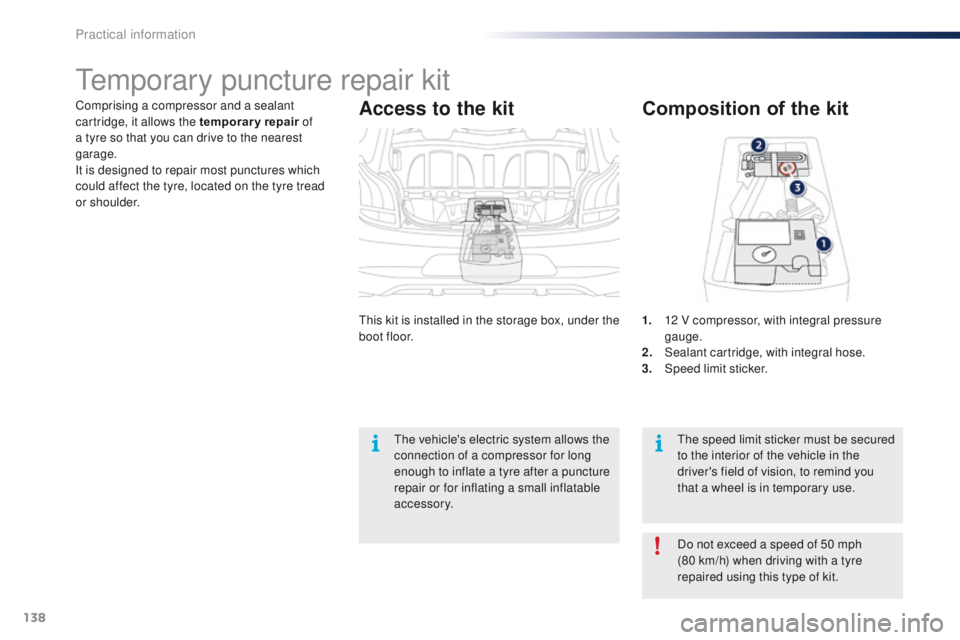
temporary puncture repair kit
Composition of the kit
1. 12 V compressor, with integral pressure gauge.
2.
S
ealant cartridge, with integral hose.
3.
Spe
ed limit sticker.
th
e speed limit sticker must be secured
to the interior of the vehicle in the
driver's field of vision, to remind you
that a wheel is in temporary use.th
is kit is installed in the storage box, under the
boot floor.
th
e vehicle's electric system allows the
connection of a compressor for long
enough to inflate a tyre after a puncture
repair or for inflating a small inflatable
accessory.
Do not exceed a speed of 50 mph
(80
km/h) when driving with a tyre
repaired using this type of kit.
Access to the kit
Practical information
Page 141 of 271
139
108_en_Chap09_info-pratiques_ed01-2015
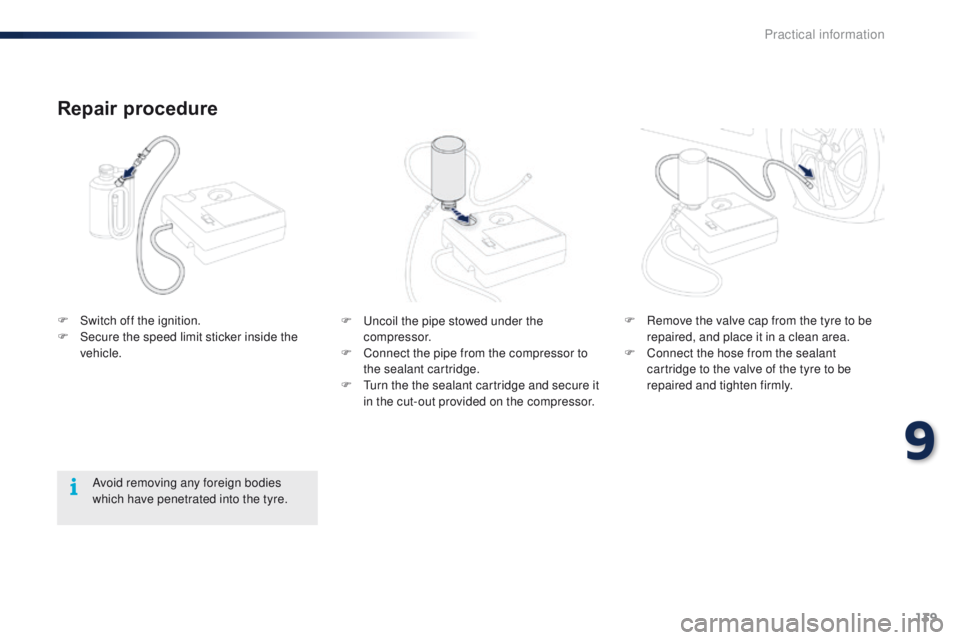
F uncoil the pipe stowed under the compressor.
F
C
onnect the pipe from the compressor to
the sealant cartridge.
F
t
u
rn the the sealant cartridge and secure it
in the cut-out provided on the compressor.
Repair procedure
Avoid removing any foreign bodies
which have penetrated into the tyre. F
R
emove the valve cap from the tyre to be
repaired, and place it in a clean area.
F
C
onnect the hose from the sealant
cartridge to the valve of the tyre to be
repaired and tighten firmly.
F
S
witch off the ignition.
F
S
ecure the speed limit sticker inside the
vehicle.
9
Practical information
Page 148 of 271
146
108_en_Chap09_info-pratiques_ed01-2015
Fitting the "space-saver"
type spare wheel
If your vehicle is fitted with alloy wheels,
it is normal to notice when tightening
the wheel bolts that the washers do not
come into contact with the "space-
saver" type spare wheel.
t
h
e wheel is
secured by the conical contact sur face
on each bolt.
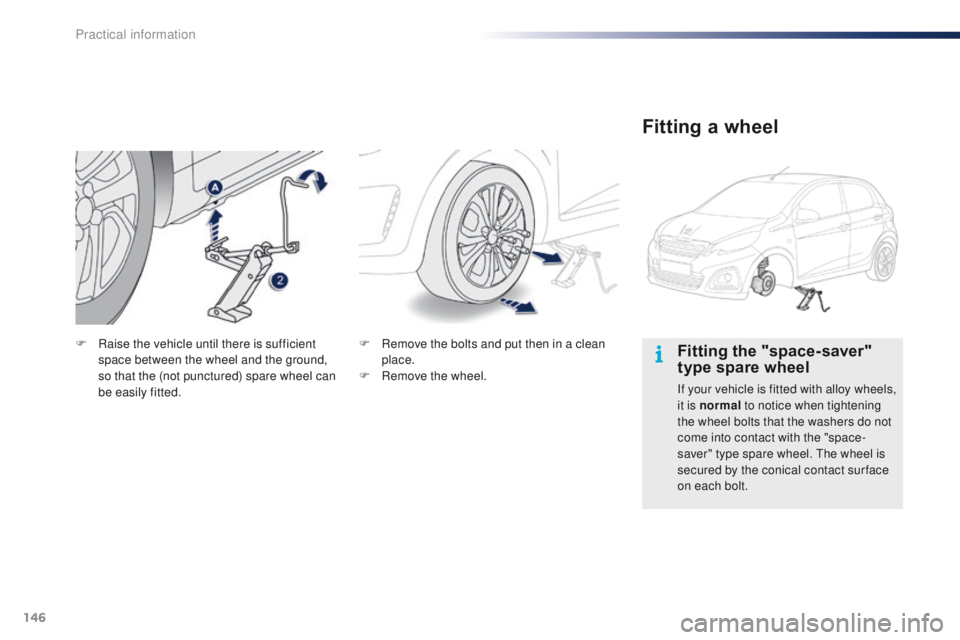
Fitting a wheel
F Remove the bolts and put then in a clean place.
F
R
emove the wheel.
F
Ra
ise the vehicle until there is sufficient
space between the wheel and the ground,
so that the (not punctured) spare wheel can
be easily fitted.
Practical information
Page 157 of 271
155
108_en_Chap09_info-pratiques_ed01-2015
Before changing a fuse, it is necessary to:
F i mmobilise the vehicle and switch off the
ignition,
F
s
witch off all electrical consumers,
F
i
dentify the failed fuse using the fuse
allocation tables and diagrams in the
following pages,
F
i
dentify and correct the cause of the
problem.
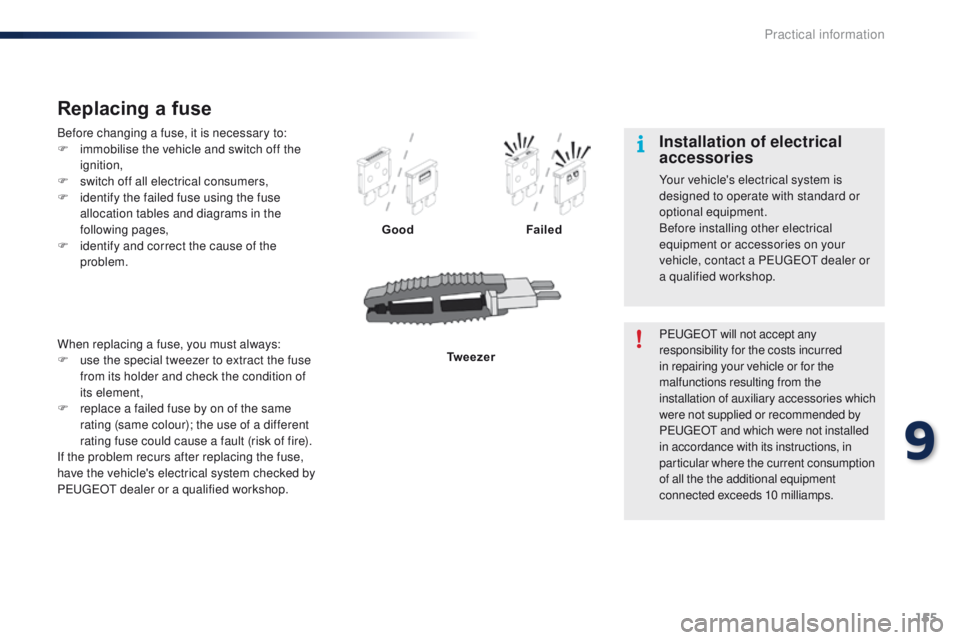
Replacing a fuse
Good Failed
Tw e e z e r
When replacing a fuse, you must always:
F
u
se the special tweezer to extract the fuse
from its holder and check the condition of
its element,
F
r
eplace a failed fuse by on of the same
rating (same colour); the use of a different
rating fuse could cause a fault (risk of fire).
If the problem recurs after replacing the fuse,
have the vehicle's electrical system checked by
P
e
uge
Ot
dealer or a qualified workshop. P
e
uge
Ot
will not accept any
responsibility for the costs incurred
in repairing your vehicle or for the
malfunctions resulting from the
installation of auxiliary accessories which
were not supplied or recommended by
P
e
uge
Ot
and which were not installed
in accordance with its instructions, in
particular where the current consumption
of all the the additional equipment
connected exceeds 10 milliamps.
Installation of electrical
accessories
Your vehicle's electrical system is
designed to operate with standard or
optional equipment.
Before installing other electrical
equipment or accessories on your
vehicle, contact a P
e
uge
Ot
dealer or
a qualified workshop.
9
Practical information
Page 165 of 271
163
108_en_Chap09_info-pratiques_ed01-2015
12 V battery
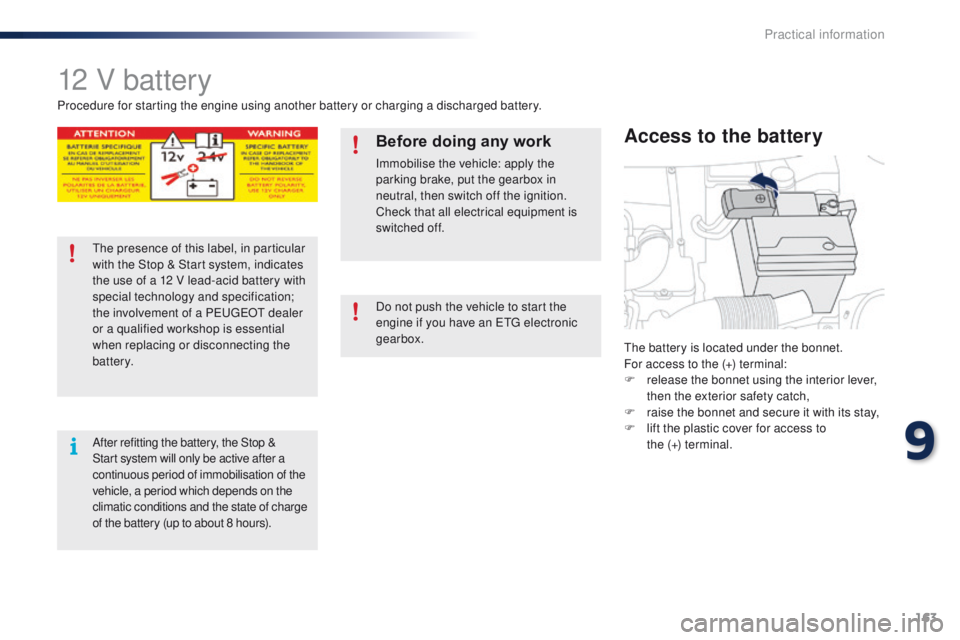
the battery is located under the bonnet.
For access to the (+) terminal:
F
r
elease the bonnet using the interior lever,
then the exterior safety catch,
F
r
aise the bonnet and secure it with its stay,
F
l
ift the plastic cover for access to
the (+)
terminal.
Access to the battery
Procedure for starting the engine using another battery or charging a discharged battery.
Before doing any work
Immobilise the vehicle: apply the
parking brake, put the gearbox in
neutral, then switch off the ignition.
Check that all electrical equipment is
switched off.
th
e presence of this label, in particular
with the Stop & Start system, indicates
the use of a 12 V lead-acid battery with
special technology and specification;
the involvement of a P
e
uge
Ot
dealer
or a qualified workshop is essential
when replacing or disconnecting the
battery.
After refitting the battery, the Stop &
Start system will only be active after a
continuous period of immobilisation of the
vehicle, a period which depends on the
climatic conditions and the state of charge
of the battery (up to about 8 hours). Do not push the vehicle to start the
engine if you have an
etg electronic
gearbox.
9
Practical information
Page 171 of 271
169
108_en_Chap09_info-pratiques_ed01-2015
Accessories
A wide range of accessories and genuine parts is available from the PeugeOt dealer network.th
ese accessories and parts are all suitable for your vehicle and benefit from Pe ugeOt' s recommendation and warranty.
"Transport solutions":
boot carpet, boot liner,
boot net, transverse roof bars, bicycle carrier,
ski carrier, roof boxes, boot dividers, ...
"Style":
ligne S body kit, ligne S personalised
mats, aluminium gear lever knob, alloy wheels,
exterior personalisation stickers, chrome side
mouldings, chrome mirror shells, door sill
finishers, personalised remote control shells, ... "Comfort":
air deflectors, insulated module,
sun blinds, scented air freshener, portable
ashtray, reading lamp, front and rear parking
sensors, centre armrest, cigarette lighter... "Security and safety": anti-theft alarm,
vehicle tracking system, snow chains, wheel
non-slip covers, wheel security bolts, child
seats, first aid kit, warning triangle, high
visibility vest, breathalyzer, fire extinguisher,
pet seat belt, foglamp kit, seat belt cutter/glass
hammer, ...
"Protection":
mats, mud flaps, vehicle cover,
seat covers, bumper protectors, ...
to p
revent the mat from becoming caught
under the pedals:
-
e
nsure that the mat is secured correctly,
-
n
ever fit one mat on top of another."Multimedia":
CD player, audio system,
speaker, semi-integral navigation systems,
hands-free kit, driving assistance systems,
230 V socket, rear multi-media support, DVD
players, portable satellite navigation system,
telephone/smartphone support, digital radio, ...
9
Practical information
Page 212 of 271
210
108_en_Chap12a_Autoradio-Toyota-tactile-1_ed01-2015
Mirror Screen® - iPhone® connections
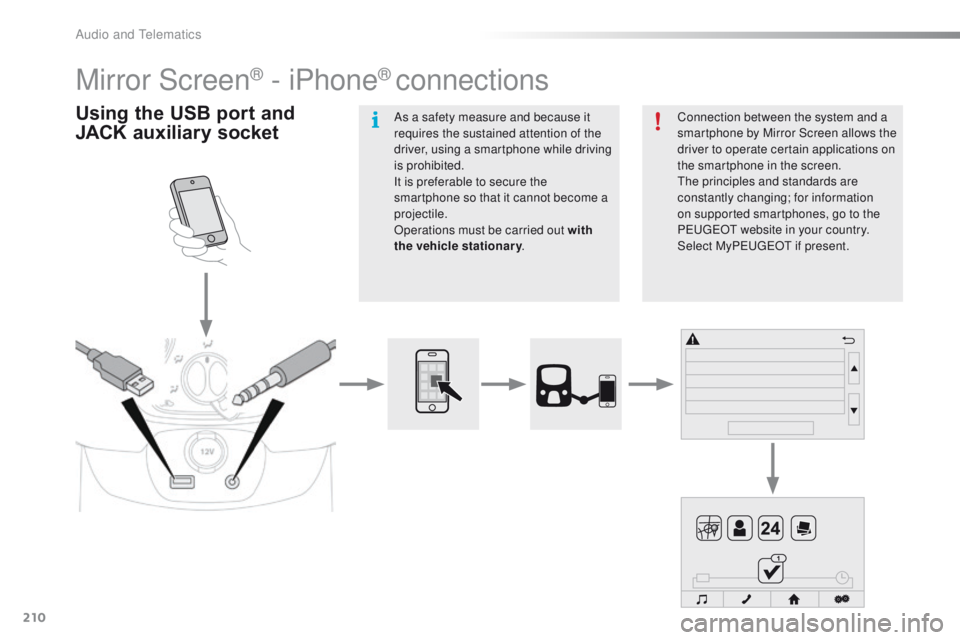
Using the USB port and
JACK auxiliary socketConnection between the system and a
smartphone by Mirror Screen allows the
driver to operate certain applications on
the smartphone in the screen.
th
e principles and standards are
constantly changing; for information
on supported smartphones, go to the
P
e
uge
Ot
website in your country.
Select MyP
e
uge
Ot i
f present.
As a safety measure and because it
requires the sustained attention of the
driver, using a smartphone while driving
is prohibited.
It is preferable to secure the
smartphone so that it cannot become a
projectile.
Operations must be carried out with
the vehicle stationary
.
Audio and telematics
Page 216 of 271
214
108_en_Chap12a_Autoradio-Toyota-tactile-1_ed01-2015
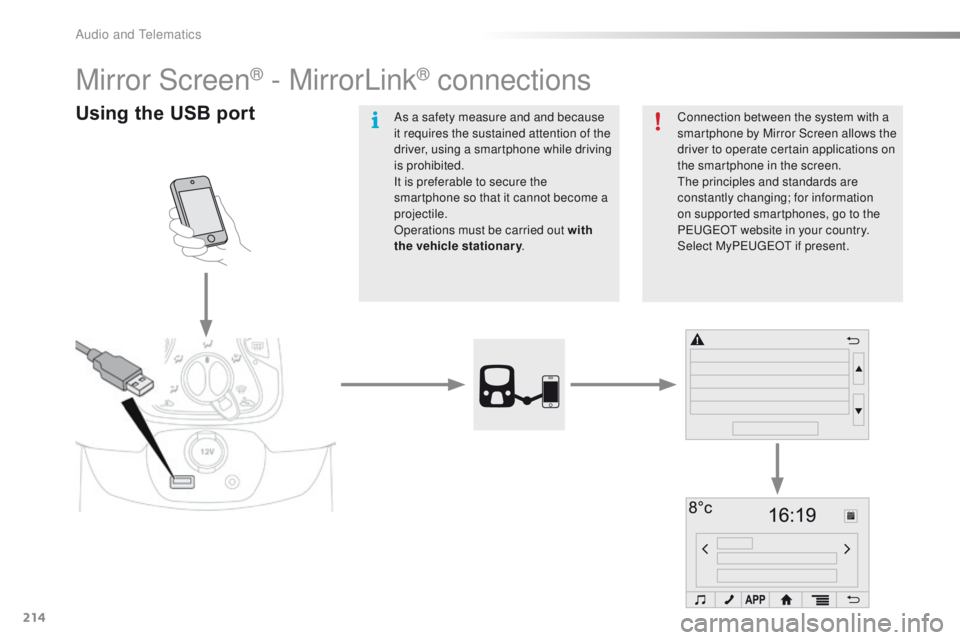
Mirror Screen® - MirrorLink® connections
Using the USB portConnection between the system with a
smartphone by Mirror Screen allows the
driver to operate certain applications on
the smartphone in the screen.
th
e principles and standards are
constantly changing; for information
on supported smartphones, go to the
P
e
uge
Ot
website in your country.
Select MyP
e
uge
Ot i
f present.
As a safety measure and and because
it requires the sustained attention of the
driver, using a smartphone while driving
is prohibited.
It is preferable to secure the
smartphone so that it cannot become a
projectile.
Operations must be carried out with
the
vehicle stationary .
Audio and telematics