audio Peugeot 207 CC 2014 User Guide
[x] Cancel search | Manufacturer: PEUGEOT, Model Year: 2014, Model line: 207 CC, Model: Peugeot 207 CC 2014Pages: 232, PDF Size: 11.11 MB
Page 99 of 232
6
i
i
!
SAFETY
97
207CC_EN_CHAP06_SECURITE_ED01-2014
DIRECTION INDICATORS
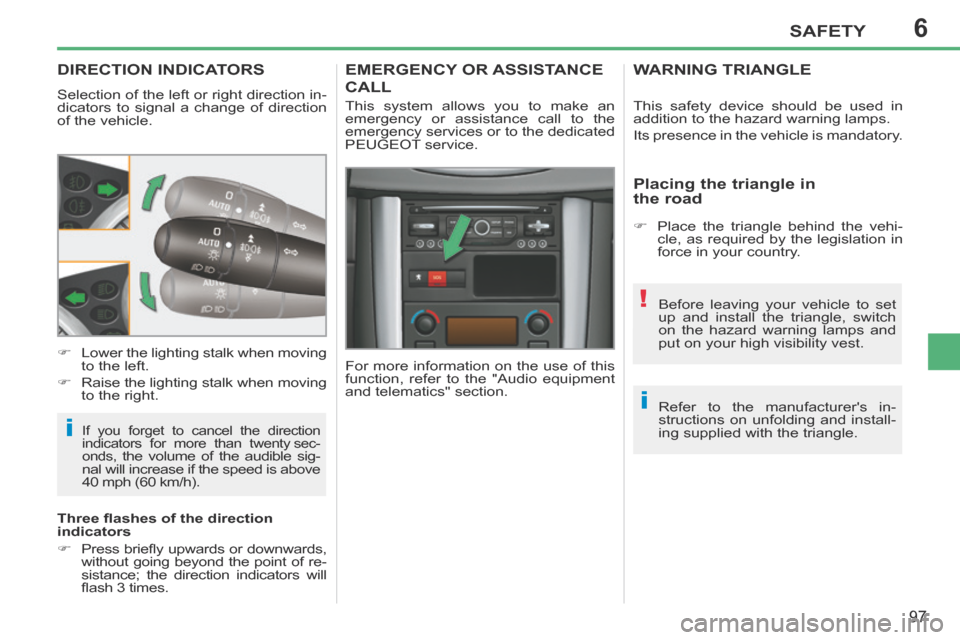
Selection of the left or right direction in-
dicators to signal a change of direction
of the vehicle.
If you forget to cancel the direction
indicators for more than twenty sec-
onds
, the volume of the audible sig-
nal will increase if the speed is above
40 mph (60 km/h).
Lower the lighting stalk when moving
to the left.
Raise the lighting stalk when moving to the right.
Three fl ashes of the direction
indicators
Press briefl y upwards or downwards, without going beyond the point of re-
sistance; the direction indicators will
fl ash 3 times.
EMERGENCY OR ASSISTANCE
CALL
For more information on the use of this
function, refer to the "Audio equipment
and telematics" section. This system allows you to make an
emergency or assistance call to the
emergency services or to the dedicated
PEUGEOT service. This safety device should be used in
addition to the hazard warning lamps.
Its presence in the vehicle is mandatory.
WARNING TRIANGLE
Placing the triangle in
the road
Place the triangle behind the vehi-
cle, as required by the legislation in
force in your country.
Before leaving your vehicle to set
up and install the triangle, switch
on the hazard warning lamps and
put on your high visibility vest.
Refer to the manufacturer's in-
structions on unfolding and install-
ing supplied with the triangle.
Page 146 of 232
9PRACTICAL INFORMATION
144
207CC_EN_CHAP09_INFO PRATIQUES_ED01-2014
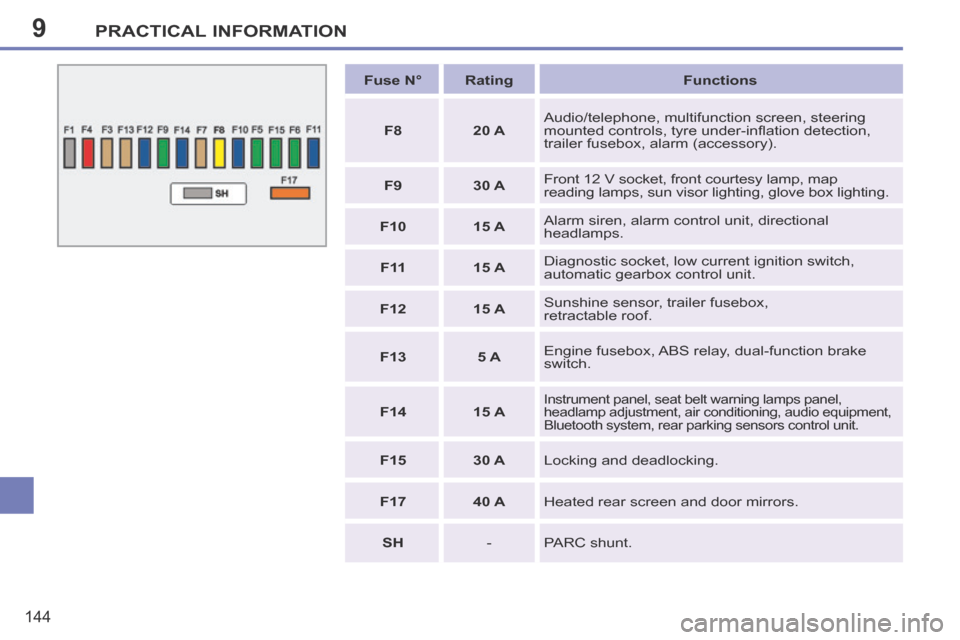
Fuse N° Rating Functions
F8 20 A Audio/telephone, multifunction screen, steering
mounted controls, tyre under-infl ation detection,
trailer fusebox, alarm (accessory).
F9 30 A Front 12 V socket, front courtesy lamp, map
reading lamps, sun visor lighting, glove box lighting.
F10 15 A Alarm siren, alarm control unit, directional
headlamps.
F 11 15 A Diagnostic socket, low current ignition switch,
automatic gearbox control unit.
F12 15 A Sunshine sensor, trailer fusebox,
retractable roof.
F13 5 A Engine fusebox, ABS relay, dual-function brake
switch.
F14 15 A
Instrument panel, seat belt warning lamps panel,
headlamp adjustment, air conditioning, audio equipment,
Bluetooth system, rear parking sensors control unit.
F15 30 A Locking and deadlocking.
F17 40 A Heated rear screen and door mirrors.
SH - PARC shunt.
Page 151 of 232
9
!
i
PRACTICAL INFORMATION
149
207CC_EN_CHAP09_INFO PRATIQUES_ED01-2014
A fl at battery prevents the engine
from starting (refer to the corre-
sponding paragraph).
If a roof operation is in progress,
it will be completed, but no further
operation is possible.
ENERGY ECONOMY MODE
System which manages the duration of
use of certain functions to conserve a
suffi cient level of charge in the battery.
After the engine has stopped, you can
still use functions such as the audio
equipment, windscreen wipers, dipped
beam headlamps, courtesy lamp, etc.
for a maximum combined duration of
thirty minutes.
Exiting economy mode
These functions are reactivated auto-
matically next time the vehicle is driven.
In order to resume the use of these
functions immediately, start the
engine and let it run for a few minutes.
The time available to you will then be
double the duration for which the engine
is left running. However, this period will al-
ways be between fi ve and thirty minutes.
Switching to economy mode
Once the thirty minutes are over, a
message appears on the multifunction
screen indicating that the vehicle has
switched to economy mode and the ac-
tive functions are put on standby.
CHANGING A WIPER BLADE
Procedure for replacing a worn wiper
blade with a new one without the use
of tools.
Removing a front wiper blade
Raise the corresponding wiper arm.
Unclip the wiper blade and remove it.
Fitting a front wiper blade
Check the size of the wiper blade as the shorter blade is fi tted on the
right-hand side of the vehicle.
Put the corresponding new wiper blade in place and clip it.
Fold down the wiper arm carefully.
LOAD REDUCTION MODE
System which manages the use of cer-
tain functions according to the level of
charge remaining in the battery.
When the vehicle is being driven, the
load reduction function temporarily deac-
tivates certain functions, such as the air
conditioning, the heated rear screen...
The deactivated functions are reactivated
automatically as soon as conditions permit.
Page 155 of 232
9
i
!
i
PRACTICAL INFORMATION
153
207CC_EN_CHAP09_INFO PRATIQUES_ED01-2014
ACCESSORIES
A wide range of accessories and genu-
ine parts is available from the PEUGEOT
dealer network.
These accessories and parts have
been tested and approved for reliability
and safety.
They are all adapted to your vehicle and
benefi t from PEUGEOT's recommen-
dation and warranty. Depending on the legislation in
force in the country, certain safety
equipment may be compulsory:
high visibility safety vests, warn-
ing triangles, breathalyzers, spare
bulbs, spare fuses, a fi re extin-
guisher, a fi rst aid kit, mud fl aps at
the rear of the vehicle.
The fi tting of electrical equipment
or accessories which are not rec-
ommended by PEUGEOT may
result in a failure of your vehicle's
electronic system and excessive
electrical consumption.
Please note this precaution. You are
advised to contact a PEUGEOT rep-
resentative to be shown the range of
recommended equipment and ac-
cessories.
"Comfort":
door defl ectors, side blinds and rear
blind, coat hanger fi xed to head re-
straint, front centre armrest, under shelf
storage, front and rear parking sen-
sors...
Installation of radio
communication transmitters
Before installing any after-market ra-
dio communication transmitter, you
can contact a PEUGEOT dealer for
the specifi cation of transmitters which
can be fi tted (frequency, maximum
power, aerial position, specifi c instal-
lation requirements), in line with the
Vehicle Electromagnetic Compatibil-
ity Directive (2004/104/EC).
"Transport solutions":
boot liner, luggage net, cigarette lighter,
roof bars, bicycle carrier on roof bars,
ski carrier, roof box...
Towbar, which must be fi tted by PEUGEOT
dealer or a qualifi ed workshop.
"Styling":
aluminium gear lever knob, spoiler, styling
strips, alloy wheels, trims, chromed mirror
shells, body kit... * To avoid any risk of jamming of the pedals:
- ensure that the mat is positioned and secured correctly,
- never fi t one mat on top of another.
"Security":
anti-theft alarm, window engraving,
wheel security bolts, child seats and
booster cushions, breathalyzer, fi rst aid
kit, warning triangle, high visibility jacket,
stolen vehicle tracking system, tempo-
rary puncture repair kit, snow chains,
non-slip covers, front foglamps kit...
"Protection":
mats * , seat covers compatible with lateral
airbags, aluminium or PVC door aperture
fi nishers...
"Multimedia":
audio systems, satellite navigation
systems, hands-free kit, CD changer,
speakers, DVD player, connection kit
for MP3 or CD player, USB Box...
You can also obtain products for clean-
ing and maintenance (exterior and in-
terior), topping up (screenwash...), and
refi lls (cartridge for the temporary punc-
ture repair kit...) by visiting a PEUGEOT
dealer.
Page 165 of 232
163
207CC_EN_CHAP11B_RNEG_ED01-2014
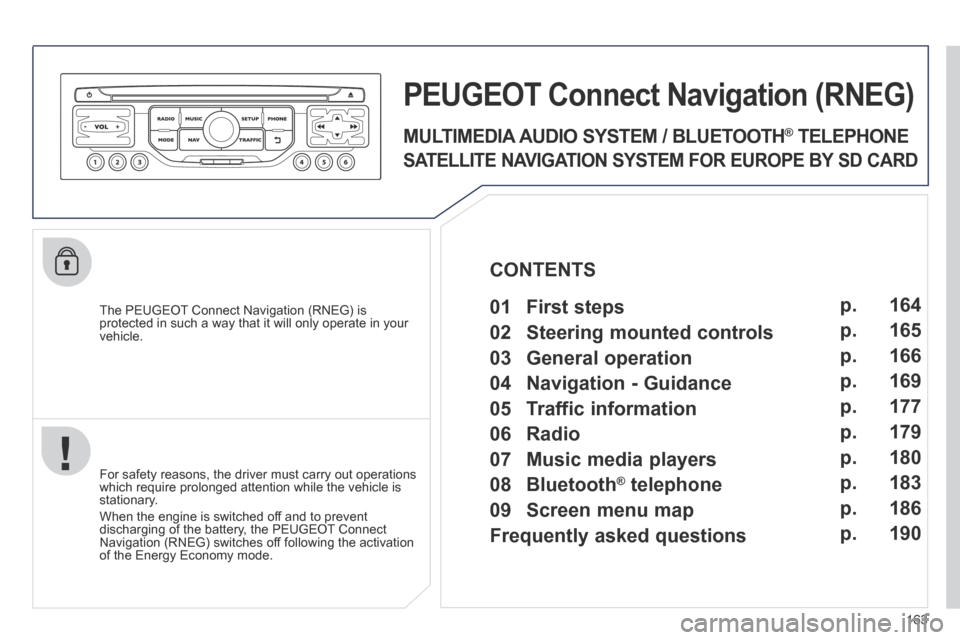
The PEUGEOT Connect Navigation (RNEG) is protected in such a way that it will only operate in your vehicle.
PEUGEOT Connect Nonnect Nonnectavigation (RNEG)
For safety reasons, the driver must carry out operations which require prolonged attention while the vehicle is stationary.
When the engine is switched off and to prevent discharging of the battery, the PEUGEOT Connect Navigation (RNEG) switches off following the activation of the Energy Economy mode.
MULTIMEDIA AUDIO SYSTEM / BLUETOOTH ® TELEPHONE
SATELLITE NAVIGATION SYSTEM FOR EUROPE BY SD CARD
01 First steps CONTENTS
02 Steering mounted controls
03 General operation
04 Navigation - Guidance
05 Traffic information
06 Radio
07 Music media players
08 Bluetooth
® telephone
09 Screen menu map
Frequently asked questions p.
p.
p.
p.
p.
p.
p.
p.
p.
p.
164
165
166
169
177
179
180
183
186
190
Page 166 of 232
164
01
207CC_EN_CHAP11B_RNEG_ED01-2014
FIRST STEPS
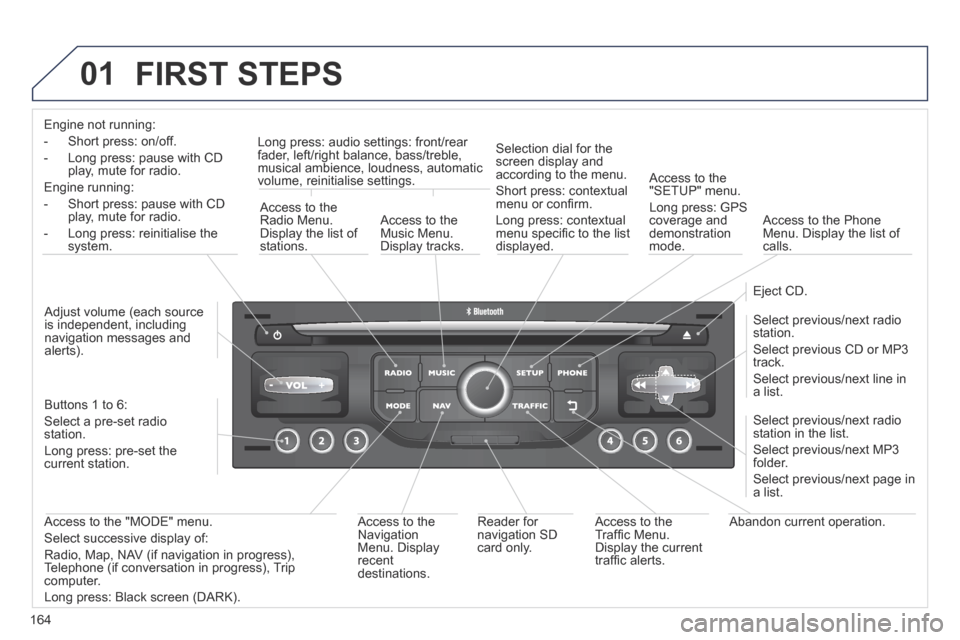
Engine not running:
- Short press: on/off.
- Long press: pause with CD play, mute for radio.
Engine running:
- Short press: pause with CD play, mute for radio.
- Long press: reinitialise the system.
Access to the Radio Menu. Display the list of stations.
Access to the Music Menu. Display tracks.
Long press: audio settings: front/rear fader, left/right balance, bass/treble, musical ambience, loudness, automatic volume, reinitialise settings.
Selection dial for the screen display and according to the menu.
Short press: contextual menu or confi rm.
Long press: contextual menu specifi c to the list displayed.
Access to the "SETUP" menu.
Long press: GPS coverage and demonstration mode.
Access to the Phone Menu. Display the list of calls.
Eject CD.
Select previous/next radio station.
Select previous CD or MP3 track.
Select previous/next line in a list.
Select previous/next radio station in the list.
Select previous/next MP3 folder.
Select previous/next page in a list.
Abandon current operation. Access to the Traffi c Menu. Display the current traffi c alerts.
Reader for navigation SD card only.
Access to the Navigation Menu. Display recent destinations.
Access to the "MODE" menu.
Select successive display of:
Radio, Map, NAV (if navigation in progress), Telephone (if conversation in progress), Trip computer.
Long press: Black screen (DARK).
Buttons 1 to 6:
Select a pre-set radio station.
Long press: pre-set the current station.
Adjust volume (each source is independent, including navigation messages and alerts).
Page 167 of 232
165
02
207CC_EN_CHAP11B_RNEG_ED01-2014
STEERING MOUNTED CONTROLS
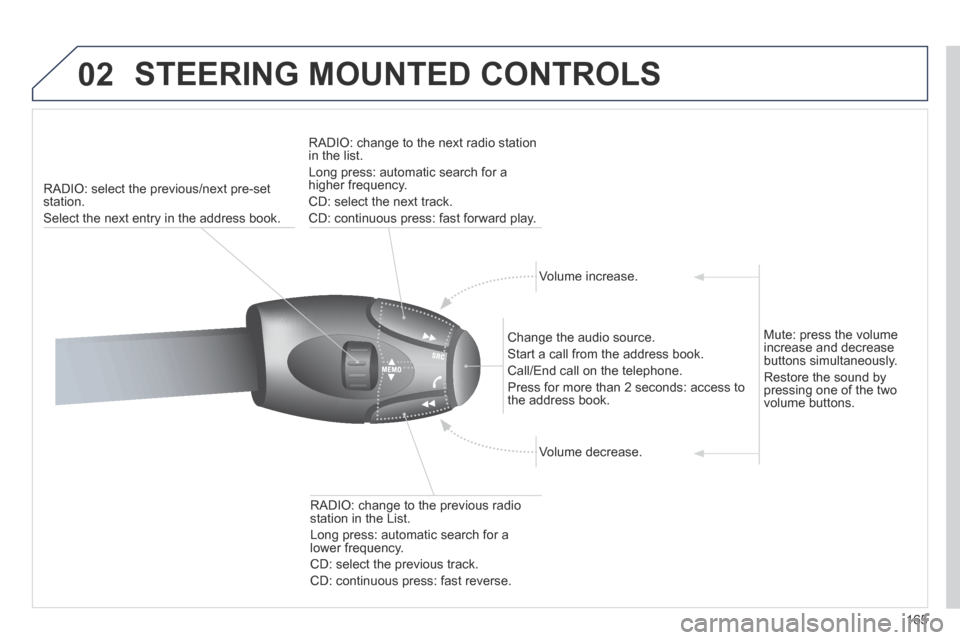
RADIO: select the previous/next pre-set station.
Select the next entry in the address book.
RADIO: change to the next radio station in the list.
Long press: automatic search for a higher frequency.
CD: select the next track.
CD: continuous press: fast forward play.
Volume increase.
Change the audio source.
Start a call from the address book.
Call/End call on the telephone.
Press for more than 2 seconds: access to the address book.
Volume decrease.
RADIO: change to the previous radio station in the List.
Long press: automatic search for a lower frequency.
CD: select the previous track.
CD: continuous press: fast reverse.
Mute: press the volume increase and decrease buttons simultaneously.
Restore the sound by pressing one of the two volume buttons.
Page 180 of 232
178
05
2 1
3
2
1
207CC_EN_CHAP11B_RNEG_ED01-2014
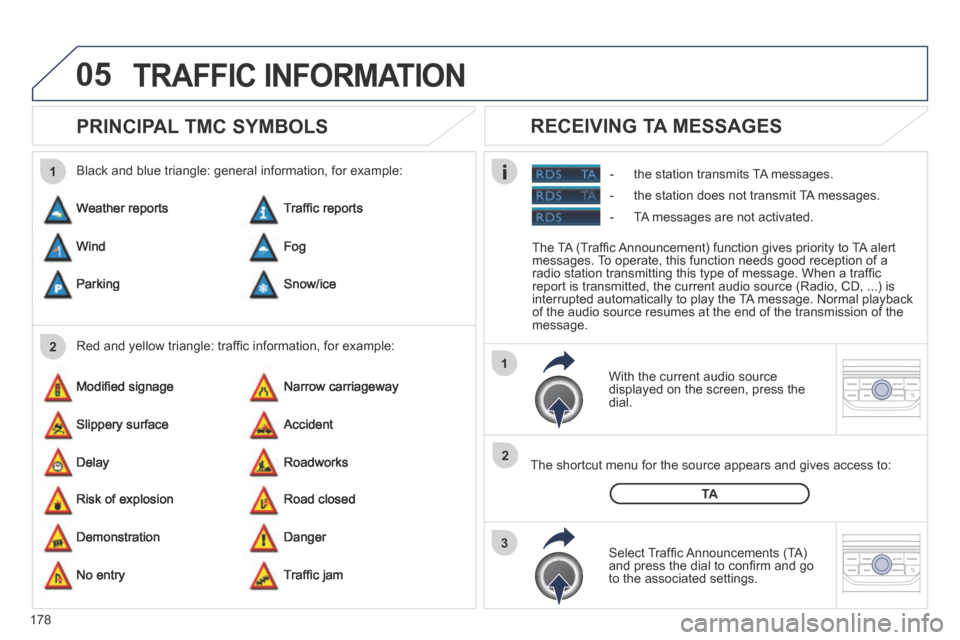
PRINCIPAL TMC SYMBOLS
With the current audio source displayed on the screen, press the dial.
The shortcut menu for the source appears and gives access to:
Select Traffi c Announcements (TA) and press the dial to confi rm and go to the associated settings.
TA
- the station transmits TA messages.
RECEIVING TA MESSAGES
Red and yellow triangle: traffi c information, for example:
Black and blue triangle: general information, for example:
Weather reports
Modifi ed signage
Risk of explosion
Traffi c reports
Narrow carriageway
Road closed
Wind
Slippery surface
Demonstration
Fog
Accident
Danger
Parking
Delay
No entry
Snow/ice
Roadworks
Traffi c jam
TRAFFIC INFORMATION
The TA (Traffi c Announcement) function gives priority to TA alert messages. To operate, this function needs good reception of a radio station transmitting this type of message. When a traffi c report is transmitted, the current audio source (Radio, CD, ...) is interrupted automatically to play the TA message. Normal playback of the audio source resumes at the end of the transmission of the message.
- the station does not transmit TA messages.
- TA messages are not activated.
Page 181 of 232
179
06
3 2 1
1
207CC_EN_CHAP11B_RNEG_ED01-2014
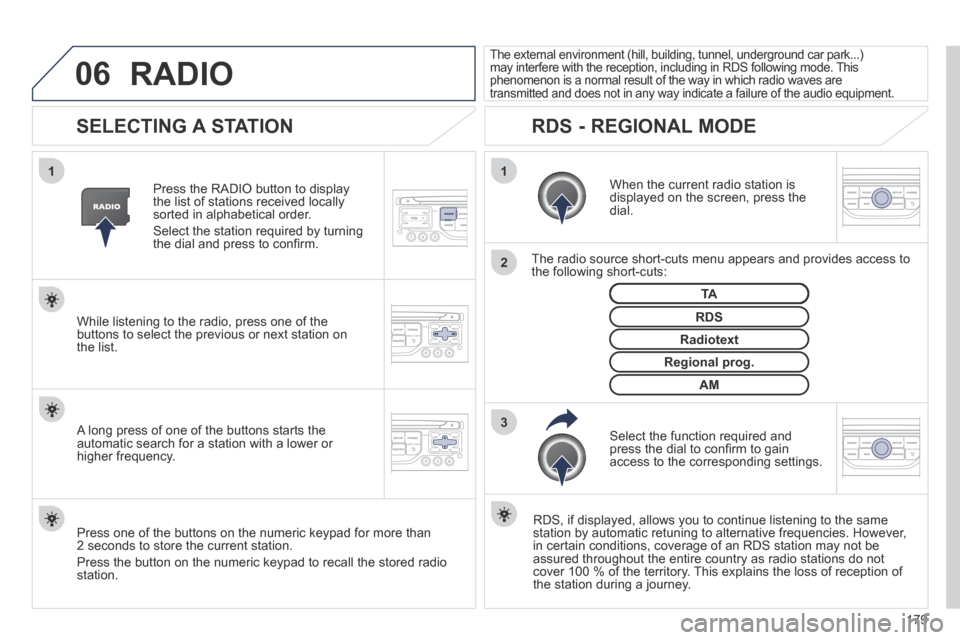
SELECTING A STATION
When the current radio station is displayed on the screen, press the dial.
The radio source short-cuts menu appears and provides access to the following short-cuts:
Select the function required and press the dial to confi rm to gain access to the corresponding settings.
TA
RDS, if displayed, allows you to continue listening to the same station by automatic retuning to alternative frequencies. However, in certain conditions, coverage of an RDS station may not be assured throughout the entire country as radio stations do not cover 100 % of the territory. This explains the loss of reception of the station during a journey.
The external environment (hill, building, tunnel, underground car park.\
..) may interfere with the reception, including in RDS following mode. This phenomenon is a normal result of the way in which radio waves are transmitted and does not in any way indicate a failure of the audio equi\
pment.
RDS - REGIONAL MODE
Press the RADIO button to display the list of stations received locally sorted in alphabetical order.
Select the station required by turning the dial and press to confi rm.
Regional prog.
Radiotext
RDS While listening to the radio, press one of the buttons to select the previous or next station on the list.
Press one of the buttons on the numeric keypad for more than 2 seconds to store the current station.
Press the button on the numeric keypad to recall the stored radio station.
AM
A long press of one of the buttons starts the automatic search for a station with a lower or higher frequency.
RADIO
Page 182 of 232
180
07
207CC_EN_CHAP11B_RNEG_ED01-2014
MUSIC MEDIA PLAYERS
CD, MP3/WMA CD
INFORMATION AND ADVICE
In order to be able to play a recorded CDR or CDRW, when recording it is preferable to select the ISO 9660 level 1, 2 or Joliet standard.
If the disc is recorded in another format it may not be played correctly.
It is recommended that the same recording standard is always used for an individual disc, with as low a speed as possible (4x maximum) for optimum sound quality.
In the particular case of a multi-session CD, the Joliet standard is recommended.
The PEUGEOT Connect Navigation will only play audio fi les with the extension ".mp3" with a speed of between 8 Kbps and 320 Kbps and the extension ".wma" with a speed of between 5 Kbps and 384 Kbps.
It also supports the VBR (Variable Bit Rate) mode.
No other type of fi le (.mp4, .m3u...) can be played.
The MP3 format, an abbreviation of MPEG 1, 2 & 2.5 Audio Layer 3 and the WMA format, an abbreviation of Windows Media Audio and the property of Microsoft, are audio compression standards which permit the recording of several tens of music fi les on a single disc.
It is advisable to restrict fi le names to 20 characters, without using special characters (e.g.: " ? ; ù) to avoid any play or displ\
ay problems.