audio Peugeot 207 CC 2014 Owner's Guide
[x] Cancel search | Manufacturer: PEUGEOT, Model Year: 2014, Model line: 207 CC, Model: Peugeot 207 CC 2014Pages: 232, PDF Size: 11.11 MB
Page 184 of 232
182
07
43
1
2
207CC_EN_CHAP11B_RNEG_ED01-2014
MUSIC MEDIA PLAYERS
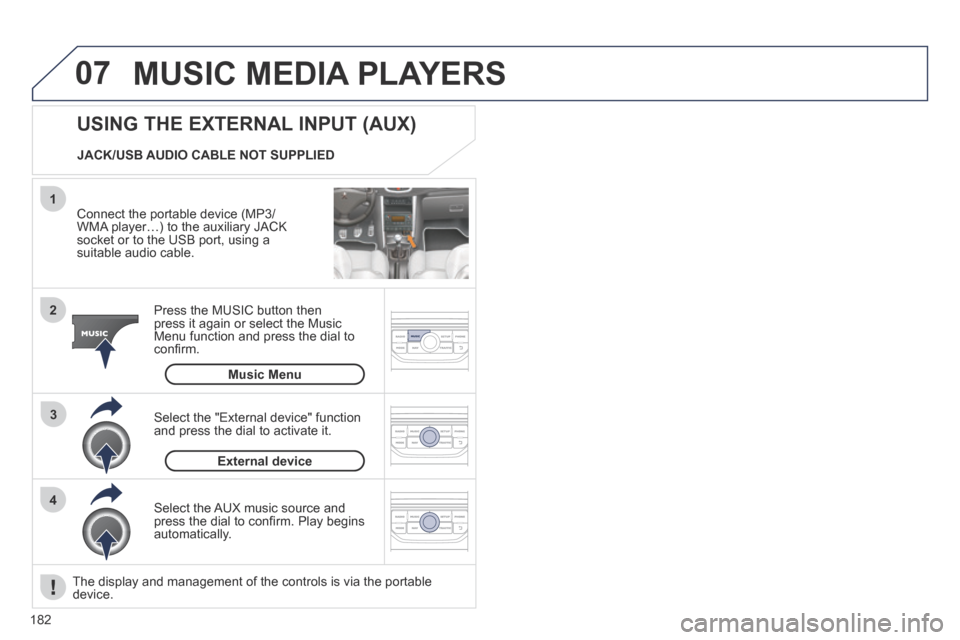
Connect the portable device (MP3/WMA player…) to the auxiliary JACK socket or to the USB port, using a suitable audio cable.
Press the MUSIC button then press it again or select the Music Menu function and press the dial to confi rm.
Select the AUX music source and press the dial to confi rm. Play begins automatically.
Select the "External device" function and press the dial to activate it.
External device
USING THE EXTERNAL INPUT (AUX)
Music Menu
JACK/USB AUDIO CABLE NOT SUPPLIED
The display and management of the controls is via the portable device.
Page 192 of 232
190
207CC_EN_CHAP11B_RNEG_ED01-2014
FREQUENTLY ASKED QUESTIONS
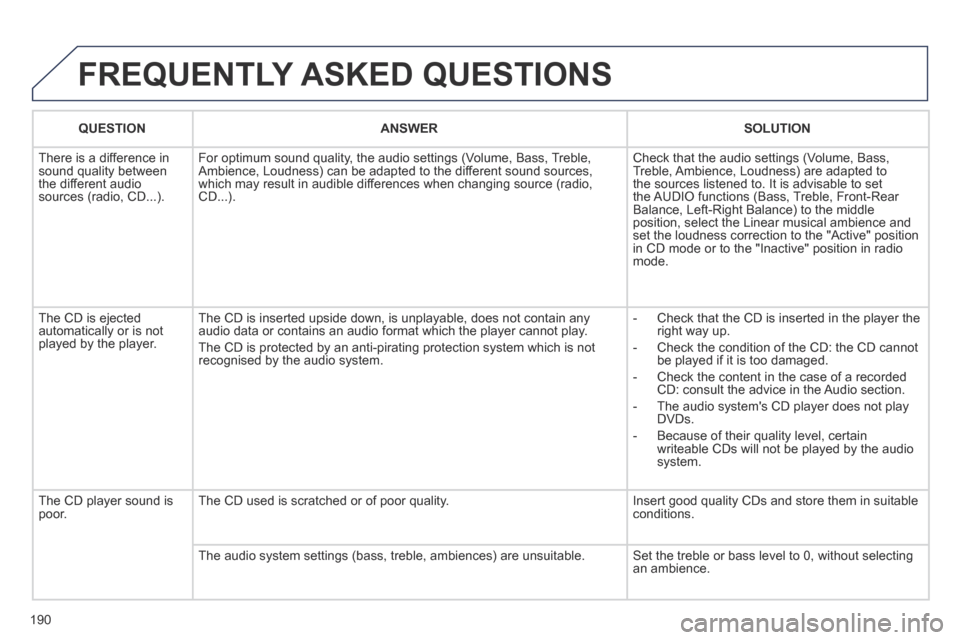
QUESTIONANSWERSOLUTION
There is a difference in sound quality between the different audio sources (radio, CD...).
For optimum sound quality, the audio settings (Volume, Bass, Treble, Ambience, Loudness) can be adapted to the different sound sources, which may result in audible differences when changing source (radio, CD...).
Check that the audio settings (Volume, Bass, Treble, Ambience, Loudness) are adapted to the sources listened to. It is advisable to set the AUDIO functions (Bass, Treble, Front-Rear Balance, Left-Right Balance) to the middle position, select the Linear musical ambience and set the loudness correction to the "Active" position in CD mode or to the "Inactive" position in radio mode.
The CD is ejected automatically or is not played by the player.
The CD is inserted upside down, is unplayable, does not contain any audio data or contains an audio format which the player cannot play.
The CD is protected by an anti-pirating protection system which is not recognised by the audio system.
- Check that the CD is inserted in the player the right way up.
- Check the condition of the CD: the CD cannot be played if it is too damaged.
- Check the content in the case of a recorded CD: consult the advice in the Audio section.
- The audio system's CD player does not play DVDs.
- Because of their quality level, certain writeable CDs will not be played by the audio system.
The CD player sound is poor. The CD used is scratched or of poor quality. Insert good quality CDs and store them in suitable conditions.
The audio system settings (bass, treble, ambiences) are unsuitable. Set the treble or bass level to 0, without selecting an ambience.
Page 193 of 232
191
207CC_EN_CHAP11B_RNEG_ED01-2014
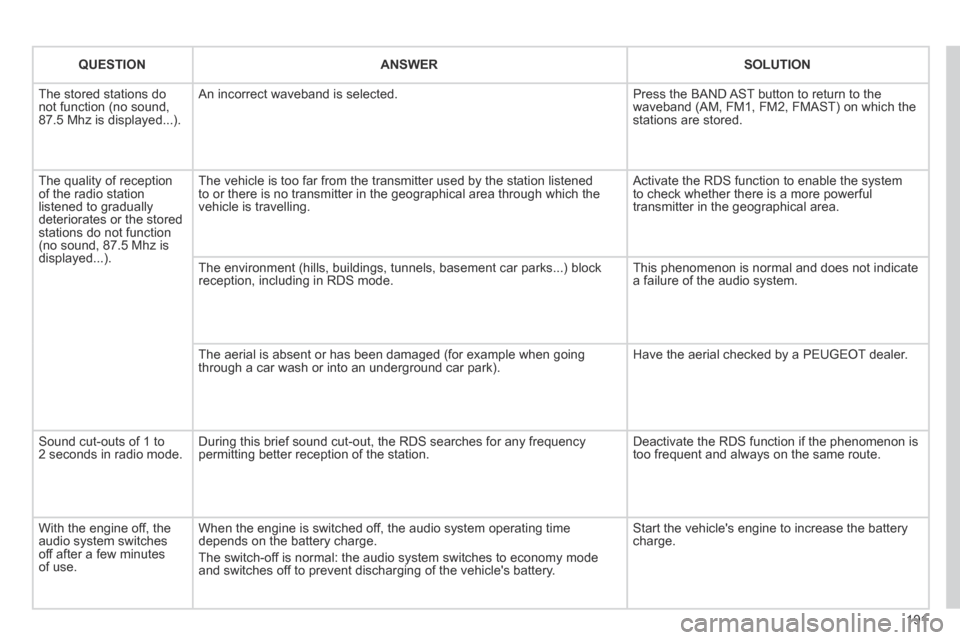
QUESTIONANSWERSOLUTION
The stored stations do not function (no sound, 87.5 Mhz is displayed...).
An incorrect waveband is selected. Press the BAND AST button to return to the waveband (AM, FM1, FM2, FMAST) on which the stations are stored.
The quality of reception of the radio station listened to gradually deteriorates or the stored stations do not function (no sound, 87.5 Mhz is displayed...).
The vehicle is too far from the transmitter used by the station listened\
to or there is no transmitter in the geographical area through which the\
vehicle is travelling.
Activate the RDS function to enable the system to check whether there is a more powerful transmitter in the geographical area.
The environment (hills, buildings, tunnels, basement car parks...) blo\
ck reception, including in RDS mode. This phenomenon is normal and does not indicate a failure of the audio system.
The aerial is absent or has been damaged (for example when going through a car wash or into an underground car park). Have the aerial checked by a PEUGEOT dealer.
Sound cut-outs of 1 to 2 seconds in radio mode. During this brief sound cut-out, the RDS searches for any frequency permitting better reception of the station. Deactivate the RDS function if the phenomenon is too frequent and always on the same route.
With the engine off, the audio system switches off after a few minutes of use.
When the engine is switched off, the audio system operating time depends on the battery charge.
The switch-off is normal: the audio system switches to economy mode and switches off to prevent discharging of the vehicle's battery.
Start the vehicle's engine to increase the battery charge.
Page 197 of 232
195
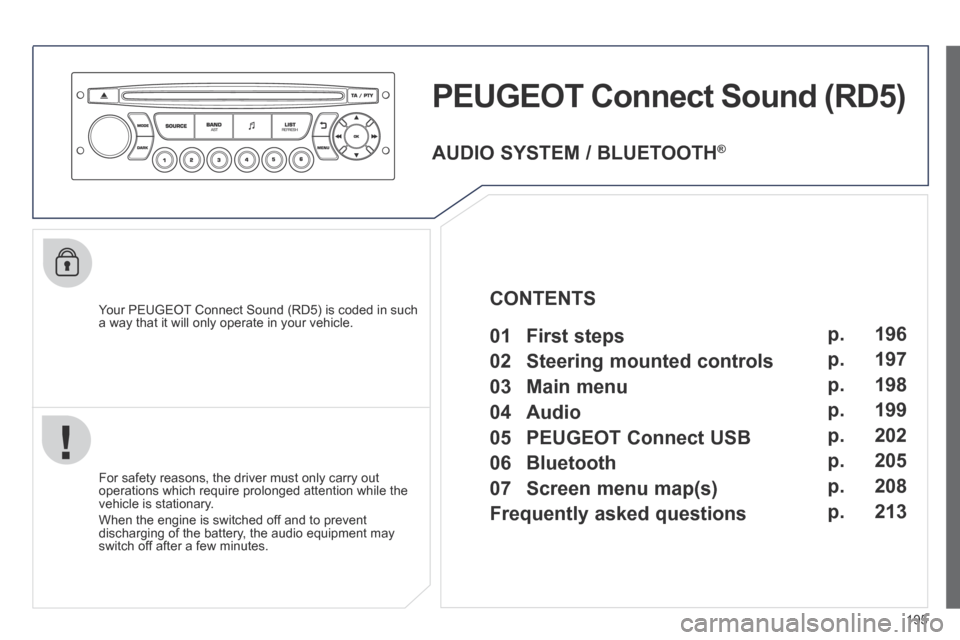
PEUGEOT Connect Sound (RD5)
Your PEUGEOT Connect Sound (RD5) is coded in such a way that it will only operate in your vehicle.
For safety reasons, the driver must only carry out operations which require prolonged attention while the vehicle is stationary.
When the engine is switched off and to prevent discharging of the battery, the audio equipment may switch off after a few minutes.
AUDIO SYSTEM / BLUETOOTH ®
01 First steps
02 Steering mounted controls
03 Main menu
04 Audio
05 PEUGEOT Connect USB
06 Bluetooth
07 Screen menu map(s)
Frequently asked questions p.
p.
p.
p.
p.
p.
p.
p.
196
197
198
199
202
205
208
213
CONTENTS
Page 198 of 232
196
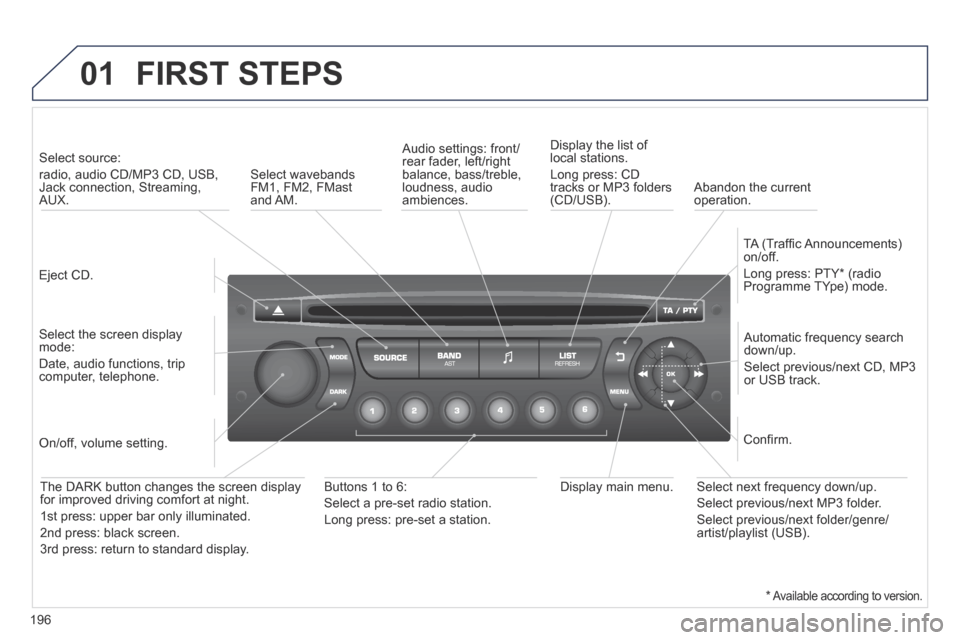
01 FIRST STEPS
Eject CD.
Select source:
radio, audio CD/MP3 CD, USB, Jack connection, Streaming, AUX.
Select the screen display mode:
Date, audio functions, trip computer, telephone.
Automatic frequency search down/up.
Select previous/next CD, MP3 or USB track.
Audio settings: front/rear fader, left/right balance, bass/treble, loudness, audio ambiences.
Display the list of local stations.
Long press: CD tracks or MP3 folders (CD/USB).
TA (Traffi c Announcements) on/off.
Long press: PTY * (radio Programme TYpe) mode.
Display main menu. The DARK button changes the screen display for improved driving comfort at night.
1 st press: upper bar only illuminated.
2 nd press: black screen.
3 rd press: return to standard display.
On/off, volume setting.
Buttons 1 to 6:
Select a pre-set radio station.
Long press: pre-set a station.
Select next frequency down/up.
Select previous/next MP3 folder.
Select previous/next folder/genre/artist/playlist (USB).
Confi rm.
Select wavebands FM1, FM2, FMast and AM. Abandon the current operation.
* Available according to version.
Page 199 of 232
197
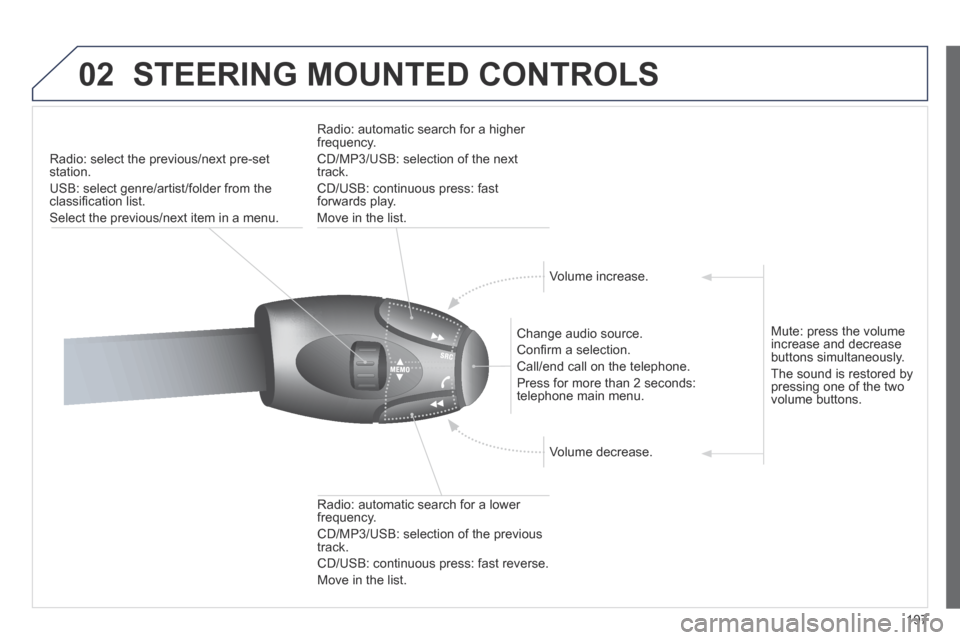
02 STEERING MOUNTED CONTROLS
Radio: select the previous/next pre-set station.
USB: select genre/artist/folder from the classifi cation list.
Select the previous/next item in a menu.
Change audio source.
Confi rm a selection.
Call/end call on the telephone.
Press for more than 2 seconds: telephone main menu.
Radio: automatic search for a lower frequency.
CD/MP3/USB: selection of the previous track.
CD/USB: continuous press: fast reverse.
Move in the list.
Radio: automatic search for a higher frequency.
CD/MP3/USB: selection of the next track.
CD/USB: continuous press: fast forwards play.
Move in the list.
Volume increase.
Volume decrease.
Mute: press the volume increase and decrease buttons simultaneously.
The sound is restored by pressing one of the two volume buttons.
Page 200 of 232
198
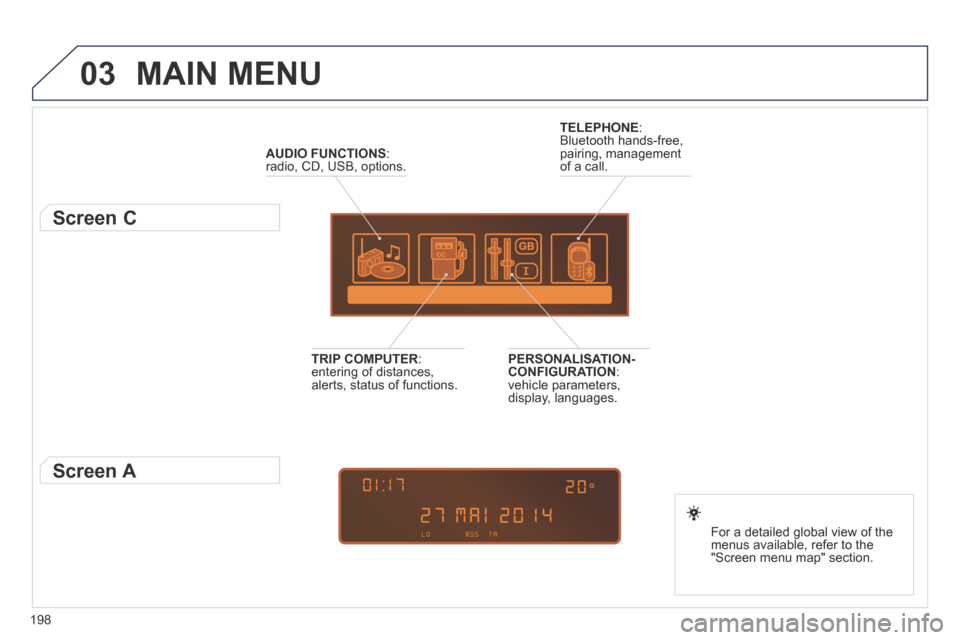
03 MAIN MENU
AUDIO FUNCTIONS : radio, CD, USB, options.
Screen C
For a detailed global view of the menus available, refer to the "Screen menu map" section.
TELEPHONE : Bluetooth hands-free, pairing, management of a call.
PERSONALISATION-CONFIGURATION : vehicle parameters, display, languages.
TRIP COMPUTER : entering of distances, alerts, status of functions.
Screen A
Page 201 of 232
199
04
1
2
3
4
1
2
3
4
SOURCE
BANDAST
LISTREFRESH
MENU
AUDIO
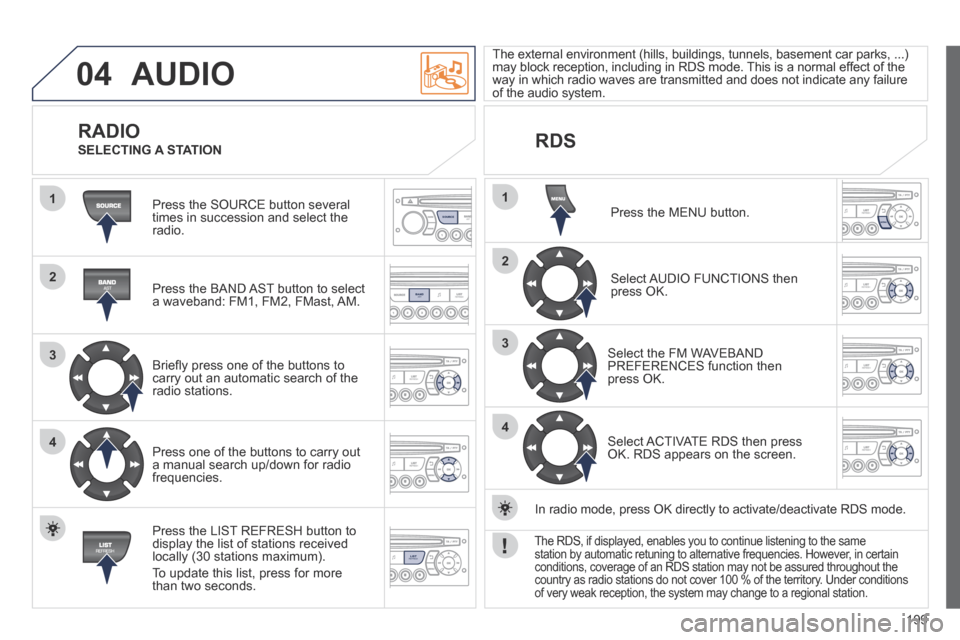
Press the SOURCE button several times in succession and select the radio.
Press the BAND AST button to select a waveband: FM1, FM2, FMast, AM.
Briefl y press one of the buttons to carry out an automatic search of the radio stations.
Press one of the buttons to carry out a manual search up/down for radio frequencies.
Press the LIST REFRESH button to display the list of stations received locally (30 stations maximum).
To update this list, press for more than two seconds.
The external environment (hills, buildings, tunnels, basement car parks\
, ...) may block reception, including in RDS mode. This is a normal effect of the way in which radio waves are transmitted and does not indicate any failu\
re of the audio system.
RDS
RADIO SELECTING A STATION
Press the MENU button.
Select AUDIO FUNCTIONS then press OK.
Select the FM WAVEBAND PREFERENCES function then press OK.
Select ACTIVATE RDS then press OK. RDS appears on the screen.
In radio mode, press OK directly to activate/deactivate RDS mode.
The RDS, if displayed, enables you to continue listening to the same station by automatic retuning to alternative frequencies. However, in certain conditions, coverage of an RDS station may not be assured throughout the\
country as radio stations do not cover 100 % of the territory. Under conditions of very weak reception, the system may change to a regional station.
Page 202 of 232
200
04
1
2
3
1
SOURCE
AUDIO
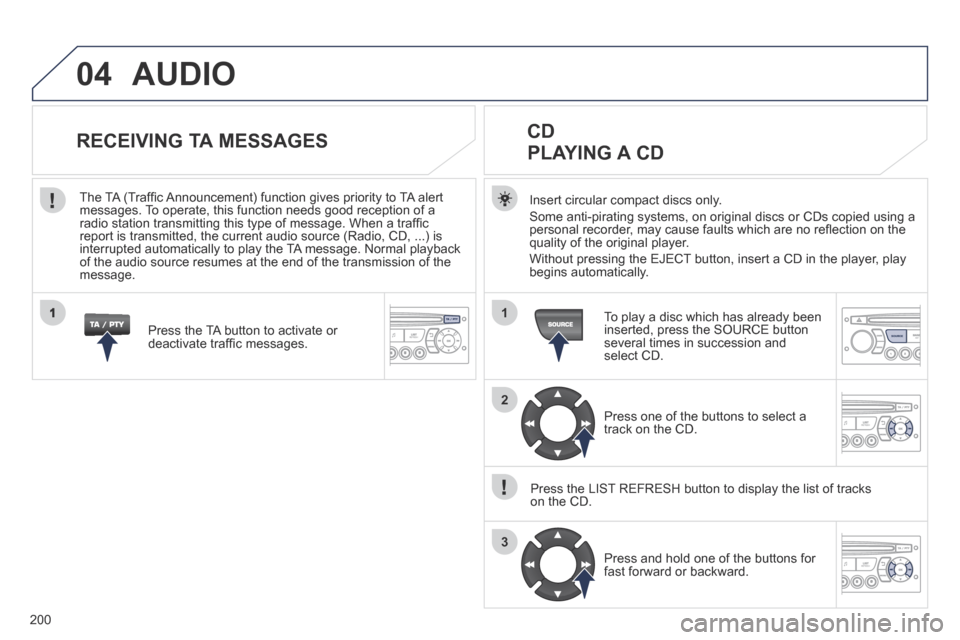
Insert circular compact discs only.
Some anti-pirating systems, on original discs or CDs copied using a personal recorder, may cause faults which are no refl ection on the quality of the original player.
Without pressing the EJECT button, insert a CD in the player, play begins automatically.
CD PLAYING A CD
To play a disc which has already been inserted, press the SOURCE button several times in succession and select CD.
Press one of the buttons to select a track on the CD.
Press the LIST REFRESH button to display the list of tracks on the CD.
Press and hold one of the buttons for fast forward or backward.
RECEIVING TA MESSAGES
Press the TA button to activate or deactivate traffi c messages.
The TA (Traffi c Announcement) function gives priority to TA alert messages. To operate, this function needs good reception of a radio station transmitting this type of message. When a traffi c report is transmitted, the current audio source (Radio, CD, ...) is interrupted automatically to play the TA message. Normal playback of the audio source resumes at the end of the transmission of the message.
Page 203 of 232
201
04
1
2
3
SOURCE
The MP3 format, an abbreviation of MPEG 1.2 & 2.5 Audio Layer 3, is an audio compression standard which permits the recording of several tens of music fi les on a single disc.
In order to be able to play a recorded CDR or CDRW, when recording, the ISO 9660 level 1.2 or Joliet fi le format is recommended.
If the disc is recorded in another format, it may not be played correctly.
It is recommended that the same recording format is always used for an individual disc, with as low a speed as possible (4x maximum) for optimum sound quality.
In the particular case of a multi-session CD, the Joliet format is recommended.
The audio system will only play fi les with the extension ".mp3" with a sampling rate of 22.05 KHz or 44.1 KHz. No other type of fi le (.wma, .mp4, .m3u...) can be played.
It is advisable to restrict fi le names to 20 characters without using special characters (e.g. " ? ; ù) to avoid any playing or displayin\
g problems.
MP3 CD
INFORMATION AND ADVICE
AUDIO
Empty CDs are not recognised and may damage the system.
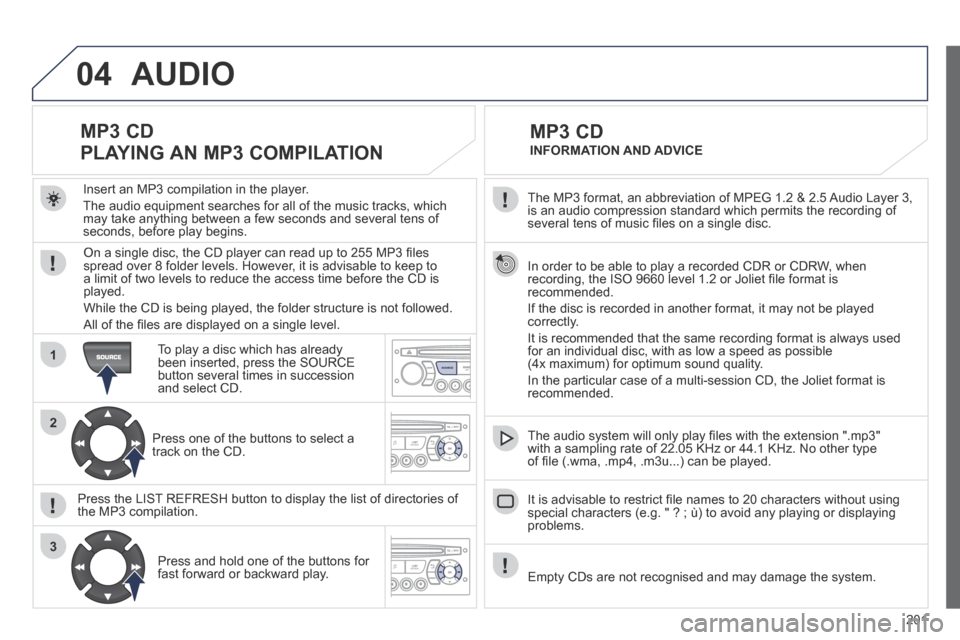
Insert an MP3 compilation in the player.
The audio equipment searches for all of the music tracks, which may take anything between a few seconds and several tens of seconds, before play begins.
MP3 CD
PLAYING AN MP3 COMPILATION
On a single disc, the CD player can read up to 255 MP3 fi les spread over 8 folder levels. However, it is advisable to keep to a limit of two levels to reduce the access time before the CD is played.
While the CD is being played, the folder structure is not followed.
All of the fi les are displayed on a single level.
To play a disc which has already been inserted, press the SOURCE button several times in succession and select CD.
Press one of the buttons to select a track on the CD.
Press the LIST REFRESH button to display the list of directories of the MP3 compilation.
Press and hold one of the buttons for fast forward or backward play.