time Peugeot 308 2014 Owners Manual
[x] Cancel search | Manufacturer: PEUGEOT, Model Year: 2014, Model line: 308, Model: Peugeot 308 2014Pages: 400, PDF Size: 10.05 MB
Page 331 of 400
05
329
308_EN_CHAP10C_SMEGPLUS_ED02-2013
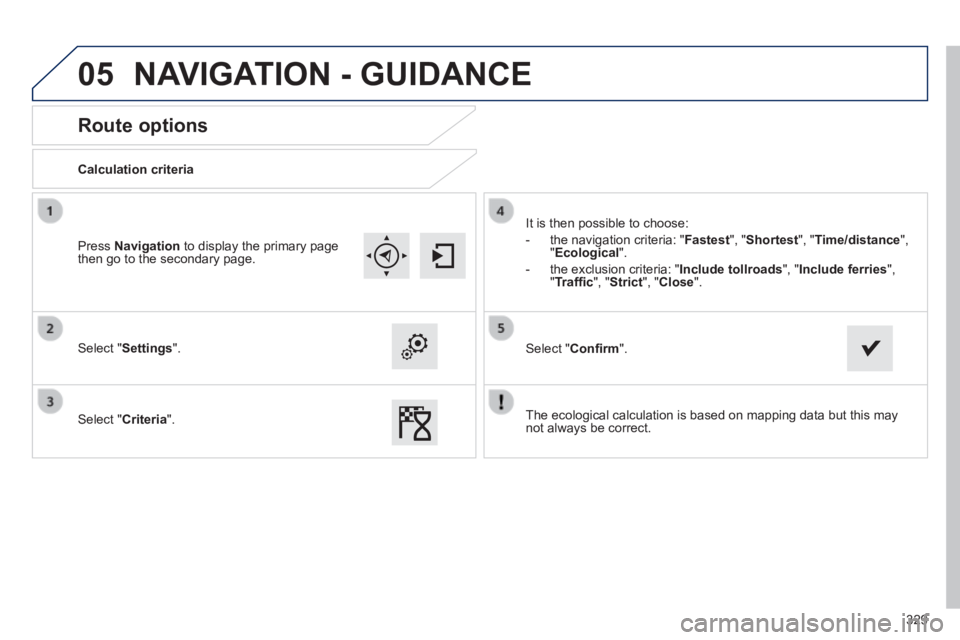
Route options
Calculation criteria
Select " Settings ".
Select " Criteria ".
It is then possible to choose:
- the navigation criteria: " Fastest ", " Shortest ", " Time/distance ", " Ecological ".
- the exclusion criteria: " Include tollroads" , " Include ferries ", " Traffi c ", " Strict ", " Close ".
Select " Confi rm ".
Press Navigation to display the primary page then go to the secondary page.
NAVIGATION - GUIDANCE
The ecological calculation is based on mapping data but this may not always be correct.
Page 332 of 400
05
330
308_EN_CHAP10C_SMEGPLUS_ED02-2013
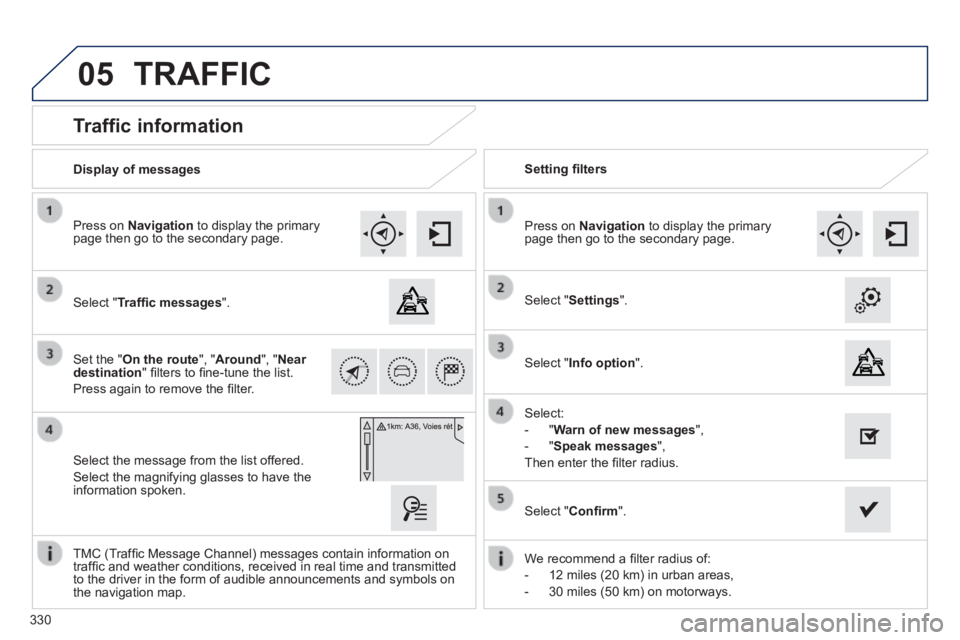
Traffic information
Select " Traffi c messages ".
Press on Navigation to display the primary page then go to the secondary page.
Select the message from the list offered.
Select the magnifying glasses to have the information spoken.
Set the " On the route ", " Around ", " Near destination " fi lters to fi ne-tune the list.
Press again to remove the fi lter.
Select " Settings ".
Select:
- " Warn of new messages ",
- " Speak messages ",
Then enter the fi lter radius.
Press on Navigation to display the primary page then go to the secondary page.
Display of messages Setting fi lters
We recommend a fi lter radius of:
- 12 miles (20 km) in urban areas,
- 30 miles (50 km) on motorways.
TMC (Traffi c Message Channel) messages contain information on traffi c and weather conditions, received in real time and transmitted to the driver in the form of audible announcements and symbols on the navigation map.
Select " Confi rm ".
TRAFFIC
Select " Info option ".
Page 334 of 400
05
308_EN_CHAP10C_SMEGPLUS_ED02-2013
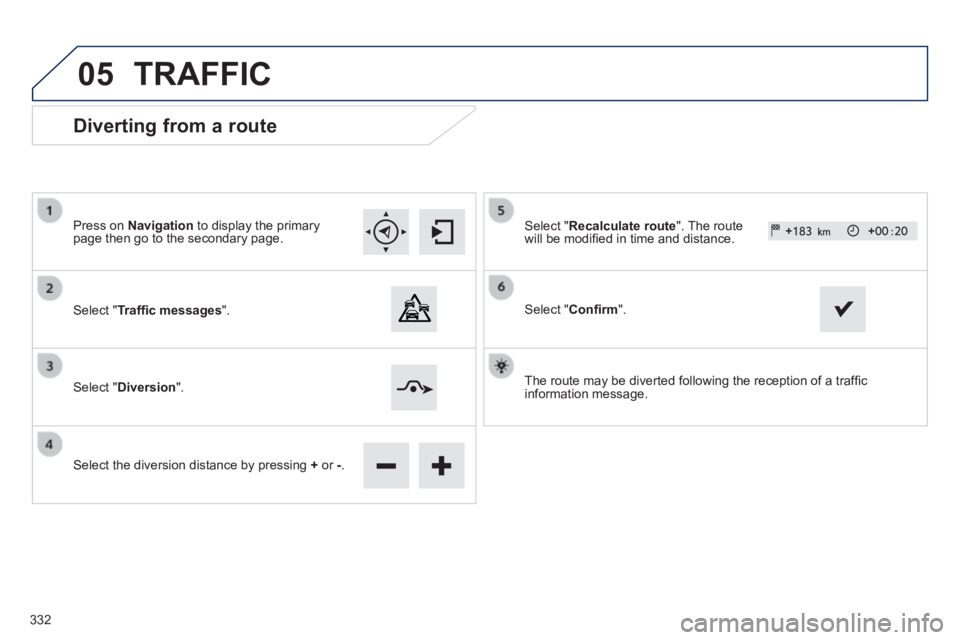
Diverting from a route
Press on Navigation to display the primary page then go to the secondary page.
Select " Traffi c messages ".
Select " Diversion ".
Select the diversion distance by pressing + or -.
Select " Recalculate route ". The route will be modifi ed in time and distance.
Select " Confi rm ".
The route may be diverted following the reception of a traffi c information message.
TRAFFIC
332
Page 340 of 400
06
338
308_EN_CHAP10C_SMEGPLUS_ED02-2013
CONFIGURATION
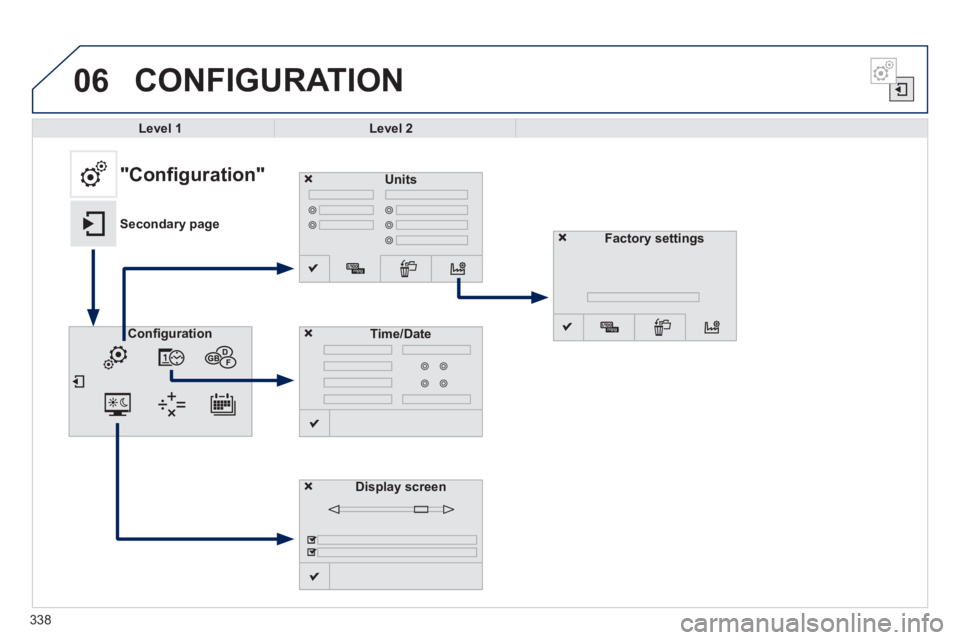
Level 1Level 2
Units
Display screen
Confi gurationTime/Date
"Configuration"
Secondary pageFactory settings
Page 341 of 400
339
308_EN_CHAP10C_SMEGPLUS_ED02-2013
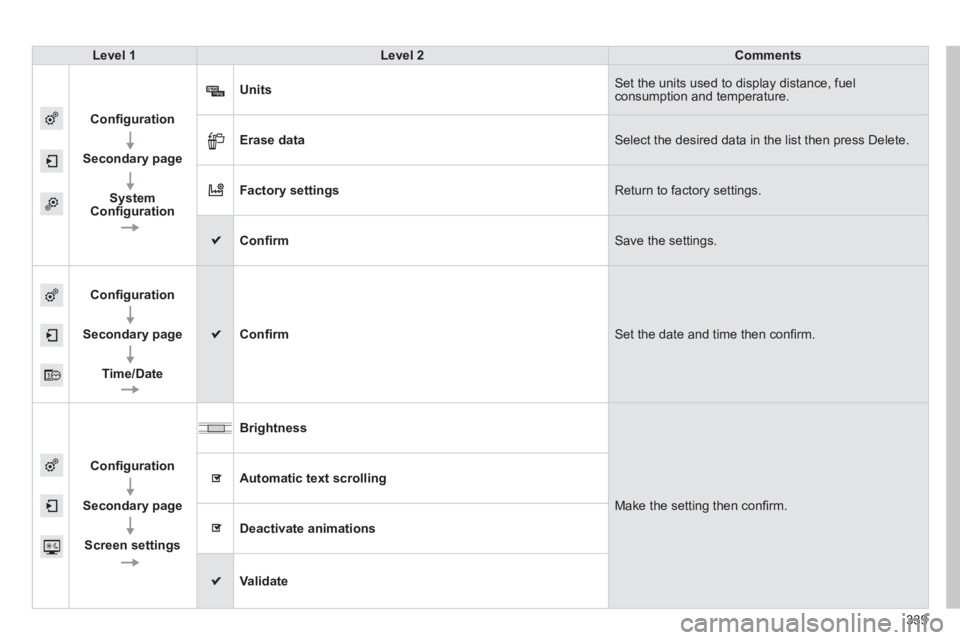
Level 1Level 2Comments
Confi guration
Secondary page
SystemConfi guration
Units Set the units used to display distance, fuel consumption and temperature.
Erase data Select the desired data in the list then press Delete.
Factory settings Return to factory settings.
Confi rm Save the settings.
Confi guration
Secondary page
Time/Date
Confi rm Set the date and time then confi rm.
Confi guration
Secondary page
Screen settings
Brightness
Make the setting then confi rm.
Automatic text scrolling
Deactivate animations
Validate
Page 347 of 400
06
345
308_EN_CHAP10C_SMEGPLUS_ED02-2013
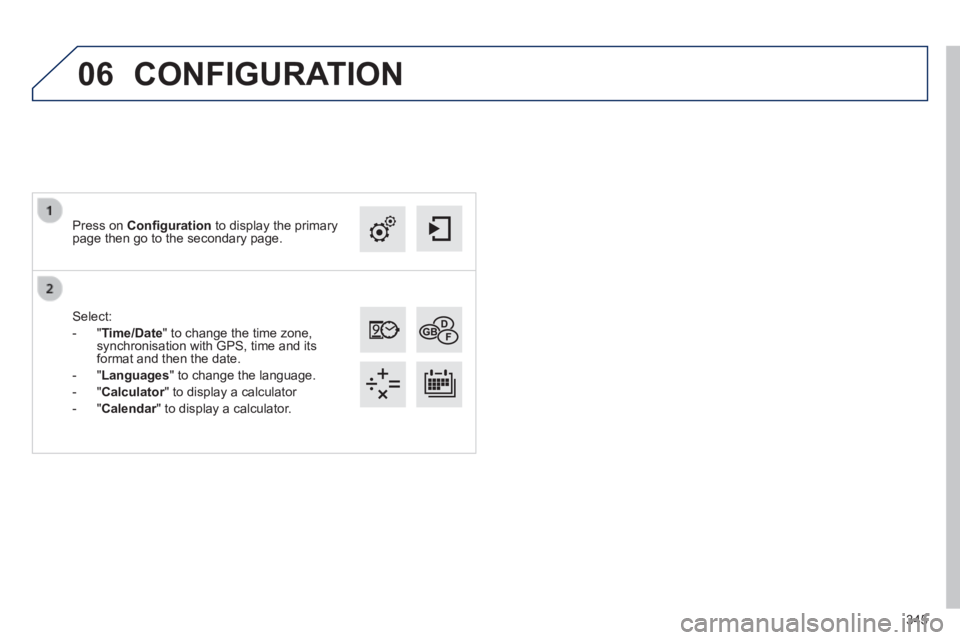
Select:
- " Time/Date " to change the time zone, synchronisation with GPS, time and its format and then the date.
- " Languages " to change the language.
- " Calculator " to display a calculator Calculator " to display a calculator Calculator
- " Calendar " to display a calculator. Calendar " to display a calculator. Calendar
Press on Confi guration to display the primary page then go to the secondary page.
CONFIGURATION
Page 349 of 400
07
308_EN_CHAP10C_SMEGPLUS_ED02-2013
PEUGEOT CONNECT APPS
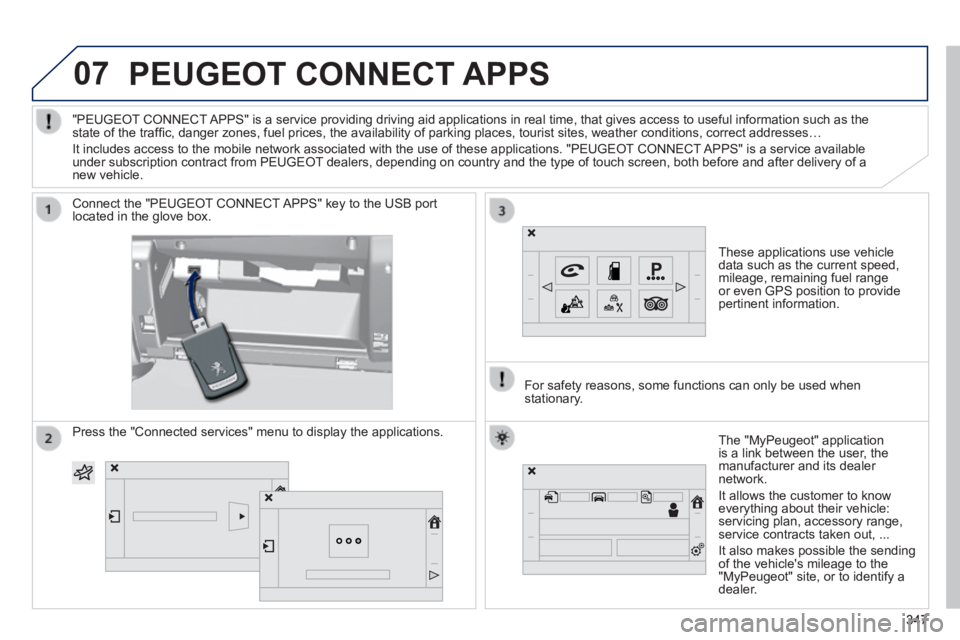
These applications use vehicle data such as the current speed, mileage, remaining fuel range or even GPS position to provide pertinent information.
Connect the "PEUGEOT CONNECT APPS" key to the USB port located in the glove box.
The "MyPeugeot" application is a link between the user, the manufacturer and its dealer network.
It allows the customer to know everything about their vehicle: servicing plan, accessory range, service contracts taken out, ...
It also makes possible the sending of the vehicle's mileage to the "MyPeugeot" site, or to identify a dealer.
"PEUGEOT CONNECT APPS" is a service providing driving aid applications in real time, that\
gives access to useful information such as the state of the traffi c, danger zones, fuel prices, the availability of parking places, tourist sites, weather conditions, correct addresses…
It includes access to the mobile network associated with the use of thes\
e applications. "PEUGEOT CONNECT APPS" is a service available under subscription contract from PEUGEOT dealers, depending on country and the type of touch screen, both before\
and after delivery of a new vehicle.
For safety reasons, some functions can only be used when stationary.
Press the "Connected services" menu to display the applications.
347347347
Page 355 of 400
08
353
308_EN_CHAP10C_SMEGPLUS_ED02-2013
Depending on your telephone, you may be asked to accept automatic connection every time the ignition is switched on.
Depending on the type of telephone, the system will ask you to accept or not the transfer of your contacts.
The services available depend on the network, the SIM card and the compatibility of the Bluetooth telephone used. Check the telephone manual and with your network provider for details of the services available to you.
On return to the vehicle, the last telephone connected automatically reconnects, within around 30 seconds after switching on the ignition (Bluetooth activated).
To modify the automatic connection mode, select the telephone in the list then select the desired profi le.
The telephone is added to the list.
BLUETOOTH
If not, select " Update ".
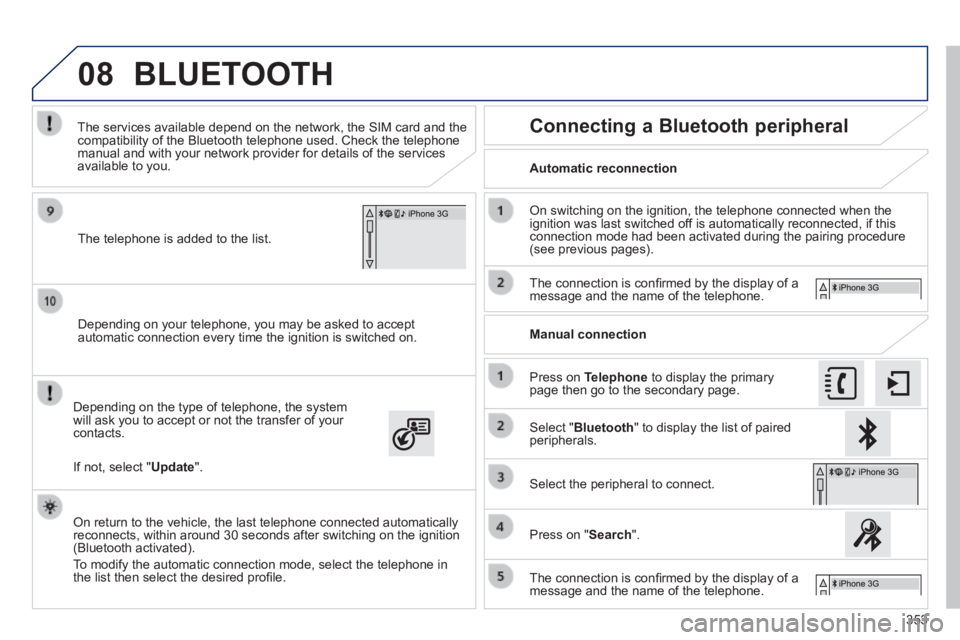
Automatic reconnection
Connecting a Bluetooth peripheral
On switching on the ignition, the telephone connected when the ignition was last switched off is automatically reconnected, if this connection mode had been activated during the pairing procedure (see previous pages).
The connection is confi rmed by the display of a message and the name of the telephone.
Press on Telephone to display the primary page then go to the secondary page.
Manual connection
Select " Bluetooth " to display the list of paired peripherals.
Select the peripheral to connect.
Press on " Search ".
The connection is confi rmed by the display of a message and the name of the telephone.
Page 360 of 400
308_EN_CHAP10C_SMEGPLUS_ED02-2013
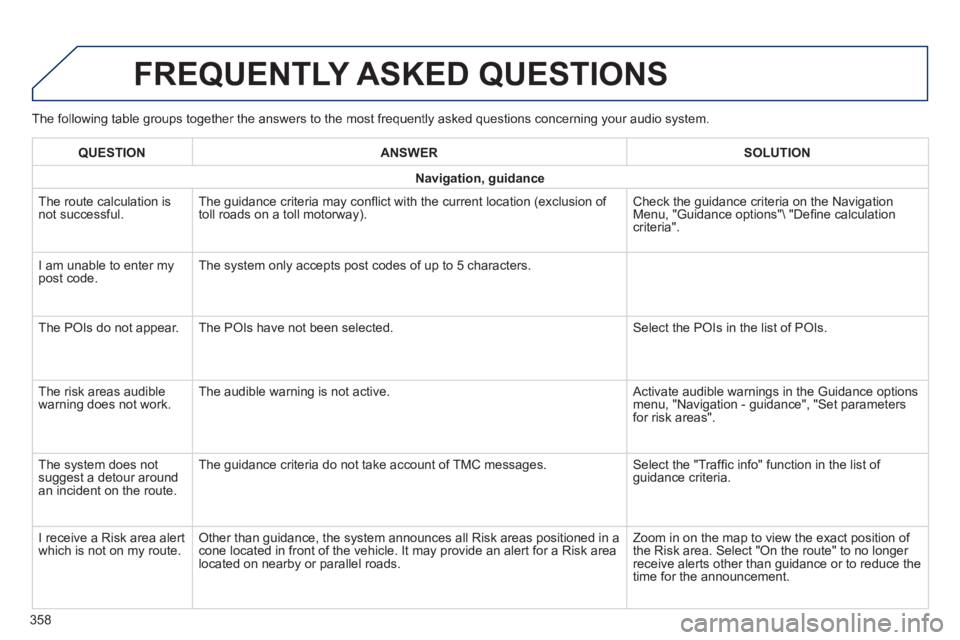
The following table groups together the answers to the most frequently asked questions concerning your audio system.
FREQUENTLY ASKED QUESTIONS
358
QUESTIONANSWERSOLUTION
Navigation, guidance
The route calculation is not successful. The guidance criteria may confl ict with the current location (exclusion of toll roads on a toll motorway). Check the guidance criteria on the Navigation Menu, "Guidance options"\ "Defi ne calculation criteria".
I am unable to enter my post code. The system only accepts post codes of up to 5 characters.
The POIs do not appear. The POIs have not been selected. Select the POIs in the list of POIs.
The risk areas audible warning does not work. The audible warning is not active. Activate audible warnings in the Guidance options menu, "Navigation - guidance", "Set parameters for risk areas".
The system does not suggest a detour around an incident on the route.
The guidance criteria do not take account of TMC messages. Select the "Traffi c info" function in the list of guidance criteria.
I receive a Risk area alert which is not on my route. Other than guidance, the system announces all Risk areas positioned in a\
cone located in front of the vehicle. It may provide an alert for a Risk\
area located on nearby or parallel roads.
Zoom in on the map to view the exact position of the Risk area. Select "On the route" to no longer receive alerts other than guidance or to reduce the time for the announcement.
Page 361 of 400
308_EN_CHAP10C_SMEGPLUS_ED02-2013
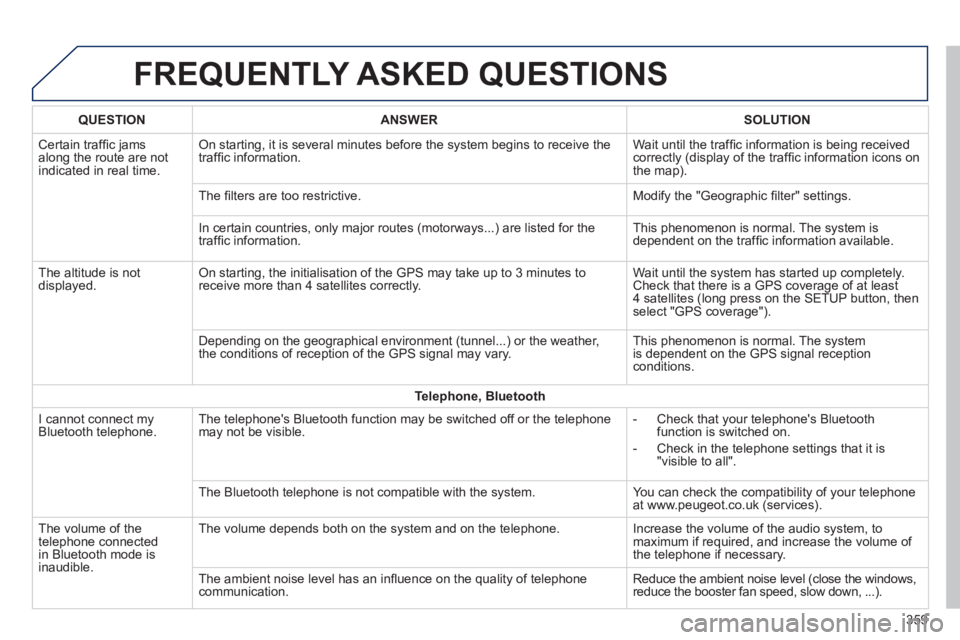
FREQUENTLY ASKED QUESTIONS
359
QUESTIONANSWERSOLUTION
Certain traffi c jams along the route are not indicated in real time.
On starting, it is several minutes before the system begins to receive t\
he traffi c information. Wait until the traffi c information is being received correctly (display of the traffi c information icons on the map).
The fi lters are too restrictive. Modify the "Geographic fi lter" settings.
In certain countries, only major routes (motorways...) are listed for \
the traffi c information. This phenomenon is normal. The system is dependent on the traffi c information available.
The altitude is not displayed. On starting, the initialisation of the GPS may take up to 3 minutes to receive more than 4 satellites correctly. Wait until the system has started up completely. Check that there is a GPS coverage of at least 4 satellites (long press on the SETUP button, then select "GPS coverage").
Depending on the geographical environment (tunnel...) or the weather, the conditions of reception of the GPS signal may vary. This phenomenon is normal. The system is dependent on the GPS signal reception conditions.
Telephone, Bluetooth
I cannot connect my Bluetooth telephone. The telephone's Bluetooth function may be switched off or the telephone may not be visible. - Check that your telephone's Bluetooth function is switched on.
- Check in the telephone settings that it is "visible to all".
The Bluetooth telephone is not compatible with the system. You can check the compatibility of your telephone at www.peugeot.co.uk (services).
The volume of the telephone connected in Bluetooth mode is inaudible.
The volume depends both on the system and on the telephone. Increase the volume of the audio system, to maximum if required, and increase the volume of the telephone if necessary.
The ambient noise level has an infl uence on the quality of telephone communication. Reduce the ambient noise level (close the windows, reduce the booster fan speed, slow down, ...).