time Peugeot 308 2014 Service Manual
[x] Cancel search | Manufacturer: PEUGEOT, Model Year: 2014, Model line: 308, Model: Peugeot 308 2014Pages: 400, PDF Size: 10.05 MB
Page 131 of 400
129
4
Driving
308_EN_CHAP04_CONDUITE_ED02-2013
Stop & Start
Operation
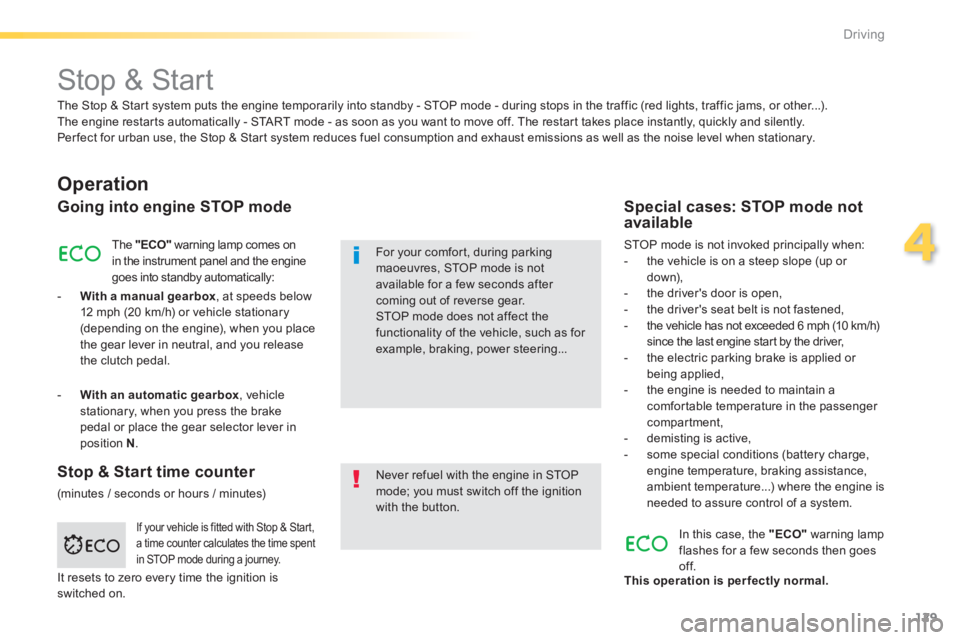
Going into engine STOP mode
The "ECO" warning lamp comes on in the instrument panel and the engine goes into standby automatically:
- With a manual gearbox , at speeds below 12 mph (20 km/h) or vehicle stationary (depending on the engine), when you place the gear lever in neutral, and you release the clutch pedal.
Never refuel with the engine in STOP mode; you must switch off the ignition with the button.
For your comfort, during parking maoeuvres, STOP mode is not available for a few seconds after coming out of reverse gear. STOP mode does not affect the functionality of the vehicle, such as for example, braking, power steering...
Special cases: STOP mode not available
STOP mode is not invoked principally when: - the vehicle is on a steep slope (up or d ow n), - the driver's door is open, - the driver's seat belt is not fastened, - the vehicle has not exceeded 6 mph (10 km/h) since the last engine start by the driver, - the electric parking brake is applied or being applied, - the engine is needed to maintain a comfortable temperature in the passenger compartment,
- demisting is active, - some special conditions (battery charge, engine temperature, braking assistance, ambient temperature...) where the engine is needed to assure control of a system.
If your vehicle is fitted with Stop & Start, a time counter calculates the time spent in STOP mode during a journey.
In this case, the "ECO" warning lamp flashes for a few seconds then goes of f. This operation is perfectly normal.
The Stop & Start system puts the engine temporarily into standby - STOP mode - during stops in the traffic (red lights, traffic jams, or other...). The engine restarts automatically - START mode - as soon as you want to move off. The restart takes place instantly, quickly and silently. Per fect for urban use, the Stop & Start system reduces fuel consumption and exhaust emissions as well as the noise level when stationary.
Stop & Start time counter
(minutes / seconds or hours / minutes)
- With an automatic gearbox , vehicle stationary, when you press the brake pedal or place the gear selector lever in position N .
It resets to zero every time the ignition is switched on.
Page 132 of 400
130
Driving
308_EN_CHAP04_CONDUITE_ED02-2013
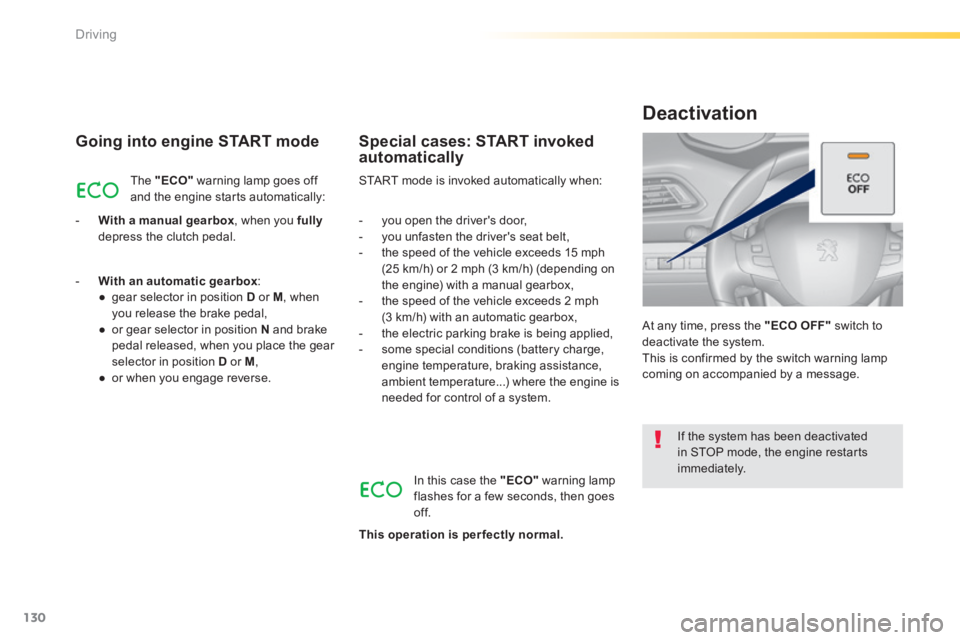
Going into engine START mode
The "ECO" warning lamp goes off and the engine starts automatically:
- With a manual gearbox , when you fullydepress the clutch pedal.
START mode is invoked automatically when:
Special cases: START invoked automatically
- you open the driver's door, - you unfasten the driver's seat belt, - the speed of the vehicle exceeds 15 mph (25 km/h) or 2 mph (3 km/h) (depending on the engine) with a manual gearbox, - the speed of the vehicle exceeds 2 mph (3 km/h) with an automatic gearbox, - the electric parking brake is being applied, - some special conditions (battery charge, engine temperature, braking assistance, ambient temperature...) where the engine is needed for control of a system.
If the system has been deactivated in STOP mode, the engine restarts immediately.
At any time, press the "ECO OFF" switch to deactivate the system. This is confirmed by the switch warning lamp coming on accompanied by a message.
Deactivation
In this case the "ECO" warning lamp flashes for a few seconds, then goes of f.
This operation is perfectly normal.
- With an automatic gearbox : ● gear selector in position D or M , when you release the brake pedal, ● or gear selector in position N and brake pedal released, when you place the gear selector in position D or M , ● or when you engage reverse.
Page 138 of 400
136
Driving
308_EN_CHAP04_CONDUITE_ED02-2013
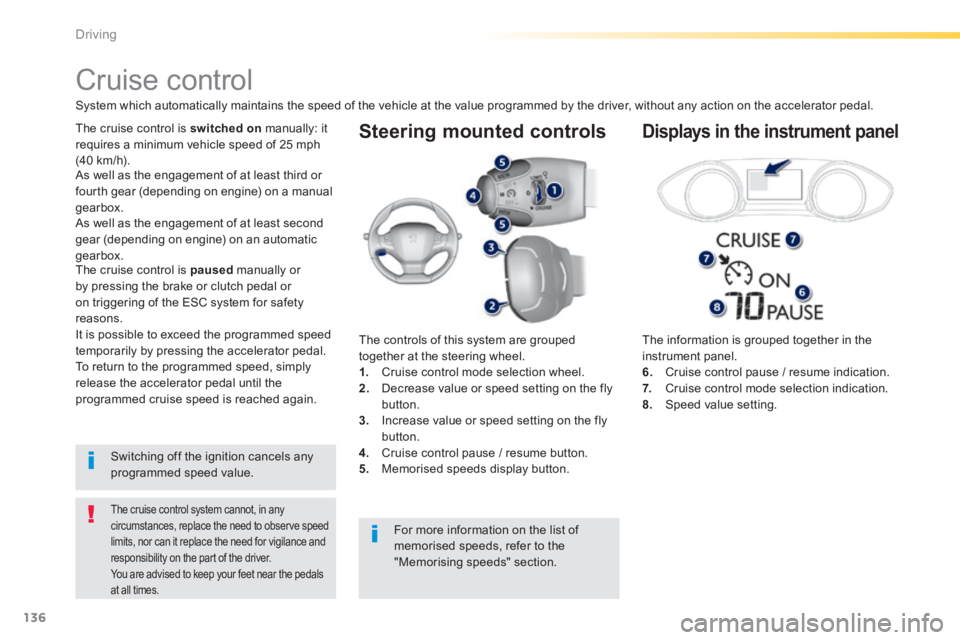
Steering mounted controls
The information is grouped together in the instrument panel. 6. Cruise control pause / resume indication. 7. Cruise control mode selection indication. 8. Speed value setting.
Cruise control
System which automatically maintains the speed of the vehicle at the value programmed by the driver, without any action on the accelerator pedal.
The cruise control system cannot, in any circumstances, replace the need to observe speed limits, nor can it replace the need for vigilance and responsibility on the part of the driver. You are advised to keep your feet near the pedals
at all times.
The cruise control is switched on manually: it requires a minimum vehicle speed of 25 mph (40 km/h).
The controls of this system are grouped together at the steering wheel. 1. Cruise control mode selection wheel. 2. Decrease value or speed setting on the fly button. 3. Increase value or speed setting on the fly
button. 4. Cruise control pause / resume button. 5. Memorised speeds display button.
Displays in the instrument panel
Switching off the ignition cancels any programmed speed value.
The cruise control is paused manually or by pressing the brake or clutch pedal or on triggering of the ESC system for safety reasons. It is possible to exceed the programmed speed temporarily by pressing the accelerator pedal. To return to the programmed speed, simply release the accelerator pedal until the programmed cruise speed is reached again.
As well as the engagement of at least third or fourth gear (depending on engine) on a manual gearbox.
For more information on the list of
memorised speeds, refer to the "Memorising speeds" section.
As well as the engagement of at least second
gear (depending on engine) on an automatic gearbox.
Page 139 of 400
137
4
Driving
308_EN_CHAP04_CONDUITE_ED02-2013
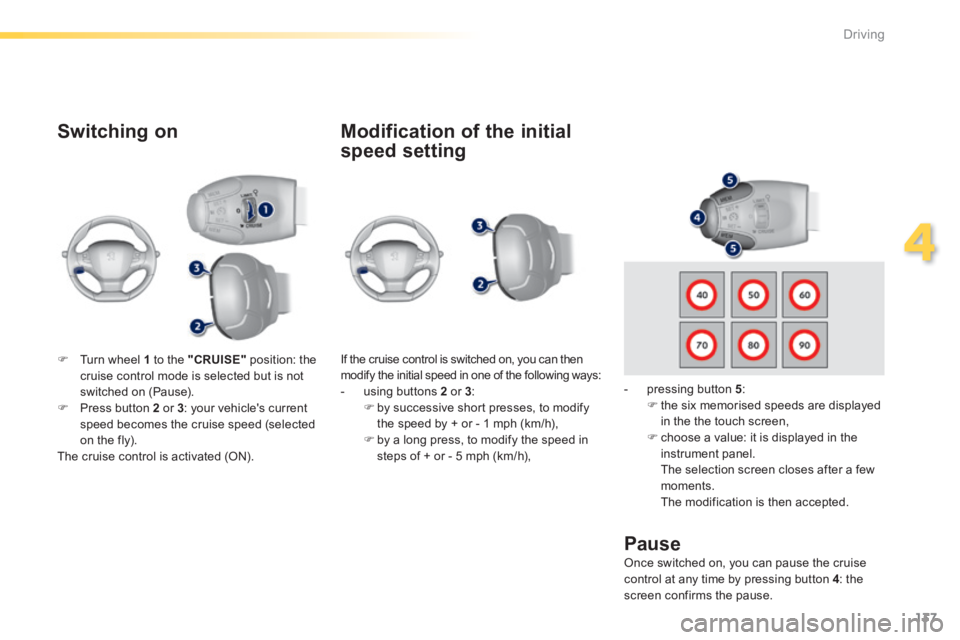
Switching on
If the cruise control is switched on, you can then modify the initial speed in one of the following ways: - using buttons 2 or 3 : by successive short presses, to modify the speed by + or - 1 mph (km/h), by a long press, to modify the speed in steps of + or - 5 mph (km/h),
Pause
Turn wheel 1 to the "CRUISE" position: the cruise control mode is selected but is not switched on (Pause). Press button 2 or 3 : your vehicle's current speed becomes the cruise speed (selected on the fly). The cruise control is activated (ON).
Modification of the initial
speed setting
- pressing button 5 : the six memorised speeds are displayed in the the touch screen,
choose a value: it is displayed in the instrument panel. The selection screen closes after a few moments. The modification is then accepted.
Once switched on, you can pause the cruise control at any time by pressing button 4 : the screen confirms the pause.
Page 141 of 400
139
4
Driving
308_EN_CHAP04_CONDUITE_ED02-2013
Active cruise control
This systems allows the vehicle's speed to be maintained at a value set by the driver. In addition it allows (when circumstances permit) an inter-vehicle time that you have selected (around 2 seconds by default and at each activation of the system) to be maintained.
Principles of operation
Using a radar with a range of about 100 metres, located at the front of the vehicle, this system detects a vehicle running in front of your vehicle. It automatically adapts the speed of your
vehicle to that of the vehicle in front. If the vehicle in front is running more slowly, the system progressively reduces the speed of your vehicle using just engine braking (as if the driver had pressed the " - " button). If your vehicle is too close to, or approaching too quickly the vehicle in front, the cruise control is automatically deactivated. The driver is then alerted by an audible signal, accompanied by a message. If the vehicle in front accelerates or changes lane, the active cruise control progressively accelerates your vehicle to return to the programmed speed. If the driver operates a direction indicator to overtake a slower vehicle, the active cruise control allows your vehicle to temporarily approach the vehicle in front to assist the overtaking manoeuvre, though never exceeding
the programmed speed.
The active cruise control operates by day and at night, in fog or moderate rainfall.
The system does not act on the braking system, but works only with engine braking. The regulation range is limited: there will no longer be any adjustment of speed if the difference between the programmed speed setting and the speed of the vehicle in front becomes too high.
The activation of this system deactivates the display of inter-vehicle time.
If the difference between the programmed speed setting and the speed of the vehicle in front is too great, the speed cannot be adjusted:
the cruise control is automatically deactivated.
Page 142 of 400
140
Driving
308_EN_CHAP04_CONDUITE_ED02-2013
The active cruise control is switched on manually, it requires that the speed of the vehicle be between 25 mph (40 km/h) and 90 mph (150 km/h).
General points
The active cruise control can be pausedmanually with the control, or automatically: - by pressing the brake or clutch pedal, - in the event of operation of the ESP, for safety reasons, - in the event of an action of the electric parking brake control, - when an inter-vehicle time threshold is reached (calculated according to the relative speeds of your vehicle and the vehicle in front and the inter-vehicle time setting chosen), - when the distance between your vehicle and the one in front becomes to small, - when the speed of the vehicle in front is to low, - when the speed of your vehicle becomes too low.
The active cruise control cannot in any circumstances replace the observation of speed limits, nor the the vigilance and responsibility of the driver. It is recommended that you always keep your feet close to the pedals.
Switching off the ignition cancels any programmed value, and the inter-vehicle time is reset to 2 seconds.
As well as the engagement of at least third or fourth gear (depending on engine) on a manual gearbox.
As well as the engagement of at least second gear (depending on engine) on an automatic gearbox.
If the cruise speed setting is above 90 mph (150 km/h), the active cruise control switches to normal cruise control mode (without automatic adjustment of the safety inter-vehicle distance).
Page 143 of 400
141
4
Driving
308_EN_CHAP04_CONDUITE_ED02-2013
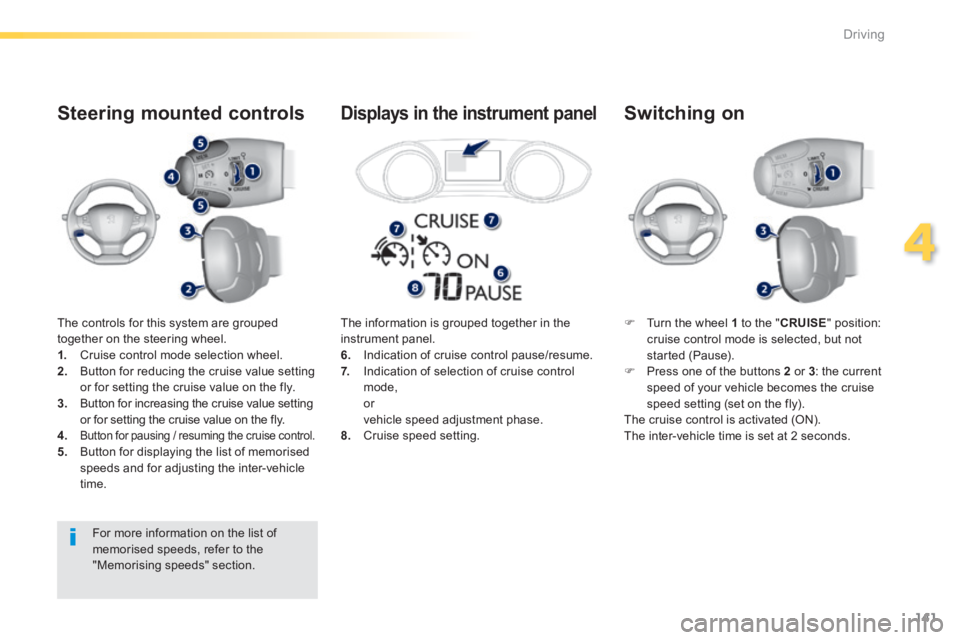
The controls for this system are grouped together on the steering wheel. 1. Cruise control mode selection wheel. 2. Button for reducing the cruise value setting or for setting the cruise value on the fly. 3. Button for increasing the cruise value setting or for setting the cruise value on the fly.
4.Button for pausing / resuming the cruise control. 5. Button for displaying the list of memorised speeds and for adjusting the inter-vehicle time.
Steering mounted controls
Turn the wheel 1 to the " CRUISE " position: cruise control mode is selected, but not started (Pause). Press one of the buttons 2 or 3 : the current speed of your vehicle becomes the cruise speed setting (set on the fly). The cruise control is activated (ON). The inter-vehicle time is set at 2 seconds.
Switching on
The information is grouped together in the instrument panel. 6. Indication of cruise control pause/resume. 7. Indication of selection of cruise control mode, or vehicle speed adjustment phase. 8. Cruise speed setting.
Displays in the instrument panel
For more information on the list of memorised speeds, refer to the "Memorising speeds" section.
Page 144 of 400
142
Driving
308_EN_CHAP04_CONDUITE_ED02-2013
Modification of the cruise
control speed and/or the
inter-vehicle time
Modification of the cruise
control speed only
Buttons 2 (SET+) and 3 (SET-)
If the cruise control is on, you can modify the speed: by successive short presses, to modify by steps of + or - 1 mph (km/h), by a maintained press, to modify in steps of + or - 5 mph (km/h).
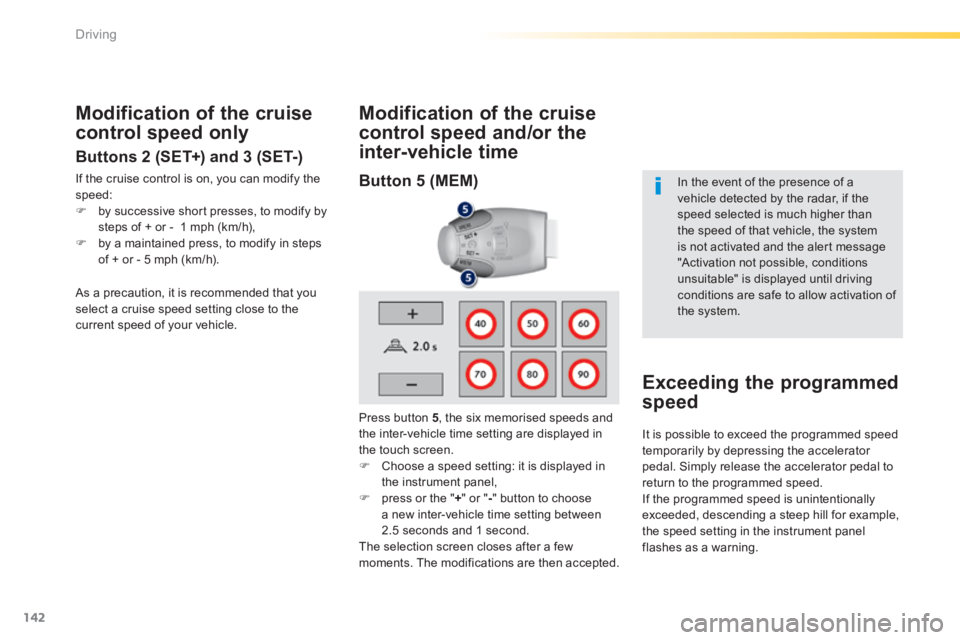
Press button 5 , the six memorised speeds and the inter-vehicle time setting are displayed in the touch screen. Choose a speed setting: it is displayed in the instrument panel, press or the " + " or " - " button to choose a new inter-vehicle time setting between 2.5 seconds and 1 second. The selection screen closes after a few moments. The modifications are then accepted.
In the event of the presence of a vehicle detected by the radar, if the speed selected is much higher than
the speed of that vehicle, the system is not activated and the alert message "Activation not possible, conditions unsuitable" is displayed until driving conditions are safe to allow activation of the system.
Exceeding the programmed
speed
As a precaution, it is recommended that you select a cruise speed setting close to the current speed of your vehicle.
It is possible to exceed the programmed speed temporarily by depressing the accelerator pedal. Simply release the accelerator pedal to return to the programmed speed. If the programmed speed is unintentionally exceeded, descending a steep hill for example, the speed setting in the instrument panel flashes as a warning.
Button 5 (MEM)
Page 146 of 400
144
Driving
308_EN_CHAP04_CONDUITE_ED02-2013
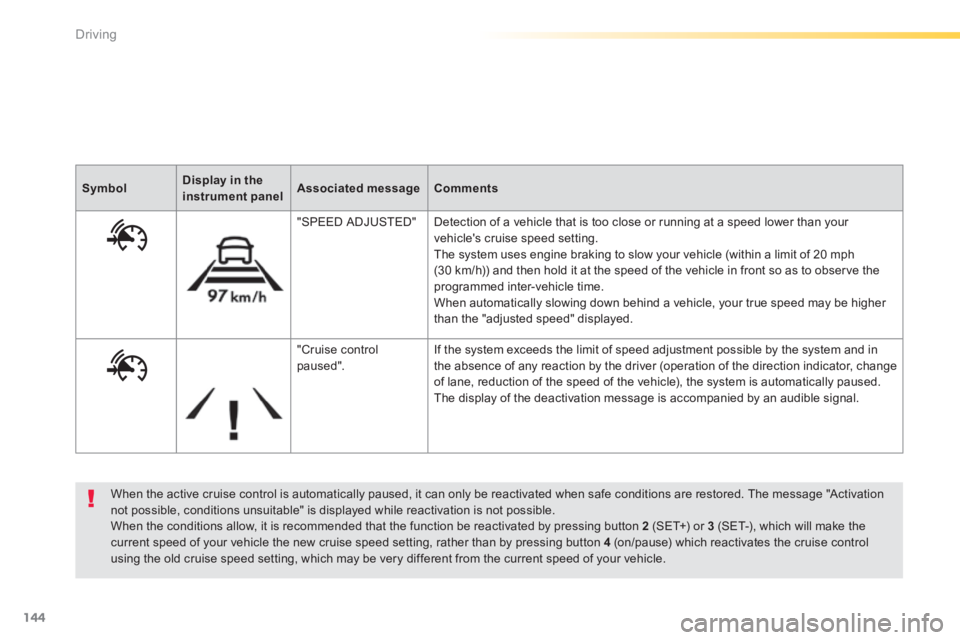
When the active cruise control is automatically paused, it can only be reactivated when safe conditions are restored. The message "Activation not possible, conditions unsuitable" is displayed while reactivation is not possible. When the conditions allow, it is recommended that the function be reactivated by pressing button 2 (SET+) or 3 (SET-), which will make the current speed of your vehicle the new cruise speed setting, rather than by pressing button 4 (on/pause) which reactivates the cruise control using the old cruise speed setting, which may be very different from the current speed of your vehicle.
SymbolDisplay in the instrument panelAssociated messageComments
"SPEED ADJUSTED" Detection of a vehicle that is too close or running at a speed lower than your vehicle's cruise speed setting. The system uses engine braking to slow your vehicle (within a limit of 20 mph (30 km/h)) and then hold it at the speed of the vehicle in front so as to observe the programmed inter-vehicle time. When automatically slowing down behind a vehicle, your true speed may be higher than the "adjusted speed" displayed.
"Cruise control paused". If the system exceeds the limit of speed adjustment possible by the system and in the absence of any reaction by the driver (operation of the direction indicator, change of lane, reduction of the speed of the vehicle), the system is automatically paused. The display of the deactivation message is accompanied by an audible signal.
Page 149 of 400
147
4
Driving
308_EN_CHAP04_CONDUITE_ED02-2013
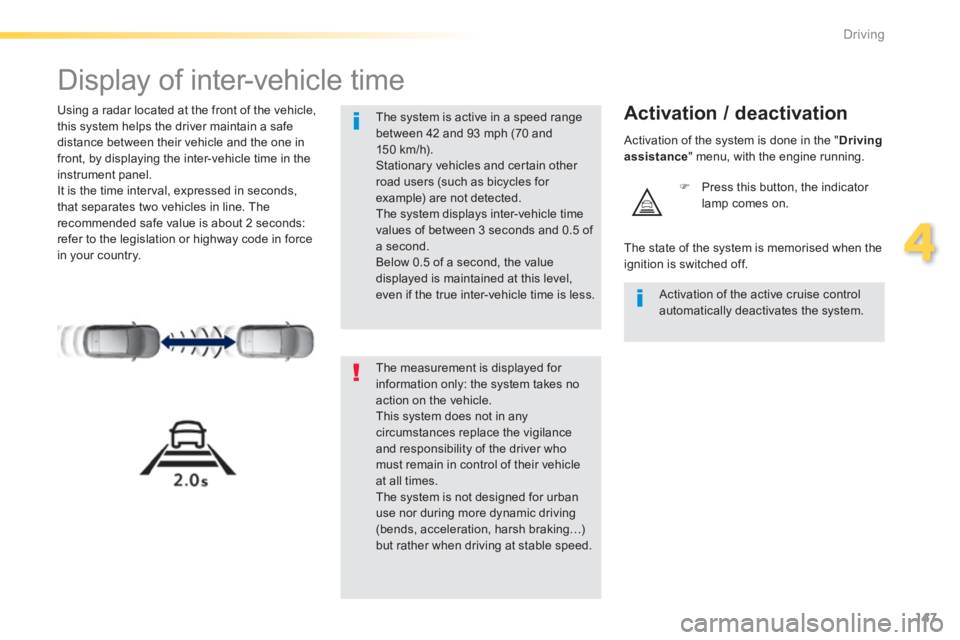
Display of inter-vehicle time
Using a radar located at the front of the vehicle, this system helps the driver maintain a safe distance between their vehicle and the one in front, by displaying the inter-vehicle time in the instrument panel. It is the time interval, expressed in seconds, that separates two vehicles in line. The recommended safe value is about 2 seconds: refer to the legislation or highway code in force in your country.
Activation / deactivation
Press this button, the indicator lamp comes on.
The measurement is displayed for information only: the system takes no action on the vehicle. This system does not in any circumstances replace the vigilance and responsibility of the driver who must remain in control of their vehicle at all times. The system is not designed for urban use nor during more dynamic driving (bends, acceleration, harsh braking…)
but rather when driving at stable speed.
The system is active in a speed range between 42 and 93 mph (70 and 150 km/h). Stationary vehicles and certain other road users (such as bicycles for example) are not detected. The system displays inter-vehicle time values of between 3 seconds and 0.5 of a second. Below 0.5 of a second, the value displayed is maintained at this level, even if the true inter-vehicle time is less. Activation of the active cruise control automatically deactivates the system.
The state of the system is memorised when the ignition is switched off.
Activation of the system is done in the " Driving assistance " menu, with the engine running.