display Peugeot 406 Break 2003 Owner's Guide
[x] Cancel search | Manufacturer: PEUGEOT, Model Year: 2003, Model line: 406 Break, Model: Peugeot 406 Break 2003Pages: 177, PDF Size: 2.2 MB
Page 63 of 177

17-02-2003
Manual station searchPress the "MAN"button.
Briefly press button Kor Lto increase or decrease the frequency displayed.
By continuing to press the button in the direction selected, you will obtain continuous scrolling of the frequency. The scrolling stops at the first station found as soon as the button is released.Pressing the "MAN"button again returns you to automatic station search.
Manual storing of stations in the memory Select the station required. Press one of the buttons 1to
6for more than two seconds.
The sound stops then becomes audible again, confirming that the station has been stored in the memory. Automatic storing of FM stations in the memory (autostore) Press button Bfor more than two seconds, to automatically store the 6 stations with the strongest signal in
FM. These stations are stored in the FM3 waveband. Ð If it is not possible to find 6 stations, the remaining memories are empty.
Recalling stations stored in the memory For each waveband, briefly press buttons 1to 6to recall the corresponding station.
YOUR 406 IN DETAIL 85
Page 64 of 177

17-02-2003
RDS Using the RDS (Radio Data System) function on FMRadio Data System allows you to continue listening to the same station, whatever frequency it is using for the region you are going through. Briefly press the "RDS"button to switch the function on or off.
The display will show: Ð "RDS" if the function is selected.
Ð "(RDS)" if the function is selected but not available.
RDS station following
The display indicates the name of the station selected. The radio is continually searching for the station which has the best r ecep-
tion and which is transmitting the same programme.
Traffic information programme
Press the "TA"button to switch the function on or off.
The display will show: Ð "TA" if the function is selected,
Ð "(TA)" if the function is selected but not available.
Any traffic information flash will be given priority, whatever source you are listening to (radio, CD or CD changer). If you wish to interrupt a message, press the "TA"button; this switches the function off.
Note: the volume of traffic information announcements is independent of the volume of normal radio listening. You can adjust it using the volume button. The setting will be stored and will be used when the next messages are broad-cast. Regional following mode When they are part of a network, certain stations broadcast regional programmes in the various areas they serve. With regional following mode you can keep listening to the same programme.
Press the "RDS"button for more than two seconds to switch the function on or off.
YOUR 406 IN DETAIL
86
Page 65 of 177

17-02-2003
PTY functionThis allows you to listen to stations broadcasting a specific type of programme (news, culture, sport, rock etc.). With FM selected, press the "TA"button for two seconds to switch this function on or off.
To search for a PTY programme: Ð select the PTYfunction,
Ð briefly press button Kor Lto scroll down the list of the various types of pro-
grammes offered.
Ð when the programme of your choice is displayed, keep button Kor Lpressed for two seconds to carry out an automatic
search (after an automatic search the PTYfunction is switched off).
In PTY mode the different types of programmes can be stored in the
memory. To do this, press the preselection buttons 1to 6for more
than two seconds. To recall the type of programme stored in the
memory, briefly press the corresponding button.
EON system
This connects stations which are part of the same network. It enables the broadcast of traffic information by a station, which is part of the same network as the station to which you are listening.
This service is available when you have selected the TA traffic information programme or the PTYfunction.
YOUR 406 IN DETAIL 87
Page 71 of 177

17-02-2003
THE SATELLITE NAVIGATION SYSTEM IntroductionThe satellite navigation system guides you to the destination of your choiceby means of vocal and visual instruc-tions. The heart of the system lies in the use of a map database and GPS (Global
Positioning System). This enablesyour position to be located by meansof several satellites. The satellite navigation system con- sists of the following components:
Ð the remote control,
Ð the display,
Ð the control unit,
Ð the last voice message recall con-trol,
Ð the CD ROM.
Some functions or services
described in this guide may vary depending on the CD ROM version or the country.THE REMOTE CONTROL
There is a storage compartment for the remote control in front of the ashtray. Pointing the remote control at the screen enables the information contained in the various menus to be selected.
Direction arrows: These enable you to move around the screen and thus select a function.
On the welcome screen only, the Up and Down buttons enable the brightness of the screen to beadjusted.
menu : this button allows access to the main menu. It canbe used at any time.
esc : escape button "Short press": cancels the current operation and returns to the previous screen. "Press for more than 2 seconds": returns to the welcome screen. This button can be used in any menu. It is inactive during guidance.
mod : mode button "Short press": changes between date, navigation, radio and permanent locating.
val : Confirmation button Confirms the function selected.
YOUR 406 IN DETAIL 93
Page 72 of 177
17-02-2003
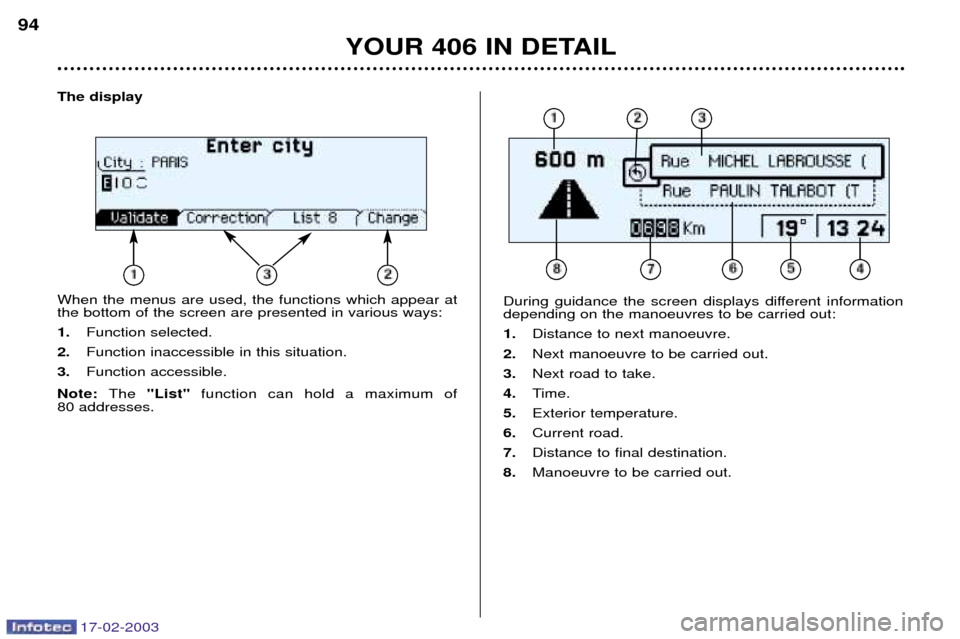
The display When the menus are used, the functions which appear at the bottom of the screen are presented in various ways: 1.Function selected.
2. Function inaccessible in this situation.
3. Function accessible.
Note: The "List" function can hold a maximum of
80 addresses.
During guidance the screen displays different information depending on the manoeuvres to be carried out: 1. Distance to next manoeuvre.
2. Next manoeuvre to be carried out.
3. Next road to take.
4. Time.
5. Exterior temperature.
6. Current road.
7. Distance to final destination.
8. Manoeuvre to be carried out.
YOUR 406 IN DETAIL
94
Page 75 of 177
17-02-2003
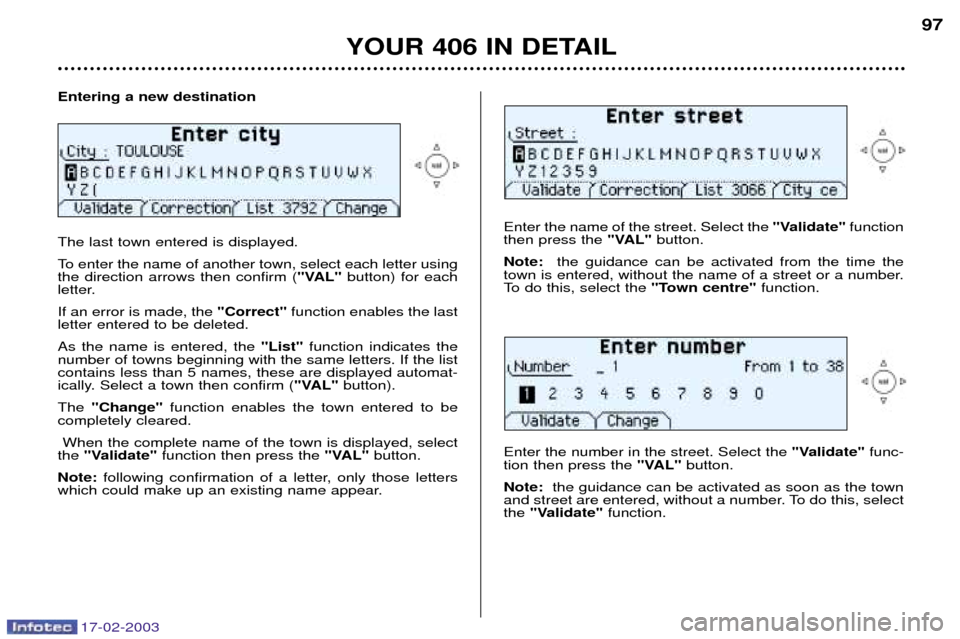
Entering a new destination The last town entered is displayed.
To enter the name of another town, select each letter using the direction arrows then confirm ("VAL"button) for each
letter. If an error is made, the "Correct"function enables the last
letter entered to be deleted.As the name is entered, the "List"function indicates the
number of towns beginning with the same letters. If the list contains less than 5 names, these are displayed automat-
ically. Select a town then confirm ( "VAL"button).
The "Change" function enables the town entered to be
completely cleared.
When the complete name of the town is displayed, select
the "Validate" function then press the "VAL"button.
Note: following confirmation of a letter, only those letters
which could make up an existing name appear.
Enter the name of the street. Select the "Validate"function
then press the "VAL"button.
Note: the guidance can be activated from the time the
town is entered, without the name of a street or a number.
To do this, select the "Town centre"function.
YOUR 406 IN DETAIL 97
Enter the number in the street. Select the "Validate"func-
tion then press the "VAL"button.
Note: the guidance can be activated as soon as the town
and street are entered, without a number. To do this, select the "Validate" function.
Page 76 of 177
17-02-2003
YOUR 406 IN DETAIL
98
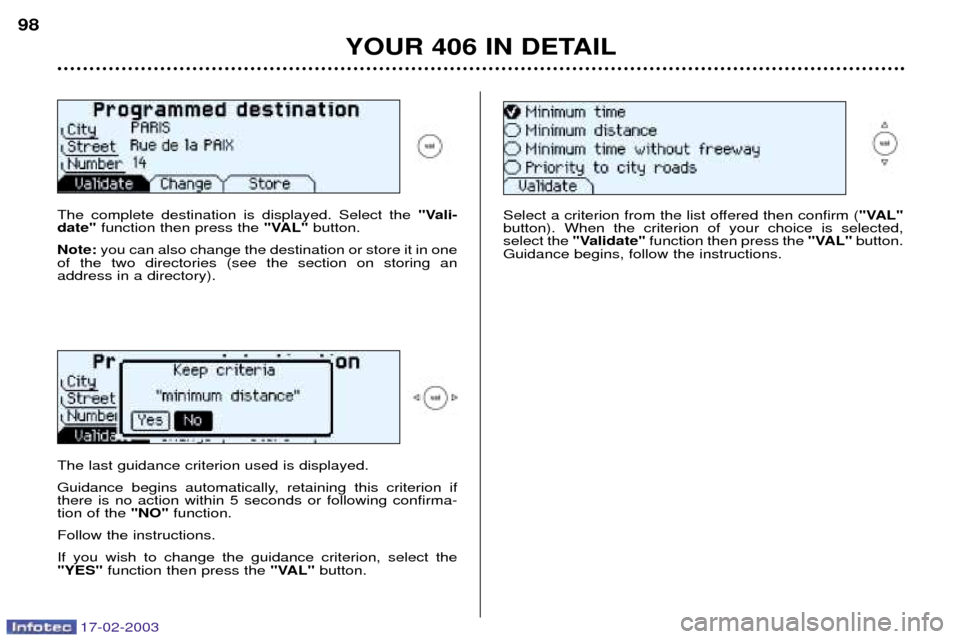
The complete destination is displayed. Select the "Vali-
date" function then press the "VAL"button.
Note: you can also change the destination or store it in one
of the two directories (see the section on storing an address in a directory). The last guidance criterion used is displayed.
Guidance begins automatically, retaining this criterion if there is no action within 5 seconds or following confirma-tion of the "NO"function.
Follow the instructions. If you wish to change the guidance criterion, select the "YES" function then press the "VAL"button. Select a criterion from the list offered then confirm (
"VAL"
button). When the criterion of your choice is selected,select the "Validate" function then press the "VAL"button.
Guidance begins, follow the instructions.
Page 77 of 177
17-02-2003
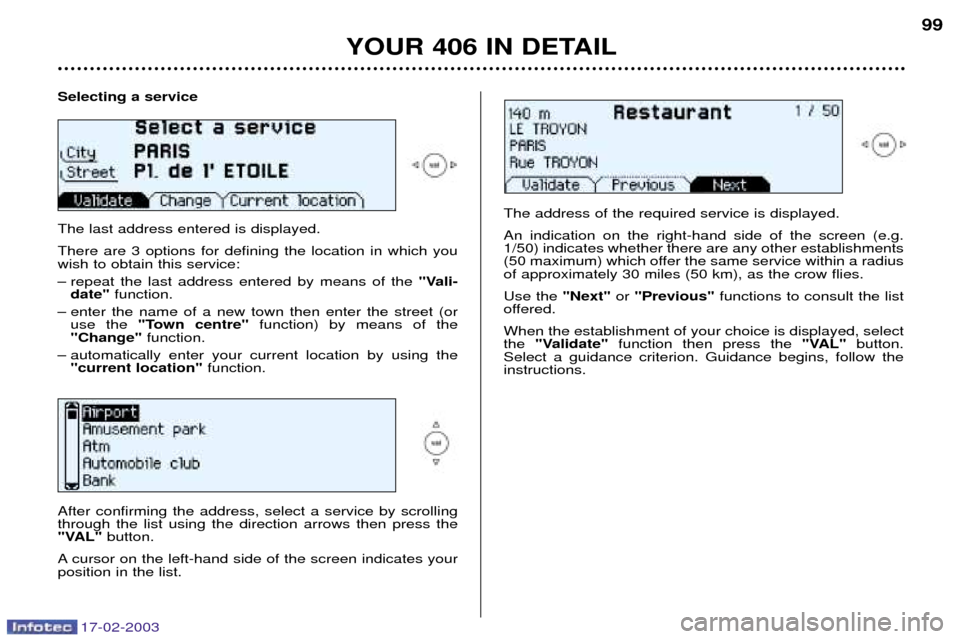
Selecting a service The last address entered is displayed. There are 3 options for defining the location in which you wish to obtain this service:
Ð repeat the last address entered by means of the "Vali-
date" function.
Ð enter the name of a new town then enter the street (or use the "Town centre" function) by means of the
"Change" function.
Ð automatically enter your current location by using the "current location" function.
YOUR 406 IN DETAIL 99
After confirming the address, select a service by scrolling through the list using the direction arrows then press the
"VAL" button.
A cursor on the left-hand side of the screen indicates yourposition in the list. The address of the required service is displayed. An indication on the right-hand side of the screen (e.g. 1/50) indicates whether there are any other establishments
(50 maximum) which offer the same service within a radiusof approximately 30 miles (50 km), as the crow flies. Use the
"Next"or "Previous" functions to consult the list
offered.When the establishment of your choice is displayed, select the "Validate" function then press the "VAL"button.
Select a guidance criterion. Guidance begins, follow theinstructions.
Page 78 of 177

17-02-2003
Selecting a stored destination Using the direction arrows, select the directory in which the address you are looking for is stored, then press the "VAL"
button. The stored addresses are displayed.
A cursor on the left-hand side of the screen indicates your position in the list. Select a name by scrolling through thelist using the direction arrows, then press the "Val"button.
The complete address is displayed. Select the "Validate"
function then press the "Val"button. Select a guidance cri-
terion. Guidance begins, follow the instructions.
YOUR 406 IN DETAIL
100
Storing an address in a directory When a new address is entered, you can store it by selecting the "Store" function.
Enter the name for the address. If the name already exists
for a different address, you can replace the old addresswith a new one. Select the Personal directory or the Professional directory then press the "VAL"button. The address is then stored in
the directory of your choice (memory capacity:
100 addresses).
Page 79 of 177
17-02-2003
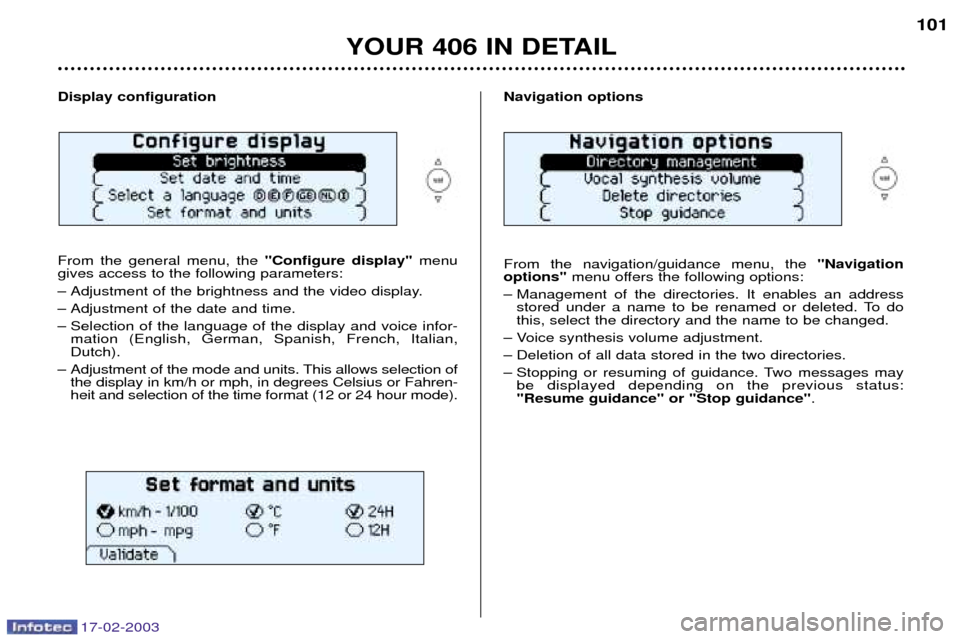
Navigation options From the navigation/guidance menu, the "Navigation
options" menu offers the following options:
Ð Management of the directories. It enables an address stored under a name to be renamed or deleted. To do this, select the directory and the name to be changed.
Ð Voice synthesis volume adjustment.
Ð Deletion of all data stored in the two directories.
Ð Stopping or resuming of guidance. Two messages may be displayed depending on the previous status: "Resume guidance" or "Stop guidance" .
YOUR 406 IN DETAIL 101
Display configuration From the general menu, the "Configure display"menu
gives access to the following parameters:
Ð Adjustment of the brightness and the video display.
Ð Adjustment of the date and time.
Ð Selection of the language of the display and voice infor- mation (English, German, Spanish, French, Italian, Dutch).
Ð Adjustment of the mode and units. This allows selection of the display in km/h or mph, in degrees Celsius or Fahren-
heit and selection of the time format (12 or 24 hour mode).