light PEUGEOT 5008 2014 Owner's Manual
[x] Cancel search | Manufacturer: PEUGEOT, Model Year: 2014, Model line: 5008, Model: PEUGEOT 5008 2014Pages: 404, PDF Size: 23.34 MB
Page 67 of 404
3
Comfort65
Switching the system off/on
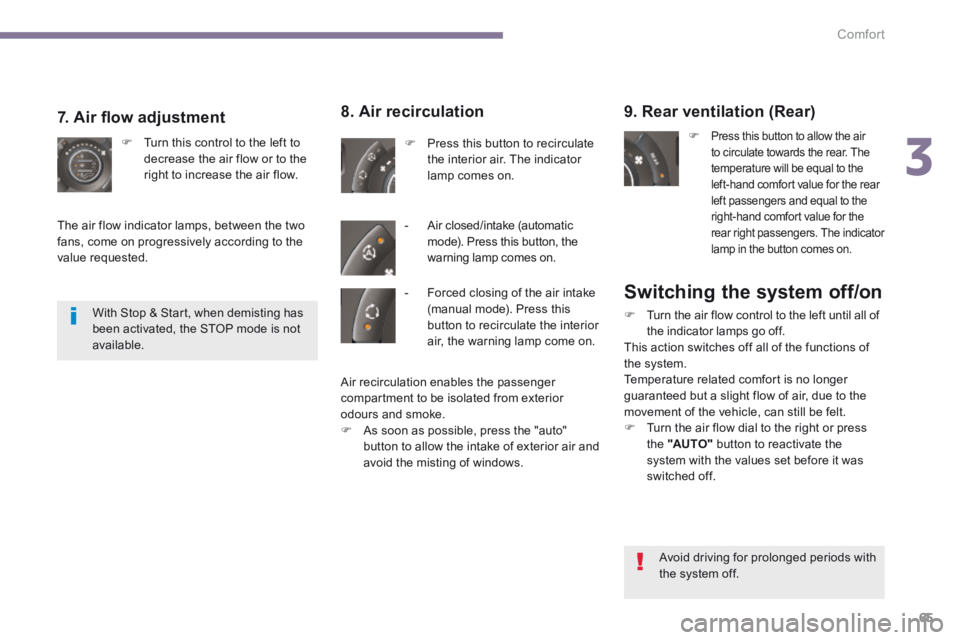
Turn the air flow control to the left until all of the indicator lamps go off. This action switches off all of the functions of the system. Temperature related comfort is no longer guaranteed but a slight flow of air, due to the movement of the vehicle, can still be felt. Turn the air flow dial to the right or press the "AUTO" button to reactivate the system with the values set before it was switched off.
9. Rear ventilation (Rear)
Press this button to allow the air to circulate towards the rear. The temperature will be equal to the left-hand comfort value for the rear left passengers and equal to the right-hand comfort value for the rear right passengers. The indicator lamp in the button comes on.
8. Air recirculation
Press this button to recirculate the interior air. The indicator lamp comes on.
- Air closed/intake (automatic mode). Press this button, the warning lamp comes on.
7. Air fl ow adjustment
Turn this control to the left to decrease the air flow or to the right to increase the air flow.
The air flow indicator lamps, between the two fans, come on progressively according to the value requested.
With Stop & Start, when demisting has been activated, the STOP mode is not available.
Avoid driving for prolonged periods with the system off.
- Forced closing of the air intake (manual mode). Press this button to recirculate the interior air, the warning lamp come on.
Air recirculation enables the passenger compartment to be isolated from exterior odours and smoke.
As soon as possible, press the "auto" button to allow the intake of exterior air and avoid the misting of windows.
Page 74 of 404
Comfort
72
2 nd row seats
Forwards-backwards adjustment
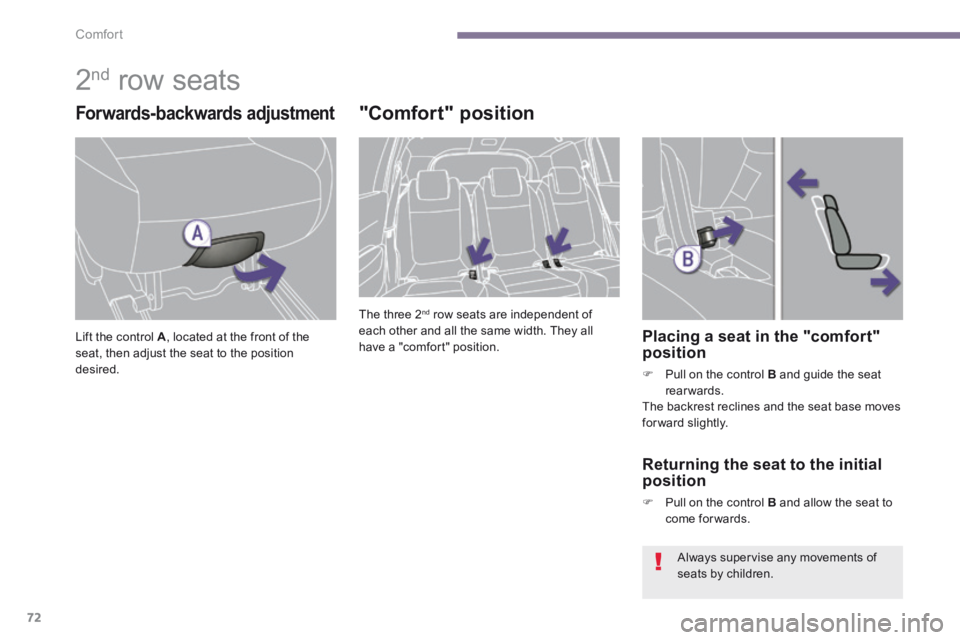
Lift the control A Lift the control A Lift the control , located at the front of the seat, then adjust the seat to the position desired.
"Comfort" position
The three 2 nd row seats are independent of each other and all the same width. They all have a "comfort" position. Placing a seat in the "comfort" position
Pull on the control B and guide the seat rearwards. The backrest reclines and the seat base moves for ward slightly.
Returning the seat to the initial position
Pull on the control B and allow the seat to come for wards.
Always supervise any movements of seats by children.
Page 75 of 404
3
Comfort73
Flat floor
Each seat can be folded onto the floor to enable you to modify your vehicle’s interior space.
Folding the seat from the 2 nd row
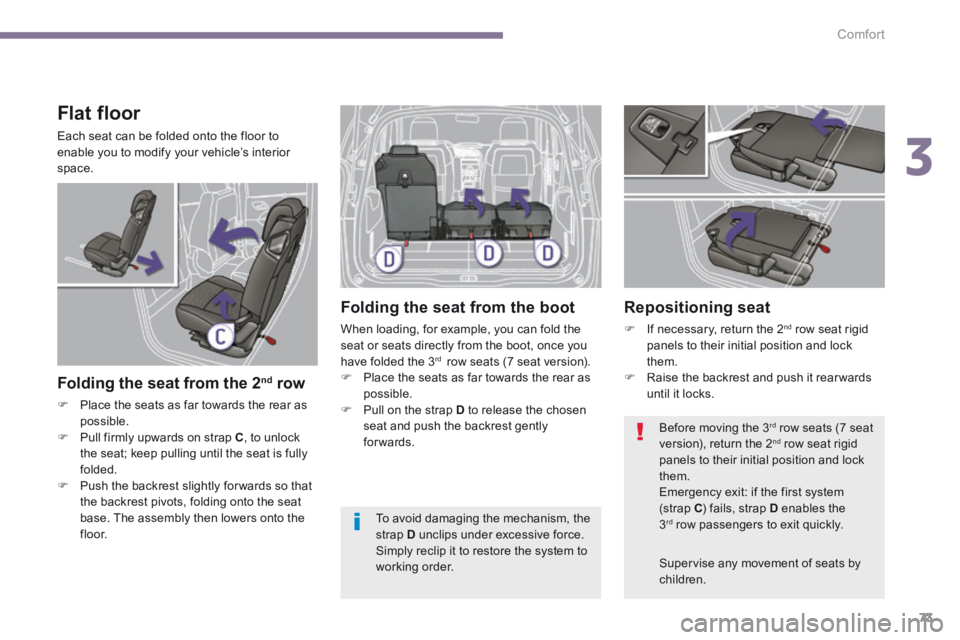
Place the seats as far towards the rear as possible. Pull firmly upwards on strap C , to unlock the seat; keep pulling until the seat is fully folded. Push the backrest slightly for wards so that the backrest pivots, folding onto the seat base. The assembly then lowers onto the f l o o r.
Folding the seat from the boot
When loading, for example, you can fold the seat or seats directly from the boot, once you have folded the 3 rd row seats (7 seat version). Place the seats as far towards the rear as possible. Pull on the strap D to release the chosen seat and push the backrest gently forwards.
Repositioning seat
If necessary, return the 2 nd row seat rigid panels to their initial position and lock them. Raise the backrest and push it rear wards until it locks.
Supervise any movement of seats by children.
Before moving the 3 rd row seats (7 seat version), return the 2 nd row seat rigid panels to their initial position and lock them. Emergency exit: if the first system (strap C ) fails, strap D enables the 3 rd row passengers to exit quickly. To avoid damaging the mechanism, the strap D unclips under excessive force. Simply reclip it to restore the system to working order.
Page 81 of 404
3
Comfort79
Adjustment
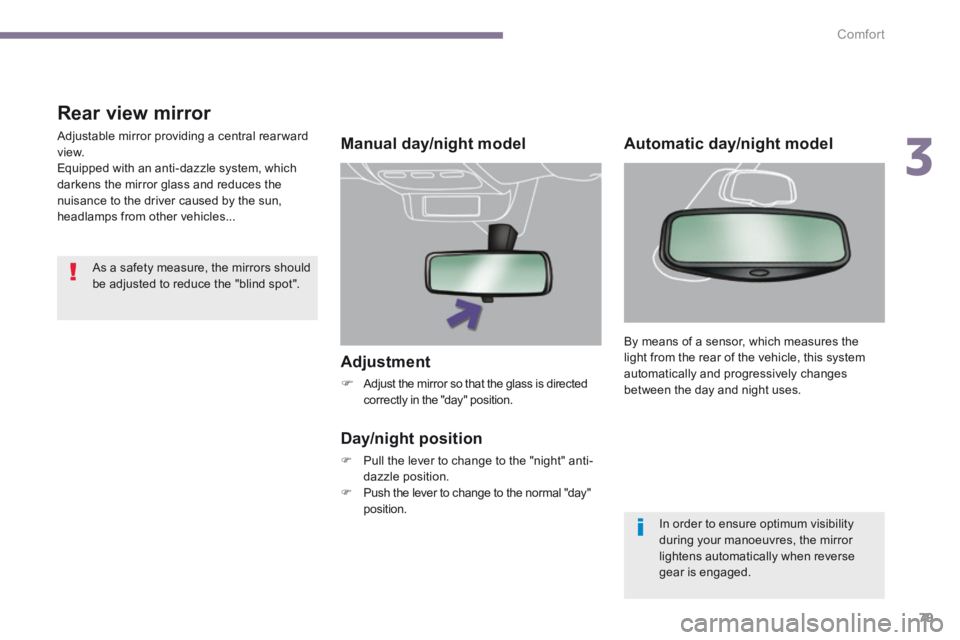
Adjust the mirror so that the glass is directed correctly in the "day" position.
Manual day/night model
Day/night position
Pull the lever to change to the "night" anti-dazzle position. Push the lever to change to the normal "day" position.
Rear view mirror
Adjustable mirror providing a central rearward view. Equipped with an anti-dazzle system, which darkens the mirror glass and reduces the nuisance to the driver caused by the sun, headlamps from other vehicles...
Automatic day/night model
By means of a sensor, which measures the light from the rear of the vehicle, this system automatically and progressively changes between the day and night uses.
In order to ensure optimum visibility during your manoeuvres, the mirror lightens automatically when reverse gear is engaged.
As a safety measure, the mirrors should be adjusted to reduce the "blind spot".
Page 83 of 404
4
Access81
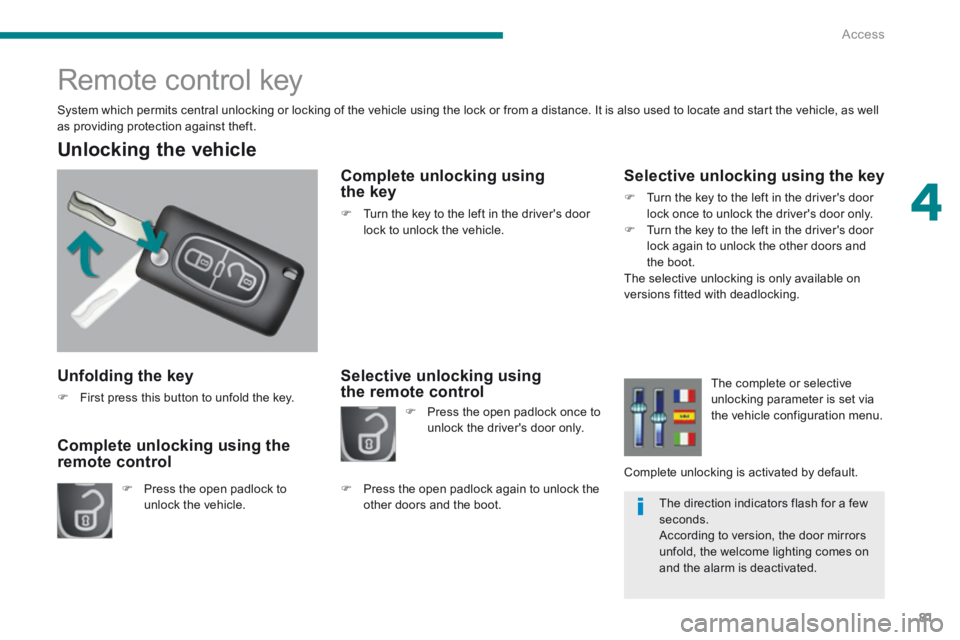
Unfolding the key
First press this button to unfold the key.
Unlocking the vehicle
Press the open padlock to unlock the vehicle.
Complete unlocking using the remote control
Remote control key
System which permits central unlocking or locking of the vehicle using the lock or from a distance. It is also used to locate and start the vehicle, as well as providing protection against theft.
Complete unlocking using the key
Turn the key to the left in the driver's door lock to unlock the vehicle.
Selective unlocking using the remote control
Selective unlocking using the key
Turn the key to the left in the driver's door lock once to unlock the driver's door only. Turn the key to the left in the driver's door lock again to unlock the other doors and the boot. The selective unlocking is only available on versions fitted with deadlocking.
Press the open padlock once to unlock the driver's door only.
Press the open padlock again to unlock the other doors and the boot.
The complete or selective unlocking parameter is set via the vehicle configuration menu.
Complete unlocking is activated by default.
The direction indicators flash for a few seconds. According to version, the door mirrors unfold, the welcome lighting comes on and the alarm is deactivated.
Page 85 of 404
4
Access83
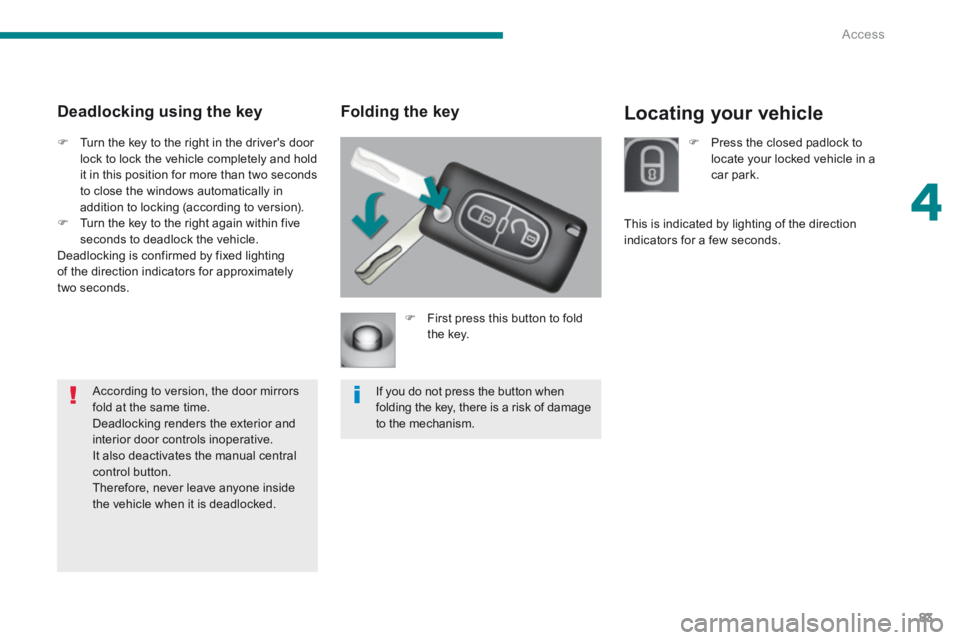
Locating your vehicle Folding the key
First press this button to fold the key.
If you do not press the button when folding the key, there is a risk of damage to the mechanism.
Deadlocking using the key
Turn the key to the right in the driver's door lock to lock the vehicle completely and hold it in this position for more than two seconds to close the windows automatically in addition to locking (according to version). Turn the key to the right again within five seconds to deadlock the vehicle. Deadlocking is confirmed by fixed lighting of the direction indicators for approximately two seconds.
According to version, the door mirrors fold at the same time. Deadlocking renders the exterior and interior door controls inoperative. It also deactivates the manual central control button. Therefore, never leave anyone inside the vehicle when it is deadlocked.
Press the closed padlock to locate your locked vehicle in a car park.
This is indicated by lighting of the direction indicators for a few seconds.
Page 102 of 404
Visibility
100
Lighting controls
Main lighting
The various front and rear lamps of the vehicle are designed to adapt the lighting progressively in relation to the climatic conditions and so improve the driver's visibility: - sidelamps, to be seen, - dipped beam headlamps to see without dazzling other drivers, - main beam headlamps to see clearly when the road is clear, - directional headlamps for improved visibility when cornering.
Additional lighting
Other lamps are installed to fulfil the requirements of particular driving conditions: - a rear foglamp to be seen from a distance, - front foglamps for even better visibility, - daytime running lamps to be seen during the day.
Programming
Various automatic lighting control modes are also available according to the following options: - guide-me-home lighting, - automatic lighting, - directional headlamps.
System for selection and control of the various front and rear lamps providing the vehicle's lighting.
Travelling abroad
If using your vehicle in a country that drives on the other side of the road, the headlamps must be adjusted to avoid dazzling on-coming drivers. Contact an official dealer or a qualified workshop.
Page 103 of 404
5
Visibility101
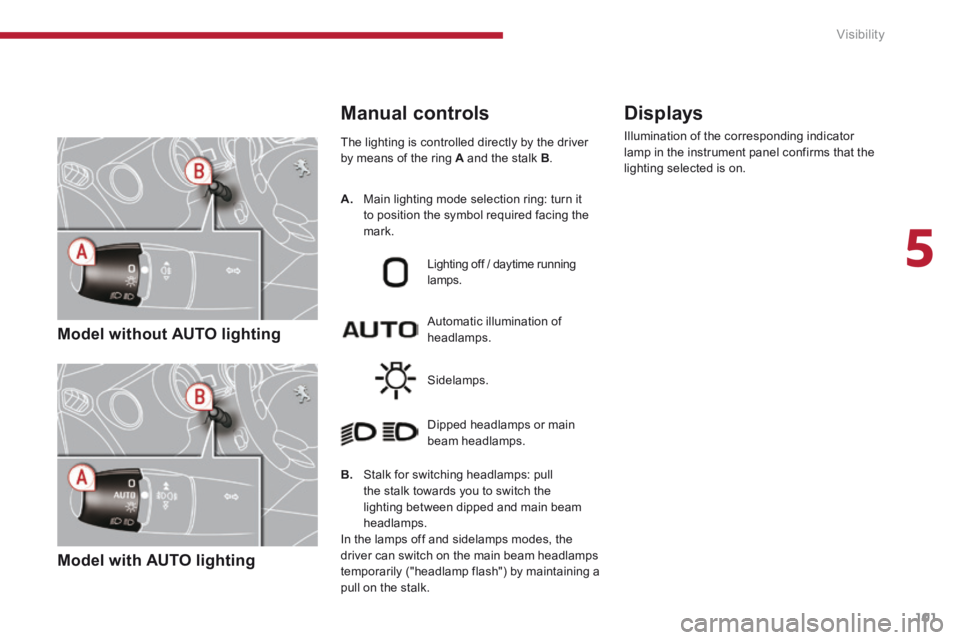
Model without AUTO lighting
Model with AUTO lighting
The lighting is controlled directly by the driver by means of the ring A and the stalk B .
B. Stalk for switching headlamps: pull the stalk towards you to switch the lighting between dipped and main beam headlamps.
In the lamps off and sidelamps modes, the driver can switch on the main beam headlamps temporarily ("headlamp flash") by maintaining a pull on the stalk.
Automatic illumination of headlamps.
Lighting off / daytime running lamps.
Sidelamps.
Dipped headlamps or main beam headlamps.
Displays
Illumination of the corresponding indicator lamp in the instrument panel confirms that the lighting selected is on.
Manual controls
A. Main lighting mode selection ring: turn it to position the symbol required facing the mark.
Page 104 of 404
Visibility
102
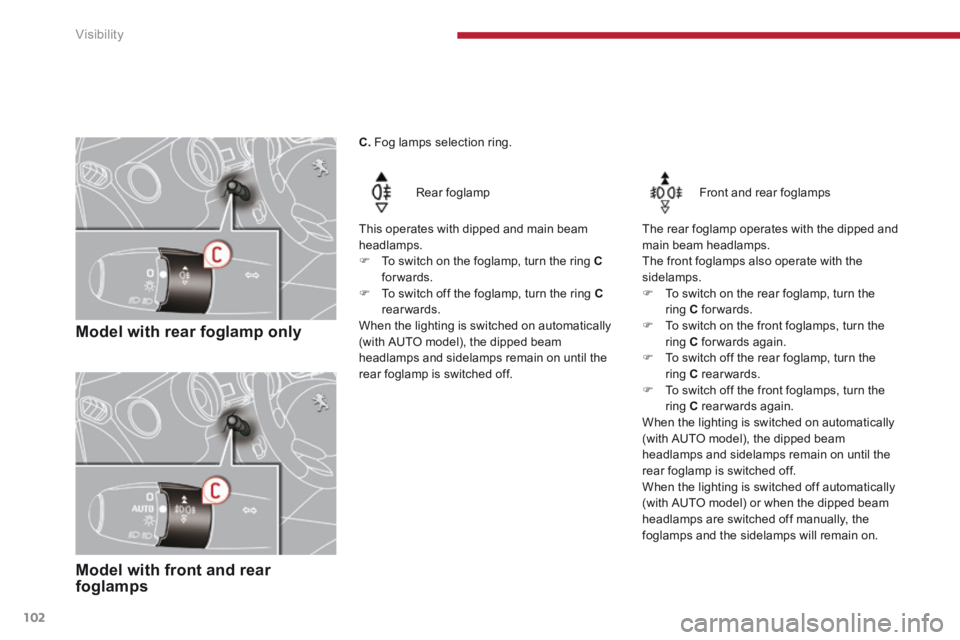
Model with rear foglamp only
Rear foglamp
This operates with dipped and main beam headlamps. To switch on the foglamp, turn the ring Cforwards. To switch off the foglamp, turn the ring Crearwards. When the lighting is switched on automatically (with AUTO model), the dipped beam headlamps and sidelamps remain on until the rear foglamp is switched off.
Model with front and rear foglamps
Front and rear foglamps
The rear foglamp operates with the dipped and main beam headlamps. The front foglamps also operate with the sidelamps. To switch on the rear foglamp, turn the ring C forwards. To switch on the front foglamps, turn the ring C forwards again. To switch off the rear foglamp, turn the ring C rearwards. To switch off the front foglamps, turn the ring C rearwards again. When the lighting is switched on automatically
(with AUTO model), the dipped beam headlamps and sidelamps remain on until the rear foglamp is switched off. When the lighting is switched off automatically (with AUTO model) or when the dipped beam headlamps are switched off manually, the foglamps and the sidelamps will remain on.
C. Fog lamps selection ring.
Page 105 of 404
5
Visibility103
Switching off the lighting when switching off the ignition
When the ignition is switched off, all of the lamps switch off immediately, except for the dipped beam headlamps if automatic guide-me-home lighting is activated.
In good or rainy weather, by both day and night, the front foglamps and the rear foglamps are prohibited. In these situations, the power of their beams may dazzle other drivers. They should
only be used in fog or falling snow. In these weather conditions, you should switch on the foglamps and dipped beam headlamps manually, as the sunshine sensor may detect sufficient light. Do not forget to switch off the front and rear foglamps when they are no longer necessary.
Switching on the lighting when switching on the ignition
To reactivate the lighting control stalk, turn the ring A to position "0" - lighting off, then to the position of your choice.
If the lighting is switched on manually after switching off the ignition, there is an audible signal when a front door is opened to warn the driver that they have forgotten to switch off the vehicle's lighting, with the ignition off. They switch off automatically after a period which depends on the state of charge of the battery (entry to energy economy mode).