tow PEUGEOT 5008 2014 Workshop Manual
[x] Cancel search | Manufacturer: PEUGEOT, Model Year: 2014, Model line: 5008, Model: PEUGEOT 5008 2014Pages: 404, PDF Size: 23.34 MB
Page 262 of 404
Technical data
260
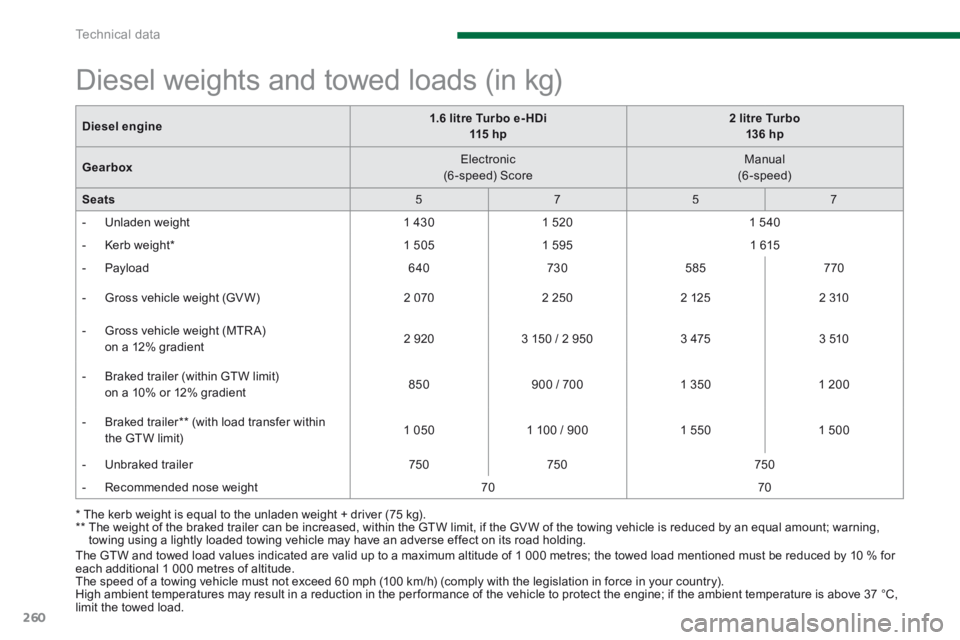
The GTW and towed load values indicated are valid up to a maximum altitude of 1 000 metres; the towed load mentioned must be reduced by 10 % for each additional 1 000 metres of altitude. The speed of a towing vehicle must not exceed 60 mph (100 km/h) (comply with the legislation in force in your country). High ambient temperatures may result in a reduction in the per formance of the vehicle to protect the engine; if the ambient temperature is above 37 °C, limit the towed load.
* The kerb weight is equal to the unladen weight + driver (75 kg). ** The weight of the braked trailer can be increased, within the GTW limit, if the GV W of the towing vehicle is reduced by an equal amount; warning, towing using a lightly loaded towing vehicle may have an adverse effect on its road holding.
Diesel weights and towed loads (in kg)
Diesel engine1.6 litre Turbo e- HDi 115 hp2 litre Turbo 136 hp
Gearbox Electronic (6 -speed) Score Manual (6-speed)
Seats 5 7 5 7
- Unladen weight 1 4 3 0 1 5 2 0 1 5 4 0
- Kerb weight * 1 5 0 5 1 5 9 5 1 6 1 5
- Payload 6 4 0 7 3 0 585 7 7 0
- Gross vehicle weight (GV W) 2 0 7 0 2 2 5 0 2 1 2 5 2 3 1 0
- Gross vehicle weight (MTR A) on a 12% gradient 2 9 2 0 3 150 / 2 950 3 4 7 5 3 5 1 0
- Braked trailer (within GTW limit) on a 10% or 12% gradient 850 900 / 700 1 3 5 0 1 2 0 0
- Braked trailer ** (with load transfer within the GTW limit) 1 0 5 0 1 100 / 900 1 5 5 0 1 5 0 0
- Unbraked trailer 7 5 0 7 5 0 7 5 0
- Recommended nose weight 7 0 7 0
Page 263 of 404
12
Technical data261
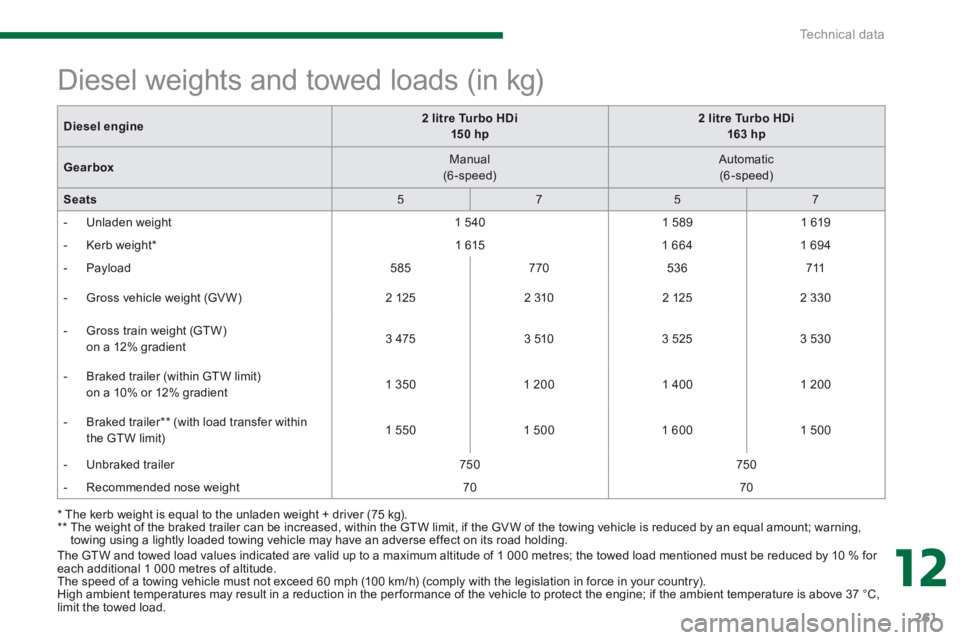
The GTW and towed load values indicated are valid up to a maximum altitude of 1 000 metres; the towed load mentioned must be reduced by 10 % for each additional 1 000 metres of altitude. The speed of a towing vehicle must not exceed 60 mph (100 km/h) (comply with the legislation in force in your country). High ambient temperatures may result in a reduction in the per formance of the vehicle to protect the engine; if the ambient temperature is above 37 °C, limit the towed load.
* The kerb weight is equal to the unladen weight + driver (75 kg). ** The weight of the braked trailer can be increased, within the GTW limit, if the GV W of the towing vehicle is reduced by an equal amount; warning, towing using a lightly loaded towing vehicle may have an adverse effect on its road holding.
Diesel weights and towed loads (in kg)
Diesel engine2 litre Turbo HDi 15 0 hp2 litre Turbo HDi 163 hp
Gearbox Manual (6-speed) Automatic (6-speed)
Seats 5 7 5 7
- Unladen weight 1 5 4 0 1 5 8 9 1 6 1 9
- Kerb weight * 1 6 1 5 1 6 6 4 1 6 9 4
- Payload 585 7 7 0 5 3 6 7 1 1
- Gross vehicle weight (GV W) 2 1 2 5 2 3 1 0 2 1 2 5 2 3 3 0
- Gross train weight (GTW) on a 12% gradient 3 4 7 5 3 5 1 0 3 5 2 5 3 5 3 0
- Braked trailer (within GTW limit) on a 10% or 12% gradient 1 3 5 0 1 2 0 0 1 4 0 0 1 2 0 0
- Braked trailer ** (with load transfer within the GTW limit) 1 5 5 0 1 5 0 0 1 6 0 0 1 5 0 0
- Unbraked trailer 7 5 0 7 5 0
- Recommended nose weight 7 0 7 0
Page 264 of 404
Technical data
262
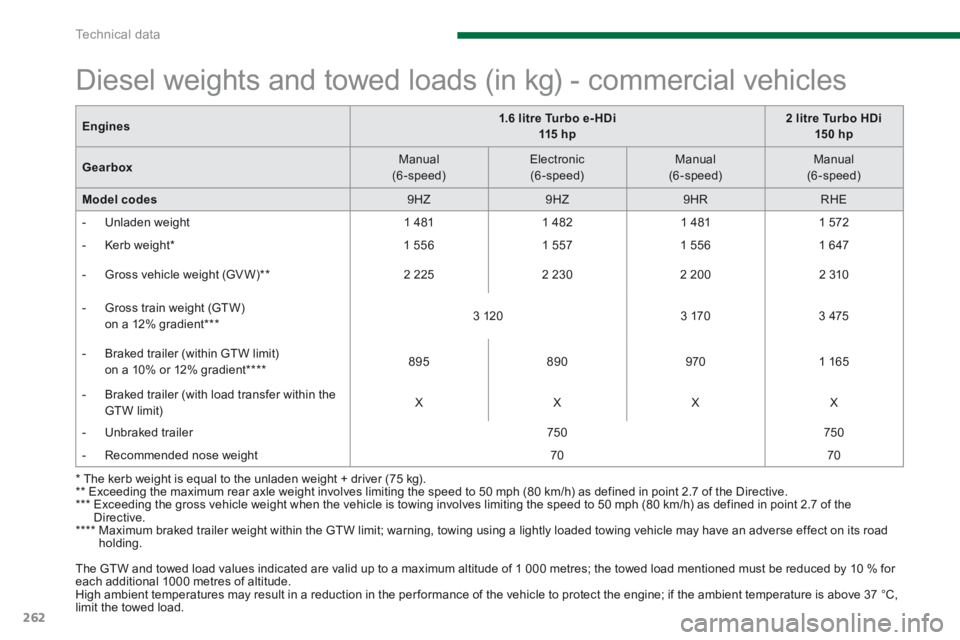
Engines1.6 litre Turbo e- HDi 115 h p2 litre Turbo HDi 15 0 hp
Gearbox Manual (6-speed) Electronic (6-speed) Manual ( 6 - s p e e d ) Manual (6-speed)
Model codes 9 H Z 9 H Z 9 H R RHE
- Unladen weight 1 4 8 1 1 4 8 2 1 4 8 1 1 5 7 2
- Kerb weight * 1 5 5 6 1 5 5 7 1 5 5 6 1 6 4 7
- Gross vehicle weight (GV W) ** 2 2 2 5 2 2 3 0 2 2 0 0 2 3 1 0
- Gross train weight (GTW) on a 12% gradient *** 3 1 2 0 3 1 7 0 3 4 7 5
- Braked trailer (within GTW limit) on a 10% or 12% gradient **** 8 9 5 8 9 0 9 7 0 1 1 6 5
- Braked trailer (with load transfer within the GTW limit) X X X X
- Unbraked trailer 7 5 0 7 5 0
- Recommended nose weight 7 0 7 0
* The kerb weight is equal to the unladen weight + driver (75 kg). ** Exceeding the maximum rear axle weight involves limiting the speed to 50 mph (80 km/h) as defined in point 2.7 of the Directive. *** Exceeding the gross vehicle weight when the vehicle is towing involves limiting the speed to 50 mph (80 km/h) as defined in point 2.7 of the Directive. **** Maximum braked trailer weight within the GTW limit; warning, towing using a lightly loaded towing vehicle may have an adverse effect on its road holding.
The GTW and towed load values indicated are valid up to a maximum altitude of 1 000 metres; the towed load mentioned must be reduced by 10 % for each additional 1000 metres of altitude. High ambient temperatures may result in a reduction in the per formance of the vehicle to protect the engine; if the ambient temperature is above 37 °C, limit the towed load.
Diesel weights and towed loads (in kg) - commercial vehicles
Page 282 of 404
280
04
NAV2AB C3DEF5JKL4GHI6MNO8TUV7PQR S9WXYZ0*#
1RADIO MEDIA NA
V TRAFFIC
SETUPADDR
BOOK
2ABC3DEF5JKL4GHI6MNO8TUV7PQR S9WXYZ0*#
1RADIO MEDIA NA
V TRAFFIC
SETUPADDR
BOOK
2ABC3DEF5JKL4GHI6MNO8TUV7PQR S9WXYZ0*#
1RADIO MEDIA NA
V TRAFFIC
SETUPADDR
BOOK
2ABC3DEF5JKL4GHI6MNO8TUV7PQR S9WXYZ0*#
1RADIO MEDIA NA
V TRAFFIC
SETUPADDR
BOOK
2ABC3DEF5JKL4GHI6MNO8TUV7PQR S9WXYZ0*#
1RADIO MEDIA NA
V TRAFFIC
SETUPADDR
BOOK
2ABC3DEF5JKL4GHI6MNO8TUV7PQR S9WXYZ0*#
1RADIO MEDIA NA
V TRAFFIC
SETUPADDR
BOOK
NAVIGATION - GUIDANCE
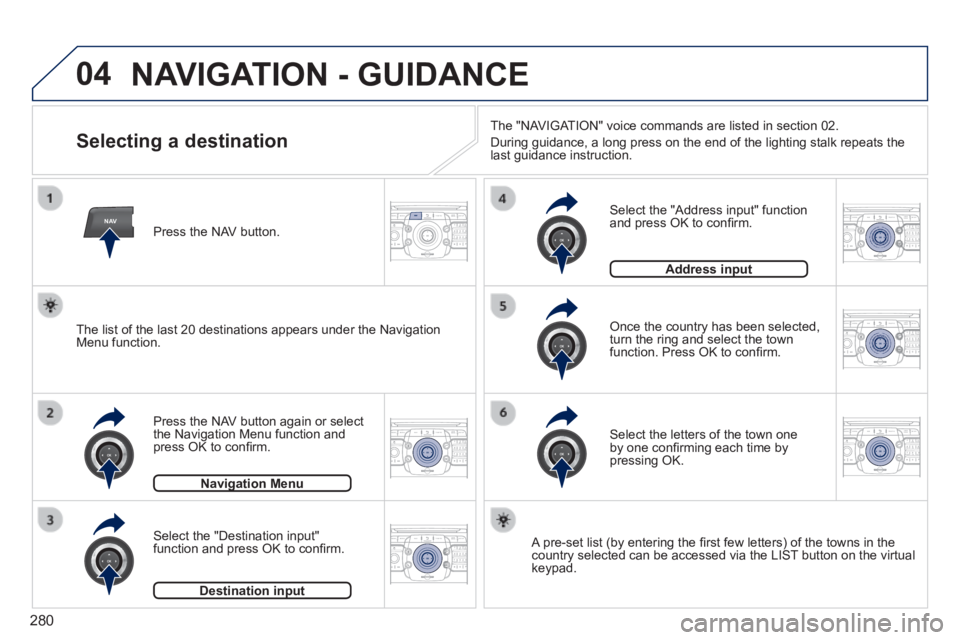
Selecting a destination
Press the NAV button again or select the Navigation Menu function and press OK to confi rm.
Select the "Destination input" function and press OK to confi rm.
Press the NAV button.
Select the letters of the town one by one confi rming each time by pressing OK.
Once the country has been selected, turn the ring and select the town function. Press OK to confi rm.
Navigation MenuNavigation Menu
Destination inputDestination input
A pre-set list (by entering the fi rst few letters) of the towns in the country selected can be accessed via the LIST button on the virtual keypad.
Select the "Address input" function and press OK to confi rm.
Address inputAddress input
The list of the last 20 destinations appears under the Navigation Menu function.
The "NAVIGATION" voice commands are listed in section 02.
During guidance, a long press on the end of the lighting stalk repeats t\
he last guidance instruction.
Page 283 of 404
281
04
2ABC3DEF5JKL4GHI6MNO8TUV7PQR S9WXYZ0*#
1RADIO MEDIA NA
V TRAFFIC
SETUPADDR
BOOK
2ABC3DEF5JKL4GHI6MNO8TUV7PQR S9WXYZ0*#
1RADIO MEDIA NA
V TRAFFIC
SETUPADDR
BOOK
2ABC3DEF5JKL4GHI6MNO8TUV7PQR S9WXYZ0*#
1RADIO MEDIA NA
V TRAFFIC
SETUPADDR
BOOK
2ABC3DEF5JKL4GHI6MNO8TUV7PQR S9WXYZ0*#
1RADIO MEDIA NA
V TRAFFIC
SETUPADDR
BOOK
2ABC3DEF5JKL4GHI6MNO8TUV7PQR S9WXYZ0*#
1RADIO MEDIA NA
V TRAFFIC
SETUPADDR
BOOK
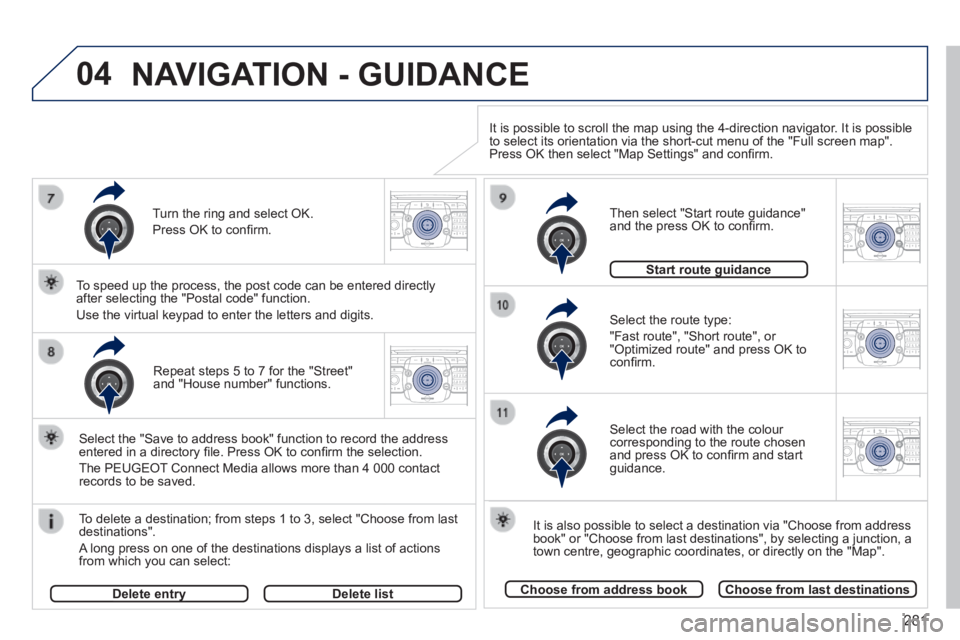
Repeat steps 5 to 7 for the "Street" and "House number" functions.
To delete a destination; from steps 1 to 3, select "Choose from last destinations".
A long press on one of the destinations displays a list of actions from which you can select:
Select the "Save to address book" function to record the address entered in a directory fi le. Press OK to confi rm the selection.
The PEUGEOT Connect Media allows more than 4 000 contact records to be saved.
To speed up the process, the post code can be entered directly after selecting the "Postal code" function.
Use the virtual keypad to enter the letters and digits. Select the route type:
"Fast route", "Short route", or "Optimized route" and press OK to confi rm.
Then select "Start route guidance" and the press OK to confi rm.
It is also possible to select a destination via "Choose from address book" or "Choose from last destinations", by selecting a junction, a town centre, geographic coordinates, or directly on the "Map".
Choose from address bookChoose from last destinations
Start route guidanceStart route guidance
It is possible to scroll the map using the 4-direction navigator. It is possible to select its orientation via the short-cut menu of the "Full screen map\
". Press OK then select "Map Settings" and confi rm.
Select the road with the colour corresponding to the route chosen and press OK to confi rm and start guidance.
Turn the ring and select OK.
Press OK to confi rm.
Delete entryDelete entryDelete list
NAVIGATION - GUIDANCE
Page 284 of 404
282
04
NAV2AB C3DEF5JKL4GHI6MNO8TUV7PQR S9WXYZ0*#
1RADIO MEDIA NA
V TRAFFIC
SETUPADDR
BOOK
2ABC3DEF5JKL4GHI6MNO8TUV7PQR S9WXYZ0*#
1RADIO MEDIA NA
V TRAFFIC
SETUPADDR
BOOK
2ABC3DEF5JKL4GHI6MNO8TUV7PQR S9WXYZ0*#
1RADIO MEDIA NA
V TRAFFIC
SETUPADDR
BOOK
2ABC3DEF5JKL4GHI6MNO8TUV7PQR S9WXYZ0*#
1RADIO MEDIA NA
V TRAFFIC
SETUPADDR
BOOK
NAVIGATION - GUIDANCE
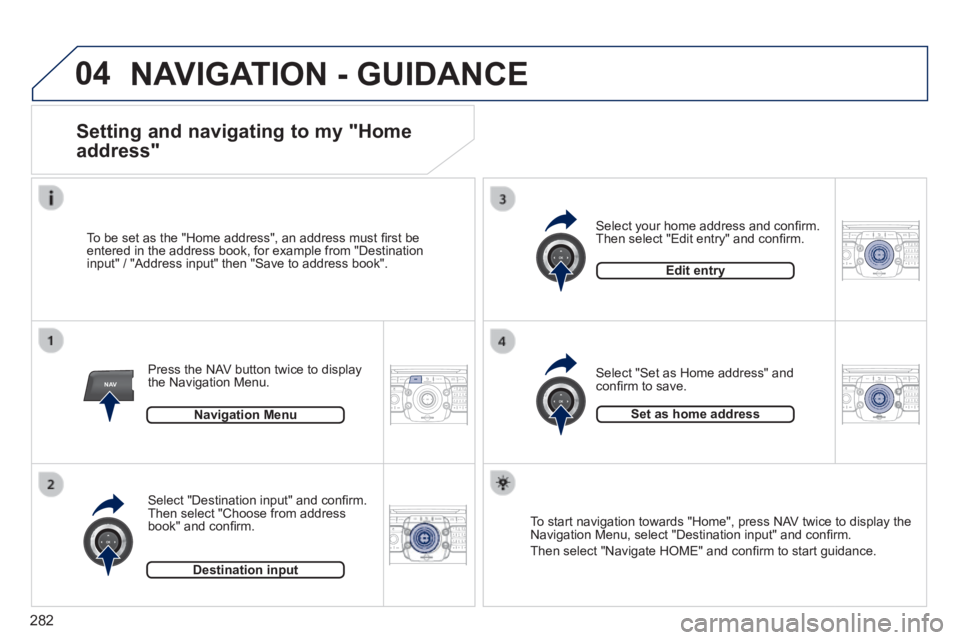
Setting and navigating to my "Home
address"
Press the NAV button twice to display the Navigation Menu.
To be set as the "Home address", an address must fi rst be entered in the address book, for example from "Destination input" / "Address input" then "Save to address book".
Select "Destination input" and confi rm. Then select "Choose from address book" and confi rm.
Select "Set as Home address" and confi rm to save.
Select your home address and confi rm. Then select "Edit entry" and confi rm.
To start navigation towards "Home", press NAV twice to display the Navigation Menu, select "Destination input" and confi rm.
Then select "Navigate HOME" and confi rm to start guidance.
Navigation Menu
Destination input
Edit entry
Set as home address
Page 285 of 404
283
04
NAV2AB C3DEF5JKL4GHI6MNO8TUV7PQR S9WXYZ0*#
1RADIO MEDIA NA
V TRAFFIC
SETUPADDR
BOOK
2ABC3DEF5JKL4GHI6MNO8TUV7PQR S9WXYZ0*#
1RADIO MEDIA NA
V TRAFFIC
SETUPADDR
BOOK
2ABC3DEF5JKL4GHI6MNO8TUV7PQR S9WXYZ0*#
1RADIO MEDIA NA
V TRAFFIC
SETUPADDR
BOOK
2ABC3DEF5JKL4GHI6MNO8TUV7PQR S9WXYZ0*#
1RADIO MEDIA NA
V TRAFFIC
SETUPADDR
BOOK
2ABC3DEF5JKL4GHI6MNO8TUV7PQR S9WXYZ0*#
1RADIO MEDIA NA
V TRAFFIC
SETUPADDR
BOOK
2ABC3DEF5JKL4GHI6MNO8TUV7PQR S9WXYZ0*#
1RADIO MEDIA NA
V TRAFFIC
SETUPADDR
BOOK2ABC3DEF5JKL4GHI6MNO8TUV7PQR S9WXYZ0*#
1RADIO MEDIA NA
V TRAFFIC
SETUPADDR
BOOK
NAVIGATION - GUIDANCE
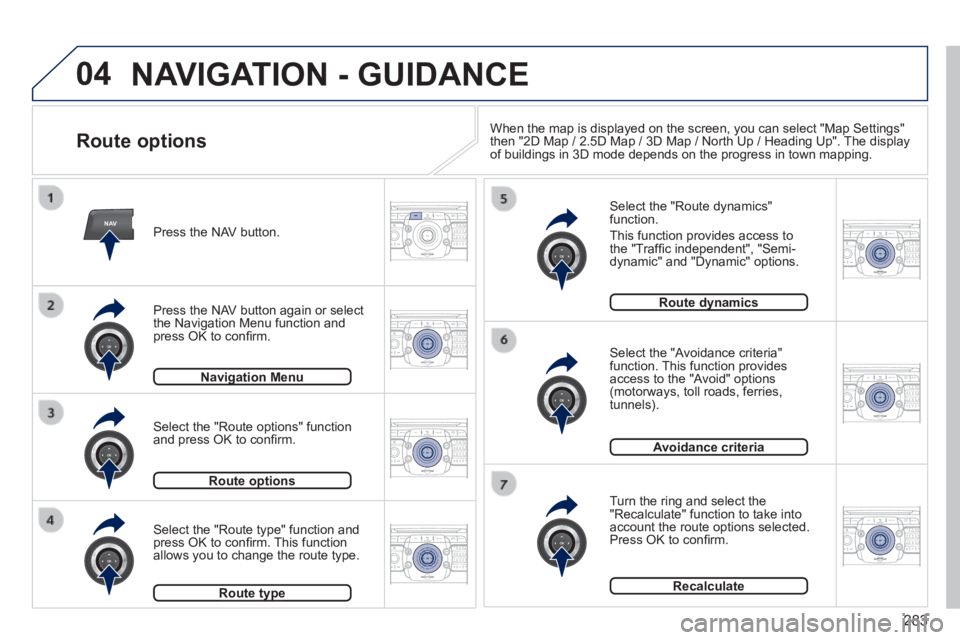
Route options
Select the "Route dynamics" function.
This function provides access to the "Traffi c independent", "Semi-dynamic" and "Dynamic" options.
Select the "Avoidance criteria" function. This function provides access to the "Avoid" options (motorways, toll roads, ferries, tunnels).
Turn the ring and select the "Recalculate" function to take into account the route options selected. Press OK to confi rm.
Press the NAV button.
Press the NAV button again or select the Navigation Menu function and press OK to confi rm.
Select the "Route type" function and press OK to confi rm. This function allows you to change the route type.
Select the "Route options" function and press OK to confi rm.
Navigation MenuNavigation Menu
Route optionsRoute options
Route typeRoute type
Route dynamicsRoute dynamics
Avoidance criteria
Recalculate
When the map is displayed on the screen, you can select "Map Settings" then "2D Map / 2.5D Map / 3D Map / North Up / Heading Up". The display of buildings in 3D mode depends on the progress in town mapping.
Page 322 of 404
320
04
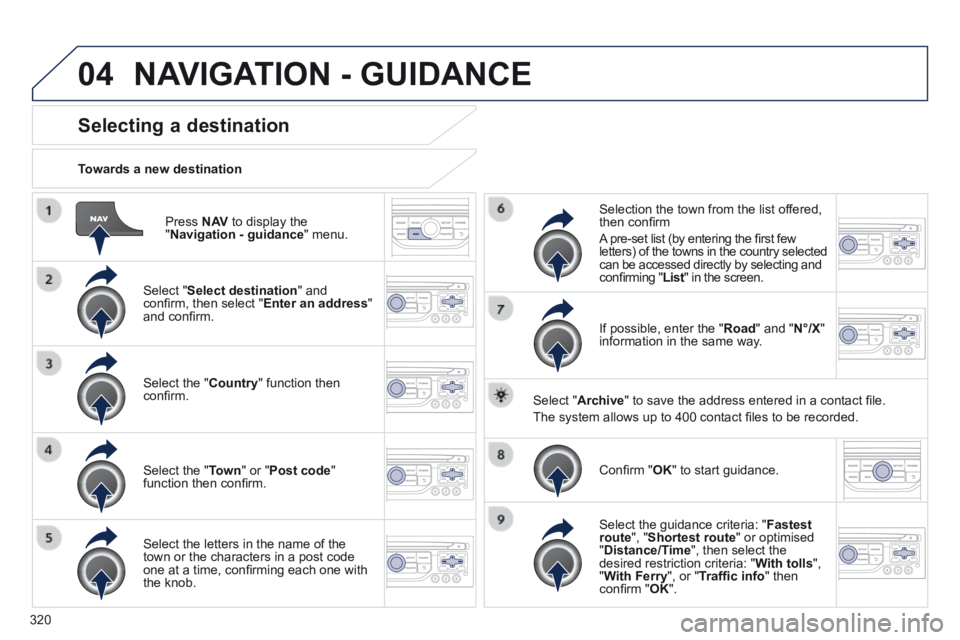
Press N AV to display the " Navigation - guidance " menu.
Towards a new destination
Selecting a destination
Select " Select destination " and confi rm, then select " Enter an address " and confi rm.
Select the " Country " function then confi rm.
Select the " Town " or " Post code " function then confi rm.
Select the letters in the name of the town or the characters in a post code one at a time, confi rming each one with the knob.
Selection the town from the list offered, then confi rm
A pre-set list (by entering the fi rst few letters) of the towns in the country selected can be accessed directly by selecting and confi rming " List " in the screen. List " in the screen. List
If possible, enter the " Road " and " N°/X " information in the same way.
Select " Archive " to save the address entered in a contact fi le.
The system allows up to 400 contact fi les to be recorded.
Confi rm " OK " to start guidance.
Select the guidance criteria: " Fastest route ", " Shortest route " or optimised " Distance/Time ", then select the desired restriction criteria: " With tolls ", " With Ferry ", or " Traffi c info " then confi rm " OK ".
NAVIGATION - GUIDANCE
Page 323 of 404
321
04
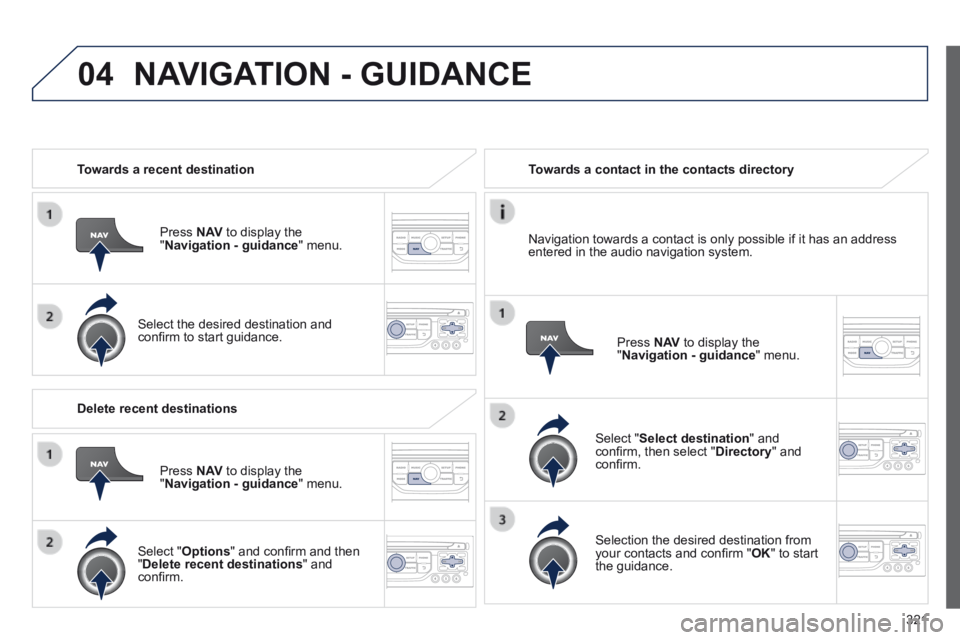
Towards a recent destination
Press N AV to display the " Navigation - guidance " menu.
Select the desired destination and confi rm to start guidance.
Towards a contact in the contacts directory
Select " Select destination " and confi rm, then select " Directory " and confi rm.
Selection the desired destination from your contacts and confi rm " OK " to start the guidance.
Press N AV to display the " Navigation - guidance " menu.
Navigation towards a contact is only possible if it has an address entered in the audio navigation system.
Delete recent destinations
Press N AV to display the " Navigation - guidance " menu.
Select " Options " and confi rm and then " Delete recent destinations " and confi rm.
NAVIGATION - GUIDANCE
Page 324 of 404
322
04
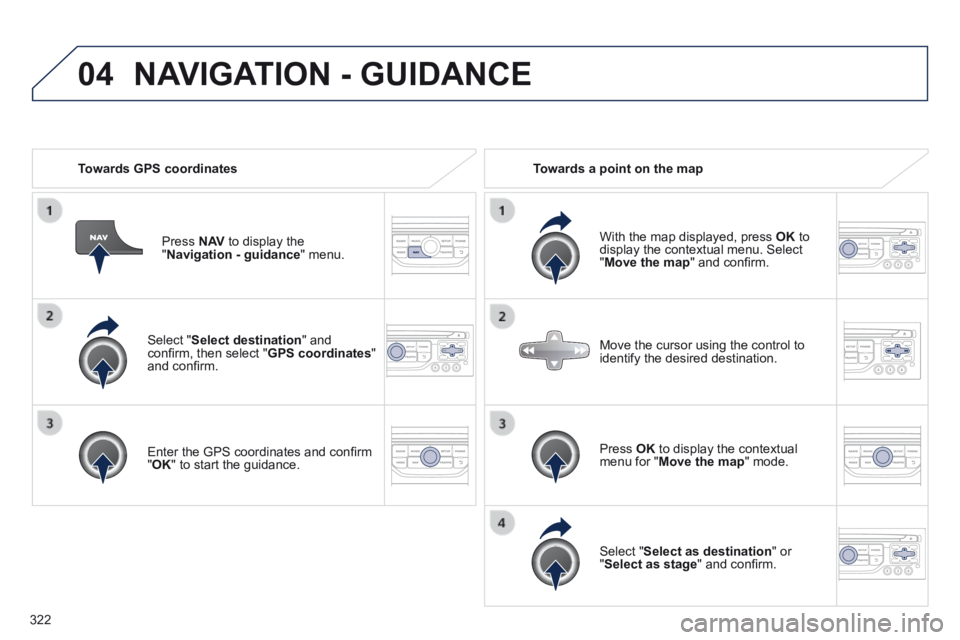
Select " Select destination " and confi rm, then select " GPS coordinates " and confi rm.
Enter the GPS coordinates and confi rm " OK " to start the guidance.
Press N AV to display the " Navigation - guidance " menu.
Towards GPS coordinates Towards a point on the map
With the map displayed, press OK to display the contextual menu. Select " Move the map " and confi rm.
Press OK to display the contextual menu for " Move the map " mode.
Select " Select as destination " or " Select as stage " and confi rm.
Move the cursor using the control to identify the desired destination.
NAVIGATION - GUIDANCE