Air PEUGEOT 5008 2018 User Guide
[x] Cancel search | Manufacturer: PEUGEOT, Model Year: 2018, Model line: 5008, Model: PEUGEOT 5008 2018Pages: 364, PDF Size: 13.03 MB
Page 42 of 364
40
Touch screen
As a safety measure, the driver must
o nly carry out operations that require
sustained attention with the vehicle
stationary.
Some functions are not accessible when
driving.
General operation
Recommendations
This screen is of the capacitive type.
Use is possible in all temperatures.
Do not use pointed objects on the touch
screen.
Do not touch the touch screen with wet hands.
Use a
soft clean cloth to clean the touch
screen.
•
"
Fatigue Detection System".
For more information on the Fatigue
detection system , refer to the "Driving"
section.
-
"
Driving assistance ":
•
"
Auto. emergency braking".
For more information on the Active
Safety Brake , refer to the "Driving"
section.
•
"
Speed recommendation".
For more information on Speed limit
recognition , refer to the "Driving"
section.
•
"
Tyre inflation".
For more information on Under-
inflation detection and reinitialisation in
particular, refer to the "Driving" section.
Choice of language
This menu allows selection of the language
used by the screen and the instrument panel.
Display configuration
This menu gives access to the following
settings:
-
"
Choice of units",
-
"
Date and time adjustment",
-
"
Display parameters",
-
"Brightness". Adjusting the date and time
F
P
ress the "
7" or " 8" button to display the
"Display configuration" menu, then press
OK.
F
P
ress the "
5" or " 6" button to select the
"Date and time adjustment" button, then
press OK.
F
P
ress the "
7" or " 8" button to select the
setting to modify. Confirm by pressing OK,
then modify the setting and confirm again to
save the modification.
F
A
djust the settings one by one, confirming
with the OK button.
F
P
ress the "
5" or " 6" button, then the OK
button to select the OK box and confirm or
the Back button to cancel.
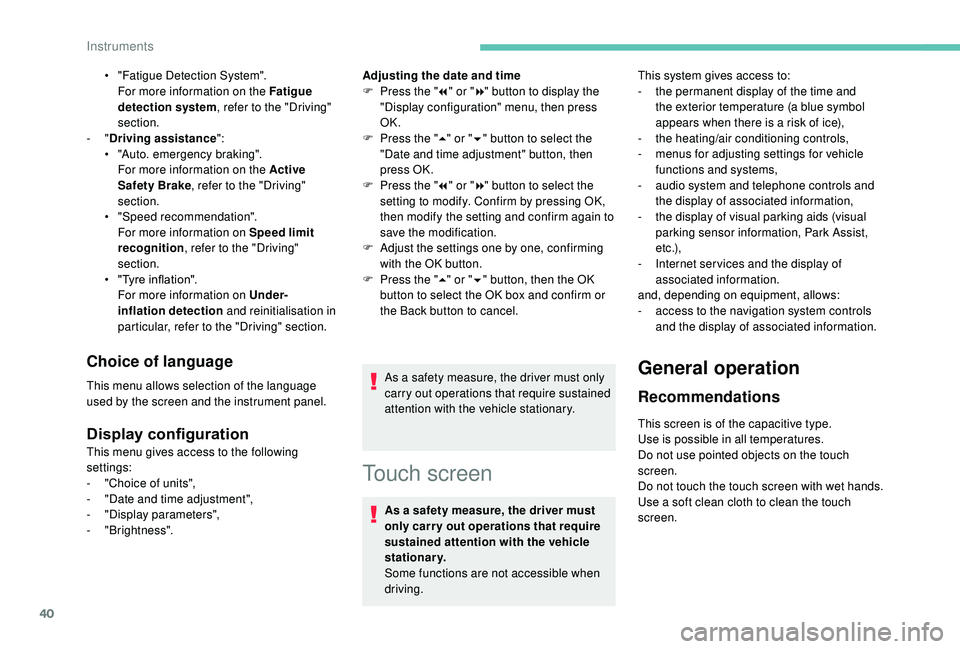
As a safety measure, the driver must only
carry out operations that require sustained
attention with the vehicle stationary. This system gives access to:
-
t
he permanent display of the time and
the exterior temperature (a blue symbol
appears when there is a risk of ice),
-
t
he heating/air conditioning controls,
-
m
enus for adjusting settings for vehicle
functions and systems,
-
a
udio system and telephone controls and
the display of associated information,
-
t
he display of visual parking aids (visual
parking sensor information, Park Assist,
e t c .),
-
I
nternet ser vices and the display of
associated information.
and, depending on equipment, allows:
-
a
ccess to the navigation system controls
and the display of associated information.
Instruments
Page 43 of 364
41
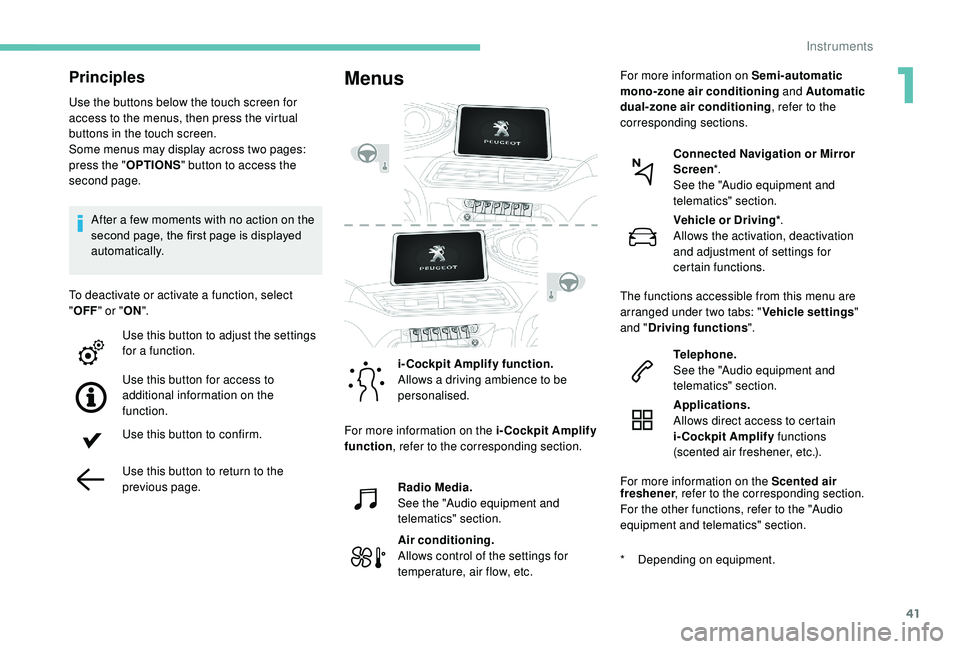
Principles
Use the buttons below the touch screen for
access to the menus, then press the virtual
buttons in the touch screen.
Some menus may display across two pages:
press the "OPTIONS" button to access the
second page.
After a
few moments with no action on the
second page, the first page is displayed
automatically.
To deactivate or activate a
function, select
" OFF " or " ON".
Use this button to adjust the settings
for a
function.
Use this button for access to
additional information on the
function.
Use this button to confirm.
Use this button to return to the
previous page.
Menus
i-Cockpit Amplify function.
Allows a driving ambience to be
personalised.
Radio Media.
See the "Audio equipment and
telematics" section.
Air conditioning.
Allows control of the settings for
temperature, air flow, etc. Connected Navigation or Mirror
Screen
*.
See the "Audio equipment and
telematics" section.
Telephone.
See the "Audio equipment and
telematics" section.
Applications.
Allows direct access to certain
i-Cockpit Amplify functions
(scented air freshener, etc.).
For more information on the Scented air
*
D
epending on equipment.Vehicle or Driving*
.
Allows the activation, deactivation
and adjustment of settings for
certain functions.
The functions accessible from this menu are
arranged under two tabs: " Vehicle settings"
and " Driving functions ".
For more information on the i-Cockpit Amplify
function , refer to the corresponding section. For more information on
Semi-automatic
mono-zone air conditioning and Automatic
dual-zone air conditioning , refer to the
corresponding sections.
freshener , refer to the corresponding section.
For the other functions, refer to the "Audio
equipment and telematics" section.
1
Instruments
Page 44 of 364
42
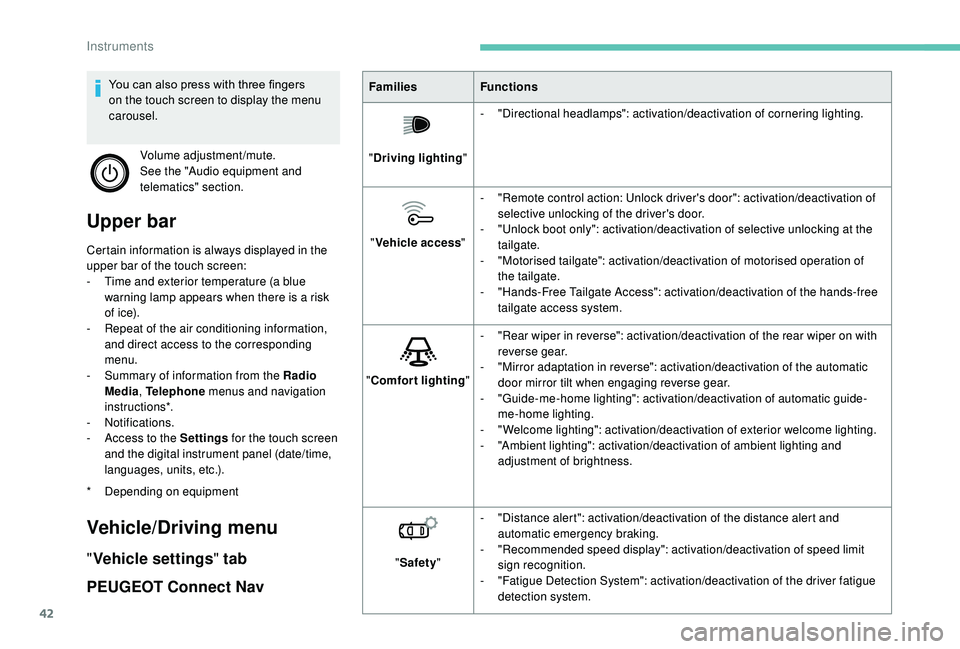
Upper bar
Certain information is always displayed in the
upper bar of the touch screen:
-
T
ime and exterior temperature (a blue
warning lamp appears when there is a
risk
of i c e).
-
R
epeat of the air conditioning information,
and direct access to the corresponding
menu.
-
S
ummary of information from the Radio
Media , Telephone menus and navigation
instructions*.
-
Notifications.
-
A
ccess to the Settings for the touch screen
and the digital instrument panel (date/time,
languages, units, etc.).
Vehicle/Driving menu
" Vehicle settings " tab
PEUGEOT Connect Nav
* Depending on equipment Families
Functions
" Driving lighting "-
"
Directional headlamps": activation/deactivation of cornering lighting.
" Vehicle access "-
"
Remote control action: Unlock driver's door": activation/deactivation of
selective unlocking of the driver's door.
-
"
Unlock boot only": activation/deactivation of selective unlocking at the
tailgate.
-
"
Motorised tailgate": activation/deactivation of motorised operation of
the tailgate.
-
"
Hands-Free Tailgate Access": activation/deactivation of the hands-free
tailgate access system.
" Comfort lighting "-
"
Rear wiper in reverse": activation/deactivation of the rear wiper on with
reverse gear.
-
"
Mirror adaptation in reverse": activation/deactivation of the automatic
door mirror tilt when engaging reverse gear.
-
"
Guide-me-home lighting": activation/deactivation of automatic guide-
me-home lighting.
-
"
Welcome lighting": activation/deactivation of exterior welcome lighting.
-
"
Ambient lighting": activation/deactivation of ambient lighting and
adjustment of brightness.
" Safety " -
"
Distance alert": activation/deactivation of the distance alert and
automatic emergency braking.
-
"
Recommended speed display": activation/deactivation of speed limit
sign recognition.
-
"
Fatigue Detection System": activation/deactivation of the driver fatigue
detection system.
You can also press with three fingers
on the touch screen to display the menu
carousel.
Volume adjustment/mute.
See the "Audio equipment and
telematics" section.
Instruments
Page 48 of 364
46
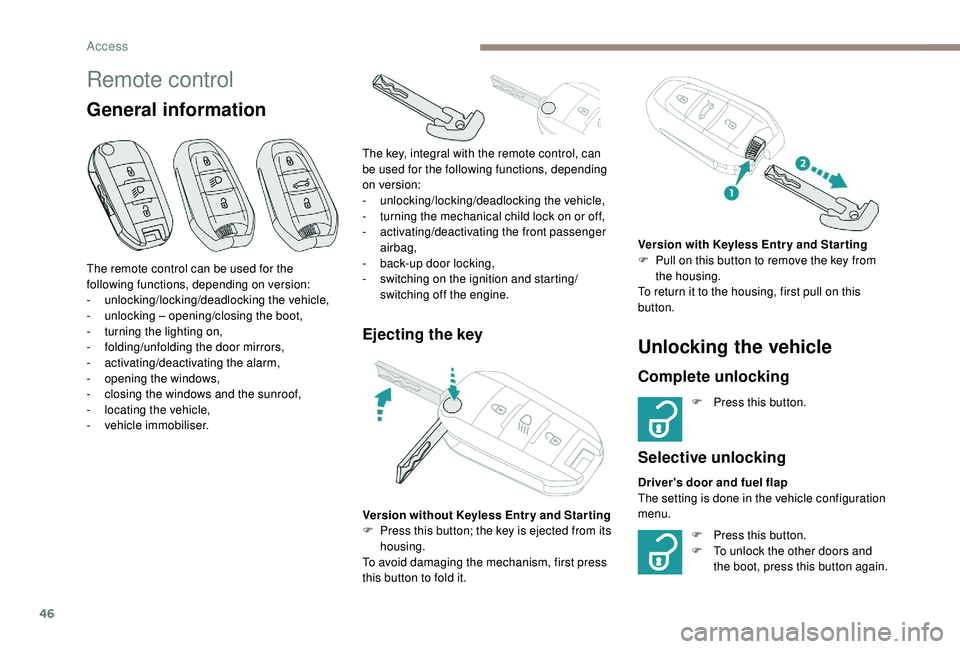
Remote control
General information
Ejecting the key
The remote control can be used for the
following functions, depending on version:
-
u
nlocking/locking/deadlocking the vehicle,
-
u
nlocking – opening/closing the boot,
-
t
urning the lighting on,
-
fo
lding/unfolding the door mirrors,
-
a
ctivating/deactivating the alarm,
-
o
pening the windows,
-
c
losing the windows and the sunroof,
-
l
ocating the vehicle,
-
v
ehicle immobiliser. The key, integral with the remote control, can
be used for the following functions, depending
on version:
-
u
nlocking/locking/deadlocking the vehicle,
-
t
urning the mechanical child lock on or off,
-
a
ctivating/deactivating the front passenger
airbag,
- b ack-up door locking,
- s witching on the ignition and starting/
switching off the engine.
Version without
K
eyless Entr y and Star ting
F
P
ress this button; the key is ejected from its
housing.
To avoid damaging the mechanism, first press
this button to fold it.
Unlocking the vehicle
Complete unlocking
F Press this button.
Selective unlocking
Driver's door and fuel flap
The setting is done in the vehicle configuration
menu. Version with
K
eyless Entr y and Star ting
F
P
ull on this button to remove the key from
the housing.
To return it to the housing, first pull on this
button.
F
P
ress this button.
F
T
o unlock the other doors and
the boot, press this button again.
Access
Page 72 of 364
70
2. Adjusting the height of the seat cushion
F R aise or lower the control as many times as
needed to obtain the desired seat height.
3. Adjusting the seat backrest angle
F
T
urn the knob for wards or backwards to
recline the backrest to the desired angle.
or
F
F
or a passenger seat that can be placed in
the table position, pull the handle and guide
the backrest for wards or backwards.
4. Adjusting the height of the head restraint
Refer to the corresponding section.
5. Adjusting the lumbar support
(only on the driver's seat)
F
T
urn the knob for wards or backwards to
increase or decrease the level of lumbar
support.
Before moving the seat backwards,
ensure that there is nothing that might
prevent the full travel of the seat.
There is a
risk of trapping or pinching
passengers if present in the rear seats
or jamming the seat if large objects are
placed on the floor behind the seat." AGR " certified seats
Additional adjustments
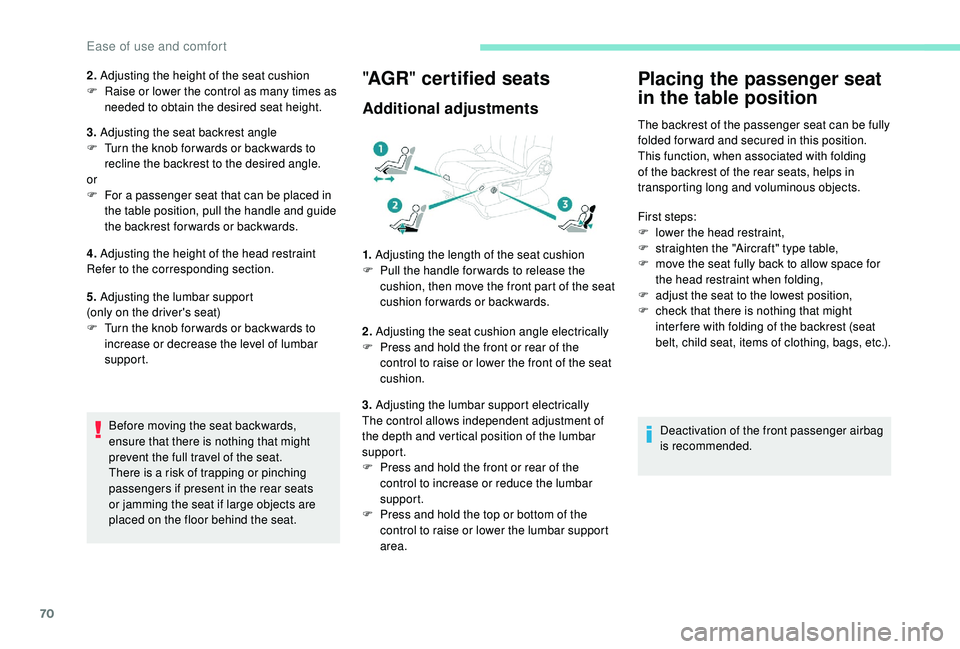
1. Adjusting the length of the seat cushion
F P ull the handle for wards to release the
cushion, then move the front part of the seat
cushion forwards or backwards.
2. Adjusting the seat cushion angle electrically
F
P
ress and hold the front or rear of the
control to raise or lower the front of the seat
cushion.
3. Adjusting the lumbar support electrically
The control allows independent adjustment of
the depth and vertical position of the lumbar
support.
F
P
ress and hold the front or rear of the
control to increase or reduce the lumbar
support.
F
P
ress and hold the top or bottom of the
control to raise or lower the lumbar support
area.
Placing the passenger seat
in the table position
The backrest of the passenger seat can be fully
folded for ward and secured in this position.
This function, when associated with folding
of the backrest of the rear seats, helps in
transporting long and voluminous objects.
First steps:
F
l
ower the head restraint,
F
s
traighten the "Aircraft" type table,
F
m
ove the seat fully back to allow space for
the head restraint when folding,
F
a
djust the seat to the lowest position,
F
c
heck that there is nothing that might
inter fere with folding of the backrest (seat
belt, child seat, items of clothing, bags, etc.).
Deactivation of the front passenger airbag
is recommended.
Ease of use and comfort
Page 75 of 364
73
Recalling a stored position
Ignition on or engine running
F
P ress button 1 or 2 to recall the
corresponding position.
An audible signal confirms that adjustment is
complete.
You can interrupt the current movement by
pressing button M , 1
or 2 or by using one
of the seat controls.
A stored position cannot be recalled while
driving.
Recalling stored positions is deactivated
45
seconds after switching off the ignition.
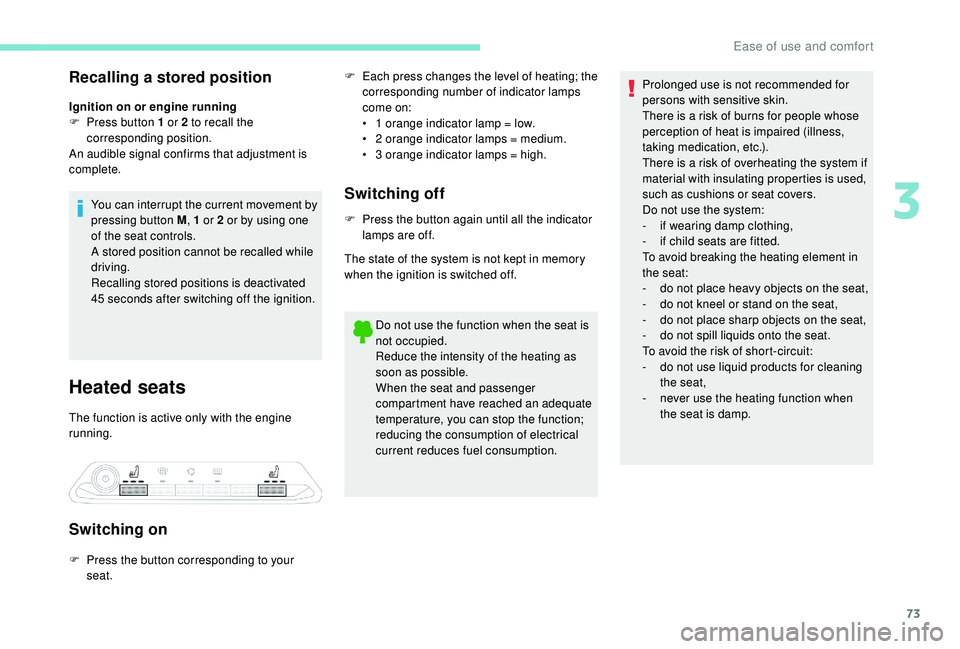
Heated seats
The function is active only with the engine
running.
Switching on
F Each press changes the level of heating; the corresponding number of indicator lamps
come on:
•
1
orange indicator lamp = low.
•
2
orange indicator lamps = medium.
•
3
orange indicator lamps = high.
Switching off
F Press the button again until all the indicator lamps are off.
The state of the system is not kept in memory
when the ignition is switched off.
Do not use the function when the seat is
not occupied.
Reduce the intensity of the heating as
soon as possible.
When the seat and passenger
compartment have reached an adequate
temperature, you can stop the function;
reducing the consumption of electrical
current reduces fuel consumption.
F
P
ress the button corresponding to your
seat. Prolonged use is not recommended for
persons with sensitive skin.
There is a
risk of burns for people whose
perception of heat is impaired (illness,
taking medication, etc.).
There is a risk of overheating the system if
material with insulating properties is used,
such as cushions or seat covers.
Do not use the system:
- i f wearing damp clothing,
-
i
f child seats are fitted.
To avoid breaking the heating element in
the seat:
-
d
o not place heavy objects on the seat,
-
d
o not kneel or stand on the seat,
-
d
o not place sharp objects on the seat,
-
d
o not spill liquids onto the seat.
To avoid the risk of short-circuit:
-
d
o not use liquid products for cleaning
the seat,
-
n
ever use the heating function when
the seat is damp.
3
Ease of use and comfort
Page 80 of 364
78
Folding the backrests
F Check that the "aircraft" type tables of the front seats are properly folded.
F
P
lace the 2
nd row seats in the maximum rear
position.
Before and while per forming operations
on the seats, check that the passengers,
children in particular, keep their hands and
their feet far from the moving elements of
the seats (hinges, slides, etc.) – Risk of
serious injury!
Folding from the outside Folding from the boot
Replacing the seat
Before performing any operations on
the rear seats, to avoid damage to the
seat belts, check that the outer belts are
properly tensioned. The central belt must
be stored in the headlining.
Continuity panels
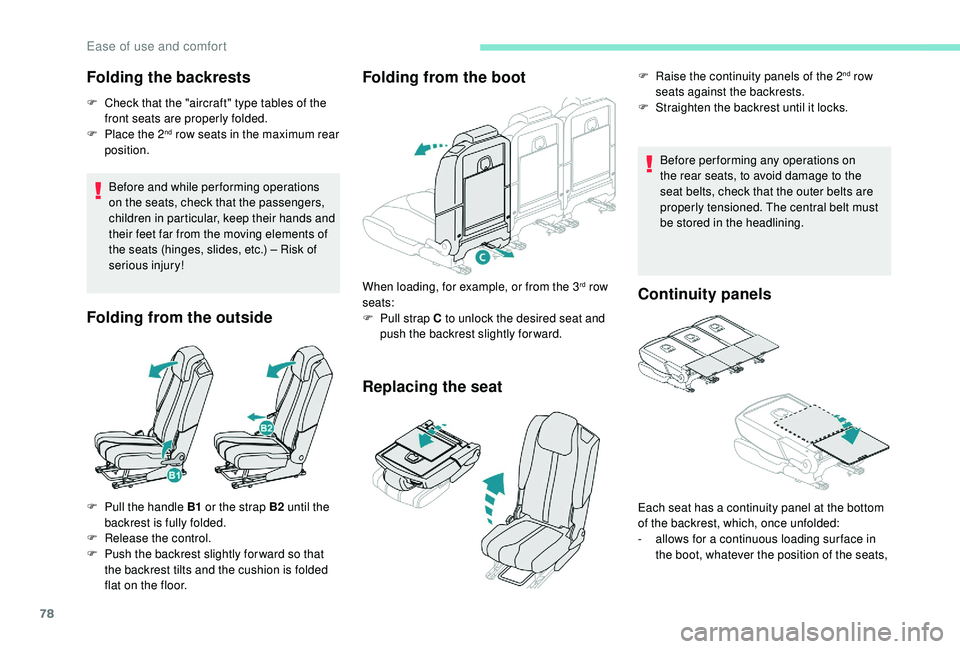
F Pull the handle B1
or the strap B2 until the
backrest is fully folded.
F
R
elease the control.
F
P
ush the backrest slightly for ward so that
the backrest tilts and the cushion is folded
flat on the floor. When loading, for example, or from the 3
rd row
seats:
F
P
ull strap C to unlock the desired seat and
push the backrest slightly for ward. F
R
aise the continuity panels of the 2
nd row
seats against the backrests.
F
S
traighten the backrest until it locks.
Each seat has a
continuity panel at the bottom
of the backrest, which, once unfolded:
-
a
llows for a
continuous loading sur face in
the boot, whatever the position of the seats,
Ease of use and comfort
Page 81 of 364
79
These continuity panels are not designed
to support a weight greater than 30 kg.
Before deploying the continuity panels,
check that the 2
nd row seats are pulled as
far back as possible.
Access to third row seats
Third row seats are accessed via the second
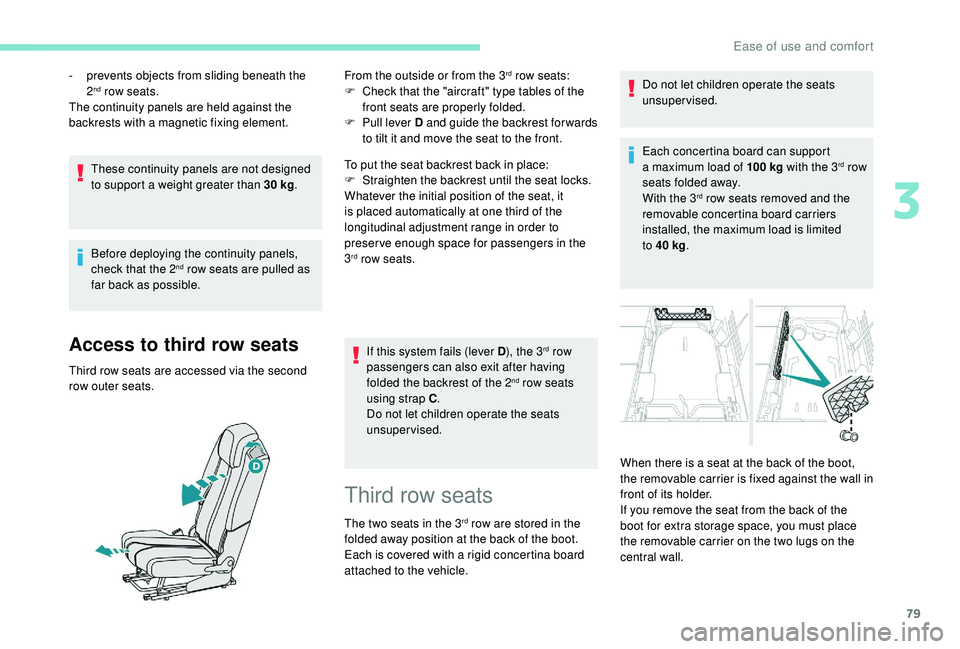
row outer seats. From the outside or from the 3
rd row seats:
F
C
heck that the "aircraft" type tables of the
front seats are properly folded.
F
P
ull lever D and guide the backrest for wards
to tilt it and move the seat to the front.
To put the seat backrest back in place:
F
S
traighten the backrest until the seat locks.
Whatever the initial position of the seat, it
is placed automatically at one third of the
longitudinal adjustment range in order to
preserve enough space for passengers in the
3
rd row seats.
If this system fails (lever D ), the 3
rd row
passengers can also exit after having
folded the backrest of the 2
nd row seats
using strap C .
Do not let children operate the seats
unsupervised.
-
p
revents objects from sliding beneath the
2
nd row seats.
The continuity panels are held against the
backrests with a
magnetic fixing element.
Third row seats
The two seats in the 3rd row are stored in the
folded away position at the back of the boot.
Each is covered with a
rigid concertina board
attached to the vehicle. Do not let children operate the seats
unsupervised.
Each concertina board can support
a
maximum load of 100
kg
with the 3
rd row
seats folded away.
With the 3
rd row seats removed and the
removable concertina board carriers
installed, the maximum load is limited
to 40
kg .
When there is a
seat at the back of the boot,
the removable carrier is fixed against the wall in
front of its holder.
If you remove the seat from the back of the
boot for extra storage space, you must place
the removable carrier on the two lugs on the
central wall.
3
Ease of use and comfort
Page 85 of 364
83
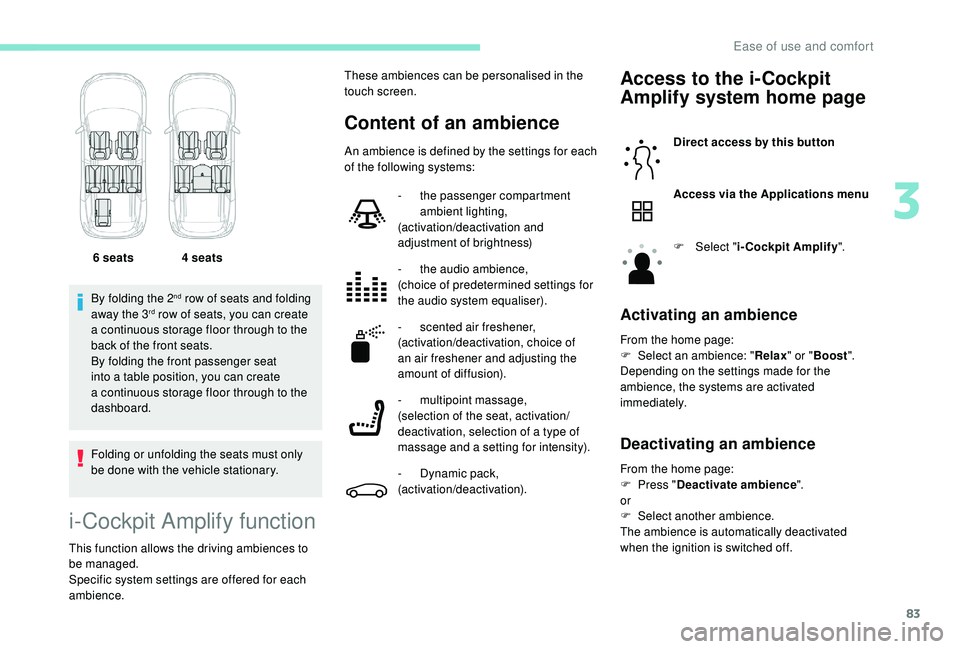
By folding the 2nd row of seats and folding
away the 3rd row of seats, you can create
a
continuous storage floor through to the
back of the front seats.
By folding the front passenger seat
into a
table position, you can create
a
continuous storage floor through to the
dashboard.
Folding or unfolding the seats must only
be done with the vehicle stationary. 6
seats 4 seats
i-Cockpit Amplify function
This function allows the driving ambiences to
be managed.
Specific system settings are offered for each
ambience.
Content of an ambience
Access to the i-Cockpit
Amplify system home page
Direct access by this button
Access via the Applications menu
F
Sel
ect "i-Cockpit Amplify ".
Activating an ambience
From the home page:
F
Sel ect an ambience: " Relax" or "Boost ".
Depending on the settings made for the
ambience, the systems are activated
immediately.
Deactivating an ambience
These ambiences can be personalised in the
touch screen.
An ambience is defined by the settings for each
of the following systems:
-
t
he passenger compartment
ambient lighting,
(activation/deactivation and
adjustment of brightness)
-
t
he audio ambience,
(choice of predetermined settings for
the audio system equaliser).
-
s
cented air freshener,
(activation/deactivation, choice of
an air freshener and adjusting the
amount of diffusion).
-
m
ultipoint massage,
(selection of the seat, activation/
deactivation, selection of a
type of
massage and a
setting for intensity).
-
D
ynamic pack,
(activation/deactivation). From the home page:
F
P
ress "Deactivate ambience ".
or
F
Sel
ect another ambience.
The ambience is automatically deactivated
when the ignition is switched off.
3
Ease of use and comfort
Page 86 of 364
84
Personalising an ambience
From the home page:
F S elect an ambience to activate it.
F
P
ress " Settings " to display the settings
page for the ambience.
F
S
elect a system for which you wish to
modify the settings.
F
A
fter making the modifications, press any
area of the screen outside the system
settings window to return to the ambience
settings page.
F
A
fter making all of the desired modifications
to settings, press " Save settings".
The modifications are taken into account
immediately.
It is possible to temporarily modify an
ambience at any time, by modifying the
settings for one or more of the systems
managed in the ambience, without going
via the i- Cockpit Amplify function.
For example, you can deactivate or modify
the intensity of the current massage by
pressing the massage activation button
on your seat or activate/deactivate
the ambient lighting in the passenger
compartment from the Vehicle/Driving
menu.
In this case, the new settings will not be
saved as part of the current ambience.Heating and Ventilation
Air intake
The air circulating in the passenger
compartment is filtered and originates either
from the outside via the grille located at the
base of the windscreen or from the inside in air
recirculation mode.
Controls
The incoming air follows various routes
depending on the controls selected by
the driver, the front passenger and rear
passengers, depending on the level of
equipment.
The temperature control enables you to obtain
the level of comfort required by mixing the air of
the various circuits.
The air distribution control enables you to
select the air vents used in the passenger
compartment by the combined use of the
associated buttons.
The air flow control enables you to increase or
reduce the speed of the ventilation fan.
Depending on your vehicle, the controls are
accessible in the Air conditioning menu of the
touch screen or are grouped together on the
control panel of the centre console.
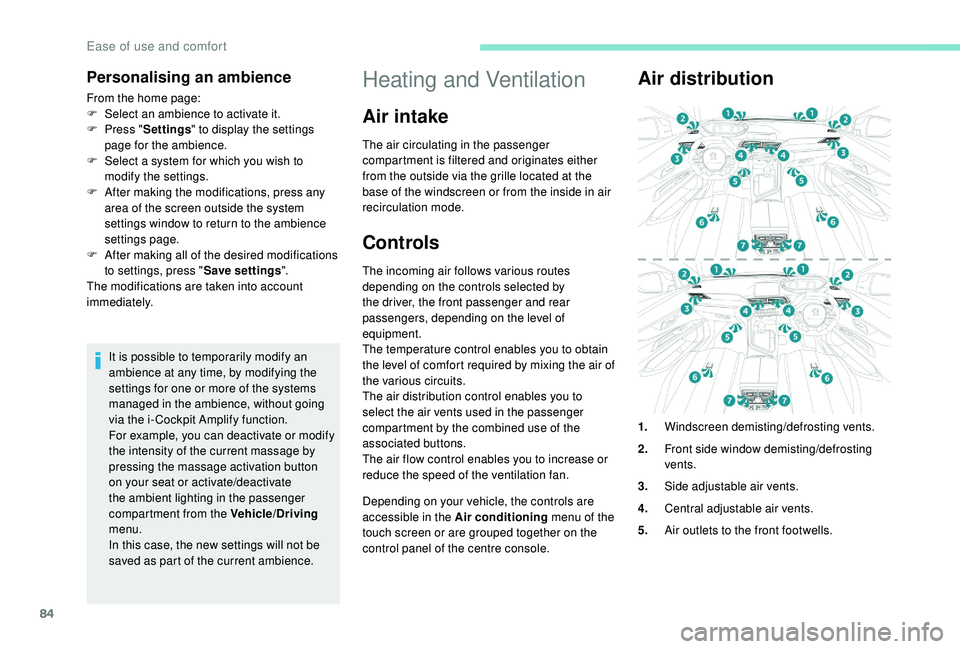
Air distribution
1. Windscreen demisting/defrosting vents.
2. Front side window demisting/defrosting
vents.
3. Side adjustable air vents.
4. Central adjustable air vents.
5. Air outlets to the front footwells.
Ease of use and comfort