display PEUGEOT 5008 2018 Owner's Guide
[x] Cancel search | Manufacturer: PEUGEOT, Model Year: 2018, Model line: 5008, Model: PEUGEOT 5008 2018Pages: 364, PDF Size: 13.03 MB
Page 47 of 364
45
PEUGEOT Connect Radio
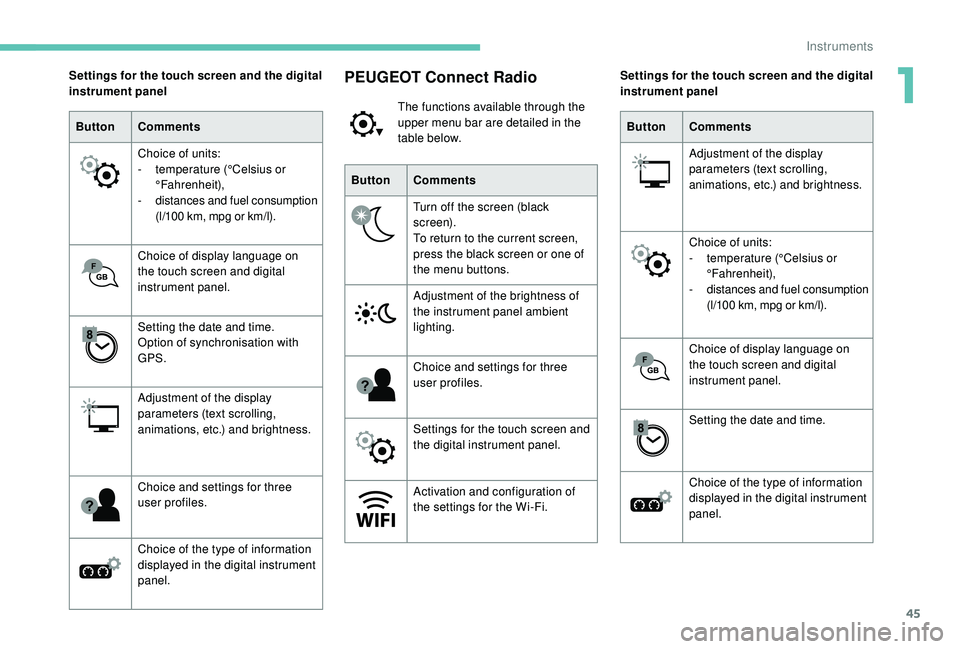
The functions available through the
upper menu bar are detailed in the
table below.
Button Comments
Turn off the screen (black
screen).
To return to the current screen,
press the black screen or one of
the menu buttons.
Adjustment of the brightness of
the instrument panel ambient
lighting.
Choice and settings for three
user profiles.
Settings for the touch screen and
the digital instrument panel.
Activation and configuration of
the settings for the Wi-Fi.
Settings for the touch screen and the digital
instrument panel
Button Comments
Choice of units:
-
t
emperature (°Celsius or
°Fahrenheit),
-
d
istances and fuel consumption
(l/100
km, mpg or km/l).
Choice of display language on
the touch screen and digital
instrument panel.
Setting the date and time.
Option of synchronisation with
GPS.
Adjustment of the display
parameters (text scrolling,
animations, etc.) and brightness.
Choice and settings for three
user profiles.
Choice of the type of information
displayed in the digital instrument
panel. Settings for the touch screen and the digital
instrument panel
Button Comments
Adjustment of the display
parameters (text scrolling,
animations, etc.) and brightness.
Choice of units:
-
t
emperature (°Celsius or
°Fahrenheit),
-
d
istances and fuel consumption
(l/100
km, mpg or km/l).
Choice of display language on
the touch screen and digital
instrument panel.
Setting the date and time.
Choice of the type of information
displayed in the digital instrument
panel.
1
Instruments
Page 56 of 364
54
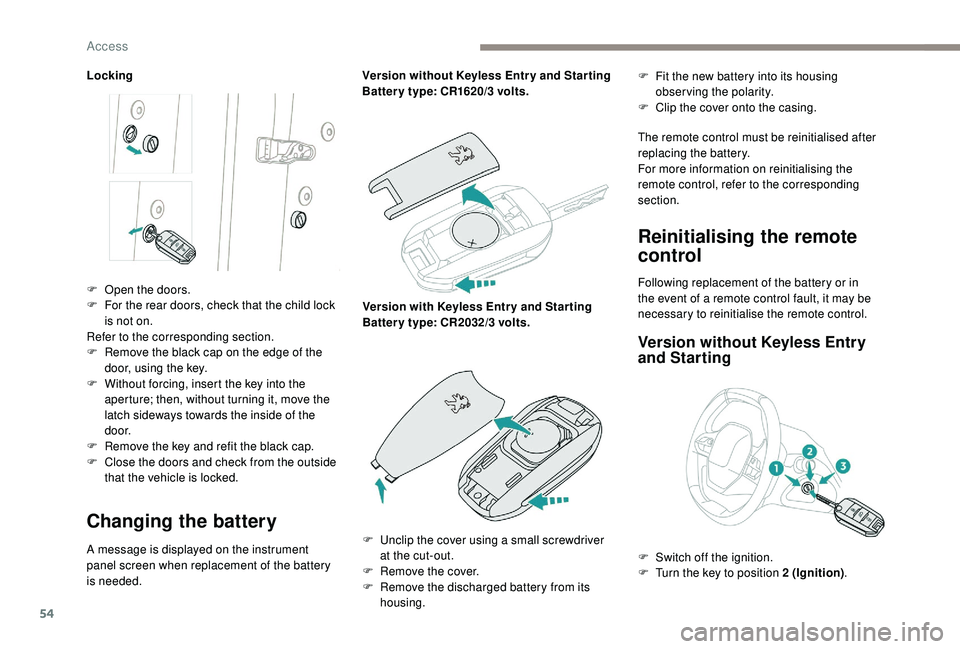
Locking
Changing the battery
A message is displayed on the instrument
panel screen when replacement of the battery
is needed.Version without
K
eyless Entr y and Star ting
Batter y type: CR1620/3 volts.
Version with
K
eyless Entr y and Star ting
Batter y type: CR2032/3 volts.F
F
it the new battery into its housing
observing the polarity.
F
C
lip the cover onto the casing.
The remote control must be reinitialised after
replacing the battery.
For more information on reinitialising the
remote control, refer to the corresponding
section.
Reinitialising the remote
control
F Open the doors.
F F or the rear doors, check that the child lock
is not on.
Refer to the corresponding section.
F
R
emove the black cap on the edge of the
door, using the key.
F
W
ithout forcing, insert the key into the
aperture; then, without turning it, move the
latch sideways towards the inside of the
d o o r.
F
R
emove the key and refit the black cap.
F
C
lose the doors and check from the outside
that the vehicle is locked. Following replacement of the battery or in
the event of a
remote control fault, it may be
necessary to reinitialise the remote control.
Version without K eyless Entry
and Starting
F Unclip the cover using a small screwdriver
at the cut-out.
F
R
emove the cover.
F
R
emove the discharged battery from its
housing. F
S
witch off the ignition.
F
T
urn the key to position 2 (Ignition).
Access
Page 58 of 364
56
Anti-intrusion security
This system allows automatic simultaneous
locking of the doors and boot as soon as the
speed of the vehicle exceeds 6 mph (10 km/h).
Operation
If one of the doors or the boot is open, the
automatic central locking does not take place.
Carrying long or voluminous objects
If you want to drive with the boot open, you
should press the central locking button
to lock the doors. Other wise, every time
the speed of the vehicle exceeds 6
mph
(10
km/h), the locks will rebound and the
alerts mentioned above will appear.
Pressing the central locking button
unlocks the vehicle.
Above 6
mph (10 km/h), this unlocking is
te m p o r a r y.
Activation/Deactivation
Driving with the doors locked may render
access for the emergency services
difficult in an emergency.
This is signalled by the sound of
the locks rebounding, accompanied
by illumination of this symbol in the
instrument panel, an audible signal and
the display of an alert message.
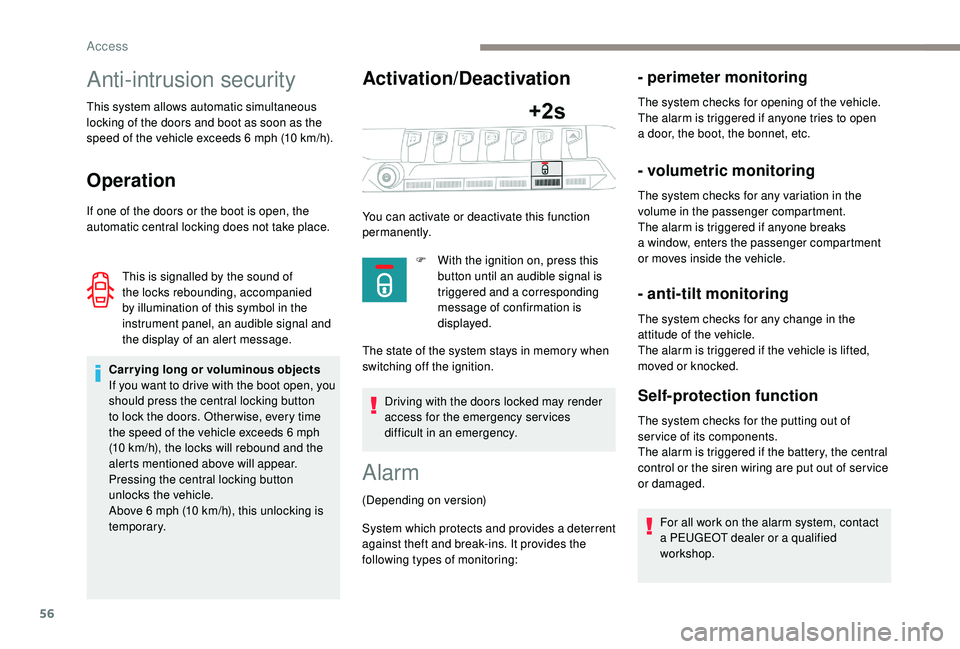
You can activate or deactivate this function
permanently.
F
W
ith the ignition on, press this
button until an audible signal is
triggered and a corresponding
message of confirmation is
displayed.
The state of the system stays in memory when
switching off the ignition.
Alarm
(Depending on version)
System which protects and provides a
deterrent
against theft and break-ins. It provides the
following types of monitoring:
- perimeter monitoring
The system checks for opening of the vehicle.
The alarm is triggered if anyone tries to open
a
door, the boot, the bonnet, etc.
- volumetric monitoring
The system checks for any variation in the
volume in the passenger compartment.
The alarm is triggered if anyone breaks
a
window, enters the passenger compartment
or moves inside the vehicle.
- anti-tilt monitoring
The system checks for any change in the
attitude of the vehicle.
The alarm is triggered if the vehicle is lifted,
moved or knocked.
Self-protection function
The system checks for the putting out of
ser vice of its components.
The alarm is triggered if the battery, the central
control or the siren wiring are put out of ser vice
or damaged.
For all work on the alarm system, contact
a
PEUGEOT dealer or a qualified
workshop.
Access
Page 61 of 364
59
From inside
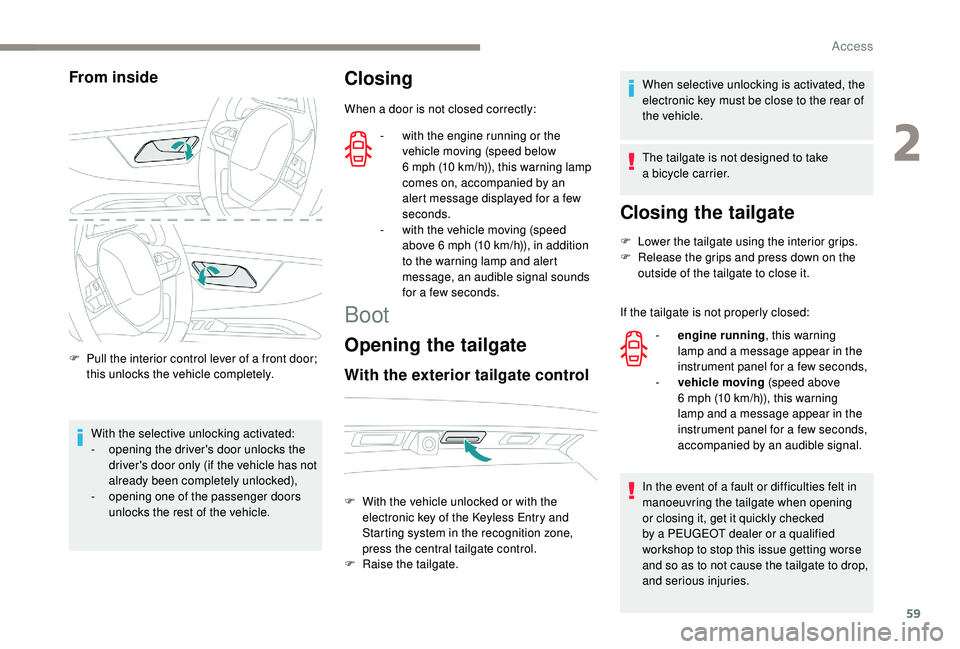
F Pull the interior control lever of a front door;
this unlocks the vehicle completely.
With the selective unlocking activated:
-
o
pening the driver's door unlocks the
driver's door only (if the vehicle has not
already been completely unlocked),
-
o
pening one of the passenger doors
unlocks the rest of the vehicle.
Closing
When a door is not closed correctly:
Boot
Opening the tailgate
With the exterior tailgate control
When selective unlocking is activated, the
electronic key must be close to the rear of
the vehicle.
The tailgate is not designed to take
a
bicycle carrier.
Closing the tailgate
F Lower the tailgate using the interior grips.
F R elease the grips and press down on the
outside of the tailgate to close it.
If the tailgate is not properly closed:
In the event of a
fault or difficulties felt in
manoeuvring the tailgate when opening
or closing it, get it quickly checked
by a
PEUGEOT dealer or a qualified
workshop to stop this issue getting worse
and so as to not cause the tailgate to drop,
and serious injuries.
-
w
ith the engine running or the
vehicle moving (speed below
6
mph (10
km/h)), this warning lamp
comes on, accompanied by an
alert message displayed for a
few
seconds.
-
w
ith the vehicle moving (speed
above 6
mph (10
km/h)), in addition
to the warning lamp and alert
message, an audible signal sounds
for a
few seconds.
F
W
ith the vehicle unlocked or with the
electronic key of the
K
eyless Entry and
Starting system in the recognition zone,
press the central tailgate control.
F
Ra
ise the tailgate. -
e
ngine running , this warning
lamp and a
message appear in the
instrument panel for a
few seconds,
-
v
ehicle moving (speed above
6
mph (10 km/h)), this warning
lamp and a
message appear in the
instrument panel for a
few seconds,
accompanied by an audible signal.
2
Access
Page 76 of 364
74
Multipoint massage
System with a choice of type of massage and
ad justment of its intensity.
This system operates with the engine running,
as well as in STOP mode of Stop & Start.
Activation/Settings
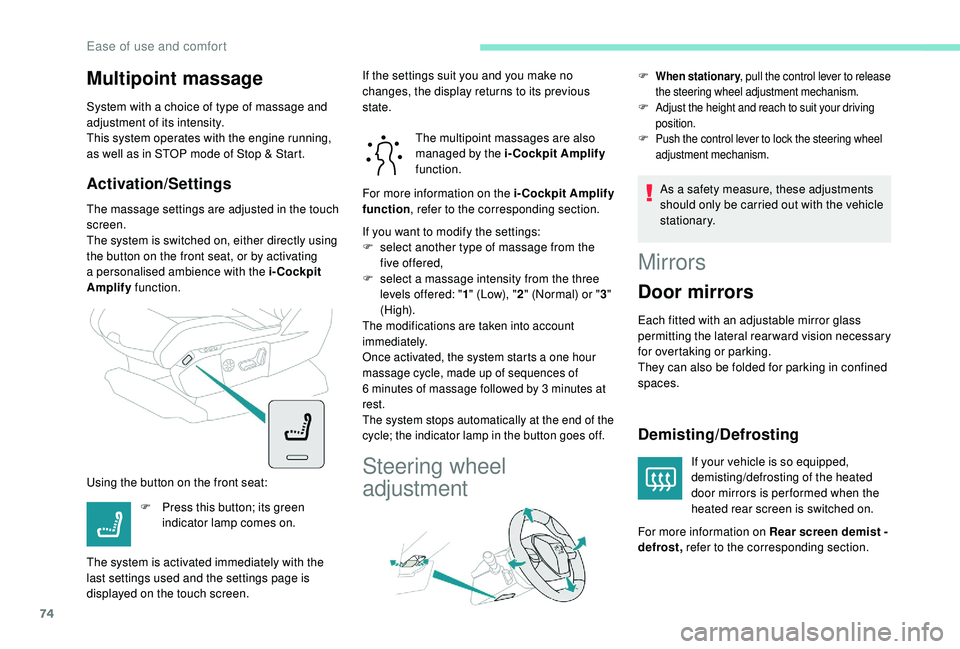
The massage settings are adjusted in the touch
screen.
The system is switched on, either directly using
the button on the front seat, or by activating
a
personalised ambience with the i-Cockpit
Amplify function.
Using the button on the front seat: The multipoint massages are also
managed by the i-Cockpit Amplify
function.
If you want to modify the settings:
F
s
elect another type of massage from the
five offered,
F
s
elect a massage intensity from the three
levels offered: " 1" (Low), " 2" (Normal) or " 3"
(High).
The modifications are taken into account
immediately.
Once activated, the system starts a
one hour
massage cycle, made up of sequences of
6
minutes of massage followed by 3 minutes at
rest.
The system stops automatically at the end of the
cycle; the indicator lamp in the button goes off.
Steering wheel
adjustment
F When stationary , pull the control lever to release
the steering wheel adjustment mechanism.
F Adjust the height and reach to suit your driving position.
F Push the control lever to lock the steering wheel adjustment mechanism.
As a safety measure, these adjustments
s hould only be carried out with the vehicle
stationary.
F
P
ress this button; its green
indicator lamp comes on.
The system is activated immediately with the
last settings used and the settings page is
displayed on the touch screen. If the settings suit you and you make no
changes, the display returns to its previous
state.
For more information on the i-Cockpit Amplify
function
, refer to the corresponding section.
Mirrors
Door mirrors
Each fitted with an adjustable mirror glass
permitting the lateral rearward vision necessary
for overtaking or parking.
They can also be folded for parking in confined
spaces.
Demisting/Defrosting
If your vehicle is so equipped,
demisting/defrosting of the heated
door mirrors is per formed when the
heated rear screen is switched on.
For more information on Rear screen demist -
defrost, refer to the corresponding section.
Ease of use and comfort
Page 86 of 364
84
Personalising an ambience
From the home page:
F S elect an ambience to activate it.
F
P
ress " Settings " to display the settings
page for the ambience.
F
S
elect a system for which you wish to
modify the settings.
F
A
fter making the modifications, press any
area of the screen outside the system
settings window to return to the ambience
settings page.
F
A
fter making all of the desired modifications
to settings, press " Save settings".
The modifications are taken into account
immediately.
It is possible to temporarily modify an
ambience at any time, by modifying the
settings for one or more of the systems
managed in the ambience, without going
via the i- Cockpit Amplify function.
For example, you can deactivate or modify
the intensity of the current massage by
pressing the massage activation button
on your seat or activate/deactivate
the ambient lighting in the passenger
compartment from the Vehicle/Driving
menu.
In this case, the new settings will not be
saved as part of the current ambience.Heating and Ventilation
Air intake
The air circulating in the passenger
compartment is filtered and originates either
from the outside via the grille located at the
base of the windscreen or from the inside in air
recirculation mode.
Controls
The incoming air follows various routes
depending on the controls selected by
the driver, the front passenger and rear
passengers, depending on the level of
equipment.
The temperature control enables you to obtain
the level of comfort required by mixing the air of
the various circuits.
The air distribution control enables you to
select the air vents used in the passenger
compartment by the combined use of the
associated buttons.
The air flow control enables you to increase or
reduce the speed of the ventilation fan.
Depending on your vehicle, the controls are
accessible in the Air conditioning menu of the
touch screen or are grouped together on the
control panel of the centre console.
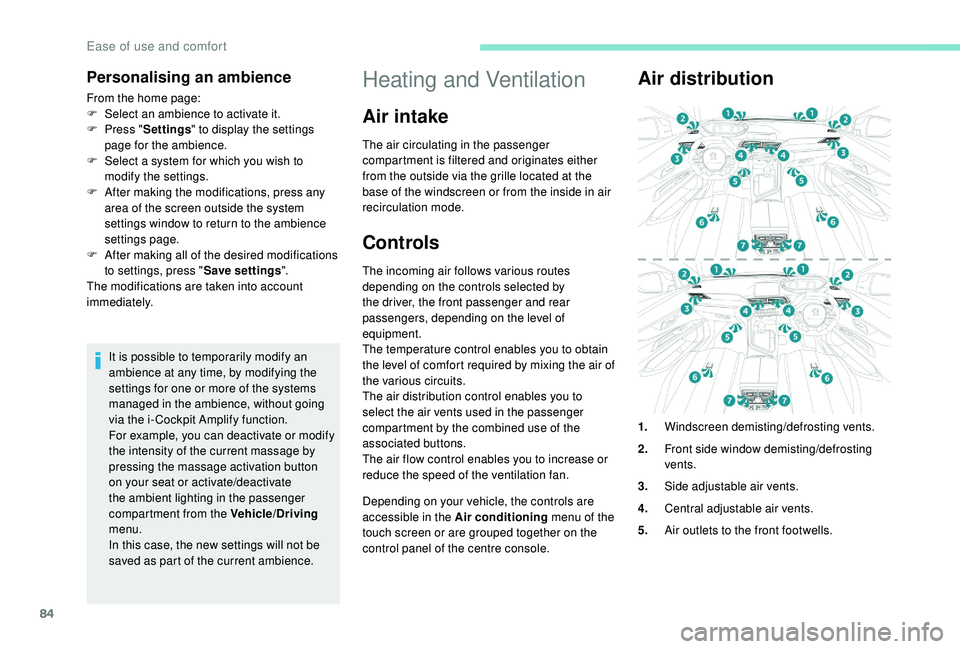
Air distribution
1. Windscreen demisting/defrosting vents.
2. Front side window demisting/defrosting
vents.
3. Side adjustable air vents.
4. Central adjustable air vents.
5. Air outlets to the front footwells.
Ease of use and comfort
Page 89 of 364
87
The air conditioning does not operate
when the air flow adjustment is set to off.
To obtain cool air more quickly, you can
activate recirculation of the interior air for
a few moments.
Switching off
F Press this button again; its indicator lamp goes off.
Switching off the air conditioning may result in
some discomfort (humidity, condensation).
Semi-automatic mono-
zone air conditioning
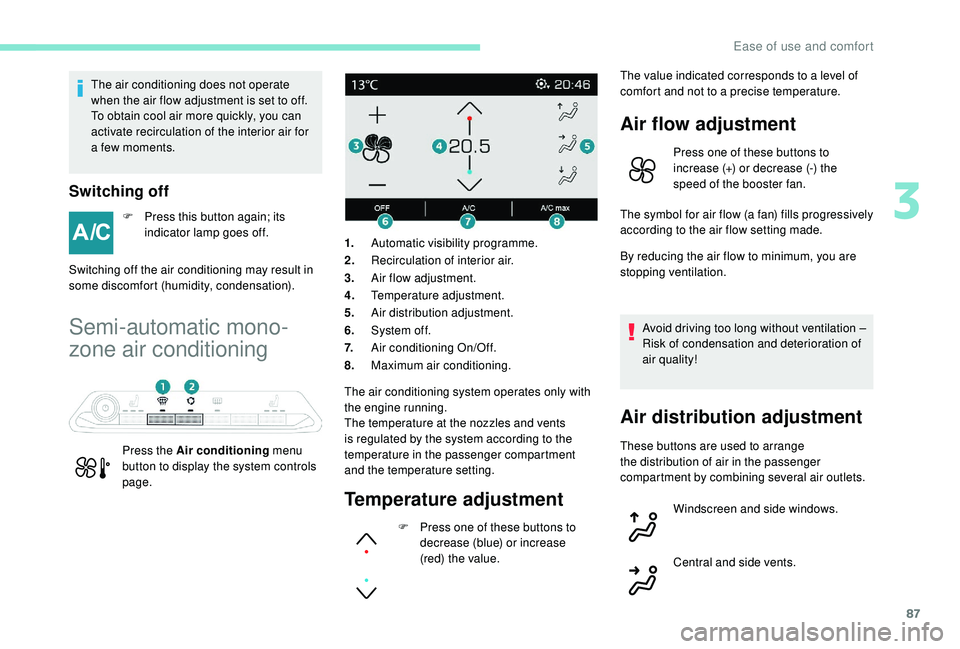
Press the Air conditioning menu
button to display the system controls
page. The air conditioning system operates only with
the engine running.
The temperature at the nozzles and vents
is regulated by the system according to the
temperature in the passenger compartment
and the temperature setting.1.
Automatic visibility programme.
2. Recirculation of interior air.
3. Air flow adjustment.
4. Temperature adjustment.
5. Air distribution adjustment.
6. System of f.
7. Air conditioning On/Off.
8. Maximum air conditioning.
Temperature adjustment
F Press one of these buttons to
decrease (blue) or increase
(red) the value. The value indicated corresponds to a
level of
comfort and not to a precise temperature.
Air flow adjustment
Press one of these buttons to
increase (+) or decrease (-) the
speed of the booster fan.
The symbol for air flow (a fan) fills progressively
according to the air flow setting made.
By reducing the air flow to minimum, you are
stopping ventilation.
Avoid driving too long without ventilation –
Risk of condensation and deterioration of
air quality!
Air distribution adjustment
These buttons are used to arrange
the distribution of air in the passenger
compartment by combining several air outlets. Windscreen and side windows.
Central and side vents.
3
Ease of use and comfort
Page 91 of 364
89
Automatic dual-zone air
conditioning
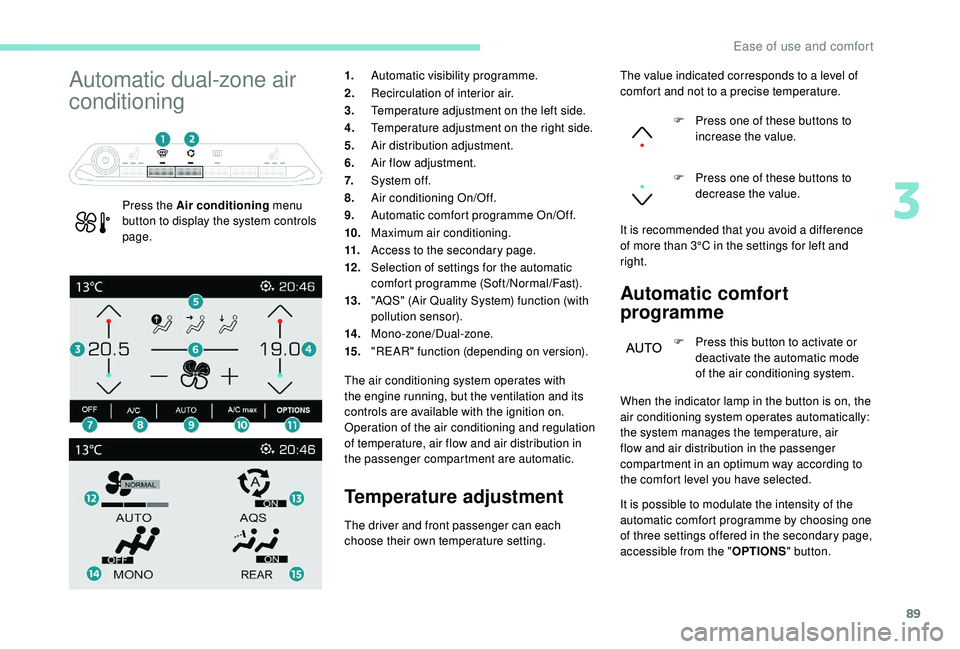
Press the Air conditioning menu
button to display the system controls
page. 1.
Automatic visibility programme.
2. Recirculation of interior air.
3. Temperature adjustment on the left side.
4. Temperature adjustment on the right side.
5. Air distribution adjustment.
6. Air flow adjustment.
7. System of f.
8. Air conditioning On/Off.
9. Automatic comfort programme On/Off.
10. Maximum air conditioning.
11. Access to the secondary page.
12 . Selection of settings for the automatic
comfort programme (Soft/Normal/Fast).
13. "AQS" (Air Quality System) function (with
pollution sensor).
14 . Mono-zone/Dual-zone.
15. "REAR" function (depending on version).
The air conditioning system operates with
the engine running, but the ventilation and its
controls are available with the ignition on.
Operation of the air conditioning and regulation
of temperature, air flow and air distribution in
the passenger compartment are automatic.
Temperature adjustment Automatic comfort
programme
F Press this button to activate or
deactivate the automatic mode
of the air conditioning system.
The driver and front passenger can each
choose their own temperature setting. The value indicated corresponds to a
level of
comfort and not to a precise temperature.
F
P
ress one of these buttons to
increase the value.
F
P
ress one of these buttons to
decrease the value.
It is recommended that you avoid a difference
of more than 3°C in the settings for left and
right.
When the indicator lamp in the button is on, the
air conditioning system operates automatically:
the system manages the temperature, air
flow and air distribution in the passenger
compartment in an optimum way according to
the comfort level you have selected.
It is possible to modulate the intensity of the
automatic comfort programme by choosing one
of three settings offered in the secondary page,
accessible from the " OPTIONS" button.
3
Ease of use and comfort
Page 92 of 364
90
$872
)$67
$872
1250$/
62)7
$872
To change the current setting, shown by
illumination of the corresponding indicator
lamp, press this button repeatedly until the
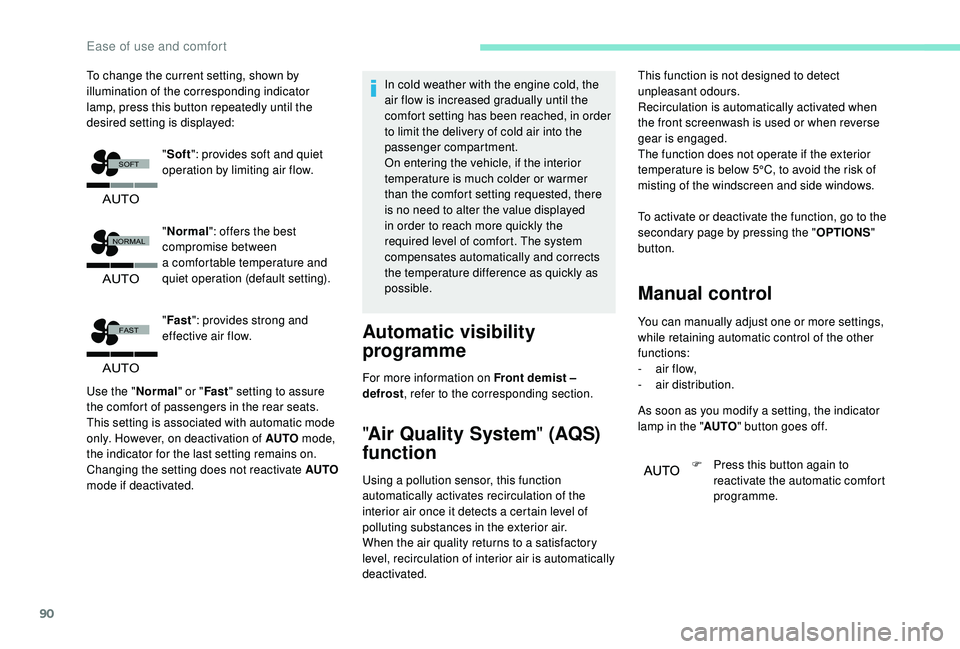
desired setting is displayed:"Normal ": offers the best
compromise between
a
comfortable temperature and
quiet operation (default setting).
" Fast ": provides strong and
effective air flow.
Use the " Normal" or "Fast" setting to assure
the comfort of passengers in the rear seats.
This setting is associated with automatic mode
only. However, on deactivation of AUTO mode,
the indicator for the last setting remains on.
Changing the setting does not reactivate AUTO
mode if deactivated. In cold weather with the engine cold, the
air flow is increased gradually until the
comfort setting has been reached, in order
to limit the delivery of cold air into the
passenger compartment.
On entering the vehicle, if the interior
temperature is much colder or warmer
than the comfort setting requested, there
is no need to alter the value displayed
in order to reach more quickly the
required level of comfort. The system
compensates automatically and corrects
the temperature difference as quickly as
possible.
Automatic visibility
programme
For more information on Front demist –
defrost
, refer to the corresponding section.
"Air Quality System " (AQS)
function
Using a pollution sensor, this function
a utomatically activates recirculation of the
interior air once it detects a
certain level of
polluting substances in the exterior air.
When the air quality returns to a
satisfactory
level, recirculation of interior air is automatically
deactivated. To activate or deactivate the function, go to the
secondary page by pressing the "
OPTIONS"
button.
Manual control
You can manually adjust one or more settings,
while retaining automatic control of the other
functions:
-
a
ir flow,
-
a
ir distribution.
As soon as you modify a
setting, the indicator
lamp in the " AUTO" button goes off.
F
P
ress this button again to
reactivate the automatic comfort
programme.
"
Soft ": provides soft and quiet
operation by limiting air flow. This function is not designed to detect
unpleasant odours.
Recirculation is automatically activated when
the front screenwash is used or when reverse
gear is engaged.
The function does not operate if the exterior
temperature is below 5°C, to avoid the risk of
misting of the windscreen and side windows.
Ease of use and comfort
Page 93 of 364
91
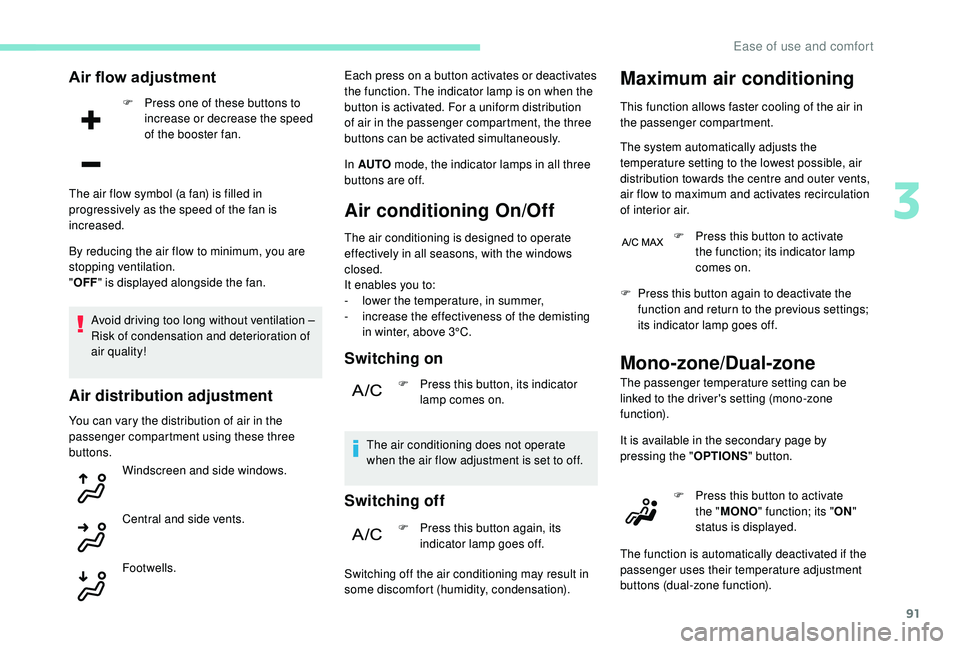
Air flow adjustment
F Press one of these buttons to increase or decrease the speed
of the booster fan.
By reducing the air flow to minimum, you are
stopping ventilation.
" OFF " is displayed alongside the fan.
Avoid driving too long without ventilation –
Risk of condensation and deterioration of
air quality!
Air distribution adjustment
You can vary the distribution of air in the
passenger compartment using these three
buttons. Windscreen and side windows.
Central and side vents.
The air flow symbol (a fan) is filled in
progressively as the speed of the fan is
increased.
Footwells. Each press on a
button activates or deactivates
the function. The indicator lamp is on when the
button is activated. For a uniform distribution
of air in the passenger compartment, the three
buttons can be activated simultaneously.
In AUTO mode, the indicator lamps in all three
buttons are off.
Air conditioning On/Off
The air conditioning is designed to operate
effectively in all seasons, with the windows
closed.
It enables you to:
-
l
ower the temperature, in summer,
-
i
ncrease the effectiveness of the demisting
in winter, above 3°C.
Switching on
F Press this button, its indicator lamp comes on.
The air conditioning does not operate
when the air flow adjustment is set to off.
Switching off
F Press this button again, its indicator lamp goes off.
Switching off the air conditioning may result in
some discomfort (humidity, condensation).
Maximum air conditioning
This function allows faster cooling of the air in
the passenger compartment.
The system automatically adjusts the
temperature setting to the lowest possible, air
distribution towards the centre and outer vents,
air flow to maximum and activates recirculation
of interior air. F
P
ress this button to activate
the function; its indicator lamp
comes on.
F
P
ress this button again to deactivate the
function and return to the previous settings;
its indicator lamp goes off.
Mono-zone/Dual-zone
The passenger temperature setting can be
linked to the driver's setting (mono-zone
function).
It is available in the secondary page by
pressing the " OPTIONS" button.
F
P
ress this button to activate
the " MONO " function; its " ON"
status is displayed.
The function is automatically deactivated if the
passenger uses their temperature adjustment
buttons (dual-zone function).
3
Ease of use and comfort