ESP Peugeot 508 RXH 2013 User Guide
[x] Cancel search | Manufacturer: PEUGEOT, Model Year: 2013, Model line: 508 RXH, Model: Peugeot 508 RXH 2013Pages: 308, PDF Size: 8.95 MB
Page 84 of 308
82
Access
Electric windows
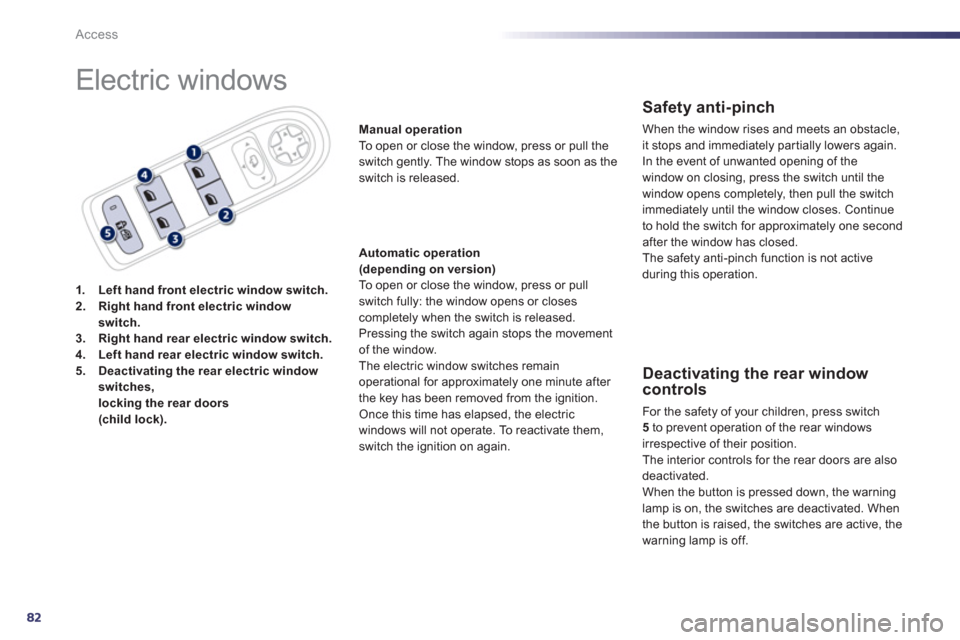
1.Left hand front electric window switch.2.Right hand front electric windowswitch.3.Right hand rear electric window switch.4.Left hand rear electric window switch.5.Deactivating the rear electric window
switches, locking the rear doors (child lock).
Manual operation
To open or close the window, press or pull the
switch gently. The window stops as soon as the
switch is released.
Automatic operation(depending on version) To open or close the window, press or pull
switch fully: the window opens or closescompletely when the switch is released. Pressing the switch again stops the movementof the window.
The electric window switches remain
operational for approximately one minute after
the key has been removed from the ignition.
Once this time has elapsed, the electric
windows will not o
perate. To reactivate them,
switch the ignition on again.
Safety anti-pinch
When the window rises and meets an obstacle, it stops and immediately partially lowers again.
In the event o
f unwanted opening of the
window on closing, press the switch until the
window opens completely, then pull the switch
immediatel
y until the window closes. Continue
to hold the switch for approximately one secondafter the window has closed.
The safety anti-pinch function is not active
during this operation.
Deactivating the rear window controls
For the safety of your children, press switch 5
to prevent operation of the rear windows
irrespective of their position.
Th
e interior controls for the rear doors are also deactivated.
When the button is pressed down, the warninglamp is on, the switches are deactivated. When
the button is raised, the switches are active, the
warning lamp is off.
Page 95 of 308
3
93
Comfort
Storing driving positions
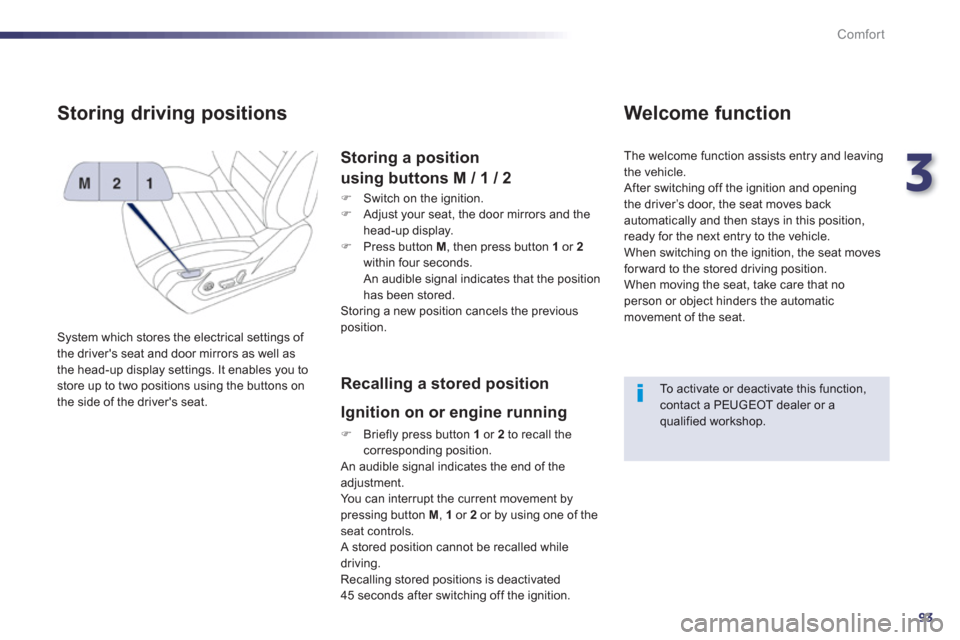
System which stores the electrical settings of
the driver's seat and door mirrors as well as
the head-up display settings. It enables you to store up to two positions using the buttons on
the side of the driver's seat.
Storing a position
using buttons M / 1 / 2
)
Switch on the ignition. )
Adjust your seat, the door mirrors and the
head-up display.
) Press button M
, then press button 1or 2
within four seconds.
An audible signal indicates that the position
has been stored.
Storing a new position cancels the previousposition.
Recalling a stored position
I
gnition on or engine running
) Briefly press button 1
or 2
to recall thecorresponding position.
An audible signal indicates the end of the adjustment. You can interrupt the current movement by pressing button M , 1or 2or by using one of the seat controls.
A stored position cannot be recalled while
driving.
Recalling stored positions is deactivated
45 seconds after switching off the ignition.
Welcome function
The welcome function assists entry and leaving
th
e vehicle.
After switching off the ignition and openingthe driver’s door, the seat moves back
automatically and then stays in this position,
ready for the next entry to the vehicle.
When switching on the ignition, the seat movesfor ward to the stored driving position.
When moving the seat, take care that no
person or object hinders the automatic
movement of the seat.
To activate or deactivate this function, contact a PEUGEOT dealer or a qualified workshop.
Page 99 of 308
3
97
Comfort
Folding the seat from the
rear
Check that no object, either on or underneath
the seat, could hinder its movement.
Returning the seat back to its original position
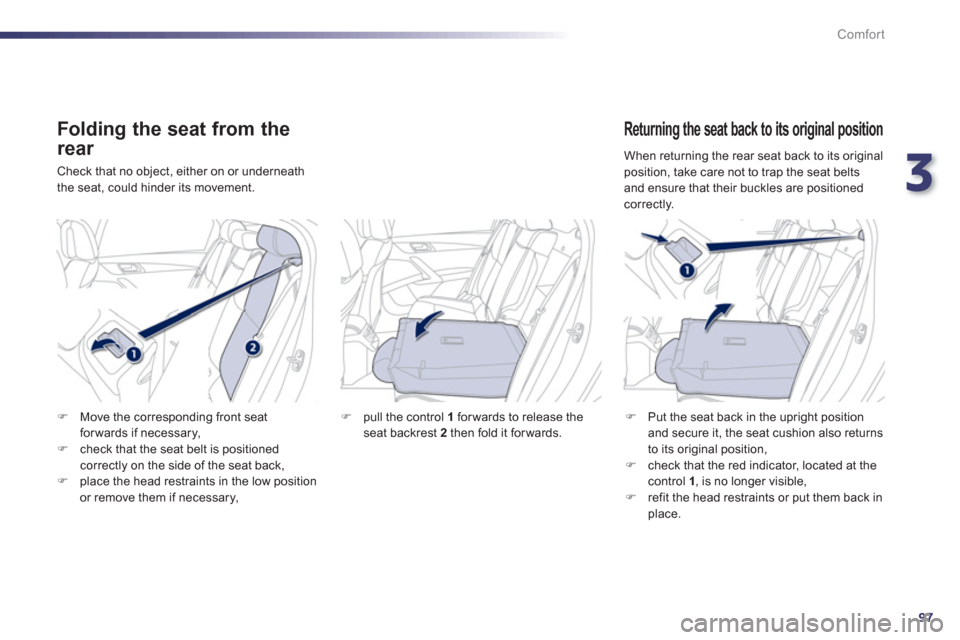
)Put the seat back in the upright position
and secure it, the seat cushion also returns
to its original position, )check that the red indicator, located at thecontrol 1 , is no longer visible,)refit the head restraints or put them back in place.
)Move the corresponding front seat
forwards if necessar
y, )check that the seat belt is positionedcorrectly on the side of the seat back, )place the head restraints in the low position
or remove them if necessary,
) pull the control 1forwards to release the
seat backrest 2then fold it forwards.
When returning the rear seat back to its original
position, take care not to trap the seat belts
and ensure that their buckles are positioned correctly.
Page 100 of 308
98
Comfort
Mirrors
Each fitted with an adjustable mirror glasspermitting the lateral rearward vision necessary for overtaking or parking. They can also befolded for parking in confined spaces.
Door mirrors
If the mirrors are folded using control A
,they will not unfold when the vehicle is unlocked. Pull again on control A.
The folding and unfolding of the door mirrors using the remote control can bedeactivated by a PEUGEOT dealer or a qualified workshop.
Fold the mirrors when putting your vehicle through an automatic car wash.
The objects obser ved are, in reality, closer than they appear.
Take this into account in order to correctly judge the distance of vehicles approaching from behind.
Demisting - Defrosting
If your vehicle is fitted with heated mirrors, the
demisting-defrosting operates by switching
on the heated rear screen (refer to the "Rear screen demist-defrost" page).
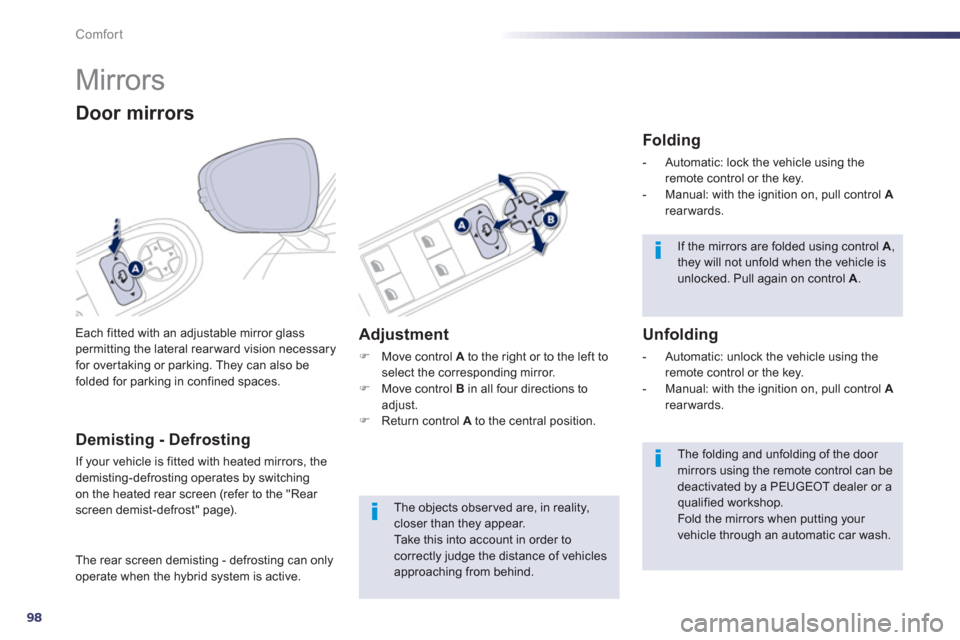
Adjustment
)
Move control Ato the right or to the left to select the corresponding mirror. )
Move control Bin all four directions toadjust. )
Return control Ato the central position.
Folding
- Automatic: lock the vehicle using the remote control or the key.
- Manual: with the ignition on, pull control Arearwards.
Unfolding
- Automatic: unlock the vehicle using the remote control or the key.
- Manual: with the ignition on, pull control Arearwards.
The rear screen demistin
g - defrosting can onlyoperate when the hybrid system is active.
Page 101 of 308
3
99
Comfort
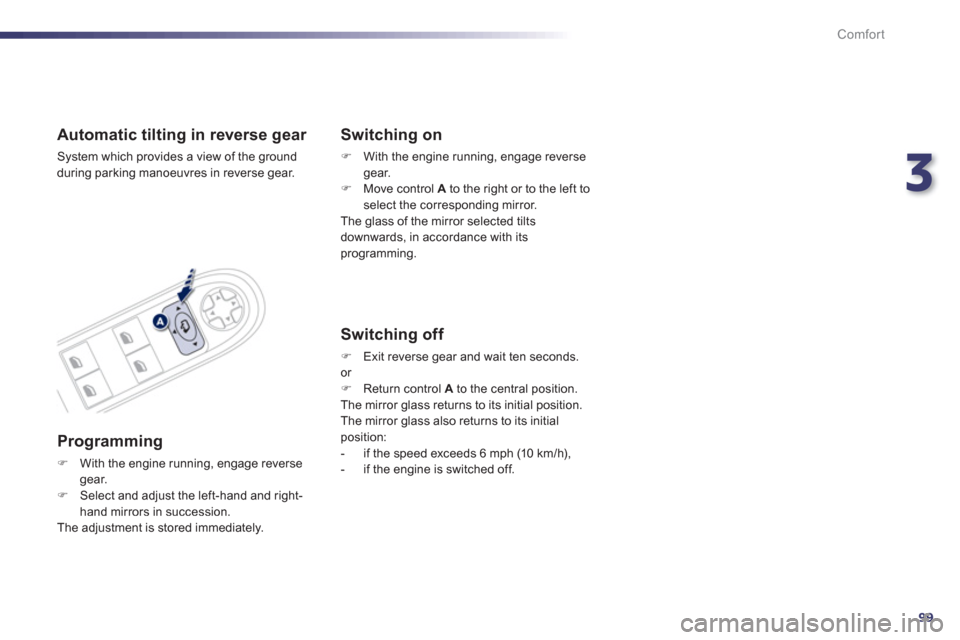
Automatic tilting in reverse gear
System which provides a view of the ground
durin
g parking manoeuvres in reverse gear.
Programming
)With the engine running, engage reverse gear.)Select and adjust the left-hand and right-hand mirrors in succession.
The adjustment is stored immediately.
Switching on
)
With the engine running, engage reversegear. )
Move control A
to the right or to the left to select the corresponding mirror.
The glass of the mirror selected tilts downwards, in accordance with its programming.
Switching off
) Exit reverse gear and wait ten seconds.or )
Return control Ato the central position.
The mirror glass returns to its initial position.
The mirror glass also returns to its initial position:
- if the speed exceeds 6 mph (10 km/h),
- if the engine is switched off.
Page 110 of 308
108
Comfort
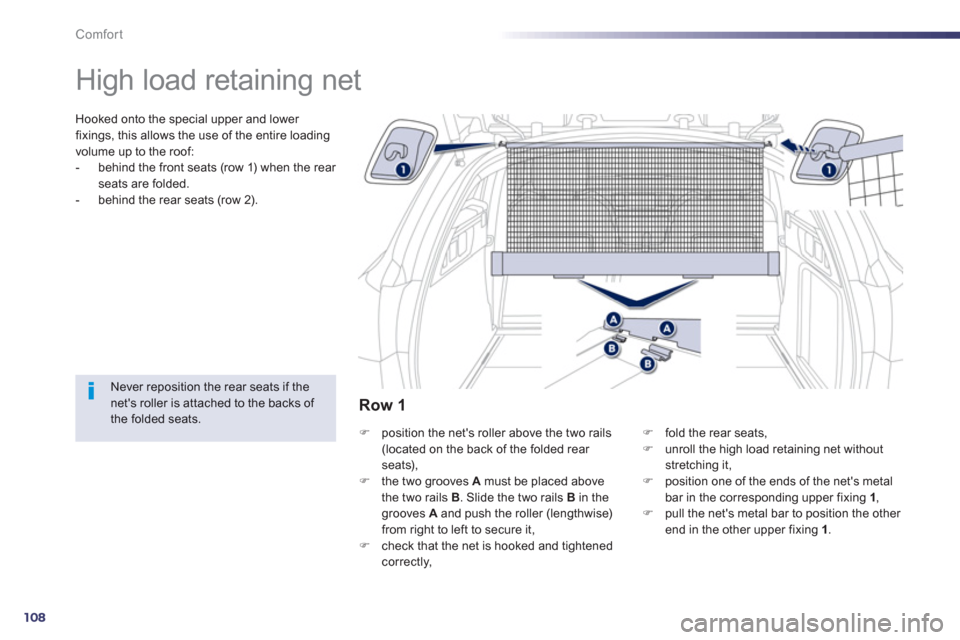
High load retaining net
Hooked onto the special upper and lower
fixings, this allows the use of the entire loadingvolume up to the roof:
- behind the front seats (row 1) when the rear seats are folded.
- behind the rear seats (row 2).
Never reposition the rear seats if thenet's roller is attached to the backs of the folded seats. )
position the net's roller above the two rails (located on the back of the folded rear seats),)
the two grooves Amust be placed above
the two rails B
. Slide the two rails B
in the grooves A
and push the roller (lengthwise)from right to left to secure it,
)
check that the net is hooked and tightened correctly,
)fold the rear seats, )unroll the high load retaining net withoutstretching it, )position one of the ends of the net's metal
bar in the corresponding upper fixing 1,)pull the net's metal bar to position the other end in the other upper fixing 1 .
Row 1
Page 111 of 308
3
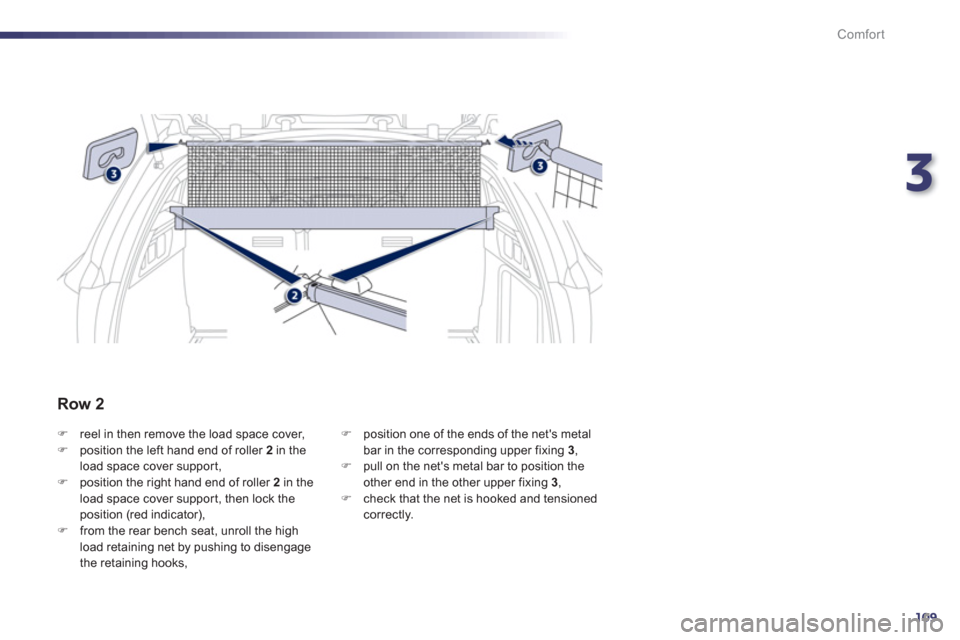
109
Comfort
)reel in then remove the load space cover, )position the left hand end of roller 2 in the load space cover suppor t, )position the right hand end of roller 2
in theload space cover support, then lock theposition (red indicator), )from the rear bench seat, unroll the high
load retaining net by pushing to disengage
the retaining hooks,
) position one of the ends of the net's metalbar in the corresponding upper fixing 3 ,)
pull on the net's metal bar to position the
other end in the other upper fixing 3,) check that the net is hooked and tensioned correctly.
Row 2
Page 114 of 308
112
Comfort
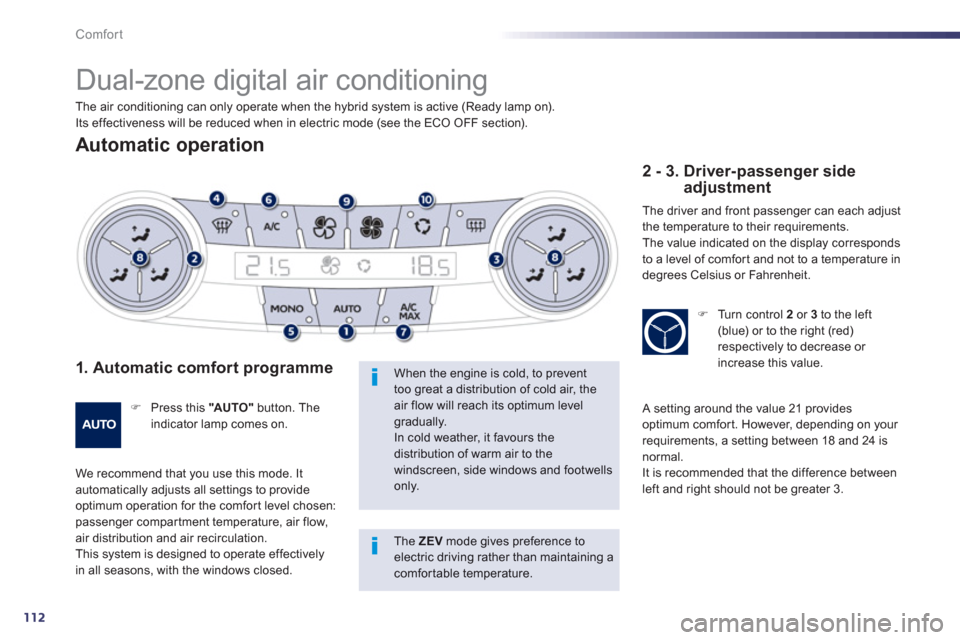
Dual-zone digital air conditioning
Automatic operation
1. Automatic comfort programme
)
Press this "AU TO "button. Theindicator lamp comes on.
We recommend that you use this mode. It automatically adjusts all settings to provide
optimum operation for the comfor t level chosen: passenger compar tment temperature, air flow, air distribution and air recirculation.
This system is designed to operate effectivelyin all seasons, with the windows closed.
When the engine is cold, to prevent too great a distribution of cold air, the air flow will reach its optimum levelgradually. In cold weather, it favours the distribution of warm air to the windscreen, side windows and footwells only.
2 - 3. Driver-passenger side adjustment
The driver and front passenger can each adjust
the temperature to their requirements.
The value indicated on the displa
y corresponds
to a level of comfor t and not to a temperature in
degrees Celsius or Fahrenheit.
) Turn control 2or 3to the left(blue) or to the right (red) respectively to decrease or increase this value.
A setting around the value 21 provides
optimum comfor t. However, depending on your
requirements, a setting between 18 and 24 isnormal.
It is recommended that the difference between
left and right should not be greater 3. The air conditionin
g can only operate when the hybrid system is active (Ready lamp on).
Its effectiveness will be reduced when in electric mode (see the ECO OFF section).
The ZEV mode gives preference to electric driving rather than maintaining a comfortable temperature.
Page 116 of 308
114
Comfort
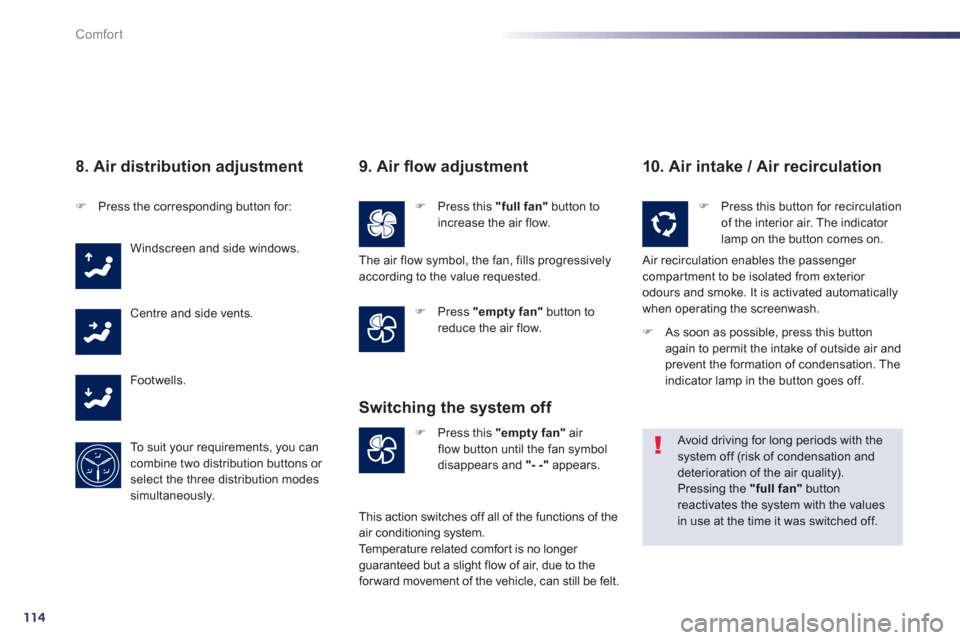
8. Air distribution adjustment
)Press the corresponding button for:
Windscreen and side windows.
Centre and side vents.
F
ootwells.
To s u i t
your requirements, you cancombine two distribution buttons or select the three distribution modes
simultaneously.
9. Air fl ow adjustment
)Press this "full fan"button toincrease the air flow.
)Press "empty fan"
button to reduce the air flow.
10. Air intake / Air recirculation
)Press this "empty fan"
air flow button until the fan symbol
disappears and "- -"
appears.
Switching the system off
)
Press this button for recirculation of the interior air. The indicator
lamp on the button comes on.
Air recirculation enables the passenger compartment to be isolated from exterior
odours and smoke. It is activated automaticallywhen operating the screenwash.
Avoid driving for long periods with the system off (risk of condensation and deterioration of the air quality).
Pressing the "full fan"buttonreactivates the system with the valuesin use at the time it was switched off.
The air flow symbol, the fan, fills progressivelyaccording to the value requested.
Thi
s action switches off all of the functions of the
air conditioning system.
Temperature related comfor t is no longer guaranteed but a slight flow of air, due to the forward movement of the vehicle, can still be felt.
)As soon as possible, press this buttonagain to permit the intake of outside air and prevent the formation of condensation. The
indicator lamp in the button goes off.
Page 117 of 308
3
115
Comfort
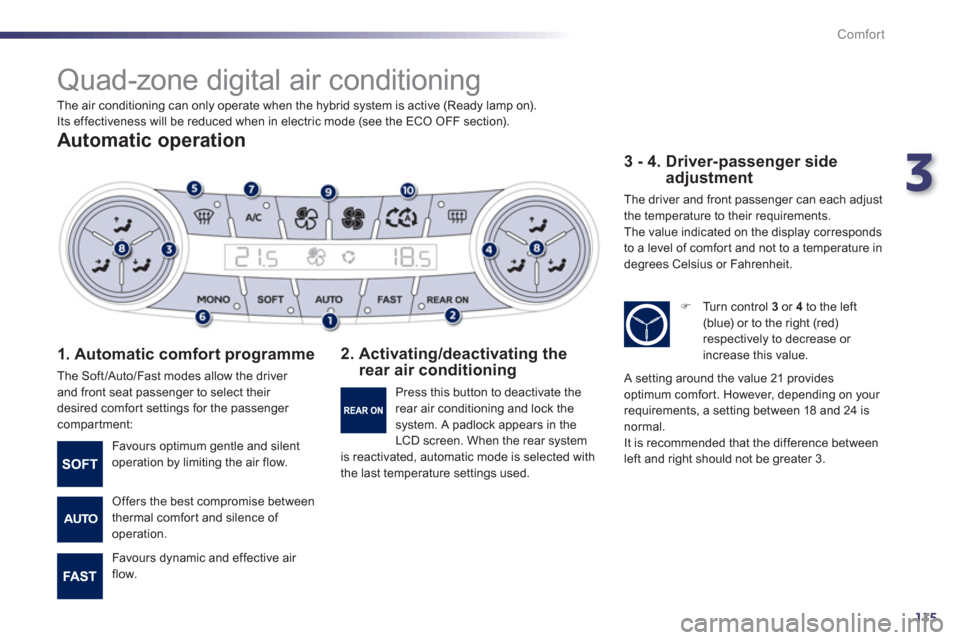
Quad-zone digital air conditioning
Automatic operation
1. Automatic comfort programme
The Soft/Auto/Fast modes allow the driver
and front seat passenger to select their
desired comfort settings for the passenger compartment:
2. Activating/deactivating the rear air conditioning
3 - 4. Driver-passenger side adjustment
The driver and front passenger can each adjust
the temperature to their requirements.
The value indicated on the display corresponds
to a level of comfor t and not to a temperature in
degrees Celsius or Fahrenheit.
Favours optimum gentle and silent
operation by limiting the air flow.
Offers the best compromise between
thermal comfort and silence of
operation.
Favours d
ynamic and effective air
flow. Pr
ess this button to deactivate the
rear air conditioning and lock thesystem. A padlock appears in the
LCD screen. When the rear system is reactivated, automatic mode is selected with
the last temperature settings used.
)
Turn control 3
or 4
to the left (blue) or to the right (red)respectively to decrease or
increase this value.
A setting around the value 21 providesoptimum comfort. However, depending on your
requirements, a setting between 18 and 24 is
normal.
It is recommended that the difference between
left and right should not be greater 3. The air conditionin
g can only operate when the hybrid system is active (Ready lamp on).
Its effectiveness will be reduced when in electric mode (see the ECO OFF section).