settings Peugeot 508 RXH 2013 User Guide
[x] Cancel search | Manufacturer: PEUGEOT, Model Year: 2013, Model line: 508 RXH, Model: Peugeot 508 RXH 2013Pages: 308, PDF Size: 8.95 MB
Page 120 of 308
118
Comfort
Adjusting the rear passenger comfort level
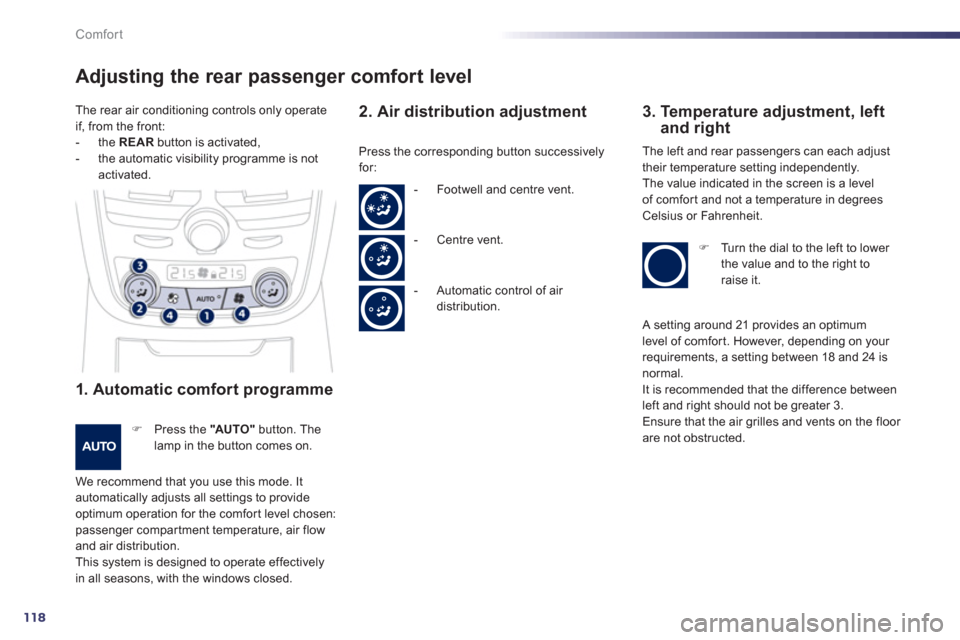
1. Automatic comfort programme
) Press the "AUTO"
button. The lamp in the button comes on.
We recommend that you use this mode. It automatically adjusts all settings to provide
optimum operation for the comfor t level chosen: passenger compar tment temperature, air flowand air distribution.
This system is designed to operate effectivelyin all seasons, with the windows closed.
2. Air distribution adjustment
3. Temperature adjustment, leftand right
Press the corresponding button successively
for: The le
ft and rear passengers can each adjust
their temperature setting independently.
Th
e value indicated in the screen is a level
of comfor t and not a temperature in degreesCelsius or Fahrenheit.
) Turn the dial to the left to lower
the value and to the right to
r
aise it. - F
ootwell and centre vent.
-
Centre vent.
- A
utomatic control of air distribution. The rear air conditionin
g controls only operate
if, from the front:
- th
e REARbutton is activated,- the automatic visibility programme is notactivated.
A setting around 21 provides an optimum
level of comfor t. However, depending on your
requirements, a setting between 18 and 24 isnormal.
It is recommended that the difference between
left and right should not be greater 3.
Ensure that the air grilles and vents on the floor are not obstructed.
Page 122 of 308
120
Comfort
) Switch off the demist/defrost of the rear screen and door mirrors assoon as it is no longer needed as lower current consumption results in reduced fuel consumption.
Front Demist -
Defrost
Rear screen
demist - defrost
The control button is located on theair conditioning system control panel. With manual air
conditioning
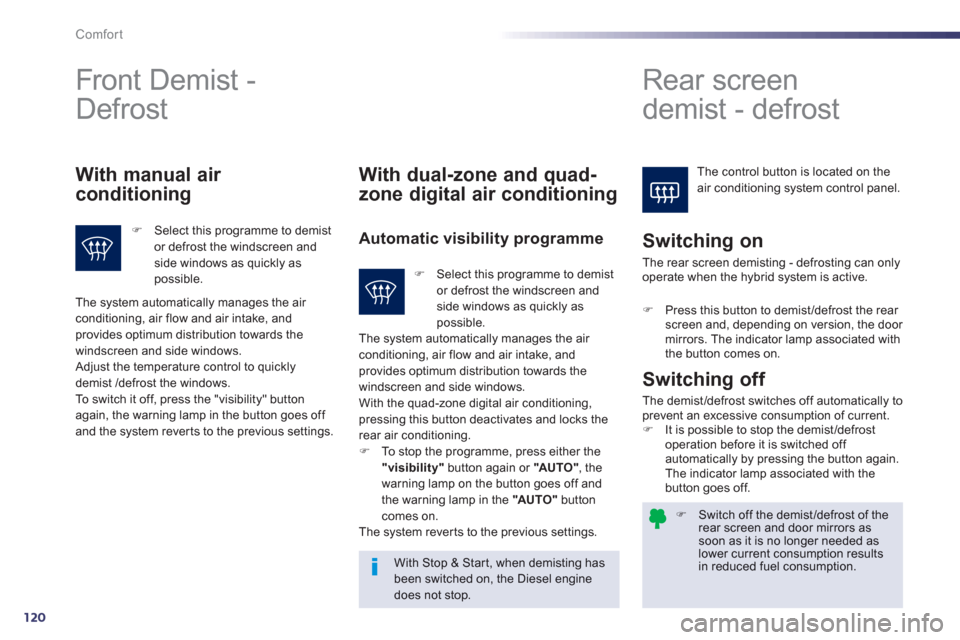
) Select this programme to demistor defrost the windscreen and side windows as quickly aspossible.
With dual-zone and quad-
zone di
gital air conditioning
Automatic visibility programme
Switching on
With Stop & Star t, when demisting has been switched on, the Diesel enginedoes not stop.
Switching off
The demist /defrost switches off automatically toprevent an excessive consumption of current. )It is possible to stop the demist /defrost
operation before it is switched off automatically by pressing the button again.
The indicator lamp associated with the
button
goes off.
The system automatically manages the air conditioning, air flow and air intake, and provides optimum distribution towards the
windscreen and side windows.
Adjust the temperature control to quickly
demist /defrost the windows.
To switch it off, press the "visibility" button again, the warning lamp in the button goes off and the system rever ts to the previous settings.
)Select this programme to demist or defrost the windscreen andside windows as quickly as possible.
The system automatically manages the air conditioning, air flow and air intake, and
provides optimum distribution towards the
win
dscreen and side windows.
With the quad-zone digital air conditioning,
pressing this button deactivates and locks the
rear air conditioning. ) To stop the programme, press either the "visibility"button again or "AU TO "
, the
warning lamp on the button goes off and
the warning lamp in the "AU TO "buttoncomes on.
The system rever ts to the previous settings.
The rear screen demistin
g - defrosting can onlyoperate when the hybrid system is active.
)Press this button to demist/defrost the rear screen and, depending on version, the door mirrors. The indicator lamp associated with
the button comes on.
Page 137 of 308
4
135
Driving
Head-up display
a smoked strip in the field of vision of the driver so that they do not have to take their eyes off
th
e road.
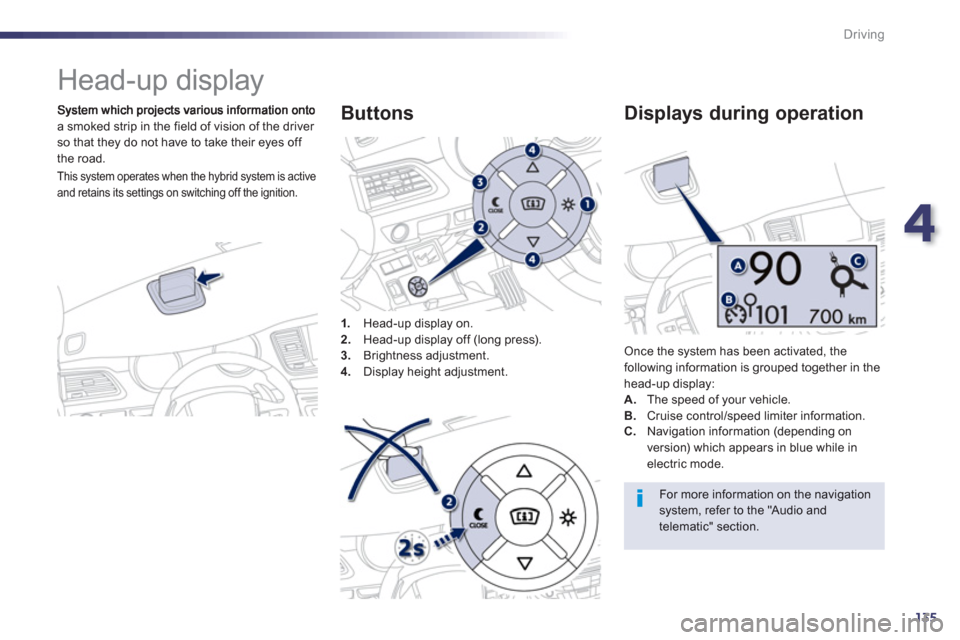
1
.Head-up display on.
2. Head-up display off (long press).3.
Brightness adjustment. 4.
Display height adjustment.
Buttons
Once the system has been activated, thefollowing information is grouped together in the
head-up display:A.The speed of your vehicle. B. Cruise control/speed limiter information.
Displays during operation
C.
Navigation information (depending on
version) which appears in blue while in electric mode.
For more information on the navigation system, refer to the "Audio andtelematic" section.
This system operates when the hybrid system is active
and retains its settings on switching off the ignition.
Page 241 of 308
239
The system is protected in such a way that it will onlyoperate in your vehicle.
Peugeot Connect Navigation (RT6)
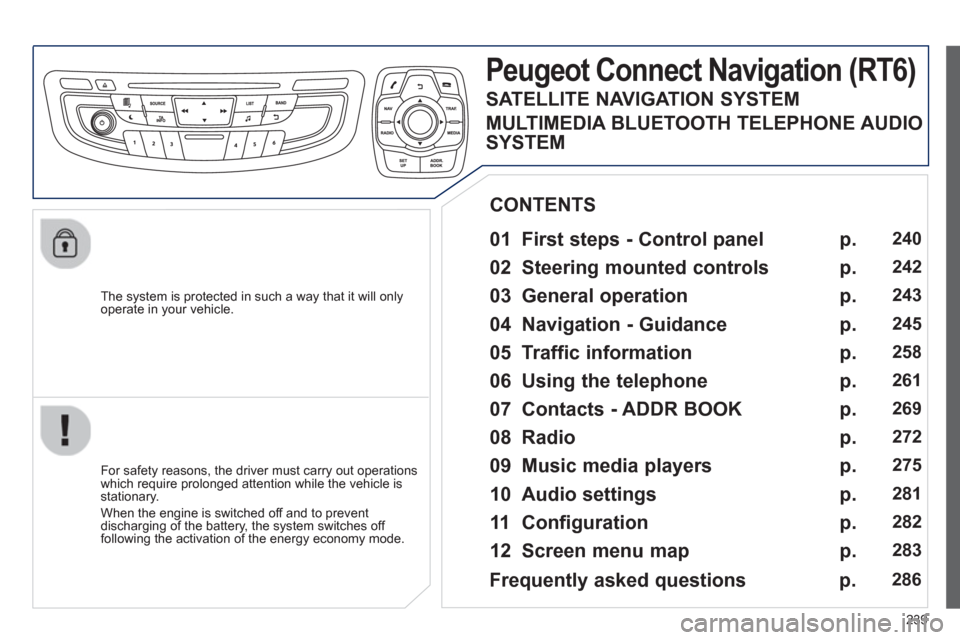
01 First steps - Control panel
For safety reasons, the driver must carry out operations
which require prolonged attention while the vehicle is stationary.
When the en
gine is switched off and to prevent
discharging of the battery, the system switches off following the activation of the energy economy mode.
CONTENTS
02 Steering mounted controls
03 General operation
04 Navigation - Guidance
05 Traffic information
06 Using the telephone
07 Contacts - ADDR BOOK
08 Radio
09 Music media players
10 Audio settings
11 Configuration
12 Screen menu map p.
p.
p.
p.
p.
p.
p.
p.
p.
p.
p.
p.
240
2
42
243
245
2
58
261
269
272
275
2
81
282
283
Frequently asked questions p. 286
SATELLITE NAVIGATION SYSTEM
MULTIMEDIA BLUETOOTH TELEPHONE AUDIO
SYSTEM
Page 242 of 308

240
01 FIRST STEPS
TA (Traffi c
Announcement)function On / Off.
Displa
y the list of radio stations received, CD/MP3/Apple Æ
player tracks or folders.
Lon
g press: management of the classifi cation of MP3/WMA fi les/update the list of stations received.
Select the source: CD,USB, AUX, Apple®
player, Bluetooth Streaming, Radio.
Access to " Audio
settings": musicalambiences, bass, treble,loudness, distribution, left/right balance, front/rear fader, automatic volume
adjustment.
Abandon the current
operation, go up one level.
Lon
g press: return topermanent display.
Select the FM waveband (AM not available onHybrid vehicles).
Displa
y black screen.
MODE button: select thetype of permanent display.
Short
press: mute / restoresound. Pr
ess and hold: reinitialise thesystem.
Short press: select a
preset ra
dio station.
Long press: store
th
e current radiostation.
Select:
- the
previous/next line in a list or menu.
- the previous next media folder.
- step b
y step previous/next radio frequency.
- previous
/next MP3 folder.
Move up
/down, in "Move the map" mode. Rotation: ad
just volume (each source is independent,
including TA messages and
navigation instructions).
Select:
- automaticall
y the previous/next radio frequency.
- the previous/next CD, MP3 or media track.
Move le
ft/right, in " Move the map " mode.
On / Off.
Page 245 of 308

243
03
For the details of the menus, refer to the "Screen menu map"section.
For cleaning the screen, the use of a soft, non-abrasive cloth (spectacles cloth) is recommended, with no additional product. "RADIO
"
"TELEPHONE"
(If conversation in progress)
SETUP:
PARAMETER
S
date and time, display confi guration, sound, vehicle settings.
Changing the audio source:
RADIO:
RADIO broadcasts.
MUSIC: playing MUSIC. Pr
ess the MODE button several times in succession for access to the following displays:
GENERAL OPERATION
"FULL SCREEN MAP"
"
MAP IN WINDOW"
(If navigation guidance inprogress)
HYBRID FLOW
For more information, refer to the "Hybrid System" section, then "View
hybrid fl ow information".
HYBRID CONSUMPTION
For more in
formation, refer to the "Hybrid System" section, then"Consumption of your hybrid".
Page 283 of 308
281
10AUDIO SETTINGS
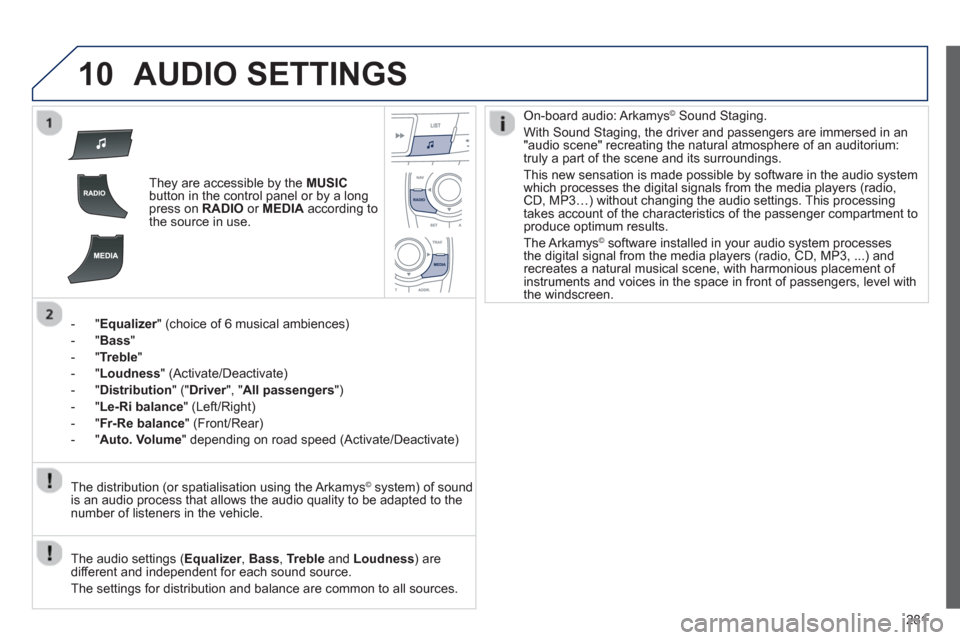
They are accessible by the MUSICbutton in the control panel or by a longpress on RADIO
or MEDIAaccording to
the source in use.
- "
Equalizer" (choice of 6 musical ambiences) r
- " Bass"
- " Trebl
e
"
-"Loudness"
(Activate/Deactivate)
-
"Distribution" (" Driver
", "rAll passengers
")
-
"Le-Ri balance " (Left/Right)
-
" Fr-Re balance
" (Front/Rear)
- " Auto. Volume
" depending on road speed (Activate/Deactivate)
The audio settings ( Equalizer, rBass , Trebleand Loudness) are
different and independent for each sound source.
The settings
for distribution and balance are common to all sources. The distribution
(or spatialisation using the Arkamys©system) of sound
is an audio process that allows the audio quality to be adapted to the
number of listeners in the vehicle.
On-board audio: Arkamys©Sound Staging.
With Sound Staging, the driver and passengers are immersed in an"audio scene" recreating the natural atmosphere of an auditorium:
truly a part of the scene and its surroundings.
This new sensation is made possible b
y software in the audio system
which processes the digital signals from the media players (radio, CD, MP3…) without changing the audio settings. This processingtakes account of the characteristics of the passenger compartment toproduce optimum results.
The Arkamys© software installed in your audio system processes©
the digital signal from the media players (radio, CD, MP3, ...) andrecreates a natural musical scene, with harmonious placement of
instruments and voices in the space in front of passengers, level with
the windscreen.
Page 286 of 308
284
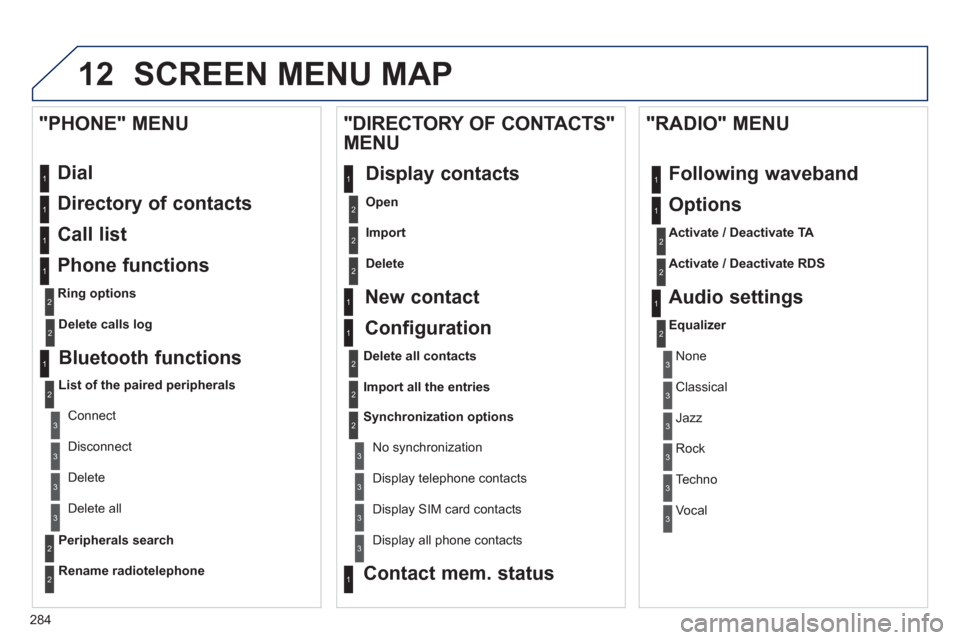
12 SCREEN MENU MAP
Dial
Directory of contacts
Call list
Phone functions
Ring options
"PHONE" MENU
1
1
2
1
1
2
3
3
2
1
3
3
2
2
1
2
2
2
1
1
2
2
2
1
3
3
3
3
1
2
2
1
1
3
3
3
3
3
3
2
Configuration
Delete all contacts
Import all the entries
S
ynchronization options
No s
ynchronization
"DIRECTORY OF CONTACTS"
MENU
Display contacts
Open
Import
Delete
New contact
Equalizer
"RADIO" MENU
Following waveband
Options
Activate / Deactivate TA
Activate / Deactivate RDS
Audio settings
Display telephone contacts
Displa
y SIM card contacts
Contact mem. status
Display all phone contacts
Delete calls log
Bluetooth functions
List of the paired peripherals
Connect
Di
sconnect
D
elete
Peripherals searchD
elete all
Rename radiotelephon
e
None
Classical
Jazz
Rock
Techno
Vocal
Page 287 of 308
285
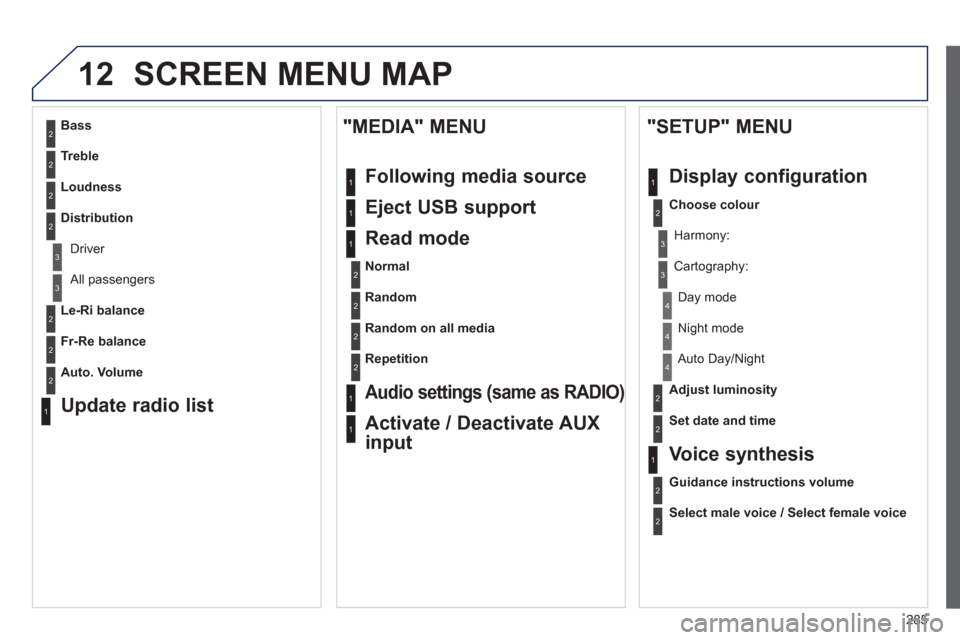
12 SCREEN MENU MAP
2
3
3
1
4
2
2
1
4
4
2
2
1
1
1
2
1
1
2
2
2
2
2
2
2
3
3
2
2
2
1
Random on all media
Repetition
Audio settings (same as RADIO)
Activate / Deactivate AUX
input
"MEDIA" MENU
Following media source
Eject USB support
Read mode
Normal
Random
All passengers
Le-Ri balance
Fr-Re balance
Auto. Volume
Update radio list
Bass
Treble
Loudness
Distribution
Driv
er
Ni
ght mode
Auto Day/Night
Ad
just luminosity
Set date and time
"SETUP" MENU
Display configuration
Choose colour
Harmony:
Carto
graphy:
Da
y mode
Voice synthesis
Guidance instructions volume
Select male voice / Select female voice
Page 289 of 308
287
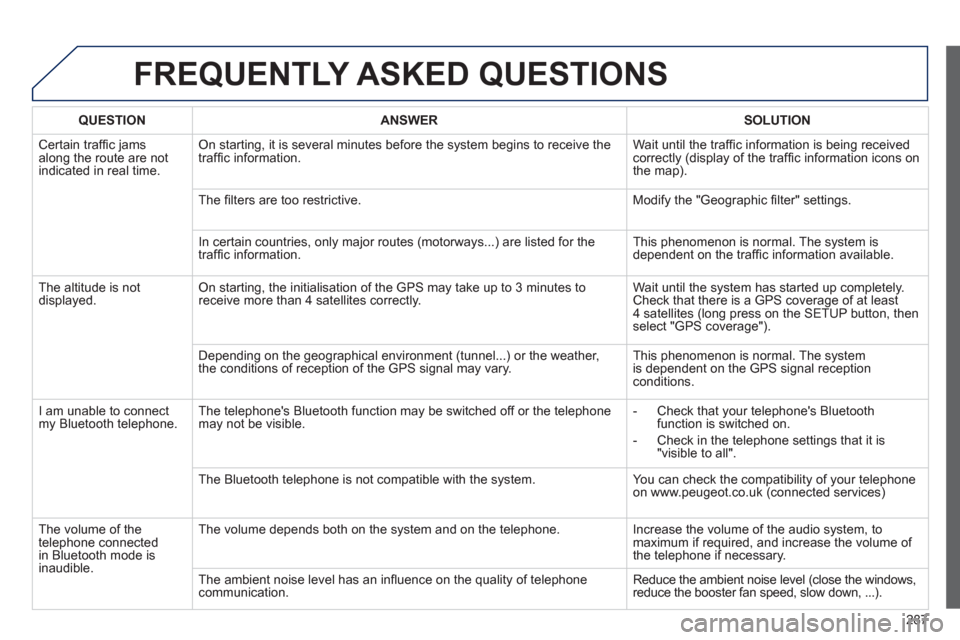
FREQUENTLY ASKED QUESTIONS
QUESTIONANSWER SOLUTION
Certain traffi c jams
along the route are not
indicated in real time.
On starting, it is several minutes before the system begins to receive the
traffi c information. Wait until the traffi c information is being received correctly (display of the traffi c information icons on
the map).
Th
e fi lters are too restrictive. Modify the "Geographic fi lter" settings.
In certain countries, onl
y major routes (motorways...) are listed for the
traffi c information. This phenomenon is normal. The system is
dependent on the traffi c information available.
Th
e altitude is not
displayed. On starting, the initialisation of the GPS may take up to 3 minutes toreceive more than 4 satellites correctly. Wait until the system has started up completely. Check that there is a GPS coverage of at least
4 satellites (long press on the SETUP button, then select "GPS coverage").
Dependin
g on the geographical environment (tunnel...) or the weather,
the conditions of reception of the GPS signal may vary. This phenomenon is normal. The system
is dependent on the GPS signal receptionconditions.
I
am unable to connect my Bluetooth telephone. The telephone's Bluetooth function may be switched off or the telephone
may not be visible.
- Check that your telephone's Bluetoothfunction is switched on.
- Check in the telephone settin
gs that it is "visible to all".
The Bluetooth telephone is not compatible with the s
ystem. You can check the compatibility of your telephone
on www.peugeot.co.uk (connected services)
Th
e volume of thetelephone connectedin Bluetooth mode isinaudible.
The volume depends both on the system and on the telephone. Increase the volume of the audio system, tomaximum if required, and increase the volume of
the telephone if necessary.
The ambient noise level has an infl uence on the qualit
y of telephone communication. Reduce the ambient noise level (close the windows,reduce the booster fan speed, slow down, ...).