Bluetooth Peugeot 508 RXH 2013 Owner's Manual
[x] Cancel search | Manufacturer: PEUGEOT, Model Year: 2013, Model line: 508 RXH, Model: Peugeot 508 RXH 2013Pages: 308, PDF Size: 8.95 MB
Page 11 of 308
.
9
Familiarisation
Interior
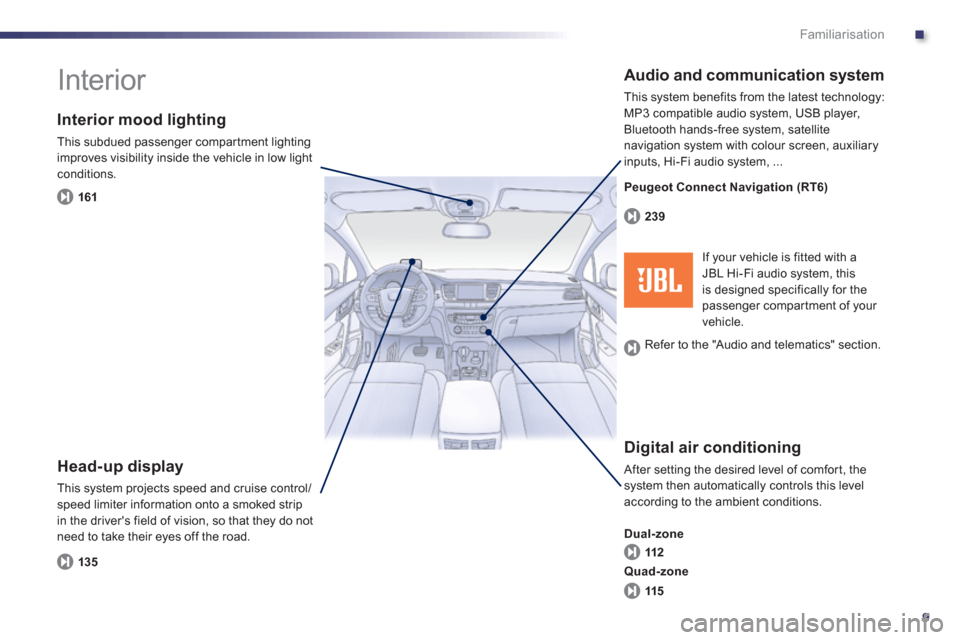
Interior mood lighting
This subdued passenger compar tment lighting
improves visibility inside the vehicle in low light conditions.
Head-up display
This system projects speed and cruise control/speed limiter information onto a smoked strip
in the driver's field of vision, so that they do not need to take their eyes off the road.
Digital air conditioning
After setting the desired level of comfor t, the system then automatically controls this level
according to the ambient conditions.
Dual-zone
Audio and communication system
This system benefits from the latest technology: MP3 compatible audio system, USB player,
Bluetooth hands-free system, satellite
navigation system with colour screen, auxiliary
inputs, Hi-Fi audio s
ystem, ...
16
1
135112 239
115 Quad-zone
If your vehicle is fitted with aJBL Hi-Fi audio system, this
is designed specifically for thepassenger compar tment of your
vehicle. Peu
geot Connect Navigation (RT6)
R
efer to the "Audio and telematics" section.
Page 212 of 308
210
Practical information
Load reduction mode
System which manages the use of cer tain
functions according to the level of chargeremaining in the battery.
When the vehicle is being driven, the loadreduction function temporarily deactivates certain functions, such as the air conditioning,
the heated rear screen...
The deactivated functions are reactivated automatically as soon as conditions permit.
S
ystem which manages the duration of use of certain functions to conser ve a sufficient level of charge in the battery.
After the engine has stopped, you can still use functions such as the audio and telematics
system, windscreen wipers, dipped beam headlamps, cour tesy lamps, etc. for a maximumcombined duration of about forty minutes.
Energy economy mode
Switching to economy mode
A message then appears in the instrument
panel screen indicating that the vehicle has
switched to economy mode and the activefunctions are put on standby.
If a telephone call is being made at this time, it
will be maintained for around 10 minutes with
the Bluetooth hands-free system of your audio
system.
Exiting economy mode
These functions are reactivated automaticallynext time the vehicle is driven.)In order to restore the use of these functions immediately, star t the engine and let it run:
- for less than ten minutes, to use
the equipment for approximately
five minutes,
- for more than ten minutes, to use the
equipment for up to approximatel
y thirtyminutes.
Let the engine run for the duration specified toensure that the battery charge is sufficient.
Do not repeatedly and continuously restar t theengine in order to charge the battery.
A flat battery prevents the engine from star ting (refer to the "Battery" section).
In this energy economy mode and whenstarting up the hybrid system, it maytake a few seconds before the Readylamp comes on.
Page 221 of 308
8
219
Practical information
The fitting of electrical equipmentor accessories which are notrecommended by PEUGEOT may result in a failure of your vehicle's electronic system and excessive electricalconsumption.Please note this precaution. You are advised to contact a PEUGEOT representative to be shown the rangeof recommended equipment andaccessories.
Installation of radio communication transmitters
Before installing any after-market radio communication transmitter, you can contact a PEUGEOT dealer for the specification of transmitters which canbe fitted (frequency, maximum power, aerial position, specific installationrequirements), in line with the Vehicle
Electromagnetic Compatibility Directive(2004/10 4/EC).
Depending on the legislation in force in the country, it may be compulsoryto have a high visibility safety vest, warning triangle and spare bulbs and fuses available in the vehicle. You can also obtain products
for cleaning and
maintenance (exterior and interior) and topping up fluids (screenwash, ...), as well as refills(cartridge for temporary tyre repair kit...) fromPEUGEOT dealers.
"Multimedia":
audio systems, portable navigation system,
Ta k a r a / S o ny por table video screen, Bluetoothsystem, speakers, DVD player, Wi-Fi, drivingaids, video suppor t, microwave unit...
Page 241 of 308
239
The system is protected in such a way that it will onlyoperate in your vehicle.
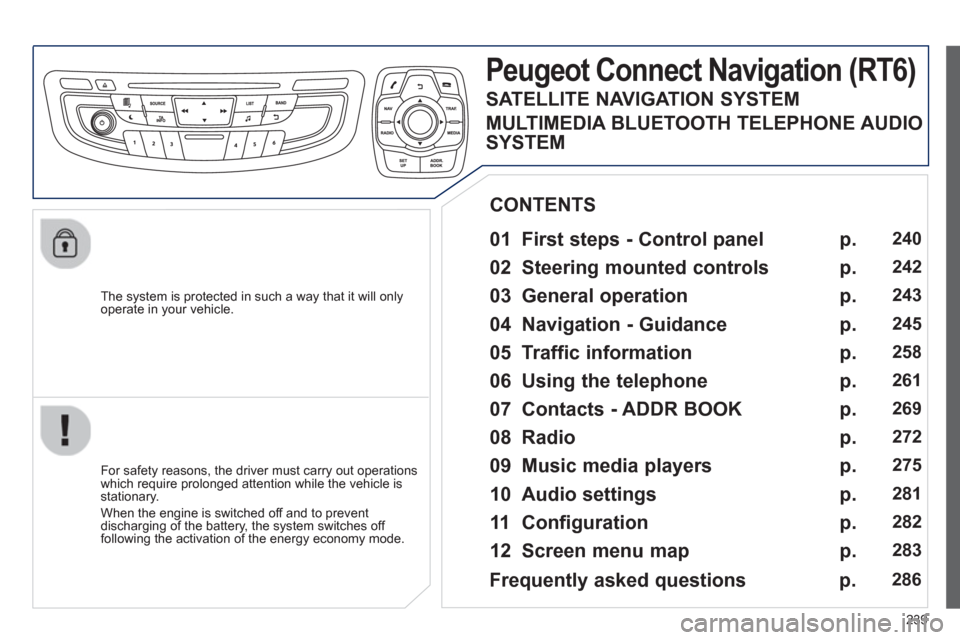
Peugeot Connect Navigation (RT6)
01 First steps - Control panel
For safety reasons, the driver must carry out operations
which require prolonged attention while the vehicle is stationary.
When the en
gine is switched off and to prevent
discharging of the battery, the system switches off following the activation of the energy economy mode.
CONTENTS
02 Steering mounted controls
03 General operation
04 Navigation - Guidance
05 Traffic information
06 Using the telephone
07 Contacts - ADDR BOOK
08 Radio
09 Music media players
10 Audio settings
11 Configuration
12 Screen menu map p.
p.
p.
p.
p.
p.
p.
p.
p.
p.
p.
p.
240
2
42
243
245
2
58
261
269
272
275
2
81
282
283
Frequently asked questions p. 286
SATELLITE NAVIGATION SYSTEM
MULTIMEDIA BLUETOOTH TELEPHONE AUDIO
SYSTEM
Page 242 of 308

240
01 FIRST STEPS
TA (Traffi c
Announcement)function On / Off.
Displa
y the list of radio stations received, CD/MP3/Apple Æ
player tracks or folders.
Lon
g press: management of the classifi cation of MP3/WMA fi les/update the list of stations received.
Select the source: CD,USB, AUX, Apple®
player, Bluetooth Streaming, Radio.
Access to " Audio
settings": musicalambiences, bass, treble,loudness, distribution, left/right balance, front/rear fader, automatic volume
adjustment.
Abandon the current
operation, go up one level.
Lon
g press: return topermanent display.
Select the FM waveband (AM not available onHybrid vehicles).
Displa
y black screen.
MODE button: select thetype of permanent display.
Short
press: mute / restoresound. Pr
ess and hold: reinitialise thesystem.
Short press: select a
preset ra
dio station.
Long press: store
th
e current radiostation.
Select:
- the
previous/next line in a list or menu.
- the previous next media folder.
- step b
y step previous/next radio frequency.
- previous
/next MP3 folder.
Move up
/down, in "Move the map" mode. Rotation: ad
just volume (each source is independent,
including TA messages and
navigation instructions).
Select:
- automaticall
y the previous/next radio frequency.
- the previous/next CD, MP3 or media track.
Move le
ft/right, in " Move the map " mode.
On / Off.
Page 264 of 308
262
06
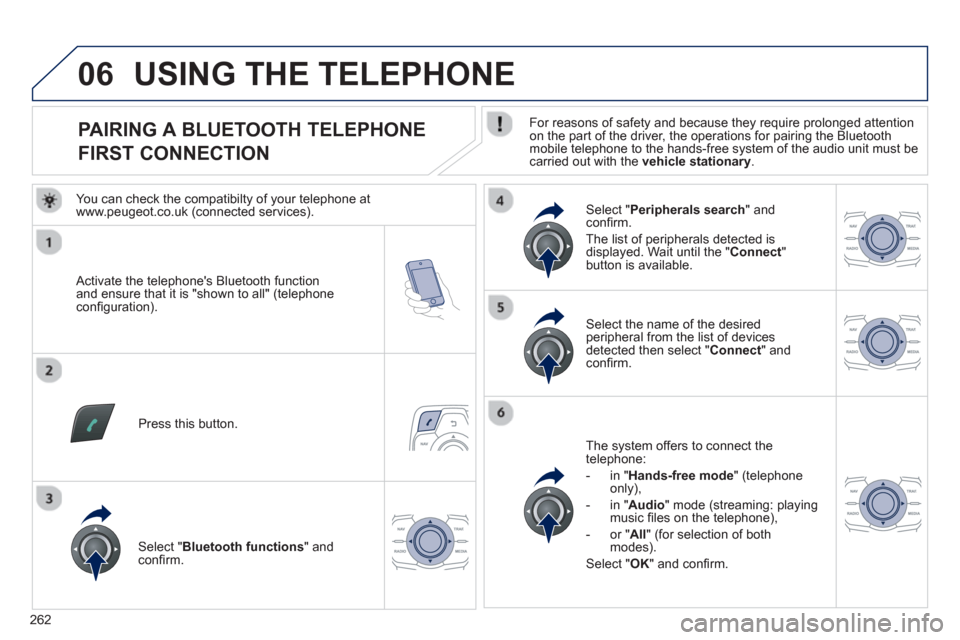
PAIRING A BLUETOOTH TELEPHONE
FIRST CONNECTION
For reasons of safety and because they require prolonged attention on the part of the driver, the operations for pairing the Bluetooth
mobile telephone to the hands-free system of the audio unit must becarried out with the vehicle stationary.
Activate the telephone's Bluetooth
function and ensure that it is "shown to all" (telephone confi guration).
Pr
ess this button.
Select the name of the desired
peripheral from the list of devicesdetected then select "Connect" andconfi rm.
The s
ystem offers to connect the
telephone:
- in " Hands-free mod
e
" (telephone
only),
- in "
Audio
" mode (streaming: playing music fi les on the telephone),
-
or "All" (for selection of bothmodes).
Select "OK" and confi rm.
Select " Bluetooth functions " and confi rm.
Select "Peripherals search" andconfi rm.
The list of
peripherals detected is
displayed. Wait until the " Connect"button is available.
USING THE TELEPHONE
You can check the compatibilty of your telephone atwww.peugeot.co.uk (connected services).
Page 265 of 308
263
06
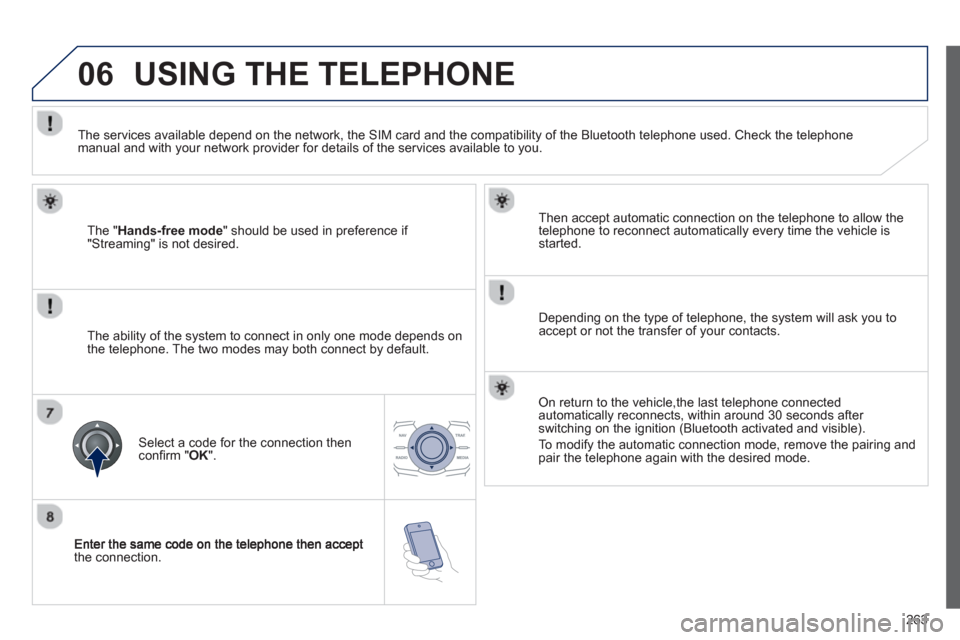
the connection.
Then accept automatic connection on the telephone to allow the
telephone to reconnect automaticall
y every time the vehicle is started.
Dependin
g on the type of telephone, the system will ask you to
accept or not the transfer of your contacts.
USING THE TELEPHONE
The "Hands-free mode" should be used in preference if "Streaming" is not desired.
The services available depend on the network, the
SIM card and the compatibility of the Bluetooth telephone used. Check the telephone manual and with your network provider for details of the services available to you.
The ability o
f the system to connect in only one mode depends on
the telephone. The two modes may both connect by default.
Select a code for the connection then confi rm " OK
".
On return to the vehicle,the last telephone connected
automatically reconnects, within around 30 seconds after
switching on the ignition (Bluetooth activated and visible).
To modif
y the automatic connection mode, remove the pairing and pair the telephone again with the desired mode.
Page 270 of 308
268
06
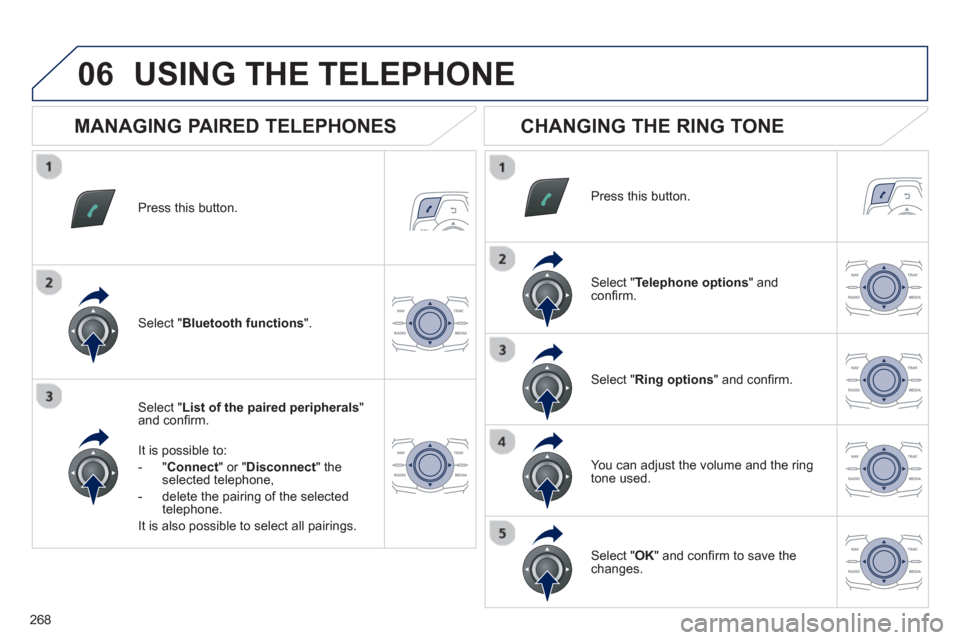
Press this button.
Select " List of the paired peripherals"and confi rm.
It is possible to:
-
"Connect" or " Disconnect " theselected telephone,
- delete the pairin
g of the selected
telephone.
It is also possible to select all pairin
gs.
USING THE TELEPHONE
MANAGING PAIRED TELEPHONES
CHANGING THE RING TONE
Press this button.
Select " Telephone options" andconfi rm.
Select " Ring options" and confi rm.
You can ad
just the volume and the ring
tone used.
Select " Bluetooth functions".
Select " OK
" and confi rm to save thechanges.
Page 271 of 308
269
07 DIRECTORY - ADDR BOOK
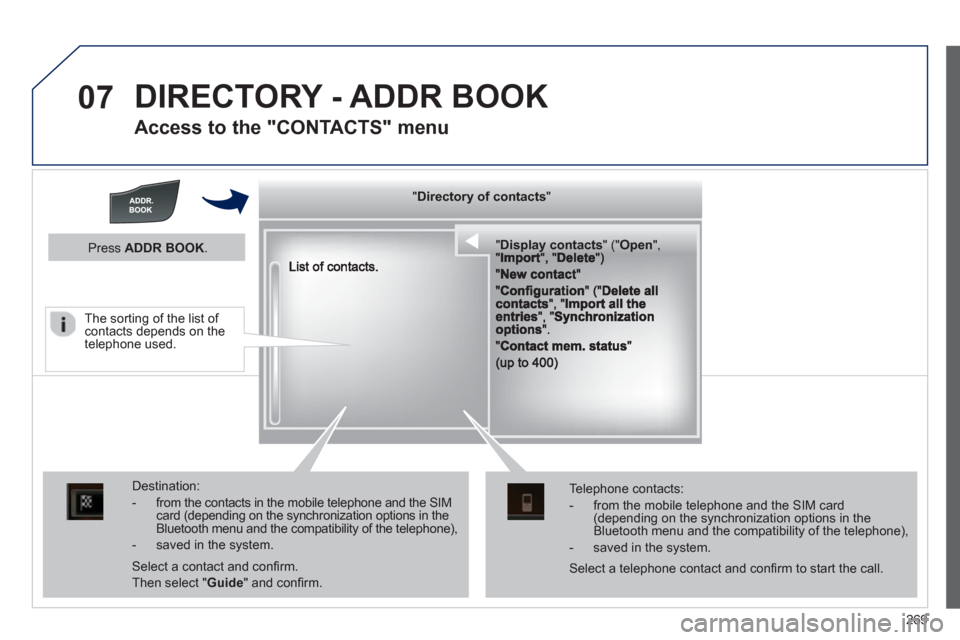
Access to the "CONTACTS" menu
""""""""yyyyyDirectory of contactsDirectory of contactsDirectory of contactsDirectory of contactsDirectory of contactsDirectory of contactsDirectory of contactsDirectory of contactsDirectory of contactsDirectory of contactsDirectory of contactsDirectory of contactsDirectory of contactsDirectory of contactsDi t f t tDi t f t tDi t f t tDi t f t tDi f """"""""
""""""""""pypypypypypypysp ay co tactsDisplay contactsDisplay contactsDisplay contactsDisplay contactsDisplay contactsDisplay contactsDisplay contactsDisplay contactsDisplay contactsDisplay contactsDisplay contactsDisplay contactsDisplay contactsDisplay contactsDisplay contactsDisplay contactsDisplay contactsDisplay contactsDisplay contactsDisplay contactsDi l t tDi l t tDi l t tDi l t tDi l t tDi l t tDi l(((((((( ( (((((((((((((((("(""(""(""(""(""(""(""(""(""("pppppppOpeOpenOpenOpenOpenOpenOpenOpenOpenOpenOpenOpenOpenOpenOpenOpenOpenOpenOpenOpenOpenOOOOOOO,,,,, , ,,,""""""""""""""ItItItIt""""""""DltDltDltDlt")")")"))
Destination:
- from the contacts in the mobile telephone and the SIMcard (depending on the synchronization options in the Bluetooth menu and the compatibility of the telephone),
- saved in the system.
Select a contact and confi rm.
Then select "Guide
" and confi rm.
Telephone contacts:
- from the mobile telephone and the SIM card(depending on the synchronization options in the Bluetooth menu and the compatibility of the telephone),
- saved in the system.
Press ADDR BOOK.
Select a telephone contact and confi rm to start the call.
The sorting of the list of contacts depends on the telephone used.
Page 273 of 308
271
07
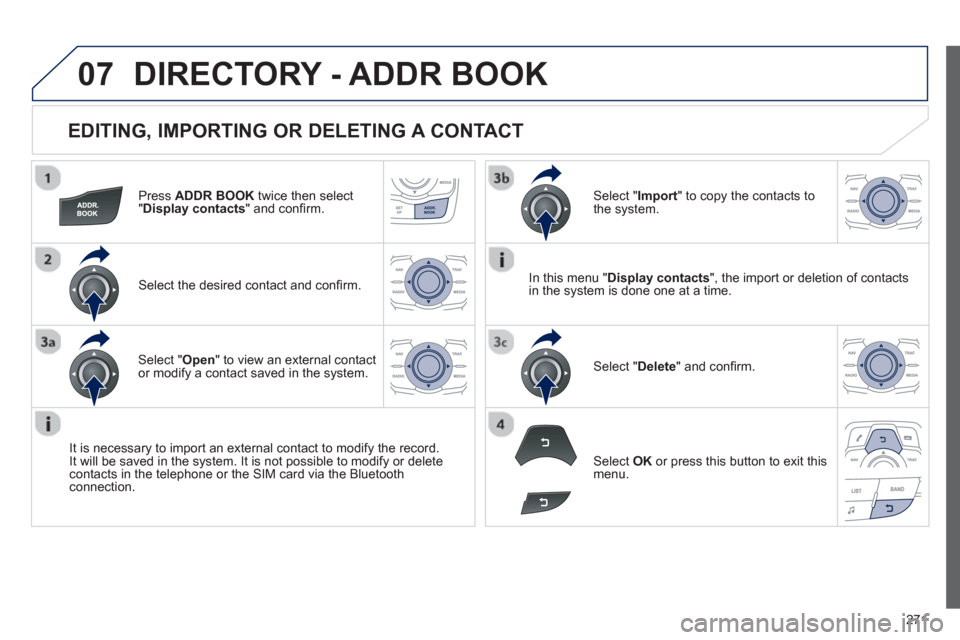
EDITING, IMPORTING OR DELETING A CONTACT
Press ADDR BOOK
twice then select"Display contacts
" and confi rm.
Select the desired contact and confi rm.
It is necessar
y to import an external contact to modify the record. It will be saved in the system. It is not possible to modify or deletecontacts in the telephone or the SIM card via the Bluetooth connection.
Select OK
or press this button to exit this
menu.
DIRECTORY - ADDR BOOK
In this menu " Display contacts
", the import or deletion of contacts
in the system is done one at a time.
Select "Import" to copy the contacts to
the system.
Select "Delete
" and confi rm. Select "Open " to view an external contact or modify a contact saved in the system.