Settings Peugeot 508 RXH 2013 Owner's Manual
[x] Cancel search | Manufacturer: PEUGEOT, Model Year: 2013, Model line: 508 RXH, Model: Peugeot 508 RXH 2013Pages: 308, PDF Size: 8.95 MB
Page 12 of 308
10
Familiarisation
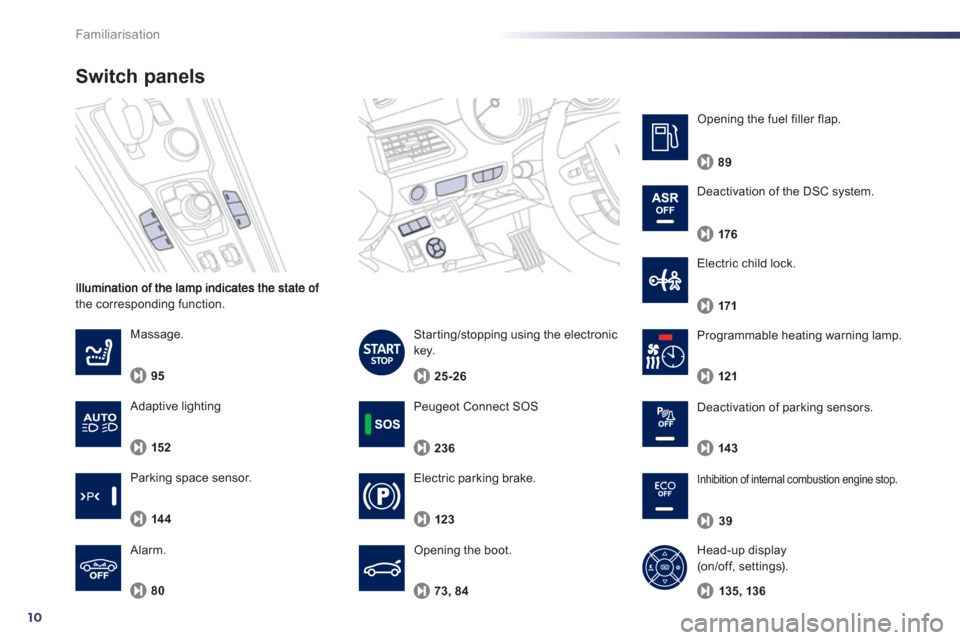
the corresponding function.
Switch panels
Electric parking brake.
Opening the boot.
123
Massa
ge.
95
80
Al
arm.
El
ectric child lock.
73
, 84
171
Peugeot Connect SOS
236
Starting/stopping using the electronic
key.
25-26
Deactivation of parking sensors.
143
Inhibition of internal combustion engine stop.
39
Programmable heating warning lamp.
121
Parkin
g space sensor.
14 4
Deactivation of the DSC system.
176
Opening the fuel filler flap.
89
Adaptive lighting
152
Head-up display (on/off, settings).
135
, 136
Page 51 of 308
1
49
Instruments and controls
Instrument panel
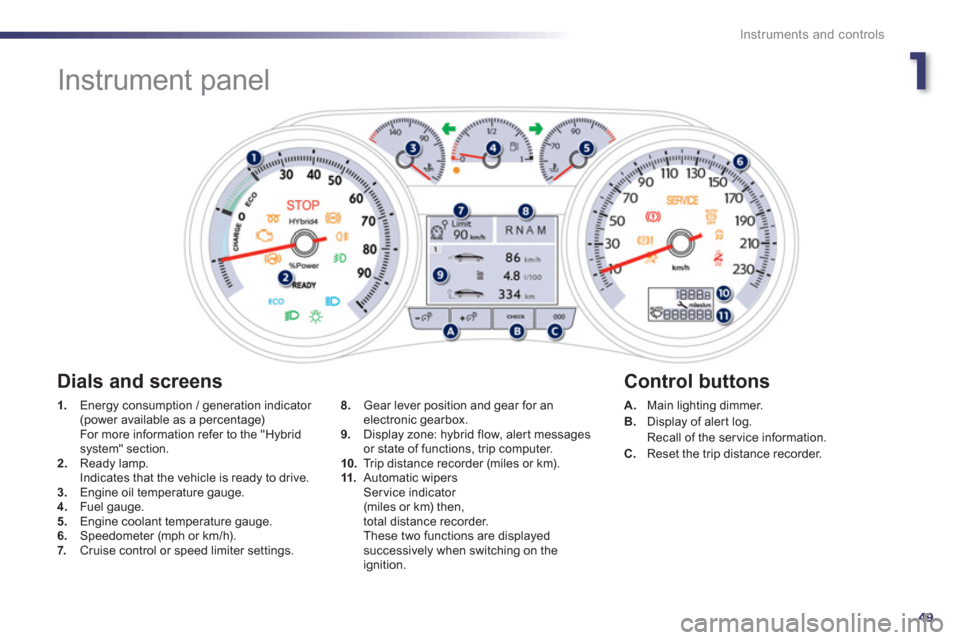
1.
Energy consumption / generation indicator (power available as a percentage) For more information refer to the "Hybrid system" section. 2.Ready lamp.
Indicates that the vehicle is ready to drive. 3.Engine oil temperature gauge. 4. Fuel gauge.
5. Engine coolant temperature gauge.
6.Speedometer (mph or km/h).7. Cruise control or speed limiter settings.
A.Main lighting dimmer. B.
Display of aler t log.
Recall of the service information.
C. Reset the trip distance recorder.
8.
Gear lever position and gear for anelectronic gearbox.
9. Display zone: hybrid flow, alert messages
or state of functions, trip computer.
10.Trip distance recorder (miles or km). 11.Automatic wipersSer vice indicator (miles or km) then,
total distance recorder.
These two functions are displayedsuccessively when switching on the ignition.
Dials and screens
Control buttons
Page 52 of 308
50
Instruments and controls
Indicator and warning
lamps
Visual indicators informing the driver that a system is in operation, switched off or has a
fault.
When the ignition is switched on
Certain warning lamps come on for a few seconds in the instrument panel and/or
instrument panel screen when the vehicle's
ignition is switched on.
When the engine is started, these same
warning lamps should go off.
If they remain on, before moving off, refer to the
information on the warning lamp concerned.
Associated warnings
The switching on of cer tain warning lamps maybe accompanied by an audible signal and a message in the instrument panel screen.
The warning lamps may come on continuously(fixed) or flash.
Certain warning lamps may come on inone of two modes. Only by relating thetype of lighting to the operating status
of the vehicle can it be ascertainedwhether the situation is normal or whether a fault has occurred.
1
2
2
2
3
3
3
2
3
3
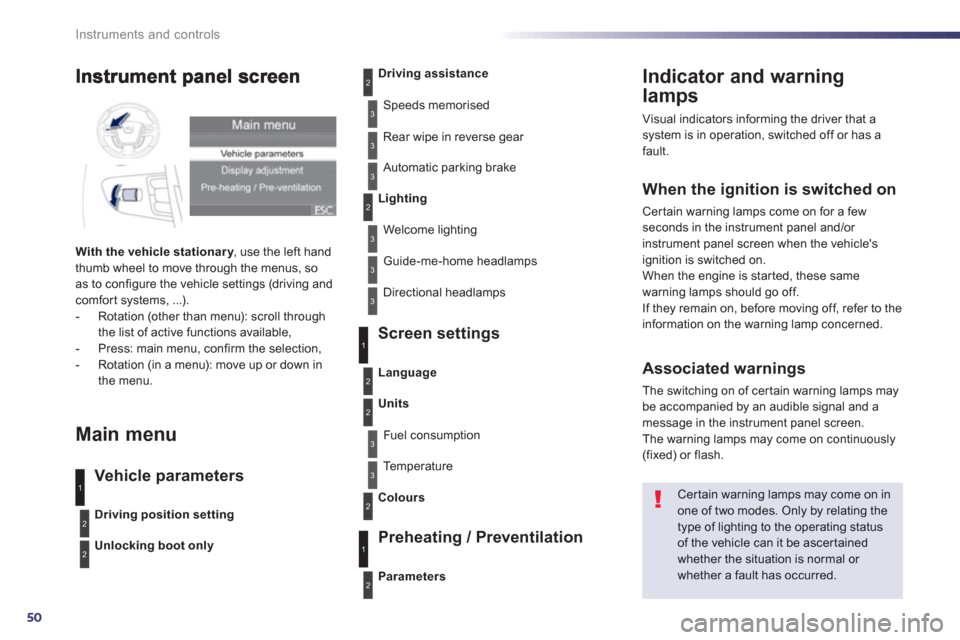
With the vehicle stationar y
, use the left handythumb wheel to move through the menus, so as to configure the vehicle settings (driving andcomfort systems, ...).
- Rotation (other than menu): scroll through
the list of active functions available,
- Press: main menu, confirm the selection,
- Rotation (in a menu): move up or down in
the menu.
Main menu
Vehicle parameters Screen settin
gs
Preheatin
g / Preventilation
Driving position setting
Unlocking boot only
Driving assistance
Speeds memorised
Rear wipe in reverse
gear
Automatic parkin
g brake
Lighting
Welcome lighting
Guide-me-home headlamps
Directional headlamps
Parameters
Language
Units
Fuel consumption
Te m p e r a t u r e
Colours
3
1
2
2
3
2
3
1
2
Page 71 of 308
1
69
Instruments and controls
Setting the date and time
Peugeot Connect Navigation (RT6)
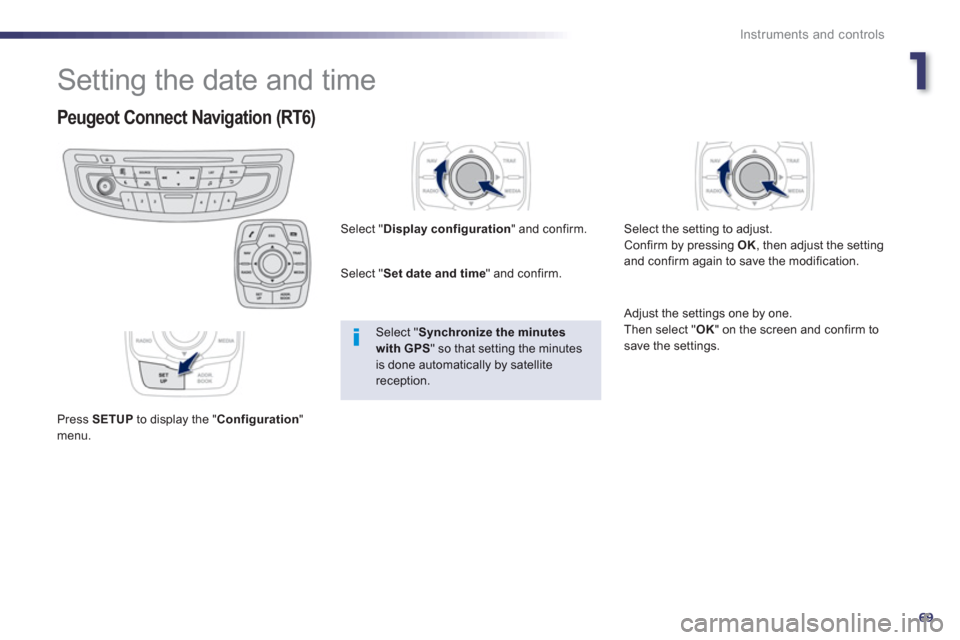
Press SETUPto display the "Configuration
"menu. Select "
Display configuration
" and confirm.
Select " Set date and time" and confirm.
Select "Synchronize the minutes with GPS
" so that setting the minutes is done automatically by satellite reception.
Select the settin
g to adjust.
Confirm by pressing OK, then adjust the settingand confirm again to save the modification.
Adjust the settings one by one.
Then select "OK
" on the screen and confirm tosave the settings.
Page 90 of 308
88
Access
Panoramic sunroof
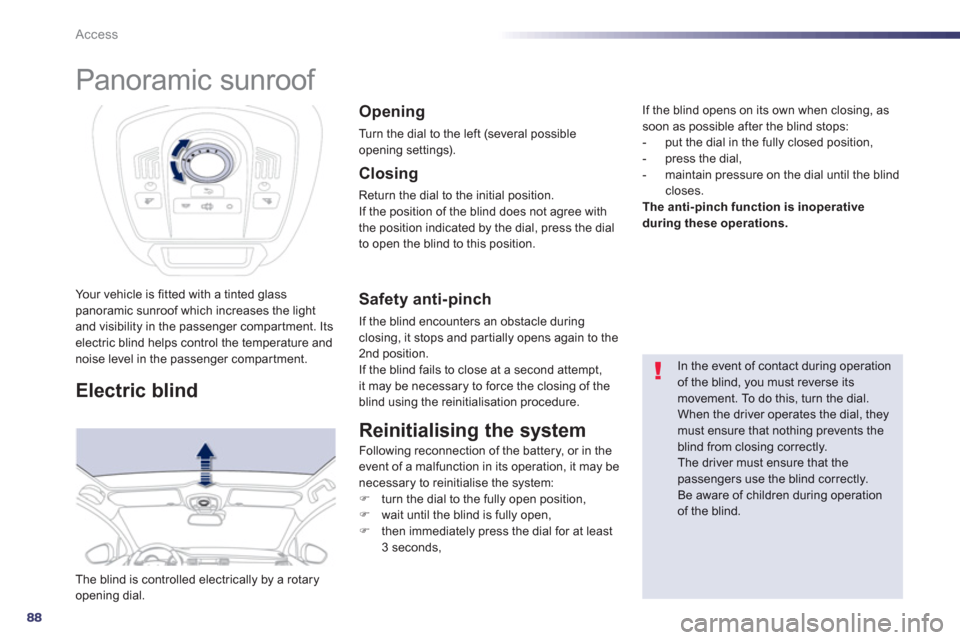
Your vehicle is fitted with a tinted glass panoramic sunroof which increases the lightand visibility in the passenger compartment. Itselectric blind helps control the temperature andnoise level in the passenger compartment.
Electric blind
The blind is controlled electrically by a rotaryopening dial.
Opening
Turn the dial to the left (several possible
opening settings).
In the event of contact during operationof the blind, you must reverse its movement. To do this, turn the dial.
When the driver operates the dial, theymust ensure that nothing prevents theblind from closing correctly. The driver must ensure that the passengers use the blind correctly.
Be aware of children during operationof the blind.
Closing
Return the dial to the initial position.
If the position of the blind does not agree with
t
he position indicated by the dial, press the dialto open the blind to this position.
Safety anti-pinch
If the blind encounters an obstacle duringclosing, it stops and par tially opens again to the 2nd position.
If the blind fails to close at a second attempt,
it may be necessary to force the closing of the blind using the reinitialisation procedure.
Reinitialising the system
Following reconnection of the battery, or in the event of a malfunction in its operation, it may be
necessary to reinitialise the system:
) turn the dial to the fully open position, )
wait until the blind is fully open,)
then immediately press the dial for at least
3 seconds,
If the blind opens on its own when closing, as soon as possible after the blind stops:
- put the dial in the fully closed position,
- press the dial,
- ma
intain pressure on the dial until the blindcloses. The anti-pinch function is inoperative
during these operations.
Page 95 of 308
3
93
Comfort
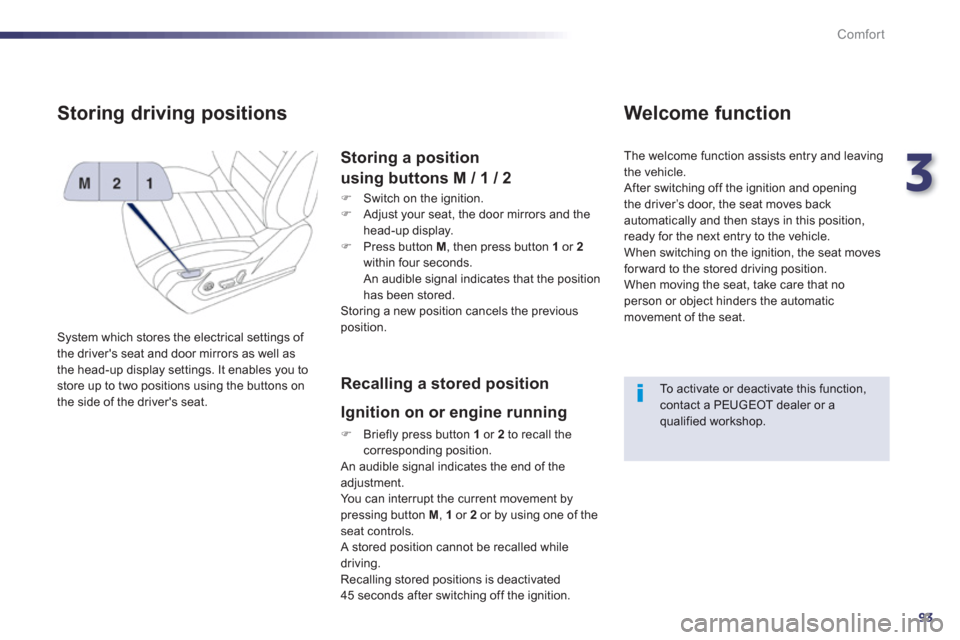
Storing driving positions
System which stores the electrical settings of
the driver's seat and door mirrors as well as
the head-up display settings. It enables you to store up to two positions using the buttons on
the side of the driver's seat.
Storing a position
using buttons M / 1 / 2
)
Switch on the ignition. )
Adjust your seat, the door mirrors and the
head-up display.
) Press button M
, then press button 1or 2
within four seconds.
An audible signal indicates that the position
has been stored.
Storing a new position cancels the previousposition.
Recalling a stored position
I
gnition on or engine running
) Briefly press button 1
or 2
to recall thecorresponding position.
An audible signal indicates the end of the adjustment. You can interrupt the current movement by pressing button M , 1or 2or by using one of the seat controls.
A stored position cannot be recalled while
driving.
Recalling stored positions is deactivated
45 seconds after switching off the ignition.
Welcome function
The welcome function assists entry and leaving
th
e vehicle.
After switching off the ignition and openingthe driver’s door, the seat moves back
automatically and then stays in this position,
ready for the next entry to the vehicle.
When switching on the ignition, the seat movesfor ward to the stored driving position.
When moving the seat, take care that no
person or object hinders the automatic
movement of the seat.
To activate or deactivate this function, contact a PEUGEOT dealer or a qualified workshop.
Page 114 of 308
112
Comfort
Dual-zone digital air conditioning
Automatic operation
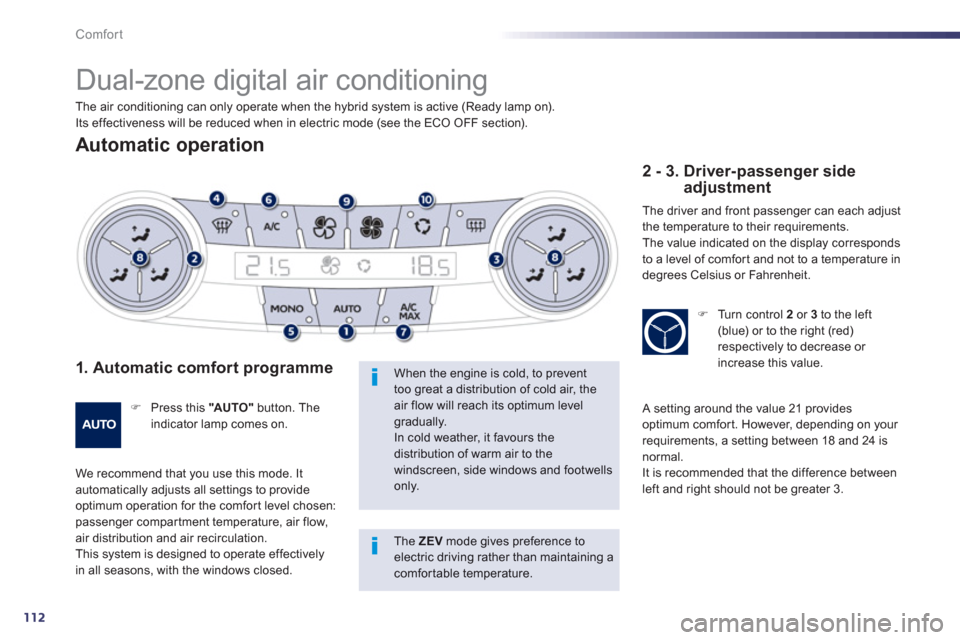
1. Automatic comfort programme
)
Press this "AU TO "button. Theindicator lamp comes on.
We recommend that you use this mode. It automatically adjusts all settings to provide
optimum operation for the comfor t level chosen: passenger compar tment temperature, air flow, air distribution and air recirculation.
This system is designed to operate effectivelyin all seasons, with the windows closed.
When the engine is cold, to prevent too great a distribution of cold air, the air flow will reach its optimum levelgradually. In cold weather, it favours the distribution of warm air to the windscreen, side windows and footwells only.
2 - 3. Driver-passenger side adjustment
The driver and front passenger can each adjust
the temperature to their requirements.
The value indicated on the displa
y corresponds
to a level of comfor t and not to a temperature in
degrees Celsius or Fahrenheit.
) Turn control 2or 3to the left(blue) or to the right (red) respectively to decrease or increase this value.
A setting around the value 21 provides
optimum comfor t. However, depending on your
requirements, a setting between 18 and 24 isnormal.
It is recommended that the difference between
left and right should not be greater 3. The air conditionin
g can only operate when the hybrid system is active (Ready lamp on).
Its effectiveness will be reduced when in electric mode (see the ECO OFF section).
The ZEV mode gives preference to electric driving rather than maintaining a comfortable temperature.
Page 115 of 308
3
113
Comfort
On entering the vehicle, if the interior temperature is much colder or warmer than the comfort value, there is noneed to change the value displayed in order to obtain the comfort required.The system corrects the differencein temperature automatically and asquickly as possible.
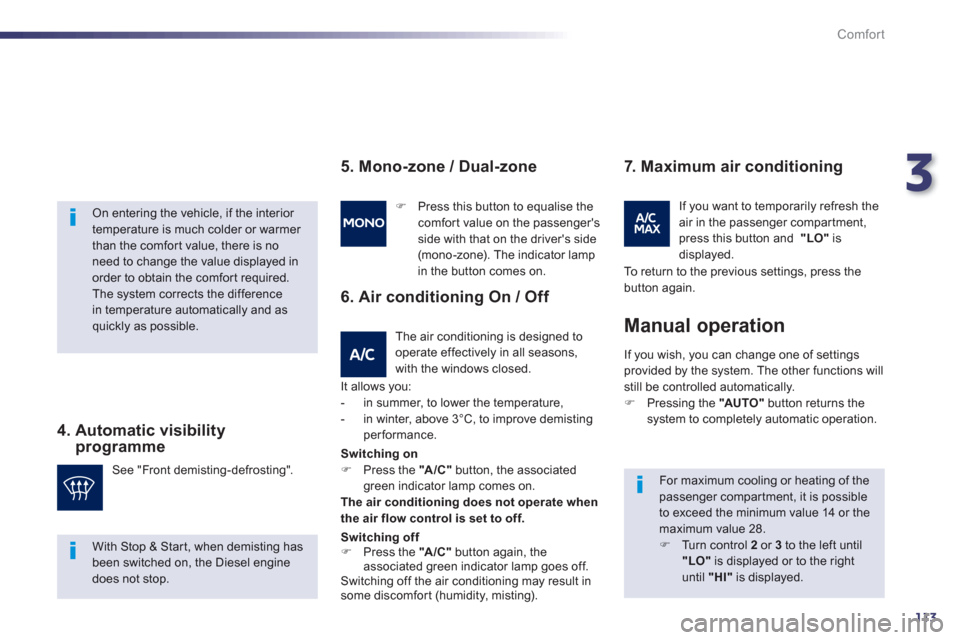
4. Automatic visibility programme
For maximum cooling or heating of thepassenger compartment, it is possibleto exceed the minimum value 14 or themaximum value 28.)
Turn control 2or 3
to the left until "LO"is displayed or to the right until "HI"
is displayed. See "Front demistin
g-defrosting".
)
Press this button to equalise thecomfort value on the passenger's
side with that on the driver's side (mono-zone). The indicator lamp in the button comes on.
I
f you wish, you can change one of settings
provided by the system. The other functions will still be controlled automatically.) Pressing the "AUTO"
button returns the system to completely automatic operation.
Manual operation
5. Mono-zone / Dual-zone
The air conditioning is designed to operate effectively in all seasons,
with the windows closed.
6. Air conditioning On / Off
It allows you:
- in summer, to lower the temperature,
- in winter, above 3°C, to improve demistin
gperformance.
7. Maximum air conditioning
If you want to temporarily refresh theair in the passenger compartment,
press this button and "LO"isdisplayed.
With Stop & Start, when demisting has been switched on, the Diesel engine does not stop.Switchin
g on) Press the "A/C"button, the associated green indicator lamp comes on.The air conditioning does not operate when
the air flow control is set to off.
Switching off) Press the "A /C "
button again, the
associated green indicator lamp goes off.Switching off the air conditioning may result in
some discomfort (humidity, misting). To return to the previous settings, press the
button a
gain.
Page 117 of 308
3
115
Comfort
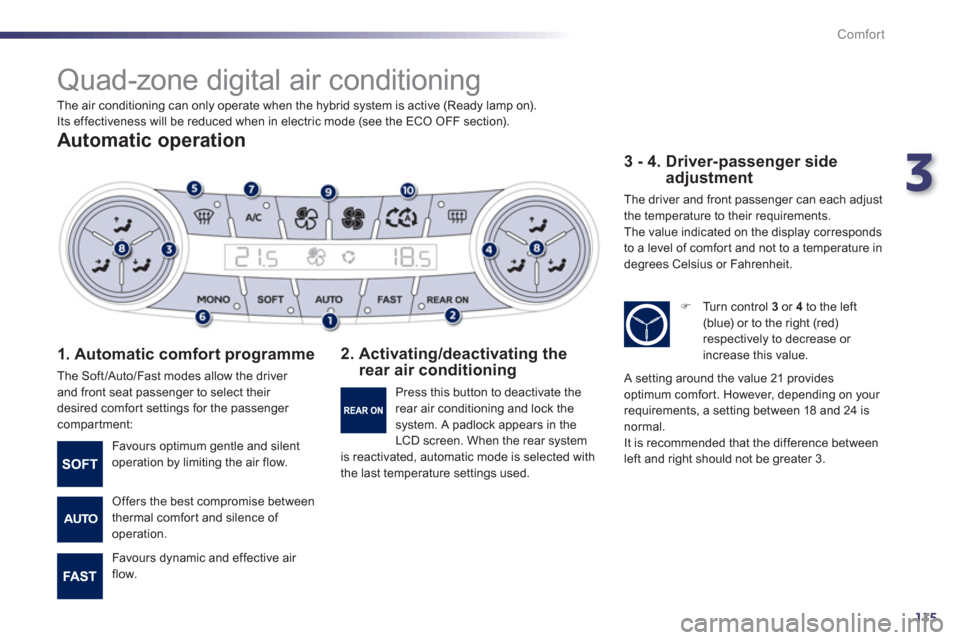
Quad-zone digital air conditioning
Automatic operation
1. Automatic comfort programme
The Soft/Auto/Fast modes allow the driver
and front seat passenger to select their
desired comfort settings for the passenger compartment:
2. Activating/deactivating the rear air conditioning
3 - 4. Driver-passenger side adjustment
The driver and front passenger can each adjust
the temperature to their requirements.
The value indicated on the display corresponds
to a level of comfor t and not to a temperature in
degrees Celsius or Fahrenheit.
Favours optimum gentle and silent
operation by limiting the air flow.
Offers the best compromise between
thermal comfort and silence of
operation.
Favours d
ynamic and effective air
flow. Pr
ess this button to deactivate the
rear air conditioning and lock thesystem. A padlock appears in the
LCD screen. When the rear system is reactivated, automatic mode is selected with
the last temperature settings used.
)
Turn control 3
or 4
to the left (blue) or to the right (red)respectively to decrease or
increase this value.
A setting around the value 21 providesoptimum comfort. However, depending on your
requirements, a setting between 18 and 24 is
normal.
It is recommended that the difference between
left and right should not be greater 3. The air conditionin
g can only operate when the hybrid system is active (Ready lamp on).
Its effectiveness will be reduced when in electric mode (see the ECO OFF section).
Page 118 of 308
116
Comfort
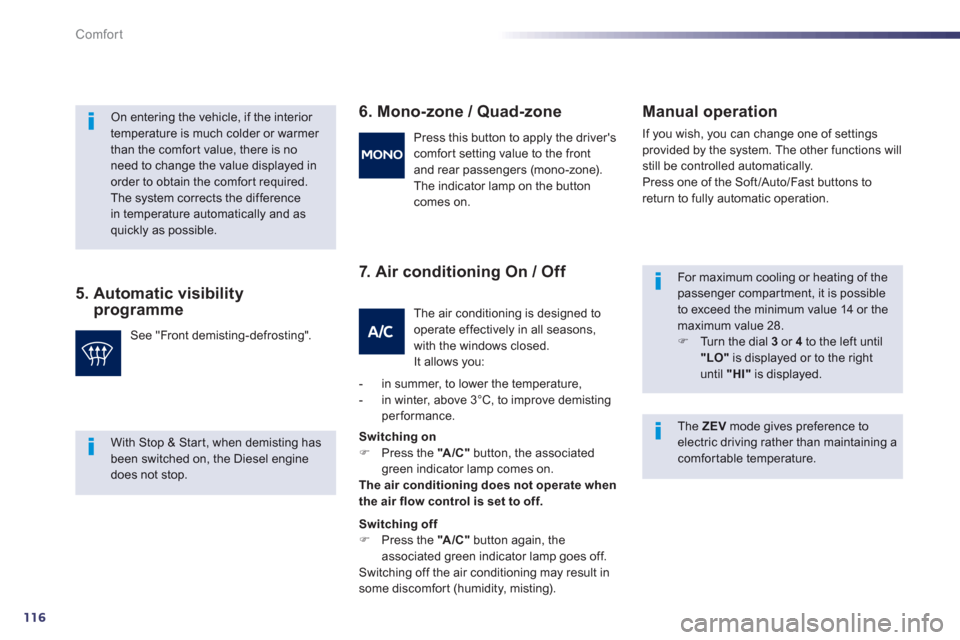
5. Automatic visibilityprogramme
6. Mono-zone / Quad-zone
7. Air conditionin
g On / Off
Manual o
peration
If you wish, you can change one of settings provided by the system. The other functions will
still be controlled automatically.
Press one of the Soft/Auto/Fast buttons toreturn to fully automatic operation.
On entering the vehicle, if the interior temperature is much colder or warmer than the comfort value, there is no
need to change the value displayed in order to obtain the comfort required.The system corrects the differencein temperature automatically and as quickly as possible.
See "Front demisting-defrosting". Press this button to appl
y the driver's comfort setting value to the front
and rear passen
gers (mono-zone).
The indicator lamp on the button
comes on.
The air conditioning is designed to
operate e
ffectively in all seasons,
with the windows closed.
It allows you:
- in summer, to lower the tem
perature,
- in winter, above 3°C, to improve demistingperformance.
Switchin
g on) Press the "A/C"button, the associated green indicator lamp comes on. The air conditioning does not operate when
the air flow control is set to off.
Switching off) Press the "A/C"button again, the
associated green indicator lamp goes off.
Switching off the air conditioning may result in
some discomfort
(humidity, misting).
For maximum cooling or heating of thepassenger compar tment, it is possibleto exceed the minimum value 14 or themaximum value 28. )
Turn the dial 3
or 4
to the left until"LO"is displayed or to the right until "HI"
is displayed.
With Stop & Star t, when demisting hasbeen switched on, the Diesel engine does not stop.
The ZEVmode gives preference to electric driving rather than maintaining acomfor table temperature.