wheel Peugeot 807 2013 User Guide
[x] Cancel search | Manufacturer: PEUGEOT, Model Year: 2013, Model line: 807, Model: Peugeot 807 2013Pages: 234, PDF Size: 9.8 MB
Page 39 of 234
Gearboxes and steering wheel
READY TO SET OFF
2
37
GEARBOXES AND STEERING WHEEL
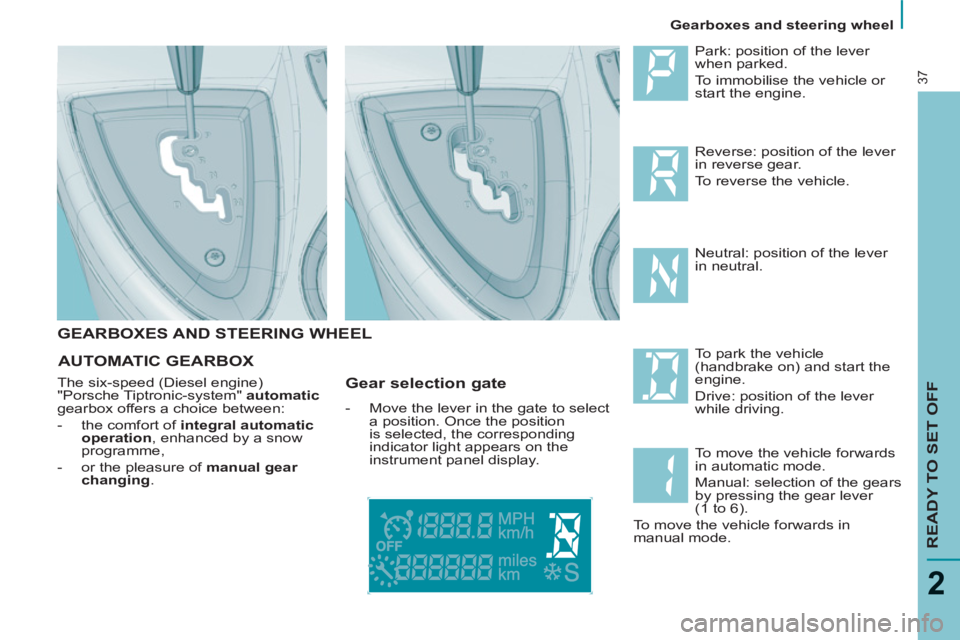
Park: position of the lever
when parked.
To immobilise the vehicle or
start the engine.
To park the vehicle
(handbrake on) and start the
engine.
Drive: position of the lever
while driving. Reverse: position of the lever
in reverse gear.
To reverse the vehicle.
Neutral: position of the lever
in neutral.
To move the vehicle forwards
in automatic mode.
Manual: selection of the gears
by pressing the gear lever
(1 to 6).
To move the vehicle forwards in
manual mode.
AUTOMATIC GEARBOX
The six-speed (Diesel engine)
"Porsche Tiptronic-system" automatic
gearbox offers a choice between:
- the comfort of integral automatic
operation
, enhanced by a snow
programme,
- or the pleasure of manual gear
changing
.
Gear selection gate
- Move the lever in the gate to select
a position. Once the position
is selected, the corresponding
indicator light appears on the
instrument panel display.
Page 40 of 234
Gearboxes and steering wheel
38
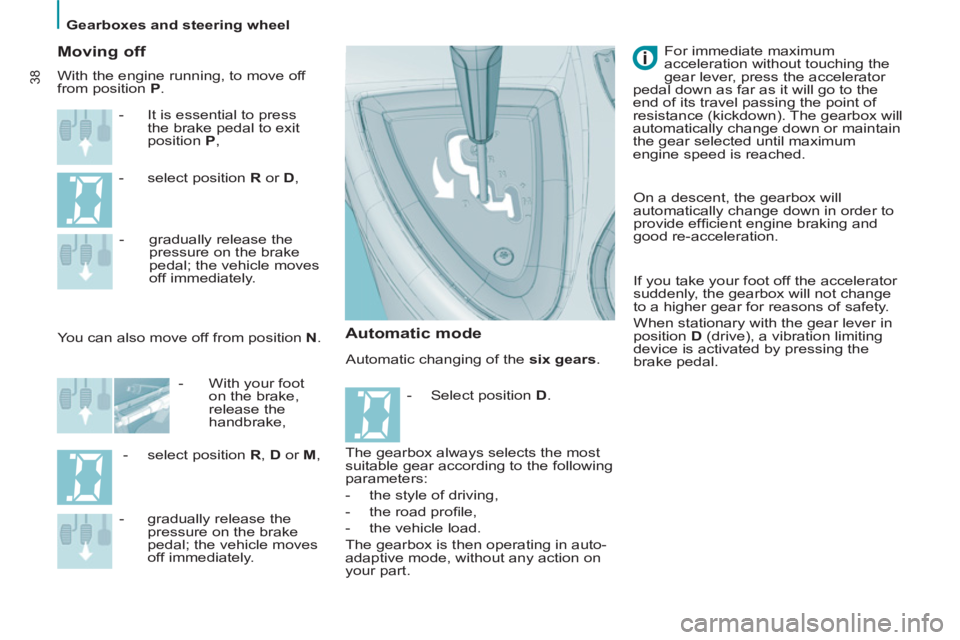
Automatic changing of the six gears
.
Moving off
- It is essential to press
the brake pedal to exit
position P
,
- select position R
or D
,
You can also move off from position N
.
- gradually release the
pressure on the brake
pedal; the vehicle moves
off immediately.
- With your foot
on the brake,
release the
handbrake,
- select position R
, D
or M
,
- gradually release the
pressure on the brake
pedal; the vehicle moves
off immediately.
The gearbox always selects the most
suitable gear according to the following
parameters:
- the style of driving,
- the road profi le,
- the vehicle load.
The gearbox is then operating in auto-
adaptive mode, without any action on
your part. For immediate maximum
acceleration without touching the
gear lever, press the accelerator
pedal down as far as it will go to the
end of its travel passing the point of
resistance (kickdown). The gearbox will
automatically change down or maintain
the gear selected until maximum
engine speed is reached. With the engine running, to move off
from position P
.
Automatic mode
On a descent, the gearbox will
automatically change down in order to
provide effi cient engine braking and
good re-acceleration.
If you take your foot off the accelerator
suddenly, the gearbox will not change
to a higher gear for reasons of safety.
When stationary with the gear lever in
position D
(drive), a vibration limiting
device is activated by pressing the
brake pedal.
- Select position D
.
Page 41 of 234
Gearboxes and steering wheel
READY TO SET OFF
2
39
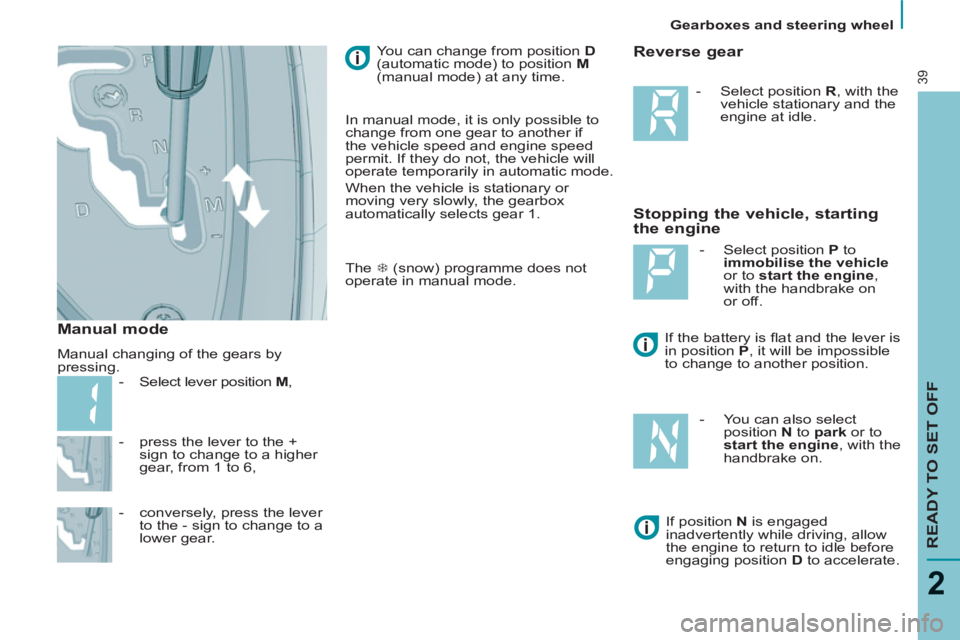
- press the lever to the +
sign to change to a higher
gear, from 1 to 6,
- conversely, press the lever
to the - sign to change to a
lower gear. You can change from position D
(automatic mode) to position M
(manual mode) at any time.
Stopping the vehicle, starting
the engine
Reverse gear
- Select position R
, with the
vehicle stationary and the
engine at idle.
If the battery is fl at and the lever is
in position P
, it will be impossible
to change to another position.
- Select position P
to
immobilise the vehicle
or to start the engine
,
with the handbrake on
or off.
- You can also select
position N
to park
or to
start the engine
, with the
handbrake on.
If position N
is engaged
inadvertently while driving, allow
the engine to return to idle before
engaging position D
to accelerate.
Manual mode
Manual changing of the gears by
pressing.
- Select lever position M
, In manual mode, it is only possible to
change from one gear to another if
the vehicle speed and engine speed
permit. If they do not, the vehicle will
operate temporarily in automatic mode.
When the vehicle is stationary or
moving very slowly, the gearbox
automatically selects gear 1.
The 7 (snow) programme does not
operate in manual mode.
Page 42 of 234
Gearboxes and steering wheel
40
Good practice
Never select position N
when the
vehicle is moving.
Never select positions P
or R
unless
the vehicle is stationary.
Never change between positions to
optimise braking on a slippery surface.
There is a risk of damage to the
gearbox:
- if you press the accelerator and
brake pedals at the same time,
- if you force the lever from
position P
to another position in
the event of a battery failure.
When the engine is at idle, brakes
not applied, if position R
, D
or M
is
selected the vehicle moves even
without the accelerator being pressed.
For this reason, do not leave children
unsupervised inside the vehicle,
with the engine running
.
Operating abnormality
Any operating abnormality is indicated
by an audible signal, accompanied by
the message "Automatic gear fault"
on the display and fl ashing of the Snow
snowfl ake on the instrument panel.
In this situation the gearbox operates in
downgrade mode (locked in 3rd gear).
You may feel a substantial knock when
changing from P
to R
and from N
to R
(this will not cause any damage to the
gearbox).
Do not exceed 60 mph (100 km/h),
keeping within the limit of local speed
restrictions.
Contact a PEUGEOT dealer as soon
as possible.
You can return to the automatic
programme at any time.
- Press button 7 again to switch off
the programme you are in.
Snow programme
In addition to the automatic
programme, there is a special
Snow programme.
This improves starting
and drive when traction is
poor. The snowfl ake appears on the
instrument panel display.
- Press button 7 once the
vehicle has been started
and position D
selected.
The gearbox adapts to driving
on slippery roads.
Page 43 of 234
Gearboxes and steering wheel
READY TO SET OFF
41
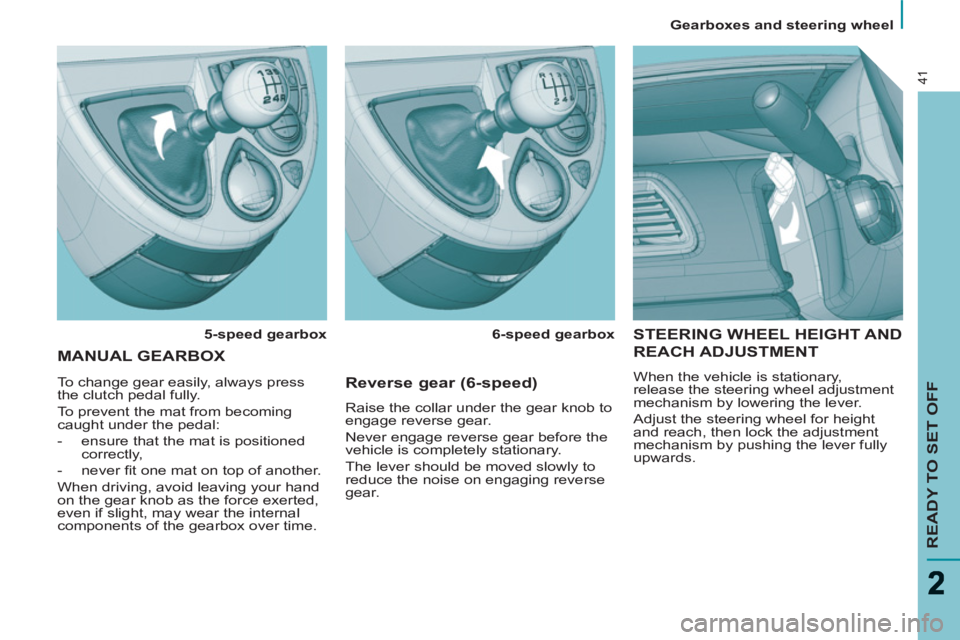
STEERING WHEEL HEIGHT AND
REACH ADJUSTMENT
When the vehicle is stationary,
release the steering wheel adjustment
mechanism by lowering the lever.
Adjust the steering wheel for height
and reach, then lock the adjustment
mechanism by pushing the lever fully
upwards.
MANUAL GEARBOX
5-speed gearbox
6-speed gearbox
To change gear easily, always press
the clutch pedal fully.
To prevent the mat from becoming
caught under the pedal:
- ensure that the mat is positioned
correctly,
- never fi t one mat on top of another.
When driving, avoid leaving your hand
on the gear knob as the force exerted,
even if slight, may wear the internal
components of the gearbox over time.
Reverse gear (6-speed)
Raise the collar under the gear knob to
engage reverse gear.
Never engage reverse gear before the
vehicle is completely stationary.
The lever should be moved slowly to
reduce the noise on engaging reverse
gear.
Page 45 of 234
Steering wheel controls
EASE OF USE and COMFORT
3
43
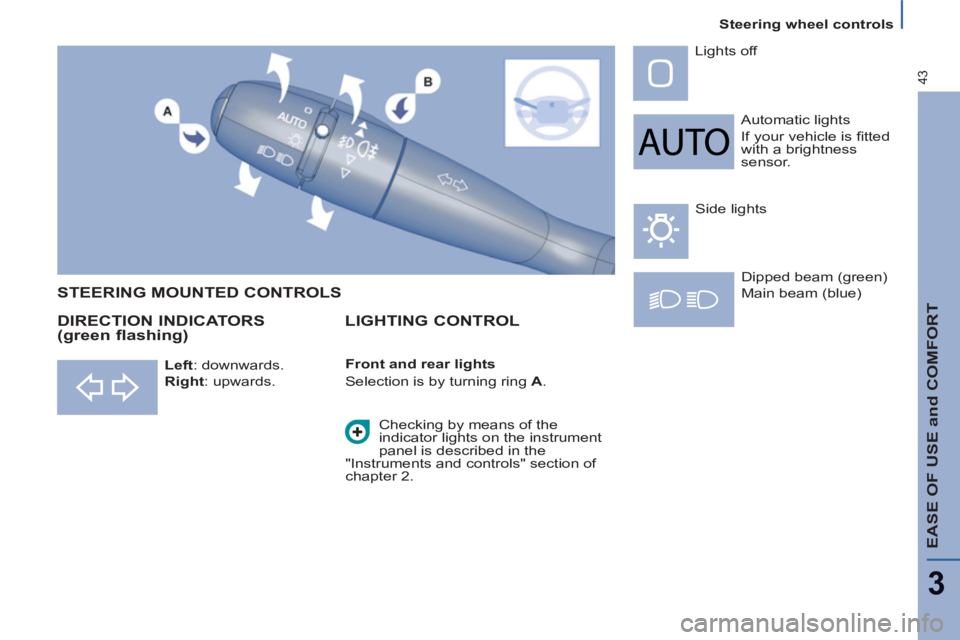
Automatic lights
If your vehicle is fi tted
with a brightness
sensor. Lights off
Dipped beam (green)
Main beam (blue)
DIRECTION INDICATORS
(green flashing) STEERING MOUNTED CONTROLS
Checking by means of the
indicator lights on the instrument
panel is described in the
"Instruments and controls" section of
chapter 2. Side lights
LIGHTING CONTROL
Left
: downwards.
Right
: upwards.
Front and rear lights
Selection is by turning ring A
.
Page 47 of 234
Steering wheel controls
EASE OF USE and COMFORT
3
45
Automatic "Follow-Me-Home"
lighting
With the ignition off, when you leave
your vehicle with the automatic
switching on of the lights function
activated
, the side lights and dipped
headlamps remain on for the selected
duration.
To deactivate or activate this
function, go to the display
confi guration menu.
The duration of the timed period must
also be set (15, 30, 60 seconds), via
the display confi guration menu.
Carry out these operations when the
vehicle is stationary.
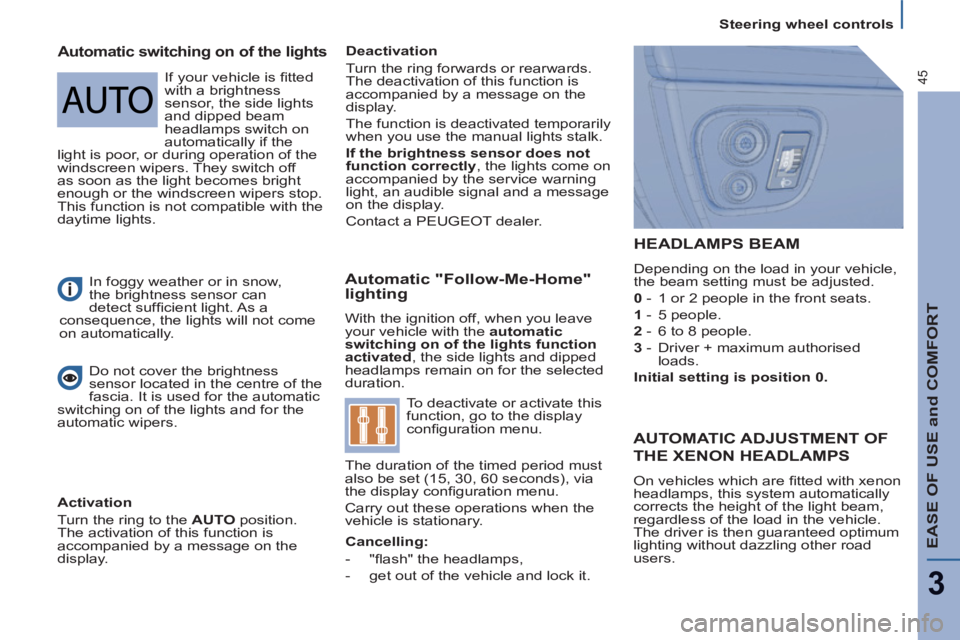
HEADLAMPS BEAM
Depending on the load in your vehicle,
the beam setting must be adjusted.
0
- 1 or 2 people in the front seats.
1
- 5 people.
2
- 6 to 8 people.
3
- Driver + maximum authorised
loads.
Initial setting is position 0.
In foggy weather or in snow,
the brightness sensor can
detect suffi cient light. As a
consequence, the lights will not come
on automatically.
Automatic switching on of the lights
Deactivation
Turn the ring forwards or rearwards.
The deactivation of this function is
accompanied by a message on the
display.
The function is deactivated temporarily
when you use the manual lights stalk.
If the brightness sensor does not
function correctly
, the lights come on
accompanied by the service warning
light, an audible signal and a message
on the display.
Contact a PEUGEOT dealer.
Do not cover the brightness
sensor located in the centre of the
fascia. It is used for the automatic
switching on of the lights and for the
automatic wipers.
Activation
Turn the ring to the AUTO
position.
The activation of this function is
accompanied by a message on the
display.
AUTOMATIC ADJUSTMENT OF
THE XENON HEADLAMPS
On vehicles which are fi tted with xenon
headlamps, this system automatically
corrects the height of the light beam,
regardless of the load in the vehicle.
The driver is then guaranteed optimum
lighting without dazzling other road
users.
Cancelling:
- "fl ash" the headlamps,
-
get out of the vehicle and lock it.
If your vehicle is fi tted
with a brightness
sensor, the side lights
and dipped beam
headlamps switch on
automatically if the
light is poor, or during operation of the
windscreen wipers. They switch off
as soon as the light becomes bright
enough or the windscreen wipers stop.
This function is not compatible with the
daytime lights.
Page 49 of 234
Steering wheel controls
EASE OF USE and COMFORT
3
47
Activation
Press the control downwards.
Activation of the function is
accompanied by a message on the
display.
The automatic windscreen wipers
function must be reactivated
if the
ignition has been switched off for more
than one minute, by pressing the stalk
downwards.
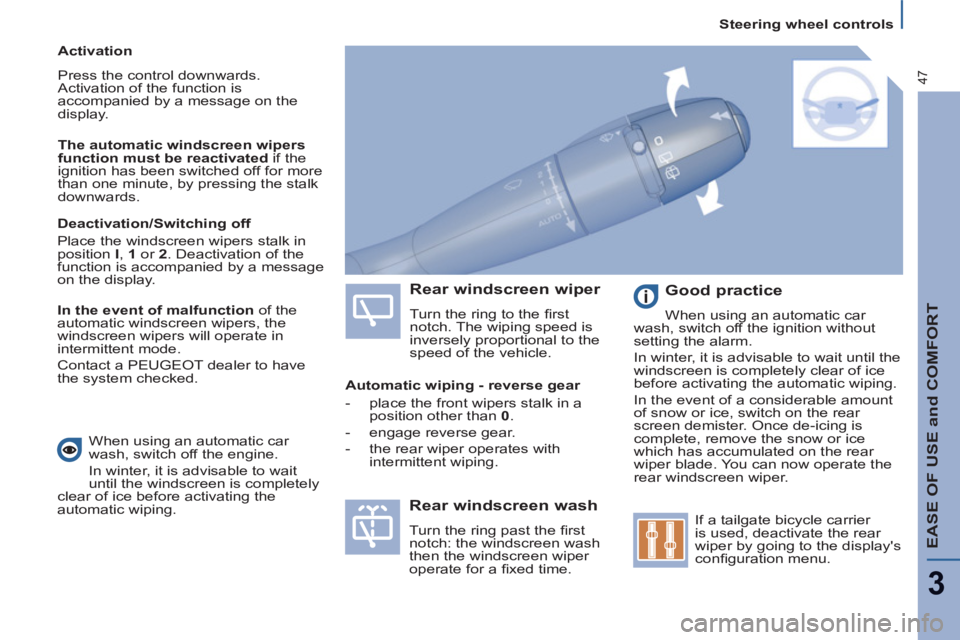
Rear windscreen wiper
Turn the ring to the fi rst
notch. The wiping speed is
inversely proportional to the
speed of the vehicle.
Rear windscreen wash
Turn the ring past the fi rst
notch: the windscreen wash
then the windscreen wiper
operate for a fi xed time.
Good practice
When using an automatic car
wash, switch off the ignition without
setting the alarm.
In winter, it is advisable to wait until the
windscreen is completely clear of ice
before activating the automatic wiping.
In the event of a considerable amount
of snow or ice, switch on the rear
screen demister. Once de-icing is
complete, remove the snow or ice
which has accumulated on the rear
wiper blade. You can now operate the
rear windscreen wiper.
If a tailgate bicycle carrier
is used, deactivate the rear
wiper by going to the display's
confi guration menu.
Deactivation/Switching off
Place the windscreen wipers stalk in
position I
, 1
or 2
. Deactivation of the
function is accompanied by a message
on the display.
In the event of malfunction
of the
automatic windscreen wipers, the
windscreen wipers will operate in
intermittent mode.
Contact a PEUGEOT dealer to have
the system checked.
Automatic wiping - reverse gear
- place the front wipers stalk in a
position other than 0
.
- engage reverse gear.
- the rear wiper operates with
intermittent wiping.
When using an automatic car
wash, switch off the engine.
In winter, it is advisable to wait
until the windscreen is completely
clear of ice before activating the
automatic wiping.
Page 51 of 234
Steering wheel controls
EASE OF USE and COMFORT
3
49
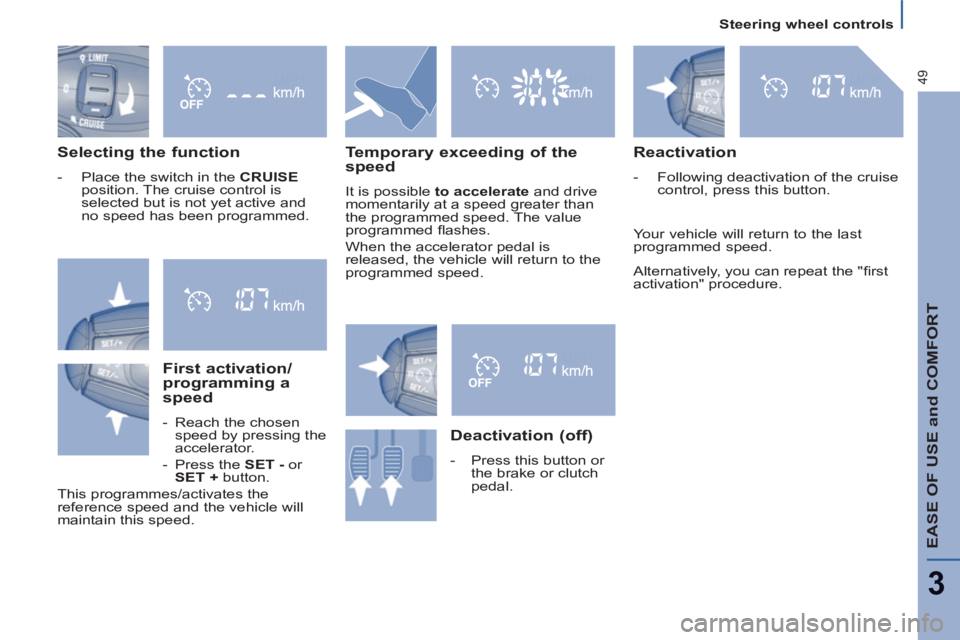
Selecting the function
- Place the switch in the CRUISE
position. The cruise control is
selected but is not yet active and
no speed has been programmed.
First activation/
programming a
speed
- Reach the chosen
speed by pressing the
accelerator.
- Press the SET -
or
SET +
button.
This programmes/activates the
reference speed and the vehicle will
maintain this speed.
Temporary exceeding of the
speed
It is possible to accelerate
and drive
momentarily at a speed greater than
the programmed speed. The value
programmed fl ashes.
When the accelerator pedal is
released, the vehicle will return to the
programmed speed.
Reactivation
- Following deactivation of the cruise
control, press this button.
Your vehicle will return to the last
programmed speed.
Alternatively, you can repeat the "fi rst
activation" procedure.
Deactivation (off)
- Press this button or
the brake or clutch
pedal.
Page 53 of 234
Steering wheel controls
EASE OF USE and COMFORT
3
51
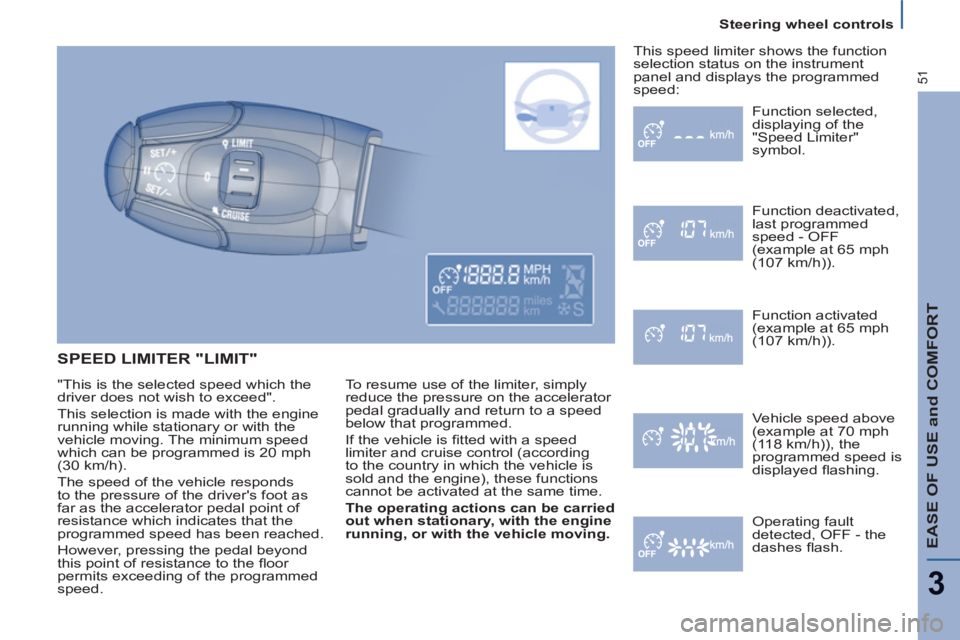
SPEED LIMITER "LIMIT"
To resume use of the limiter, simply
reduce the pressure on the accelerator
pedal gradually and return to a speed
below that programmed.
If the vehicle is fi tted with a speed
limiter and cruise control (according
to the country in which the vehicle is
sold and the engine), these functions
cannot be activated at the same time
.
The operating actions can be carried
out when stationary, with the engine
running, or with the vehicle moving.
Function selected,
displaying of the
"Speed Limiter"
symbol.
Function deactivated,
last programmed
speed - OFF
(example at 65 mph
(107 km/h)).
Function activated
(example at 65 mph
(107 km/h)).
Vehicle speed above
(example at 70 mph
(118 km/h)), the
programmed speed is
displayed fl ashing.
Operating fault
detected,
OFF - the
dashes fl ash. This speed limiter shows the function
selection status on the instrument
panel and displays the programmed
speed:
"This is the selected speed which the
driver does not wish to exceed".
This selection is made with the engine
running while stationary or with the
vehicle moving. The minimum speed
which can be programmed is 20 mph
(30 km/h).
The speed of the vehicle responds
to the pressure of the driver's foot as
far as the accelerator pedal point of
resistance which indicates that the
programmed speed has been reached.
However, pressing the pedal beyond
this point of resistance to the fl oor
permits exceeding of the programmed
speed.