ignition Peugeot Boxer 2013 Owner's Guide
[x] Cancel search | Manufacturer: PEUGEOT, Model Year: 2013, Model line: Boxer, Model: Peugeot Boxer 2013Pages: 184, PDF Size: 4.53 MB
Page 52 of 184
50
Steering mounted controls
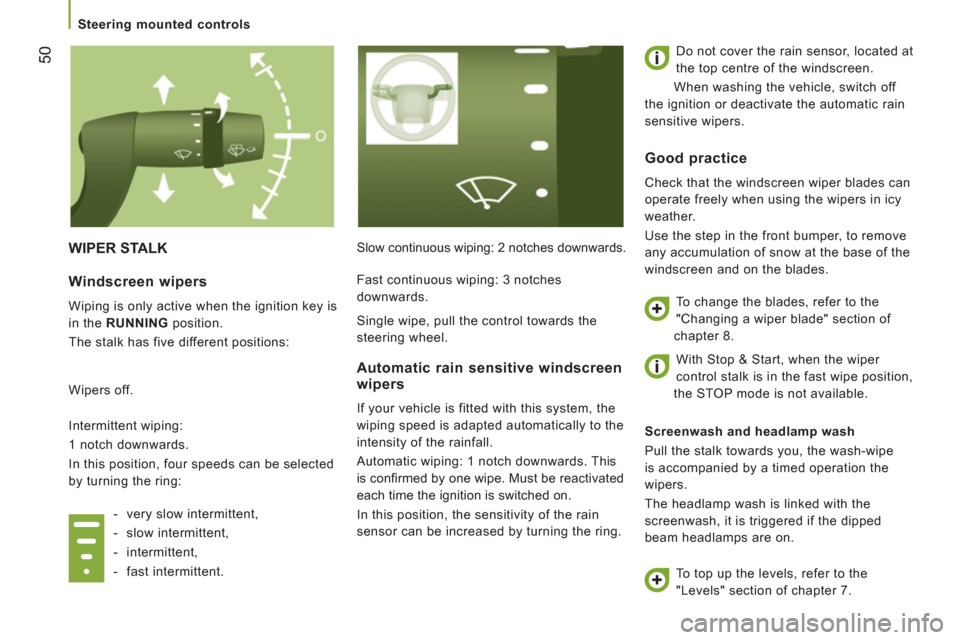
WIPER STALK
Slow continuous wiping: 2 notches downwards. Do not cover the rain sensor, located at
the top centre of the windscreen.
When washing the vehicle, switch off
the ignition or deactivate the automatic rain
sensitive wipers.
Screenwash and headlamp wash
Pull the stalk towards you, the wash-wipe
is accompanied by a timed operation the
wipers.
The headlamp wash is linked with the
screenwash, it is triggered if the dipped
beam headlamps are on.
Windscreen wipers
Wiping is only active when the ignition key is
in the RUNNING
position.
The stalk has five different positions:
Wipers off.
Intermittent wiping:
1 notch downwards.
In this position, four speeds can be selected
by turning the ring:
- very slow intermittent,
- slow intermittent,
- intermittent,
- fast intermittent.
Automatic rain sensitive windscreen
wipers
If your vehicle is fitted with this system, the
wiping speed is adapted automatically to the
intensity of the rainfall.
Automatic wiping: 1 notch downwards. This
is confi rmed by one wipe. Must be reactivated
each time the ignition is switched on.
In this position, the sensitivity of the rain
sensor can be increased by turning the ring.
Good practice
Check that the windscreen wiper blades can
operate freely when using the wipers in icy
weather.
Use the step in the front bumper, to remove
any accumulation of snow at the base of the
windscreen and on the blades.
To change the blades, refer to the
"Changing a wiper blade" section of
chapter 8.
To top up the levels, refer to the
"Levels" section of chapter 7. Fast continuous wiping: 3 notches
downwards.
Single wipe, pull the control towards the
steering wheel.
With Stop & Start, when the wiper
control stalk is in the fast wipe position,
the STOP mode is not available.
Page 55 of 184
53
3
EASE OF USE
and
COMFOR
T
Steering mounted controls
Good practice
When changing the programmed reference
speed by pressing and holding the control,
take care as the speed may increase or
decrease rapidly.
Do not use the cruise control on slippery
roads or in heavy traffic.
On a steep gradient, the cruise control will
not be able to prevent the vehicle from
exceeding the programmed speed.
The cruise control cannot, in any
circumstances, replace the need to comply
with speed limits nor can it replace the need
for vigilance and responsibility on the part
of driver.
It is advisable to leave your feet near the
pedals.
To prevent the mat from becoming caught
under the pedals:
- ensure that the mat is positioned
correctly,
- never fit one mat on top of another.
Cancelling the programmed speed
When the vehicle stops, after the ignition is
switched off, the system no longer stores
any speed.
Operating fault
In the event of a malfunction, the function is
switched off and the indicator switches off.
Contact a PEUGEOT dealer to have the
system checked.
Page 76 of 184
Practical information
74
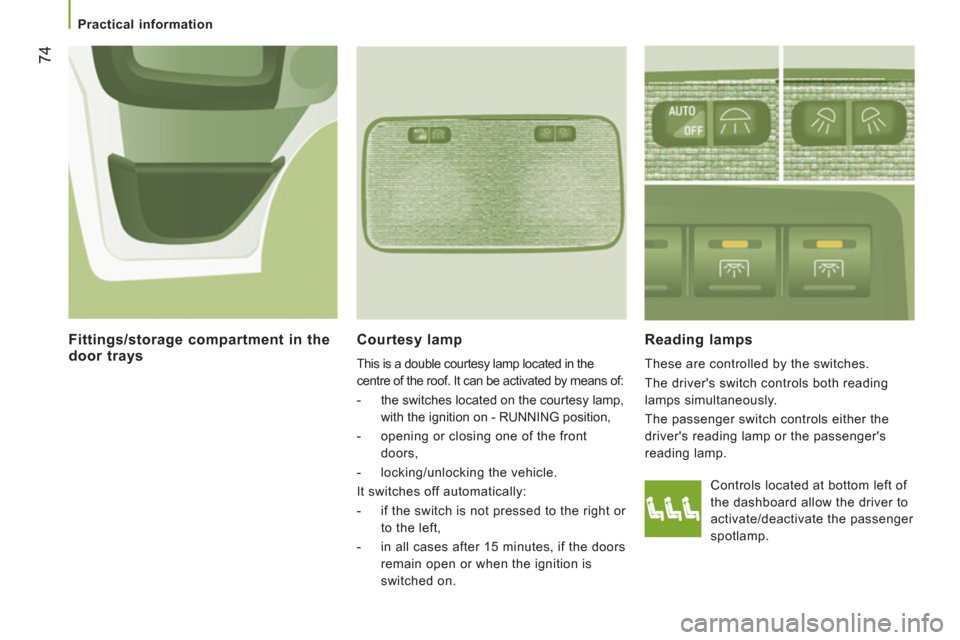
Courtesy lamp
This is a double courtesy lamp located in the
centre of the roof. It can be activated by means of:
- the switches located on the courtesy lamp,
with the ignition on - RUNNING position,
- opening or closing one of the front
doors,
- locking/unlocking the vehicle.
It switches off automatically:
- if the switch is not pressed to the right or
to the left,
- in all cases after 15 minutes, if the doors
remain open or when the ignition is
switched on.
Reading lamps
These are controlled by the switches.
The driver's switch controls both reading
lamps simultaneously.
The passenger switch controls either the
driver's reading lamp or the passenger's
reading lamp.
Fittings/storage compartment in the
door trays
Controls located at bottom left of
the dashboard allow the driver to
activate/deactivate the passenger
spotlamp.
Page 79 of 184
Mirrors and windows
77
3
EASE OF USE
and
COMFOR
T
MIRRORS AND WINDOWS
MIRROR
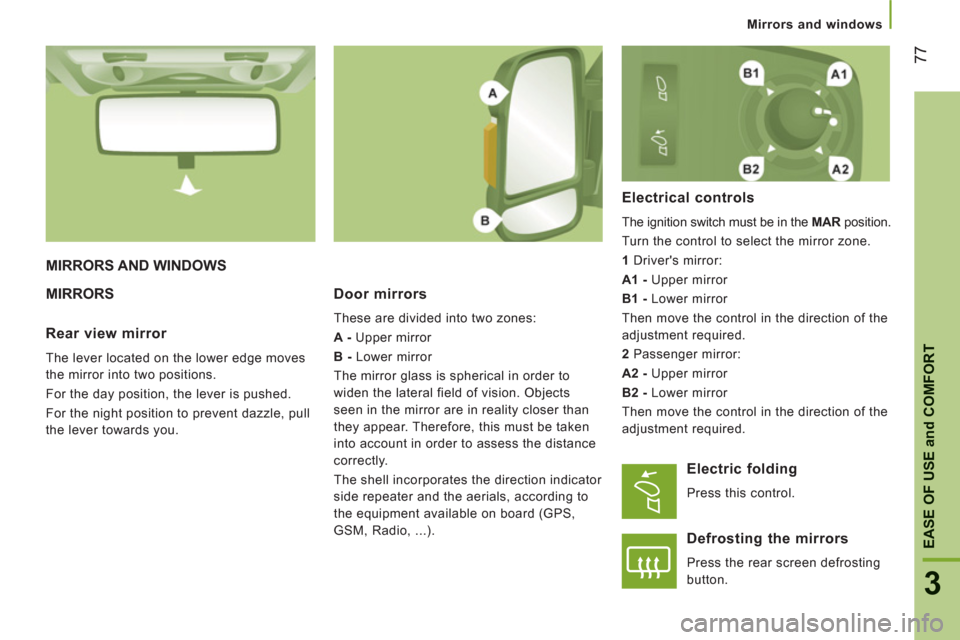
S Door mirrors
These are divided into two zones:
A -
Upper mirror
B -
Lower mirror
The mirror glass is spherical in order to
widen the lateral field of vision. Objects
seen in the mirror are in reality closer than
they appear. Therefore, this must be taken
into account in order to assess the distance
correctly.
The shell incorporates the direction indicator
side repeater and the aerials, according to
the equipment available on board (GPS,
GSM, Radio, ...).
Electrical controls
The ignition switch must be in the MAR
position.
Turn the control to select the mirror zone.
1
Driver's mirror:
A1 -
Upper mirror
B1 -
Lower mirror
Then move the control in the direction of the
adjustment required.
2
Passenger mirror:
A2 -
Upper mirror
B2 -
Lower mirror
Then move the control in the direction of the
adjustment required.
Rear view mirror
The lever located on the lower edge moves
the mirror into two positions.
For the day position, the lever is pushed.
For the night position to prevent dazzle, pull
the lever towards you.
Electric folding
Press this control.
Defrosting the mirrors
Press the rear screen defrosting
button.
Page 80 of 184
Mirrors and windows
78
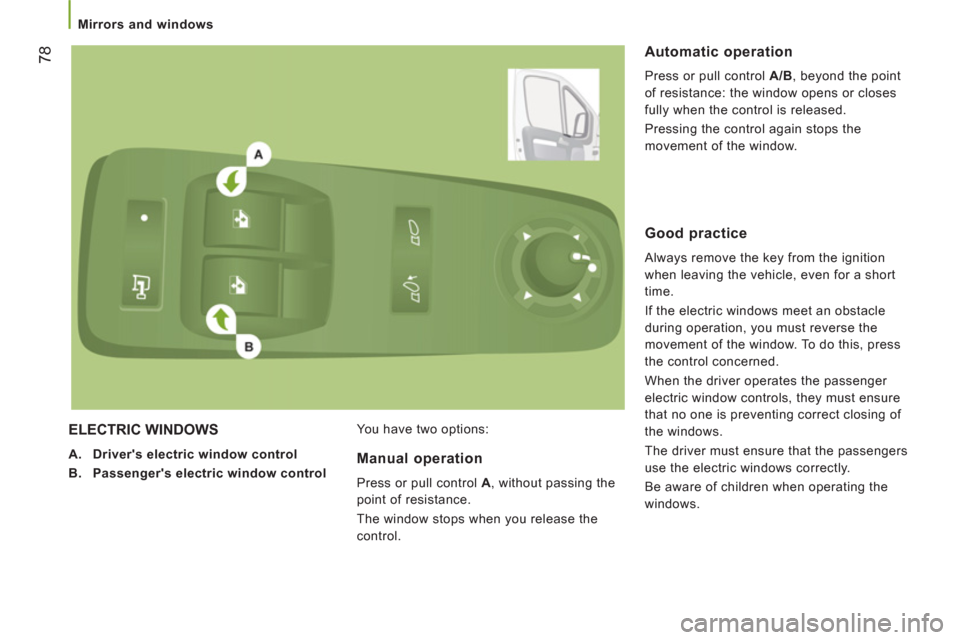
ELECTRIC WINDOWS
A.
Driver's electric window control
B.
Passenger's electric window control
You have two options:
Automatic operation
Press or pull control A/B
, beyond the point
of resistance: the window opens or closes
fully when the control is released.
Pressing the control again stops the
movement of the window.
Manual operation
Press or pull control A
, without passing the
point of resistance.
The window stops when you release the
control.
Good practice
Always remove the key from the ignition
when leaving the vehicle, even for a short
time.
If the electric windows meet an obstacle
during operation, you must reverse the
movement of the window. To do this, press
the control concerned.
When the driver operates the passenger
electric window controls, they must ensure
that no one is preventing correct closing of
the windows.
The driver must ensure that the passengers
use the electric windows correctly.
Be aware of children when operating the
windows.
Page 81 of 184
79
4
TECHNOLOGY ON BOAR
D
Trip computer
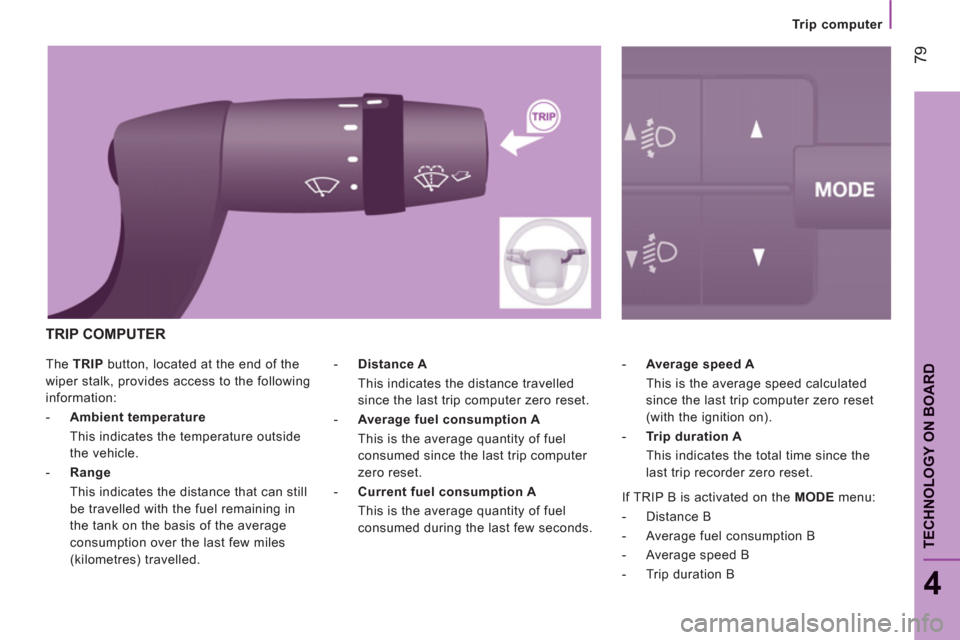
The TRIP
button, located at the end of the
wiper stalk, provides access to the following
information:
- Ambient temperature
This indicates the temperature outside
the vehicle.
- Range
This indicates the distance that can still
be travelled with the fuel remaining in
the tank on the basis of the average
consumption over the last few miles
(kilometres) travelled.
- Average speed A
This is the average speed calculated
since the last trip computer zero reset
(with the ignition on).
- Trip duration A
This indicates the total time since the
last trip recorder zero reset.
- Distance A
This indicates the distance travelled
since the last trip computer zero reset.
- Average fuel consumption A
This is the average quantity of fuel
consumed since the last trip computer
zero reset.
- Current fuel consumption A
This is the average quantity of fuel
consumed during the last few seconds.
TRIP COMPUTER
If TRIP B is activated on the MODE
menu:
- Distance B
- Average fuel consumption B
- Average speed B
- Trip duration B
Page 82 of 184
Mode
80
MODE
Confi
guration - Personalisation
If your vehicle is fitted with the control panel
located to the left of the steering wheel, this
provides access to menus which permit the
personalisation of some of your equipment.
Seven languages are offered: Italian,
English, German, French, Spanish,
Portuguese, Dutch.
As a safety precaution, some menus can
only be accessed when the ignition is off.
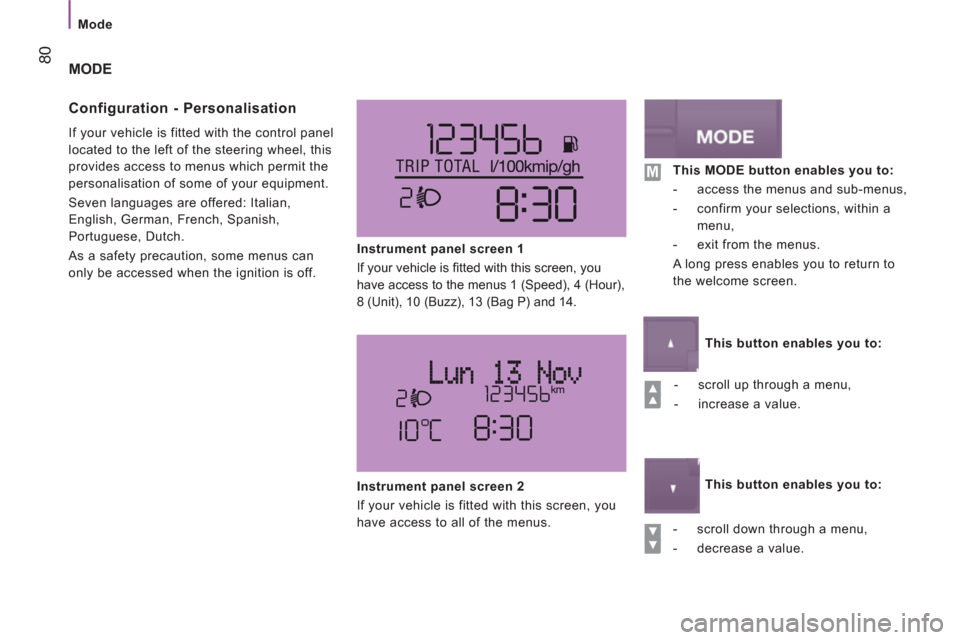
Instrument panel screen 1
If your vehicle is fi tted with this screen, you
have access to the menus 1 (Speed), 4 (Hour),
8 (Unit), 10 (Buzz), 13 (Bag P) and 14.
- scroll up through a menu,
- increase a value.
- scroll down through a menu,
- decrease a value.
Instrument panel screen 2
If your vehicle is fitted with this screen, you
have access to all of the menus.
This MODE button enables you to:
- access the menus and sub-menus,
- confirm your selections, within a
menu,
- exit from the menus.
A long press enables you to return to
the welcome screen.
This button enables you to:
This button enables you to:
Page 102 of 184
100
Bluetooth hands-free system
When prompted by the telephone, enter the
PIN displayed in the instrument panel.
If the pairing has been successful, the
system announces "Connecting".
The name of the telephone identified
appears in the instrument panel screen,
pairing is confirmed. "Settings"\wait for a response\
"Pairing".
PIN
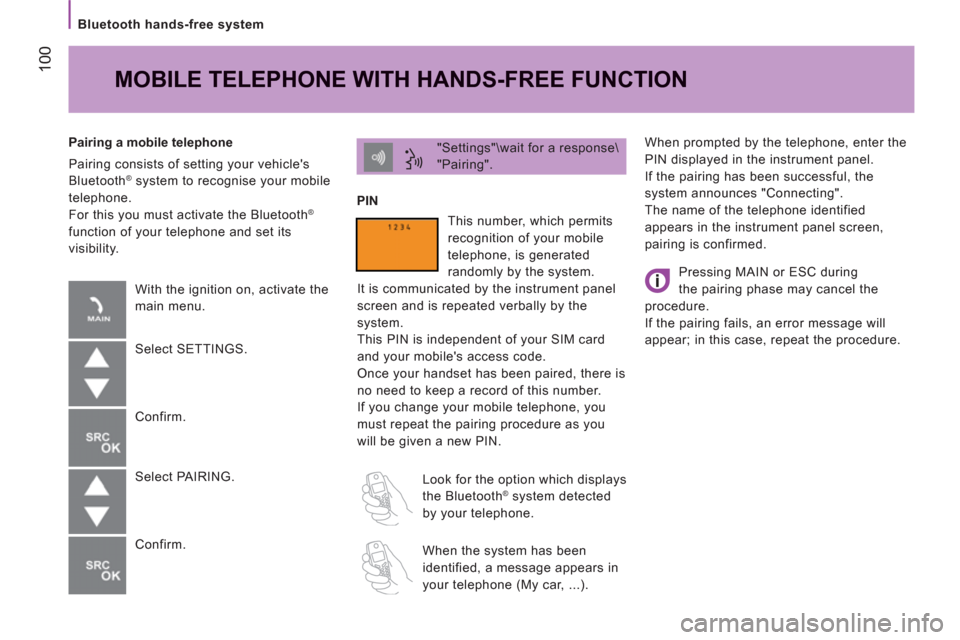
Pairing a mobile telephone
Pairing consists of setting your vehicle's
Bluetooth
® system to recognise your mobile
telephone.
For this you must activate the Bluetooth
®
function of your telephone and set its
visibility.
MOBILE TELEPHONE WITH HANDS-FREE FUNCTION
With the ignition on, activate the
main menu.
Select SETTINGS.
Confirm.
Select PAIRING.
Confirm. This number, which permits
recognition of your mobile
telephone, is generated
randomly by the system.
It is communicated by the instrument panel
screen and is repeated verbally by the
system.
This PIN is independent of your SIM card
and your mobile's access code.
Once your handset has been paired, there is
no need to keep a record of this number.
If you change your mobile telephone, you
must repeat the pairing procedure as you
will be given a new PIN.
Look for the option which displays
the Bluetooth
® system detected
by your telephone.
When the system has been
identified, a message appears in
your telephone (My car, ...).
Pressing MAIN or ESC during
the pairing phase may cancel the
procedure.
If the pairing fails, an error message will
appear; in this case, repeat the procedure.
Page 105 of 184
103
Bluetooth hands-free system
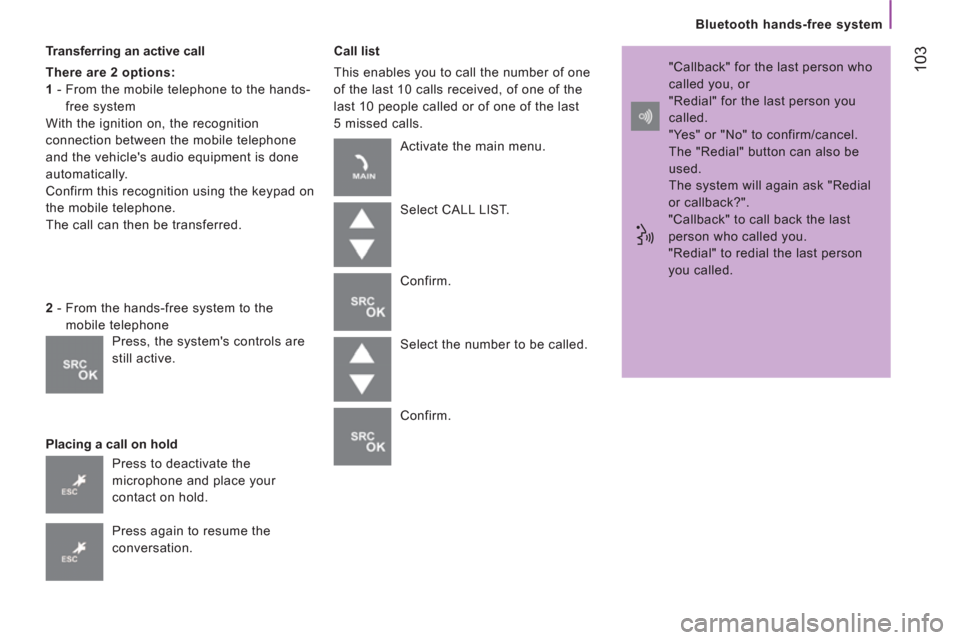
Transferring an active call
There are 2 options:
1
- From the mobile telephone to the hands-
free system
With the ignition on, the recognition
connection between the mobile telephone
and the vehicle's audio equipment is done
automatically.
Confirm this recognition using the keypad on
the mobile telephone.
The call can then be transferred.
Placing a call on hold
Call list
This enables you to call the number of one
of the last 10 calls received, of one of the
last 10 people called or of one of the last
5 missed calls.
2
- From the hands-free system to the
mobile telephone
Press to deactivate the
microphone and place your
contact on hold.
Press again to resume the
conversation. Activate the main menu.
Select CALL LIST.
Confirm.
Select the number to be called.
Confirm. "Callback" for the last person who
called you, or
"Redial" for the last person you
called.
"Yes" or "No" to confirm/cancel.
The "Redial" button can also be
used.
The system will again ask "Redial
or callback?".
"Callback" to call back the last
person who called you.
"Redial" to redial the last person
you called.
Press, the system's controls are
still active.
Page 112 of 184
11
0
Bluetooth hands-free system
Audio tracks in .mp3, .wma, .wav format
and playlists with the extension .wpl are
recognised by the system.
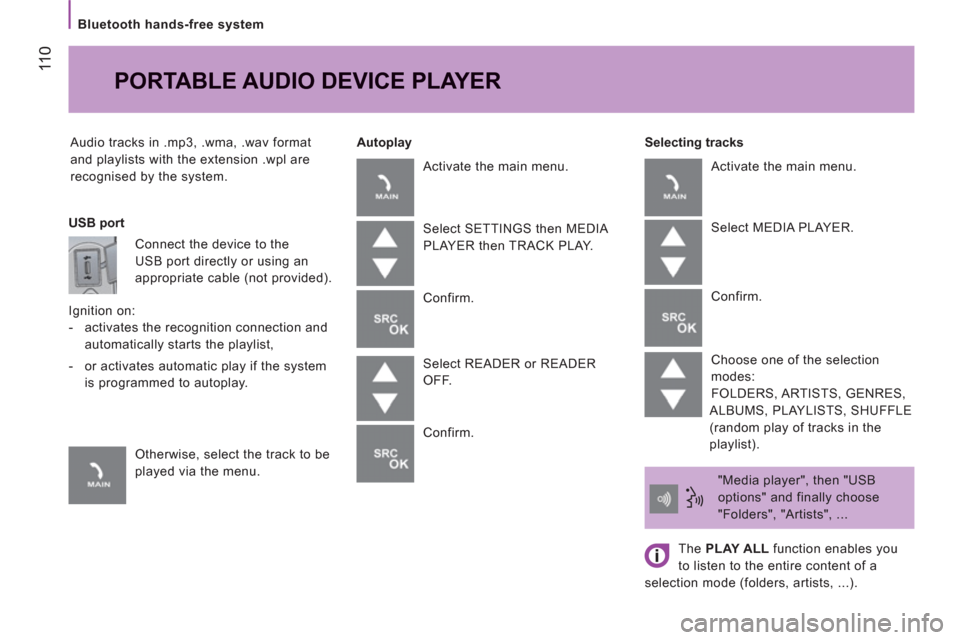
Selecting tracks
PORTABLE AUDIO DEVICE PLAYER
Autoplay
USB port
Connect the device to the
USB port directly or using an
appropriate cable (not provided).
Ignition on:
- activates the recognition connection and
automatically starts the playlist,
- or activates automatic play if the system
is programmed to autoplay.
Otherwise, select the track to be
played via the menu. Activate the main menu.
Select SETTINGS then MEDIA
PLAYER then TRACK PLAY.
Confirm.
Select READER or READER
OFF.
Confirm. Activate the main menu.
Select MEDIA PLAYER.
Confirm.
Choose one of the selection
modes:
FOLDERS, ARTISTS, GENRES,
ALBUMS, PLAYLISTS, SHUFFLE
(random play of tracks in the
playlist).
"Media player", then "USB
options" and finally choose
"Folders", "Artists", ...
The PLAY ALL
function enables you
to listen to the entire content of a
selection mode (folders, artists, ...).