mirror Peugeot Expert VU 2016 Workshop Manual
[x] Cancel search | Manufacturer: PEUGEOT, Model Year: 2016, Model line: Expert VU, Model: Peugeot Expert VU 2016Pages: 599, PDF Size: 13.14 MB
Page 512 of 599
510
Expert_en_Chap11_index-alpha_ed01-2016
Pads, brake ................................................... 282
Paint colour code .......................................... 337
Parking brake
.................................. 18, 205, 282
Parking sensors, audible and visual
.............256
Parking sensors, front
...................................256
Parking sensors, rear ............................255, 256
PE
u
g
Eo
t Connect Assistance ...................338
PE
u
g
Eo
t Connect Nav
...............................3
41
P
Eu
g
Eot C
onnect Packs
...........................338
PE
u
g
Eo
t Connect Radio ...........................429
P
Eu
g
Eot C
onnect S
oS ............................. 33
8
Plates, identification ...................................... 337
Platform cab
.......................................... 3
15, 332
Player, Apple
® .............................. 3 99, 455, 495
Player, MP3 CD ............................................. 494
Player,
u
S
B
.................................. 398, 454, 492
Port,
u
S
B
............................. 1
22, 398, 454, 492
Pressures, tyres
................... 290, 295, 302, 337 Pre-tensioning seat belts
..............................
169
Priming pump
................................................
327
Priming the fuel system ................................
327
Profiles
..................................................
418 , 474
Protecting children
.................
171, 174 -176 , 18 2 ,
187, 188, 190, 193
Puncture
........................................................
290
Radio
...................
394, 398, 450, 454, 488, 489
Radio, digital (Digital Audio Broadcasting - DAB)
..........
396, 397, 452, 453
Radio Media
........
388, 390, 392, 444, 446, 448
Range
..............................................................
42
Range, AdBlue
................................................
35
RDS
.......................................................
3 9 5 , 4 51
Rear screen, demisting
.........................
13 3, 13 4
Recharging the battery
................................. 32
3
Recirculation, air
...................
125, 126, 128, 131
Reduction of electrical load
..........................
270
Regeneration of the particle filter
.................
2
81
Reinitialisation of the under-inflation detection system .........................................
263
Reinitialising the remote control
............... 5
4, 70
Reminder, key in ignition ...............................
201
Reminder, lighting on ....................................
148
Remote control
...... 4
7-50, 52, 55 -59, 67, 68, 71, 74, 75
Removing a wheel
........................................299
Removing the mat
.........................................11 9Safety, children
......................
17
1, 174 -176 , 18 2 ,
187, 188, 190, 193
Saturation of the particle filter (Diesel)
.........
2
81
Screen, instrument panel ..........................
4 0 , 41
Screen menu map .......
352, 354, 356, 360, 362,
370, 372, 374, 378, 384, 386, 388, 390, 392, 400, 402, 404, 412, 414, 416, 434, 440, 442,
444, 446, 448, 456, 458, 460, 468, 470, 472
Screen, multifunction (with audio system)
....487
P
R
S
Replacing bulbs .....3 03, 3 0 4, 310, 311, 313 - 315
Replacing fuses .............................. ......316, 317
Replacing the air filter
...................................281
Replacing the oil filter
................................... 2
81
Replacing the passenger compartment filter
...................................... 281
Reservoir, headlamp wash
...........................280
Reservoir, screenwash
................................. 28
0
Reset journey
.................................................. 41
Resetting the service indicator
.......................33
Resetting the trip recorder
..............................38
Rev counter
................................................ 14 -16
Reversing camera
......................................... 259
Reversing camera (on interior mirror)
..........258
Reversing lamp
............................. 31
0, 313, 315
Roof bars
............................................... 2
72, 273
Roof rack
............................................... 2
72, 273
Running out of fuel (Diesel)
..........................3
27oi
l change
..................................................... 278oi
l consumption
............................................ 278
oi
l, engine
...............................
...................... 278
on
-board tools
...................................... 287, 289
op
ening the bonnet
...................................... 2
76
op
ening the boot
..............................
.. 47, 59, 94
op
ening the doors
....... 4
7, 59, 74, 78 - 81, 83, 93
op
ening to 90/180/235°
.................................. 92
op
ening to 180°
.............................................. 91
O
Alphabetical index
Page 549 of 599
102
21,518,5
Transversal-Peugeot_en_Chap02_RCC-2-2-0_ed01-2016
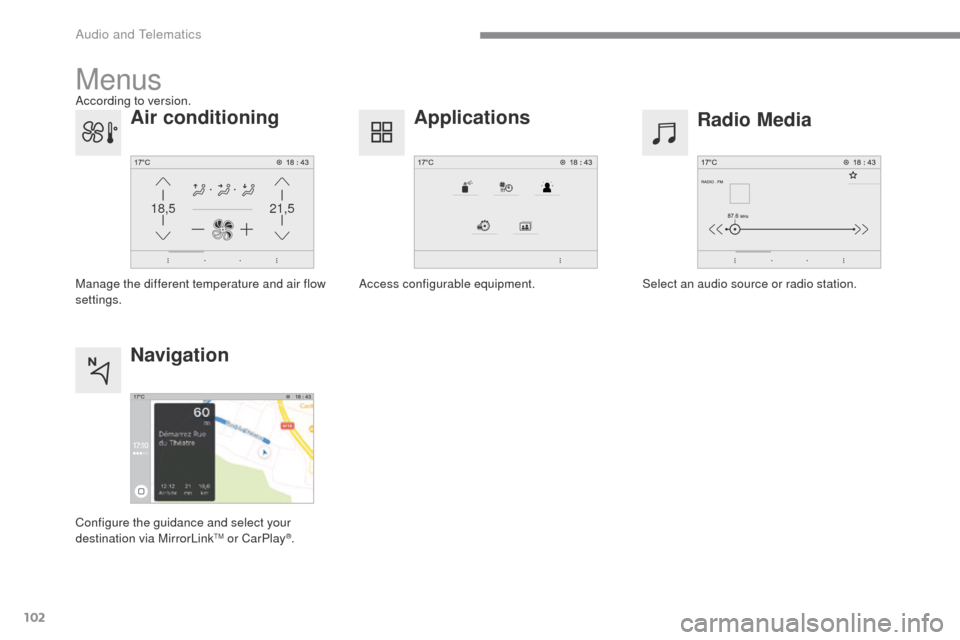
Menus
Radio Media
Applications
Select an audio source or radio station.
Access configurable equipment.
Air conditioning
Manage the different temperature and air flow
settings.
Navigation
Configure the guidance and select your
destination via MirrorLinkTM or CarPlay®.
According to version.
Audio and Telematics
Page 550 of 599
103
Transversal-Peugeot_en_Chap02_RCC-2-2-0_ed01-2016
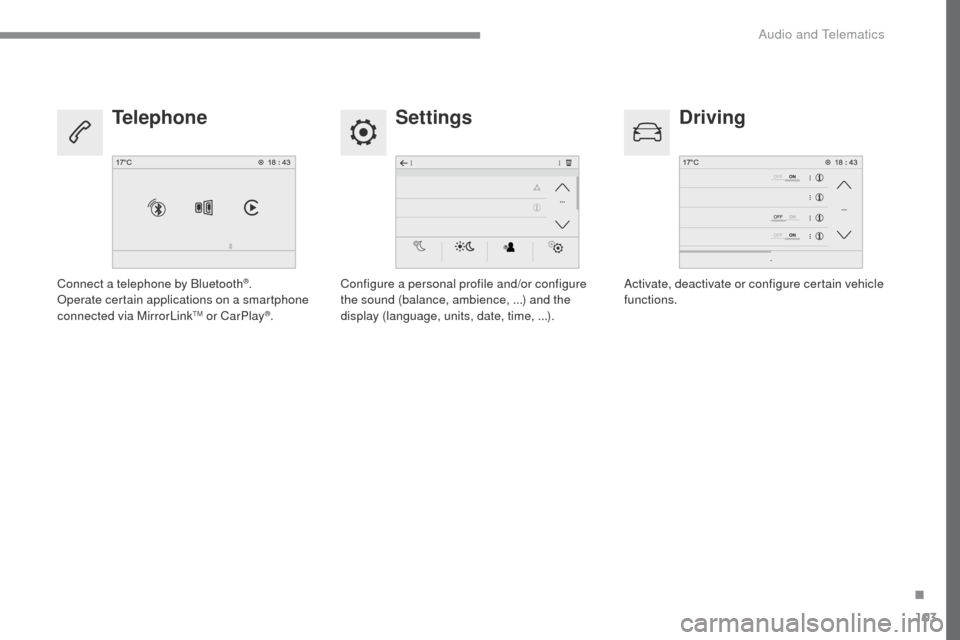
SettingsDriving
Telephone
Configure a personal profile and/or configure
the sound (balance, ambience, ...) and the
display (language, units, date, time, ...). Activate, deactivate or configure certain vehicle
functions.
Connect a telephone by Bluetooth®.
Operate certain applications on a smartphone
connected via MirrorLink
TM or CarPlay®.
.
Audio and Telematics
Page 572 of 599
125
1
2
3
4
Transversal-Peugeot_en_Chap02_RCC-2-2-0_ed01-2016
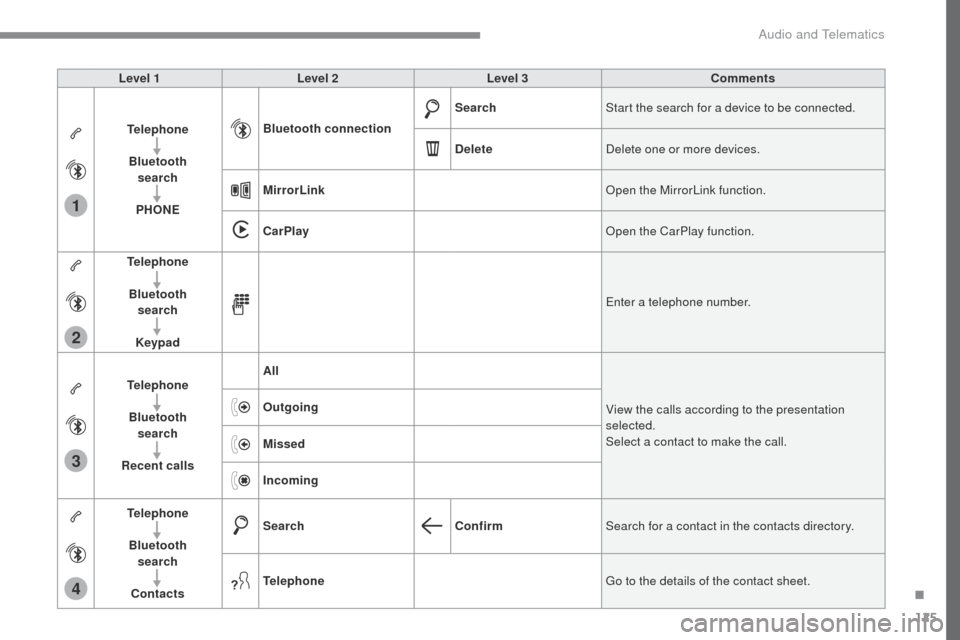
Level 1Level 2 Level 3 Comments
Telephone Bluetooth search
PHONE Bluetooth connection
Search
Start the search for a device to be connected.
Delete Delete one or more devices.
MirrorLink Open the MirrorLink function.
CarPlay Open the CarPlay function.
Telephone
Bluetooth search
Keypad Enter a telephone number.
Telephone Bluetooth search
Recent calls All
View the calls according to the presentation
selected.
Select a contact to make the call.
Outgoing
Missed
Incoming
Telephone Bluetooth search
Contacts Search
ConfirmSearch for a contact in the contacts directory.
Telephone Go to the details of the contact sheet.
.
Audio and Telematics
Page 575 of 599
128
1
Transversal-Peugeot_en_Chap02_RCC-2-2-0_ed01-2016
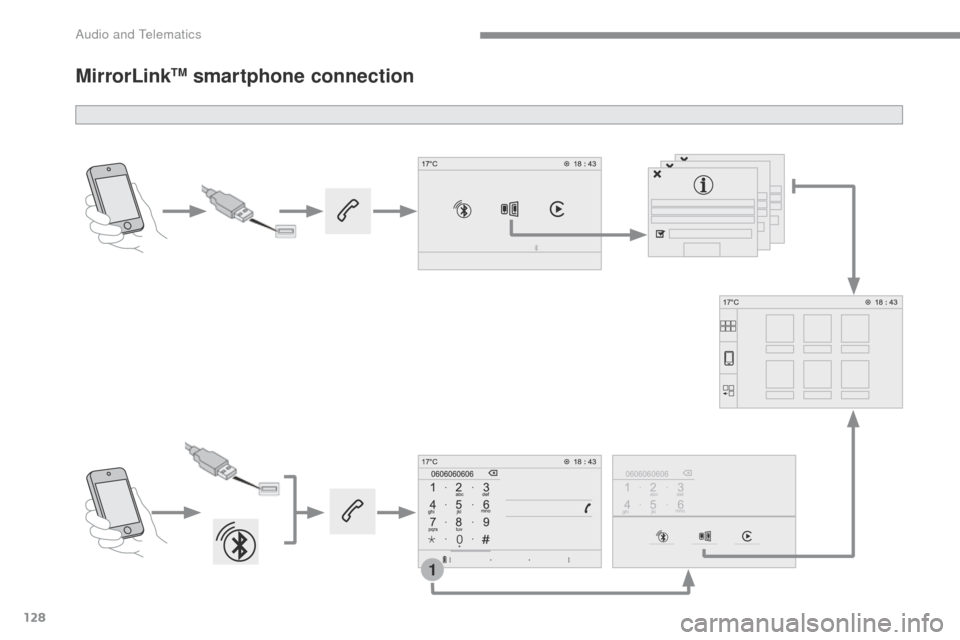
MirrorLinkTM smartphone connection
Audio and Telematics
Page 576 of 599
129
1
Transversal-Peugeot_en_Chap02_RCC-2-2-0_ed01-2016
As a safety measure and because it
requires the sustained attention of
the driver, using a smartphone when
driving is prohibited.
Operation must be with the vehicle
stationary.
The synchronisation of a
smartphone allows applications on a
smartphone that are adapted to the
MirrorLink
TM technology to be displayed
i
n the vehicle's screen.
The principles and standards
are constantly evolving. For the
communication process between
the smartphone and the system to
work correctly, the smartphone must
be unlocked; update the operating
system of your smar tphone as
well as the date and time in the
smartphone and the system .
For the list of eligible smartphones,
connect to the Brand's internet website
in your country. The "MirrorLink
TM" function requires
a compatible smartphone and
applications.
There may be a wait for the availability
of applications, depending on the
quality of your network.
When connecting a smartphone to
the system, it is recommended that
"Bluetooth
®" be started on the smartphone
Depending on the smartphone, it may be
necessary to activate the "MirrorLinkTM" function.
During the procedure, several screen
pages relating to certain functions
are displayed.
Accept to start and end the
connection. Connect the USB cable. The
smartphone charges when
connected by a USB cable.
Press " MirrorLink
TM" to start the
application in the system. Once connection is established, a page
is displayed with the applications already
downloaded to your smartphone and adapted
to the MirrorLink
TM technology.
Access to the different audio sources remains
accessible in the margin of the MirrorLink
TM
display, using touch buttons in the upper bar.
Access to the menus for the system is possible
at any time using the dedicated buttons
Telephone not connected by
Bluetooth®
Telephone connected by Bluetooth®
From the system, press " Telephone"
to display the primary page. From the system, press "
Telephone"
to display the primary page.
As a safety measure, applications
can only be viewed with the vehicle
stationary; display is interrupted once
the vehicle is moving.
Press the "PHONE" button to display
the secondary page.
Press " MirrorLink
TM" to start the
application in the system.
.
Audio and Telematics
Page 578 of 599
131
Transversal-Peugeot_en_Chap02_RCC-2-2-0_ed01-2016
Level 1Level 2 Level 3 Comments
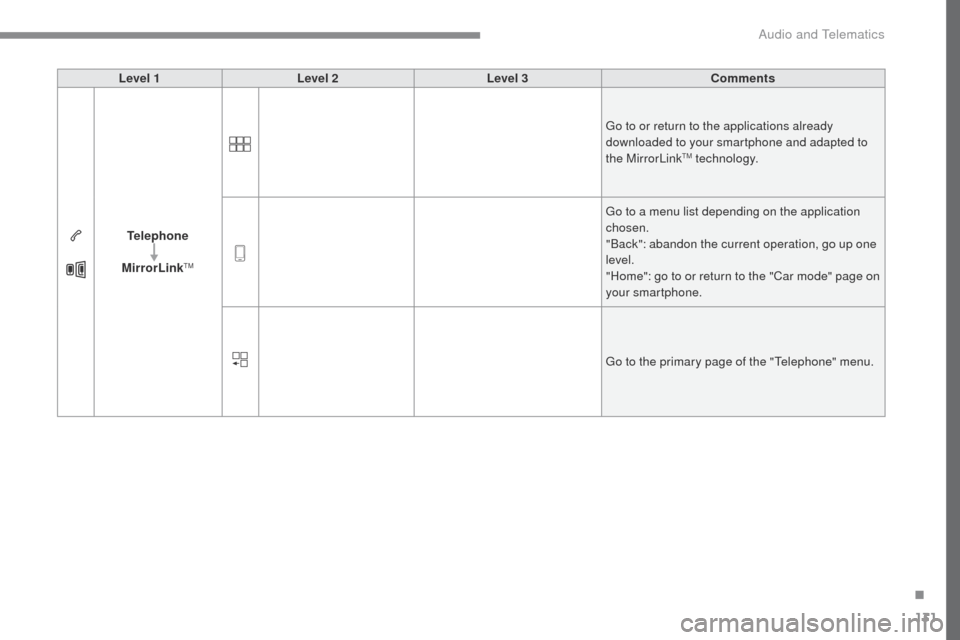
Telephone
MirrorLink
TM
Go to or return to the applications already
downloaded to your smartphone and adapted to
the MirrorLink
TM technology.
Go to a menu list depending on the application
chosen.
"Back": abandon the current operation, go up one
level.
"Home": go to or return to the "Car mode" page on
your smartphone.
Go to the primary page of the "Telephone" menu.
.
Audio and Telematics