mirror PEUGEOT PARTNER 2022 Owner's Manual
[x] Cancel search | Manufacturer: PEUGEOT, Model Year: 2022, Model line: PARTNER, Model: PEUGEOT PARTNER 2022Pages: 324, PDF Size: 9.42 MB
Page 165 of 324
163
Driving
6
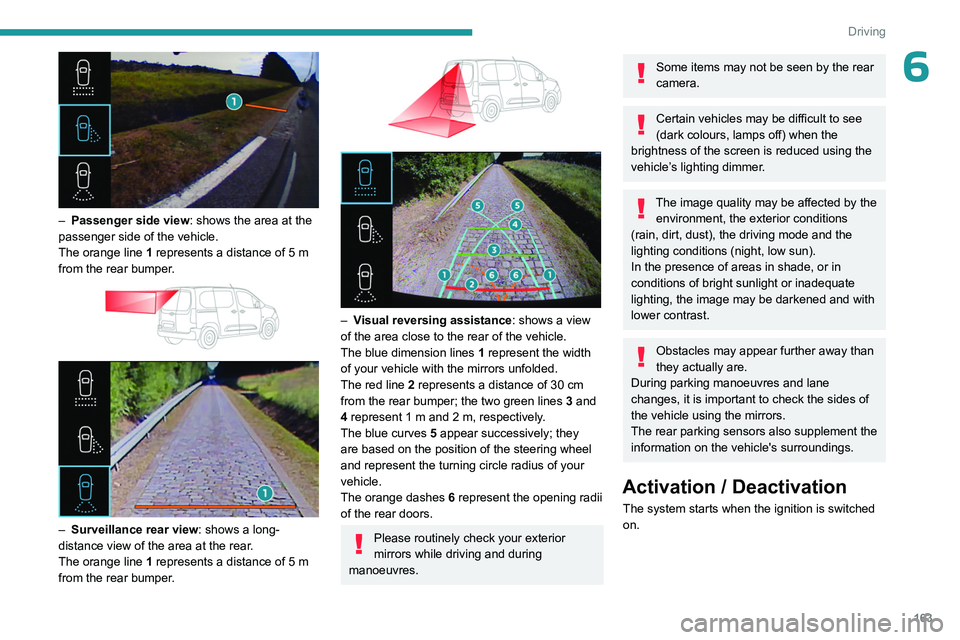
– Passenger side view: shows the area at the
passenger side of the vehicle.
The orange line 1 represents a distance of 5
m
from the rear bumper.
– Surveillance rear view : shows a long-
distance view of the area at the rear.
The orange line 1 represents a distance of 5
m
from the rear bumper.
– Visual reversing assistance : shows a view
of the area close to the rear of the vehicle.
The blue dimension lines 1 represent the width
of your vehicle with the mirrors unfolded.
The red line 2 represents a distance of 30
cm
from the rear bumper; the two green lines 3 and
4 represent 1
m and 2 m, respectively.
The blue curves 5 appear successively; they
are based on the position of the steering wheel
and represent the turning circle radius of your
vehicle.
The orange dashes 6 represent the opening radii
of the rear doors.
Please routinely check your exterior
mirrors while driving and during
manoeuvres.
Some items may not be seen by the rear
camera.
Certain vehicles may be difficult to see
(dark colours, lamps off) when the
brightness of the screen is reduced using the
vehicle’s lighting dimmer.
The image quality may be affected by the environment, the exterior conditions
(rain, dirt, dust), the driving mode and the
lighting conditions (night, low sun).
In the presence of areas in shade, or in
conditions of bright sunlight or inadequate
lighting, the image may be darkened and with
lower contrast.
Obstacles may appear further away than
they actually are.
During parking manoeuvres and lane
changes, it is important to check the sides of
the vehicle using the mirrors.
The rear parking sensors also supplement the
information on the vehicle's surroundings.
Activation / Deactivation
The system starts when the ignition is switched
on.
Page 168 of 324
166
Driving
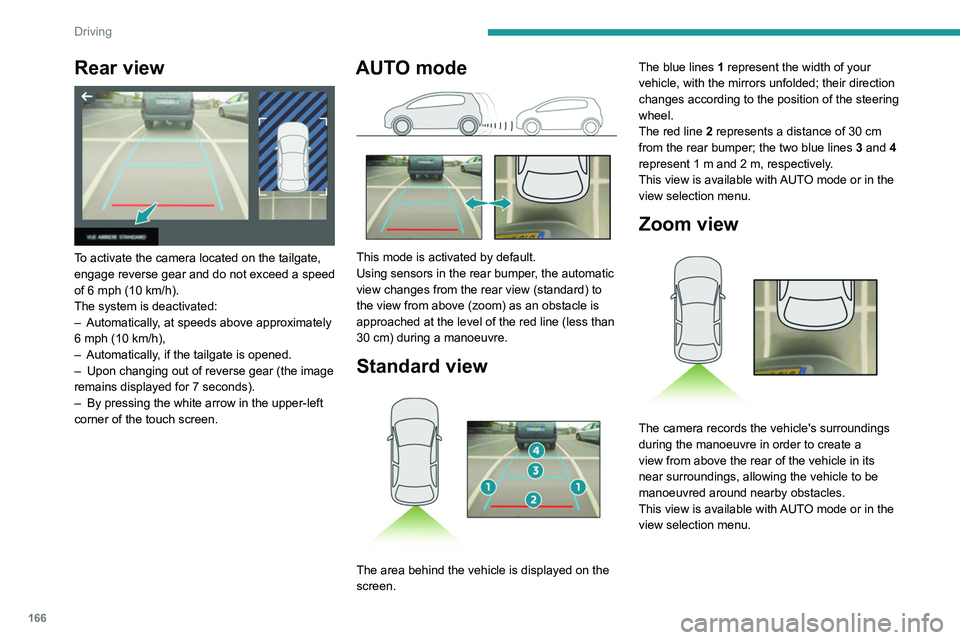
Rear view
To activate the camera located on the tailgate,
engage reverse gear and do not exceed a speed
of 6 mph (10 km/h).
The system is deactivated:
–
Automatically
, at speeds above approximately
6 mph (10
km/h),
–
Automatically
, if the tailgate is opened.
–
Upon changing out of reverse gear (the image
remains displayed for 7
seconds).
–
By pressing the white arrow in the upper-left
corner of the touch screen.
AUTO mode
This mode is activated by default.
Using sensors in the rear bumper, the automatic
view changes from the rear view (standard) to
the view from above (zoom) as an obstacle is
approached at the level of the red line (less than
30
cm) during a manoeuvre.
Standard view
The area behind the vehicle is displayed on the
screen. The blue lines
1 represent the width of your
vehicle, with the mirrors unfolded; their direction
changes according to the position of the steering
wheel.
The red line 2 represents a distance of 30 cm
from the rear bumper; the two blue lines 3 and 4
represent 1 m and 2 m, respectively.
This view is available with AUTO mode or in the
view selection menu.
Zoom view
The camera records the vehicle's surroundings
during the manoeuvre in order to create a
view from above the rear of the vehicle in its
near surroundings, allowing the vehicle to be
manoeuvred around nearby obstacles.
This view is available with AUTO mode or in the
view selection menu.
Page 169 of 324
167
Driving
6Obstacles may appear further away than
they actually are.
It is important to monitor the sides of the
vehicle during the manoeuvre, using the
mirrors.
Parking sensors also provide additional
information about the area around the vehicle.
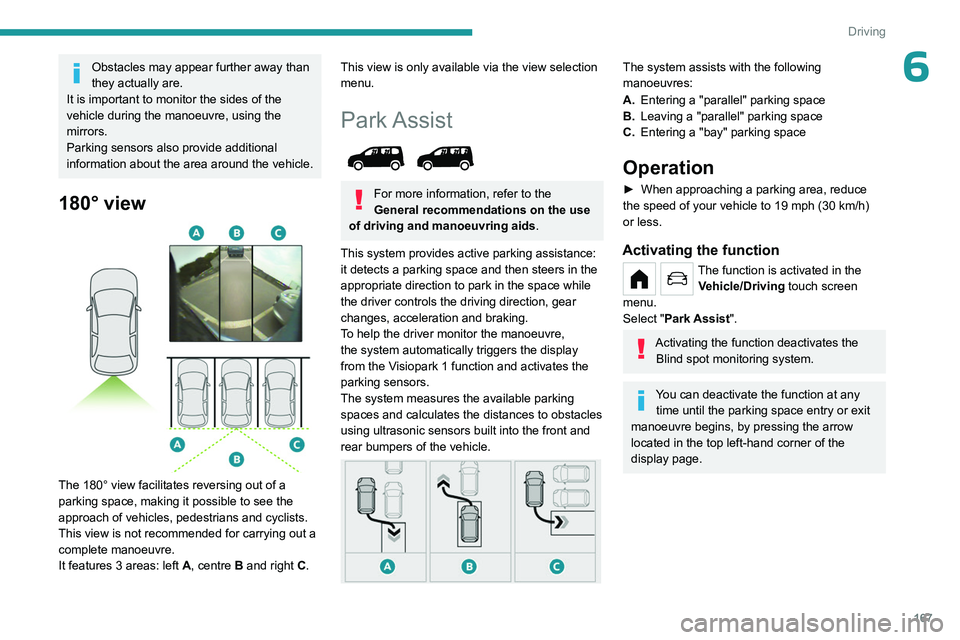
180° view
The 180° view facilitates reversing out of a
parking space, making it possible to see the
approach of vehicles, pedestrians and cyclists.
This view is not recommended for carrying out a
complete manoeuvre.
It features 3 areas: left A, centre B and right C.
This view is only available via the view selection
menu.
Park Assist
For more information, refer to the
General recommendations on the use
of driving and manoeuvring aids .
This system provides active parking assistance:
it detects a parking space and then steers in the
appropriate direction to park in the space while
the driver controls the driving direction, gear
changes, acceleration and braking.
To help the driver monitor the manoeuvre,
the system automatically triggers the display
from the
Visiopark 1 function and activates the
parking sensors.
The system measures the available parking
spaces and calculates the distances to obstacles
using ultrasonic sensors built into the front and
rear bumpers of the vehicle.
The system assists with the following
manoeuvres:
A. Entering a "parallel" parking space
B. Leaving a "parallel" parking space
C. Entering a "bay" parking space
Operation
► When approaching a parking area, reduce
the speed of your vehicle to 19 mph (30 km/h)
or less.
Activating the function
The function is activated in the Vehicle/Driving touch screen
menu.
Select "Park Assist".
Activating the function deactivates the Blind spot monitoring system.
You can deactivate the function at any time until the parking space entry or exit
manoeuvre begins, by pressing the arrow
located in the top left-hand corner of the
display page.
Page 222 of 324
220
Technical data
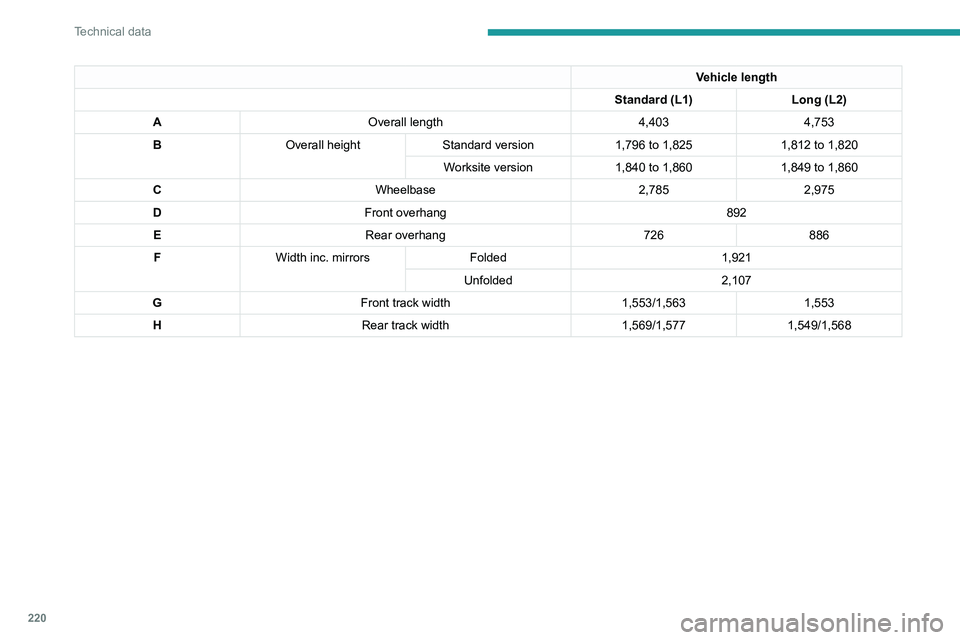
Vehicle length
Standard (L1) Long (L2)
A Overall length 4,4034,753
B Overall height Standard version 1,796 to 1,8251,812 to 1,820
Worksite version 1,840 to 1,8601,849 to 1,860
C Wheelbase 2,7852,975
D Front overhang 892
E Rear overhang 726886
F Width inc. mirrors Folded 1,921
Unfolded 2,107
G Front track width 1,553/1,5631,553
H Rear track width 1,569/1,5771,549/1,568
Page 226 of 324
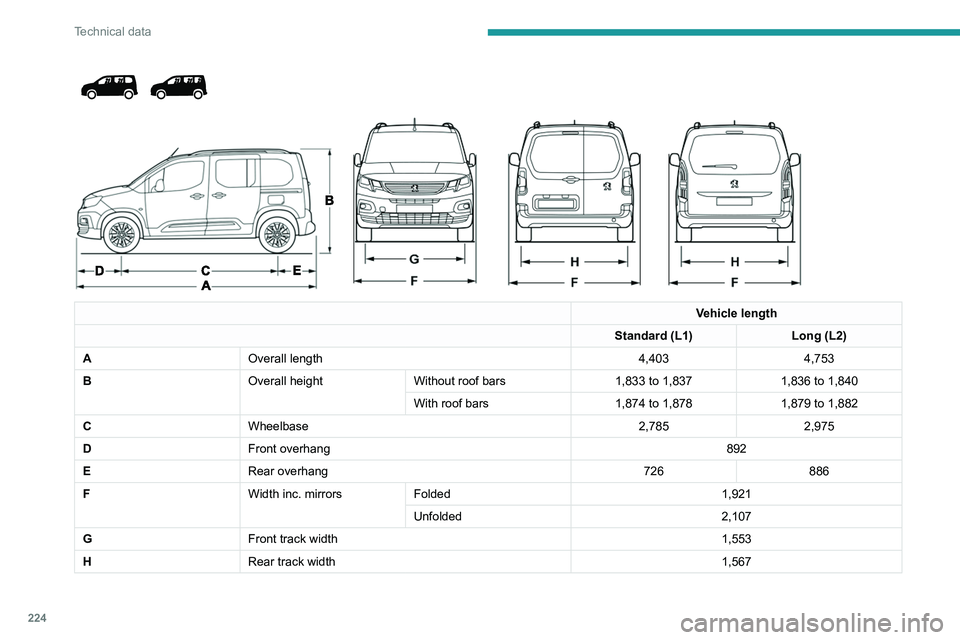
224
Technical data
Vehicle length
Standard (L1) Long (L2)
A Overall length 4,4034,753
B Overall heightWithout roof bars 1,833 to 1,8371,836 to 1,840
With roof bars 1,874 to 1,8781,879 to 1,882
C Wheelbase 2,7852,975
D Front overhang 892
E Rear overhang 726886
F Width inc. mirrorsFolded 1,921
Unfolded 2,107
G Front track width 1,553
H Rear track width 1,567
Page 289 of 324
287
Alphabetical index
Changing a wheel 201, 204
Changing a wiper blade
89–90
Changing the remote control battery
40
Changing to free-wheeling
197, 216
Charger, induction
62
Charger, wireless
62
Charging cable
178
Charging cable (Electric)
177
Charging connector (Electric)
176, 181, 183, 185
Charging flap (Electric)
176, 181, 183–185
Charging system (Electric)
5, 9, 30, 174, 191
Charging the traction battery
(Electric)
174, 181, 183, 185
Checking the levels
191–193
Checking tyre pressures
(using the kit)
202–203
Checks
191, 194–195
Checks, routine
194–195
Child lock
11 6
Children
102, 110, 114–116
Children (safety)
11 6
Child seats
102, 106–107, 109–111, 114–115
Child seats, conventional
109
Child seats, i-Size
11 5
Child seats, ISOFIX
114–116
Cleaning (advice)
175, 198–199
Closing the doors
32, 37
Collision Risk Alert
150–151
Configuration, vehicle
29–30
Connected applications
270Connection, Bluetooth 240–241, 253–254,
270–271, 275–276
Connection, MirrorLink
252
Connection, Wi-Fi network
271
Connectivity
269
Consumption figures
30
Container, AdBlue®
196
Control, emergency boot release
39
Control, emergency door
32, 38–39
Control, heated seats
52–53
Controls, steering mounted
131
Control stalk, lighting
83–84
Control stalk, wipers
88–90
Control unit
177–178
Courtesy lamp
81–82
Courtesy lamp, front
82
Courtesy lamp, rear
82
Courtesy lamps
82
Cover, load space
65
Cruise control
141, 144–146, 150
Cruise control, adaptive
146
Cruise control by speed limit recognition
141
Cruise control, dynamic with Stop
function
141
Cup holder
60
D
DAB (Digital Audio Broadcasting) -
Digital radio
238, 250, 273
Date (setting)
256, 278
Daytime running lamps 85, 208–209
Deactivating the passenger
airbag
104, 108–109
Deactivation of DSC (ESC)
96
Deadlocking
38
Deferred charging
31
Deferred charging (Electric)
30, 176, 181, 184
Defrosting
54, 77
Defrosting, front
77
Demisting
77
Demisting, front
77
Demisting, rear
53, 78
Demisting, rear screen
53, 78
Dials and gauges
10, 12
Digital instrument panel
11–13
Dimensions
219
Dipstick
192
Direction indicators
84, 208, 210–211
Display screen, instrument panel
10
Domestic charging
178
Domestic charging (Electric)
183, 185, 234
Doors, side
43
Doors, side-hinged
37–38
Driver’s attention warning
158
Drive selector (Electric)
132, 195
Driving
117–118
Driving aids camera (warnings)
138
Driving aids (recommendations)
138
Driving economically
8
Driving modes
133–134
Dynamic stability control (DSC)
96–98
Page 291 of 324
289
Alphabetical index
Indicator lamps, operation 83
Indicators, direction
84
Inflating tyres
195, 234
Inflating tyres and accessories
(using the kit)
202–203
Infrared camera
138
Instrument panel
10, 10–12, 10–13, 139
Instrument panel, LCD
10
Instrument panel, matrix
10
Instrument panels
10
Internet browser
267, 270
ISOFIX
11 4
J
Jack 204, 273
Jump starting
213
K
Key 32–35, 37–39
Key, electronic
32, 122
Keyless Entry and Starting
32–37, 120–121
Key not recognised
122
Key with remote control
37
Kit, hands-free
240–241, 253, 275
Kit, puncture repair
201
Kit, temporary puncture repair
200–203
L
Labels 6, 58
Labels, identification
234
Lamps, front
208
Lamps, parking
84
Lamps, rear
2 11
Lane departure warning active
153
LEDs - Light-emitting diodes
85, 208–209
Level, AdBlue®
193
Level, brake fluid
193
Level, Diesel additive
193–194
Level, engine coolant
193
Level, engine oil
192
Level, headlamp wash
89
Levels and checks
191–193
Level, screenwash fluid
89, 193
Light-emitting diodes - LEDs
85, 208–209
Lighting
83
Lighting, exterior
83, 86
Lighting, guide-me home
85–86
Lighting, welcome
85–86
Loading
67, 189
Load reduction mode
186
Load restraint
66
Locating your vehicle
33
Locking
32–33, 37
Locking from the inside
41–42
Long load support bar
45
Low fuel level
172–173
Lumbar
51
M
Mains socket (domestic network) 177
Maintenance (advice)
175, 198
Maintenance, routine
139, 194
Manoeuvring aids (recommendations)
138
Markings, identification
234
Mat
60, 139
Memorising a speed
150
Menu
252
Menu, main
30
Menus (audio)
236–237, 247–248, 259–260
Menu short cuts
30
Messages
277
Messages, quick
277
Mirror, child surveillance
54
Mirror, rear view
54
Mirrors, door
53–54, 78, 156
Misfuel prevention
173–174
Mobile application
31, 81, 184
Motor, electric
121, 191, 234
Mountings, ISOFIX
11 2
N
Navigation 264–266
Navigation, connected
267–269
Net
65–66
Net, high load retaining
64
Number plate lamps
211–212