service RAM 1500 2021 Service Manual
[x] Cancel search | Manufacturer: RAM, Model Year: 2021, Model line: 1500, Model: RAM 1500 2021Pages: 496, PDF Size: 20.89 MB
Page 173 of 496

STARTING AND OPERATING171
This system uses a lifting and lowering pattern
which keeps the headlights from incorrectly
shining into oncoming traffic. When raising the
vehicle, the rear of the vehicle will move up first
and then the front. When lowering the vehicle,
the front will move down first and then the rear.
After the engine is turned off, it may be noticed
that the air suspension system operates briefly;
this is normal. The system is correcting the
position of the vehicle to ensure a proper
appearance.
To assist with changing a spare tire, the air
suspension system has a feature which allows
the automatic leveling to be disabled
Úpage 237.
NOTE:
If equipped with a touchscreen radio, all
enabling/disabling of air suspension features
must be done through the radio Ú page 237.AIR SUSPENSION MODES
The Air Suspension system has multiple modes
to protect the system in unique situations:
AERO Mode
To improve aerodynamics, the air suspension
system has a feature which will put the vehicle
into AERO height automatically Úpage 114.
Tire Jack Mode
To assist with changing a tire, the air
suspension system has a feature which allows
the automatic leveling to be disabled
Ú page 237.
Transport Mode
For towing your vehicle with four wheels off the
road, the air suspension system has a feature
which will put the vehicle into Entry/Exit height
and disable the automatic load leveling system
Ú page 237.
Wheel Alignment Mode
Before performing a wheel alignment, this
mode must be enabled Ú page 237.Protection Strategy
In order to “protect” the air suspension system,
the vehicle will disable load leveling as required
(suspension overloaded, battery charge low,
etc.). Load leveling will automatically resume as
soon as system operation requirements are
met. See an authorized dealer if system does
not resume.
NOTE:
For towing with air suspension Ú
page 214.
INSTRUMENT CLUSTER DISPLAY
M
ESSAGES
When the appropriate conditions exist, a
message will appear in the instrument cluster
display Ú page 114.
An audible chime will be heard whenever a
system error has been detected.
See an authorized dealer for system service if
normal operation does not resume.
WARNING!
The air suspension system uses a high
pressure volume of air to operate the system.
To avoid personal injury or damage to the
system, see an authorized dealer for service.
4
21_DT_OM_EN_USC_t.book Page 171
Page 176 of 496

174STARTING AND OPERATING
LIMITED-SLIP DIFFERENTIAL — IF
EQUIPPED
The limited-slip differential provides additional
traction on snow, ice, mud, sand and gravel,
particularly when there is a difference between
the traction characteristics of the surface under
the right and left rear wheels. During normal
driving and cornering, the limited-slip unit
performs similarly to a conventional differential.
On slippery surfaces, however, the differential
delivers more of the driving effort to the rear
wheel having the better traction.
The limited-slip differential is especially helpful
during slippery driving conditions. With both
rear wheels on a slippery surface, a slight
application of the accelerator will supply
maximum traction. When starting with only one
rear wheel on an excessively slippery surface,
slight momentary application of the parking
brake may be necessary to gain maximum
traction. Care should be taken to avoid sudden
accelerations when both rear wheels are on a
slippery surface. This could cause both rear
wheels to spin, and allow the vehicle to slide
sideways on the crowned surface of a road or in
a turn.
POWER STEERING
ELECTRIC POWER STEERING
The electric power steering system will provide
increased vehicle response and ease of
maneuverability. The power steering system
adapts to different driving conditions.
If the steering icon is flashing, it indicates that
the vehicle needs to be taken to the dealer for
service. It is likely the vehicle has lost power
steering assistance.If the steering icon is displayed and the “POWER
STEERING SYSTEM OVER TEMP” message is
displayed on the instrument cluster screen, this
indicates an over temperature condition in the
power steering system. Once driving conditions
are safe, pull over and let the vehicle idle for a
few moments until the icon and message turn
off Ú
page 114.
If the steering icon is displayed and the
“SERVICE POWER STEERING – ASSIST OFF”
message is displayed the instrument cluster
screen, this indicates the vehicle needs to be
taken to the dealer for service Ú page 114.
NOTE:
Even if the power steering assistance is no
longer operational, it is still possible to steer
the vehicle. Under these conditions there will
be a substantial increase in steering effort,
especially at low speeds and during parking
maneuvers.
If the condition persists, see an authorized
dealer for service.
WARNING!
When servicing vehicles equipped with a
limited-slip or locking differential never run
the engine with one rear wheel off the ground
since the vehicle may drive through the rear
wheel remaining on the ground and result in
unintended movement.
21_DT_OM_EN_USC_t.book Page 174
Page 179 of 496

STARTING AND OPERATING177
TO MANUALLY TURN ON THE STOP
S
TART SYSTEM
Push the Stop/Start OFF switch (located on the
switch bank). The light on the switch will turn
off.
SYSTEM MALFUNCTION
If there is a malfunction in the Stop/Start
system, the system will not shut down the
engine. A “SERVICE STOP/START SYSTEM”
message will appear in the instrument cluster
display Ú page 126.
The system will need to be checked by an
authorized dealer.
CRUISE CONTROL SYSTEMS — IF EQUIPPED
Your vehicle may be equipped with the Cruise
Control system, or the Adaptive Cruise Control
(ACC) system:
Cruise Control for cruising at a constant
preset speed.
Adaptive Cruise Control (ACC) for maintaining
a set distance between you and the vehicle
ahead using Fixed Speed Cruise Control to
automatically adjust the preset speed. NOTE:
In vehicles equipped with ACC, if an ACC
distance is not set, Fixed Speed Cruise Control
will not detect vehicles directly ahead of you.
Always be aware of the mode selected.
CRUISE CONTROL — IF EQUIPPED
When engaged, the Cruise Control takes over
accelerator operations at speeds greater than
20 mph (32 km/h).
The Cruise Control buttons are located on the
right side of the steering wheel.
Cruise Control Buttons
NOTE:
In order to ensure proper operation, the Cruise
Control system has been designed to shut down
if multiple Cruise Control functions are operated
at the same time. If this occurs, the Cruise
Control system can be reactivated by pushing
the Cruise Control on/off button and resetting
the desired vehicle set speed.
To Activate
Push the on/off button to activate the Cruise
Control. The cruise indicator light in the
instrument cluster display will illuminate. To
turn the system off, push the on/off button a 1 — CANC/Cancel
2 — SET (+)/Accel
3 — On/Off
4 — RES/Resume
5 — SET (-)/Decel
WARNING!
Cruise Control can be dangerous where the
system cannot maintain a constant speed.
Your vehicle could go too fast for the
conditions, and you could lose control and
have an accident. Do not use Cruise Control
in heavy traffic or on roads that are winding,
icy, snow-covered or slippery.
4
21_DT_OM_EN_USC_t.book Page 177
Page 189 of 496

STARTING AND OPERATING187
If weather conditions are not a factor, the driver
should examine the windshield and the camera
located on the back side of the inside rear view
mirror. They may require cleaning or removal of
an obstruction.
When the condition that created limited
functionality is no longer present, the system
will return to full functionality.
NOTE:
If the “ACC/FCW Limited Functionality Clean
Front Windshield” message occurs frequently
(e.g. more than once on every trip) without any
snow, rain, mud, or other obstruction, have the
windshield and forward facing camera
inspected at an authorized dealer.
Service ACC/FCW Warning
If the system turns off, and the instrument
cluster displays “ACC/FCW Unavailable Service
Required” or “Cruise/FCW Unavailable Service
Required”, there may be an internal system
fault or a temporary malfunction that limits ACC
functionality. Although the vehicle is still
drivable under normal conditions, ACC will be
temporarily unavailable. If this occurs, try
activating ACC again later, following an ignition
cycle. If the problem persists, see an authorized
dealer.Precautions While Driving With ACC
NOTE:
Aftermarket add-ons such as snow plows, lift
kits, and brush/grille bars can hinder module
performance. Ensure the radar/camera has
no obstructions in the field of view.
Height modifications can limit module perfor -
mance and functionality.
Do not put stickers or easy passes over the
camera/radar field of view.
Any modifications to the vehicle that may
obstruct the field of view of the radar/camera
are not recommended.
In certain driving situations, ACC may have
detection issues. In these cases, ACC may
brake late or unexpectedly. The driver needs to
stay alert and may need to intervene. The
following are examples of these types of
situations:
Towing A Trailer
ACC while towing a trailer is recommended only
with an Integrated Trailer Brake Controller.
Aftermarket trailer brake controllers will not
activate the trailer brakes when ACC is braking. Offset Driving
ACC may not detect a vehicle in the same lane
that is offset from your direct line of travel, or a
vehicle merging in from a side lane. There may
not be sufficient distance to the vehicle ahead.
The offset vehicle may move in and out of the
line of travel, which can cause your vehicle to
brake or accelerate unexpectedly.
Offset Driving Condition Example
Turns And Bends
When driving on a curve with ACC engaged, the
system may decrease the vehicle speed and
acceleration for stability reasons, with no
vehicle in front detected. Once the vehicle is out
of the curve the system will resume your original
set speed. This is a part of normal ACC system
functionality.
4
21_DT_OM_EN_USC_t.book Page 187
Page 195 of 496

STARTING AND OPERATING193
Front Park Assist Audible Alerts
ParkSense will turn off the Front Park Assist
audible alert (chime) after approximately three
seconds when an obstacle has been detected,
the vehicle is stationary, and brake pedal is
applied.
Adjustable Chime Volume Settings
The Front and Rear chime volume settings are
programmable through the Uconnect system
Úpage 237.
ENABLING AND DISABLING FRONT
A
ND/OR REAR PARKSENSE
Front ParkSense can be enabled and disabled
with the Front ParkSense switch.
Rear ParkSense can be enabled and disabled
with the Rear ParkSense switch.
When the Front or Rear ParkSense
switch is pushed to disable the
system, the instrument cluster display
Úpage 114 will show a vehicle
graphic of the Front or Rear ParkSense on/off
state for two seconds. When the gear selector is moved to REVERSE
and the Front or Rear system is disabled, the
instrument cluster display will show a vehicle
graphic with “OFF” on the corresponding side.
This vehicle graphic will be displayed for as long
as the vehicle is in REVERSE.
NOTE:
Arc alerts from the enabled ParkSense system,
will interrupt the five second messages, and the
instrument cluster display will show the vehicle
graphic with the corresponding arcs and “OFF”
message.
The Front or Rear ParkSense switch LED will be
on when Front or Rear ParkSense is disabled or
requires service. The Front or Rear ParkSense
switch LED will be off when the Front or Rear
system is enabled. If the Front or Rear
ParkSense switch is pushed, and the system
requires service, the Front or Rear ParkSense
switch LED will blink momentarily, and then the
LED will be on.
SERVICE THE PARKSENSE PARK ASSIST
S
YSTEM
During vehicle start up, when the ParkSense
System has detected a faulted condition, the
instrument cluster will actuate a single chime,
once per ignition cycle, and it will display the
"PARKSENSE UNAVAILABLE WIPE REAR
SENSORS", "PARKSENSE UNAVAILABLE WIPE
FRONT SENSORS", or the "PARKSENSE
UNAVAILABLE SERVICE REQUIRED" message
for five seconds. When the gear selector is
moved to REVERSE and the system has
detected a faulted condition, the instrument
cluster display will display a "WIPE OFF"
message on the corresponding blocked system
while the vehicle is in REVERSE. The system will
continue to provide arc alerts for the side that is
functioning properly.
If "PARKSENSE UNAVAILABLE WIPE REAR
SENSORS" or "PARKSENSE UNAVAILABLE WIPE
FRONT SENSORS" appears in the instrument
cluster display make sure the outer surface and
the underside of the rear fascia/bumper and/or
front fascia/bumper is clean and clear of snow,
ice, mud, dirt or other obstruction and then
cycle the ignition. If the message continues to
appear see an authorized dealer.
4
21_DT_OM_EN_USC_t.book Page 193
Page 196 of 496

194STARTING AND OPERATING
NOTE:
Water from a car wash or road slush in freezing
weather may also cause sensors to become
blocked.
If the "PARKSENSE UNAVAILABLE SERVICE
REQUIRED" message appears in the instrument
cluster display, see your authorized dealer.
CLEANING THE PARKSENSE SYSTEM
Clean the ParkSense sensors with water, car
wash soap and a soft cloth. Do not use rough or
hard cloths. Do not scratch or poke the sensors.
PARKSENSE SYSTEM USAGE
P
RECAUTIONS
NOTE:
Ensure that the front and rear fascias/
bumpers are free of snow, ice, mud, dirt and
debris to keep the ParkSense system oper -
ating properly.
Jackhammers, large trucks, and other vibra -
tions could affect the performance of Park -
Sense.
When you turn Front or Rear ParkSense off,
the instrument cluster display will show a
vehicle graphic of the Front or Rear Park -
Sense on/off state for two seconds. Further -
more, once you turn Front or Rear ParkSense
off, it remains off until you turn it on again,
even if you cycle the ignition.
When you move the gear selector to the
REVERSE position and Front or Rear Park -
Sense is turned off, the instrument cluster
display will show a vehicle graphic with "OFF"
in the corresponding side. This vehicle
graphic will be displayed for as long as the
vehicle is in REVERSE.
ParkSense, when on, will reduce the volume
of the radio when it is sounding a tone.
Clean the ParkSense sensors regularly,
taking care not to scratch or damage them.
The sensors must not be covered with ice,
snow, slush, mud, dirt or debris. Failure to do
so can result in the system not working prop -
erly. The ParkSense system might not detect
an obstacle behind or in front of the fascia/
bumper, or it could provide a false indication
that an obstacle is behind or in front of the
fascia/bumper.
Use the ParkSense switch to turn the Park -
Sense system off if obstacles such as bicycle
carriers, trailer hitches, etc. are placed near
the rear fascia/bumper. Failure to do so can
result in the system misinterpreting a close
obstacle as a sensor problem, causing the
“PARKSENSE UNAVAILABLE SERVICE
REQUIRED” message to be appear in the
instrument cluster display.
ParkSense should be disabled when the tail -
gate is in the lowered or open position. A
lowered tailgate could provide a false indica -
tion that an obstacle is behind the vehicle
and could also cause a false braking event.
The Rear ParkSense system will automati -
cally disable when the system detects that a
trailer with trailer brakes has been connected
to the Integrated Trailer Brake Module.
The Front ParkSense system will automati -
cally disable if a snow plow has been
connected to the vehicle.
21_DT_OM_EN_USC_t.book Page 194
Page 214 of 496

212STARTING AND OPERATING
(Continued)
(Continued)
2. Insert DEF fill adapter/nozzle into DEF tank filler neck.
NOTE:
The DEF gauge may take up to five seconds
to update after adding a gallon or more of
(DEF) to the DEF tank. If you have a fault
related to the DEF system, the gauge may not
update to the new level. See an authorized
dealer for service.
The DEF gauge may also not immediately
update after a refill if the temperature of the
DEF fluid is below 12°F (-11°C). The DEF line
heater will possibly warm up the DEF fluid
and allow the gauge to update after a period
of run time. Under very cold conditions, it is
possible that the gauge may not reflect the
new fill level for several drives.
Refilling With Nozzles
You can fill up at any DEF distributor.
Proceed as follows:
Insert the DEF nozzle in the filler, start
refilling and stop refilling at the first
shut-off (the shut-off indicates that the
DEF tank is full). Do not proceed with the
refilling, to prevent spillage of DEF.
Extract the nozzle. Refilling With Containers
Proceed as follows:
Check the expiration date.
Read the advice for use on the label
before pouring the content of the bottle
into the DEF tank.
If systems which cannot be screwed in
(e.g. tanks) are used for refilling, after the
indication appears on the instrument
panel display Ú
page 114 fill the DEF
tank with no more than 2 Gallons (8
liters).
If containers which can be screwed to the
filler are used, the reservoir is full when
the DEF level in the container stops
pouring out. Do not proceed further.
CAUTION!
To avoid DEF spillage, and possible
damage to the DEF tank from overfilling, do
not “top off” the DEF tank after filling.
DO NOT OVERFILL. DEF will freeze below
12ºF (-11ºC). The DEF system is designed
to work in temperatures below the DEF
freezing point, however, if the tank is over -
filled and freezes, the system could be
damaged.
When DEF is spilled, clean the area imme -
diately with water and use an absorbent
material to soak up the spills on the ground.
Do not attempt to start your engine if DEF is
accidentally added to the diesel fuel tank
as it can result in severe damage to your
engine, including but not limited to failure
of the fuel pump and injectors.
CAUTION! (Continued)
21_DT_OM_EN_USC_t.book Page 212
Page 237 of 496
STARTING AND OPERATING235
OFF-ROAD DRIVING TIPS
Care should be taken when attempting to climb
steep hills or driving diagonally across a hill or
slope. If natural obstacles force you to travel
diagonally up or down a hill, choose a mild angle
and keep as little side tilt as possible. Keep the
vehicle moving and make turns slowly and
cautiously. If you must back down a hill, back straight down
using REVERSE gear. Never back down in
NEUTRAL or diagonally across the hill.
When driving over sand, mud, and other soft
terrain, shift to low gear and drive steadily.
Apply the accelerator slowly to avoid spinning
the wheels.
Do not reduce the tire pressures for this type of
driving.
After Driving Off-Road
Off-road operation puts more stress on your
vehicle than does most on-road driving. After
going off-road, it is always a good idea to check
for damage. That way you can get any problems
taken care of right away and have your vehicle
ready when you need it.
Completely inspect the underbody of your
vehicle. Check tires, body structure, steering,
suspension, and exhaust system for damage.
Inspect the radiator for mud and debris and
clean as required.
Check threaded fasteners for looseness,
particularly on the chassis, drivetrain compo
-
nents, steering, and suspension. Retighten
them, if required, and torque to the values
specified in the Service Manual.
Check for accumulations of plants or brush.
These things could be a fire hazard. They
might hide damage to fuel lines, brake hoses,
axle pinion seals, and propeller shafts.
After extended operation in mud, sand,
water, or similar dirty conditions, have the
radiator, fan, brake rotors, wheels, brake
linings, and axle yokes inspected and
cleaned as soon as possible.
If you experience unusual vibration after
driving in mud, slush or similar conditions,
check the wheels for impacted material.
Impacted material can cause a wheel imbal-
ance and freeing the wheels of it will correct
the situation.
Driving through standing water may cause
damage to your vehicle’s drivetrain compo -
nents. Always inspect your vehicle’s fluids
(i.e., engine oil, transmission, axle, etc.) for
signs of contamination (i.e., fluid that is
milky or foamy in appearance) after driving
through standing water. Do not continue to
operate the vehicle if any fluid appears
contaminated, as this may result in further
damage. Such damage is not covered by
the New Vehicle Limited Warranty.
Getting water inside your vehicle’s engine
can cause it to lock up and stall out, and
cause serious internal damage to the
engine. Such damage is not covered by the
New Vehicle Limited Warranty.
CAUTION! (Continued)
WARNING!
Abrasive material in any part of the brakes
may cause excessive wear or unpredictable
braking. You might not have full braking
power when you need it to prevent a collision.
If you have been operating your vehicle in
dirty conditions, get your brakes checked and
cleaned as necessary.
4
21_DT_OM_EN_USC_t.book Page 235
Page 247 of 496
MULTIMEDIA245
Brakes
After pressing the Brakes button on the touchscreen, the following settings will be available:
Lights
When the Lights button is pressed on the touchscreen, the system displays the options related to the vehicle’s exterior and interior lights.
NOTE:
When the “Daytime Running Lights” feature is selected, the daytime running lights can be turned on or off. This feature is only allowed by law in the
country of the vehicle purchased.
Setting Name Selectable Options
Auto Park Brake This setting will turn the Auto Park Brake on or off.
Brake Service This setting will allow you to retract the brakes for servicing.
Setting NameDescription
Headlight Off Delay This setting will allow you to set the amount of time it takes for the
headlights to shut off after the vehicle is turned off. The available
settings are “0 sec”, “30 sec”, “60 sec”, and “90 sec”.
Headlight Illumination On Approach This setting will allow you to set the amount of time it takes for the
headlights to shut off after the vehicle is unlocked. The available settings
are “0 sec”, “30 sec”, “60 sec”, and “90 sec”.
Headlights with Wipers This setting will turn the headlights on when the wipers are activated.
Daytime Running Lights This setting will allow you to turn the Daytime Running Lights on or off.
Flash Lights With Lock This setting will allow you to turn the flashing of the lights when the Lock
button is pushed on the key fob on or off.
5
21_DT_OM_EN_USC_t.book Page 245
Page 263 of 496
MULTIMEDIA261
GO
Once the last digit of a station has been
entered, press “GO”. The Direct Tune screen will
close, and the system will automatically tune to
that station.
Radio Voice Commands
Use your voice to quickly get to the AM, FM, or
SiriusXM® Satellite Radio stations you would
like to hear. (Subscription or included
SiriusXM® Satellite Radio trial required.)
Push the VR button on the steering wheel
and wait for the beep to say a command. See
some examples below.
“Tune to ninety-five-point-five FM”
“Tune to Satellite Channel Hits 1”
Did You Know: At any time, if you are not sure of
what to say or want to learn a Voice Command,
push the VR button and say “ Help”. The
system provides you with a list of commands.
SiriusXM® Satellite Radio Mode — If
Equipped
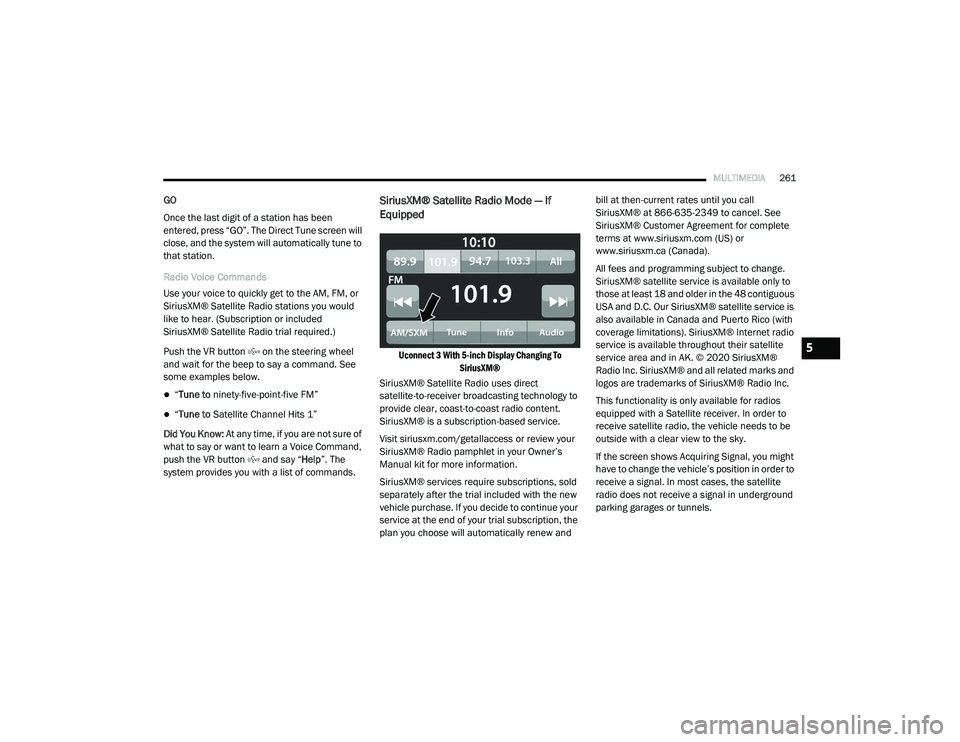
Uconnect 3 With 5-inch Display Changing To SiriusXM®
SiriusXM® Satellite Radio uses direct
satellite-to-receiver broadcasting technology to
provide clear, coast-to-coast radio content.
SiriusXM® is a subscription-based service.
Visit siriusxm.com/getallaccess or review your
SiriusXM® Radio pamphlet in your Owner’s
Manual kit for more information.
SiriusXM® services require subscriptions, sold
separately after the trial included with the new
vehicle purchase. If you decide to continue your
service at the end of your trial subscription, the
plan you choose will automatically renew and bill at then-current rates until you call
SiriusXM® at 866-635-2349 to cancel. See
SiriusXM® Customer Agreement for complete
terms at www.siriusxm.com (US) or
www.siriusxm.ca (Canada).
All fees and programming subject to change.
SiriusXM® satellite service is available only to
those at least 18 and older in the 48 contiguous
USA and D.C. Our SiriusXM® satellite service is
also available in Canada and Puerto Rico (with
coverage limitations). SiriusXM® Internet radio
service is available throughout their satellite
service area and in AK. © 2020 SiriusXM®
Radio Inc. SiriusXM® and all related marks and
logos are trademarks of SiriusXM® Radio Inc.
This functionality is only available for radios
equipped with a Satellite receiver. In order to
receive satellite radio, the vehicle needs to be
outside with a clear view to the sky.
If the screen shows Acquiring Signal, you might
have to change the vehicle’s position in order to
receive a signal. In most cases, the satellite
radio does not receive a signal in underground
parking garages or tunnels.5
21_DT_OM_EN_USC_t.book Page 261