park assist RAM PROMASTER 2021 Owners Manual
[x] Cancel search | Manufacturer: RAM, Model Year: 2021, Model line: PROMASTER, Model: RAM PROMASTER 2021Pages: 288, PDF Size: 15.22 MB
Page 4 of 288
2
INTRODUCTION
Symbols Key ............................................................ 7
WARNINGS AND CAUTIONS ................................. 7
VAN CONVERSIONS/CAMPERS ........................... 7
VEHICLE MODIFICATIONS/ALTERATIONS ........... 7
Symbol Glossary ..................................................... 8
GETTING TO KNOW YOUR VEHICLE
KEYS ......................................................................10
Key Fob......................................................... 10
SENTRY KEY ..........................................................12
IGNITION SWITCH .................................................12
VEHICLE SECURITY SYSTEM —
IF EQUIPPED .........................................................13
To Arm The System ...................................... 13
To Disarm The System................................. 13
Rearming Of The System............................. 13
Security System Manual Override .............. 13
DOORS ..................................................................14
Power Door Locks ....................................... 14
Auto Unlock Doors ....................................... 15
Automatic Door Locks ................................. 15
STEERING WHEEL.................................................15
Telescoping Steering Column ..................... 15 SEATS .................................................................... 15
Manual Adjustments ................................... 16
Heated Seats — If Equipped ....................... 19
Fold Down Tray — If Equipped..................... 20
Adjustable Armrests — If Equipped ............ 20
Head Restraints .......................................... 20
UCONNECT VOICE RECOGNITION ....................... 22
Introducing Voice Recognition .................... 22
Basic Voice Commands............................... 22
Get Started ................................................... 22
Additional Information ................................. 22
MIRRORS ............................................................. 23
Inside Rearview Mirror ................................ 23
Outside Mirrors ........................................... 24
Power Mirrors — If Equipped ....................... 24
Power Folding Outside Mirrors —
If Equipped ................................................... 25 Heated Mirrors — If Equipped ..................... 25
EXTERIOR LIGHTS ................................................ 26
Multifunction Lever ..................................... 26
Headlights ................................................... 26
Daytime Running Lights (DRLs) —
If Equipped .................................................. 26 High/Low Beam Switch .............................. 26
Flash-To-Pass .............................................. 26
Parking Lights ............................................. 26
Follow Me Home/Headlight Delay .............. 27
Fog Lights — If Equipped ............................ 27 Turn Signals ................................................. 27
Lane Change Assist ..................................... 27
Battery Saver ............................................... 27
INTERIOR LIGHTS ................................................28
Courtesy Lights ............................................ 28
Illuminated Entry ......................................... 30
WIPERS AND WASHERS .....................................30
Windshield Wiper Operation ...................... 30
CLIMATE CONTROLS ...........................................31
Manual Climate Control Descriptions
And Functions .............................................. 31 Additional Rear Climate Control —
If Equipped ................................................... 34 Operating Tips.............................................. 34
INTERIOR STORAGE AND EQUIPMENT ..............36
Storage ......................................................... 36
USB/AUX Control — If Equipped ................ 37
Power Outlets............................................... 37
Auxiliary Switches — If Equipped ................ 38
WINDOWS ............................................................39
Power Windows .......................................... 39
Window Bar Grates — If Equipped .............. 39
Wind Buffeting ............................................ 40
HOOD......................................................................40
Opening ........................................................ 40
Closing.......................................................... 41
CARGO AREA FEATURES .....................................41
21_VF_OM_EN_USC_t.book Page 2
Page 5 of 288
3
GETTING TO KNOW YOUR
INSTRUMENT PANEL
INSTRUMENT CLUSTER........................................42Instrument Cluster Descriptions ................. 43
INSTRUMENT CLUSTER DISPLAY .......................44
Location And Controls ................................. 44
Change Engine Oil — If Equipped................ 45
Display Setup Menu .................................... 46
Values Displayed ......................................... 46
Personal Settings
(Customer-Programmable Features) .......... 47
TRIP COMPUTER ...................................................47
Trip Button.................................................... 47
Trip Functions .............................................. 48
WARNING LIGHTS AND MESSAGES ..................48
Red Warning Lights...................................... 48
Yellow Warning Lights ................................. 50
Yellow Indicator Lights................................. 53
Green Indicator Lights ................................. 54
Blue Indicator Lights .................................... 54
ONBOARD DIAGNOSTIC SYSTEM — OBD II ......55
Onboard Diagnostic System (OBD II)
Cybersecurity................................................ 55
EMISSIONS INSPECTION AND MAINTENANCE
PROGRAMS ...........................................................56
STARTING AND OPERATING
STARTING THE ENGINE ...................................... 57
Automatic Transmission.............................. 57
Normal Starting............................................ 57
Cold Weather Operation
(Below –22°F Or −30°C) ........................... 57 If Engine Fails To Start ................................ 57
After Starting ................................................ 58
ENGINE BLOCK HEATER — IF EQUIPPED ......... 58
ENGINE BREAK-IN RECOMMENDATIONS ........ 58
PARKING BRAKE ................................................. 59
AUTOMATIC TRANSMISSION ............................. 60 Key Ignition Park Interlock .......................... 60
Brake/Transmission Shift Interlock
System ......................................................... 60 Six-Speed Automatic Transmission ............ 61
POWER STEERING .............................................. 66
Power Steering Fluid Check ....................... 67
CRUISE CONTROL — IF EQUIPPED .................... 67
To Activate.................................................... 68
To Set A Desired Speed............................... 68
To Vary The Speed Setting .......................... 68
To Accelerate For Passing ........................... 69
To Resume Speed ....................................... 69
To Deactivate ............................................... 69
PARKSENSE REAR PARK ASSIST —
IF EQUIPPED ......................................................... 69
ParkSense Rear Park Assist Sensors ......... 70
ParkSense Rear Park Assist Alerts ............. 70 ParkSense Rear Park Assist Failure
Indications.................................................... 72 Cleaning The ParkSense System................ 72
ParkSense Rear Park Assist System
Usage Precautions ...................................... 72
PARKVIEW REAR BACK UP CAMERA ...............73
REFUELING THE VEHICLE ....................................75
Loose Fuel Filler Cap Message................... 76
VEHICLE LOADING ................................................76
Vehicle Certification Label .......................... 76
Gross Vehicle Weight Rating (GVWR) ......... 76
Gross Axle Weight Rating (GAWR) ............. 76
Tire Size ........................................................ 77
Rim Size ....................................................... 77
Inflation Pressure ........................................ 77
Curb Weight ................................................. 77
Overloading .................................................. 77
Loading ........................................................ 77
TRAILER TOWING .................................................78
Common Towing Definitions ....................... 78
Trailer Hitch Classification .......................... 80
Trailer Towing Weights
(Maximum Trailer Weight Ratings) ............ 81 Trailer And Tongue Weight ......................... 81
Towing Requirements ................................ 81
Towing Tips ................................................. 84
RECREATIONAL TOWING
(BEHIND MOTORHOME) ......................................85
Towing This Vehicle Behind Another
Vehicle .......................................................... 85 Recreational Towing .................................... 85
21_VF_OM_EN_USC_t.book Page 3
Page 68 of 288

66STARTING AND OPERATING
Overdrive Operation
The automatic transmission includes an
electronically controlled Overdrive (SIXTH gear).
The transmission will automatically shift into
Overdrive if the following conditions are present:
The gear selector is in the DRIVE position.
The transmission fluid has reached an
adequate temperature.
The engine coolant has reached an adequate
temperature.
The vehicle speed is sufficiently high.
The driver is not heavily pressing the acceler -
ator.
When To Use TOW/HAUL Mode
When driving in hilly areas, towing a trailer,
carrying a heavy load, etc., and frequent
transmission shifting occurs, push the TOW/
HAUL switch to activate TOW/HAUL mode. This
will improve performance and reduce the
potential for transmission overheating or failure
due to excessive shifting. When operating in
TOW/HAUL mode, transmission upshifts are
delayed, and the transmission will automatically
downshift (for engine braking) during steady
braking maneuvers.
The “TOW/HAUL Indicator Light” will illuminate
in the instrument cluster to indicate that TOW/
HAUL mode has been activated. Pushing the
switch a second time restores normal
operation. Normal operation is always the
default at engine start-up. If TOW/HAUL mode is
desired, the switch must be pushed each time
the engine is started.
Torque Converter Clutch
A feature designed to improve fuel economy
has been included in the automatic
transmission on your vehicle. A clutch within the
torque converter engages automatically at
calibrated speeds. This may result in a slightly
different feeling or response during normal
operation in the upper gears. When the vehicle
speed drops or during some accelerations, the
clutch automatically disengages.
NOTE:
The torque converter clutch will not engage
until the transmission fluid and engine
coolant are warm [usually after 1 to 3 miles
(2 to 5 km) of driving]. Because the engine
speed is higher when the torque converter
clutch is not engaged, it may seem as if the
transmission is not shifting into Overdrive
when cold. This is normal. Using the Elec
-
tronic Range Select (ERS) shift control, when
the transmission is sufficiently warm, will
demonstrate that the transmission is able to
shift into and out of Overdrive.
If the vehicle has not been driven for several
days, the first few seconds of operation after
shifting the transmission into gear may seem
sluggish. This is due to the fluid partially
draining from the torque converter into the
transmission. This condition is normal and
will not cause damage to the transmission.
The torque converter will refill within five
seconds after starting the engine.
POWER STEERING
The standard power steering system will
provide increased vehicle response and ease
of maneuverability. The system will provide
mechanical steering capability if power assist
is lost.
If for some reason the power assist is
interrupted, it will still be possible to steer your
vehicle. Under these conditions, you will
observe a substantial increase in steering
effort, especially at very low vehicle speeds and
during parking maneuvers.
21_VF_OM_EN_USC_t.book Page 66
Page 71 of 288
STARTING AND OPERATING69
TO ACCELERATE FOR PASSING
While the Cruise Control system is set, press the
accelerator to pass as you would normally.
When the pedal is released, the vehicle will
return to the set speed.
Using Cruise Control On Hills
The transmission may downshift on hills to
maintain the vehicle set speed.
The Cruise Control system maintains speed up
and down hills. A slight speed change on
moderate hills is normal. On steep hills, a
greater speed loss or gain may occur so it may
be preferable to drive without Cruise Control.
TO RESUME SPEED
To resume a previously set speed, push the RES
button and release. Resume can be used at any
speed above 20 mph (32 km/h) up to the
maximum speed of 100 mph (160 km/h).
TO DEACTIVATE
A soft tap on the brake pedal, pushing the RES
button, or normal brake pressure while slowing
the vehicle will deactivate Cruise Control
without erasing the set speed memory. Rotating
the center ring upward to turn the system off or
placing the ignition in the STOP (OFF/LOCK)
position erases the set speed memory.
PARKSENSE REAR PARK ASSIST — IF
EQUIPPED
The ParkSense Rear Park Assist system
provides an audible indication of the distance
between the rear fascia/bumper and a
detected obstacle when backing up (e.g. during
a parking maneuver) Úpage 72.
The ParkSense Rear Park Assist is
automatically activated when the transmission
is placed into REVERSE. As the distance from an
obstacle behind the vehicle decreases, the
audible alert becomes more frequent.
Interaction With Trailer Towing
The Rear Park Assist system is automatically
deactivated when a trailer is hitched to the
vehicle. The system will be automatically
activated as soon as the trailer is removed.
WARNING!
Cruise Control can be dangerous where the
system cannot maintain a constant speed.
Your vehicle could go too fast for the
conditions, and you could lose control and
have an accident. Do not use Cruise Control
in heavy traffic or on roads that are winding,
icy, snow-covered or slippery.
4
21_VF_OM_EN_USC_t.book Page 69
Page 72 of 288

70STARTING AND OPERATING
PARKSENSE REAR PARK ASSIST
S
ENSORS
The four ParkSense Rear Park Assist sensors,
located in the rear fascia/bumper, monitor the
area behind the vehicle that is within the
sensors’ field of view. The sensors can detect
obstacles, in the horizontal direction, from
approximately 12 inches (30 cm) up to
55 inches (140 cm) from the center of the rear
fascia/bumper and up to 24 inches (60 cm)
from the corners of the rear fascia/bumper,
depending on the location, type and orientation
of the obstacle.
Rear Park Assist Sensors Location
If several obstacles are detected, the
ParkSense Rear Park Assist system indicates
the nearest obstacle.
The minimum height of a detectable obstacle
corresponds to the maximum height of an
obstacle that would clear the underside of the
vehicle during the parking maneuver.
PARKSENSE REAR PARK ASSIST
A
LERTS
If an obstacle is behind the vehicle when
REVERSE gear is engaged, an audible alert is
activated.
The tones emitted by the loudspeaker inform
the driver that the vehicle is approaching an
obstacle. The pauses between the tones are
directly proportional to the distance from the
obstacle. Pulses emitted in quick succession
indicate the presence of a very close obstacle.
A continuous tone indicates that the obstacle is
less than 12 inches (30 cm) away.
21_VF_OM_EN_USC_t.book Page 70
Page 73 of 288

STARTING AND OPERATING71
While audible signals are emitted, the audio system is not muted.
The audible signal is turned off immediately if the distance increases. The tone cycle remains constant if the distance measured by the inner sensors
is constant. If this condition occurs for the external sensors, the signal is turned off after three seconds (stopping warnings during maneuvers parallel
to walls).
Audible And Visual Signals Supplied By The ParkSense Rear Park Assist System
SIGNAL MEANING INDICATION
Obstacle DistanceAn obstacle is present within the
sensors' field of view Audible Signal
(dashboard loudspeaker)
• Sound pulses emitted at a rate that increases as the distance
decreases.
• Emits continuous tone at 12 inches (30 cm).
• Adjustable volume level programmable through personal
settings in the instrument cluster display Ú page 44.
Failure Sensor or System failures Visual Signal
(instrument panel)
• Icon appears on display.
• Message is displayed in instrument cluster display (if equipped).
4
21_VF_OM_EN_USC_t.book Page 71
Page 74 of 288
72STARTING AND OPERATING
(Continued)
PARKSENSE REAR PARK ASSIST
F
AILURE INDICATIONS
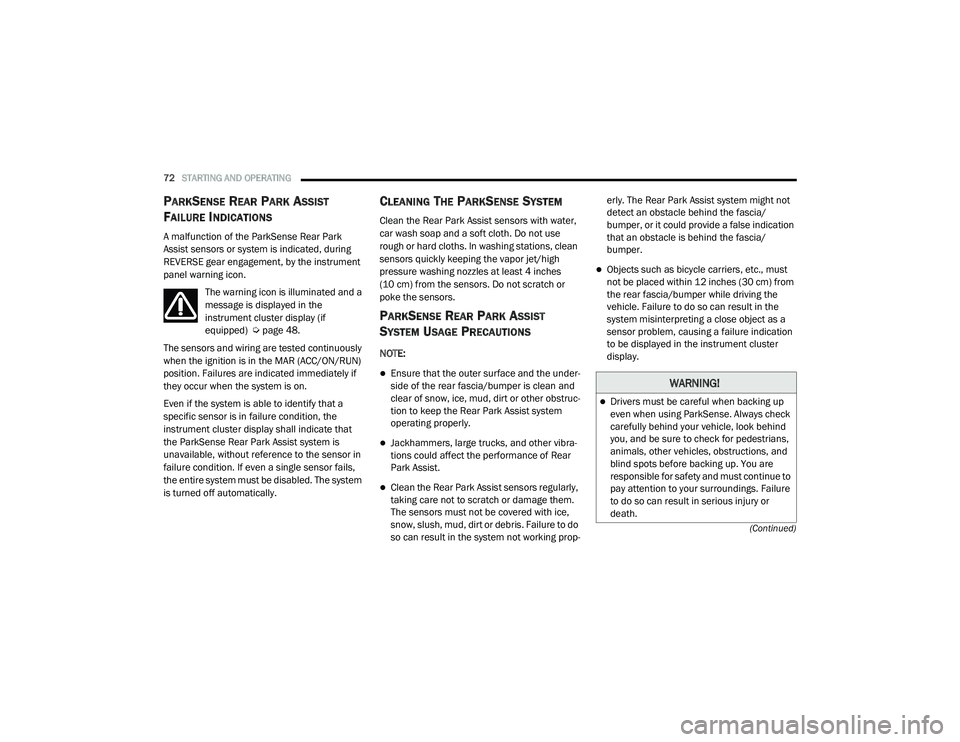
A malfunction of the ParkSense Rear Park
Assist sensors or system is indicated, during
REVERSE gear engagement, by the instrument
panel warning icon.
The warning icon is illuminated and a
message is displayed in the
instrument cluster display (if
equipped) Ú page 48.
The sensors and wiring are tested continuously
when the ignition is in the MAR (ACC/ON/RUN)
position. Failures are indicated immediately if
they occur when the system is on.
Even if the system is able to identify that a
specific sensor is in failure condition, the
instrument cluster display shall indicate that
the ParkSense Rear Park Assist system is
unavailable, without reference to the sensor in
failure condition. If even a single sensor fails,
the entire system must be disabled. The system
is turned off automatically.
CLEANING THE PARKSENSE SYSTEM
Clean the Rear Park Assist sensors with water,
car wash soap and a soft cloth. Do not use
rough or hard cloths. In washing stations, clean
sensors quickly keeping the vapor jet/high
pressure washing nozzles at least 4 inches
(10 cm) from the sensors. Do not scratch or
poke the sensors.
PARKSENSE REAR PARK ASSIST
S
YSTEM USAGE PRECAUTIONS
NOTE:
Ensure that the outer surface and the under -
side of the rear fascia/bumper is clean and
clear of snow, ice, mud, dirt or other obstruc -
tion to keep the Rear Park Assist system
operating properly.
Jackhammers, large trucks, and other vibra -
tions could affect the performance of Rear
Park Assist.
Clean the Rear Park Assist sensors regularly,
taking care not to scratch or damage them.
The sensors must not be covered with ice,
snow, slush, mud, dirt or debris. Failure to do
so can result in the system not working prop -erly. The Rear Park Assist system might not
detect an obstacle behind the fascia/
bumper, or it could provide a false indication
that an obstacle is behind the fascia/
bumper.
Objects such as bicycle carriers, etc., must
not be placed within 12 inches (30 cm) from
the rear fascia/bumper while driving the
vehicle. Failure to do so can result in the
system misinterpreting a close object as a
sensor problem, causing a failure indication
to be displayed in the instrument cluster
display.
WARNING!
Drivers must be careful when backing up
even when using ParkSense. Always check
carefully behind your vehicle, look behind
you, and be sure to check for pedestrians,
animals, other vehicles, obstructions, and
blind spots before backing up. You are
responsible for safety and must continue to
pay attention to your surroundings. Failure
to do so can result in serious injury or
death.
21_VF_OM_EN_USC_t.book Page 72
Page 95 of 288
MULTIMEDIA93
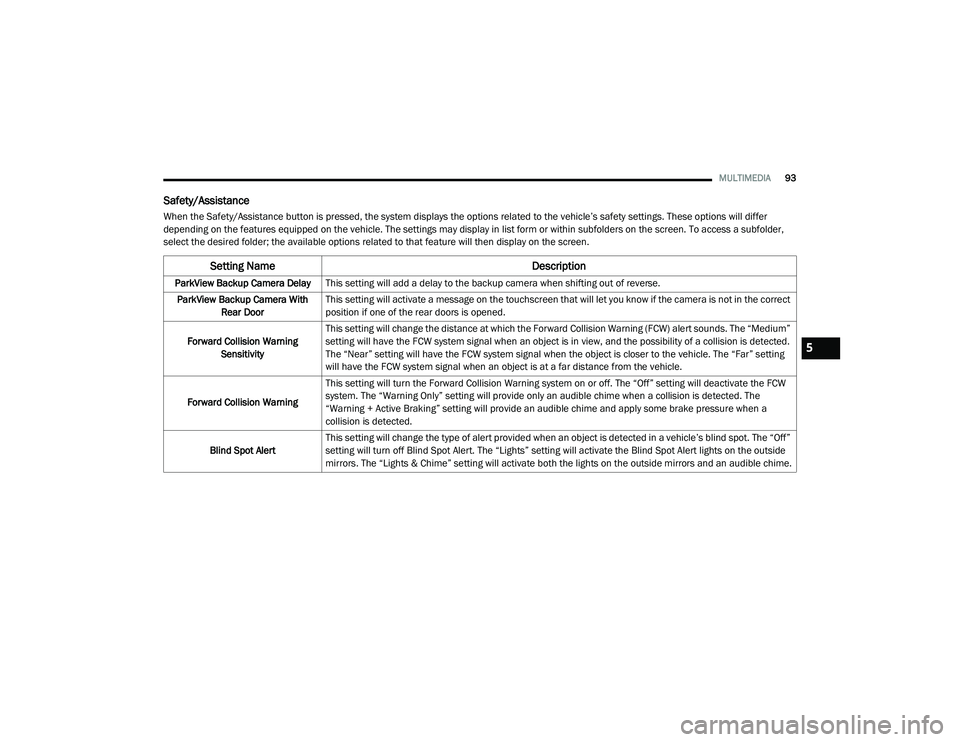
Safety/Assistance
When the Safety/Assistance button is pressed, the system displays the options related to the vehicle’s safety settings. These options will differ
depending on the features equipped on the vehicle. The settings may display in list form or within subfolders on the screen. To access a subfolder,
select the desired folder; the available options related to that feature will then display on the screen.
Setting Name Description
ParkView Backup Camera DelayThis setting will add a delay to the backup camera when shifting out of reverse.
ParkView Backup Camera With Rear Door This setting will activate a message on the touchscreen that will let you know if the camera is not in the correct
position if one of the rear doors is opened.
Forward Collision Warning Sensitivity This setting will change the distance at which the Forward Collision Warning (FCW) alert sounds. The “Medium”
setting will have the FCW system signal when an object is in view, and the possibility of a collision is detected.
The “Near” setting will have the FCW system signal when the object is closer to the vehicle. The “Far” setting
will have the FCW system signal when an object is at a far distance from the vehicle.
Forward Collision Warning This setting will turn the Forward Collision Warning system on or off. The “Off” setting will deactivate the FCW
system. The “Warning Only” setting will provide only an audible chime when a collision is detected. The
“Warning + Active Braking” setting will provide an audible chime and apply some brake pressure when a
collision is detected.
Blind Spot Alert This setting will change the type of alert provided when an object is detected in a vehicle’s blind spot. The “Off”
setting will turn off Blind Spot Alert. The “Lights” setting will activate the Blind Spot Alert lights on the outside
mirrors. The “Lights & Chime” setting will activate both the lights on the outside mirrors and an audible chime.
5
21_VF_OM_EN_USC_t.book Page 93
Page 116 of 288
114MULTIMEDIA
The system handles multiple inputs in the same
phrase or sentence such as “make a phone
call” and “to Kelly Smith”. For multiple inputs in
the same phrase or sentence, the system
identifies the topic or context and provides the
associated follow-up prompt such as “Who do
you want to call?” in the case where a phone
call was requested but the specific name was
not recognized.
The system utilizes continuous dialog. When the
system requires more information from the
user, it will ask a question to which the user can
respond without pushing the Voice Recognition
(VR) button on the steering wheel.
Help Command
If you need assistance at any prompt, or if you
want to know your options at any prompt, say
“Help” following the beep.
To activate the Uconnect Phone from idle,
simply push the Phone button (if active) on your
steering wheel and say a command or say
“Help”. All Uconnect Phone sessions begin with
a push of the VR button or Phone button on the
radio faceplate. Cancel Command
At any prompt, after the beep, you can say
“Cancel” and you will be returned to the main
menu.
You can also push the VR button or Phone
button on your steering wheel when the system
is listening for a command and be returned to
the main or previous menu.
Pair (Link) Uconnect Phone To A Mobile Phone
To begin using your Uconnect Phone, you must
pair your compatible Bluetooth®-enabled
mobile phone. Mobile phone pairing is the
process of establishing a wireless connection
between a cellular phone and the Uconnect
system.
To complete the pairing process, you will need
to reference your mobile phone’s manual.
Please visit UconnectPhone.com for complete
mobile phone compatibility information.
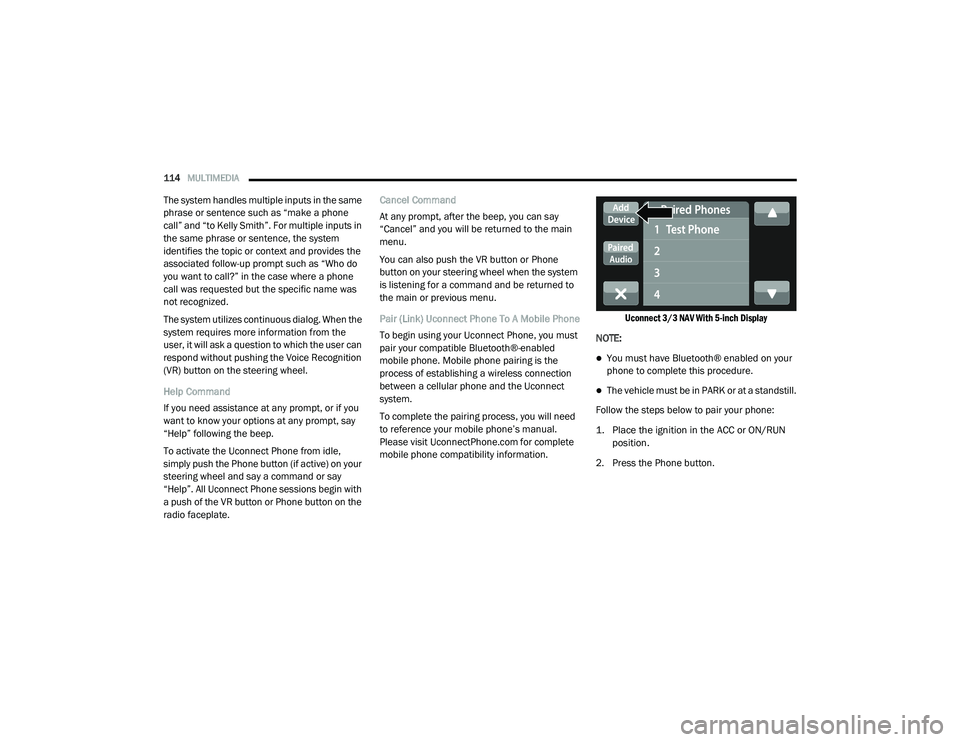
Uconnect 3/3 NAV With 5-inch Display
NOTE:
You must have Bluetooth® enabled on your
phone to complete this procedure.
The vehicle must be in PARK or at a standstill.
Follow the steps below to pair your phone:
1. Place the ignition in the ACC or ON/RUN position.
2. Press the Phone button.
21_VF_OM_EN_USC_t.book Page 114
Page 155 of 288
SAFETY153
The ESC OFF Indicator Light indicates
that the Electronic Stability Control
(ESC) is in a reduced mode.
NOTE:
The ESC Activation/Malfunction Indicator
Light and the ESC OFF Indicator Light come
on momentarily each time the ignition switch
is placed in the ON position.
Each time the ignition is placed in the ON
position, the ESC system will be on even if it
was turned off previously.
The ESC system will make buzzing or clicking
sounds when it is active. This is normal; the
sounds will stop when ESC becomes inactive
following the maneuver that caused the ESC
activation.
Hill Start Assist (HSA)
The HSA system is designed to assist the driver
when starting a vehicle from a stop on a hill.
HSA will maintain the level of brake pressure
the driver applied for a short period of time after
the driver takes their foot off of the brake pedal.
If the driver does not apply the throttle during
this short period of time, the system will release
brake pressure and the vehicle will roll down the
hill. The system will release brake pressure in
proportion to the amount of throttle applied as
the vehicle starts to move in the intended
direction of travel.
HSA Activation Criteria
The following criteria must be met in order for
HSA to activate:
The vehicle must be stopped.
The vehicle must be on a 6% (approximate)
grade or greater hill.
Gear selection matches vehicle uphill direction
(i.e., vehicle facing uphill is in forward gear;
vehicle backing uphill is in REVERSE gear).
HSA will work in REVERSE and all forward gears
when the activation criteria have been met. The
system will not activate if the vehicle is placed
in NEUTRAL or PARK.
WARNING!
There may be situations on minor hills with a
loaded vehicle, or while pulling a trailer, when
the system will not activate and slight rolling
may occur. This could cause a collision with
another vehicle or object. Always remember
the driver is responsible for braking the
vehicle.
6
21_VF_OM_EN_USC_t.book Page 153