wheel RAM PROMASTER 2023 User Guide
[x] Cancel search | Manufacturer: RAM, Model Year: 2023, Model line: PROMASTER, Model: RAM PROMASTER 2023Pages: 296, PDF Size: 12.31 MB
Page 80 of 296

78STARTING AND OPERATING
ENGINE BREAK-IN RECOMMENDATIONS
A long break-in period is not required for the engine and
drivetrain (transmission and axle) in your vehicle.
Drive moderately during the first 300 miles (500 km).
After the initial 60 miles (100 km), speeds up to 50 or
55 mph (80 or 90 km/h) are desirable.
While cruising, brief full-throttle acceleration within
the limits of local traffic laws contributes to a good
break-in. Wide-open throttle acceleration in low
gear can be detrimental and should be avoided.
The engine oil installed in the engine at the factory
is a high-quality energy conserving type lubricant.
Oil changes should be consistent with anticipated
climate conditions under which vehicle operations
will occur. For the recommended viscosity and
quality grades see Úpage 273.
NOTE:A new engine may consume some oil during its first
few thousand miles (kilometers) of operation. This
should be considered a normal part of the break-in
and not interpreted as a problem. Please check
your oil level with the engine oil indicator often
during the break-in period. Add oil as required.
PARKING BRAKE
ELECTRIC PARK BRAKE (EPB)
Your vehicle is equipped with an EPB that offers
simple operation, and some additional features
that make the parking brake more convenient and
useful.
The parking brake is primarily intended to prevent
the vehicle from rolling while parked. Before
leaving the vehicle, make sure that the parking
brake is applied. Also, be certain to leave the
transmission in PARK.
You can engage the parking brake in two ways:
Manually, by applying the parking brake switch.
Automatically, by enabling the Auto Park Brake
feature in the Customer Programmable
Features section of the Uconnect settings.
The parking brake switch is located on the
instrument panel to the left of the steering wheel
(below the headlamp switch).
Electric Park Brake Switch
To apply the parking brake manually, pull up on the
switch momentarily. You may hear a slight sound
from the back of the vehicle while the parking brake
engages. Once the park brake is fully engaged, the
Brake Warning Light in the instrument cluster and an
indicator on the switch will illuminate. If your foot is on
the brake pedal while you apply the parking brake, you
may notice a small amount of brake pedal movement.
The parking brake can be applied even when the
ignition switch is OFF but the Brake Warning Light will
not illuminate, however, it can only be released when
the ignition is in the ON/RUN position.
NOTE:The EPB Warning Light will illuminate if the EPB
switch is held for longer than 20 seconds in either
the released or applied position. The light will extin -
guish upon releasing the switch.
CAUTION!
Never use Non-Detergent Oil or Straight Mineral
Oil in the engine or damage may result.
23_VF_OM_EN_USC_t.book Page 78
Page 81 of 296

STARTING AND OPERATING79
(Continued)
If the Auto Park Brake feature is enabled, the
parking brake will automatically engage whenever
the transmission is placed into PARK. If your foot is
on the brake pedal, you may notice a small amount
of brake pedal movement while the parking brake
is engaging.
The parking brake will release automatically when
the ignition is ON, the transmission is in DRIVE or
REVERSE, the driver seat belt is buckled, and an
attempt is made to drive away.
To release the parking brake manually, the ignition
switch must be in the ON/RUN position. Put your
foot on the brake pedal, then push the parking
brake switch down momentarily. You may hear a
slight whirring sound from the back of the vehicle
while the parking brake disengages. You may also
notice a small amount of movement in the brake
pedal. Once the parking brake is fully disengaged,
the Brake Warning Light in the instrument cluster
and the LED indicator on the switch will extinguish.
NOTE:When parking on a hill, it is important to turn the
front wheels toward the curb on a downhill grade
and away from the curb on an uphill grade. Apply
the parking brake before placing the gear selector
in PARK, otherwise the load on the transmission
locking mechanism may make it difficult to move
the gear selector out of PARK.
If exceptional circumstances should make it
necessary to engage the parking brake while the
vehicle is in motion, maintain upward pressure
on the EPB switch for as long as engagement is
desired. The Brake Warning Light will illuminate,
and a continuous chime will sound. The rear stop
lamps will also be illuminated automatically while
the vehicle remains in motion.
To disengage the parking brake while the vehicle
is in motion, release the switch. If the vehicle is
brought to a complete stop using the parking
brake, when the vehicle reaches approximately
3 mph, (5 km/h) the parking brake will remain
engaged.
WARNING!
Never use the PARK position as a substitute
for the parking brake. Always apply the
parking brake fully when parked to guard
against vehicle movement and possible injury
or damage.
When exiting the vehicle, always take the key
fob with you and lock your vehicle.
Never leave children alone in a vehicle, or with
access to an unlocked vehicle. Allowing children to
be in a vehicle unattended is dangerous for a
number of reasons. A child or others could be seri
-
ously or fatally injured. Children should be warned
not to touch the parking brake, brake pedal or the
gear selector.
Do not leave the key fob in or near the vehicle,
or in a location accessible to children, and do
not leave a vehicle equipped with Keyless
Enter ‘n Go™ in the ACC or ON/RUN position.
A child could operate power windows, other
controls, or move the vehicle.
Be sure the parking brake is fully disengaged
before driving; failure to do so can lead to
brake failure and a collision.
Always fully apply the parking brake when leaving
your vehicle, or it may roll and cause damage or
injury. Also be certain to leave the transmission in
PARK. Failure to do so may allow the vehicle to roll
and cause damage or injury.
CAUTION!
If the Brake System Warning Light remains on
with the parking brake released, a brake system
malfunction is indicated. Have the brake system
serviced by an authorized dealer immediately.
WARNING!
4
23_VF_OM_EN_USC_t.book Page 79
Page 84 of 296

82STARTING AND OPERATING
NOTE:Swivel seats that are unlocked can also prevent
the transmission gear selector from being moved
out of the PARK position. To shift the transmission
out of the PARK position the first time after
cranking is allowed, ensure swivel seats are locked
in the forward facing position.
9-SPEED AUTOMATIC TRANSMISSION
The transmission gear position display (located in
the instrument cluster) indicates the transmission
gear range. You must press the brake pedal to
move the gear selector out of PARK. To drive, move
the gear selector from PARK or NEUTRAL to the
DRIVE position.
The electronically controlled transmission provides
a precise shift schedule. The transmission
electronics are self-calibrating; therefore, the first
few shifts on a new vehicle may be somewhat
abrupt. This is a normal condition, and precision
shifts will develop within a few hundred miles
(kilometers).
Gear Selector
Only shift from DRIVE to PARK or REVERSE when
the accelerator pedal is released and the vehicle is
stopped. Be sure to keep your foot on the brake
pedal when shifting between these gears.
The transmission gear selector provides PARK,
REVERSE, NEUTRAL, DRIVE, and Electronic Range
Select (ERS) shift positions. Manual downshifts
can be made using the ERS shift control. Moving
the gear selector into the ERS “-”/”+” position
(beside the DRIVE position) activates ERS mode,
displays the current gear in the instrument cluster,
and prevents automatic upshifts beyond this gear.
In ERS mode, toggling the gear selector forward “-”
or rearward “+” will change the highest available
gear Ú page 85.
NOTE:If the gear selector cannot be moved to the PARK,
REVERSE, or NEUTRAL position (when pushed forward) it is probably in the ERS “+”/”-” position
(beside the DRIVE position). In ERS mode, the
transmission gear limit (1, 2, 3, etc.) is displayed in
the instrument cluster. Move the gear selector to
the right (into the DRIVE [D] position) for access to
PARK, REVERSE, and NEUTRAL.
Gear Ranges
Do not press the accelerator pedal when shifting
out of PARK or NEUTRAL.
NOTE:After selecting any gear range, wait a moment to
allow the selected gear to engage before acceler
-
ating. This is especially important when the engine
is cold.
PARK (P)
This range supplements the parking brake by
locking the transmission. The engine can be
started in this range. Never attempt to use PARK
while the vehicle is in motion. Apply the parking
brake when exiting the vehicle in this range.
When parking on a hill, apply the parking brake
before shifting the transmission to PARK,
otherwise the load on the transmission locking
mechanism may make it difficult to move the gear
selector out of PARK. As an added precaution, turn
the front wheels toward the curb on a downhill
grade, and away from the curb on an uphill grade.
23_VF_OM_EN_USC_t.book Page 82
Page 87 of 296

STARTING AND OPERATING85
NOTE:Even if the transmission can be reset, we
recommend that you visit an authorized dealer at
your earliest possible convenience. An authorized
dealer has diagnostic equipment to assess the
condition of your transmission. If the transmission
cannot be reset, authorized dealer service is
required.
Electronic Range Select (ERS) Operation
The ERS shift control allows the driver to select the max
gear limit. For example, if you set the transmission gear
limit to FOURTH gear, the transmission will not shift
above FOURTH gear, but will shift through the lower
gears normally.
You can switch between DRIVE and ERS mode at any
vehicle speed. When the gear selector is in the DRIVE
position, the transmission will operate automatically,
shifting between all available gears. Moving the gear
selector to the ERS position (beside DRIVE) will activate
ERS mode, display the current gear in the instrument
cluster, and set that gear as the max gear limit. Once in
ERS mode, moving the gear selector forward “-” or
rearward “+” will change the max gear limit.
NOTE:The transmission will still continue to use the
optimal highest gear, for the current driving condi -
tions, within the selected gear range limit.
To exit ERS mode, simply return the gear selector
to the DRIVE position.
NOTE:To select the proper gear position for maximum
deceleration (engine braking), move the gear
selector into the ERS position, then tap it forward
“-” repeatedly as the vehicle slows. The trans -
mission will shift to the range from which the
vehicle can best be slowed down.
When To Use TOW/HAUL Mode
When driving in hilly areas, towing a trailer, carrying a
heavy load, etc., and frequent transmission shifting
occurs, push the TOW/HAUL switch to activate
TOW/HAUL mode. This will improve performance and
reduce the potential for transmission overheating or
failure due to excessive shifting. When operating in
TOW/HAUL mode, transmission upshifts are delayed,
and the transmission will automatically downshift
(for engine braking) during steady braking maneuvers.
The TOW/HAUL Indicator Light will illuminate in the
instrument cluster to indicate that TOW/HAUL
mode has been activated. Pushing the switch a
second time restores normal operation. Normal operation is always the default at engine start-up.
If TOW/HAUL mode is desired, the switch must be
pushed each time the engine is started.
POWER STEERING
The electric power steering system will provide
increased vehicle response and ease of
maneuverability. The power steering system
adapts to different driving conditions.
If the steering icon is flashing, it indicates that the
vehicle needs to be taken to the dealer for service.
It is likely the vehicle has lost power steering
assistance.
If the steering icon is displayed and the
“POWER STEERING SYSTEM OVER TEMP”
message is displayed on the instrument cluster
screen, this indicates an over temperature
condition in the power steering system. Once
driving conditions are safe, pull over and let the
vehicle idle for a few moments until the icon and
message turn off Ú
page 56.
If the steering icon is displayed and the
“SERVICE POWER STEERING – ASSIST OFF”
message is displayed on the instrument cluster
screen, this indicates the vehicle needs to be
taken to the dealer for service Ú page 56.
WARNING!
Do not downshift for additional engine braking
on a slippery surface. The drive wheels could
lose their grip and the vehicle could skid,
causing a collision or personal injury.
4
23_VF_OM_EN_USC_t.book Page 85
Page 88 of 296

86STARTING AND OPERATING
NOTE:
Even if the power steering system is no longer oper -
ational, it is still possible to steer the vehicle. Under
these conditions there will be a substantial increase
in steering effort, especially at low speeds and
during parking maneuvers.
If the condition persists, see an authorized
dealer for service.
ACTIVE SPEED LIMITER — IF EQUIPPED
The Active Speed Limiter button is positioned on
the right side of the steering wheel.
Active Speed Limiter Button
This feature allows you to program the maximum
speed of travel for your vehicle.
NOTE:The Active Speed Limiter can be set with the
vehicle stationary or in motion.
ACTIVATION
To activate the feature, push the Active Speed
Limiter button located on the right side of the
steering wheel. A message will appear along with
an indicator light in the instrument cluster display
to signal that Active Speed Limiter has been
activated.
After the Active Speed Limiter on/off button has
been pushed, you must press the SET (+) or SET (–)
button to set the target speed (or RES button when
there is already a previously set target).
Push the SET (+) or SET (–) button to raise and
lower the target speed to the desired value.
Pushing and holding down the SET (+) or SET (–)
button will increase/decrease the speed value by
increments of 5 mph (5 km/h). Each time that Active Speed Limiter is activated, it
will be set to the last programmed value from the
previous activation.
NOTE:
The Cruise Control (if equipped) and Adaptive Cruise
Control (if equipped) systems will be unavailable while
the Active Speed Limiter is in use.
EXCEEDING THE SET SPEED
By fully pressing the accelerator pedal, the
programmed maximum speed can be exceeded
while the device is active.
In the event that the Active Speed Limiter set value
is exceeded manually with a driver acceleration, an
audible indicator will sound. The indicator light will
rapidly flash, and a message will appear in the
instrument cluster display.
The feature will remain disabled until the vehicle
speed drops below the set Active Speed Limiter
value, where it will reactivate automatically.
DEACTIVATION
To turn off Active Speed Limiter, push the Active Speed
Limiter button on the right side of the steering wheel.
A message will appear in the instrument cluster display
to confirm that the feature has been turned off. You can
also deactivate Active Speed Limiter by pressing the
CANC button. In this case, the system is not completely
turned off, and the driver can reactivate the Active
Speed Limiter by pressing the RES button.
23_VF_OM_EN_USC_t.book Page 86
Page 89 of 296

STARTING AND OPERATING87
INTELLIGENT SPEED ASSIST (ISA) —
IF EQUIPPED
The Intelligent Speed Assist (ISA) system
combines the Active Speed Limiter and
Traffic Sign Assist (TSA) systems to
automatically adjust the maximum speed
of the vehicle based on detected traffic signs.
ACTIVATION
To activate the feature, make sure the Traffic Sign
Assist (TSA) system is enabled within Uconnect
Settings Úpage 134, then push the Active Speed
Limiter button located on the right side of the
steering wheel. The message “Ready” will appear
along with a white indicator light in the instrument
cluster display to signal that the system has been
activated.
While the system is in the “Ready” state, the driver
must press the SET (+), SET (–), or RES button to
engage the system. When the system is fully engaged
and detects the current speed limit using the TSA
system, the message in the instrument cluster display
will indicate the new detected speed limit by suggesting
the driver to press "RES" to accept it.
If the detected speed sign is greater then the
current set speed, an up arrow will be displayed
too. If the detected speed sign is lower then the
current set speed, a down arrow will be displayed
instead. If the driver accepts the new suggested
speed sign, the indicator light will change to green.
Pushing the SET (+) or SET (–) button on the right
of the steering wheel will raise and lower the set
speed to a desired value above or below the set ISA
speed. Pushing and holding down the SET (+) or
SET (–) button will increase/decrease the speed
value by increments of 5 mph (5 km/h).
NOTE:The Cruise Control (if equipped) and Adaptive
Cruise Control (if equipped) systems will be
unavailable while the ISA system is in use.
EXCEEDING THE SET SPEED
By fully pressing the accelerator pedal, the
maximum set speed can be exceeded while the
system is active.
When the maximum set speed is exceeded, the
green indicator light will blink and the instrument
cluster display will show an override message for
five seconds, or until the accelerator pedal is
released.
DEACTIVATION
To turn off the Intelligent Speed Assist system,
push the Active Speed Limiter button on the right
side of the steering wheel. A message will appear
in the instrument cluster display to confirm that the
feature has been turned off. The Intelligent Speed
Assist system can also be deactivated by pressing
the CANC button. In this case, the ISA system is
not completely turned off, and the driver can
reactivate the system by pressing the RES button.
CRUISE CONTROL SYSTEMS — IF EQUIPPED
Your vehicle may be equipped with the Cruise
Control system, or the Adaptive Cruise Control
(ACC) system:
Cruise Control will keep your vehicle at a
constant preset speed.
Adaptive Cruise Control (ACC) will adjust the
vehicle speed up to the preset speed to main
-
tain a distance with the vehicle ahead.
4
23_VF_OM_EN_USC_t.book Page 87
Page 90 of 296
88STARTING AND OPERATING
NOTE:
In vehicles equipped with ACC, if ACC is not
enabled, Fixed Speed Cruise Control will not
detect vehicles directly ahead of you. Always be
aware of the feature selected.
Only one Cruise Control feature can operate at a
time. For example, if Fixed Speed Cruise Control
is enabled, Adaptive Cruise Control will be
unavailable, and vice versa.
CRUISE CONTROL
When engaged, the Cruise Control takes over
accelerator operations at speeds greater than
20 mph (32 km/h) up to the maximum speed of
100 mph (160 km/h).
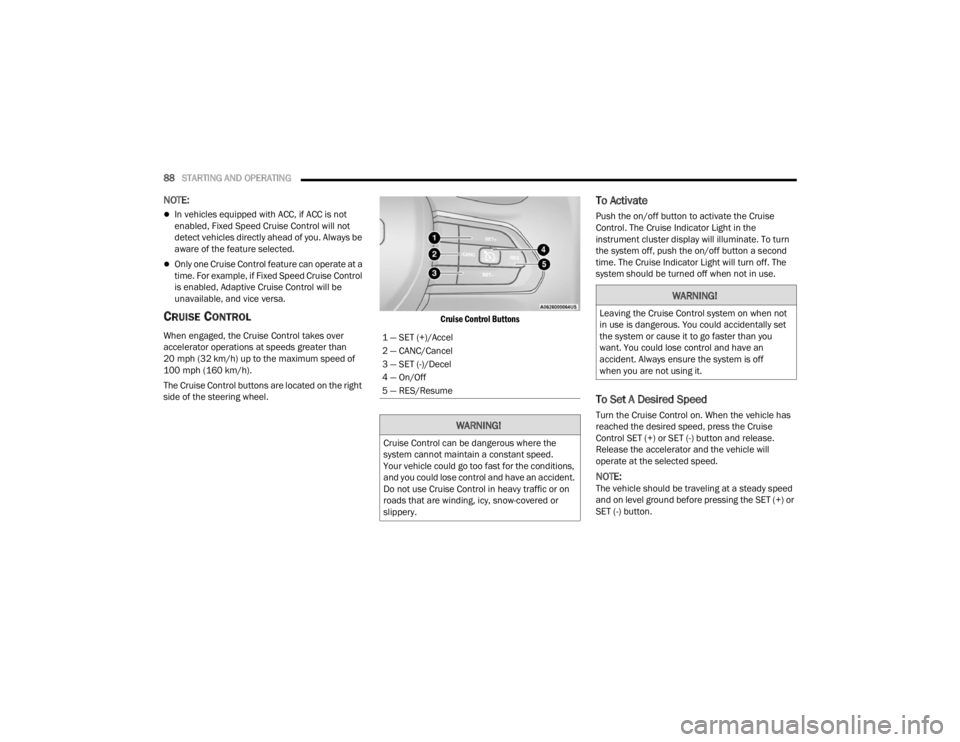
The Cruise Control buttons are located on the right
side of the steering wheel.
Cruise Control Buttons
To Activate
Push the on/off button to activate the Cruise
Control. The Cruise Indicator Light in the
instrument cluster display will illuminate. To turn
the system off, push the on/off button a second
time. The Cruise Indicator Light will turn off. The
system should be turned off when not in use.
To Set A Desired Speed
Turn the Cruise Control on. When the vehicle has
reached the desired speed, press the Cruise
Control SET (+) or SET (-) button and release.
Release the accelerator and the vehicle will
operate at the selected speed.
NOTE:The vehicle should be traveling at a steady speed
and on level ground before pressing the SET (+) or
SET (-) button.
1 — SET (+)/Accel
2 — CANC/Cancel
3 — SET (-)/Decel
4 — On/Off
5 — RES/Resume
WARNING!
Cruise Control can be dangerous where the
system cannot maintain a constant speed.
Your vehicle could go too fast for the conditions,
and you could lose control and have an accident.
Do not use Cruise Control in heavy traffic or on
roads that are winding, icy, snow-covered or
slippery.
WARNING!
Leaving the Cruise Control system on when not
in use is dangerous. You could accidentally set
the system or cause it to go faster than you
want. You could lose control and have an
accident. Always ensure the system is off
when you are not using it.
23_VF_OM_EN_USC_t.book Page 88
Page 92 of 296
90STARTING AND OPERATING
(Continued)
Adaptive Cruise Control (ACC) Operation
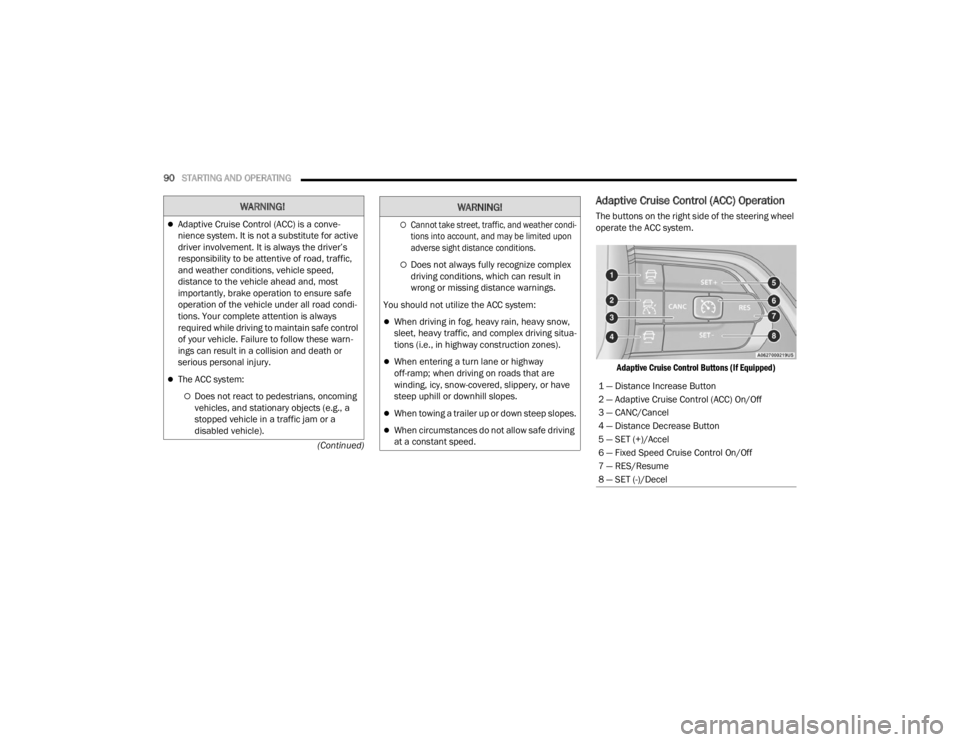
The buttons on the right side of the steering wheel
operate the ACC system.
Adaptive Cruise Control Buttons (If Equipped)
WARNING!
Adaptive Cruise Control (ACC) is a conve -
nience system. It is not a substitute for active
driver involvement. It is always the driver’s
responsibility to be attentive of road, traffic,
and weather conditions, vehicle speed,
distance to the vehicle ahead and, most
importantly, brake operation to ensure safe
operation of the vehicle under all road condi -
tions. Your complete attention is always
required while driving to maintain safe control
of your vehicle. Failure to follow these warn -
ings can result in a collision and death or
serious personal injury.
The ACC system:
Does not react to pedestrians, oncoming
vehicles, and stationary objects (e.g., a
stopped vehicle in a traffic jam or a
disabled vehicle).
Cannot take street, traffic, and weather condi -
tions into account, and may be limited upon
adverse sight distance conditions.
Does not always fully recognize complex
driving conditions, which can result in
wrong or missing distance warnings.
You should not utilize the ACC system:
When driving in fog, heavy rain, heavy snow,
sleet, heavy traffic, and complex driving situa -
tions (i.e., in highway construction zones).
When entering a turn lane or highway
off-ramp; when driving on roads that are
winding, icy, snow-covered, slippery, or have
steep uphill or downhill slopes.
When towing a trailer up or down steep slopes.
When circumstances do not allow safe driving
at a constant speed.
WARNING!
1 — Distance Increase Button
2 — Adaptive Cruise Control (ACC) On/Off
3 — CANC/Cancel
4 — Distance Decrease Button
5 — SET (+)/Accel
6 — Fixed Speed Cruise Control On/Off
7 — RES/Resume
8 — SET (-)/Decel
23_VF_OM_EN_USC_t.book Page 90
Page 101 of 296
STARTING AND OPERATING99
(Continued)
Visual + Chime
When Visual + Chime is selected, the system will alert
the driver when the current speed of the vehicle
exceeds the detected speed limit by showing a graphic
in the instrument cluster display, and by sounding an
audible alert. The audible alert will last for 10 seconds,
and the visual alert will remain on as long as the vehicle
is exceeding the speed limit.
TSA Off
When the TSA system is turned off, the system will not
show any traffic signs (unless selected in the HOME
screen, which will show detected speed limit signs),
and no alerts will be issued to the driver.
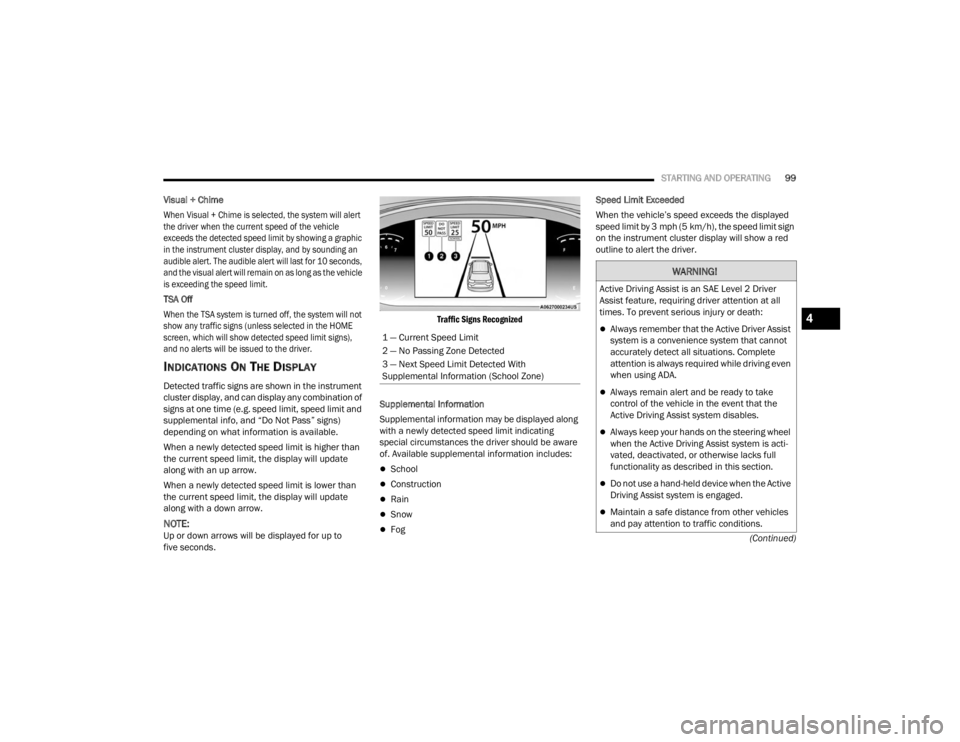
INDICATIONS ON THE DISPLAY
Detected traffic signs are shown in the instrument
cluster display, and can display any combination of
signs at one time (e.g. speed limit, speed limit and
supplemental info, and “Do Not Pass” signs)
depending on what information is available.
When a newly detected speed limit is higher than
the current speed limit, the display will update
along with an up arrow.
When a newly detected speed limit is lower than
the current speed limit, the display will update
along with a down arrow.
NOTE:Up or down arrows will be displayed for up to
five seconds.
Traffic Signs Recognized
Supplemental Information
Supplemental information may be displayed along
with a newly detected speed limit indicating
special circumstances the driver should be aware
of. Available supplemental information includes:
School
Construction
Rain
Snow
Fog Speed Limit Exceeded
When the vehicle’s speed exceeds the displayed
speed limit by 3 mph (5 km/h), the speed limit sign
on the instrument cluster display will show a red
outline to alert the driver.
1 — Current Speed Limit
2 — No Passing Zone Detected
3 — Next Speed Limit Detected With
Supplemental Information (School Zone)
WARNING!
Active Driving Assist is an SAE Level 2 Driver
Assist feature, requiring driver attention at all
times. To prevent serious injury or death:
Always remember that the Active Driver Assist
system is a convenience system that cannot
accurately detect all situations. Complete
attention is always required while driving even
when using ADA.
Always remain alert and be ready to take
control of the vehicle in the event that the
Active Driving Assist system disables.
Always keep your hands on the steering wheel
when the Active Driving Assist system is acti -
vated, deactivated, or otherwise lacks full
functionality as described in this section.
Do not use a hand-held device when the Active
Driving Assist system is engaged.
Maintain a safe distance from other vehicles
and pay attention to traffic conditions.
4
23_VF_OM_EN_USC_t.book Page 99
Page 102 of 296

100STARTING AND OPERATING
ACTIVE DRIVING ASSIST SYSTEM —
IF EQUIPPED
OPERATION
The Active Driving Assist (ADA) system is combined
with the Adaptive Cruise Control (ACC) system,
and centers the vehicle in the driving lane while
traveling at speeds up to 93 mph (150 km/h).
For ACC system operating instructions and system
limitations, see Úpage 89.
NOTE:
The driver should always obey traffic laws and
speed limits. Never drive above applicable
speed limit restrictions.
The driver can override ADA at any time by
braking, accelerating, or steering the vehicle.
Just like ACC, ADA will maintain a set speed as long
as the set distance between your vehicle and the
vehicle in front is maintained. ADA will also keep
your vehicle centered between the lane lines, and
monitor for other vehicles in adjacent lanes by
utilizing the Blind Spot Monitoring sensors.
ADA uses sensors within the steering wheel to
monitor driver attentiveness. ADA requires the
driver’s hands on the steering wheel at all times.
The system will generally aim to keep the vehicle
centered in the lane, but when the driver turns the
steering wheel (e.g. to move farther away from a
large vehicle in the next lane) the system will
reduce its control and enter "co-steering" mode.
While in co-steering mode, the system will provide
reduced assistance and allow the driver to control
the path of the vehicle. Once the driver stops
providing input to the steering wheel, the system
will require a few seconds to fully resume lane
centering assistance, especially during curves.
Do not place any objects on the steering wheel
(e.g. steering wheel covers) which could inter -
fere with the hand detection sensors.
Always pay attention to the road when using
the Active Driving Assist system. ADA will not
steer to avoid safety hazards, construction
zones, objects, or roadway impediments.
You need to maintain control to steer and
brake the vehicle in such situations and when
merging into traffic, entering the highway,
making a turn for crossing traffic, or stopping
for traffic control devices.
WARNING!WARNING!
The Active Driving Assist (ADA) system is a
convenience system. It is not a substitute for
active driver involvement. It is always the driver’s
responsibility to be attentive of road traffic, weather
conditions, vehicle speed, distance to the vehicle
ahead, position in the lane compared to other
vehicles, and brake operation to ensure safe
operation of the vehicle under all road conditions.
Your complete attention is always required while
driving to maintain safe control of your vehicle.
Failure to follow these warnings can result in a
collision and death or serious personal injury.
You should not utilize the ADA system:
When driving in complex driving situations
(e.g. urban environments, construction zones,
etc.), adverse weather or low visibility condi -
tions (e.g. rain, snow, fog, sleet, dust), or
adverse road conditions (e.g. heavy traffic,
worn or missing lane markings, etc.).
When entering a highway on-ramp or exiting
an off-ramp, when driving on roads that are
icy, snow covered, or slippery.
When circumstances do not allow safe driving
at a constant speed.
23_VF_OM_EN_USC_t.book Page 100