turn signal RENAULT ALASKAN 2017 Owner's Manual
[x] Cancel search | Manufacturer: RENAULT, Model Year: 2017, Model line: ALASKAN, Model: RENAULT ALASKAN 2017Pages: 340, PDF Size: 6.93 MB
Page 192 of 340
•
For assistance with your mobile phone inte-
gration, please visit your local approved
dealer.
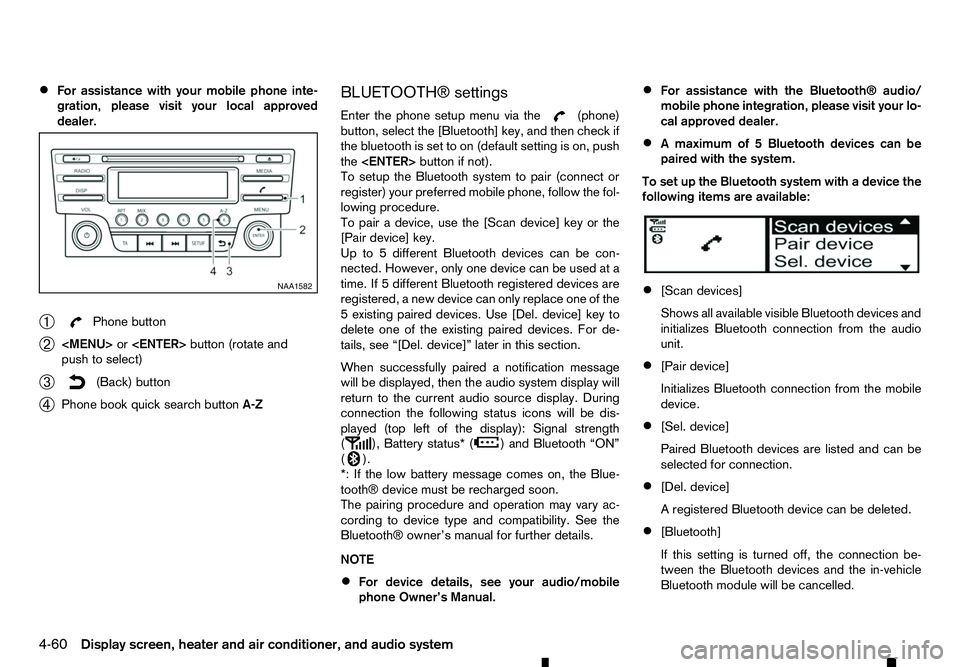
➀ Phone button
➁
Page 193 of 340
![RENAULT ALASKAN 2017 Owners Manual [Scan devices]:
1) Press the button. Select [Scan device]
The audio unit searches bluetooth devices and
shows all visible devices.
Pressing the button cancels the search.
2) Select the device to be pa](/img/7/58394/w960_58394-192.png "RENAULT ALASKAN 2017 Owners Manual [Scan devices]:
1) Press the button. Select [Scan device]
The audio unit searches bluetooth devices and
shows all visible devices.
Pressing the button cancels the search.
2) Select the device to be pa")
[Scan devices]:
1) Press the button. Select [Scan device]
The audio unit searches bluetooth devices and
shows all visible devices.
Pressing the button cancels the search.
2) Select the device to be paired. Use the
Page 197 of 340
WARNING
• Use
aphone after stopping your vehicle in a
safe location. If you have to use aphone while
driving, exercise extreme caution at all times
so full attention may be given to vehicle op-
eration.
• If you are unable to devote full attention to
vehicle operation while talking on the phone,
pull off the road to
asafe location and stop
your vehicle.
CAUTION
To avoid discharging the vehicle battery, use a
phone after starting the engine.
Your vehicle is equipped with the Bluetooth®
Hands-Free Phone System. If you have acompat-
ible Bluetooth® enabled mobile phone, you can set
up the wireless connection between your mobile
phone and the in-vehicle phone module. With Blue-
tooth® wireless technology, you can make or re-
ceive ahands-free telephone call with your mobile
phone in the vehicle.
Once your mobile phone is connected to the in-ve-
hicle phone module, no other phone connecting pro-
cedure is required. Your phone is automatically re-
connected with the in-vehicle phone module when
the ignition switch is placed in the ON position with
the connected mobile phone turned on and carried
in the vehicle. You can register up to
5different Bluetooth® mo-
bile phones to the in-vehicle phone module. How-
ever, you can talk on only one mobile phone at a
time.
Before using the Bluetooth® Hands-Free Phone
System, refer to the following notes.
• Set up the wireless connection between
amo-
bile phone and the in-vehicle phone module be-
fore using the Bluetooth® Hands-Free Phone
System.
• Some Bluetooth® enabled mobile phones may
not be recognised by the in-vehicle phone mod-
ule.
• You will not be able to use
ahands-free phone
under the following conditions:
–Y our vehicle is outside of the mobile service
area.
–Y our vehicle is in an area where it is difficult
to receive mobile signal; such as in atunnel,
in an underground parking garage, near atall
building or in amountainous area.
–Y our mobile phone is locked to prevent it
from being dialled.
• When the radio wave condition is not ideal or
ambient sound is too loud, it may be difficult to
hear the other person’s voice during
acall.
• Immediately after the ignition switch is placed in
the ON position, it may be impossible to receive
ac
all for ashort period of time. •
Do not place the mobile phone in an area sur-
rounded by metal or far away from the in-vehicle
phone module to prevent tone quality degrada-
tion and wireless connection disruption.
• While
amobile phone is connected through the
Bluetooth® wireless connection, the battery
power of the mobile phone may discharge quicker than usual. The Bluetooth® Hands-Free
Phone System cannot charge mobile phones.
• Some mobile phones or other devices may cause
interference or
abuzzing noise to come from the
audio system speakers. Storing the device in a
different location may reduce or eliminate the
noise.
• Refer to the mobile phone owner’s manual re-
garding the telephone charges, mobile phone
antenna and body, etc.
• The signal strength display on the monitor will
not coincide with the signal strength display of
some mobile phones.
REGULATORY INFORMATION
Bluetooth® trademark
m Bluetooth®
is
at rademark
owned by Bluetooth SIG, Inc.
and licensed to Robert Bosch
GmbH.
BLUETOOTH® HANDS-FREE PHONE SYSTEM (with navigation system)
Display screen, heater and air conditioner, and audio system4-65
Page 212 of 340
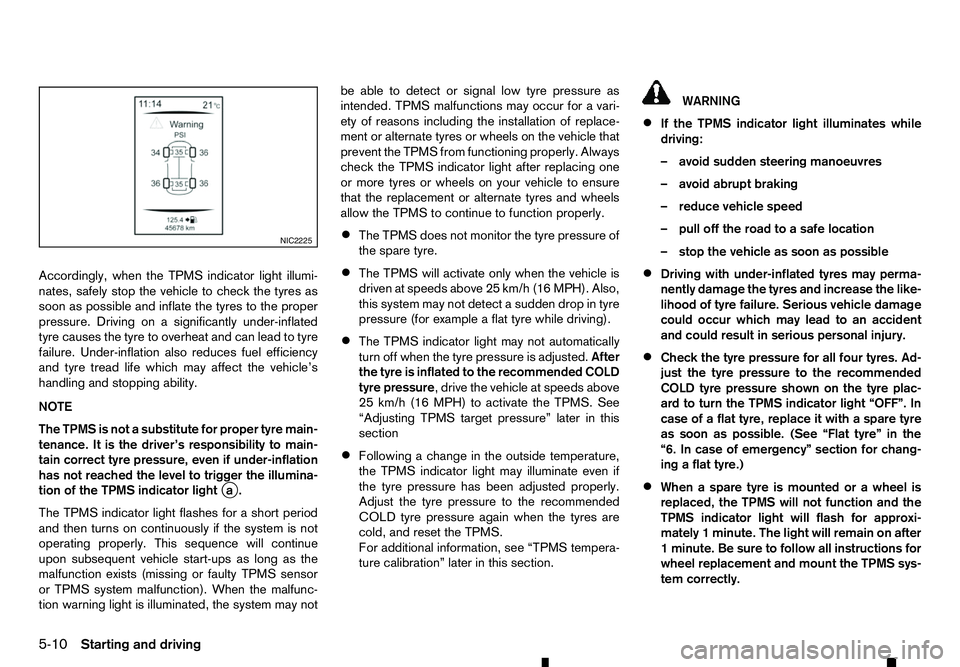
Accordingly, when the TPMS indicator light illumi-
nates, safely stop the vehicle to check the tyres as
soon as possible and inflate the tyres to the proper
pressure. Driving on asignificantly under-inflated
tyre causes the tyre to overheat and can lead to tyre
failure. Under-inflation also reduces fuel efficiency
and tyre tread life which may affect the vehicle’s
handling and stopping ability.
NOTE
The TPMS is not asubstitute for proper tyre main-
tenance. It is the driver’s responsibility to main-
tain correct tyre pressure, even if under-inflation
has not reached the level to trigger the illumina-
tion of the TPMS indicator light j
a.
The TPMS indicator light flashes for ashort period
and then turns on continuously if the system is not
operating properly. This sequence will continue
upon subsequent vehicle start-ups as long as the
malfunction exists (missing or faulty TPMS sensor
or TPMS system malfunction). When the malfunc-
tion warning light is illuminated, the system may not be able to detect or signal low tyre pressure as
intended. TPMS malfunctions may occur for avari-
ety of reasons including the installation of replace-
ment or alternate tyres or wheels on the vehicle that
prevent the TPMS from functioning properly. Always
check the TPMS indicator light after replacing one
or more tyres or wheels on your vehicle to ensure
that the replacement or alternate tyres and wheels
allow the TPMS to continue to function properly.
• The TPMS does not monitor the tyre pressure of
the spare tyre.
• The TPMS will activate only when the vehicle is
driven at speeds above 25 km/h (16 MPH). Also,
this system may not detect
asudden drop in tyre
pressure (for example aflat tyre while driving).
• The TPMS indicator light may not automatically
turn off when the tyre pressure is adjusted.
After
the tyre is inflated to the recommended COLD
tyre pressure,d rive the vehicle at speeds above
25 km/h (16 MPH) to activate the TPMS. See
“Adjusting TPMS target pressure” later in this
section
• Following
achange in the outside temperature,
the TPMS indicator light may illuminate even if
the tyre pressure has been adjusted properly.
Adjust the tyre pressure to the recommended
COLD tyre pressure again when the tyres are
cold, and reset the TPMS.
For additional information, see “TPMS tempera-
ture calibration” later in this section. WARNING
• If the TPMS indicator light illuminates while
driving:
–a void sudden steering manoeuvres
–a void abrupt braking
–r educe vehicle speed
–p ull off the road to asafe location
–s top the vehicle as soon as possible
• Driving with under-inflated tyres may perma-
nently damage the tyres and increase the like-
lihood of tyre failure. Serious vehicle damage
could occur which may lead to an accident
and could result in serious personal injury.
• Check the tyre pressure for all four tyres. Ad-
just the tyre pressure to the recommended
COLD tyre pressure shown on the tyre plac-
ard to turn the TPMS indicator light “OFF”. In
case of
aflat tyre, replace it with aspare tyre
as soon as possible. (See “Flat tyre” in the
“6. In case of emergency” section for chang-
ing aflat tyre.)
• When
aspare tyre is mounted or awheel is
replaced, the TPMS will not function and the
TPMS indicator light will flash for approxi-
mately 1minute. The light will remain on after
1m inute. Be sure to follow all instructions for
wheel replacement and mount the TPMS sys-
tem correctly. NIC2225
5-10 Starting and driving
Page 250 of 340
Your new vehicle was designed to be used primarily
to carry passengers and luggage.
Towing atrailer will place additional loads on your
vehicle’s engine, drive train, steering, braking and
other systems. The towing of atrailer will exagger-
ate other conditions such as sway caused by cross-
winds, rough road surfaces or passing trucks.
Your driving style and speed must be adjusted ac-
cording to the circumstances. Before towing a
trailer, see an approved dealer or qualified work-
shop for an explanation about the proper use of tow-
ing equipment.
OPERATING PRECAUTIONS
• Avoid towing
atrailer during the running-in pe-
riod.
• Before driving, make sure that the lighting sys-
tem of the trailer works properly.
• Observe the legal maximum speeds for trailer
operation.
• Avoid abrupt starts, accelerations and stops.
• Avoid sharp turns and lane changes.
• Always drive your vehicle at
amoderate speed.
• Follow the trailer manufacturer’s instructions.
• Choose proper coupling devices (trailer hitch,
safety chain, roof carrier, etc.) for your vehicle
and trailer. These devices are available from an
approved dealer or qualified workshop where
you can also obtain more detailed information
about trailer towing. •
Never allow the total trailer load (trailer weight
plus its cargo weight) to exceed the maximum
set for the vehicle and the coupling device. See
an approved dealer or qualified workshop for
more information.
• The trailer must be loaded so that heavy goods
are placed over the axle. The maximum allowable
vertical load on the trailer hitch must not be ex-
ceeded.
• Have your vehicle serviced more often than at
the intervals specified in
aseparate maintenance
booklet.
• Trailer towing requires more fuel than under nor-
mal circumstances because of
aconsiderable
increase in traction power and resistance.
While towing atrailer, check the engine coolant
temperature indicator to prevent the vehicle from
overheating.
TYRE PRESSURE
When towing atrailer, inflate the vehicle tyres to the
maximum recommended COLD tyre pressure (for
full loading) indicated on the tyre placard.
Do not tow atrailer when the vehicle is installed with
at emporary spare tyre or acompact spare tyre.
SAFETY CHAINS
Always use asuitable chain between the vehicle
and trailer. The chain should be crossed and should
be attached to the hitch, not to the vehicle bumper
or axle. Be sure to leave enough slack in the chain
to permit turning corners. TRAILER BRAKES
Ensure that trailer brakes are installed as required
by local regulations. Also check that all other trailer
equipment conforms to local regulations.
Always block the wheels on both the vehicle and
trailer when parking. Apply the hand brake on the
trailer where fitted. Parking on
asteep slope is not
recommended.
If parking on asteep slope is unavoidable, place the
shift lever in the P(Park) position (Automatic trans-
mission model), or in an appropriate position
(Manual transmission model), and turn the front
wheels towards the kerb.
TRAILER DETECTION (where fitted)
When towing atrailer with agenuine RENAULT tow
bar electrical kit and the turn signal switch is used,
the electrical system of the vehicle will detect the
additional electrical load of the trailer lighting. As a
result, the direction indicator tone will be different.
TRAILER TOWING
5-48
Starting and driving
Page 256 of 340
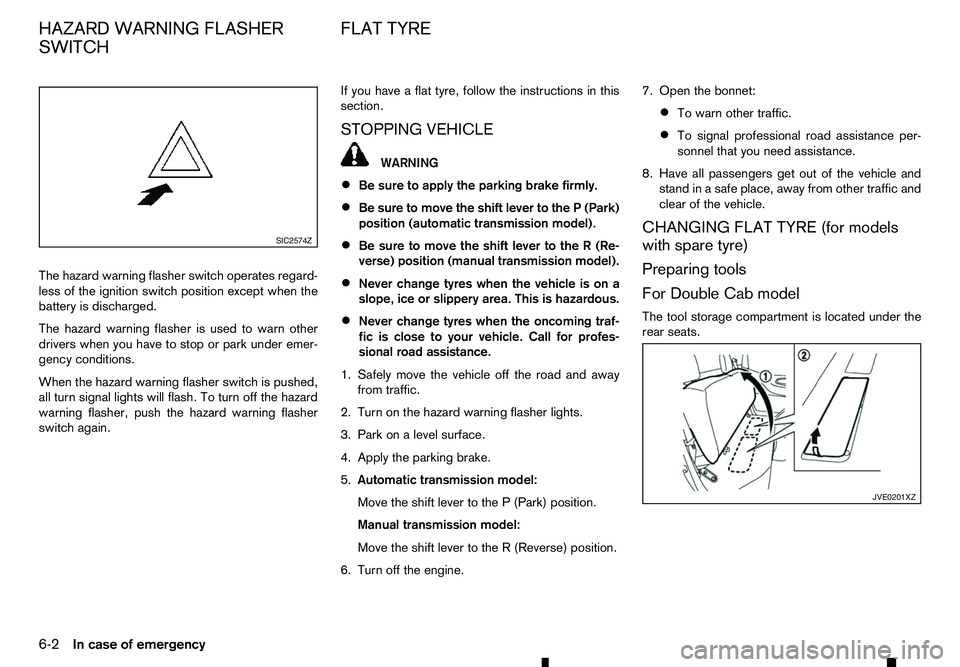
The hazard warning flasher switch operates regard-
less of the ignition switch position except when the
battery is discharged.
The hazard warning flasher is used to warn other drivers when you have to stop or park under emer-
gency conditions.
When the hazard warning flasher switch is pushed,
all turn signal lights will flash. To turn off the hazard
warning flasher, push the hazard warning flasher
switch again. If you have
aflat tyre, follow the instructions in this
section.
STOPPING VEHICLE WARNING
• Be sure to apply the parking brake firmly.
• Be sure to move the shift lever to the
P(Park)
position (automatic transmission model).
• Be sure to move the shift lever to the
R(Re-
verse) position (manual transmission model).
• Never change tyres when the vehicle is on a
slope, ice or slippery area. This is hazardous.
• Never change tyres when the oncoming traf-
fic is close to your vehicle. Call for profes-
sional road assistance.
1. Safely move the vehicle off the road and away from traffic.
2. Turn on the hazard warning flasher lights.
3. Park on alevel surface.
4. Apply the parking brake.
5. Automatic transmission model:
Move the shift lever to the P(Park) position.
Manual transmission model:
Move the shift lever to the R(Reverse) position.
6. Turn off the engine. 7. Open the bonnet:
• To warn other traffic.
• To signal professional road assistance per-
sonnel that you need assistance.
8. Have all passengers get out of the vehicle and stand in asafe place, away from other traffic and
clear of the vehicle.
CHANGING FLAT TYRE (for models
with spare tyre)
Preparing tools
For Double Cab model
The tool storage compartment is located under the
rear seats. SIC2574Z
JVE0201XZ
HAZARD WARNING FLASHER
SWITCH FLAT TYRE
6-2 In case of emergency
Page 279 of 340
Lights*:
Clean the headlights on
aregular basis. Make sure
that the headlights, stop lights, tail lights, turn signal
lights, and other lights are all operating properly and
installed securely. Also check the aim of the head-
lights.
Tyres*:
Check the pressure with agauge often and always
prior to long distance trips. Adjust the pressure in all
tyres, including the spare, to the pressure specified.
Check carefully for damage, cuts or excessive wear.
Tyre rotation*:
In the case of Two-Wheel Drive (2WD), and where
front and rear tyres are the same size: tyres should
be rotated every 10,000 km (6,000 miles). Tyres
marked with directional indicators can only be ro-
tated between front and rear. Make sure that the
directional indicators point in the direction of wheel
rotation after the tyre rotation is completed.
In the case of the Four-Wheel Drive and All Wheel
Drive (4WD/AWD), and where front and rear tyres
are the same size: tyres should be rotated every
5,000 km (3,000 miles). Tyres marked with direc-
tional indicators can only be rotated between front
and rear. Make sure that the directional indicators
point in the direction of wheel rotation after the tyre
rotation is completed.
In the case that front tyres are different size from
rear tyres: tyres cannot be rotated.
The timing for tyre rotation may vary according to
your driving habits and the road surface conditions. Tyre Pressure Monitoring System (TPMS)
transmitter components (where fitted):
Replace the TPMS transmitter grommet seal, valve
core and cap when the tyres are replaced due to
wear or age.
Wheel alignment and balance:
If the vehicle should pull to either side while driving
on astraight and level road, or if you detect uneven
or abnormal tyre wear, there may be aneed for
wheel alignment. If the steering wheel or seat vi-
brates at normal highway speeds, wheel balancing
may be needed.
Windscreen:
Clean the windscreen on aregular basis. Check the
windscreen at least every six months for cracks or
other damage. Repair as necessary.
Wiper blades*:
Check for cracks or wear if not functioning cor-
rectly. Replace as necessary.
Inside vehicle
The maintenance items listed here should be
checked on aregular basis, such as when perform-
ing periodic maintenance, cleaning the vehicle, etc.
Accelerator pedal:
Check the pedal for smooth operation and make
sure that the pedal does not catch or require uneven
effort. Keep the floor mats away from the pedal. Brake pedal*:
Check the pedal for smooth operation and make
sure that it is the proper distance from the floor mat
when depressed fully. Check the brake booster
function. Be sure to keep the floor mats away from
the pedal.
Parking brake*:
Check the parking brake operation regularly. Check
that the lever (where fitted) or the pedal (where fit-
ted) has the proper travel. Also make sure that the
vehicle is held securely on
afairly steep hill when
only the parking brake is applied.
Seat belts:
Check that all parts of the seat belt system (for
example, buckles, anchors, adjusters and retrac-
tors) operate properly and smoothly, and are in-
stalled securely. Check the belt webbing for cuts,
fraying, wear or damage.
Steering wheel:
Check for changes in the steering condition, such
as excessive play, hard steering or strange noises.
Warning lights and chimes:
Make sure that all warning lights and chimes are
operating properly.
Windscreen defogger:
Check that the air comes out of the defogger outlets
properly and in good quantity when operating the
heater or air conditioner.
Maintenance and do-it-yourself 8-3
Page 297 of 340
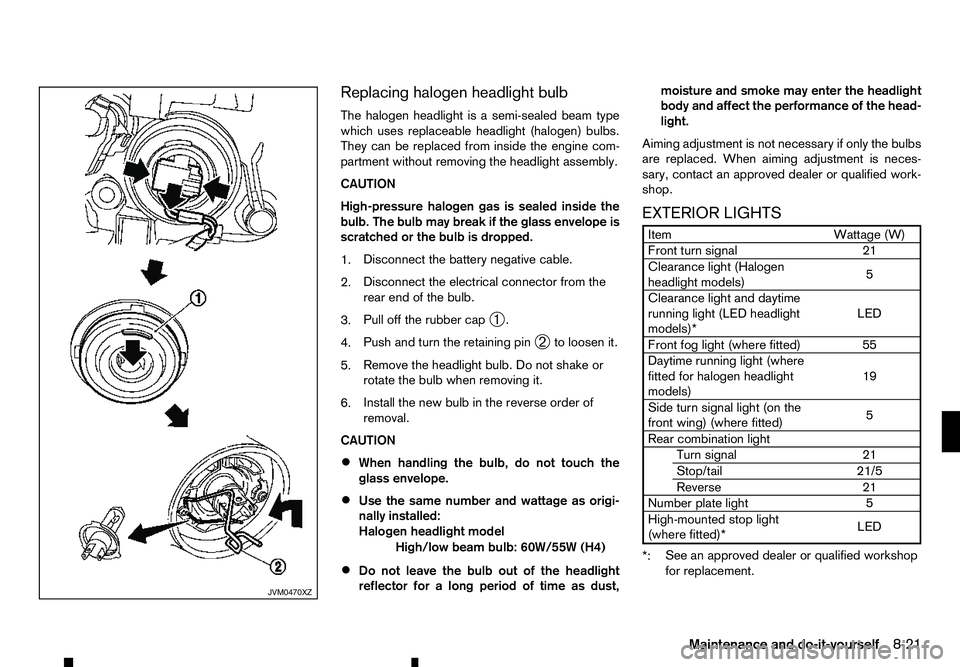
Replacing halogen headlight bulb
The halogen headlight is asemi-sealed beam type
which uses replaceable headlight (halogen) bulbs.
They can be replaced from inside the engine com-
partment without removing the headlight assembly.
CAUTION
High-pressure halogen gas is sealed inside the
bulb. The bulb may break if the glass envelope is
scratched or the bulb is dropped.
1. Disconnect the battery negative cable.
2. Disconnect the electrical connector from the
rear end of the bulb.
3. Pull off the rubber cap
➀.
4. Push and turn the retaining pin
➁to loosen it.
5. Remove the headlight bulb. Do not shake or
rotate the bulb when removing it.
6. Install the new bulb in the reverse order of
removal.
CAUTION
• When handling the bulb, do not touch the
glass envelope.
• Use the same number and wattage as origi-
nally installed:
Halogen headlight model
High/low beam bulb: 60W/55W (H4)
• Do not leave the bulb out of the headlight
reflector for
along period of time as dust, moisture and smoke may enter the headlight
body and affect the performance of the head-
light.
Aiming adjustment is not necessary if only the bulbs
are replaced. When aiming adjustment is neces-
sary, contact an approved dealer or qualified work-
shop.
EXTERIOR LIGHTS Item
Wattage (W)
Front turn signal 21
Clearance light (Halogen
headlight models) 5
Clearance light and daytime
running light (LED headlight
models)* LED
Front fog light (where fitted) 55
Daytime running light (where
fitted for halogen headlight
models) 19
Side turn signal light (on the
front wing) (where fitted) 5
Rear combination light Turn signal 21
Stop/tail 21/5
Reverse 21
Number plate light 5
High-mounted stop light (where fitted)* LED
*: See an approved dealer or qualified workshop
for replacement. JVM0470XZ
Maintenance and do-it-yourself
8-21
Page 299 of 340

LIGHT LOCATIONS
1. Front turn signal light
2. Headlight (halogen type)
3. Map light
4. Room light (where fitted)
5. Front fog light (where fitted) or Daytime run-
ning light (where fitted for halogen headlight
model)
6. Clearance light
7. Side turn signal light (where fitted)
8. Step light (where fitted)
9. Headlight (high beam) (LED type)
10. Headlight (low beam) (LED type)
11. Daytime running light (LED type)
12. Rear personal light (where fitted)
13. High-mounted stop light (where fitted)
14. Rear combination light (Turn signal/Stop/Tail/
Reverse)
15. Number plate light
j A: Halogen headlight model
j B: LED headlight model
j C: Models with cargo bed
j D: Models without cargo bed Replacement procedures
m
:
REMOVE
m :
INSTALL All
other lights are either type A, B, C,
DorE.When
replacing abulb, first remove the lens and/or cover. SDI2306 NDI1681
Front turn signal light
NDI1680
Clearance light (bulb type)
Maintenance and do-it-yourself 8-23
Page 300 of 340
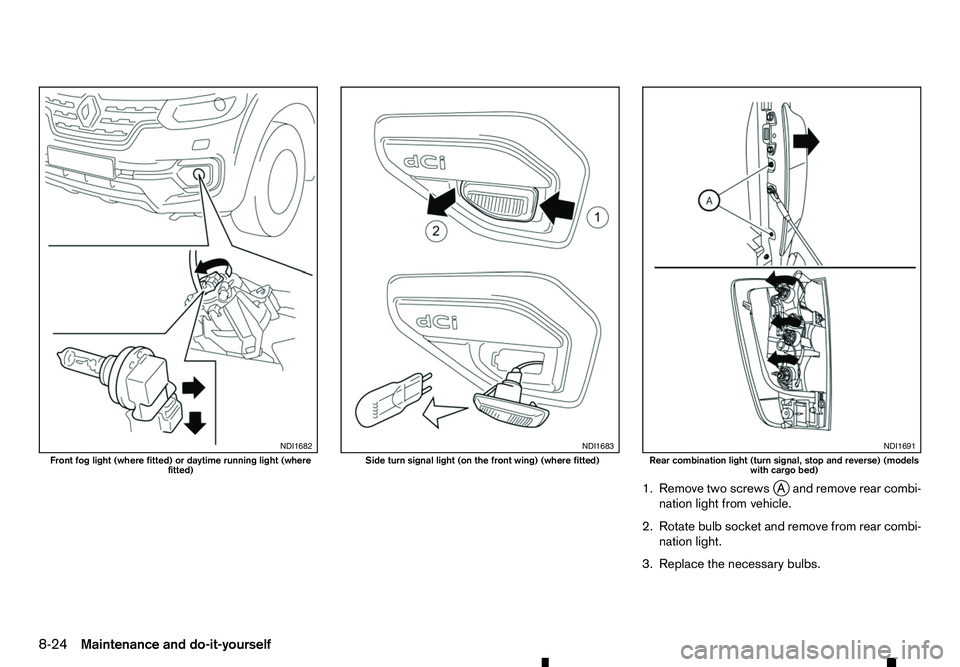
1. Remove two screws
jAa nd remove rear combi-
nation light from vehicle.
2. Rotate bulb socket and remove from rear combi- nation light.
3. Replace the necessary bulbs. NDI1682
Front fog light (where fitted) or daytime running light (where
fitted) NDI1683
Side turn signal light (on the front wing) (where fitted)
NDI1691
Rear combination light (turn signal, stop and reverse) (models
with cargo bed)
8-24 Maintenance and do-it-yourself