Eco RENAULT KOLEOS 2018 Manual PDF
[x] Cancel search | Manufacturer: RENAULT, Model Year: 2018, Model line: KOLEOS, Model: RENAULT KOLEOS 2018Pages: 332, PDF Size: 8.91 MB
Page 201 of 332
3.5
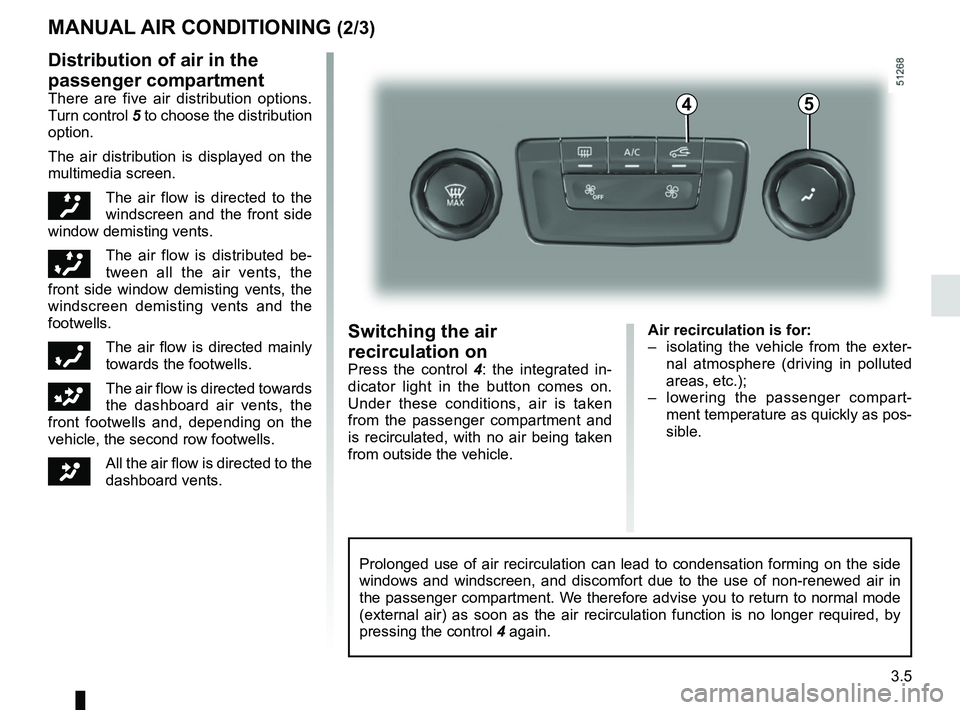
Air recirculation is for:
– isolating the vehicle from the exter-nal atmosphere (driving in polluted
areas, etc.);
– lowering the passenger compart- ment temperature as quickly as pos-
sible.Switching the air
recirculation on
Press the control 4 : the integrated in-
dicator light in the button comes on.
Under these conditions, air is taken
from the passenger compartment and
is recirculated, with no air being taken
from outside the vehicle.
MANUAL AIR CONDITIONING (2/3)
Prolonged use of air recirculation can lead to condensation forming on t\
he side
windows and windscreen, and discomfort due to the use of non-renewed air\
in
the passenger compartment. We therefore advise you to return to normal mode
(external air) as soon as the air recirculation function is no longer \
required, by
pressing the control 4 again.
Distribution of air in the
passenger compartment
There are five air distribution options.
Turn control 5 to choose the distribution
option.
The air distribution is displayed on the
multimedia screen.
õThe air flow is directed to the
windscreen and the front side
window demisting vents.
÷The air flow is distributed be-
tween all the air vents, the
front side window demisting vents, the
windscreen demisting vents and the
footwells.
óThe air flow is directed mainly
towards the footwells.
GThe air flow is directed towards
the dashboard air vents, the
front footwells and, depending on the
vehicle, the second row footwells.
JAll the air flow is directed to the
dashboard vents.
45
Page 203 of 332
3.7
AUTOMATIC CLIMATE CONTROL: Controls A (1/5)
10
15
7654
9
16
17
11
18
11
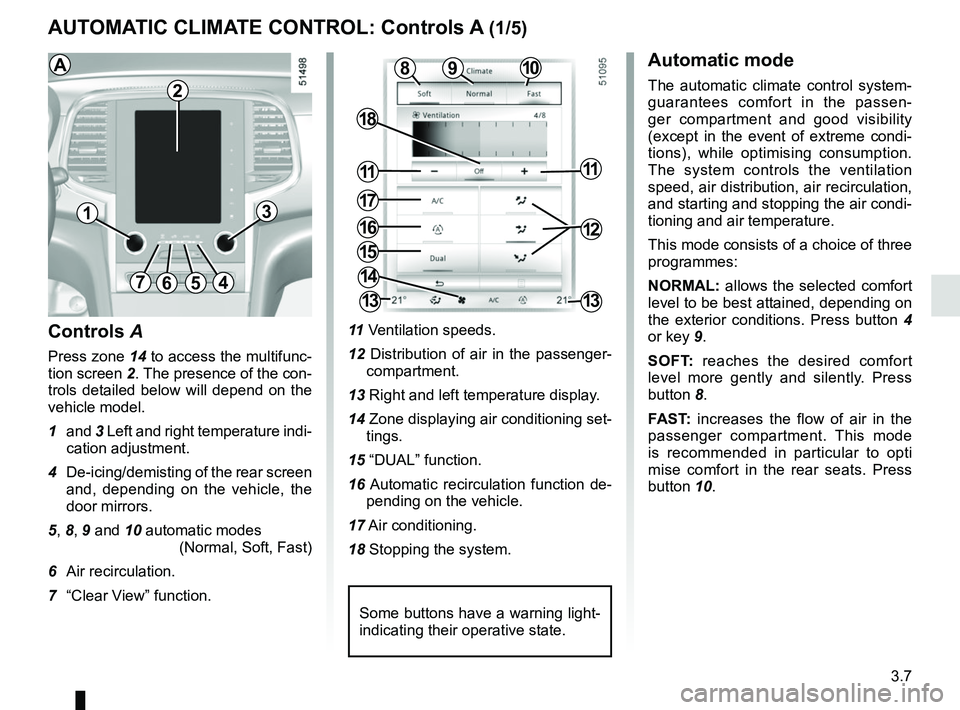
Controls A
Press zone 14 to access the multifunc-
tion screen 2. The presence of the con-
trols detailed below will depend on the
vehicle model.
1 and 3 Left and right temperature indi-
cation adjustment.
4 De-icing/demisting of the rear screen and, depending on the vehicle, the
door mirrors.
5, 8, 9 and 10 automatic modes (Normal, Soft, Fast)
6 Air recirculation.
7 “Clear View” function. 11
Ventilation speeds.
12 Distribution of air in the passenger- compartment.
13 Right and left temperature display.
14 Zone displaying air conditioning set- tings.
15 “DUAL” function.
16 Automatic recirculation function de- pending on the vehicle.
17 Air conditioning.
18 Stopping the system.
8
14
13
13
13
2
Some buttons have a warning light-
indicating their operative state.
AAutomatic mode
The automatic climate control system-
guarantees comfort in the passen-
ger compartment and good visibility
(except in the event of extreme condi-
tions), while optimising consumption.
The system controls the ventilation
speed, air distribution, air recirculation,
and starting and stopping the air condi-
tioning and air temperature.
This mode consists of a choice of three
programmes:
NORMAL: allows the selected comfort
level to be best attained, depending on
the exterior conditions. Press button 4
or key 9.
SOFT: reaches the desired comfort
level more gently and silently. Press
button 8.
FAST: increases the flow of air in the
passenger compartment. This mode
is recommended in particular to opti
mise comfort in the rear seats. Press
button 10.
12
Page 206 of 332
3.10
AUTOMATIC CLIMATE CONTROL: Controls A (4/5)
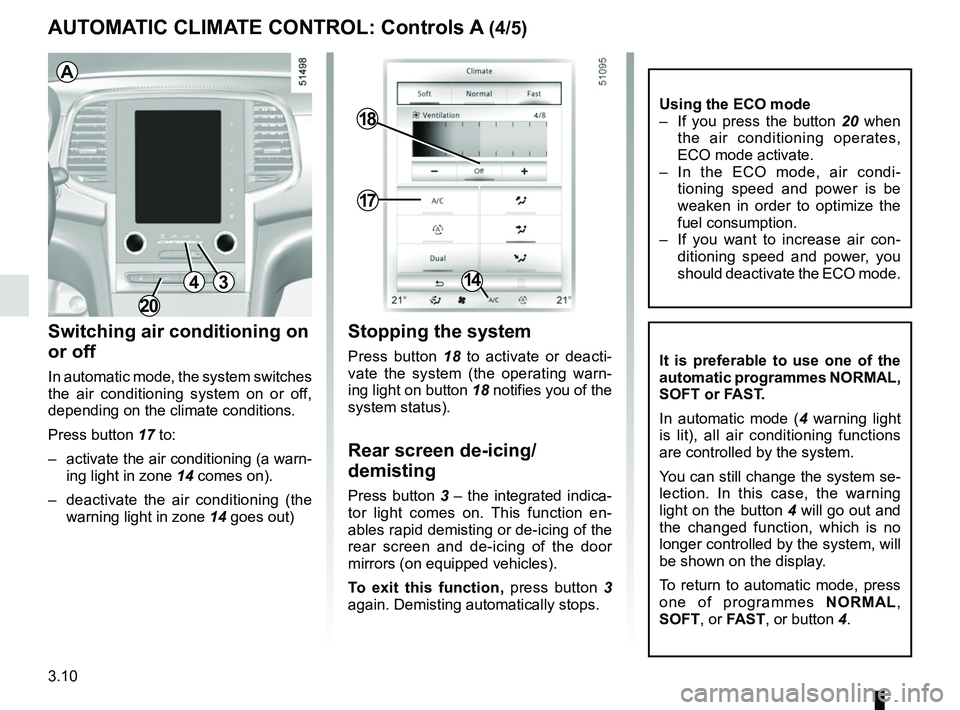
Switching air conditioning on
or off
In automatic mode, the system switches
the air conditioning system on or off,
depending on the climate conditions.
Press button 17 to:
– activate the air conditioning (a warn-ing light in zone 14 comes on).
– deactivate the air conditioning (the warning light in zone 14 goes out)
17
18
14
Stopping the system
Press button 18 to activate or deacti-
vate the system (the operating warn-
ing light on button 18 notifies you of the
system status).
Rear screen de-icing/
demisting
Press button 3 – the integrated indica-
tor light comes on. This function en-
ables rapid demisting or de-icing of the
rear screen and de-icing of the door
mirrors (on equipped vehicles).
To exit this function, press button 3
again. Demisting automatically stops.
It is preferable to use one of the
automatic programmes NORMAL,
SOFT or FAST.
In automatic mode ( 4 warning light
is lit), all air conditioning functions
are controlled by the system.
You can still change the system se-
lection. In this case, the warning
light on the button 4 will go out and
the changed function, which is no
longer controlled by the system, will
be shown on the display.
To return to automatic mode, press
one of programmes NORMAL,
SOFT , or FAST, or button 4.
3
A
4
Using the ECO mode
– If you press the button 20 when
the air conditioning operates,
ECO mode activate.
– In the ECO mode, air condi- tioning speed and power is be
weaken in order to optimize the
fuel consumption.
– If you want to increase air con- ditioning speed and power, you
should deactivate the ECO mode.
20
Page 207 of 332
3.11
AUTOMATIC CLIMATE CONTROL: Controls A (5/5)
Air recirculation
Note:
– during recirculation, air is taken from the passenger compartment and
is recycled, with no air being taken
from outside the vehicle;
– air recirculation allows the exter- nal atmosphere to be cut off (when
driving in polluted areas, etc.) and
to cool the passenger compartment
temperature more quickly.
Automatic use
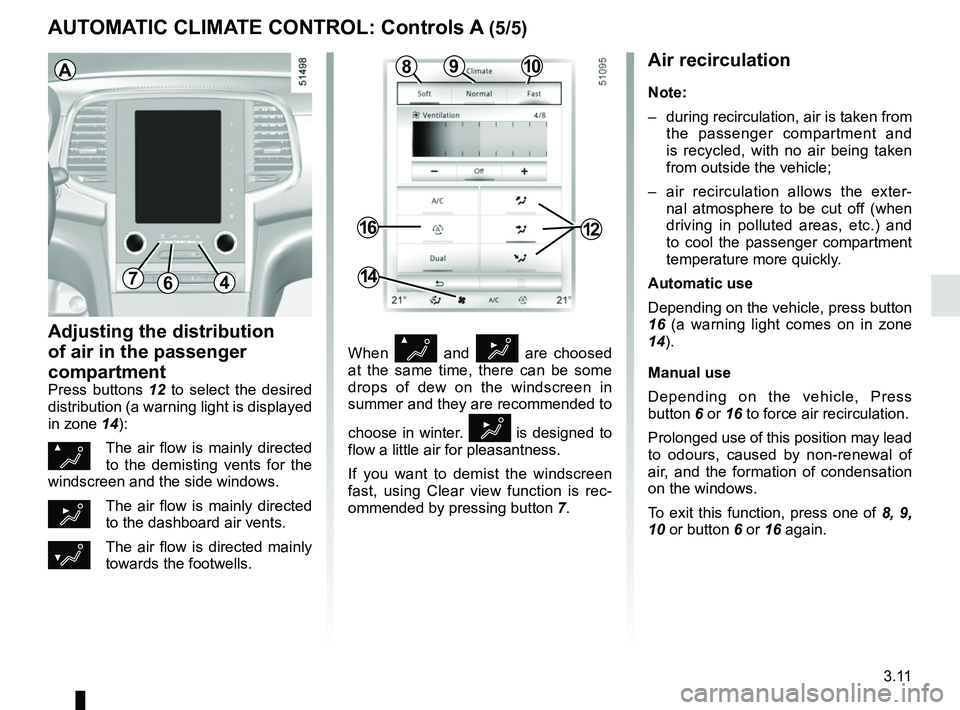
Depending on the vehicle, press button
16 (a warning light comes on in zone
14).
Manual use
Depending on the vehicle, Press
button 6 or 16 to force air recirculation.
Prolonged use of this position may lead
to odours, caused by non-renewal of
air, and the formation of condensation
on the windows.
To exit this function, press one of 8, 9,
10 or button 6 or 16 again.
Adjusting the distribution
of air in the passenger
compartment
Press buttons 12 to select the desired
distribution (a warning light is displayed
in zone 14):
ØThe air flow is mainly directed
to the demisting vents for the
windscreen and the side windows.
½The air flow is mainly directed
to the dashboard air vents.
¿The air flow is directed mainly
towards the footwells.
64
16
14
When Ø and ½ are choosed
at the same time, there can be some
drops of dew on the windscreen in
summer and they are recommended to
choose in winter.
½ is designed to
flow a little air for pleasantness.
If you want to demist the windscreen
fast, using Clear view function is rec-
ommended by pressing button 7.
A
12
1098
7
Page 208 of 332
3.12
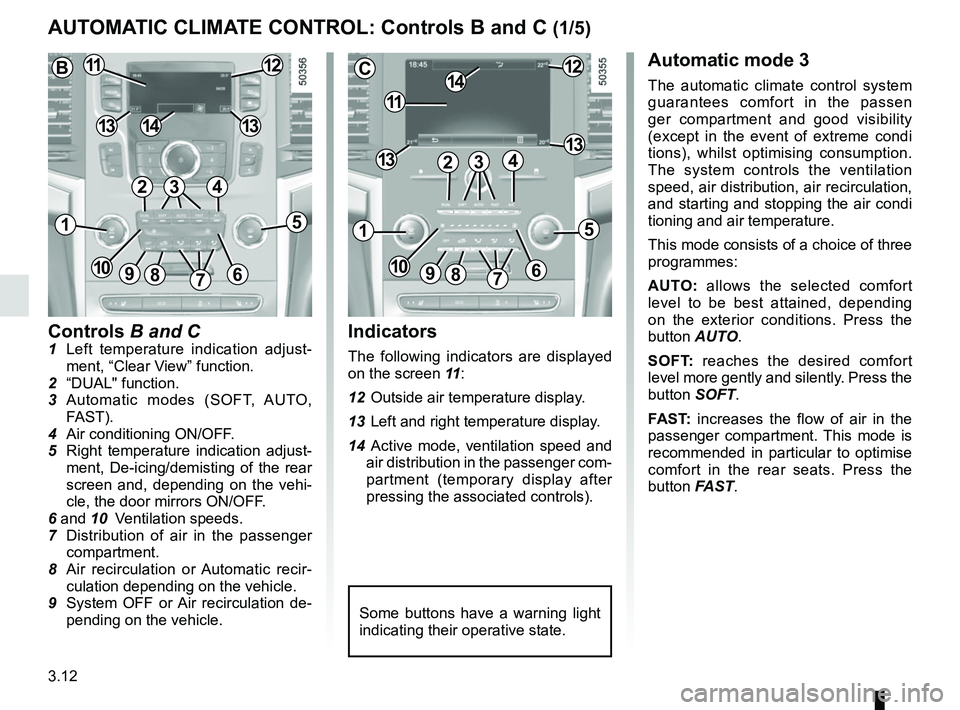
Controls B and C1 Left temperature indication adjust-ment, “Clear View” function.
2 “DUAL" function.
3 Automatic modes (SOFT, AUTO, FAST).
4 Air conditioning ON/OFF.
5 Right temperature indication adjust- ment, De-icing/demisting of the rear
screen and, depending on the vehi-
cle, the door mirrors ON/OFF.
6 and 10 Ventilation speeds.
7 Distribution of air in the passenger
compartment.
8 Air recirculation or Automatic recir- culation depending on the vehicle.
9 System OFF or Air recirculation de- pending on the vehicle.
AUTOMATIC CLIMATE CONTROL: Controls B and C (1/5)
Indicators
The following indicators are displayed
on the screen 11 :
12 Outside air temperature display.
13 Left and right temperature display.
14 Active mode, ventilation speed and air distribution in the passenger com-
partment (temporary display after
pressing the associated controls).
Automatic mode 3
The automatic climate control system
guarantees comfort in the passen
ger compartment and good visibility
(except in the event of extreme condi
tions), whilst optimising consumption.
The system controls the ventilation
speed, air distribution, air recirculation,
and starting and stopping the air condi
tioning and air temperature.
This mode consists of a choice of three
programmes:
AUTO: allows the selected comfort
level to be best attained, depending
on the exterior conditions. Press the
button AUTO.
SOFT: reaches the desired comfort
level more gently and silently. Press the
button SOFT.
FAST: increases the flow of air in the
passenger compartment. This mode is
recommended in particular to optimise
comfort in the rear seats. Press the
button FAST.
Some buttons have a warning light
indicating their operative state.
C
11
1412
131342
1
91086
5
7
3
13
B1112
1413
42
15
7
3
69810
Page 211 of 332
3.15
Switching air conditioning on
or off
In automatic mode, the system switches
the air conditioning system on or off,
depending on the climate conditions.
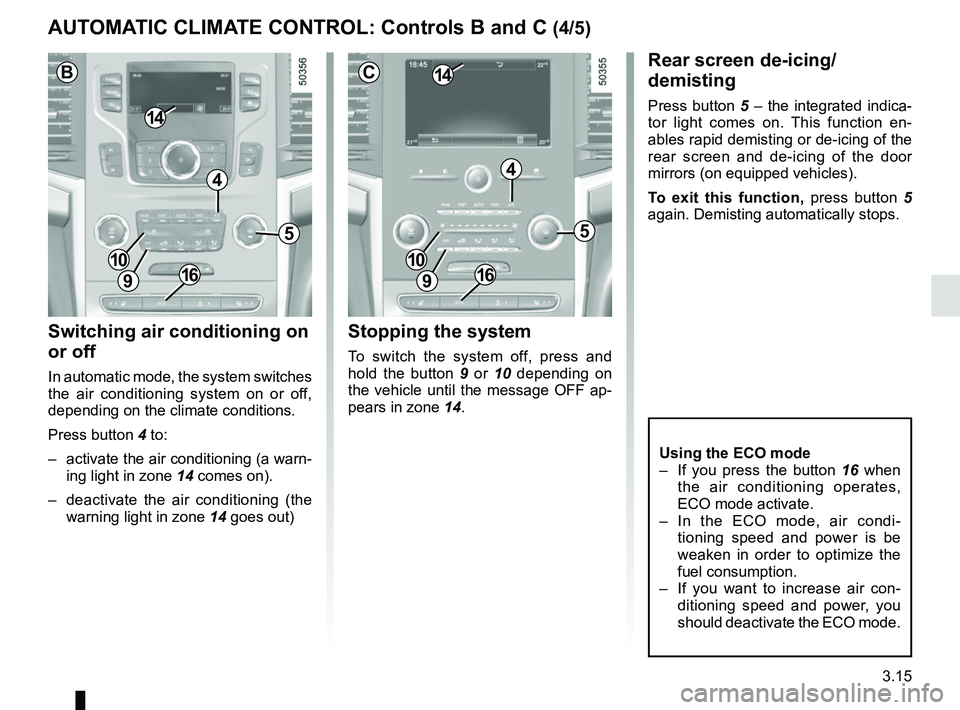
Press button 4 to:
– activate the air conditioning (a warn-ing light in zone 14 comes on).
– deactivate the air conditioning (the warning light in zone 14 goes out)
Rear screen de-icing/
demisting
Press button 5 – the integrated indica-
tor light comes on. This function en-
ables rapid demisting or de-icing of the
rear screen and de-icing of the door
mirrors (on equipped vehicles).
To exit this function, press button 5
again. Demisting automatically stops.
Stopping the system
To switch the system off, press and
hold the button 9 or 10 depending on
the vehicle until the message OFF ap-
pears in zone 14.
AUTOMATIC CLIMATE CONTROL: Controls B and C (4/5)
5
4
9
1410
C
5
4
9
14
B
10
9
10
Using the ECO mode
– If you press the button 16 when
the air conditioning operates,
ECO mode activate.
– In the ECO mode, air condi- tioning speed and power is be
weaken in order to optimize the
fuel consumption.
– If you want to increase air con- ditioning speed and power, you
should deactivate the ECO mode.
1616
Page 212 of 332
3.16
When Ø and ½ are choosed
at the same time, there can be some
drops of dew on the windscreen in
summer and they are recommended to
choose in winter.
½ is designed to
flow a little air for pleasantness.
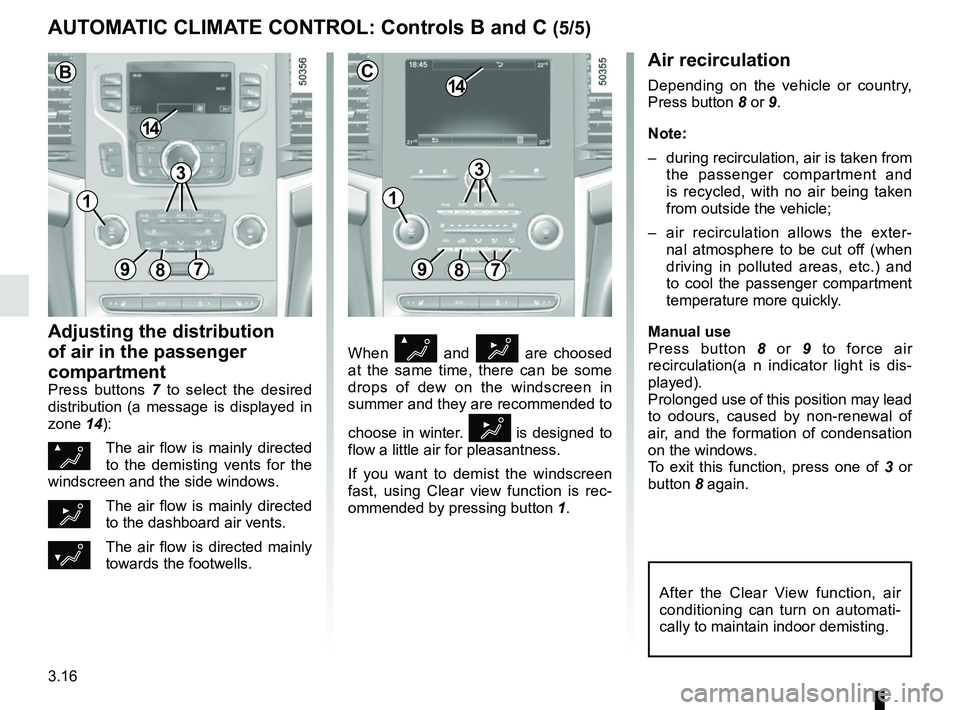
If you want to demist the windscreen
fast, using Clear view function is rec-
ommended by pressing button 1.
Air recirculation
Depending on the vehicle or country,
Press button 8 or 9.
Note:
– during recirculation, air is taken from
the passenger compartment and
is recycled, with no air being taken
from outside the vehicle;
– air recirculation allows the exter- nal atmosphere to be cut off (when
driving in polluted areas, etc.) and
to cool the passenger compartment
temperature more quickly.
Manual use
Press button 8 or 9 to force air
recirculation(a n indicator light is dis-
played).
Prolonged use of this position may lead
to odours, caused by non-renewal of
air, and the formation of condensation
on the windows.
To exit this function, press one of 3 or
button 8 again.
Adjusting the distribution
of air in the passenger
compartment
Press buttons 7 to select the desired
distribution (a message is displayed in
zone 14):
ØThe air flow is mainly directed
to the demisting vents for the
windscreen and the side windows.
½The air flow is mainly directed
to the dashboard air vents.
¿The air flow is directed mainly
towards the footwells.
AUTOMATIC CLIMATE CONTROL: Controls B and C (5/5)
89
14
7
C
After the Clear View function, air
conditioning can turn on automati-
cally to maintain indoor demisting.
3
897
14
B
3
11
Page 216 of 332
3.20
One-touch mode
Depending on the vehicle, this mode
works in addition to the operation of the
electric windows described previously.
It is only fitted to the driver’s window.
Briefly press or pull switch 1 fully: the
window is fully lowered or raised.
Pressing the switch again stops the
window moving.
Note: if the window detects resistance
when closing (e.g.: branch of a tree,
etc.) it stops and then lowers again by a
few centimetres.
ELECTRIC WINDOWS (2/2)
Operating faults
In case of a fault when closing a window,
the system reverts to normal mode:
pull the switch concerned up as often
as necessary to fully close the window
(the window will close gradually), hold
the switch (still on the closure side) for
one second then lower and raise the
window fully to reinitialise the system.
If necessary, contact your authorised
dealer.
When closing the windows,
ensure that no part of the
body (arm, hand, etc.) is
protruding from the vehicle.
Risk of serious injury.
Page 217 of 332
3.21
ELECTRIC SUNROOF (1/2)
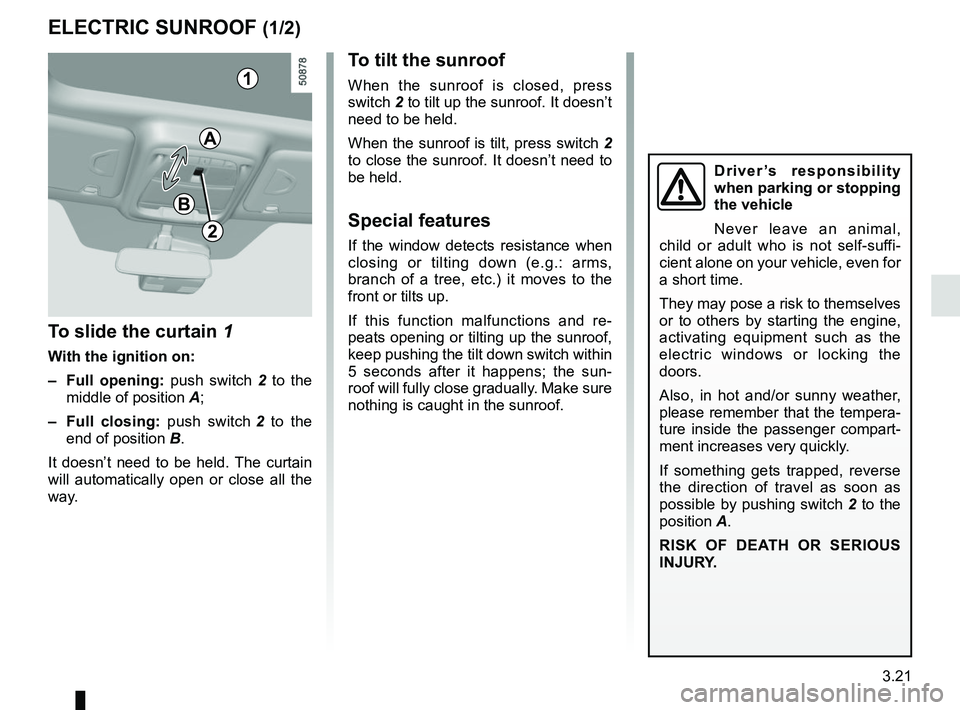
To slide the curtain 1
With the ignition on:
– Full opening: push switch 2 to the
middle of position A;
– Full closing: push switch 2 to the
end of position B.
It doesn’t need to be held. The curtain
will automatically open or close all the
way.
To tilt the sunroof
When the sunroof is closed, press
switch 2 to tilt up the sunroof. It doesn’t
need to be held.
When the sunroof is tilt, press switch 2
to close the sunroof. It doesn’t need to
be held.
Special features
If the window detects resistance when
closing or tilting down (e.g.: arms,
branch of a tree, etc.) it moves to the
front or tilts up.
If this function malfunctions and re-
peats opening or tilting up the sunroof,
keep pushing the tilt down switch within
5 seconds after it happens; the sun-
roof will fully close gradually. Make sure
nothing is caught in the sunroof.
1
2
A
B
Driver’s responsibility
when parking or stopping
the vehicle
Never leave an animal,
child or adult who is not self-suffi-
cient alone on your vehicle, even for
a short time.
They may pose a risk to themselves
or to others by starting the engine,
activating equipment such as the
electric windows or locking the
doors.
Also, in hot and/or sunny weather,
please remember that the tempera-
ture inside the passenger compart-
ment increases very quickly.
If something gets trapped, reverse
the direction of travel as soon as
possible by pushing switch 2 to the
position A.
RISK OF DEATH OR SERIOUS
INJURY.
Page 218 of 332
3.22
ELECTRIC SUNROOF (2/2)
It doesn’t need to be held. The sun-
roof will automatically open or close all
the way. To stop the window, push the
switch once more while it is opening or
closing.
Note: If you wish to open the sunroof
while driving, comfort opening is rec-
ommended to prohibit wind buffeting.
Precautions during use
– Vehicle with loaded roof bars.As a general rule, if there is a load
on the roof, use of the sunroof is not
recommended.
Before using the sunroof, check the
objects and/or accessories (bike
racks, roof boxes, etc.) attached to
the roof bars: they should be prop-
erly arranged and secured and
should not interfere with the opera-
tion of the sunroof.
Contact an approved dealer for de-
tails of possible conversions;
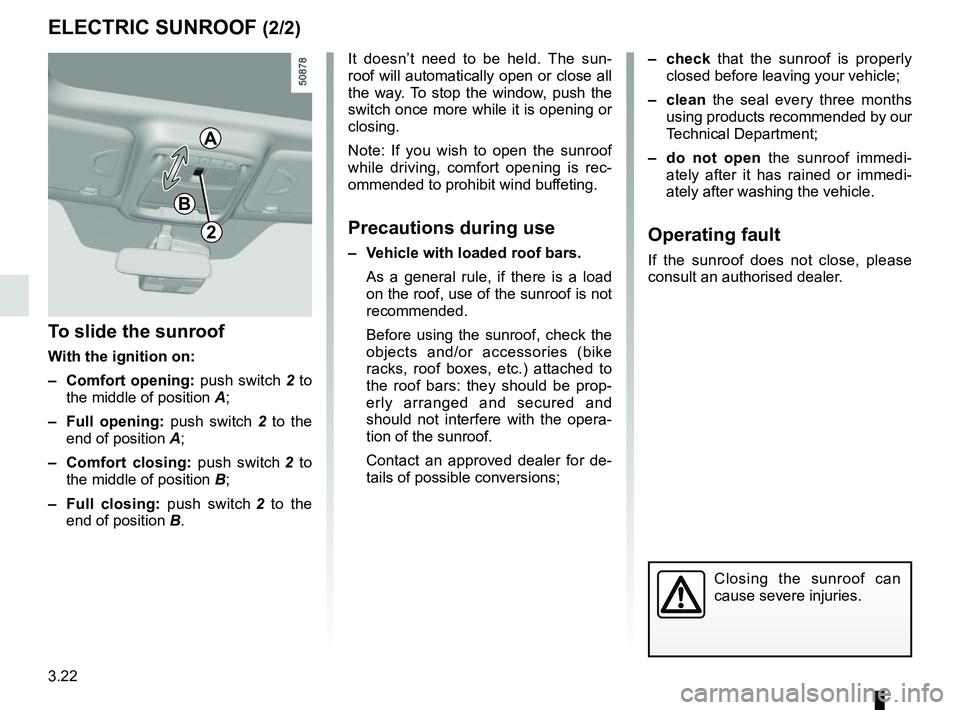
To slide the sunroof
With the ignition on:
– Comfort opening: push switch 2 to
the middle of position A;
– Full opening: push switch 2 to the
end of position A;
– Comfort closing: push switch 2 to
the middle of position B;
– Full closing: push switch 2 to the
end of position B.
2
– check that the sunroof is properly
closed before leaving your vehicle;
– clean the seal every three months using products recommended by our
Technical Department;
– do not open the sunroof immedi-
ately after it has rained or immedi-
ately after washing the vehicle.
Operating fault
If the sunroof does not close, please
consult an authorised dealer.
Closing the sunroof can
cause severe injuries.
A
B