change wheel Seat Ateca 2017 User Guide
[x] Cancel search | Manufacturer: SEAT, Model Year: 2017, Model line: Ateca, Model: Seat Ateca 2017Pages: 328, PDF Size: 6.36 MB
Page 139 of 328
Lights and visibility
The light distribution of the halogen and full-
LED he a
dlights allows the specific “tourist
light” values to be met without the need for
stickers or changes in the settings. Note
“Tourist light” is only allowed temporarily. If
y ou ar
e planning a long stay in a country that
drives on the other side, you should take the
vehicle to an Authorised Technical Service to
change the headlights. Headlight range control, lighting of
the in
s
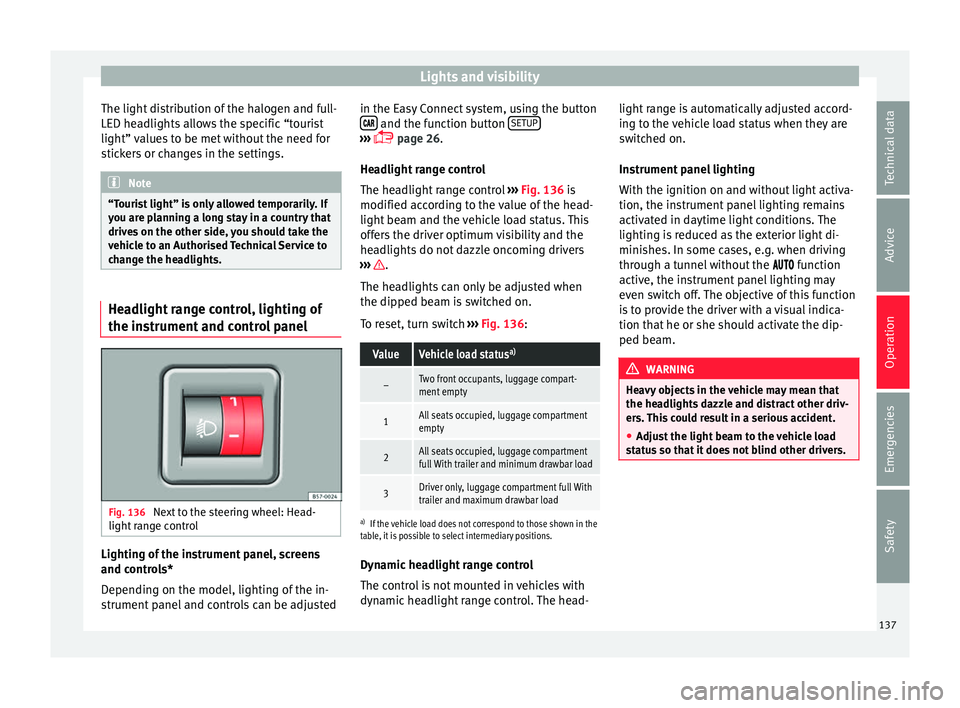
trument and control panel Fig. 136
Next to the steering wheel: Head-
light r
ange control Lighting of the instrument panel, screens
and c
ontr
ols*
Depending on the model, lighting of the in-
strument panel and controls can be adjusted in the Easy Connect system, using the button
and the function button
S
ETUP ›››
p
age 26.
He
adlight range control
The headlight range control ››› Fig. 136 is
modified according to the value of the head-
light beam and the vehicle load status. This
offers the driver optimum visibility and the
headlights do not dazzle oncoming drivers
››› .
The he a
dlights can only be adjusted when
the dipped beam is switched on.
To reset, turn switch ››› Fig. 136:
ValueVehicle load status a)
–Two front occupants, luggage compart-
ment empty
1All seats occupied, luggage compartment
empty
2All seats occupied, luggage compartment
full With trailer and minimum drawbar load
3Driver only, luggage compartment full With
trailer and maximum drawbar load
a)
If the vehicle load does not correspond to those shown in the
table, it is possible to select intermediary positions.
Dynamic headlight range control
The control is not mounted in vehicles with
dynamic headlight range control. The head- light range is automatically adjusted accord-
ing t
o the vehicle load status when they are
switched on.
Instrument panel lighting
With the ignition on and without light activa-
tion, the instrument panel lighting remains
activated in daytime light conditions. The
lighting is reduced as the exterior light di-
minishes. In some cases, e.g. when driving
through a tunnel without the function
active, the instrument panel lighting may
even switch off. The objective of this function
is to provide the driver with a visual indica-
tion that he or she should activate the dip-
ped beam. WARNING
Heavy objects in the vehicle may mean that
the he a
dlights dazzle and distract other driv-
ers. This could result in a serious accident.
● Adjust the light beam to the vehicle load
st
atus so that it does not blind other drivers. 137
Technical data
Advice
Operation
Emergencies
Safety
Page 141 of 328
Lights and visibility
Note
The light above the sun visor automatically
sw it
ches off after a few minutes in certain
conditions. This prevents the battery from
discharging. Windscreen wiper and window
w
iper sy
stems
Window wiper lever Read the additional information carefully
› ›
› page 25 CAUTION
If the ignition is switched off with the wind-
s c
reen wipers active, they complete their
wipe before returning to the rest position.
When switching the ignition back on, the
windscreen wiper will continue to operate at
the same wiping level. Ice, snow and other
obstacles on the windscreen may damage the
wiper and the windscreen wiper motor.
● If necessary, remove snow and ice from the
wind
screen wipers before starting your jour-
ney.
● Carefully lift the frozen windscreen wipers
from the gl
ass. SEAT recommends a de-icer
spray for this operation.
● Do not switch on the windscreen wipers if
the wind
screen is dry. Cleaning with the windscreen wipers while dry can cause dam-
ag
e.
● In icy
conditions, always check that the
wiper b
lades are not frozen to the glass be-
fore using the wipers. In cold weather, it may
help to leave the vehicle parked with the wip-
ers in service position ›››
page 60. Note
● The w ind
screen and window wipers only
function when the ignition is switched on and
the bonnet or rear lid, respectively, are
closed.
● The interval wipe speed varies according to
the v
ehicle speed. The faster the vehicle is
moving, the more often the windscreen is
cleaned.
● The rear wiper is automatically switched on
when the wind
screen wiper is on and the car
is in reverse gear. Windscreen wiper functions
Windscreen wiper performance in different sit-
uations
If the vehicle is at a
standstillThe activated position provision-
ally changes to the previous posi-
tion.
Windscreen wiper performance in different sit-
uations
During automatic
wipe
The air conditioner comes on for
approximately 30 seconds in air
recirculation mode to prevent the
smell of the windscreen washer
fluid entering the inside the vehi-
cle.
For the interval wipe
Intervals between wipes depend
on the vehicle's speed. The high-
er the vehicle speed the shorter
the intervals. Heated windscreen washer jets
The he
atin
g only thaws the frozen jets, it
does not thaw the water in the washer hoses.
When the ignition is switched on the heated
windscreen washer jets automatically adjust
the heat depending on the ambient tempera-
ture.
Headlight wash/wipe system
The headlight washers/wipers clean the
headlight lenses.
After the ignition is switched on, the first and
every fifth time the windscreen washer is
switched on, the headlights are also washed.
Therefore, the windscreen wiper lever should
be pulled towards the steering wheel when
the dipped beam or main beam are on. Any
incrusted dirt (such as insects) should be
cleaned regularly (e.g. when refuelling). »
139
Technical data
Advice
Operation
Emergencies
Safety
Page 161 of 328
Air conditioning
● The air c onditioner c
ompressor has been
temporarily switched off because the engine
coolant temperature is too high.
● Another fault in the vehicle. Have the air
conditioner c
hecked by a specialised work-
shop. Special Characteristics
If the humidity
and temperature outside the
vehicle are high, condensation can drip off
the evaporator in the cooling system and
form a pool underneath the vehicle. This is
normal and does not indicate a leak! Note
After starting the engine, any residual humid-
ity in the air c
onditioner could mist over the
windscreen. Switch on the defrost function as
soon as possible to clear the windscreen of
condensation. Air outlets
Fig. 161
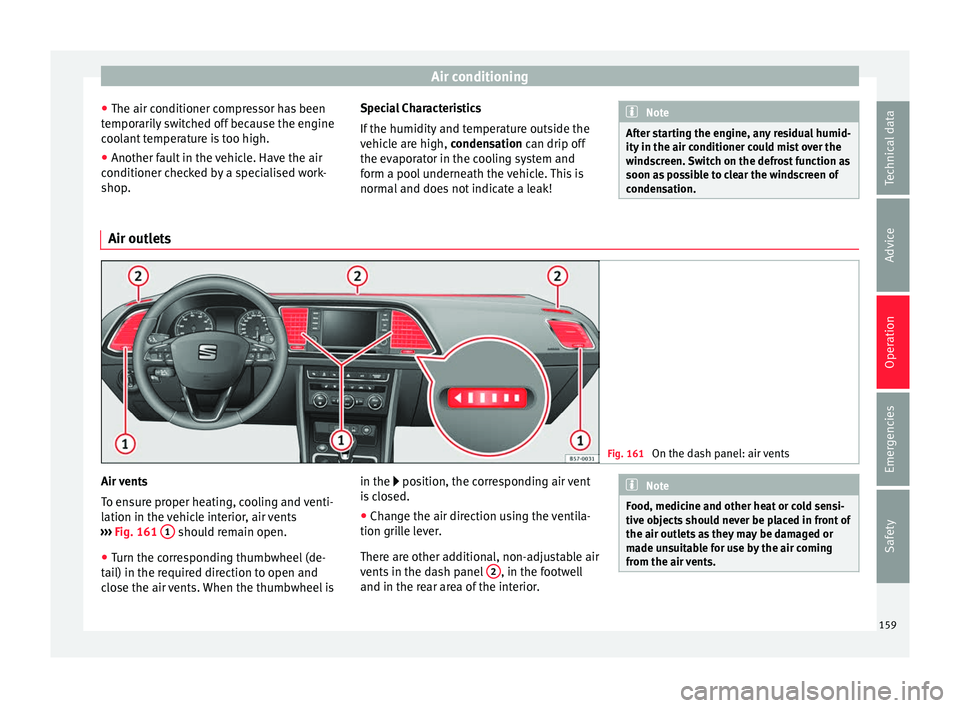
On the dash panel: air vents Air vents
T
o en
sure proper heating, cooling and venti-
lation in the vehicle interior, air vents
››› Fig. 161 1 should remain open.
● Turn the corresponding thumbwheel (de-
t ai
l) in the required direction to open and
close the air vents. When the thumbwheel is in the position, the corresponding air vent
i
s closed.
● Change the air direction using the ventila-
tion gril
le lever.
There are other additional, non-adjustable air
vents in the dash panel 2 , in the footwell
and in the r e
ar area of the interior. Note
Food, medicine and other heat or cold sensi-
tiv e o
bjects should never be placed in front of
the air outlets as they may be damaged or
made unsuitable for use by the air coming
from the air vents. 159
Technical data
Advice
Operation
Emergencies
Safety
Page 178 of 328
Operation
Disable the ESC “Snow” mode
T urn the Driv
ing Experience button to select a
different driving mode ››› page 226. WARNING
The ESC Sport mode should be activated only
when tr affic
conditions and the ability of the
driver allow it. Danger of skidding!
● With ESC in Sport mode, the stabilising
fu
nction will be limited to allow for a sportier
drive. The driving wheels could spin and the
vehicle could skid. WARNING
You should only activate the Offroad Mode or
di s
able the ASR if the experience of the driver
and traffic conditions allow it. Danger of skid-
ding!
● With the Offroad mode activated, the stabi-
lis
ation function is limited. In particular, if
the road is too smooth and slippery, the driv-
ing wheels could spin and the vehicle could
skid. Note
If the ASR is disconnected or the ESC’s Sport
mode i s
selected, cruise control* will be
switched off. Manual gearbox
Ch an
ging gear Read the additional information carefully
› ›
› page 40
In some countries the clutch pedal must be
fully pressed down for the engine to start.
Selecting reverse gear ● Engage reverse gear only when the vehicle
is
stopped.
Changing down gears
While driving, changing down a gear must al-
ways be done gradually, i.e. to the gear di-
rectly below and when the engine speed is
not too high ››› . Changing down while by-
p a
ssing one or various gears at high speeds
or at high engine speeds can damage the
clutch and the gearbox, even if the clutch
pedal remains depressed ››› .
WARNING
When the engine is running, the vehicle will
s t
art to move as soon as a gear is engaged
and the clutch released. This is also the case
with the electronic parking brake switched
on.
● Never engage reverse gear when the vehi-
cl
e is moving. WARNING
If the gear is changed down inappropriately
b y
selecting a gear that is too low, you may
lose control of the vehicle, causing an acci-
dent and serious injuries. CAUTION
When travelling at high speeds or at high en-
gine s peed
s, selecting a gear that is too low
can cause considerable damage to the clutch
and the gearbox. This can also occur if the
clutch pedal is pressed and held and it does
not engage. CAUTION
To prevent damage and avoid premature
w e
ar, please observe the following:
● Do not rest your hand on the gear lever
whil
e driving. The pressure applied by your
hand is transmitted to the gearbox selector
forks.
● Always ensure that the vehicle is complete-
ly s
topped before engaging the reverse gear.
● Always press the clutch to the floor when
ch
anging gears.
● Never hold the vehicle “on the clutch” on
hil
ls with the engine on. 176
Page 179 of 328
Driving
Automatic gearbox/DSG auto-
m atic
gearbox*
Introduction Your vehicle is equipped with an electronical-
ly
c
ontrolled manual gearbox. Torque be-
tween the engine and the gearbox is trans-
mitted via two independent clutches. They re-
place the torque converter found on conven-
tional automatic gearboxes and allow for
smooth, uninterrupted acceleration of the ve-
hicle.
The tiptronic system allows the driver to
change gears manually if desired
››› page 179, Changing gears in tiptronic
mode*.
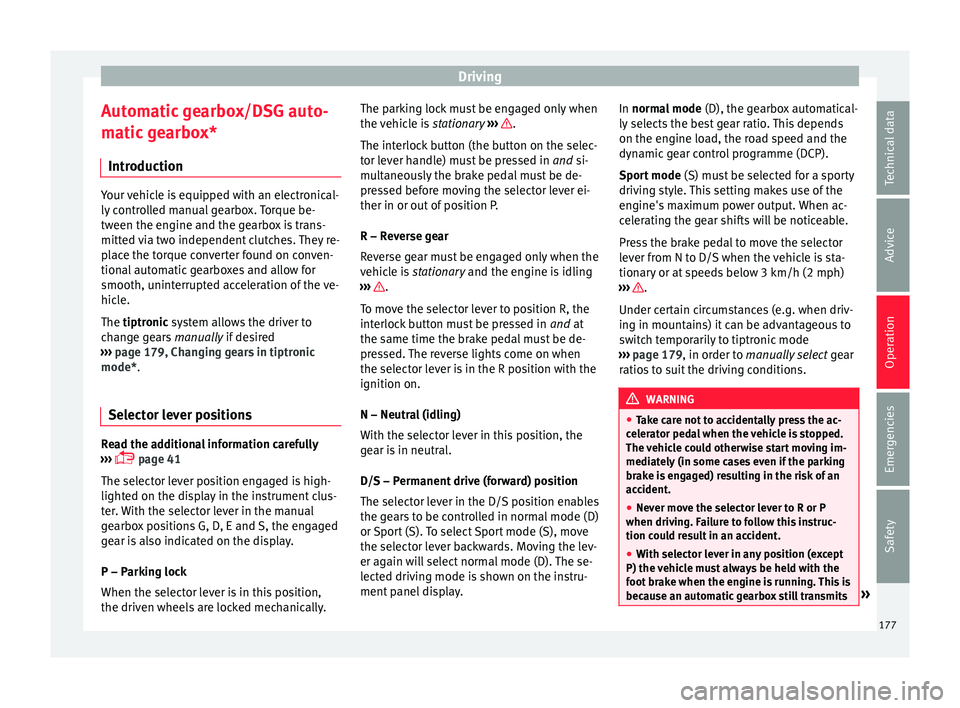
Selector lever positions Read the additional information carefully
› ›
› page 41
The selector lever position engaged is high-
lighted on the display in the instrument clus-
ter. With the selector lever in the manual
gearbox positions G, D, E and S, the engaged
gear is also indicated on the display.
P – Parking lock
When the selector lever is in this position,
the driven wheels are locked mechanically. The parking lock must be engaged only when
the v
ehicle is stationary ››› .
The int erloc
k button (the button on the selec-
tor lever handle) must be pressed in and si-
multaneously the brake pedal must be de-
pressed before moving the selector lever ei-
ther in or out of position P.
R – Reverse gear
Reverse gear must be engaged only when the
vehicle is stationary and the engine is idling
››› .
T o mo
ve the selector lever to position R, the
interlock button must be pressed in and at
the same time the brake pedal must be de-
pressed. The reverse lights come on when
the selector lever is in the R position with the
ignition on.
N – Neutral (idling)
With the selector lever in this position, the
gear is in neutral.
D/S – Permanent drive (forward) position
The selector lever in the D/S position enables
the gears to be controlled in normal mode (D)
or Sport (S). To select Sport mode (S), move
the selector lever backwards. Moving the lev-
er again will select normal mode (D). The se-
lected driving mode is shown on the instru-
ment panel display. In normal mode
(D), the g
earbox automatical-
ly selects the best gear ratio. This depends
on the engine load, the road speed and the
dynamic gear control programme (DCP).
Sport mode (S) must be selected for a sporty
driving style. This setting makes use of the
engine's maximum power output. When ac-
celerating the gear shifts will be noticeable.
Press the brake pedal to move the selector
lever from N to D/S when the vehicle is sta-
tionary or at speeds below 3 km/h (2 mph)
››› .
Under c er
tain circumstances (e.g. when driv-
ing in mountains) it can be advantageous to
switch temporarily to tiptronic mode
››› page 179, in order to manually select gear
ratios to suit the driving conditions. WARNING
● Tak
e care not to accidentally press the ac-
celerator pedal when the vehicle is stopped.
The vehicle could otherwise start moving im-
mediately (in some cases even if the parking
brake is engaged) resulting in the risk of an
accident.
● Never move the selector lever to R or P
when drivin
g. Failure to follow this instruc-
tion could result in an accident.
● With selector lever in any position (except
P) the v
ehicle must always be held with the
foot brake when the engine is running. This is
because an automatic gearbox still transmits » 177
Technical data
Advice
Operation
Emergencies
Safety
Page 181 of 328
Driving
Note
● If the sel
ector lever lock does not engage,
there is a fault. The transmission is interrup-
ted to prevent the vehicle from accidentally
moving. Follow the procedure below in order
for the selector lever lock to engage again:
–With a 6-speed gearbox: press the brake
pedal and release it again.
– With a 7-speed gearbox: press the brake
pedal. Move the selector lever to posi-
tion P or N and subsequently engage a
gear.
● Despite a gear being engaged, the vehicle
does
not move forwards or back. Proceed to
the next mode:
– When the vehicle does not move in the
required direction, the system may not
have the gear range correctly engaged.
Press the brake pedal and engage the
gear range again.
– If the vehicle still does not move in the
required direction, there is a system mal-
function. Seek specialist assistance and
have the system checked. Changing gears in tiptronic mode*
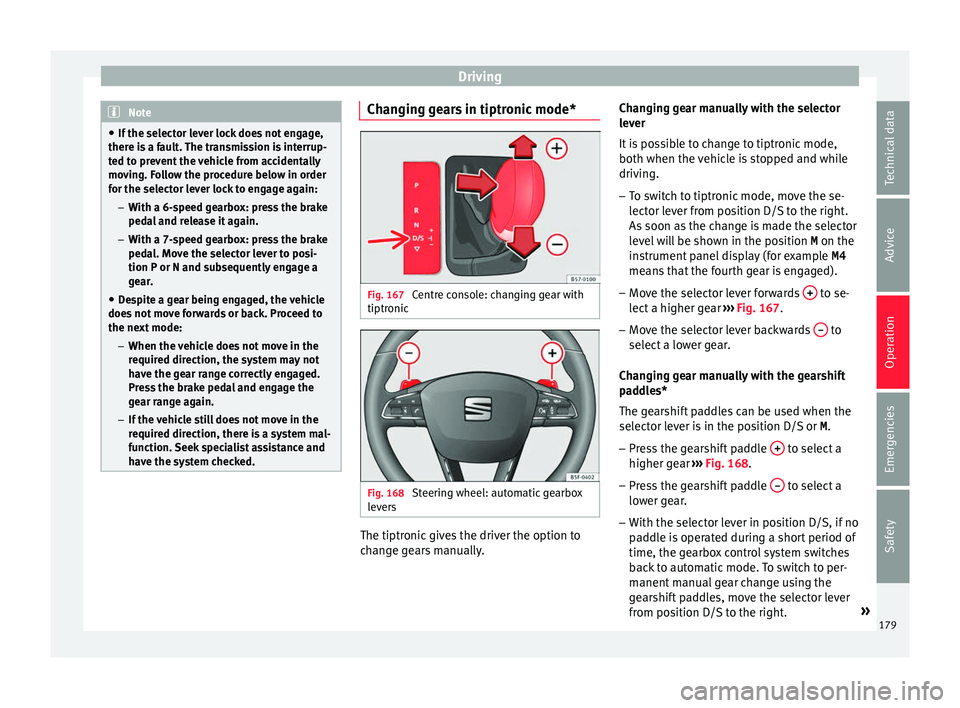
Fig. 167
Centre console: changing gear with
tiptr onic Fig. 168
Steering wheel: automatic gearbox
l ev
ers The tiptronic gives the driver the option to
c
h
ange gears manually. Changing gear manually with the selector
lev
er
It is possible to change to tiptronic mode,
both when the vehicle is stopped and while
driving.
– To switch to tiptronic mode, move the se-
lect
or lever from position D/S to the right.
As soon as the change is made the selector
level will be shown in the position M on the
instrument panel display (for example M4
means that the fourth gear is engaged).
– Move the selector lever forwards + to se-
l ect
a higher gear ››› Fig. 167.
– Move the selector lever backwards – to
sel ect
a lower gear.
Changing gear manually with the gearshift
paddles*
The gearshift paddles can be used when the
selector lever is in the position D/S or M.
– Press the gearshift paddle + to select a
higher g e
ar ››› Fig. 168.
– Press the gearshift paddle – to select a
lo w
er gear.
– With the selector lever in position D/S, if no
pa
ddle is operated during a short period of
time, the gearbox control system switches
back to automatic mode. To switch to per-
manent manual gear change using the
gearshift paddles, move the selector lever
from position D/S to the right. »
179
Technical data
Advice
Operation
Emergencies
Safety
Page 184 of 328
Operation
●
Mak
e sure that the ESC remains switched
on. Please note that when the ASR and ESC
are deactivated, the wheels may start to spin,
causing the vehicle to lose grip. Risk of acci-
dent!
● After putting the vehicle into gear, the
“spor
t” mode of the ESC should be deactiva-
ted again by briefly pressing the OFF but-
t on. Note
● Af t
er using the Launch control programme,
the temperature in the gearbox may have in-
creased considerably. In this case, the pro-
gramme could be disabled for several mi-
nutes. The programme can be used again af-
ter the cooling phase.
● Accelerating with the Launch control pro-
gramme p
laces a heavy load on all parts of
the vehicle. This can result in increased wear
and tear. Downhill speed control*
The downhill speed control function helps
the driv
er when driv
ing down steep gradi-
ents.
Downhill speed control is activated when the
selector lever is in D/S and the driver applies
the foot brake. The automatic gearbox auto-
matically engages a lower gear that is suita-
ble for the slope. The downhill speed control function attempts to maintain the speed at
which the
vehicle was travelling when the
foot brake was applied (subject to the laws of
physics and technical drive limitations). It
may be necessary to adjust the speed again
using the foot brake in certain situations. Giv-
en that the downhill speed control can only
change down to 3rd gear, on very steep de-
scents the tiptronic mode may be required. In
this case, manually reduce the tiptronic to
2nd or 1st gear to use the engine brake and
reduce the charge on the brakes.
Downhill speed control is deactivated as
soon as the road levels out again or you
press the accelerator pedal.
On vehicles with cruise control system*
››› page 193, downhill speed control is acti-
vated when you set a cruising speed. WARNING
The downhill speed control cannot defy the
l a
ws of physics. Therefore, speed cannot be
maintained constant in all situations. Always
be prepared to use the brakes! Inertia mode
The inertia mode enables the kinetic energy
of
the
vehicle to be harnessed enabling cer-
tain stretches to be driven without using the
accelerator. This enables fuel to be saved. Use the inertia mode to “let the vehicle roll”
befor
e, for example, arriving in a town.
Switching on inertia mode
Important: selector lever must be in position
D, gradients below 12 %.
– Select, in SEAT Drive Profile*, Eco mode
››
› page 225.
– Take your foot off the accelerator.
The driver me
ssage Inertia will be dis-
played. At speeds higher than 20 km/h (12
mph), the gearbox will automatically disen-
gage and the vehicle will roll freely, without
the effect of the engine brake. While the vehi-
cle rolls, the engine runs at idling speed.
Stopping inertia mode
– Press the brake or the accelerator pedal.
To m
ake use of the braking force and switch
off the engine again, simply press the brake
pedal briefly.
Applying both the inertia mode (= prolonged
section with less energy) and the switching
off using inertia (= shorter section without
the need for fuel) facilitates improved fuel
consumption and emission balance.
182
Page 186 of 328

Operation
Gearbox: press the brake and
engage a gear again.
If the f
ault was caused by a gearbox with a
high temperature, this driver message will be
displayed when the gearbox has cooled
again.
Run-in and economical driving Ru
nning-in the engine A new vehicle should be run in over a dis-
t
anc
e of 1500 km (1000 miles). For the first
1,000 km the engine speed should not ex-
ceed 2/3 of the maximum permissible engine
speed. In doing so, do not accelerate at full
throttle and do not drive with a trailer! From
1000 to 1500 km (600 to 1000 miles) you
can gradually increase the engine rpm and
road speed.
During its first few hours of running, the in-
ternal friction in the engine is greater than
later on when all the moving parts have bed-
ded down.
How the vehicle is driven for the first 1,500
km influences the future engine perform-
ance. Subsequently, also drive at a moderate
rate, especially when the engine is still cold:
this will lead to less engine wear and tear
and will prolong its useful life. You should also avoid driving with the engine
speed t
oo low. Change down to a lower gear
when the engine no longer runs “smoothly”.
If the engine revs too much, cut fuel injection
to protect the engine.
Environmental compatibility Environmental protection is a top priority in
the de
s
ign, choice of materials and manufac-
ture of your new SEAT.
Constructive measures to encourage recy-
cling
● Joints and connections designed for easy
di sm
antling
● Modular construction to facilitate disman-
tling
● Inc
reased use of single-grade materials.
● Plastic parts and elastomers are marked in
acc
ordance with ISO 1043, ISO 11469 and
ISO 1629.
Choice of materials
● Use of recycled materials.
● Use of compatible plastics in the same part
if its
components are not easily separated.
● Use of recycled materials and/or materials
originatin
g from renewable sources. ●
Reduction of
volatile components, includ-
ing odour, in plastic materials.
● Use of CFC-free coolants.
Ban on he
avy metals, with the exceptions
dictated by law (Annex II of ELV Directive
2000/53/EC): cadmium, lead, mercury, hexa-
valent chromium.
Manufacturing methods
● Reduction of the quantity of thinner in the
prot
ective wax for cavities.
● Use of plastic film as protection during ve-
hicl
e transport.
● Use of solvent-free adhesives.
● Use of CFC-free coolants in cooling sys-
tems.
● R
ecycling and energy recovery from resi-
dues
(RDF).
● Improvement in the quality of waste water.
● Use of systems for the recovery of residual
heat
(thermal recovery, enthalpy wheels,
etc.).
● The use of water-soluble paints.
184
Page 191 of 328
Driver assistance systems
– When the c lut
ch pedal is pressed the en-
gine will start up again. The warning lamp
will switch off.
Vehicles with an automatic gearbox
– Use the foot brake to bring the vehicle to a
st
op and keep the brake pedal pressed
down with your foot. The engine will switch
off. The warning lamp will appear in the
display.
– When you take your foot off the brake pedal
the engine w
ill start up again. The warning
lamp will switch off.
Additional information related to the auto-
matic gearbox
The engine stops when the selector lever is in
the positions P, D, N and S, in addition to
when in manual mode. With the selector lev-
er in position P, the engine will also remain
switched off when you take your foot off the
brake pedal. In order to start the engine up
again the accelerator must be pressed, or an-
other gear engaged or the brake released.
If the selector lever is placed in position R
during the stopping phase, the engine will
start up again.
Change from position D to P to prevent the
engine from accidentally starting when
changing and passing by position R. Note
● You c
an control whether the engine should
switch off or not by reducing or increasing the
brake force applied. While the vehicle re-
mains stopped, the engine will not stop if the
brake pedal is slightly pressed, in traffic jams
with frequent stopping and starting for exam-
ple. As soon as strong pressure is applied to
the brake pedal, the engine will stop.
● In vehicles with manual gearbox, during
the st
opping phases the brake pedal must re-
main depressed to prevent the vehicle from
moving.
● If the engine “stalls” in vehicles with man-
ual
gearbox, it can be directly started up
again by immediately pressing the clutch
pedal. General notes
The system can interrupt the Start-Stop mode
fr
equently
for different reasons.
The engine does not switch off
Before the stopping phase, the system veri-
fies whether certain conditions are met. The
engine does not switch off, in the following
situations for example:
● The engine has not yet reached the mini-
mum requir
ed temperature for the Start-Stop
mode. ●
The interior t
emperature selected for the air
conditioner has not yet been reached.
● The interior temperature is very high/low.
● Defrost function button activated
››
› page 42.
● The parking aid* is switched on.
● The battery is very low.
● The steering wheel is overly turned or is be-
ing t
urned.
● If there is a danger of misting.
● After engaging reverse gear.
● In case of a very steep gradient.
The indication i
s shown on the instrument
panel display, and in addition, the driver in-
formation system* shows, .
The engine starts by itself
During a stopping phase the normal Start-
Stop mode can be interrupted in the follow-
ing situations: The engine restarts by itself
without involvement from the driver.
● The interior temperature differs from the
value sel
ected on the air conditioner.
● Defrost function button activated
››
› page 42.
● The brake has been pressed several times
con
secutively.
● The battery is too low.
● High power consumption. »
189
Technical data
Advice
Operation
Emergencies
Safety
Page 200 of 328
Operation
km/h (18 and 150 mph), as well as the tem-
por ar
y distance required with regard to the
vehicle in front. The ACC function will adapt
the vehicle's cruise speed at all times, main-
taining a safe distance with the vehicle in
front.
The ACC function is based on a radar sensor
that can measure the distance to the vehicles
in front.
If the vehicle is equipped with automatic
gearbox, the ACC can brake the vehicle until
it stops completely if a vehicle in front of it
stops.
Driver intervention prompt
During driving, the ACC is subject to certain
limitations inherent in the system. In other
words, in certain circumstances the driver will
have to adjust speed him or herself, as well
as the distance from other vehicles.
In this case, the instrument panel screen will
warn you to intervene by applying the brake
and a warning tone will be heard
››› page 199. WARNING
The intelligent technology in the ACC cannot
o v
ercome the system's inherent limitations
or change the laws of physics. If used negli-
gently or involuntarily, it may cause serious
accidents and injuries. The system is not a re-
placement for driver awareness. ●
Ad apt
your speed and safe distance to the
vehicle in front of you at all times to suit visi-
bility, weather, road and traffic conditions.
● Do not use the ACC when visibility is bad,
on st
eep roads, with several bends or in slip-
pery circumstances such as snow, ice, rain or
loose gravel, or on flooded roads.
● Never use the ACC when driving off-road or
on unp
aved roads. The ACC has been de-
signed for use on paved roads only.
● The ACC does not react on approaching a
fix
ed obstacle, such as the tail of a traffic
jam, a damaged vehicle or a vehicle stopped
at the traffic lights.
● The ACC only reacts to people if a pedes-
trian monit
oring system is available. In addi-
tion, the system does not react to animals or
vehicles crossing your path or approaching
head-on down the same lane.
● If the ACC does not reduce speed sufficient-
ly, br
ake the vehicle immediately by applying
the pedal.
● If you are driving using the spare wheel,
the AC
C system could automatically switch
off during the journey. Switch off the system
when starting off.
● If the vehicle continues to move involuntar-
ily
after a driver intervention prompt, brake
the vehicle by applying the pedal.
● If the dash panel displays a dri
ver interven-
tion prompt, adjust the distance yourself.
● The driver should be ready to accelerate or
brak
e by him/herself at all times. CAUTION
If you have the sensation that the radar sen-
sor i s
damaged, disconnect the ACC. This will
avoid possible damage. If this occurs have it
adjusted.
● Repairs to the radar sensor require special-
is
t knowledge and special tools. SEAT recom-
mends visiting a SEAT dealership for this pur-
pose. Note
● If the A
CC system does not work as descri-
bed in this chapter, do not use it until it has
been checked by a specialised workshop.
SEAT recommends visiting a SEAT dealership
for this purpose.
● Maximum speed with the ACC activated is
limited t
o 210 km/h (150 mph).
● When the ACC is switched on, strange
noise
s may be heard during automatic brak-
ing cause by the braking system. 198