weight Seat Ateca 2017 User Guide
[x] Cancel search | Manufacturer: SEAT, Model Year: 2017, Model line: Ateca, Model: Seat Ateca 2017Pages: 328, PDF Size: 6.36 MB
Page 151 of 328
Transport and practical equipment
Electrical equipment can be connected to the
12 v
olt power socket. The appliances connec-
ted to each power socket must not exceed a
power rating of 120 Watt. WARNING
The power socket works only when the igni-
tion i s
on. Improper use may cause serious
injury or even fire. Children should therefore
not be left in the vehicle unattended if the
button is also left behind. Otherwise there is
a possibility that they may be injured. CAUTION
Always use the correct type of plugs to avoid
d am
aging the sockets. Note
The use of electrical appliances with the en-
gine sw it
ched off will cause a battery dis-
charge. Storing objects
Lo
ading the luggage compartment All luggage and other loose objects must be
s
af
ely secured in the luggage compartment.
Unsecured objects which shift back and forth
could impair the driving safety or driving characteristics of the vehicle by shifting the
centr
e of gravity.
– Distribute the load evenly in the luggage
comp
artment.
– Place heavy objects as far forward as possi-
bl
e in the luggage compartment.
– Place the heavy objects first.
– Secure heavy objects to the fitted fastening
ring
s ››› page 151. WARNING
● Loo
se luggage and other objects in the lug-
gage compartment could cause serious inju-
ries.
● Always stow objects in the luggage com-
par
tment and secure them on the fastening
rings.
● Use suitable straps to secure heavy ob-
ject
s.
● During sudden manoeuvres or accidents,
loose o
bjects can be thrown forward, injuring
vehicle occupants or passers-by. This in-
creased risk of injury will be further increased
if a loose object is struck by an inflating air-
bag. If this happens, objects may shoot out-
ward like a missile. Risk of fatal injury.
● Please note that the centre of gravity may
shift
when transporting heavy objects; this
may affect vehicle handling and lead to an ac-
cident. Therefore, it is essential to adjust
your speed and driving style accordingly, to
avoid accidents. ●
Nev er e
xceed the allowed axle weights or
allowed maximum weight. If said weights are
exceeded, the driving characteristics of the
vehicle may change, leading to accidents, in-
juries and damage to the vehicle.
● Never leave your vehicle unattended, espe-
ci
ally when the rear lid is open. Children
could climb into the luggage compartment,
closing the door behind them; they will be
trapped and run the risk of death.
● Never allow children to play in or around
the v
ehicle. Close and lock all the doors and
rear lid when you leave the vehicle. Before
you lock the vehicle, make sure that there are
no adults or children in the vehicle. Note
● Air c ir
culation in the vehicle helps reduce
fogging of the windows. Used air escapes
through ventilation slits in the side trim of
the luggage compartment. Ensure that the
ventilation slots are never covered.
● Straps for securing the load to the fasten-
ing rin
gs are commercially available. 149
Technical data
Advice
Operation
Emergencies
Safety
Page 156 of 328
Operation
Variable floor in the tilted position
When the v
ariable floor is tilted you can ac-
cess the spare wheel/anti-puncture kit area.
● Lift the variable floor using handle
››
› Fig. 158 1 and pull it back until the front
of the floor h
as fully passed the tilted
grooves ››› Fig. 159 3 .
● Pass the floor through these slots using the
h andl
e 1 , pushing until the movable front of
the v
ariable floor folds and rests on the floor
itself.
Variable floor with folded seats
● Lift the variable floor by the handle
››
› Fig. 158 1 and pull it back a little.
● Push the variable floor towards the folded
r e
ar seats with the handle 1 using some
do wn
ward pressure so that the moving part
of the floor is flush with the backs of the rear
seats. WARNING
During a sudden driving or braking manoeu-
vr e, or in the ev
ent of an accident, objects
could be flung though the interior and cause
serious or fatal injuries.
● Always secure objects, even when the lug-
gag
e compartment floor is properly lifted.
● Only objects that do not protrude more
than 2/3 the height
of the floor may be car- ried between the rear seat and the raised lug-
g
ag
e compartment floor.
● Only objects that do not weigh than ap-
pro
ximately 7.5 kg may be carried between
the rear seat and the raised luggage compart-
ment floor. CAUTION
● The m ax
imum weight that can be loaded on
the luggage compartment variable floor in
the top position is 150 kg.
● Do not let the luggage compartment floor
fa
ll when closing it. Always carefully guide it
downwards in a controlled manner. Other-
wise, the lining and the floor of the luggage
compartment could be damaged. Note
SEAT recommends the use of straps to secure
o b
jects to retaining rings. Roof carrier
Intr oduction The vehicle roof has been designed to opti-
mi
se aer
odynamics. For this reason, cross
bars or conventional roof carrier systems can-
not be secured to the roof water drains. As the roof water drains are integrated in the
roof
to reduce air resistance, only SEAT-ap-
proved cross bars and roof carrier systems
can be used.
Cases in which cross bars and the roof carri-
er system should be disassembled.
● When they are not used.
● When the vehicle is washed in a car wash.
● When the vehicle height exceeds the maxi-
mum height, for e
xample, in some garages. WARNING
When heavy or bulky loads are transported
on the r oof
carrier system, car driving per-
formance is affected, as the centre of gravity
shifts and there is greater wind resistance.
● Always secure the load properly using belts
or ret
aining straps that are suitable and in a
good condition.
● Bulky, heavy, long or flat loads have a neg-
ative eff
ect on aerodynamics, the centre of
gravity and driving performance.
● Avoid sudden braking and manoeuvres.
● Adapt your speed and driving style at all
times
to suit visibility, weather, road and traf-
fic conditions. CAUTION
● Remo
ve the cross bars and the roof carrier
system before entering a car wash. 154
Page 158 of 328
Operation
Loading the roof carrier system The load can only be secured if the crossbars
and the r
oof
carrier system are properly in-
stalled ››› .
M ax
imum authorised roof load
The maximum permissible roof load is 75 kg.
This figure comes from the combined weight
of the roof carrier, the cross bars and the load
itself on the roof ››› .
A lw
ays check the weight of the roof carrier
system, the cross bars and the weight of the
load to be transported and weigh them if
necessary. Never exceed the maximum au-
thorised roof load.
If you are using cross bars and a roof carrier
with a lower weight rating, you will not be
able to carry the maximum authorised roof
load. In this case, do not exceed the maxi-
mum weight limit for the roof carrier which is
listed in the fitting instructions.
Distributing a load
Distribute loads uniformly and secure them
correctly ››› .
Chec k
attachments
Once the cross bars and roof carrier system
have been installed, check the bolted con-
nections and attachments after a short jour- ney and subsequently with a certain frequen-
cy. WARNING
Exceeding the maximum authorised roof load
c an r
esult in accidents and considerable vehi-
cle damage.
● Never exceed the maximum authorised
loa
d on the roof and on the axles or the vehi-
cle's maximum authorised weight.
● Never exceed the load capacity of the cross
bar
s and the roof carrier system, even if the
maximum authorised roof load has not been
reached.
● Secure heavy items as far forward as possi-
bl
e and distribute the vehicle load uniformly. WARNING
If the load is loose or not secured, it could fall
fr om the r
oof carrier system or cause acci-
dents and injuries.
● Always use belts or retaining straps that
are s
uitable and in a good condition.
● Secure the load properly. Air conditioning
He atin
g, ventilation and cool-
ing
Introduction Read the additional information carefully
› ›
› page 42
Viewing Climatronic information
On the screen of Climatronic control unit and
on the screen of the factory-fitted Easy Con-
nect system, the theoretical values of the
temperature zones are shown.
The unit of temperature measurement can be
changed in the Easy Connect system.
Dust and pollen filter
The dust and pollen filter with its activated
charcoal cartridge serves as a barrier against
impurities in the air taken into the vehicle in-
terior.
The dust and pollen filter must be changed
regularly so that air conditioner performance
is not adversely affected.
If the filter loses efficiency prematurely due
to use in areas with very high levels of air
pollution, the filter must be changed more
frequently than stated in the Service Sched-
ule.
156
Page 177 of 328
Driving
Depending on the finishes and versions,
ther e i
s the possibility of disconnecting only
the ASR or activating the ESC Sport mode.
Disable ASR
The Easy Connect system menu is used to
switch off the ASR ››› page 108. The traction
control system will be disabled.
The control lamp lights up. For vehicles
with a driver information system* the driver
will be informed that ASR is disabled.
Activate ASR
The Easy Connect system menu ››› page 108
is used to switch on the ASR. The traction
control system will be enabled.
The control lamp switches off. For vehicles
with a driver information system* the driver
will be informed that ASR is enabled.
ESC in “Sport” mode
Sport mode can be connected via the Easy
Connect ››› page 108 system menu. The ac-
tion of the ESC and the ASR is limited ››› .
The c ontr
ol lamp lights up. For vehicles
with a driver information system* the driver
will be informed that: Electronic Stability Control
(ESC): sport. Warning! Limited
stability
Dis
able ESC “Sport” mode
Through the Easy Connect system menu
››› page 108. The warning lamp will switch
off. For vehicles with a driver information sys-
tem* the driver will be informed that:
Electronic Stability Control
(ESC): On
ESC in “Offroad” 1)
mode
Turn the Driving Experience button to select
the Offroad mode and connect it
››› page 226. The interventions of the ESC, as
well as of the ASR, EDS and the ABS, adapt to
irregular terrain.
The control lamp lights up. In the dash
panel, the driver will be informed that:
Electronic Stability Control
(ESC): Offroad. Warning! Limited
stability
In the following exceptional situations it may
make sense to activate the Offroad mode to
allow the wheels to spin: ●
When “swin ging” the vehicle to get it un-
stuck.
● Driving in deep snow or on loose surfaces.
● When driving on rough terrain with much of
the car's
weight is lifted off the wheels (axle
articulation).
● Steep descents with braking on unpaved
terr
ain.
For your safety we recommend that you turn
off the Offroad mode when it is not absolute-
ly necessary.
Disable the ESC Offroad mode
Turn the Driving Experience button to select a
different driving mode ››› page 226. The
warning lamp will switch off. The driver will
be informed that:
Electronic Stability Control
(ESC): On
ESC in “Snow” mode 1)
Turn the Driving Experience button to select
the “Snow” mode and connect it
››› page 226. Traction control system (ASR)
interventions adjust to the adhesion of
snowy roads. »1)
Only for 4Drive models.
175
Technical data
Advice
Operation
Emergencies
Safety
Page 188 of 328
Operation
(2.5 miles), when fuel consumption will re-
t urn t
o a normal level.
Check tyre pressure
Always make sure the tyres are inflated to the
correct pressures ››› page 292 to save fuel. If
the pressure is below half bar, fuel consump-
tion may increase by 5%. Due to the greater
rolling resistance, under-inflation also increa-
ses tyre wear and impairs handling.
Do not use winter tyres all year round as they
increase fuel consumption by up to 10%.
Avoid carrying unnecessary loads
Given that every kilo of extra weight will in-
crease the fuel consumption, it is advisable
to always check the luggage compartment to
make sure that no unnecessary loads are be-
ing transported.
Since the luggage rack increases the aerody-
namic drag of the vehicle, you should remove
it when not needed. At speeds of 100-120
km/h (62-75 mph), this will save 12% of fuel.
Save electrical energy
The engine drives the alternator, thereby gen-
erating electricity. This implies that any in-
crease in power consumption also increases
fuel consumption! For this reason, switch off
any unneeded electrical devices. Devices that
use a lot of electricity includes the blower at a high setting, the rear window heating or
the seat
heating*.
Engine management and ex-
hau
st gas purification system
Introduction WARNING
● Bec
ause of the high temperatures which
can occur in the exhaust purification system
(catalytic converter or diesel particulate fil-
ter), do not park the vehicle where the ex-
haust can come into contact with flammable
materials under the car (e.g. on grass or at
the forest edge). Fire hazard!
● Do not apply wax underneath the vehicle
arou
nd the area of the exhaust system: Fire
hazard! Note
While the control lamps , , or re-
m
ain lit, there may be engine problems, fuel
consumption may increase and the engine
may lose power. Catalytic converter
3 Ap
plies to vehicles with petrol engine
The
vehicle must only be used with unleaded
petrol, otherwise the catalytic converter will
be irreparably damaged.
Never drive until the tank is empty; an irregu-
lar supply of fuel can cause faulty combus-
tion. In these cases, unburned fuel reaches
the exhaust system, which can overheat and
damage the catalytic converter.
Diesel particulate filter 3 Ap
p
lies to vehicles with diesel engine
The diesel engine particulate filter eliminates
most of the soot from the exhaust gas sys-
tem. Under normal driving conditions, the fil-
ter cleans itself. The diesel particulate filter is
cleaned automatically without need for indi-
cation by the warning lamp . This may be
noticed because the engine idle speed in-
creases and an odour may be detected.
If automatic filter purification cannot be car-
ried out (because only short trips are taken,
for example), soot will accumulate on the fil-
ter and the Diesel particulate filter warning
lamp will switch on.
Facilitate the automatic filter cleaning proc-
ess by driving in the following manner: drive
for approximately 15 minutes at a minimum
speed of 60 km/h (37 mph) in 4th or 5th gear
186
Page 195 of 328
Driver assistance systems
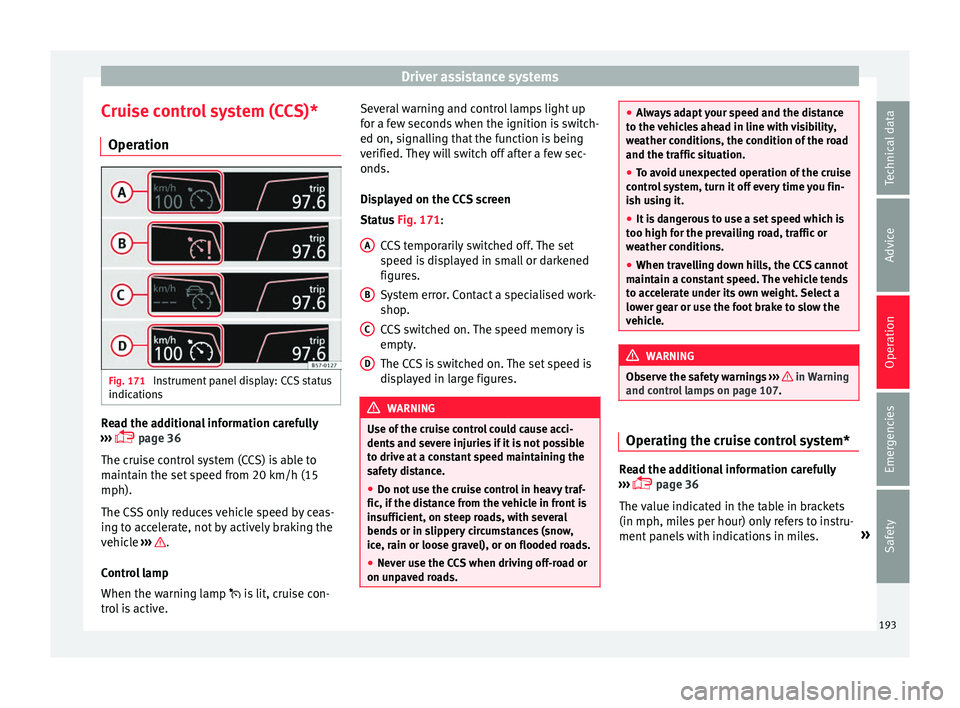
Cruise control system (CCS)* Oper ation Fig. 171
Instrument panel display: CCS status
indic ation
s Read the additional information carefully
› ›
› page 36
The cruise control system (CCS) is able to
maintain the set speed from 20 km/h (15
mph).
The CSS only reduces vehicle speed by ceas-
ing to accelerate, not by actively braking the
vehicle ››› .
C ontr
ol lamp
When the warning lamp is lit, cruise con-
trol is active. Several warning and control lamps light up
for a f
ew seconds when the ignition is switch-
ed on, signalling that the function is being
verified. They will switch off after a few sec-
onds.
Displayed on the CCS screen
Status Fig. 171:
CCS temporarily switched off. The set
speed is displayed in small or darkened
figures.
System error. Contact a specialised work-
shop.
CCS switched on. The speed memory is
empty.
The CCS is switched on. The set speed is
displayed in large figures. WARNING
Use of the cruise control could cause acci-
dent s
and severe injuries if it is not possible
to drive at a constant speed maintaining the
safety distance.
● Do not use the cruise control in heavy traf-
fic, if the di
stance from the vehicle in front is
insufficient, on steep roads, with several
bends or in slippery circumstances (snow,
ice, rain or loose gravel), or on flooded roads.
● Never use the CCS when driving off-road or
on unp
aved roads. A
B
C
D ●
Alw
ays adapt your speed and the distance
to the vehicles ahead in line with visibility,
weather conditions, the condition of the road
and the traffic situation.
● To avoid unexpected operation of the cruise
contr
ol system, turn it off every time you fin-
ish using it.
● It is dangerous to use a set speed which is
too high f
or the prevailing road, traffic or
weather conditions.
● When travelling down hills, the CCS cannot
maint
ain a constant speed. The vehicle tends
to accelerate under its own weight. Select a
lower gear or use the foot brake to slow the
vehicle. WARNING
Observe the safety warnings ››
› in Warning
and c ontr
ol lamps on page 107. Operating the cruise control system*
Read the additional information carefully
› ›
› page 36
The value indicated in the table in brackets
(in mph, miles per hour) only refers to instru-
ment panels with indications in miles. »
193
Technical data
Advice
Operation
Emergencies
Safety
Page 197 of 328
Driver assistance systems
●
When driv in
g downhill, the speed limiter
cannot limit the vehicle speed. Its speed will
increase due to its own weight. In this case,
select a lower gear or use the foot brake to
slow the vehicle. WARNING
Observe the safety warnings ›
›
› in Warning
and c ontr
ol lamps on page 107. Note
● Diff er
ent versions of the instrument panel
are available and therefore the versions and
instructions on the display may vary.
● If when switching the ignition off, the
crui
se control system (CCS), the adaptive
cruise control (ACC) or the speed limiter were
switched on, then the cruise control system or the adaptive cruise control will automati-
c
a
lly switch themselves on when the ignition
is back on. However, no speed will be stored.
The last set speed of the speed limiter will be
stored. Operate the speed limiter
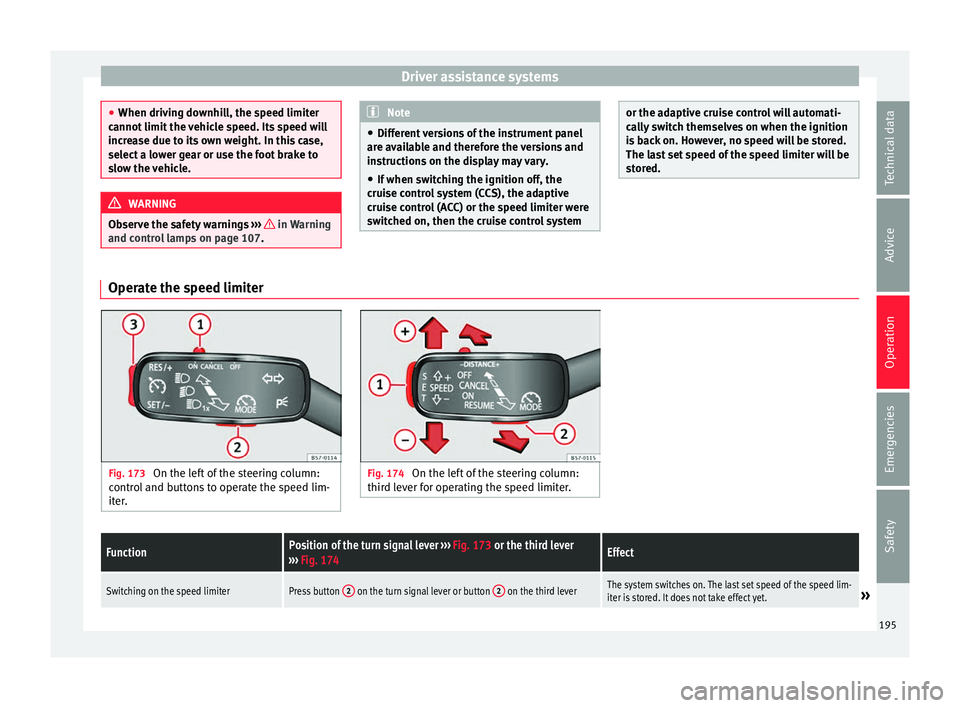
Fig. 173
On the left of the steering column:
c ontr
ol and buttons to operate the speed lim-
iter. Fig. 174
On the left of the steering column:
thir d l
ever for operating the speed limiter.
FunctionPosition of the turn signal lever ››› Fig. 173 or the third lever
››› Fig. 174Effect
Switching on the speed limiterPress button 2 on the turn signal lever or button 2 on the third leverThe system switches on. The last set speed of the speed lim-
iter is stored. It does not take effect yet.» 195
Technical data
Advice
Operation
Emergencies
Safety
Page 257 of 328
Towing bracket device*
Towing bracket device* T r
ailer mode
Introduction Take into account country-specific regula-
tion
s
about driving with a trailer and the use
of a towing bracket.
The vehicle has been developed primarily for
carrying people, although it can also be used
to tow a trailer if fitted with the correspond-
ing technical equipment. This additional load
has an effect on the useful life, fuel con-
sumption and vehicle performance and in
some cases can reduce the service intervals.
Driving with a trailer requires more force from
the vehicle, and thus more concentration
from the driver.
In winter, winter tyres should be fitted on
both the vehicle and the trailer.
Maximum vertical load technically permissi-
ble on the coupling
The maximum vertical load technically per-
mitted from the trailer draw bar on the towing
bracket's tow hitch is 85 kg.
Vehicles with the Start-Stop system
If the vehicle has a factory-fitted towing
bracket or one that is retrofitted by SEAT, the Start-Stop system operates as normal. No
s
pec
ial characteristics need to be taken into
account.
If the system does not recognise the trailer or
the trailer bracket has not been retrofitted by
SEAT, the Start-Stop system must be discon-
nected by pressing the corresponding button
in the lower part of the centre console before
driving with the trailer, and it should remain
off for the rest of the journey ››› .
V ehic
les with driving profile selection
If you are going to be towing a trailer, the use
of the Eco driving profile is not recommen-
ded. You are advised to select another of the
available driving profiles before beginning to
drive with a trailer. WARNING
Never use the trailer to transport people,
s inc
e it would put their life in danger and is
also prohibited. WARNING
Undue use of the towing bracket may cause
injur y
and accidents.
● Only use the towing bracket if it is in a per-
fect
state of repair and is properly secured.
● Never modify or repair the towing bracket
in any
way.
● In order to reduce the danger of injury in
the event
of rear-end collisions and to avoid injury to pedestrians and cyclists when park-
in
g the
vehicle, cover or remove the tow hitch
when you are not using a trailer.
● Never fit a towing bracket “with weight dis-
tribution” or “lo
ad compensation”. The vehi-
cle has not been designed for this type of
towing bracket. The towing bracket could fail
and the trailer could be released from the ve-
hicle. WARNING
Driving with a trailer and transporting heavy
or l ar
ge objects can affect driving properties
and even cause an accident.
● Always secure the load properly using belts
or str
aps that are suitable and in good condi-
tion.
● Adapt your speed and driving style at all
times
to suit visibility, weather, road and traf-
fic conditions.
● Trailers with a high centre of gravity are
more lik
ely to overturn than those with a low
one.
● Avoid sudden braking and manoeuvres.
● Take great care when overtaking.
● Reduce speed immediately if you notice
that
the trailer is swaying, however slightly.
● Never drive at more than 80 km/h (50 mph)
when to
wing a trailer (or at more than
100 km/h (60 mph) in exceptional circum-
stances). This also applies in countries where
driving at higher speeds is permitted. Take » 255
Technical data
Advice
Operation
Emergencies
Safety
Page 258 of 328
Operation
into account the speed limit for vehicles with
tr
ai
lers in the corresponding country, as it
could be less than the speed limit for vehi-
cles without a trailer.
● Never attempt to “straighten” the towing
vehic
le and trailer while accelerating. WARNING
If the towing bracket has been retrofitted by a
non- S
EAT workshop, the Start-Stop system
must be disconnected manually whenever
driving with a trailer. Otherwise the brake
system could be damaged and could conse-
quently cause a serious accident or injury.
● Always disconnect the Start-Stop system
manua
lly when using a towing bracket that
has not been fitted by a SEAT workshop. Note
● Bef
ore hitching or unhitching a trailer, al-
ways deactivate the anti-theft alarm
››› page 112. Otherwise, the tilt sensor could
cause the alarm to go off.
● Do not drive with a trailer for the engine's
firs
t 1000 km ››› page 184.
● SEAT recommends that, if possible, the tow
hitc
h be disassembled or covered when it is
not going to be used. In the event of a rear-
end collision, the damage to the vehicle
could be greater if the bracket is fitted.
● Some retrofitted towing brackets cover the
re
ar towing eye. In these cases, the towing eye should not be used for tow-starting or for
t
o
wing other vehicles. For this reason, if the
vehicle has been retrofitted with a towing
bracket, always keep the tow hitch in the ve-
hicle when you disassemble it. Control lamp
The tow hitch is not securely locked in
position.
Check that the towing bracket is locked
››› page 257. Some warning and control lamps will light up
briefly
when the ignition i
s switched on to
check certain functions. They will switch off
after a few seconds. WARNING
If the warning lamps and the corresponding
me s
sages are ignored when they light up, the
vehicle may stall in traffic and cause acci-
dents and severe injuries.
● Never ignore the warning lamps or messag-
es.
● St
op the vehicle at the next opportunity
and in a saf
e place. CAUTION
Failure to heed the control lamps and corre-
s pondin
g text messages when they light up
may result in damage to the vehicle. Technical requirements
Vehicles that are
fact
ory-equipped with a
towing bracket fulfil all the technical and le-
gal requirements for driving with a trailer.
If the vehicle is retrofitted with a towing
bracket, only a bracket that is authorised for
the maximum authorised load of the trailer
that is to be towed may be fitted. The towing
bracket must be suitable for the vehicle and
the trailer and must be properly secured to
the vehicle's chassis. Only use a towing
bracket that has been authorised by SEAT for
this vehicle. Always check and take into ac-
count the towing bracket manufacturer's in-
structions. Never fit a towing bracket “with
weight distribution” or “load compensation”.
Towing bracket fitted on the bumper
Never fit a towing bracket to the bumper or to
the area where the bumper is mounted. The
towing bracket should not impair the bum-
per's function. Do not make modifications or
repairs to the exhaust system or the brake
system. Make regular checks to ensure that
the towing bracket is secure.
Engine cooling system
Driving with a trailer increases the load on
the engine and cooling system. The cooling
system should have sufficient coolant and be
prepared for the additional effort involved in
driving with a trailer.
256
Page 260 of 328
Operation
Unlock the tow hitch and remove it
● Stop the vehicle and connect the electronic
p ark
ing brake ››› page 170.
● Switch off the engine.
● Open the rear lid.
● Pull the ››› Fig. 217
button briefly. The tow
hitch unlocks electrically and automatically
turns outwards. The control lamp in the but-
ton will flash ››› Fig. 217.
● Remove the tow hitch with your hand until
you f
eel and see that it has engaged and the
control lamp on the button stays on.
● Close the tailgate.
Co
ver the tow hitch
● Stop the vehicle and apply the electronic
park
ing brake.
● Switch off the engine.
● Unhook the trailer and interrupt the electri-
cal
connection between it and the vehicle. If
you are using an adapter, remove it from the
trailer's power socket.
● Open the rear lid.
● Pull the ››
› Fig. 217 button briefly. The tow
hitch unlocks electrically.
● Turn the tow hitch under the bumper with
your h
and until you feel and see that it en-
gages and the control lamp on the ››› Fig. 217
button stays on.
● Close the tailgate. Meaning of control lamp
●
If the warning light of the button ››
› Fig. 217
is flashing , this means that the tow hitch has
not been attached properly or is damaged
››› .
● If the warning lamp st
ays on with the rear
lid open, the tow hitch is correctly in place
both when engaged and when covered.
● The control lamp of the button will go off
appr
ox. 1 minute after closing the rear lid. WARNING
Undue use of the towing bracket may cause
injur y
and accidents.
● Only use the tow hitch if it is properly en-
gag
ed.
● Always ensure that no person, animal or
ob
ject is to be found in the path of the tow
hitch.
● Never use a tool or instrument while the
to
w hitch is moving.
● Never press the ››
› Fig. 217 button when
there is a trailer hooked to the vehicle or
when a carrier system or other accessories
are mounted on the tow hitch.
● If the tow hitch is not attached properly, do
not u
se it. Instead, go to a specialised work-
shop and have the towing bracket checked.
● If you detect any fault in the electrical sys-
tem or in the t
owing bracket, contact a speci-
alised workshop and ask them to check it. ●
If the b
all has a diameter of less than 49
mm at any one point, do not use the towing
bracket under any circumstances. CAUTION
If you clean the vehicle with high-pressure or
s t
eam devices, do not point the jet directly
towards the retractable tow hitch or the trail-
er power socket, as this may damage the
joints or remove the grease necessary for lu-
brication. Note
At extremely low temperatures, the tow hitch
m a
y be impossible to use. In this case, place
the vehicle in a warmer location (for example,
a garage). Fitting a bicycle carrier on the retract-
ab
l
e tow hitch The maximum allowed weight of the carrier
sy
s
tem, including the load, is 75 kg. The car-
rier system should not protrude more than
700 mm backwards from the spherical head.
Only carrier systems on which up to 3 bikes
can be mounted are allowed. Heavier bicy-
cles must be mounted as close to the vehicle
as possible (tow hitch).
258