left Seat Leon 5D 2013 Owner's manual
[x] Cancel search | Manufacturer: SEAT, Model Year: 2013, Model line: Leon 5D, Model: Seat Leon 5D 2013Pages: 339, PDF Size: 4.8 MB
Page 7 of 339
5
About this manual
About this manual What you should know before reading this manual
This manual contains a description of the equipment supplied with the ve-
hicle at the time of press. Some of the equipment hereunder described will
not be available until a later date, or is only available in certain markets.
Because this is a general manual for the LEON range, some of the equip-
ment and functions that are described in this manual are not included in all
types or variants of the model; they may vary or be modified in accordance
with technical or market requirements; this cannot be interpreted as dis-
honest advertising.
The illustrations are intended as a general guide and may vary from the
equipment fitted in your vehicle in some details.
The direction indications (left, right, front, rear) appearing in this manual re-
fer to the normal forward working direction of the vehicle except when oth-
erwise indicated.
The equipment marked with an asterisk * is fitted as standard only in
certain versions, and is only supplied as optional extras for some ver-
sions, or are only offered in certain countries.
All registered marks are indicated with ®. Although the copyright sym-
bol does not appear, it is a copyrighted mark.
The section is continued on the following page.
Marks the end of a section .
WARNING
Texts preceded by this symbol contain information on safety. They warn
you about possible dangers of accident or injury.
®
CAUTION
Texts with this symbol draw your attention to potential sources of damage
to your vehicle.
For the sake of the environment
Texts preceded by this symbol contain relevant information concerning envi-
ronmental protection.
Note
Texts preceded by this symbol contain additional information.
Page 43 of 339
41
Airbag system
WARNING (Continued)
● Never drive the vehicle if the loudspeakers in the door panels have
been removed, unless the holes left by the loudspeakers have been cor-
rectly closed.
● Always check that the openings are closed or covered if loudspeakers
or other equipment are fitted in the interior door panels.
● Any work carried out to the doors should be made in an authorised
specialised workshop.
● The seat belts and airbags can only provide maximum protection if
the occupants are seated correctly ⇒ page 10, Sitting position for vehicle
occupants.
● If a fault has occurred in the airbag system, have the system checked
immediately by a specialised workshop. Otherwise, during a side colli-
sion, the system may fail to trigger, or not trigger correctly.
Operation of side airbags
Inflated airbags can reduce the risk of head or chest injury
in many side impact collisions.
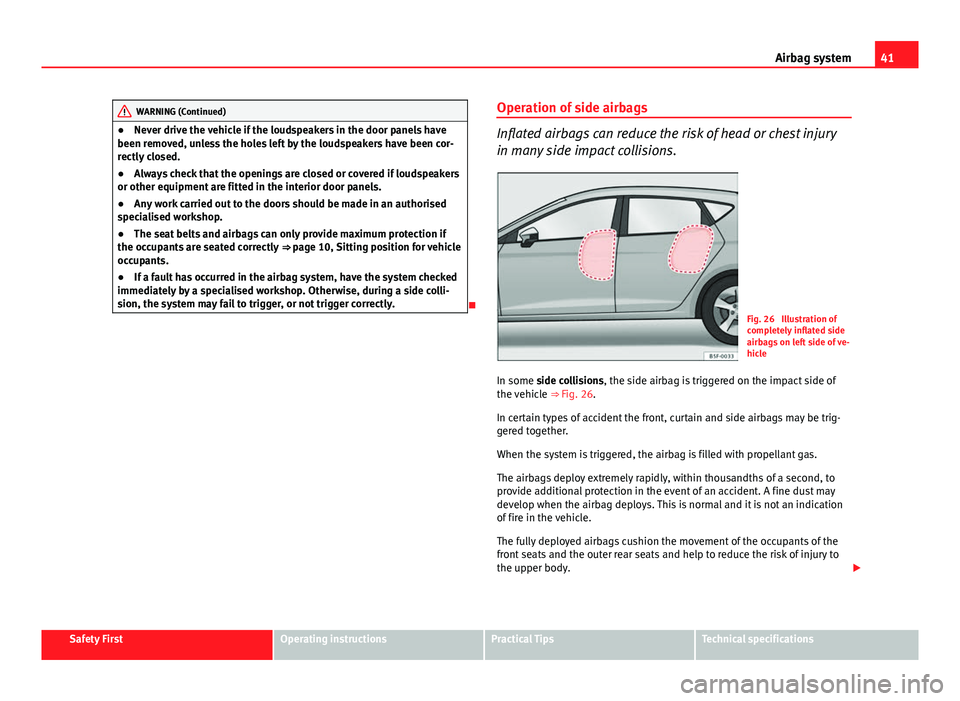
Fig. 26 Illustration of
completely inflated side
airbags on left side of ve-
hicle
In some side collisions, the side airbag is triggered on the impact side of
the vehicle ⇒ Fig. 26.
In certain types of accident the front, curtain and side airbags may be trig-
gered together.
When the system is triggered, the airbag is filled with propellant gas.
The airbags deploy extremely rapidly, within thousandths of a second, to
provide additional protection in the event of an accident. A fine dust may
develop when the airbag deploys. This is normal and it is not an indication
of fire in the vehicle.
The fully deployed airbags cushion the movement of the occupants of the
front seats and the outer rear seats and help to reduce the risk of injury to
the upper body.
Safety FirstOperating instructionsPractical TipsTechnical specifications
Page 64 of 339
62Instruments and warning/control lamps
CAUTION
● To prevent damage to the engine, the rev counter needle should only re-
main in the red zone for a short period of time.
● When the engine is cold, avoid high revs and heavy acceleration and do
not make the engine work hard.
For the sake of the environment
Changing up a gear in time reduces fuel consumption and noise.
Displays on screen
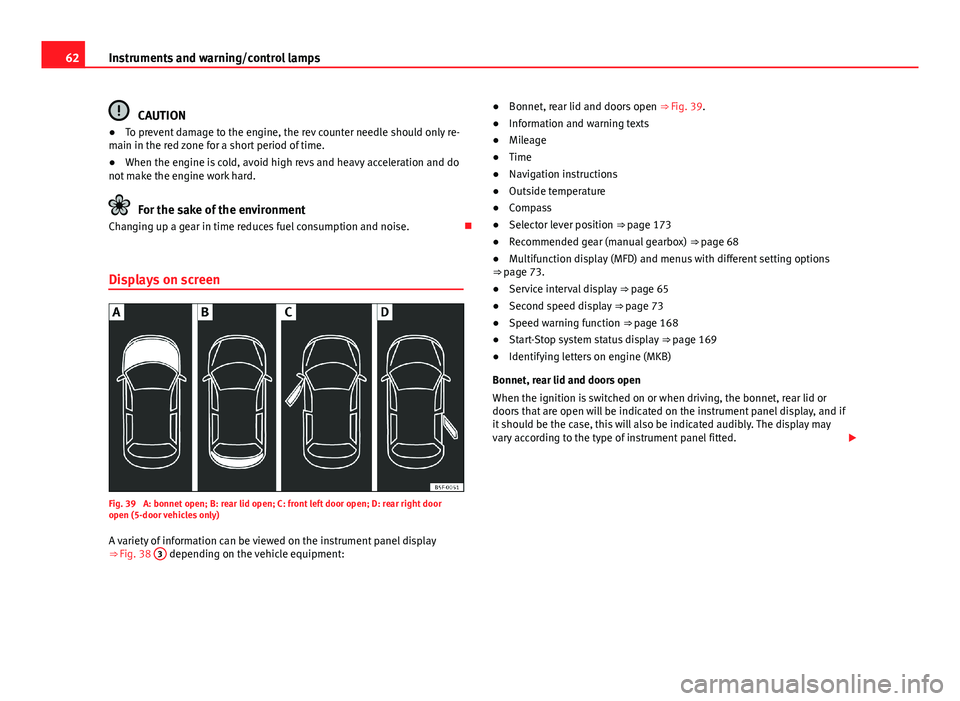
Fig. 39 A: bonnet open; B: rear lid open; C: front left door open; D: rear right door
open (5-door vehicles only)
A variety of information can be viewed on the instrument panel display
⇒ Fig. 38 3
depending on the vehicle equipment: ●
Bonnet, rear lid and doors open ⇒ Fig. 39.
● Information and warning texts
● Mileage
● Time
● Navigation instructions
● Outside temperature
● Compass
● Selector lever position ⇒ page 173
● Recommended gear (manual gearbox) ⇒ page 68
● Multifunction display (MFD) and menus with different setting options
⇒ page 73.
● Service interval display ⇒ page 65
● Second speed display ⇒ page 73
● Speed warning function ⇒ page 168
● Start-Stop system status display ⇒ page 169
● Identifying letters on engine (MKB)
Bonnet, rear lid and doors open
When the ignition is switched on or when driving, the bonnet, rear lid or
doors that are open will be indicated on the instrument panel display, and if
it should be the case, this will also be indicated audibly. The display may
vary according to the type of instrument panel fitted.
Page 69 of 339

67
Instruments and warning/control lamps
Trip recorder
Fig. 40 Instrument pan-
el: Odometer and reset
button
The distance covered is displayed in “kilometres” or miles “m”. It is possi-
ble to change the measurement units (kilometres “km”/miles “m”) in the
radio/Easy Connect*. Please refer to the Easy Connect* Instruction Manual
for more details.
Odometer/trip recorder
The odometer shows the total distance covered by the vehicle.
The trip recorder shows the distance that has been travelled since it was
last reset. It is used to measure short trips. The last digit of the trip recorder
indicates distances of 100 metres or tenths of a mile.
The trip recorder can be set to zero by pressing 0.0/SET
⇒ Fig. 40.
Fault display
If there is a fault in the instrument panel, the letters DEF will appear in the
trip recorder display. Have the fault repaired immediately, as far as is possi-
ble. Fuel level
The display
6 ⇒ Fig. 38 only works when the ignition is switched on. When
the display reaches the reserve mark, the lower diode lights up in red and
the control lamp appears ⇒ page 248. When the fuel level is very low,
the lower diode flashes in red.
The distance to empty fuel level is displayed on the instrument panel 3
⇒ Fig. 38.
The capacity of the fuel tank of your vehicle is given in the Technical data
section ⇒ page 323.
In natural gas engines
The yellow warning lamp
lights up when both fuel types (petrol and natu-
ral gas) have reached reserve level.
The green control lamp comes on when the vehicle is working with natural
gas.
The green control lamp switches off when the natural gas is exhausted.
The engine changes to operate with petrol.
Thing to note: If the vehicle is left parked for a long time immediately after
refuelling, the natural gas level indicator may not accurately indicate the
same level shown after refuelling when the vehicle is started up again. This
is not due to a leak in the system, but to a drop in pressure in the gas tank
for technical reasons after a cooling phase immediately after refuelling.
CAUTION
Never run the fuel tank completely dry. An irregular fuel supply could cause
misfiring. In this way the unburned fuel can reach the exhaust system,
which could cause the catalytic converter to overheat resulting in damage.
Safety FirstOperating instructionsPractical TipsTechnical specifications
Page 71 of 339
69
Instruments and warning/control lamps
To familiarise yourself with the gear-change indicator, we recommend driv-
ing in the normal way to start with. A gear change will be recommended if
the gear you are in is not the most economical choice.
If no gear-change is recommended, you are already in the most economical
gear.
Vehicles with a manual gearbox
The following display symbols ⇒ Fig. 41 mean:
● Change to a higher gear: The suggested gear appears to the right of
the current gear when a higher gear is recommended.
● Change to a lower gear: The suggested gear appears to the left of the
current gear when a lower gear is recommended.
The gear recommendation may occasionally skip a gear (2nd 4th).
Vehicles with an automatic gearbox*
The display is only visible in tiptronic mode ⇒ page 178
The following display symbols mean:
● Shifting up a gear
● Shifting down a gear
CAUTION
The gear-change indicator is intended to help save fuel. It is not intended to
recommend the right gear for all driving situations. In certain situations, on-
ly the driver can choose the correct gear (for instance when overtaking, driv-
ing up a steep gradient or towing a trailer).
Note
The display disappears from the instrument panel when you press the
clutch pedal. Control lamps
Control and warning lamps
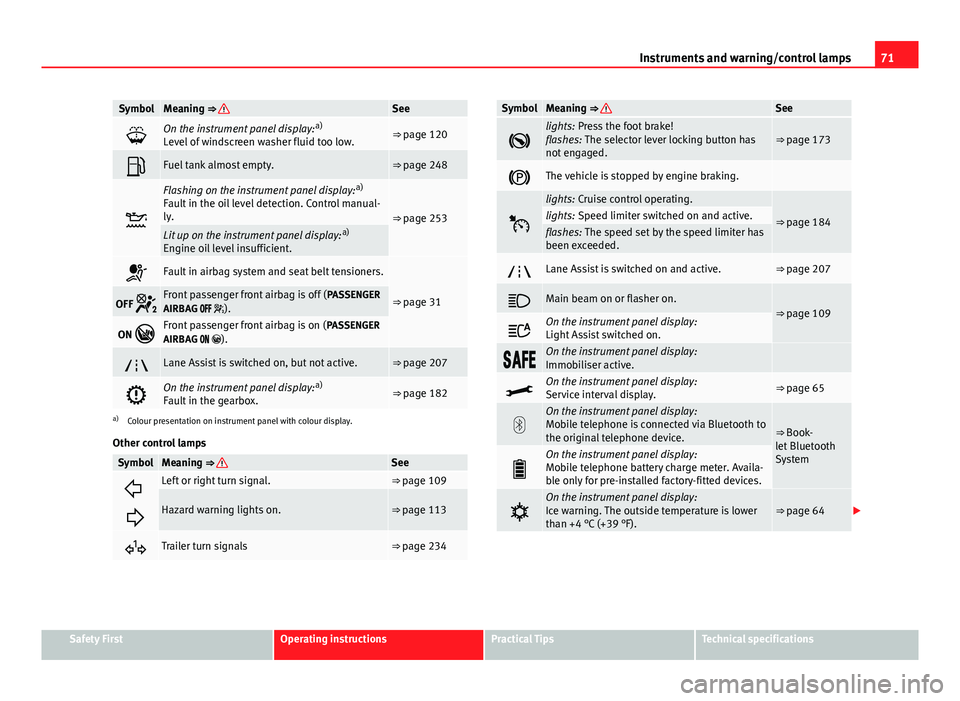
The control and warning lamps are indicators of warnings, ⇒ , faults ⇒ or certain functions. Some control and warning lamps come on when the ig-
nition is switched on, and switch off when the engine starts running, or
while driving.
Depending on the model, additional text messages may be viewed on the
instrument panel display. These may be purely informative or they may be
advising of the need for action ⇒ page 61, Instruments.
Depending upon the equipment fitted in the vehicle, instead of a warning
lamp, sometimes a symbol may be displayed on the instrument panel.
When certain control and warning lamps are lit, an audible warning is also
heard.
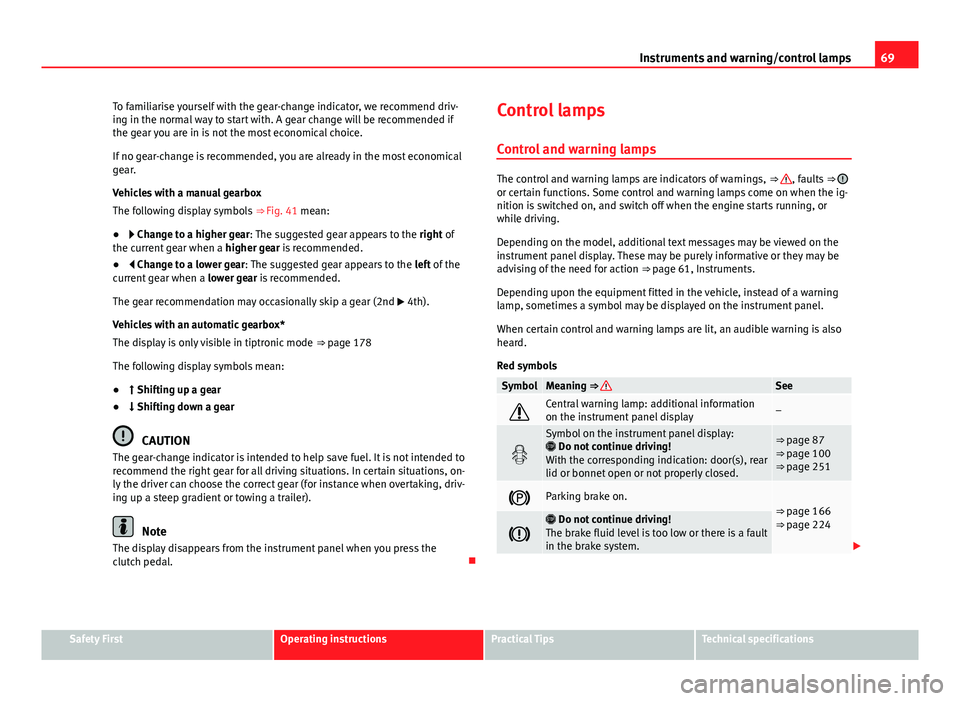
Red symbols
SymbolMeaning ⇒ See
Central warning lamp: additional information
on the instrument panel display–
Symbol on the instrument panel display:
Do not continue driving!
With the corresponding indication: door(s), rear
lid or bonnet open or not properly closed.⇒ page 87
⇒ page 100
⇒ page 251
Parking brake on.⇒ page 166
⇒ page 224
Do not continue driving!
The brake fluid level is too low or there is a fault
in the brake system.
Safety FirstOperating instructionsPractical TipsTechnical specifications
Page 73 of 339
71
Instruments and warning/control lamps
SymbolMeaning ⇒ See
On the instrument panel display: a)
Level of windscreen washer fluid too low.⇒ page 120
Fuel tank almost empty.⇒ page 248
Flashing on the instrument panel display: a)
Fault in the oil level detection. Control manual-
ly.
⇒ page 253Lit up on the instrument panel display: a)
Engine oil level insufficient.
Fault in airbag system and seat belt tensioners.
⇒ page 31OFF Front passenger front airbag is off ( PASSENGER
AIRBAG ).
ON Front passenger front airbag is on ( PASSENGER
AIRBAG ).
Lane Assist is switched on, but not active.⇒ page 207
On the instrument panel display: a)
Fault in the gearbox.⇒ page 182
a) Colour presentation on instrument panel with colour display.
Other control lamps
SymbolMeaning ⇒ See
Left or right turn signal.⇒ page 109
Hazard warning lights on.⇒ page 113
Trailer turn signals⇒ page 234
SymbolMeaning ⇒ See
lights: Press the foot brake!
flashes: The selector lever locking button has
not engaged.⇒ page 173
The vehicle is stopped by engine braking.
lights: Cruise control operating.
⇒ page 184lights: Speed limiter switched on and active.flashes: The speed set by the speed limiter has
been exceeded.
Lane Assist is switched on and active.⇒ page 207
Main beam on or flasher on.⇒ page 109
On the instrument panel display:
Light Assist switched on.
On the instrument panel display:
Immobiliser active.
On the instrument panel display:
Service interval display.⇒ page 65
On the instrument panel display:
Mobile telephone is connected via Bluetooth to
the original telephone device.
⇒ Book-
let Bluetooth
System
On the instrument panel display:
Mobile telephone battery charge meter. Availa-
ble only for pre-installed factory-fitted devices.
On the instrument panel display:
Ice warning. The outside temperature is lower
than +4 °C (+39 °F).⇒ page 64
Safety FirstOperating instructionsPractical TipsTechnical specifications
Page 97 of 339
95
Opening and closing
Valid for vehicles: with 5 doors Childproof lock
The childproof lock prevents the rear doors from being
opened from the inside. This system prevents minors from
opening a door accidentally while the vehicle is running.
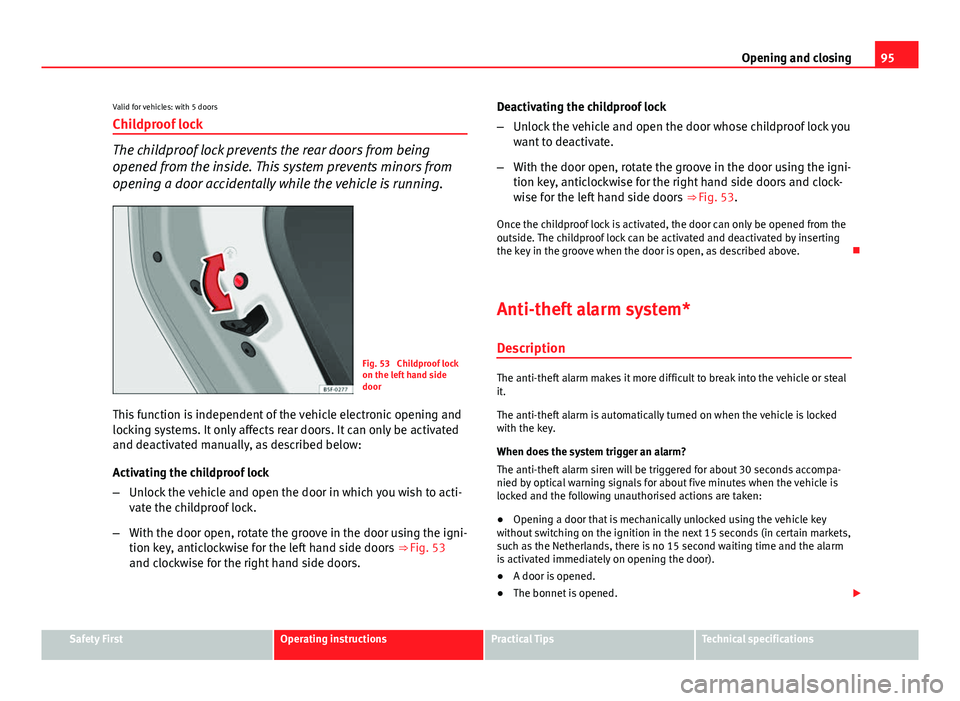
Fig. 53 Childproof lock
on the left hand side
door
This function is independent of the vehicle electronic opening and
locking systems. It only affects rear doors. It can only be activated
and deactivated manually, as described below:
Activating the childproof lock
– Unlock the vehicle and open the door in which you wish to acti-
vate the childproof lock.
– With the door open, rotate the groove in the door using the igni-
tion key, anticlockwise for the left hand side doors ⇒ Fig. 53
and clockwise for the right hand side doors. Deactivating the childproof lock
–
Unlock the vehicle and open the door whose childproof lock you
want to deactivate.
– With the door open, rotate the groove in the door using the igni-
tion key, anticlockwise for the right hand side doors and clock-
wise for the left hand side doors ⇒ Fig. 53.
Once the childproof lock is activated, the door can only be opened from the
outside. The childproof lock can be activated and deactivated by inserting
the key in the groove when the door is open, as described above.
Anti-theft alarm system* DescriptionThe anti-theft alarm makes it more difficult to break into the vehicle or steal
it.
The anti-theft alarm is automatically turned on when the vehicle is locked
with the key.
When does the system trigger an alarm?
The anti-theft alarm siren will be triggered for about 30 seconds accompa-
nied by optical warning signals for about five minutes when the vehicle is
locked and the following unauthorised actions are taken:
● Opening a door that is mechanically unlocked using the vehicle key
without switching on the ignition in the next 15 seconds (in certain markets,
such as the Netherlands, there is no 15 second waiting time and the alarm
is activated immediately on opening the door).
● A door is opened.
● The bonnet is opened.
Safety FirstOperating instructionsPractical TipsTechnical specifications
Page 98 of 339
96Opening and closing
● The rear lid is opened.
● When the ignition is switched on with a non-authorised key.
● When the vehicle battery is disconnected.
● Movement inside the vehicle (in vehicles with interior monitoring
⇒ page 97).
● When the vehicle is towed (in vehicles with anti-tow system
⇒ page 97).
● When the vehicle is raised (in vehicles with anti-tow system
⇒ page 97).
● When the vehicle is transported on a ferry or by rail (vehicles with an an-
ti-tow system or vehicle interior monitoring ⇒ page 97).
● When a trailer connected to the anti-theft alarm system is disconnected.
How to turn OFF the alarm
Unlock the vehicle with the unlocking button on the key or turn on the igni-
tion with a valid key.
Note
● The alarm will be triggered once more when anybody enters the same
zone of surveillance or any other zone. If, for example, after opening a door,
the rear lid is also opened.
● The anti-theft alarm
is not activated when the vehicle is locked from
the inside using the central locking button.
● If the driver door is unlocked mechanically with the key, only the driver
door is unlocked, the rest of the doors remain locked. Only when the igni-
tion has been turned on will the other doors be available - but not unlocked
- and the central lock button activated.
● If the vehicle battery is run down or flat then the anti-theft alarm will not
operate correctly. Vehicle interior monitoring and anti-tow system*
Monitoring or control function incorporated in the anti-theft
alarm* which detects unauthorized vehicle entry by means
of ultrasound.
Activation
– It is automatically switched on when the anti-theft alarm is acti-
vated.
Deactivation
– Open the vehicle with the key, either mechanically 1)
or by press-
ing the
button on the remote control.
– Press the button
on the remote control twice. The volumetric
sensor and tilt sensors will be deactivated. The alarm system re-
mains activated.
The vehicle interior monitoring and the anti-tow system are automatically
switched on again next time the vehicle is locked.
The vehicle interior monitoring and anti-tow sensor (tilt sensor) are auto-
matically switched on when the anti-theft alarm is switched on. In order to
activate it, all the doors and the rear lid must be closed.
If you wish to switch off the vehicle interior monitoring and the anti-tow sys-
tem, it must be done each time that the vehicle is locked; if not, they will be
automatically switched on.
The vehicle interior monitoring and the anti-tow system should be switched
off if animals are left inside the locked vehicle (otherwise, their movements
1)
The time period from when the door is opened until the key is inserted in the contact
should not exceed 15 sec., otherwise the alarm will be triggered.
Page 99 of 339
97
Opening and closing
will trigger the alarm) or when, for example, the vehicle is transported or
has to be towed with only one axle on the ground.
False alarms
The interior monitoring only operates correctly if the vehicle is completely
closed. Please observe legal requirements when doing so.
The following cases may cause a false alarm:
● opened windows (partially or fully)
● panoramic/tilting sunroof open (partially or completely).
● movement of objects inside the vehicle, such as loose papers, items
hanging from the rear vision mirror (air fresheners), etc.
Note
● If the vehicle is relocked and the alarm is activated without the volumet-
ric sensor function, relocking will activate the alarm with all its functions,
except the volumetric sensor. This function is reactivated when the alarm is
switched on again, unless it is deliberately switched off.
● If the alarm has been triggered by the volumetric sensor, this will be in-
dicated by a flashing of the warning lamp on the driver door when the vehi-
cle is opened. The flash is different to the flash indicating the alarm is acti-
vated.
● The vibration of a mobile phone left inside the vehicle may cause the ve-
hicle interior monitoring alarm to trigger, as both sensors react to move-
ments and shakes inside the vehicle.
● If on activating the alarm, any door or the rear lid is open, only the alarm
will be activated. The vehicle interior monitoring and the anti-tow system
will only be activated once all the doors are closed (including the rear lid). Deactivating the vehicle interior monitoring and tow-away
protection
1)
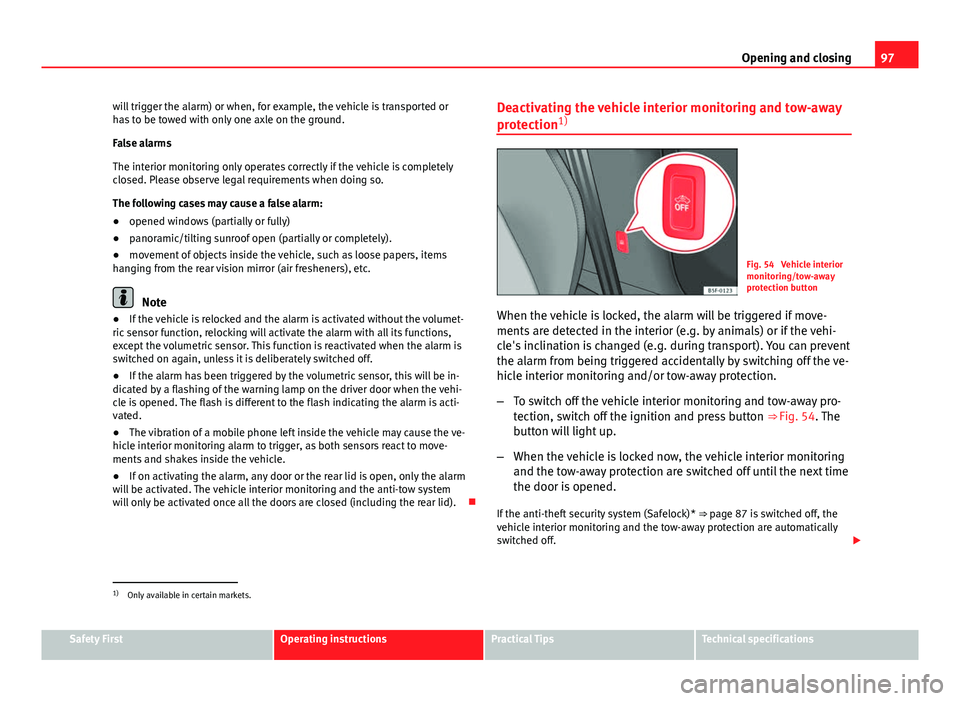
Fig. 54 Vehicle interior
monitoring/tow-away
protection button
When the vehicle is locked, the alarm will be triggered if move-
ments are detected in the interior (e.g. by animals) or if the vehi-
cle's inclination is changed (e.g. during transport). You can prevent
the alarm from being triggered accidentally by switching off the ve-
hicle interior monitoring and/or tow-away protection.
– To switch off the vehicle interior monitoring and tow-away pro-
tection, switch off the ignition and press button ⇒ Fig. 54. The
button will light up.
– When the vehicle is locked now, the vehicle interior monitoring
and the tow-away protection are switched off until the next time
the door is opened.
If the anti-theft security system (Safelock)* ⇒ page 87 is switched off, the
vehicle interior monitoring and the tow-away protection are automatically
switched off.
1)
Only available in certain markets.
Safety FirstOperating instructionsPractical TipsTechnical specifications
Page 101 of 339
99
Opening and closing
As a general rule, when the driver door is locked all other doors are locked.
When the vehicle is unlocked manually, only the driver door opens. Please
observe the instructions relating to the anti-theft alarm system ⇒ page 87.
● Unfold the vehicle key shaft ⇒ page 89.
● Insert the key shaft into the opening in the cover on the driver door han-
dle from below ⇒ Fig. 55 (arrow) then remove the cover upwards.
● Insert the key shaft into the lock cylinder to unlock or lock the vehicle.
Unlocking notes:
● The anti-theft alarm will remain active when vehicles are unlocked. How-
ever, the alarm will not yet be triggered ⇒ page 87.
● After the driver door is opened, you have 15 seconds to switch on the
ignition. After 15 seconds, the alarm is triggered.
● Switch the ignition on. When the ignition is switched on, the electronic
immobiliser recognises a valid vehicle key and deactivates the anti-theft
alarm system.
Note
The anti-theft alarm is not activated when the vehicle is locked manually us-
ing the key shaft ⇒ page 87. Manual locking of passenger door in an emergency
If the central locking system should fail to work at any time,
the passenger door will have to be locked separately.
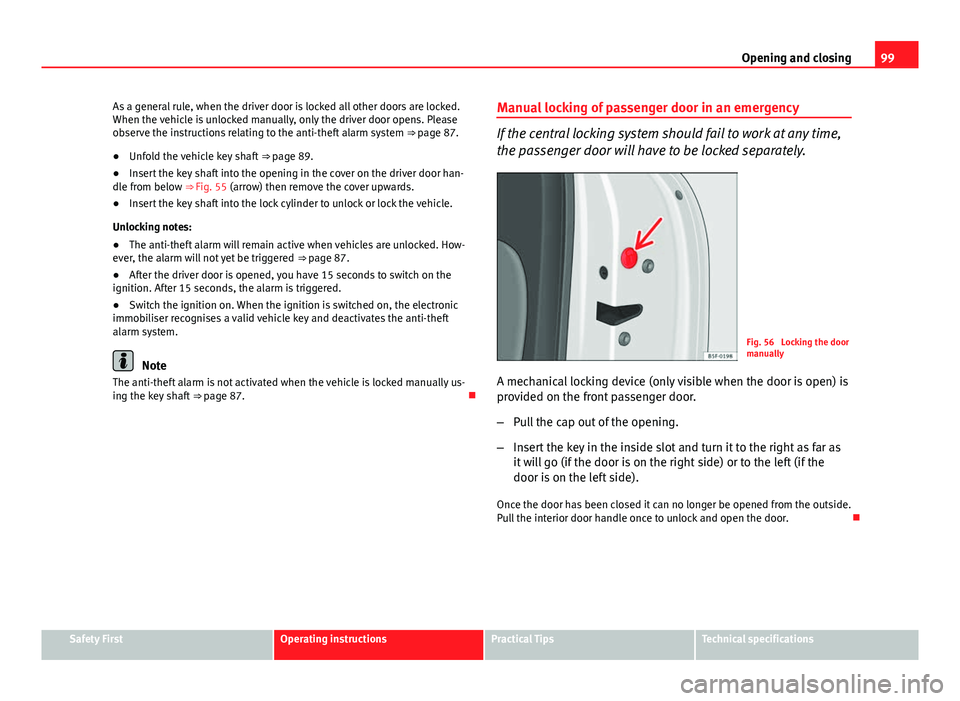
Fig. 56 Locking the door
manually
A mechanical locking device (only visible when the door is open) is
provided on the front passenger door.
– Pull the cap out of the opening.
– Insert the key in the inside slot and turn it to the right as far as
it will go (if the door is on the right side) or to the left (if the
door is on the left side).
Once the door has been closed it can no longer be opened from the outside.
Pull the interior door handle once to unlock and open the door.
Safety FirstOperating instructionsPractical TipsTechnical specifications