wheel Seat Toledo 2012 User Guide
[x] Cancel search | Manufacturer: SEAT, Model Year: 2012, Model line: Toledo, Model: Seat Toledo 2012Pages: 249, PDF Size: 3.6 MB
Page 38 of 249
37
Airbag system
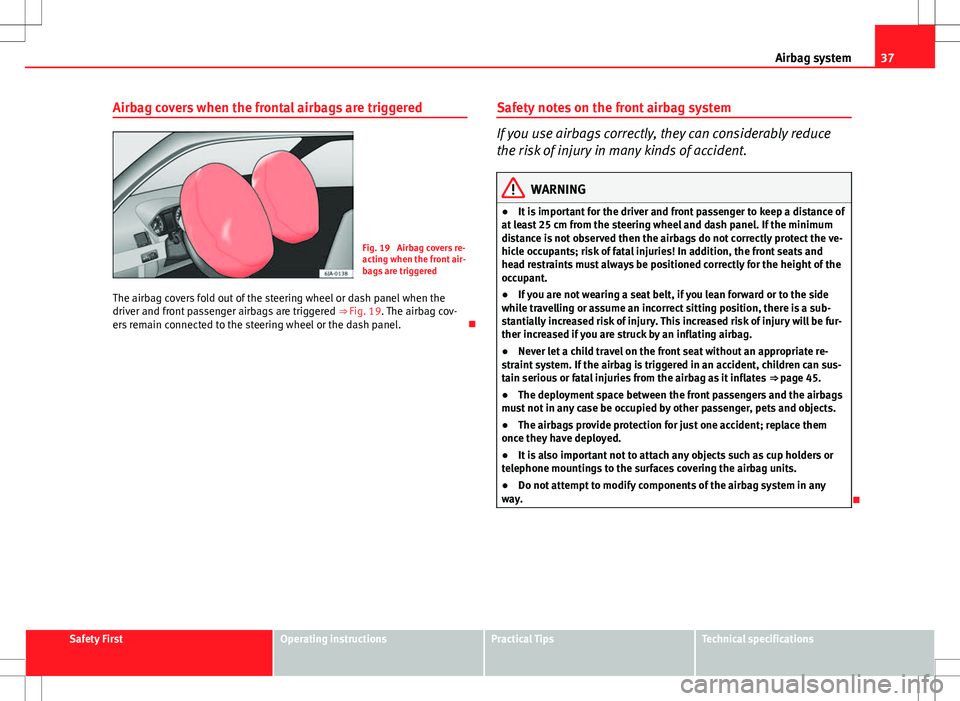
Airbag covers when the frontal airbags are triggered
Fig. 19 Airbag covers re-
acting when the front air-
bags are triggered
The airbag covers fold out of the steering wheel or dash panel when the
driver and front passenger airbags are triggered ⇒ Fig. 19. The airbag cov-
ers remain connected to the steering wheel or the dash panel. Safety notes on the front airbag system
If you use airbags correctly, they can considerably reduce
the risk of injury in many kinds of accident.
WARNING
● It is important for the driver and front passenger to keep a distance of
at least 25 cm from the steering wheel and dash panel. If the minimum
distance is not observed then the airbags do not correctly protect the ve-
hicle occupants; risk of fatal injuries! In addition, the front seats and
head restraints must always be positioned correctly for the height of the
occupant.
● If you are not wearing a seat belt, if you lean forward or to the side
while travelling or assume an incorrect sitting position, there is a sub-
stantially increased risk of injury. This increased risk of injury will be fur-
ther increased if you are struck by an inflating airbag.
● Never let a child travel on the front seat without an appropriate re-
straint system. If the airbag is triggered in an accident, children can sus-
tain serious or fatal injuries from the airbag as it inflates ⇒ page 45.
● The deployment space between the front passengers and the airbags
must not in any case be occupied by other passenger, pets and objects.
● The airbags provide protection for just one accident; replace them
once they have deployed.
● It is also important not to attach any objects such as cup holders or
telephone mountings to the surfaces covering the airbag units.
● Do not attempt to modify components of the airbag system in any
way.
Safety FirstOperating instructionsPractical TipsTechnical specifications
Page 44 of 249

43
Airbag system
WARNING (Continued)
● Do not attempt to modify components of the airbag system in any
way.
● The side and head airbags are managed through sensors located in
the interior of the front doors. To ensure the correct functioning of the
side and head airbags neither the doors nor the door panels should be
modified in any way (e.g. fitting loudspeakers). If the front door is
damaged, the airbag system may not work correctly. All work carried out
on the front door must be made in a specialised workshop.
Deactivating airbags Deactivating airbags
The deactivation of airbags corresponds only to certain cases, i.e. if:
● a child seat is required in the front passenger seat with the child facing
in the opposite direction to the direction of travel (in some countries, due to
divergent legal requirements, facing in the direction of travel) ⇒ page 47;
● despite the driver seat being in the correct position, a minimum dis-
tance of 25 cm cannot be maintained between the centre of the steering
wheel and the driver's torso.
● installation of special devices is required in the steering wheel area due
to a physical disability.
● if you have special seats installed (e.g. an orthopaedic seat without side
airbag).
The front passenger front airbag can be disabled using the switch
⇒ page 44.
We recommend that you contact an authorised SEAT dealer for the disabling
of other airbags. Airbag system control
The airbag system availability is controlled electronically, regardless of
whether an airbag is disabled.
If an airbag was disabled using a diagnostics system:
●
the airbag system warning lamp lights up after switching on the igni-
tion for about 4 seconds, and then flashes for about 12 seconds
If the airbag has been disabled with the airbag switch on the side of the
dash panel:
● the airbag control lamp will light up for about 4 seconds after the ig-
nition is switched on.
● the airbag is disabled, signalled with the warning lamp which
lights up with the word placed in the centre part of the
dash panel ⇒ Fig. 24 3
.
Note
● Respect the current legislation in your country regarding the deactiva-
tion of airbags
● At your authorised SEAT dealer you can find information on which vehi-
cle airbags can be deactivated.
Safety FirstOperating instructionsPractical TipsTechnical specifications
Page 54 of 249

53
Controls and displays
Operating instructions Controls and displays
Overview
Electric window controls . . . . . . . . . . . . . . . . . . . . . . . . . . . . . . . . . . . 92
Control for adjusting electric exterior mirrors . . . . . . . . . . . . . . . .106
Air outlets . . . . . . . . . . . . . . . . . . . . . . . . . . . . . . . . . . . . . . . . . . . . . . . . 126
Multifunction switch lever:
– turn signals, main beams, parking lights, headlight flash-
er . . . . . . . . . . . . . . . . . . . . . . . . . . . . . . . . . . . . . . . . . . . . . . . . . . . . . . 97
– cruise control . . . . . . . . . . . . . . . . . . . . . . . . . . . . . . . . . . . . . . . . . . 149
Steering wheel:
– with horn
– with the driver front airbag . . . . . . . . . . . . . . . . . . . . . . . . . . . . . . 35
– with controls for audio, navigation system and telephone .74
General instrument panel: instruments and warning lamps . .53
Multifunction switch lever:
– multifunction display . . . . . . . . . . . . . . . . . . . . . . . . . . . . . . . . . . . 59
– Windscreen wiper and washer . . . . . . . . . . . . . . . . . . . . . . . . . . . 103
Air outlets . . . . . . . . . . . . . . . . . . . . . . . . . . . . . . . . . . . . . . . . . . . . . . . . 126
Depending on the equipment:
– audio system
– navigation system
Hazard warning lights switch . . . . . . . . . . . . . . . . . . . . . . . . . . . . . . 98
Control lamp for front passenger airbag deactivated warning
lamp . . . . . . . . . . . . . . . . . . . . . . . . . . . . . . . . . . . . . . . . . . . . . . . . . . . . . 44
1234
5
67
89
1011
Front passenger airbag switch
. . . . . . . . . . . . . . . . . . . . . . . . . . . . . 44
Passenger side storage compartment . . . . . . . . . . . . . . . . . . . . . .120
Front passenger airbag . . . . . . . . . . . . . . . . . . . . . . . . . . . . . . . . . . . . 35
Switch for the lights and the main lights range control . . . . . .94, 96
Bonnet release lever . . . . . . . . . . . . . . . . . . . . . . . . . . . . . . . . . . . . . . 175
Fuse housing . . . . . . . . . . . . . . . . . . . . . . . . . . . . . . . . . . . . . . . . . . . . . 211
Steering column adjustment lever . . . . . . . . . . . . . . . . . . . . . . . . . . 137
Ignition lock . . . . . . . . . . . . . . . . . . . . . . . . . . . . . . . . . . . . . . . . . . . . . . 138
Driver seat heating control . . . . . . . . . . . . . . . . . . . . . . . . . . . . . . . . . 109
ASR switch . . . . . . . . . . . . . . . . . . . . . . . . . . . . . . . . . . . . . . . . . . . . . . . . 141
Central lock button . . . . . . . . . . . . . . . . . . . . . . . . . . . . . . . . . . . . . . . . 85
Depending on the equipment:
– gear lever (manual gearbox) . . . . . . . . . . . . . . . . . . . . . . . . . . . . 142
– selector lever (automatic gearbox) . . . . . . . . . . . . . . . . . . . . . . .144
Depending on the equipment:
– drink holder . . . . . . . . . . . . . . . . . . . . . . . . . . . . . . . . . . . . . . . . . . . . 117
– ashtray holder . . . . . . . . . . . . . . . . . . . . . . . . . . . . . . . . . . . . . . . . . . 118
glove compartment/storage compartment . . . . . . . . . . . . . . . . . .120
Heated rear window control . . . . . . . . . . . . . . . . . . . . . . . . . . . . . . . . 101
Driver seat heating control . . . . . . . . . . . . . . . . . . . . . . . . . . . . . . . . . 109
Depending on the equipment:
– heating controls . . . . . . . . . . . . . . . . . . . . . . . . . . . . . . . . . . . . . . . . 127
– air conditioning controls . . . . . . . . . . . . . . . . . . . . . . . . . . . . . . . . 129
– Climatronic controls . . . . . . . . . . . . . . . . . . . . . . . . . . . . . . . . . . . . 132
121314151617181920212223
24
25262728
Safety FirstOperating instructionsPractical TipsTechnical specifications
Page 75 of 249

74Communication
Communication
Steering wheel controls General information
The vehicle includes a multifunction module from where it is possible to
control the audio, telephone and radio/navigation functions without need-
ing to distract the driver.
There are two versions of the multifunction module:
● Audio version, to control the available audio functions from the steering
wheel (Radio, CD audio, MP3 CD, iPod ®1)
, USB 1)
).
● Audio version + telephone, to control the available audio functions from
the steering wheel (Radio, CD audio, MP3 CD, iPod ®1)
, USB 1)
, SD 1)
) and the
Bluetooth system.
1)
Depending on the vehicle equipment.
Page 76 of 249

75
Communication
Audio system adjustment
Fig. 36 Controls on the
steering wheelFig. 37 Steering wheel
controls (depending on
version of model)
ButtonRadioCD/MP3/USB*/iPod ®
*AUXAVolume upVolume upVolume upBVolume downVolume downVolume down
CSearch for next stationNext track
Hold down: Fast forwardNo function specified
DSearch for last stationPrevious track
Hold down: RewindNo function specified
ENo function specifiedNo function specifiedNo function specifiedFSilencePauseSilence
Ga)Operates on instrument panel displayOperates on instrument panel displayOperates on instrument panel displayNext preset b)Next trackb)No function specified b)
Ha)Operates on instrument panel displayOperates on instrument panel displayOperates on instrument panel displayPrevious presetb)Previous trackb)No function specified b)
Ia)Next presetChange folderNo function specifiedChange menu on instrument panelChange menu on instrument panelChange menu on instrument panel
Safety FirstOperating instructionsPractical TipsTechnical specifications
Page 77 of 249
76Communication
ButtonRadioCD/MP3/USB*/iPod ®
*AUX
Ja)Previous presetChange folderNo function specifiedChange menu on instrument panelChange menu on instrument panelChange menu on instrument panelKOperates on instrument panelOperates on instrument panelOperates on instrument panel
La)Change sourceChange sourceChange sourceOperates on instrument panelOperates on instrument panelOperates on instrument panela) Depending on the model version
b) Only if the panel is in Audio menu.
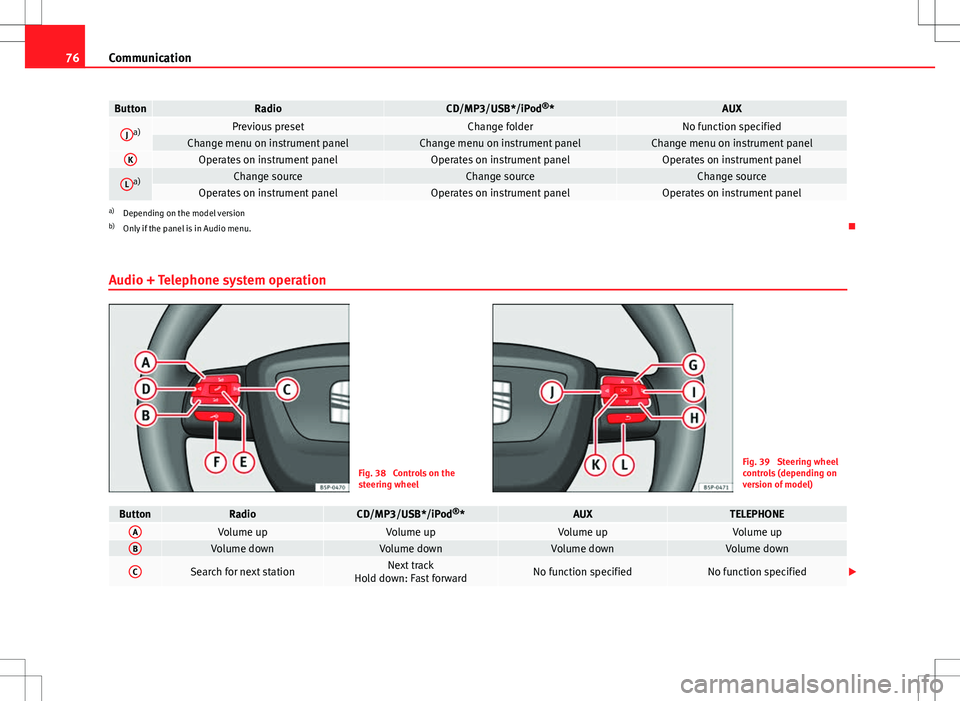
Audio + Telephone system operation
Fig. 38 Controls on the
steering wheelFig. 39 Steering wheel
controls (depending on
version of model)
ButtonRadioCD/MP3/USB*/iPod ®
*AUXTELEPHONEAVolume upVolume upVolume upVolume upBVolume downVolume downVolume downVolume down
CSearch for next stationNext track
Hold down: Fast forwardNo function specifiedNo function specified
Page 79 of 249
78Communication
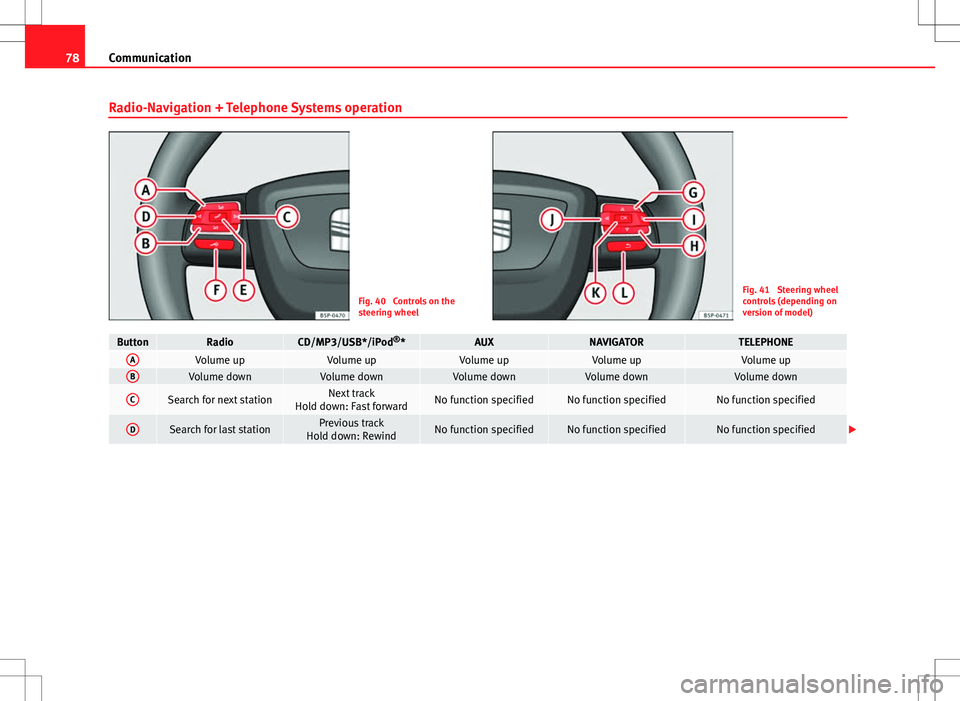
Radio-Navigation + Telephone Systems operation
Fig. 40 Controls on the
steering wheelFig. 41 Steering wheel
controls (depending on
version of model)
ButtonRadioCD/MP3/USB*/iPod ®
*AUXNAVIGATORTELEPHONEAVolume upVolume upVolume upVolume upVolume upBVolume downVolume downVolume downVolume downVolume down
CSearch for next stationNext track
Hold down: Fast forwardNo function specifiedNo function specifiedNo function specified
DSearch for last stationPrevious track
Hold down: RewindNo function specifiedNo function specifiedNo function specified
Page 82 of 249
81
Opening and closing
Opening and closing Keys
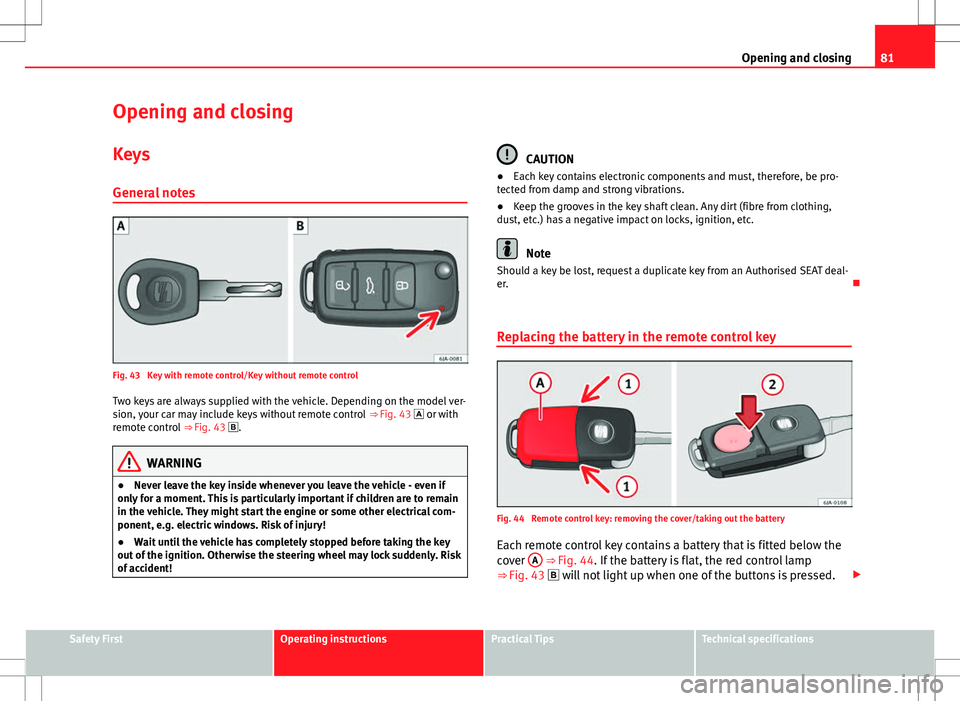
General notes
Fig. 43 Key with remote control/Key without remote control Two keys are always supplied with the vehicle. Depending on the model ver-
sion, your car may include keys without remote control ⇒ Fig. 43 or with
remote control ⇒ Fig. 43 .
WARNING
● Never leave the key inside whenever you leave the vehicle - even if
only for a moment. This is particularly important if children are to remain
in the vehicle. They might start the engine or some other electrical com-
ponent, e.g. electric windows. Risk of injury!
● Wait until the vehicle has completely stopped before taking the key
out of the ignition. Otherwise the steering wheel may lock suddenly. Risk
of accident!
CAUTION
● Each key contains electronic components and must, therefore, be pro-
tected from damp and strong vibrations.
● Keep the grooves in the key shaft clean. Any dirt (fibre from clothing,
dust, etc.) has a negative impact on locks, ignition, etc.
Note
Should a key be lost, request a duplicate key from an Authorised SEAT deal-
er.
Replacing the battery in the remote control key
Fig. 44 Remote control key: removing the cover/taking out the battery
Each remote control key contains a battery that is fitted below the
cover A
⇒ Fig. 44. If the battery is flat, the red control lamp
⇒ Fig. 43 will not light up when one of the buttons is pressed.
Safety FirstOperating instructionsPractical TipsTechnical specifications
Page 96 of 249

95
Lights and visibility
DAY LIGHT Function*
Switching on daytime driving lights
Turn the light switch ⇒ Fig. 55 ⇒ page 94 to position 0.
Switching off daytime driving lights
– Remove the fuse cover on the dash panel ⇒ page 211, Fuses in
the dash panel.
– Press the ⇒ Fig. 55 button ⇒ page 94 to the right.
Switching on daytime driving lights
– Remove the fuse cover on the dash panel ⇒ page 211, Fuses in
the dash panel.
– Press the ⇒ Fig. 55 button ⇒ page 94 to the left.
Switching off daytime driving lights in vehicles with the START-
STOP system
– Switch the ignition off.
– Move the turn signal lever ⇒ Fig. 58 towards the steering wheel,
pressing it down and keeping it in this position.
– Switch on the ignition – wait for the left turn signal to flash 4
times.
– Switch off the ignition – wait until you hear the audible warning
to confirm that the daytime driving lights have been switched
off.
– Release the turn signal lever. Switching on daytime driving lights in vehicles with the START-
STOP system
–
Switch the ignition off.
– Move the turn signal lever ⇒ Fig. 58 towards the steering wheel,
pressing it up and keeping it in this position.
– Switch on the ignition – wait for the right turn signal to flash 4
times.
– Switch off the ignition – wait until you hear the audible warning
to confirm that the daytime driving lights have been switched
on.
– Release the turn signal lever.
Note
The daytime driving lights work when the ignition is switched on.
Front fog lights
Fig. 56 Instrument pan-
el: light switch
Safety FirstOperating instructionsPractical TipsTechnical specifications
Page 98 of 249
97
Lights and visibility
Note
Make sure you set the range of the main lights when the dipped beam
headlights are switched on.
Turn signal and main beam lever
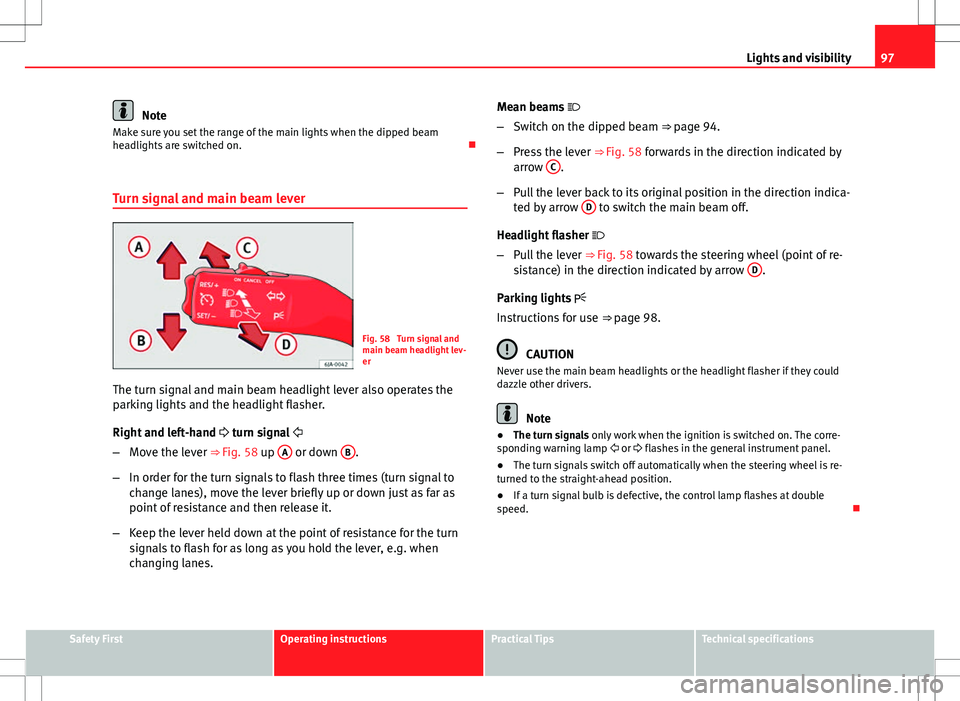
Fig. 58 Turn signal and
main beam headlight lev-
er
The turn signal and main beam headlight lever also operates the
parking lights and the headlight flasher.
Right and left-hand turn signal
– Move the lever ⇒ Fig. 58 up A
or down B.
– In order for the turn signals to flash three times (turn signal to
change lanes), move the lever briefly up or down just as far as
point of resistance and then release it.
– Keep the lever held down at the point of resistance for the turn
signals to flash for as long as you hold the lever, e.g. when
changing lanes. Mean beams
– Switch on the dipped beam ⇒ page 94.
– Press the lever ⇒ Fig. 58 forwards in the direction indicated by
arrow C
.
– Pull the lever back to its original position in the direction indica-
ted by arrow D
to switch the main beam off.
Headlight flasher
– Pull the lever ⇒ Fig. 58 towards the steering wheel (point of re-
sistance) in the direction indicated by arrow D
.
Parking lights
Instructions for use ⇒ page 98.
CAUTION
Never use the main beam headlights or the headlight flasher if they could
dazzle other drivers.
Note
● The turn signals only work when the ignition is switched on. The corre-
sponding warning lamp or flashes in the general instrument panel.
● The turn signals switch off automatically when the steering wheel is re-
turned to the straight-ahead position.
● If a turn signal bulb is defective, the control lamp flashes at double
speed.
Safety FirstOperating instructionsPractical TipsTechnical specifications