Temp SKODA CITIGO 2013 1.G User Guide
[x] Cancel search | Manufacturer: SKODA, Model Year: 2013, Model line: CITIGO, Model: SKODA CITIGO 2013 1.GPages: 176, PDF Size: 10.54 MB
Page 41 of 176
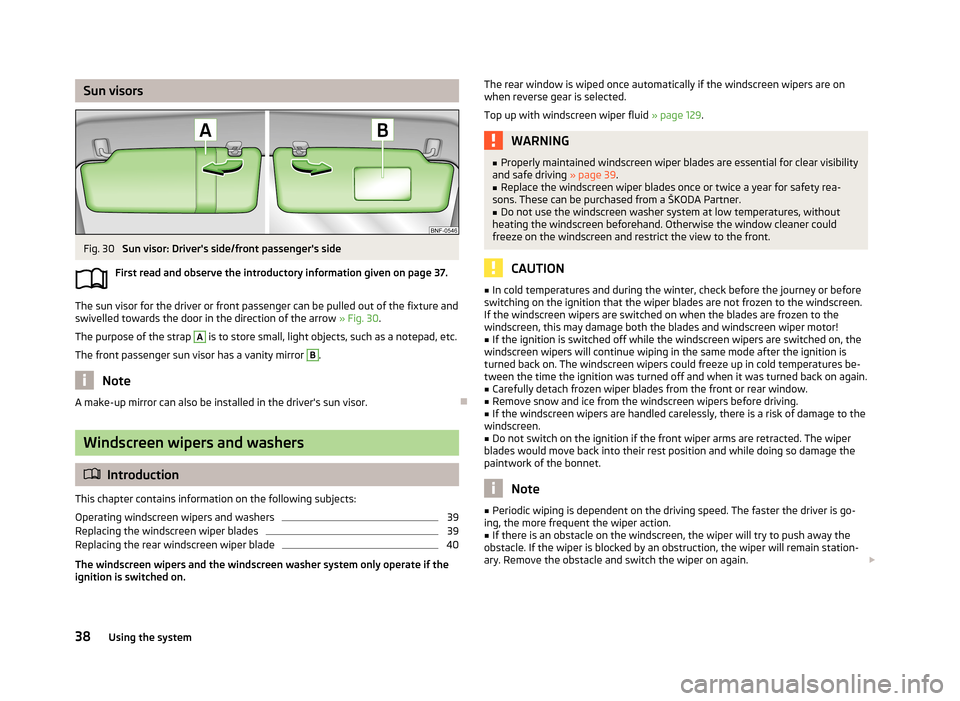
Sun visorsFig. 30
Sun visor: Driver's side/front passenger's side
First read and observe the introductory information given on page 37.
The sun visor for the driver or front passenger can be pulled out of the fixture and
swivelled towards the door in the direction of the arrow » Fig. 30.
The purpose of the strap
A
is to store small, light objects, such as a notepad, etc.
The front passenger sun visor has a vanity mirror
B
.
Note
A make-up mirror can also be installed in the driver's sun visor.
Windscreen wipers and washers
Introduction
This chapter contains information on the following subjects:
Operating windscreen wipers and washers
39
Replacing the windscreen wiper blades
39
Replacing the rear windscreen wiper blade
40
The windscreen wipers and the windscreen washer system only operate if the ignition is switched on.
The rear window is wiped once automatically if the windscreen wipers are on
when reverse gear is selected.
Top up with windscreen wiper fluid » page 129.WARNING■
Properly maintained windscreen wiper blades are essential for clear visibility
and safe driving » page 39.■
Replace the windscreen wiper blades once or twice a year for safety rea-
sons. These can be purchased from a ŠKODA Partner.
■
Do not use the windscreen washer system at low temperatures, without
heating the windscreen beforehand. Otherwise the window cleaner could
freeze on the windscreen and restrict the view to the front.
CAUTION
■ In cold temperatures and during the winter, check before the journey or before
switching on the ignition that the wiper blades are not frozen to the windscreen. If the windscreen wipers are switched on when the blades are frozen to the
windscreen, this may damage both the blades and windscreen wiper motor!■
If the ignition is switched off while the windscreen wipers are switched on, the
windscreen wipers will continue wiping in the same mode after the ignition is
turned back on. The windscreen wipers could freeze up in cold temperatures be- tween the time the ignition was turned off and when it was turned back on again.
■
Carefully detach frozen wiper blades from the front or rear window.
■
Remove snow and ice from the windscreen wipers before driving.
■
If the windscreen wipers are handled carelessly, there is a risk of damage to the
windscreen.
■
Do not switch on the ignition if the front wiper arms are retracted. The wiper
blades would move back into their rest position and while doing so damage the
paintwork of the bonnet.
Note
■ Periodic wiping is dependent on the driving speed. The faster the driver is go-
ing, the more frequent the wiper action.■
If there is an obstacle on the windscreen, the wiper will try to push away the
obstacle. If the wiper is blocked by an obstruction, the wiper will remain station-
ary. Remove the obstacle and switch the wiper on again.
38Using the system
Page 47 of 176
WARNING■The front passenger airbag should be switched off when transporting ob-
jects on the seat backrest that has been folded forwards » page 102.■
Only adjust the seat backrest when the vehicle is stationary.
■
When moving the seat backrest, make sure that the seat backrest has been
properly secured – check by pulling on the seat backrest.
■
If the seat backrest is folded, passengers may only be transported on the
outer seat behind the driver.
■
When moving the seat backrest, keep limbs out of the area between the
seat and seat backrest – risk of injury!
■
The seat backrest that has been folded forwards must never be used to
transport objects that: ■could restrict the driver's view;
■ can make it impossible for the driver to operate the vehicle, e.g. if they
could fall under the pedals or protrude into the driver's area; ■ could injure passengers when the driver accelerates sharply, changes di-
rection or brakes.
Front seat heating
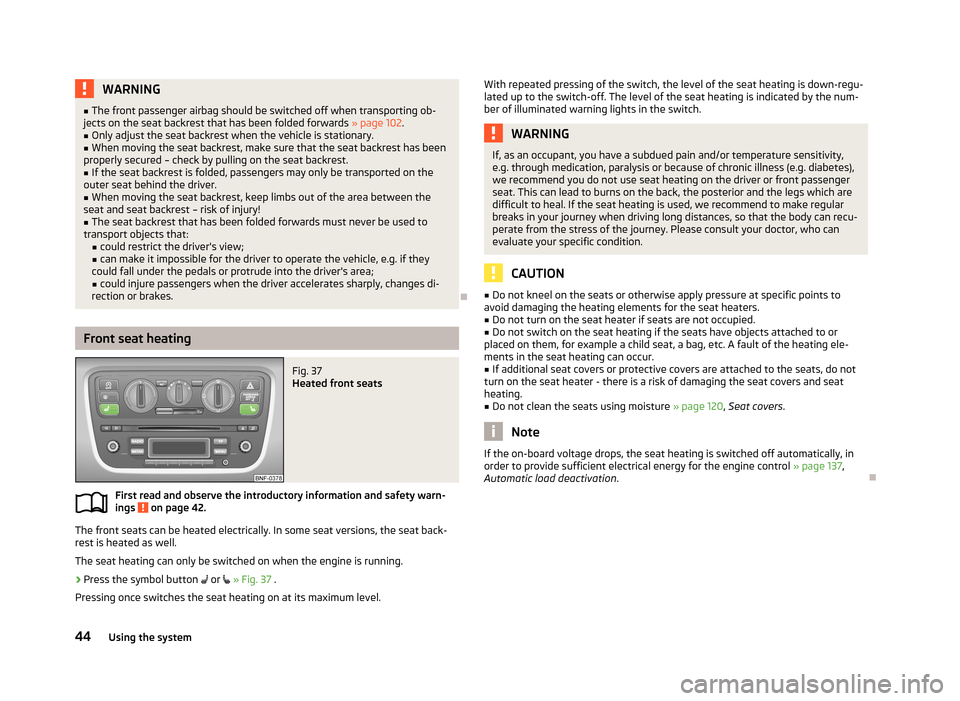
Fig. 37
Heated front seats
First read and observe the introductory information and safety warn- ings on page 42.
The front seats can be heated electrically. In some seat versions, the seat back-
rest is heated as well.
The seat heating can only be switched on when the engine is running.
›
Press the symbol button
or
» Fig. 37 .
Pressing once switches the seat heating on at its maximum level.
With repeated pressing of the switch, the level of the seat heating is down-regu-
lated up to the switch-off. The level of the seat heating is indicated by the num-
ber of illuminated warning lights in the switch.WARNINGIf, as an occupant, you have a subdued pain and/or temperature sensitivity,
e.g. through medication, paralysis or because of chronic illness (e.g. diabetes),
we recommend you do not use seat heating on the driver or front passenger
seat. This can lead to burns on the back, the posterior and the legs which are difficult to heal. If the seat heating is used, we recommend to make regular
breaks in your journey when driving long distances, so that the body can recu-
perate from the stress of the journey. Please consult your doctor, who can evaluate your specific condition.
CAUTION
■ Do not kneel on the seats or otherwise apply pressure at specific points to
avoid damaging the heating elements for the seat heaters.■
Do not turn on the seat heater if seats are not occupied.
■
Do not switch on the seat heating if the seats have objects attached to or
placed on them, for example a child seat, a bag, etc. A fault of the heating ele- ments in the seat heating can occur.
■
If additional seat covers or protective covers are attached to the seats, do not
turn on the seat heater - there is a risk of damaging the seat covers and seat
heating.
■
Do not clean the seats using moisture » page 120, Seat covers .
Note
If the on-board voltage drops, the seat heating is switched off automatically, in
order to provide sufficient electrical energy for the engine control » page 137,
Automatic load deactivation .
44Using the system
Page 60 of 176
Heating and air-conditioning
Heating, ventilation and cooling
Introduction
This chapter contains information on the following subjects:
Air outlet vents
57
The heating effect is dependent upon the coolant temperature, thus full heat output only occurs when the engine has reached its operating temperature.
If the cooling system is switched on, the temperature and air humidity drops in
the vehicle. The cooling system prevents the windows from misting up during
winter months.
It is possible to briefly activate recirculated air mode to enhance the cooling ef-
fect.
Please refer to the information regarding the recalculated air mode for air-condi-
tioning » page 61 .
WARNINGFor your own safety and that of other road users, ensure that all the windows
are free of ice, snow and misting. Please familiarize yourself about how to cor- rectly operate the heating and ventilation systems, how to demist and defrost
the windows, as well as with the cooling mode.
CAUTION
■ The air inlet in front of the windscreen must be free from ice, snow or leaves,
for example, to ensure that the heating and cooling system works properly.■
After switching on the cooling Condensation from the evaporator of the air con-
ditioning may drip down and form a puddle below the vehicle. This is not a leak!
Note■ The used air streams out through the vents in the luggage compartment.■We recommend that you do not smoke in the vehicle when the recirculating air
mode is operating since the smoke which is drawn at the evaporator from the in-
terior of the vehicle forms deposits in the evaporator of the air conditioning sys- tem. This produces a permanent odour when the air conditioning system is oper-ating which can only be eliminated through considerable effort and expense (re-
placement of compressor).
Air outlet vents
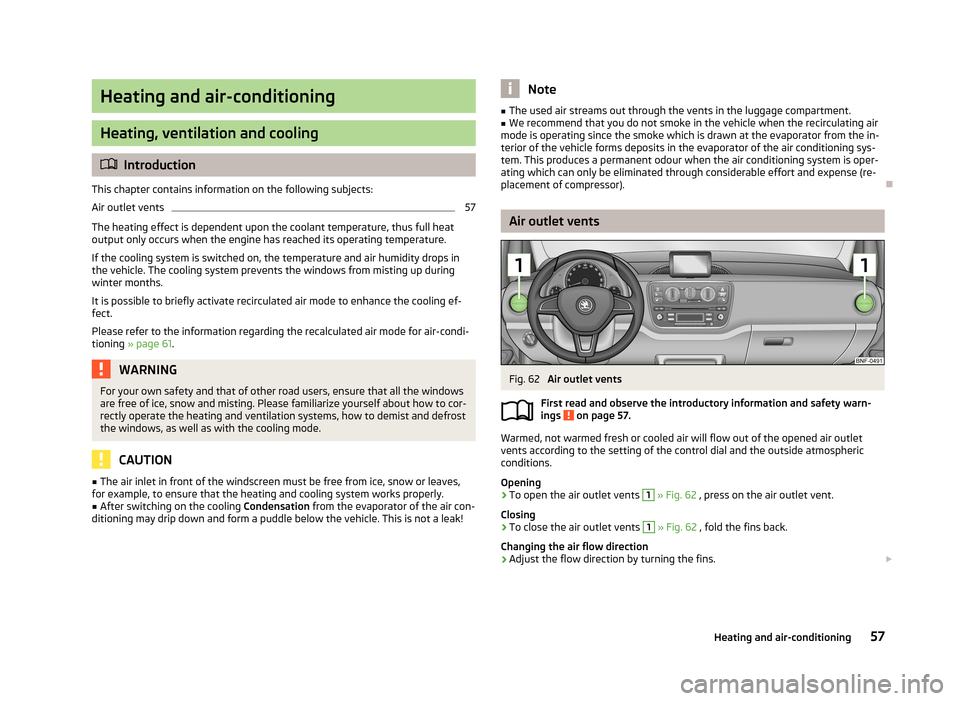
Fig. 62
Air outlet vents
First read and observe the introductory information and safety warn-
ings
on page 57.
Warmed, not warmed fresh or cooled air will flow out of the opened air outlet
vents according to the setting of the control dial and the outside atmospheric
conditions.
Opening
›
To open the air outlet vents
1
» Fig. 62 , press on the air outlet vent.
Closing
›
To close the air outlet vents
1
» Fig. 62 , fold the fins back.
Changing the air flow direction
›
Adjust the flow direction by turning the fins.
57Heating and air-conditioning
Page 61 of 176
NoteDo not cover the air outlet vents with objects of any kind.
Heating
Introduction
This chapter contains information on the following subjects:
Control elements
58
Setting
59
Control elements
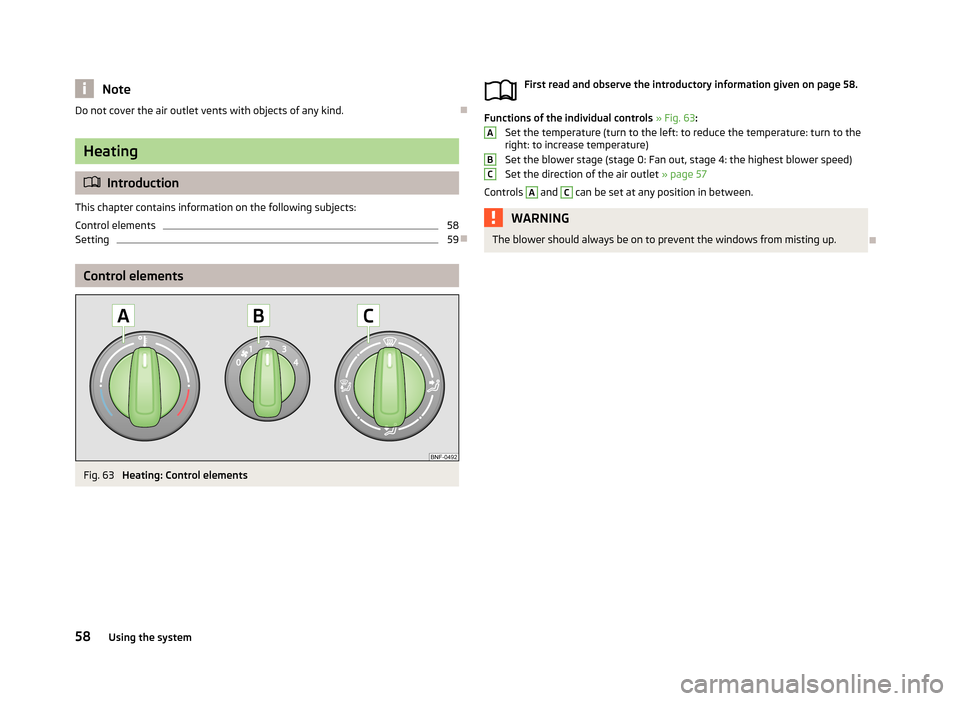
Fig. 63
Heating: Control elements
First read and observe the introductory information given on page 58.
Functions of the individual controls » Fig. 63 :
Set the temperature (turn to the left: to reduce the temperature: turn to the
right: to increase temperature)
Set the blower stage (stage 0: Fan out, stage 4: the highest blower speed) Set the direction of the air outlet » page 57
Controls
A
and
C
can be set at any position in between.
WARNINGThe blower should always be on to prevent the windows from misting up.
ABC58Using the system
Page 62 of 176
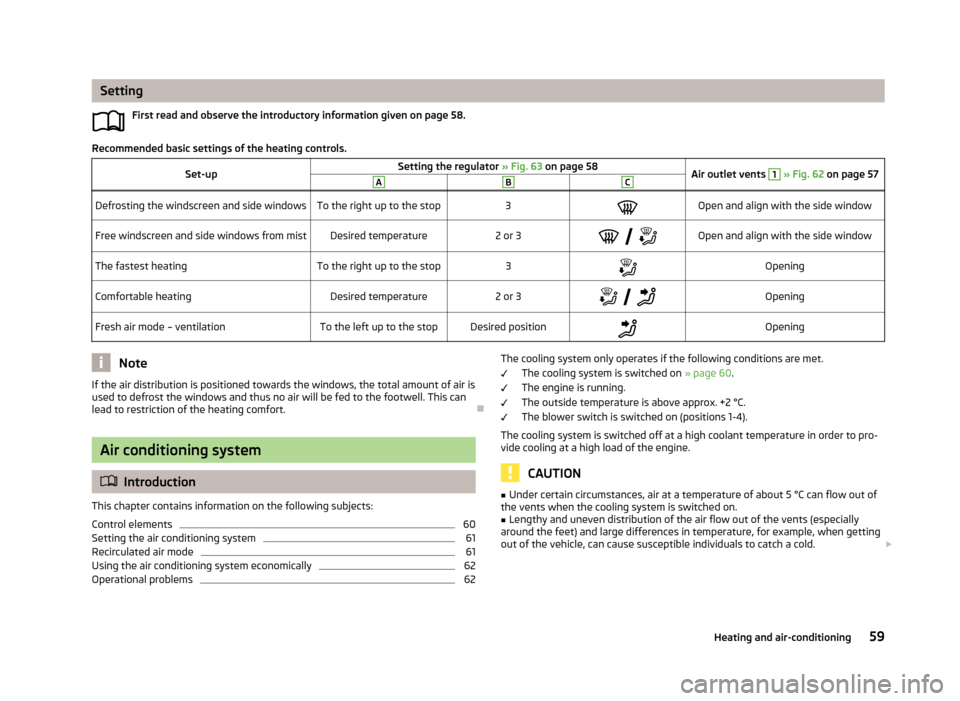
SettingFirst read and observe the introductory information given on page 58.
Recommended basic settings of the heating controls.
Set-upSetting the regulator » Fig. 63 on page 58Air outlet vents 1 » Fig. 62 on page 57ABCDefrosting the windscreen and side windowsTo the right up to the stop3Open and align with the side windowFree windscreen and side windows from mistDesired temperature2 or 3
Open and align with the side windowThe fastest heatingTo the right up to the stop3OpeningComfortable heatingDesired temperature2 or 3
OpeningFresh air mode – ventilationTo the left up to the stopDesired positionOpeningNoteIf the air distribution is positioned towards the windows, the total amount of air is
used to defrost the windows and thus no air will be fed to the footwell. This can
lead to restriction of the heating comfort.
Air conditioning system
Introduction
This chapter contains information on the following subjects:
Control elements
60
Setting the air conditioning system
61
Recirculated air mode
61
Using the air conditioning system economically
62
Operational problems
62The cooling system only operates if the following conditions are met. The cooling system is switched on » page 60.
The engine is running.
The outside temperature is above approx. +2 °C.
The blower switch is switched on (positions 1-4).
The cooling system is switched off at a high coolant temperature in order to pro-
vide cooling at a high load of the engine.
CAUTION
■ Under certain circumstances, air at a temperature of about 5 °C can flow out of
the vents when the cooling system is switched on.■
Lengthy and uneven distribution of the air flow out of the vents (especially
around the feet) and large differences in temperature, for example, when getting
out of the vehicle, can cause susceptible individuals to catch a cold.
59Heating and air-conditioning
Page 63 of 176
NoteWe recommend that you have the air conditioning system cleaned by a specialist
garage once every year.
Control elements
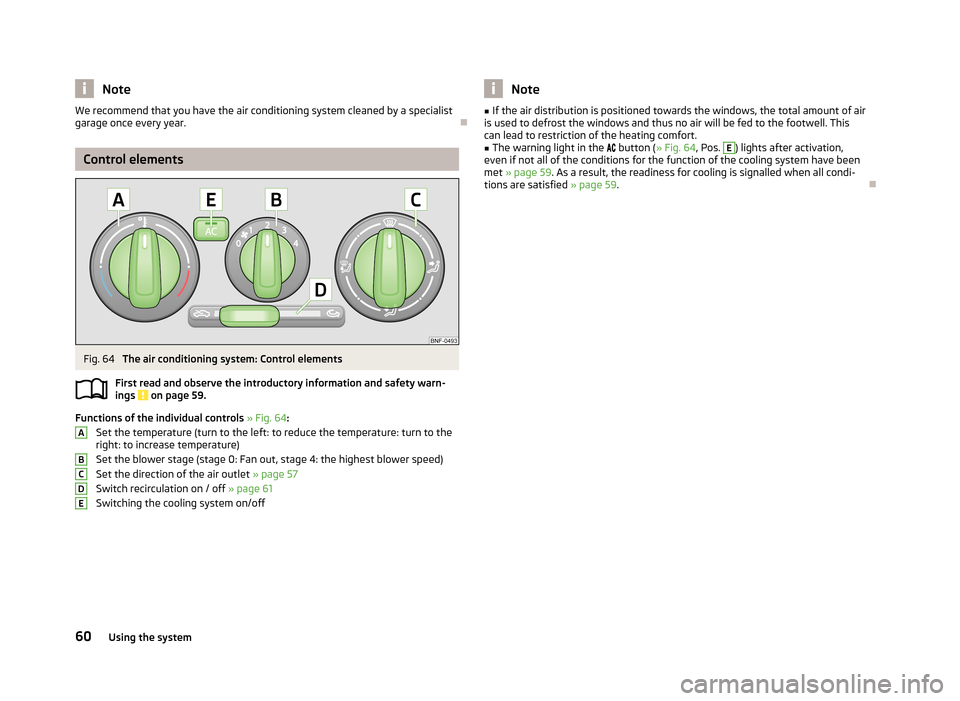
Fig. 64
The air conditioning system: Control elements
First read and observe the introductory information and safety warn- ings
on page 59.
Functions of the individual controls » Fig. 64 :
Set the temperature (turn to the left: to reduce the temperature: turn to the right: to increase temperature)
Set the blower stage (stage 0: Fan out, stage 4: the highest blower speed)
Set the direction of the air outlet » page 57
Switch recirculation on / off » page 61
Switching the cooling system on/off
ABCDENote■ If the air distribution is positioned towards the windows, the total amount of air
is used to defrost the windows and thus no air will be fed to the footwell. This can lead to restriction of the heating comfort.■
The warning light in the button ( » Fig. 64, Pos.
E
) lights after activation,
even if not all of the conditions for the function of the cooling system have been met » page 59 . As a result, the readiness for cooling is signalled when all condi-
tions are satisfied » page 59.
60Using the system
Page 64 of 176
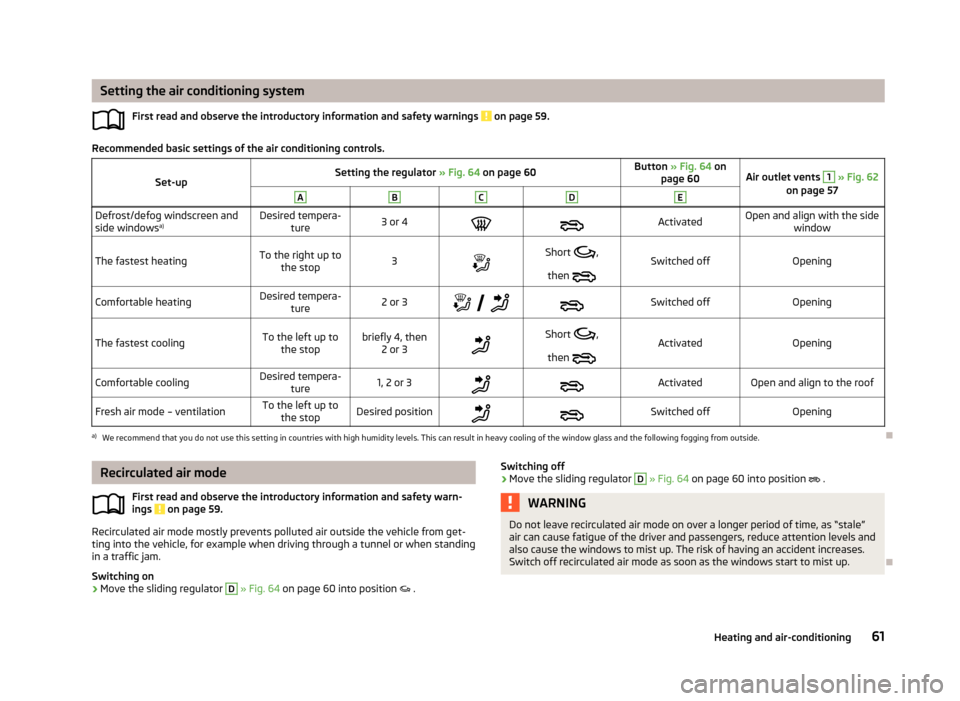
Setting the air conditioning systemFirst read and observe the introductory information and safety warnings
on page 59.
Recommended basic settings of the air conditioning controls.
Set-upSetting the regulator » Fig. 64 on page 60Button » Fig. 64 on
page 60Air outlet vents 1 » Fig. 62
on page 57ABCDEDefrost/defog windscreen and
side windows a)Desired tempera-
ture3 or 4ActivatedOpen and align with the side window
The fastest heatingTo the right up tothe stop3Short ,
then Switched offOpeningComfortable heatingDesired tempera-
ture2 or 3
Switched offOpeningThe fastest coolingTo the left up to
the stopbriefly 4, then 2 or 3Short ,
then ActivatedOpeningComfortable coolingDesired tempera-
ture1, 2 or 3ActivatedOpen and align to the roofFresh air mode – ventilationTo the left up tothe stopDesired positionSwitched offOpeninga)
We recommend that you do not use this setting in countries with high humidity levels. This can result in heavy cooling of the window glass and the following fogging from outside.
Recirculated air mode
First read and observe the introductory information and safety warn-ings
on page 59.
Recirculated air mode mostly prevents polluted air outside the vehicle from get-ting into the vehicle, for example when driving through a tunnel or when standing in a traffic jam.
Switching on
›
Move the sliding regulator
D
» Fig. 64 on page 60 into position .
Switching off›Move the sliding regulator D » Fig. 64 on page 60 into position .WARNINGDo not leave recirculated air mode on over a longer period of time, as “stale”
air can cause fatigue of the driver and passengers, reduce attention levels and
also cause the windows to mist up. The risk of having an accident increases.
Switch off recirculated air mode as soon as the windows start to mist up.
61Heating and air-conditioning
Page 65 of 176
Using the air conditioning system economicallyFirst read and observe the introductory information and safety warn-ings
on page 59.
The compressor on the air conditioning system uses power from the engine whenin cooling mode which will effect the fuel consumption.
It recommended to open the windows or the doors of a vehicle for which the inte- rior has been strongly heated through the effect of direct sunlight in order to al-low the heated air to escape.
The cooling system should not be on if the windows are open.
For the sake of the environment
Pollutant emissions are also reduced when fuel is saved » page 74.
Operational problems
First read and observe the introductory information and safety warn-
ings
on page 59.
If the cooling system does not operate at outside temperatures higher than +5 °C,
there is a problem in the system. The reasons for this may be.
› One of the fuses has blown. Check the fuse and replace if necessa-
ry » page 154 .
› The cooling system has switched off automatically for a short time because the
coolant temperature of the engine is too hot » page 15.
If you are not able to resolve the operational problem yourself, or if the cooler
output has reduced, switch off the cooling system and seek assistance from a
specialist garage.
62Using the system
Page 67 of 176
Multifunction deviceMove & FunFig. 65
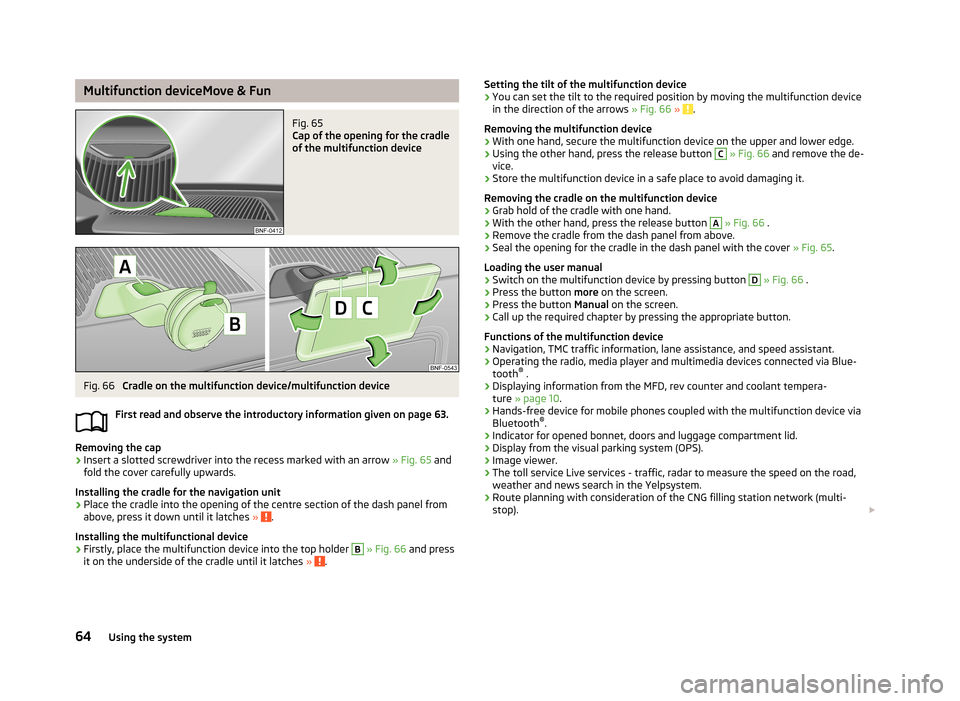
Cap of the opening for the cradle
of the multifunction device
Fig. 66
Cradle on the multifunction device/multifunction device
First read and observe the introductory information given on page 63.
Removing the cap
›
Insert a slotted screwdriver into the recess marked with an arrow » Fig. 65 and
fold the cover carefully upwards.
Installing the cradle for the navigation unit
›
Place the cradle into the opening of the centre section of the dash panel from above, press it down until it latches » .
Installing the multifunctional device
›
Firstly, place the multifunction device into the top holder
B
» Fig. 66 and press
it on the underside of the cradle until it latches » .
Setting the tilt of the multifunction device›You can set the tilt to the required position by moving the multifunction device
in the direction of the arrows » Fig. 66 » .
Removing the multifunction device
›
With one hand, secure the multifunction device on the upper and lower edge.
›
Using the other hand, press the release button
C
» Fig. 66 and remove the de-
vice.
›
Store the multifunction device in a safe place to avoid damaging it.
Removing the cradle on the multifunction device
›
Grab hold of the cradle with one hand.
›
With the other hand, press the release button
A
» Fig. 66 .
›
Remove the cradle from the dash panel from above.
›
Seal the opening for the cradle in the dash panel with the cover » Fig. 65.
Loading the user manual
›
Switch on the multifunction device by pressing button
D
» Fig. 66 .
›
Press the button more on the screen.
›
Press the button Manual on the screen.
›
Call up the required chapter by pressing the appropriate button.
Functions of the multifunction device
› Navigation, TMC traffic information, lane assistance, and speed assistant.
› Operating the radio, media player and multimedia devices connected via Blue-
tooth ®
.
› Displaying information from the MFD, rev counter and coolant tempera-
ture » page 10 .
› Hands-free device for mobile phones coupled with the multifunction device via
Bluetooth ®
.
› Indicator for opened bonnet, doors and luggage compartment lid.
› Display from the visual parking system (OPS).
› Image viewer.
› The toll service Live services - traffic, radar to measure the speed on the road,
weather and news search in the Yelpsystem.
› Route planning with consideration of the CNG filling station network (multi-
stop).
64Using the system
Page 68 of 176
WARNING■Concentrate fully at all times on your driving! As the driver you are fully re-
sponsible for the operation of your vehicle. Only use the system such that you
are in full control of your vehicle in every traffic situation – risk of accident!■
The multifunction device must always slot securely into the cradle or be
safely stored in the vehicle.
■
Unsecured or incorrectly secured multifunction devices may be thrown
through the interior of the vehicle and cause injuries in a sudden driving or
braking manoeuvre or accident.
■
Adjust the volume to ensure that acoustic signals from outside, e.g. sirens
from vehicles which have the right of way, such as police, ambulance and fire
brigade vehicles, can be heard at all time.
■
High volumes can cause hearing damage.
CAUTION
■ Improper tilt settings can damage both the multifunction device and the cradle.■Always take the multifunction device with you when leaving the vehicle to pro-
tect it from extreme temperatures and strong sunlight. Extreme ambient temper- atures can impair the functioning of the multifunction device and may damage
the device.■
Moisture can damage the electrical contacts in the dash panel for the portable
multifunction device.
■
Never use water when cleaning the navigation unit cradle. Always use a dry
cloth instead.
■
Install/remove the multifunction device cradle without the multifunction device
in it.
■
Do not install/remove the multifunction device until the cradle for the multi-
function device has been installed into the dash panel.
Note
The range of the Bluetooth ®
connection to the hands-free system is restricted to
the vehicle interior. The range is dependent on local factors, e.g. obstacles be-
tween the devices and mutual interferences with other devices. If your mobile phone is e.g. in a jacket pocket, this can lead to difficulties when establishing the
Bluetooth ®
connection with the hands-free system or the data transfer.
65Communication and multimedia