led SMART FORTWO COUPE 2011 Owner's Manual
[x] Cancel search | Manufacturer: SMART, Model Year: 2011, Model line: FORTWO COUPE, Model: SMART FORTWO COUPE 2011Pages: 228, PDF Size: 11.48 MB
Page 85 of 228
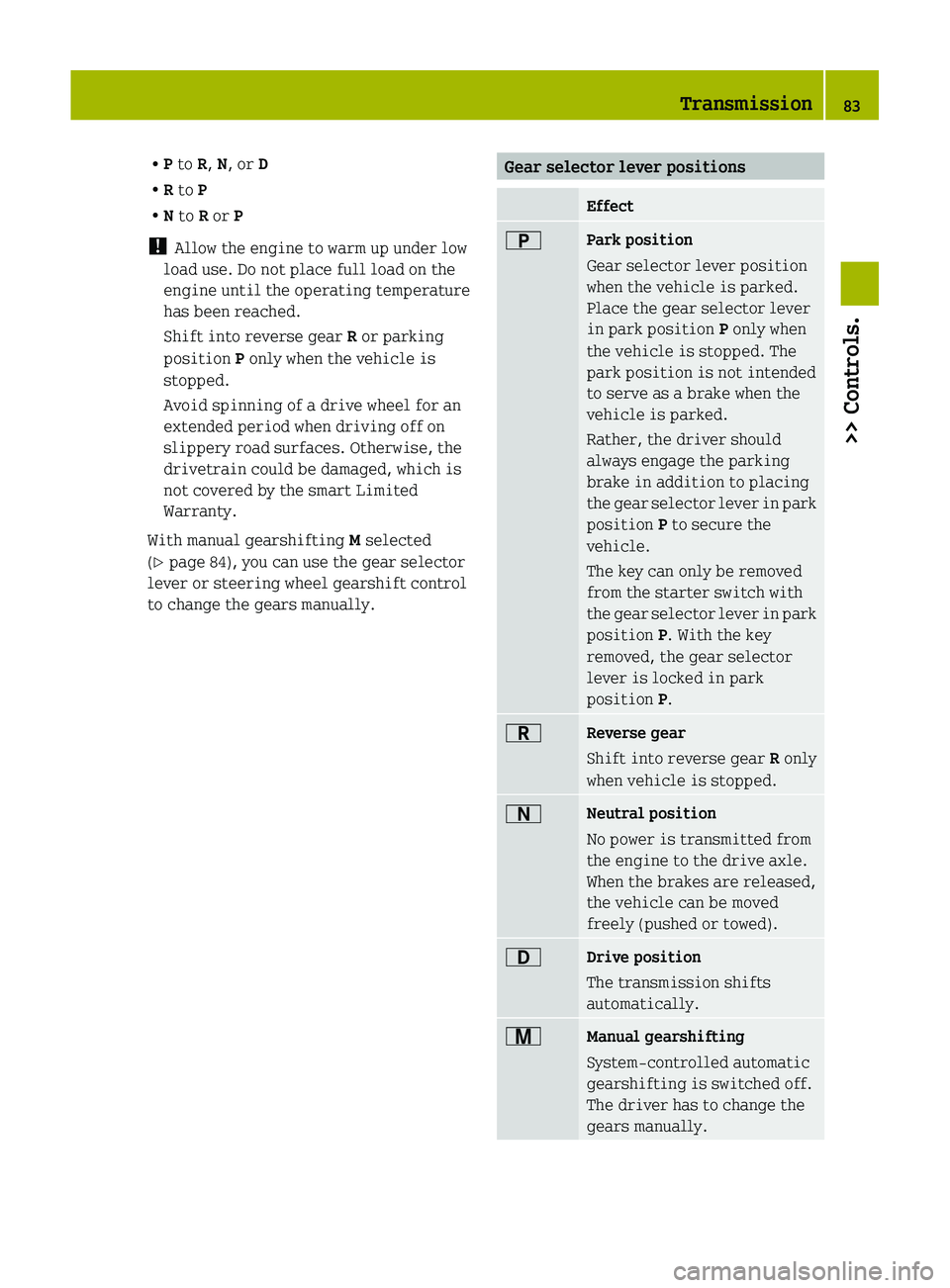
RP to R, N , or D
R R to P
R N to R or P
! Allow the engine to warm up under low
load use. Do not place full load on the
engine until the operating temperature
has been reached.
Shift into reverse gear R or parking
position P only when the vehicle is
stopped.
Avoid spinning of a drive wheel for an
extended period when driving off on
slippery road surfaces. Otherwise, the
drivetrain could be damaged, which is
not covered by the smart Limited
Warranty.
With manual gearshifting M selected
( Y page 84), you can use the gear selector
lever or steering wheel gearshift control
to change the gears manually.Gear selector lever positionsEffect0045Park position
Gear selector lever position
when the vehicle is parked.
Place the gear selector lever
in park position P only when
the vehicle is stopped. The
park position is not intended
to serve as a brake when the
vehicle is parked.
Rather, the driver should
always engage the parking
brake in addition to placing
the gear selector lever in park
position P to secure the
vehicle.
The key can only be removed
from the starter switch with
the gear selector lever in park
position P. With the key
removed, the gear selector
lever is locked in park
position P.0046Reverse gear
Shift into reverse gear R only
when vehicle is stopped.0044Neutral position
No power is transmitted from
the engine to the drive axle.
When the brakes are released,
the vehicle can be moved
freely (pushed or towed).003ADrive position
The transmission shifts
automatically.009CManual gearshifting
System-controlled automatic
gearshifting is switched off.
The driver has to change the
gears manually.Transmission83>> Controls.BA 451 USA, CA Edition A 2011; 1; 4, en-UShereepeVersion: 3.0.3.62010-05-11T15:12:26+02:00 - Seite 83Z
Page 86 of 228
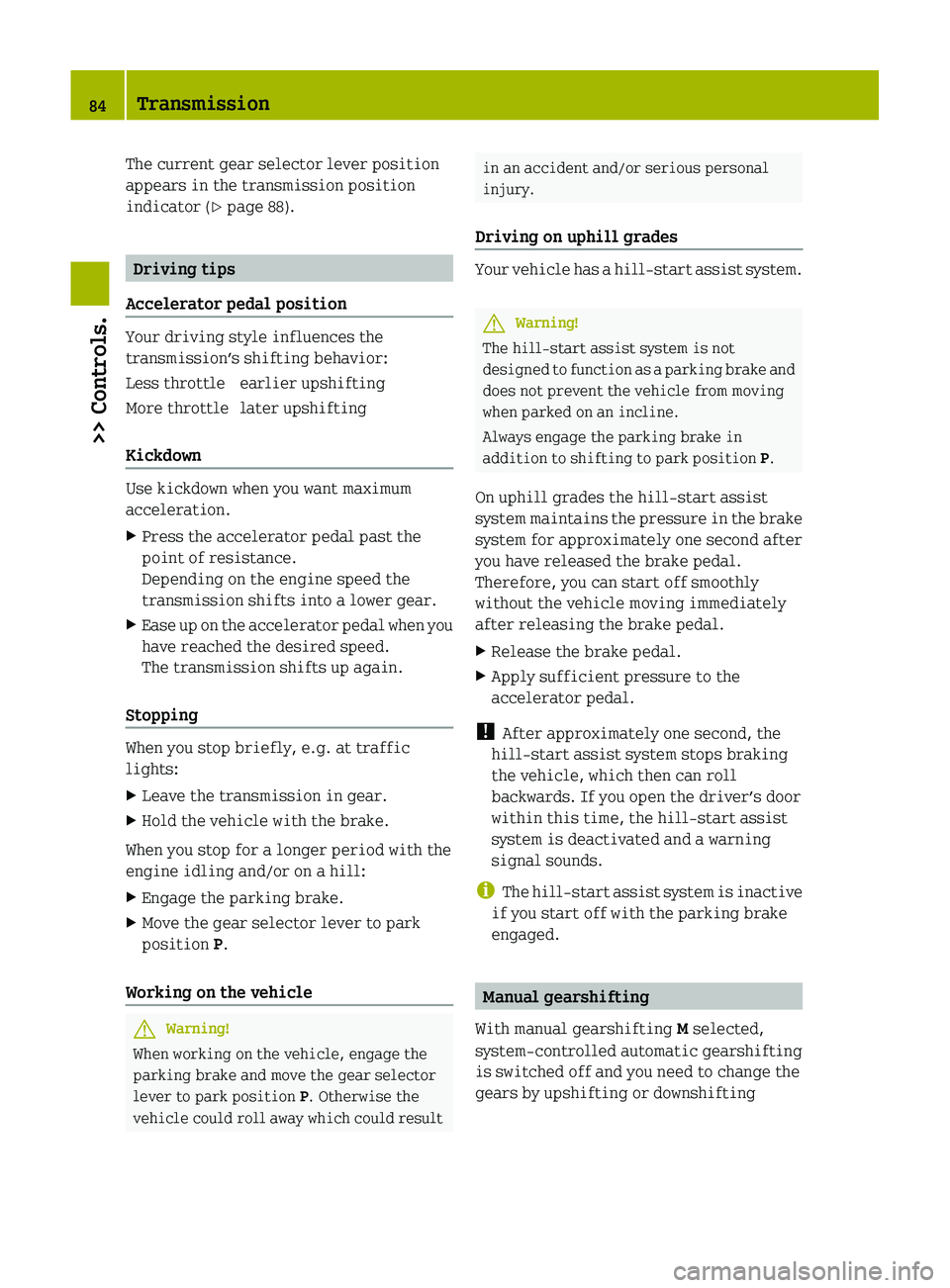
The current gear selector lever position
appears in the transmission position
indicator ( Y page 88).
Driving tips
Accelerator pedal position
Your driving style influences the
transmission’s shifting behavior:
Less throttleearlier upshiftingMore throttlelater upshifting
Kickdown
Use kickdown when you want maximum
acceleration.
XPress the accelerator pedal past the
point of resistance.
Depending on the engine speed the
transmission shifts into a lower gear.XEase up on the accelerator pedal when you
have reached the desired speed.
The transmission shifts up again.
Stopping
When you stop briefly, e.g. at traffic
lights:
XLeave the transmission in gear.XHold the vehicle with the brake.
When you stop for a longer period with the
engine idling and/or on a hill:
XEngage the parking brake.XMove the gear selector lever to park
position P.
Working on the vehicle
GWarning!
When working on the vehicle, engage the
parking brake and move the gear selector
lever to park position P. Otherwise the
vehicle could roll away which could result
in an accident and/or serious personal
injury.
Driving on uphill grades
Your vehicle has a hill‑start assist system.
GWarning!
The hill-start assist system is not
designed to function as a parking brake and
does not prevent the vehicle from moving
when parked on an incline.
Always engage the parking brake in
addition to shifting to park position P.
On uphill grades the hill‑start assist
system maintains the pressure in the brake
system for approximately one second after
you have released the brake pedal.
Therefore, you can start off smoothly
without the vehicle moving immediately
after releasing the brake pedal.
XRelease the brake pedal.XApply sufficient pressure to the
accelerator pedal.
! After approximately one second, the
hill‑start assist system stops braking
the vehicle, which then can roll
backwards. If you open the driver’s door
within this time, the hill‑start assist
system is deactivated and a warning
signal sounds.
i The hill‑start assist system is inactive
if you start off with the parking brake
engaged.
Manual gearshifting
With manual gearshifting M selected,
system-controlled automatic gearshifting
is switched off and you need to change the
gears by upshifting or downshifting
84Transmission>> Controls.
BA 451 USA, CA Edition A 2011; 1; 4, en-UShereepeVersion: 3.0.3.62010-05-11T15:12:26+02:00 - Seite 84
Page 87 of 228
manually using the gear selector lever or
the steering wheel gearshift control 10
.
! Allow the engine to warm up under low
load use. Do not place full load on the
engine until the operating temperature
has been reached.
Shift into reverse gear R or parking
position P only when the vehicle is
stopped.
Avoid spinning of a drive wheel for an
extended period when driving off on
slippery road surfaces. Otherwise, the
drivetrain could be damaged, which is
not covered by the smart Limited
Warranty.
Activating manual gearshifting
XMove the gear selector lever to drive
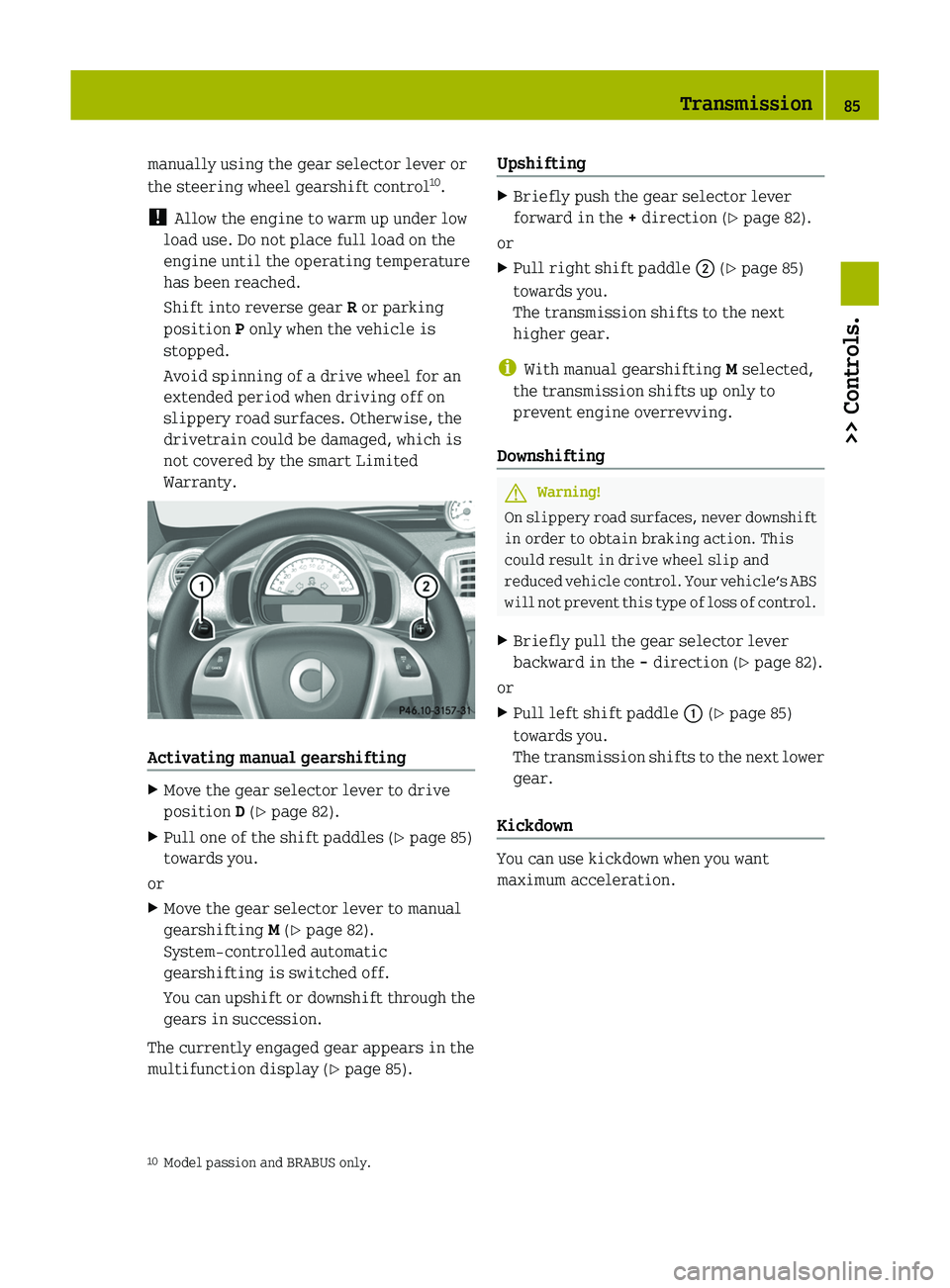
position D ( Y page 82).XPull one of the shift paddles ( Y page 85)
towards you.
or
XMove the gear selector lever to manual
gearshifting M (Y page 82).
System-controlled automatic
gearshifting is switched off.
You can upshift or downshift through the
gears in succession.
The currently engaged gear appears in the
multifunction display ( Y page 85).
UpshiftingXBriefly push the gear selector lever
forward in the + direction ( Y page 82).
or
XPull right shift paddle 0047 (Y page 85)
towards you.
The transmission shifts to the next
higher gear.
i With manual gearshifting M selected,
the transmission shifts up only to
prevent engine overrevving.
Downshifting
GWarning!
On slippery road surfaces, never downshift
in order to obtain braking action. This
could result in drive wheel slip and
reduced vehicle control. Your vehicle’s ABS
will not prevent this type of loss of control.
XBriefly pull the gear selector lever
backward in the - direction ( Y page 82).
or
XPull left shift paddle 0046 (Y page 85)
towards you.
The transmission shifts to the next lower
gear.
Kickdown
You can use kickdown when you want
maximum acceleration.
10 Model passion and BRABUS only.Transmission85>> Controls.BA 451 USA, CA Edition A 2011; 1; 4, en-UShereepeVersion: 3.0.3.62010-05-11T15:12:26+02:00 - Seite 85Z
Page 88 of 228
XPress the accelerator pedal past the
point of resistance.
Depending on the engine speed the
transmission shifts into a lower gear.XWhen you have reached the desired speed,
briefly push the gear selector lever
forward in the + direction ( Y page 82).
or
XPull right shift paddle 0047 (Y page 85)
towards you.
The transmission shifts to the next
higher gear.
Deactivating manual gearshifting
XWith drive position D selected: Pull and
hold right shift paddle 0047 (Y page 85)
towards you for longer than two seconds.
or
XWith manual gearshifting M selected:
Move the gear selector lever to drive
position D ( Y page 82).
System-controlled automatic
gearshifting is switched on again.
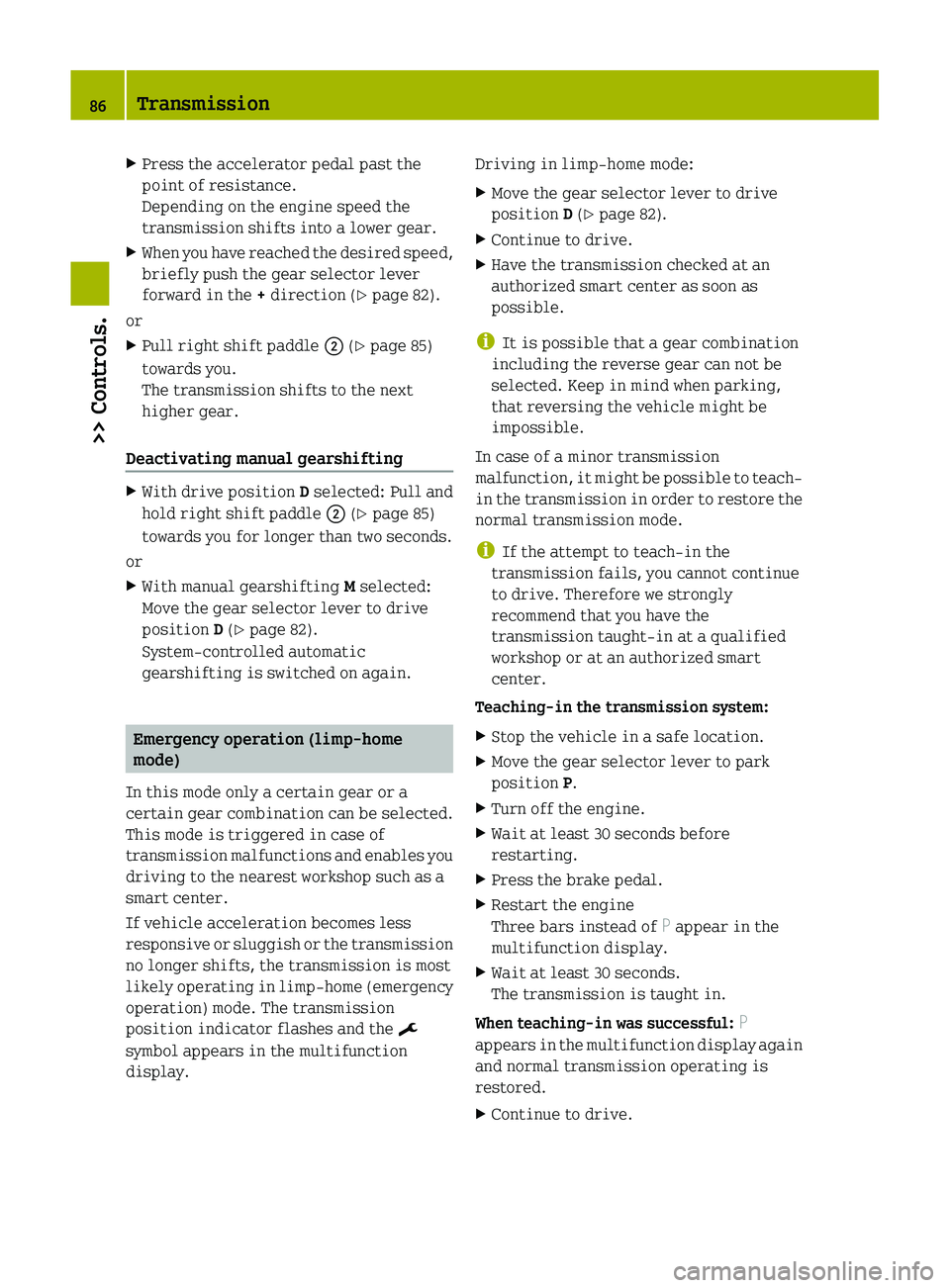
Emergency operation (limp-home
mode)
In this mode only a certain gear or a
certain gear combination can be selected.
This mode is triggered in case of
transmission malfunctions and enables you
driving to the nearest workshop such as a
smart center.
If vehicle acceleration becomes less
responsive or sluggish or the transmission
no longer shifts, the transmission is most
likely operating in limp-home (emergency
operation) mode. The transmission
position indicator flashes and the ¬
symbol appears in the multifunction
display.
Driving in limp-home mode:XMove the gear selector lever to drive
position D ( Y page 82).XContinue to drive.XHave the transmission checked at an
authorized smart center as soon as
possible.
i It is possible that a gear combination
including the reverse gear can not be
selected. Keep in mind when parking,
that reversing the vehicle might be
impossible.
In case of a minor transmission
malfunction, it might be possible to teach-
in the transmission in order to restore the
normal transmission mode.
i If the attempt to teach-in the
transmission fails, you cannot continue
to drive. Therefore we strongly
recommend that you have the
transmission taught-in at a qualified
workshop or at an authorized smart
center.
Teaching-in the transmission system:
XStop the vehicle in a safe location.XMove the gear selector lever to park
position P.XTurn off the engine.XWait at least 30 seconds before
restarting.XPress the brake pedal.XRestart the engine
Three bars instead of P appear in the
multifunction display.XWait at least 30 seconds.
The transmission is taught in.
When teaching-in was successful: P
appears in the multifunction display again
and normal transmission operating is
restored.
XContinue to drive.86Transmission>> Controls.
BA 451 USA, CA Edition A 2011; 1; 4, en-UShereepeVersion: 3.0.3.62010-05-11T15:12:26+02:00 - Seite 86
Page 101 of 228
Setting the period of dayXPress the control switch on the control
lever ( Y page 93) up or down until the
am pm submenu appears in the
multifunction display.XPress the OK button on the control lever
briefly.XPress the control switch on the control
lever ( Y page 93) up or down until the
desired setting is selected.XPress the OK button on the control lever
briefly to confirm.
The selected mode is stored.
Setting the hours
XPress the control switch on the control
lever ( Y page 93) up or down until the
Hour submenu appears in the
multifunction display.XPress the OK button on the control lever
briefly.XPress the control switch on the control
lever ( Y page 93) up or down until the
desired setting is selected.XPress the OK button on the control lever
briefly to confirm.
The selected hours are stored.
Setting the minutes
XPress the control switch on the control
lever ( Y page 93) up or down until the
Minute submenu appears in the
multifunction display.XPress the OK button on the control lever
briefly.XPress the control switch on the control
lever ( Y page 93) up or down until the
desired setting is selected.XPress the OK button on the control lever
briefly to confirm.
The selected minutes are stored.Audio system*GWarning!
In order to avoid distraction which could
lead to an accident, the driver should enter
system settings with the vehicle at a
standstill and operate the system only when
road and traffic conditions permit. Always
pay full attention to traffic conditions
first before operating system controls
while driving.
Bear in mind that at a speed of just 30 mph
(approximately 50 km/h), your vehicle is
covering a distance of 44 feet
(approximately 14 m) every second.
GWarning!
Always select a volume that allows you to
still hear ambient sound in your immediate
vicinity (e.g. horns, emergency rescue
vehicles, police vehicles, etc.). You could
otherwise cause an accident.
GWarning!
If you wish to have a radio other than an
original smart radio fitted in your
vehicle, please always have the necessary
work performed at an authorized smart
center.
This is particularly important if your
vehicle is fitted with a radio
preinstallation. Improper connection can
result in the failure of important vehicle
functions, thereby endangering the
operating safety of your vehicle and thus
your own safety and that of other people.
The following pages contain a brief
description of the audio systems available
for the coupé and cabriolet.
The devices are described with their full
complement of equipment. The description
for your individual equipment
specification applies.
Please refer to the separate operating
instructions for detailed functions.
Audio system*99>> Controls.* optionalBA 451 USA, CA Edition A 2011; 1; 4, en-UShereepeVersion: 3.0.3.62010-05-11T15:12:26+02:00 - Seite 99Z
Page 103 of 228
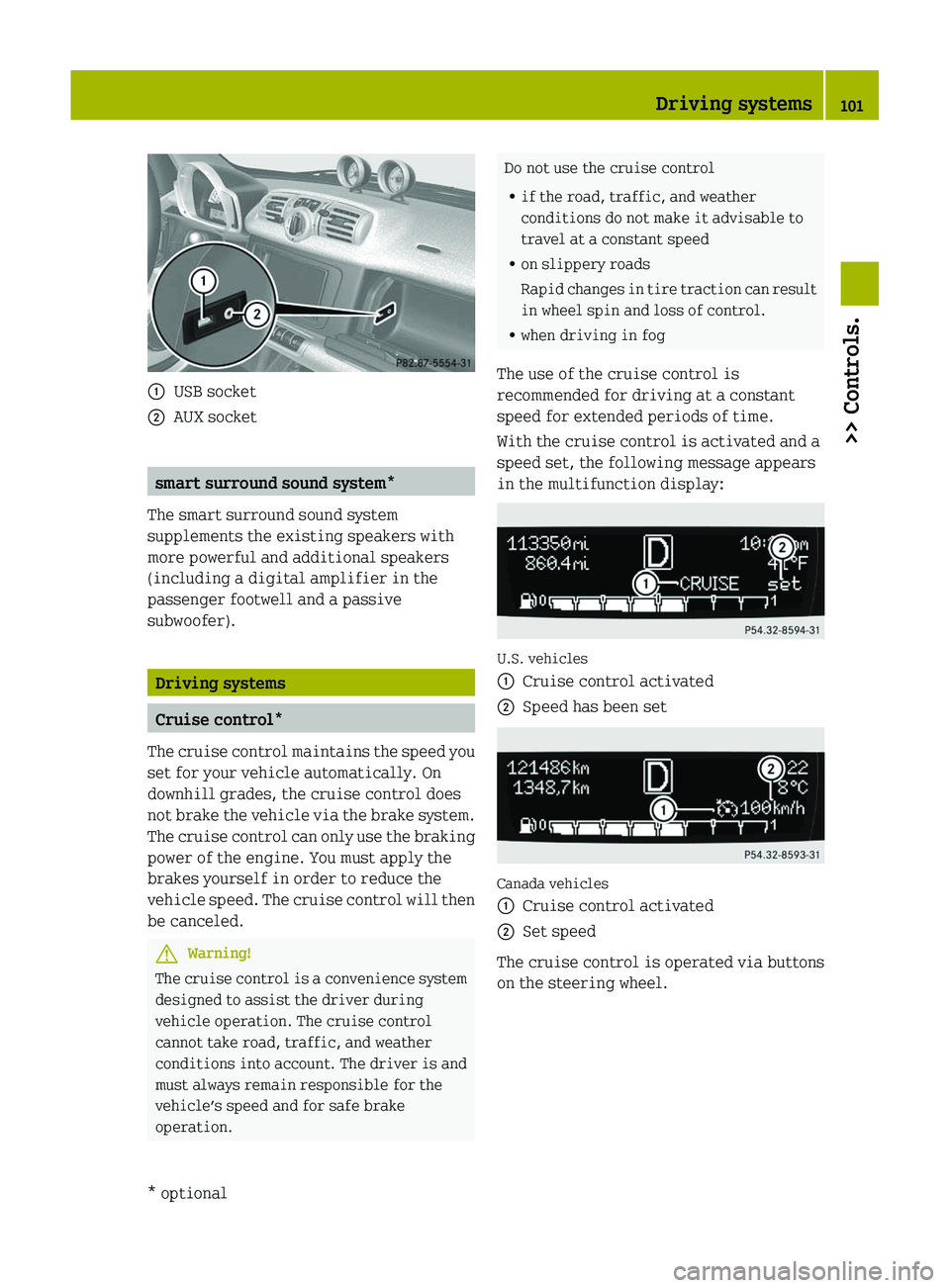
\000FUSB socket\000GAUX socket
smart surround sound system*
The smart surround sound system
supplements the existing speakers with
more powerful and additional speakers
(including a digital amplifier in the
passenger footwell and a passive
subwoofer).
Driving systems
Cruise control*
The cruise control maintains the speed you
set for your vehicle automatically. On
downhill grades, the cruise control does
not brake the vehicle via the brake system.
The cruise control can only use the braking
power of the engine. You must apply the
brakes yourself in order to reduce the
vehicle speed. The cruise control will then
be canceled.
GWarning!
The cruise control is a convenience system
designed to assist the driver during
vehicle operation. The cruise control
cannot take road, traffic, and weather
conditions into account. The driver is and
must always remain responsible for the
vehicle’s speed and for safe brake
operation.
Do not use the cruise control
Rif the road, traffic, and weather
conditions do not make it advisable to
travel at a constant speed
Ron slippery roads
Rapid changes in tire traction can result
in wheel spin and loss of control.
Rwhen driving in fog
The use of the cruise control is
recommended for driving at a constant
speed for extended periods of time.
With the cruise control is activated and a
speed set, the following message appears
in the multifunction display:
U.S. vehicles
\000FCruise control activated\000GSpeed has been set
Canada vehicles
\000FCruise control activated\000GSet speed
The cruise control is operated via buttons
on the steering wheel.
Driving systems101>> Controls.* optionalBA 451 USA, CA Edition A 2011; 1; 4, en-UShereepeVersion: 3.0.3.62010-05-11T15:12:26+02:00 - Seite 101Z
Page 109 of 228
Adjusting air volume
The air volume is controlled depending on
the blower speed selected. Five blower
speeds are available.
0Off1Slow2Medium3High/defrosting4MaximumXIncreasing or decreasing: Push air
volume control \000F up or down.
Defrosting
GWarning!
Never drive with iced up or fogged
windows. Visibility will be significantly
impaired. Impaired visibility could
endanger yourself and others. This may
prevent you from observing the traffic
conditions, thereby causing an accident.
The best defrosting of windows is achieved
if the ice is completely removed from the
windows manually with an ice scraper
before starting the engine.
Heating
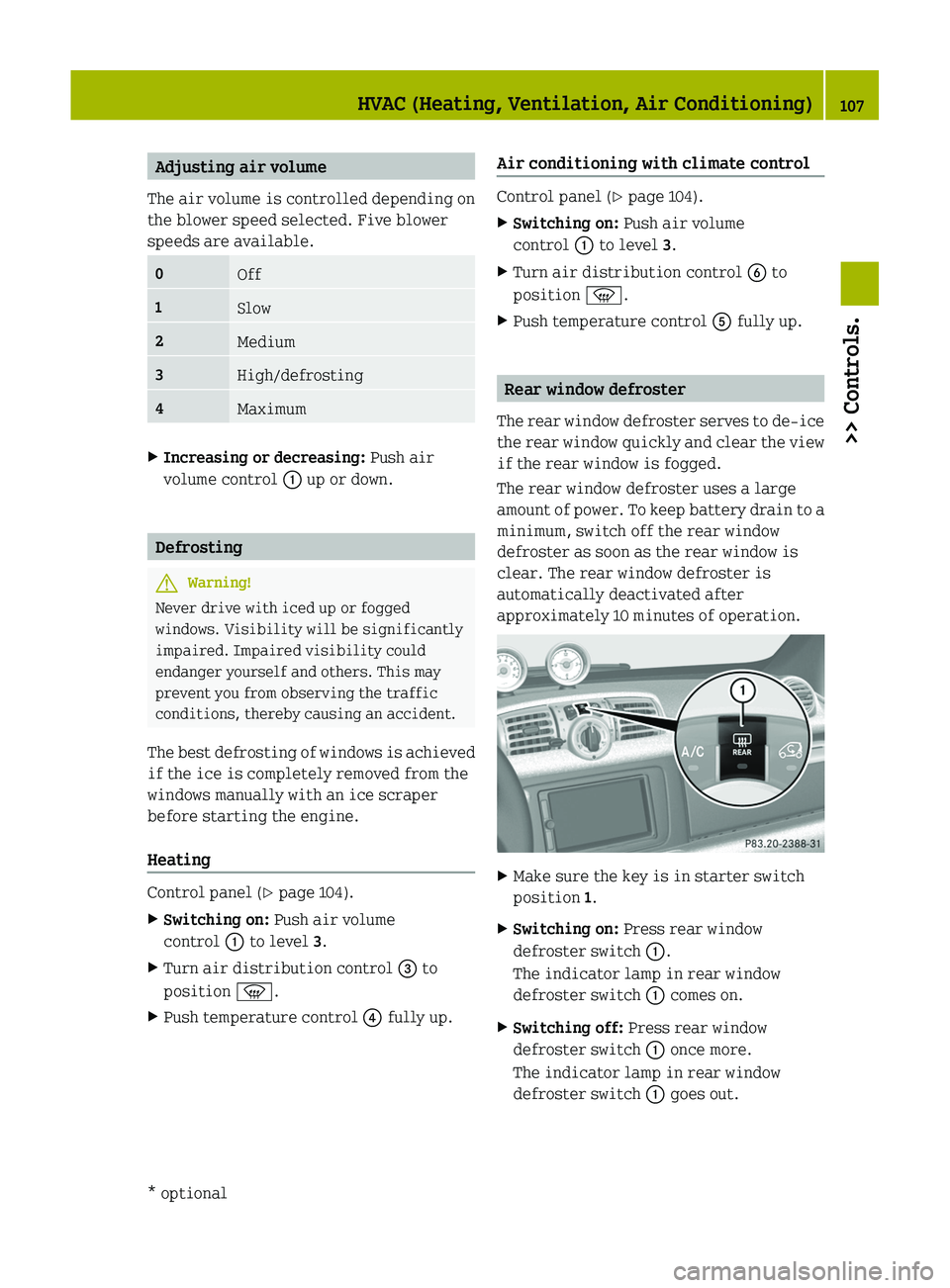
Control panel (Y page 104).
XSwitching on: Push air volume
control \000F to level 3.
XTurn air distribution control \000
Page 110 of 228
Air recirculation mode*
Switch to air recirculation mode 12
to
prevent unpleasant odors from entering the
vehicle from the outside (e.g. before
driving through a tunnel). This setting cuts
off the intake of outside air and
recirculates the air in the passenger
compartment.GWarning!
When the air recirculation mode is
switched on, windows can fog on the inside
immediately. Fogged windows impair
visibility, endangering you and others. If
the windows begin to fog on the inside,
switching off the air recirculation mode
immediately should clear interior window
fogging. If interior window fogging
persists, make sure the air conditioning is
switched on, turn air distribution control
0087 to position 0087 and increase the air
volume using air volume control 0046.
Control panel ( Y page 104).
XSwitching on: Press air recirculation
switch 0088.
The indicator lamp in air recirculation
switch 0088 comes on.XSwitching off: Press air recirculation
switch 0088 once more.
The indicator lamp in air recirculation
switch 0088 goes out.
Loading and storing
Cup holder
GWarning!
In order to help prevent spilling liquids
on vehicle occupants and/or vehicle
equipment, only use containers that fit
into the cup holder. Use lids on open
containers and do not fill containers to a
height where the contents, especially hot
liquids, could spill during braking,
vehicle maneuvers, or an accident. Liquids
spilled on vehicle occupants may cause
serious personal injury. Liquids spilled
on vehicle equipment may cause damage not
covered by the smart Limited Warranty.
Keep in mind that objects placed in a cup
holder may come loose during braking,
vehicle maneuvers, or an accident and be
thrown around in the vehicle interior.
Objects thrown around in the vehicle
interior may cause an accident and/or
serious personal injury.
The cup holder can be used to safely store
sealed drink bottles, containers with a lid,
or beverage cans.
! Do not use the cup holder as an ashtray.
Otherwise it could be damaged.
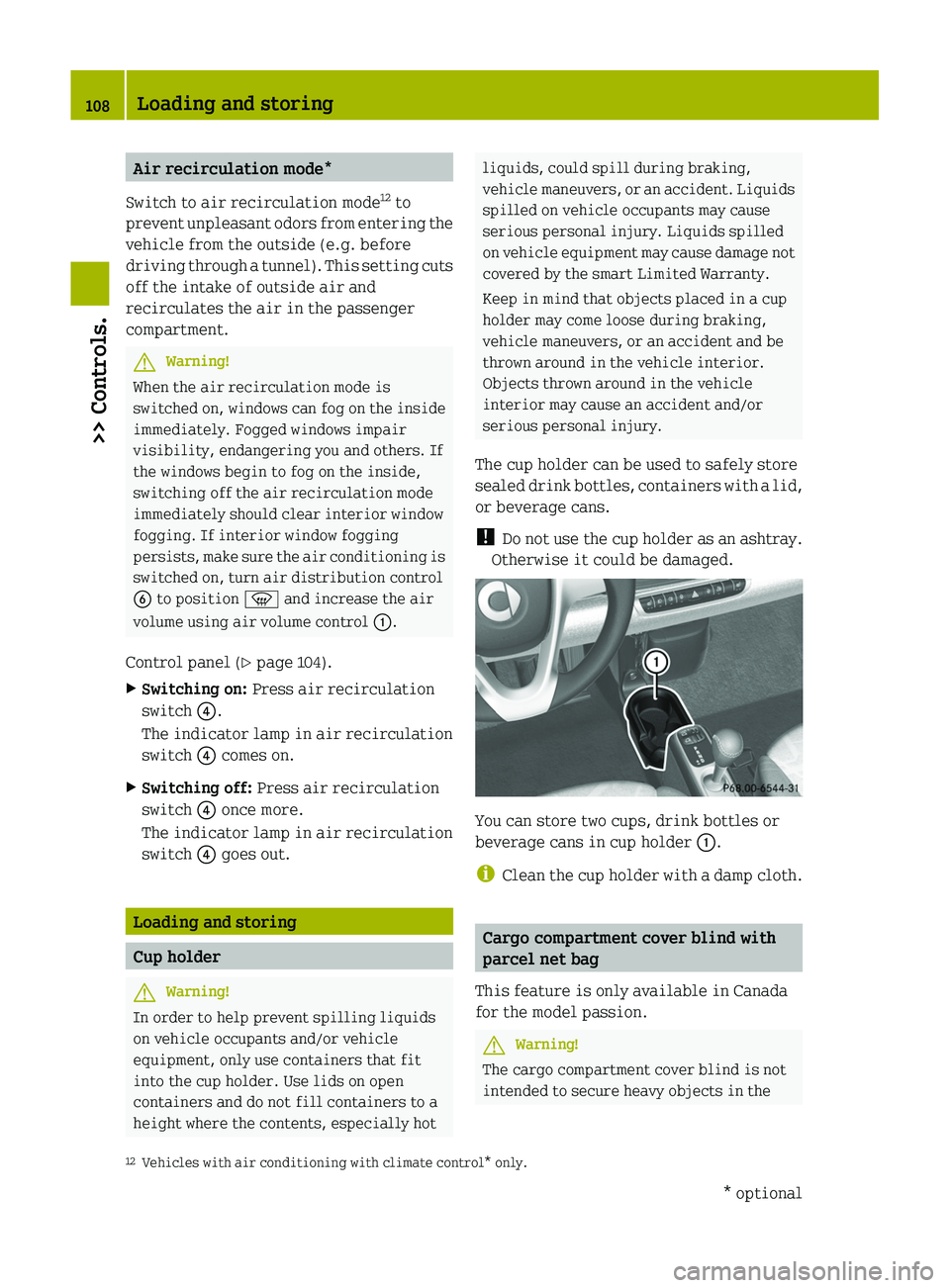
You can store two cups, drink bottles or
beverage cans in cup holder 0046.
i Clean the cup holder with a damp cloth.
Cargo compartment cover blind with
parcel net bag
This feature is only available in Canada
for the model passion.
GWarning!
The cargo compartment cover blind is not
intended to secure heavy objects in the
12 Vehicles with air conditioning with climate control* only.108Loading and storing>> Controls.* optionalBA 451 USA, CA Edition A 2011; 1; 4, en-UShereepeVersion: 3.0.3.62010-05-11T15:12:26+02:00 - Seite 108
Page 115 of 228
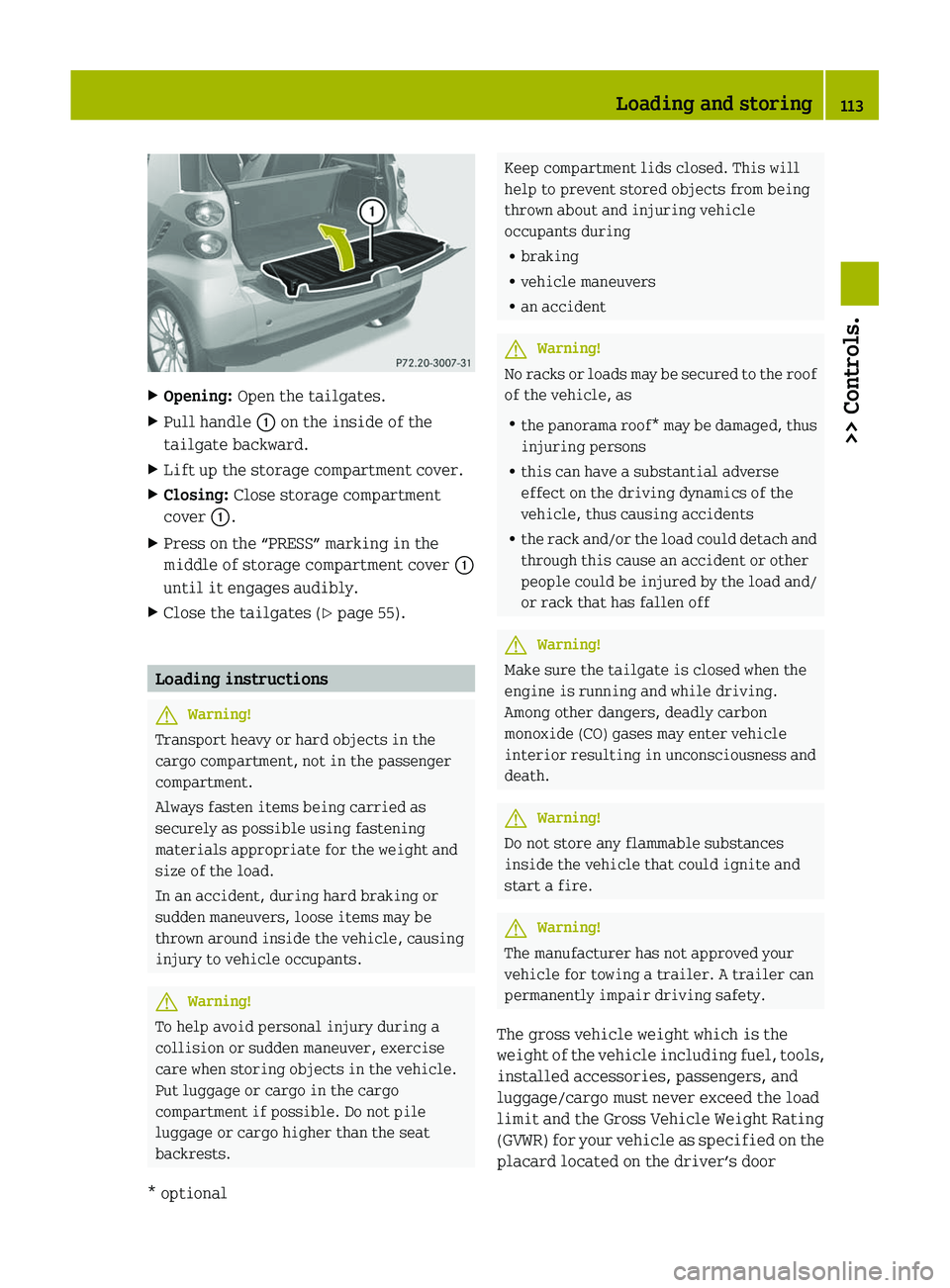
XOpening: Open the tailgates.XPull handle \000F on the inside of the
tailgate backward.
XLift up the storage compartment cover.XClosing: Close storage compartment
cover \000F.
XPress on the “PRESS” marking in the
middle of storage compartment cover \000F
until it engages audibly.
XClose the tailgates (Y page 55).
Loading instructions
GWarning!
Transport heavy or hard objects in the
cargo compartment, not in the passenger
compartment.
Always fasten items being carried as
securely as possible using fastening
materials appropriate for the weight and
size of the load.
In an accident, during hard braking or
sudden maneuvers, loose items may be
thrown around inside the vehicle, causing
injury to vehicle occupants.
GWarning!
To help avoid personal injury during a
collision or sudden maneuver, exercise
care when storing objects in the vehicle.
Put luggage or cargo in the cargo
compartment if possible. Do not pile
luggage or cargo higher than the seat
backrests.
Keep compartment lids closed. This will
help to prevent stored objects from being
thrown about and injuring vehicle
occupants during
Rbraking
Rvehicle maneuvers
Ran accident
GWarning!
No racks or loads may be secured to the roof
of the vehicle, as
Rthe panorama roof* may be damaged, thus
injuring persons
Rthis can have a substantial adverse
effect on the driving dynamics of the
vehicle, thus causing accidents
Rthe rack and/or the load could detach and
through this cause an accident or other
people could be injured by the load and/
or rack that has fallen off
GWarning!
Make sure the tailgate is closed when the
engine is running and while driving.
Among other dangers, deadly carbon
monoxide (CO) gases may enter vehicle
interior resulting in unconsciousness and
death.
GWarning!
Do not store any flammable substances
inside the vehicle that could ignite and
start a fire.
GWarning!
The manufacturer has not approved your
vehicle for towing a trailer. A trailer can
permanently impair driving safety.
The gross vehicle weight which is the
weight of the vehicle including fuel, tools,
installed accessories, passengers, and
luggage/cargo must never exceed the load
limit and the Gross Vehicle Weight Rating
(GVWR) for your vehicle as specified on the
placard located on the driver’s door
Loading and storing113>> Controls.* optionalBA 451 USA, CA Edition A 2011; 1; 4, en-UShereepeVersion: 3.0.3.62010-05-11T15:12:26+02:00 - Seite 113Z
Page 120 of 228
The first 1000 miles (1500 km)
In the Operation section you will find
detailed information on operating,
maintaining and caring for your vehicle.
The more cautiously you treat your vehicle
during the break-in period, the more
satisfied you will be with its performance
later on.
R Drive your vehicle during the first
1 000 miles (1 500 km) at varying but
moderate vehicle and engine speeds.
R During this period, avoid heavy loads
(full throttle driving) and excessive
engine speeds (no more than 2
/ 3 of
maximum rpm in each gear).
R Shift gears in a timely manner.
R Do not attempt to slow the vehicle down
by shifting to a lower gear.
R Avoid accelerating by kickdown.
After 1 000 miles (1 500 km), you may
gradually increase vehicle and engine
speeds to the permissible maximum.
All of the above instructions also apply
when driving the first 1 000 miles (1 500 km)
after the engine has been replaced.
i Always obey applicable speed limits.
At the gas station
Refueling
GWarning!
Gasoline is highly flammable and
poisonous. It burns violently and can cause
serious personal injury.
Never allow sparks, flame or smoking
materials near gasoline!
Turn off the engine before refueling.
Whenever you are around gasoline, avoid
inhaling fumes and skin or clothing
contact. Extinguish all smoking materials.
Direct skin contact with fuels and the
inhalation of fuel vapors are damaging to
your health.
! Do not put diesel fuel in vehicles with
gasoline engines. Do not mix gasoline
with diesel fuel. Even small quantities
of diesel fuel will damage the injection
system. Damage caused by adding diesel
fuel will not be covered by the smart
Limited Warranty.
If diesel fuel has mixed with gasoline,
do not start the engine. Otherwise the
catalytic converter will be irreparably
damaged.
Contact an authorized smart center or
Roadside Assistance immediately and
have the vehicle towed.
! Damage resulting from mixing gasoline
with diesel fuel is not covered by the
smart Limited Warranty.
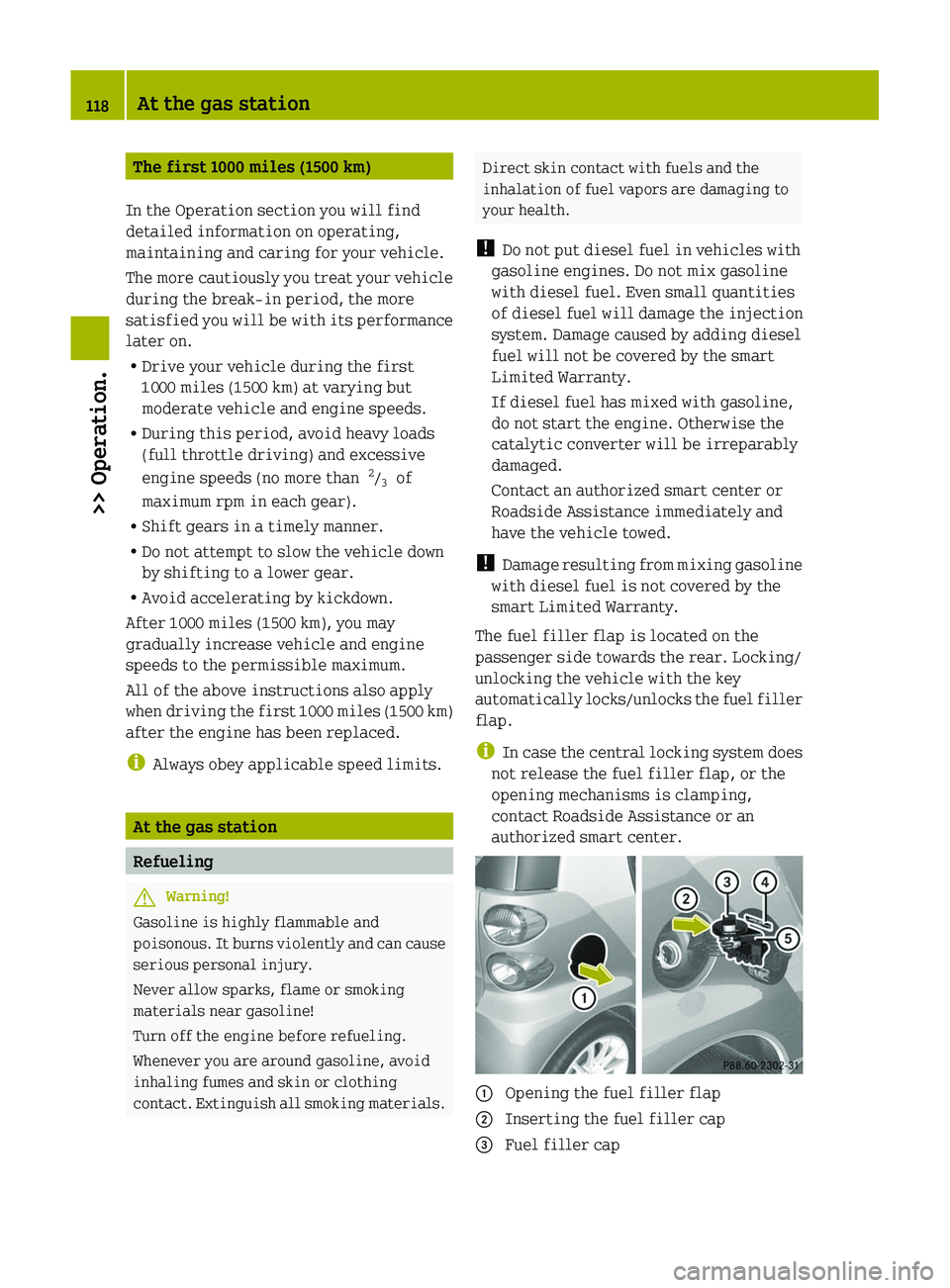
The fuel filler flap is located on the
passenger side towards the rear. Locking/
unlocking the vehicle with the key
automatically locks/unlocks the fuel filler
flap.
i In case the central locking system does
not release the fuel filler flap, or the
opening mechanisms is clamping,
contact Roadside Assistance or an
authorized smart center.0046 Opening the fuel filler flap0047 Inserting the fuel filler cap008A Fuel filler cap118At the gas station>> Operation.
BA 451 USA, CA Edition A 2011; 1; 4, en-UShereepeVersion: 3.0.3.62010-05-11T15:12:26+02:00 - Seite 118