warning SUBARU FORESTER 2004 Service Repair Manual
[x] Cancel search | Manufacturer: SUBARU, Model Year: 2004, Model line: FORESTER, Model: SUBARU FORESTER 2004Pages: 2870, PDF Size: 38.67 MB
Page 1983 of 2870
FU(H4DOTC 2.5)-53
FUEL INJECTION (FUEL SYSTEM)
Fuel Pump
B: INSTALLATION
Install in the reverse order of removal. Do the fol-
lowing:
NOTE:
Replace the gaskets with new ones.
(1) Ensure sealing portion is free from fuel or for-
eign particles before installation.
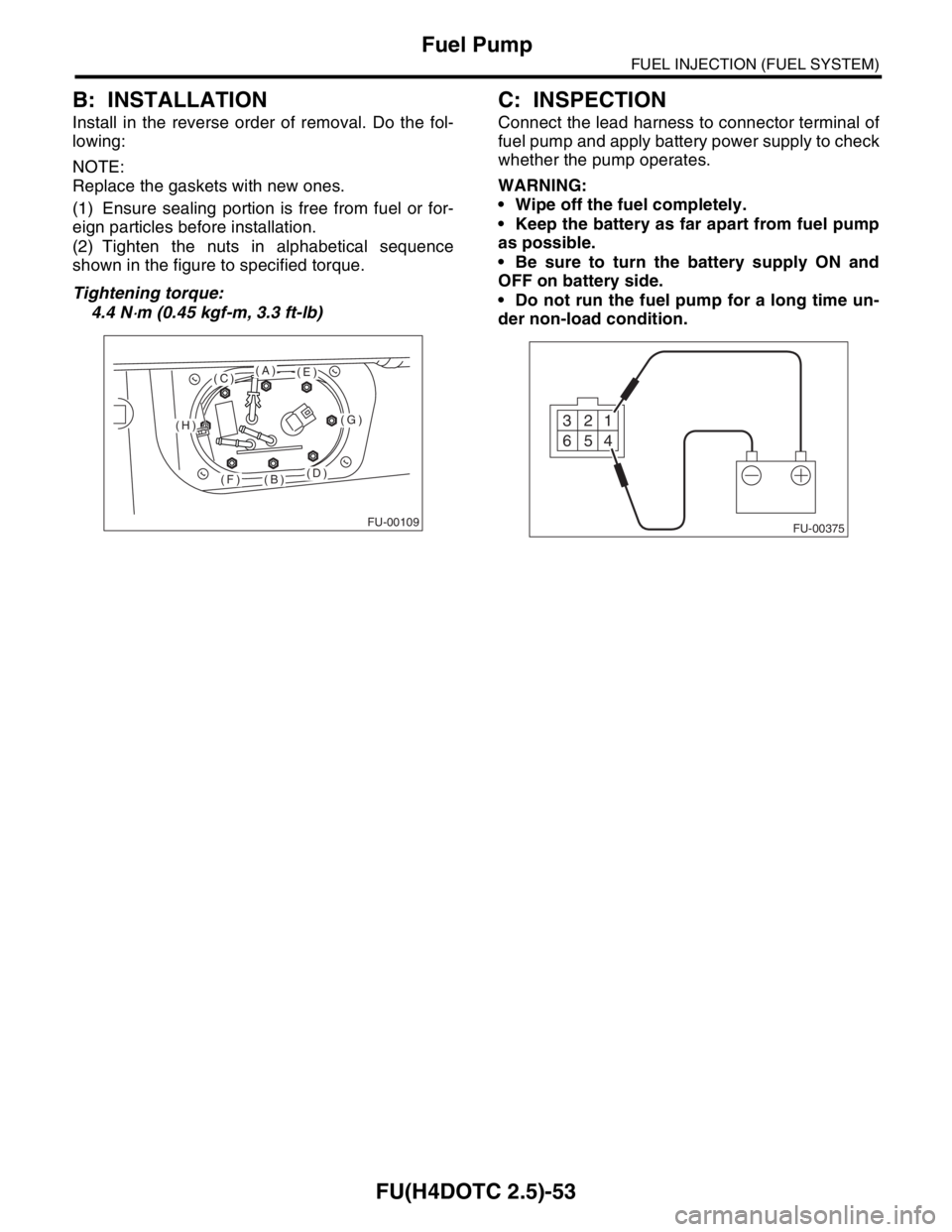
(2) Tighten the nuts in alphabetical sequence
shown in the figure to specified torque.
Tightening torque:
4.4 N
⋅m (0.45 kgf-m, 3.3 ft-lb)
C: INSPECTION
Connect the lead harness to connector terminal of
fuel pump and apply battery power supply to check
whether the pump operates.
WARNING:
Wipe off the fuel completely.
Keep the battery as far apart from fuel pump
as possible.
Be sure to turn the battery supply ON and
OFF on battery side.
Do not run the fuel pump for a long time un-
der non-load condition.
FU-00109
(A)
(B)
(C)
(D)
(E)
(F)
(G)(H)
FU-003751 2 3
4 5 6
Page 1984 of 2870
FU(H4DOTC 2.5)-54
FUEL INJECTION (FUEL SYSTEM)
Fuel Level Sensor
25.Fuel Level Sensor
A: REMOVAL
WARNING:
Place “NO FIRE” signs near the working area.
Be careful not to spill fuel on the floor.
NOTE:
Fuel level sensor is built in fuel pump assembly.
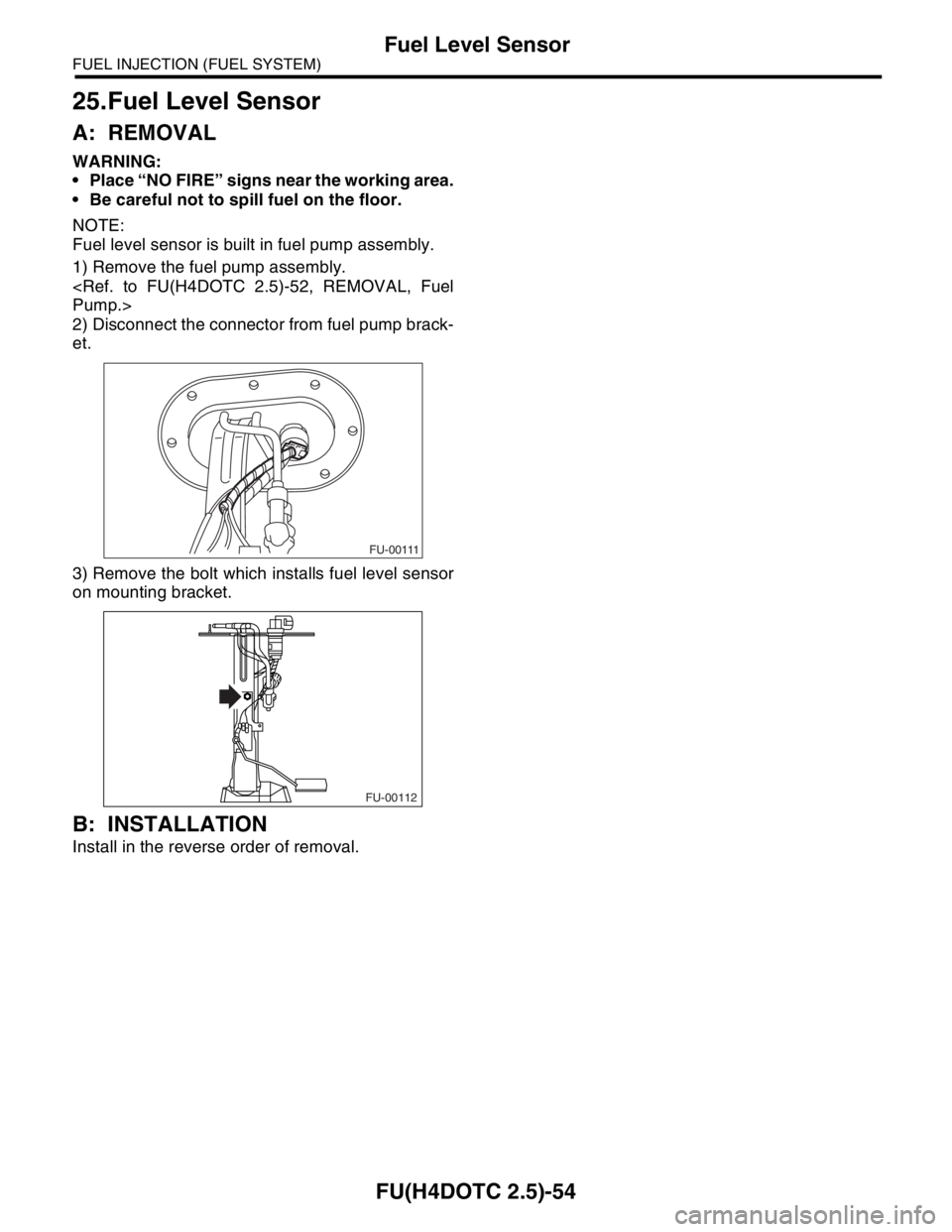
1) Remove the fuel pump assembly.
2) Disconnect the connector from fuel pump brack-
et.
3) Remove the bolt which installs fuel level sensor
on mounting bracket.
B: INSTALLATION
Install in the reverse order of removal.
FU-00111
FU-00112
Page 1985 of 2870
FU(H4DOTC 2.5)-55
FUEL INJECTION (FUEL SYSTEM)
Fuel Sub Level Sensor
26.Fuel Sub Level Sensor
A: REMOVAL
WARNING:
Place “NO FIRE” signs near the working area.
Be careful not to spill fuel on the floor.
1) Disconnect the ground cable from battery.
2) Lift-up the vehicle.
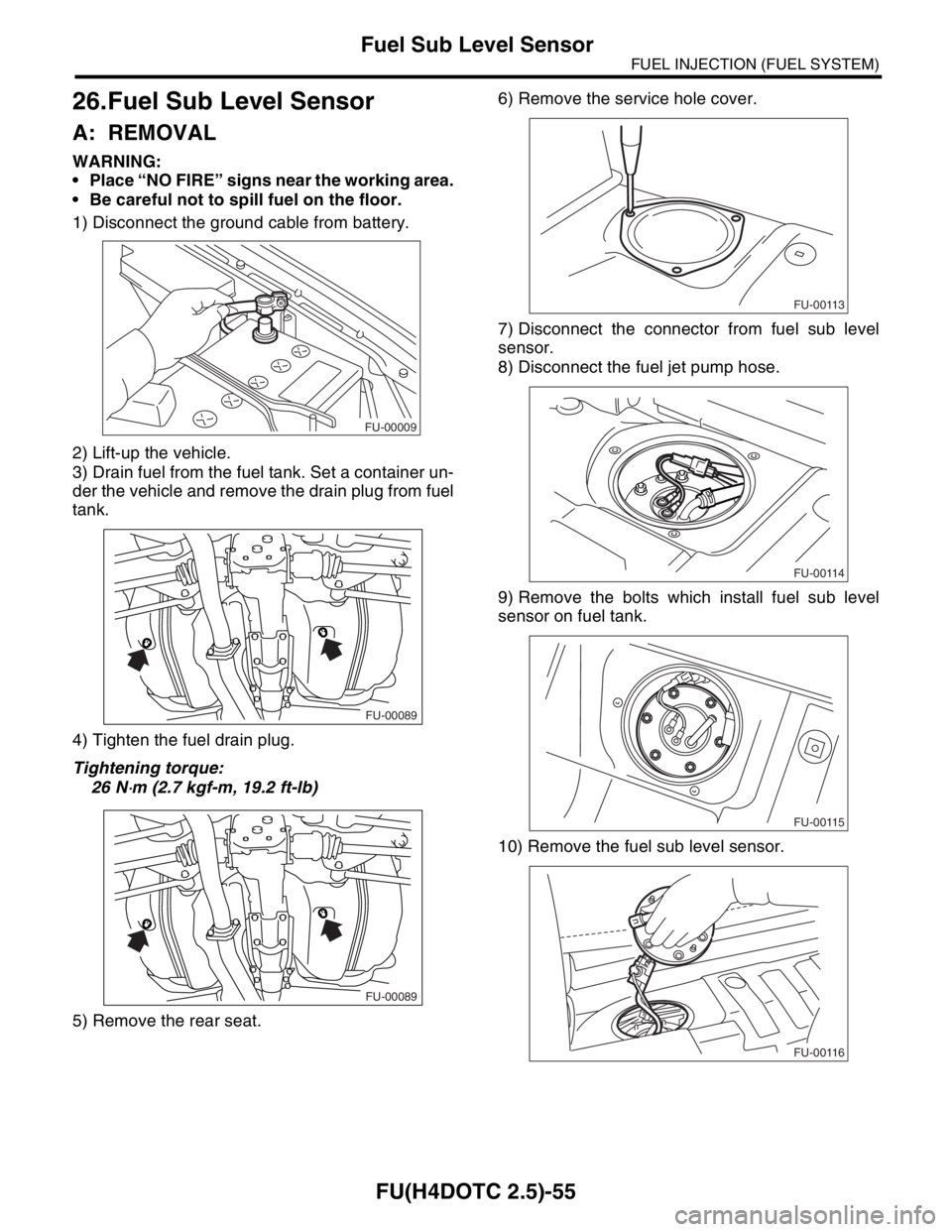
3) Drain fuel from the fuel tank. Set a container un-
der the vehicle and remove the drain plug from fuel
tank.
4) Tighten the fuel drain plug.
Tightening torque:
26 N
⋅m (2.7 kgf-m, 19.2 ft-lb)
5) Remove the rear seat.6) Remove the service hole cover.
7) Disconnect the connector from fuel sub level
sensor.
8) Disconnect the fuel jet pump hose.
9) Remove the bolts which install fuel sub level
sensor on fuel tank.
10) Remove the fuel sub level sensor.
FU-00009
FU-00089
FU-00089
FU-00113
FU-00114
FU-00115
FU-00116
Page 1987 of 2870
FU(H4DOTC 2.5)-57
FUEL INJECTION (FUEL SYSTEM)
Fuel Filter
27.Fuel Filter
A: REMOVAL
WARNING:
Place “NO FIRE” signs near the working area.
Be careful not to spill fuel on the floor.
1) Release the fuel pressure.
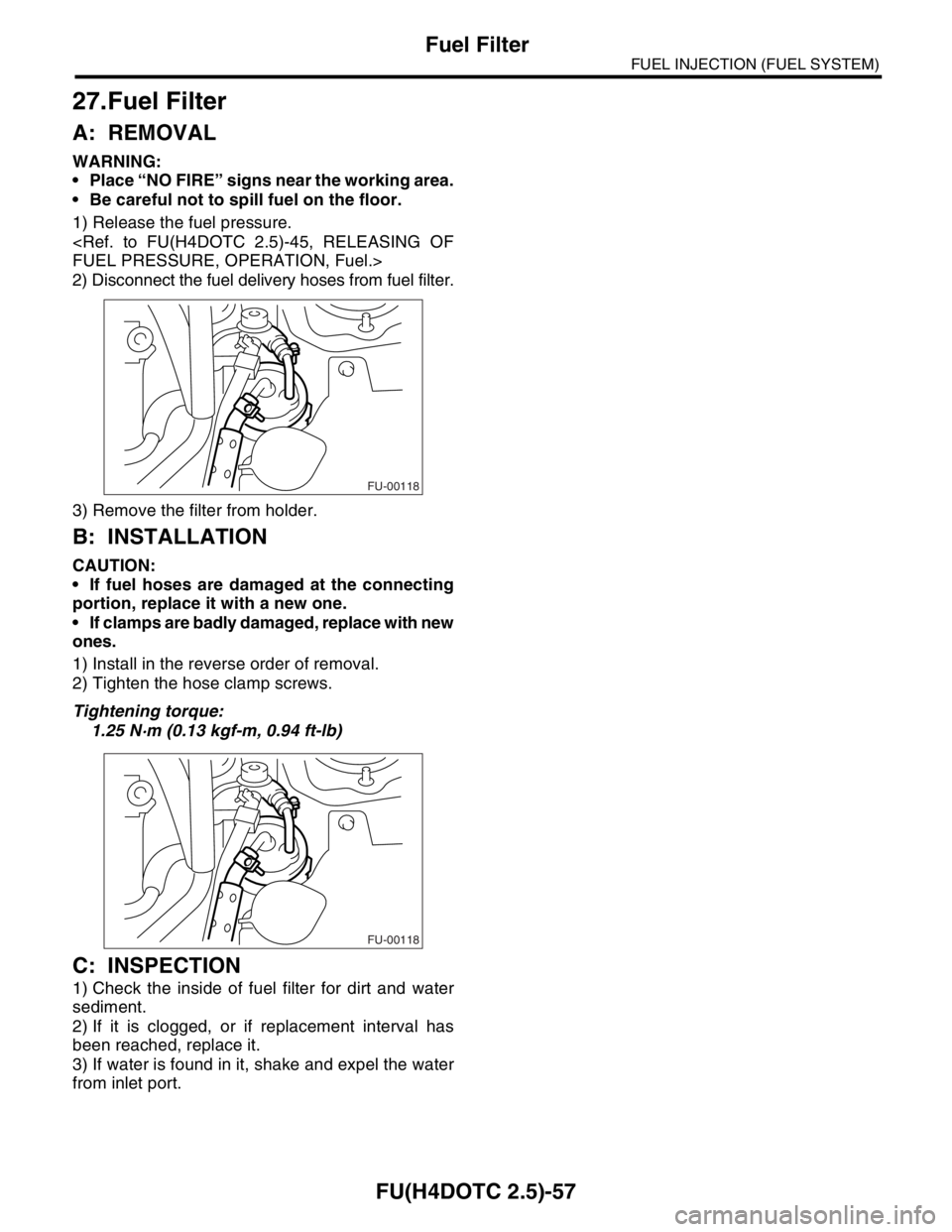
2) Disconnect the fuel delivery hoses from fuel filter.
3) Remove the filter from holder.
B: INSTALLATION
CAUTION:
If fuel hoses are damaged at the connecting
portion, replace it with a new one.
If clamps are badly damaged, replace with new
ones.
1) Install in the reverse order of removal.
2) Tighten the hose clamp screws.
Tightening torque:
1.25 N·m (0.13 kgf-m, 0.94 ft-lb)
C: INSPECTION
1) Check the inside of fuel filter for dirt and water
sediment.
2) If it is clogged, or if replacement interval has
been reached, replace it.
3) If water is found in it, shake and expel the water
from inlet port.
FU-00118
FU-00118
Page 1988 of 2870
FU(H4DOTC 2.5)-58
FUEL INJECTION (FUEL SYSTEM)
Fuel Cut Valve
28.Fuel Cut Valve
A: REMOVAL
WARNING:
Place “NO FIRE” signs near the working area.
Be careful not to spill fuel on the floor.
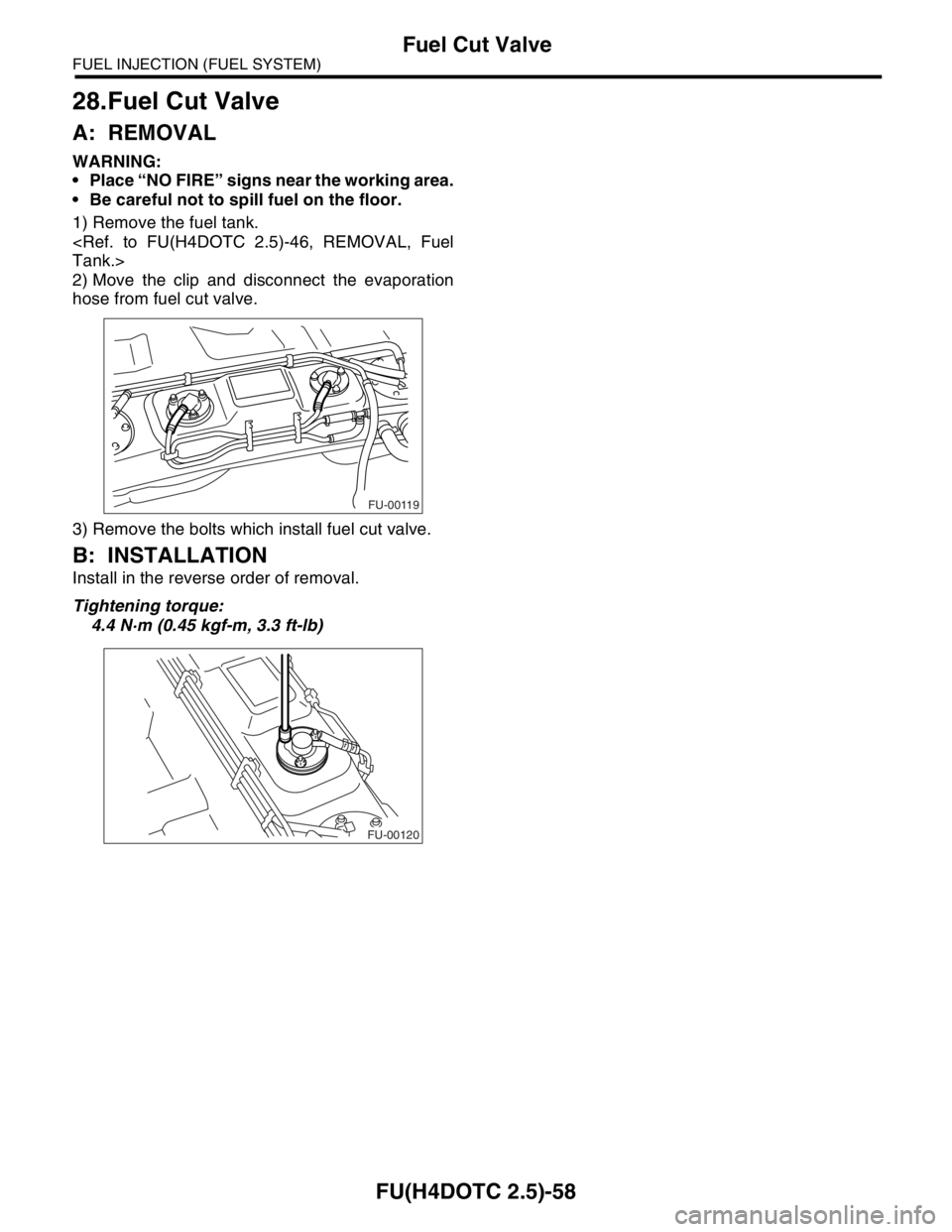
1) Remove the fuel tank.
2) Move the clip and disconnect the evaporation
hose from fuel cut valve.
3) Remove the bolts which install fuel cut valve.
B: INSTALLATION
Install in the reverse order of removal.
Tightening torque:
4.4 N·m (0.45 kgf-m, 3.3 ft-lb)
FU-00119
FU-00120
Page 2028 of 2870

EN(H4DOTC 2.5)-4
ENGINE (DIAGNOSTIC)
Check List for Interview
2. CHECK LIST No. 2
Check the following items about the vehicle’s state when malfunction indicator light turns on.
NOTE:
Use copies of this page for interviewing customers.
a) Other warning lights or indicators turn on. ❏ Ye s / ❏ No
❏ Low fuel warning light
❏ Charge indicator light
❏ AT diagnostic indicator light
❏ ABS Warning Light
❏ Oil pressure indicator light
b) Fuel level
Lack of gasoline: ❏ Yes / ❏ No
Indicator position of fuel gauge:
Experienced running out of fuel: ❏ Ye s / ❏ No
c) Intentional connecting or disconnecting of harness connectors or spark plug cords: ❏ Yes / ❏ No
What:
d) Intentional connecting or disconnecting of hoses: ❏ Ye s / ❏ No
What:
e) Installing of other parts except genuine parts: ❏ Ye s / ❏ No
What:
Where:
f) Occurrence of noise: ❏ Yes / ❏ No
From where:
What kind:
g) Occurrence of smell: ❏ Yes / ❏ No
From where:
What kind:
h) Intrusion of water into engine compartment or passenger compartment: ❏ Yes / ❏ No
i) Troubles occurred
❏ Engine does not start
❏ Engine stalls during idling
❏ Engine stalls while driving
❏ Engine speed decreases
❏ Engine speed does not decrease
❏ Rough idling
❏ Poor acceleration
❏ Back fire
❏ After fire
❏ Does not shift
❏ Excessive shift shock
Page 2030 of 2870
EN(H4DOTC 2.5)-6
ENGINE (DIAGNOSTIC)
General Description
13) Diagnostics should be conducted by rotating
with simple, easy operations and proceeding to
complicated, difficult operations. The most impor-
tant thing in diagnostics is to understand the cus-
tomer’s complaint, and distinguish between the
three causes.
14) On the model with ABS, when performing driv-
ing test in jacked-up or lifted-up position, some-
times the warning light may be lit, but this is not a
malfunction of the system. The reason for this is the
speed difference between the front and rear
wheels. After diagnosis of engine control system,
perform the ABS memory clearance procedure of
self-diagnosis function.
B: INSPECTION
Before performing diagnostics, check the following
items which might affect engine problems:
1. BATTERY
1) Measure battery voltage and specific gravity of
electrolyte.
Standard voltage: 12 V
Specific gravity: Above 1.260
2) Check the condition of the main and other fuses,
and harnesses and connectors. Also check for
proper grounding.
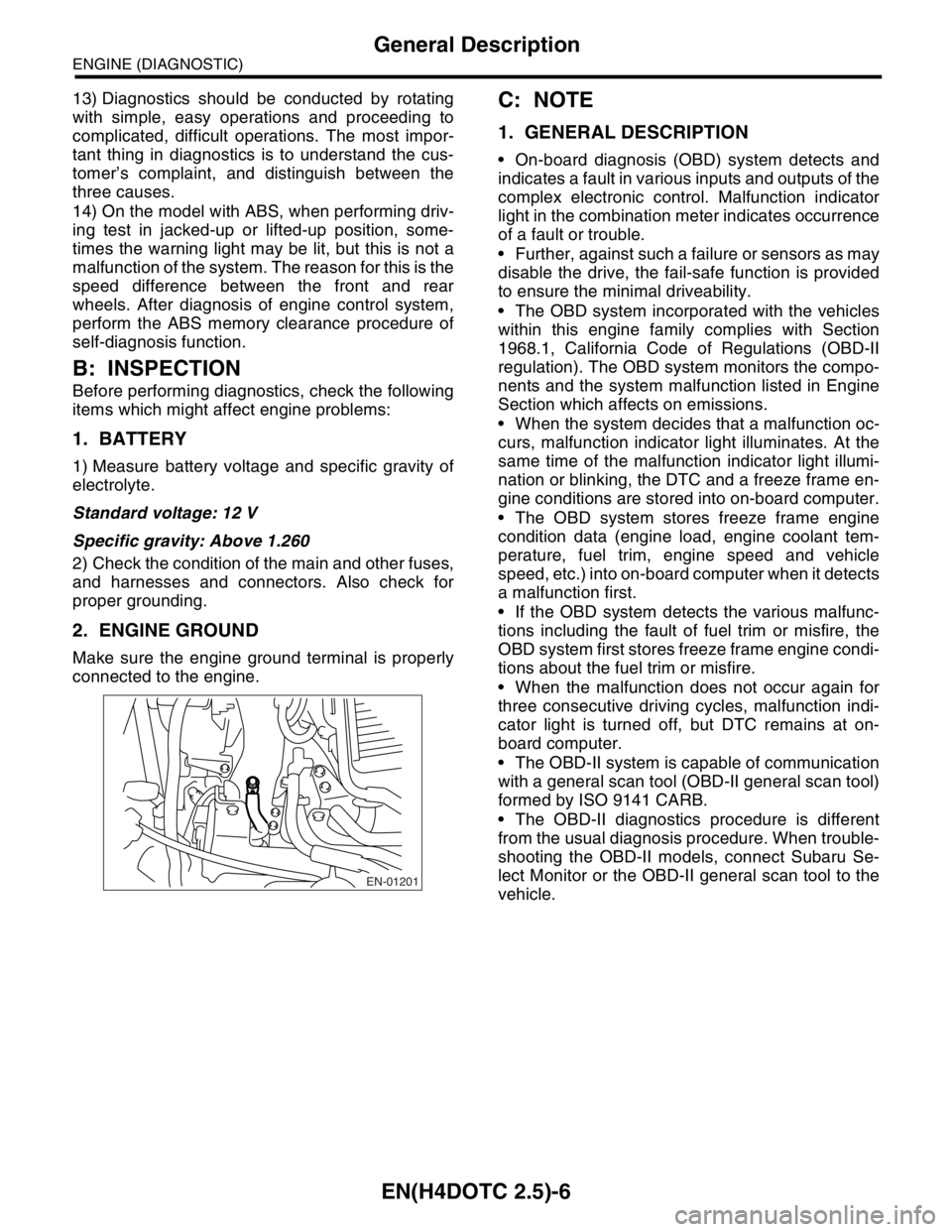
2. ENGINE GROUND
Make sure the engine ground terminal is properly
connected to the engine.
C: NOTE
1. GENERAL DESCRIPTION
On-board diagnosis (OBD) system detects and
indicates a fault in various inputs and outputs of the
complex electronic control. Malfunction indicator
light in the combination meter indicates occurrence
of a fault or trouble.
Further, against such a failure or sensors as may
disable the drive, the fail-safe function is provided
to ensure the minimal driveability.
The OBD system incorporated with the vehicles
within this engine family complies with Section
1968.1, California Code of Regulations (OBD-II
regulation). The OBD system monitors the compo-
nents and the system malfunction listed in Engine
Section which affects on emissions.
When the system decides that a malfunction oc-
curs, malfunction indicator light illuminates. At the
same time of the malfunction indicator light illumi-
nation or blinking, the DTC and a freeze frame en-
gine conditions are stored into on-board computer.
The OBD system stores freeze frame engine
condition data (engine load, engine coolant tem-
perature, fuel trim, engine speed and vehicle
speed, etc.) into on-board computer when it detects
a malfunction first.
If the OBD system detects the various malfunc-
tions including the fault of fuel trim or misfire, the
OBD system first stores freeze frame engine condi-
tions about the fuel trim or misfire.
When the malfunction does not occur again for
three consecutive driving cycles, malfunction indi-
cator light is turned off, but DTC remains at on-
board computer.
The OBD-II system is capable of communication
with a general scan tool (OBD-II general scan tool)
formed by ISO 9141 CARB.
The OBD-II diagnostics procedure is different
from the usual diagnosis procedure. When trouble-
shooting the OBD-II models, connect Subaru Se-
lect Monitor or the OBD-II general scan tool to the
vehicle.
EN-01201
Page 2061 of 2870
EN(H4DOTC 2.5)-37
ENGINE (DIAGNOSTIC)
Inspection Mode
1. PREPARATION FOR THE INSPECTION
MODE
1) Check battery voltage is more than 12 V and fuel
remains half [20 — 402 (5.3 — 10.6 US gal, 4.4 —
8.8 Imp gal)].
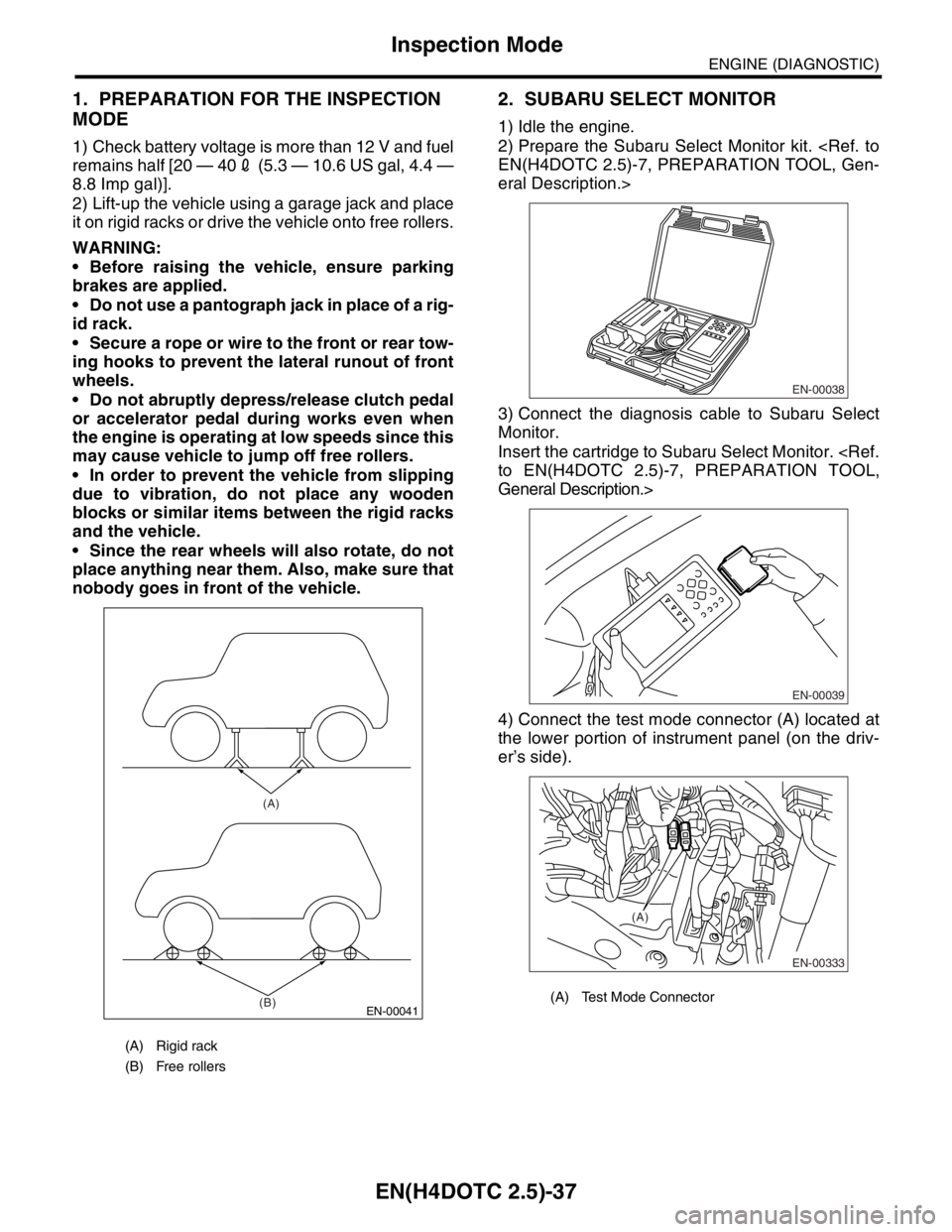
2) Lift-up the vehicle using a garage jack and place
it on rigid racks or drive the vehicle onto free rollers.
WARNING:
Before raising the vehicle, ensure parking
brakes are applied.
Do not use a pantograph jack in place of a rig-
id rack.
Secure a rope or wire to the front or rear tow-
ing hooks to prevent the lateral runout of front
wheels.
Do not abruptly depress/release clutch pedal
or accelerator pedal during works even when
the engine is operating at low speeds since this
may cause vehicle to jump off free rollers.
In order to prevent the vehicle from slipping
due to vibration, do not place any wooden
blocks or similar items between the rigid racks
and the vehicle.
Since the rear wheels will also rotate, do not
place anything near them. Also, make sure that
nobody goes in front of the vehicle.
2. SUBARU SELECT MONITOR
1) Idle the engine.
2) Prepare the Subaru Select Monitor kit.
eral Description.>
3) Connect the diagnosis cable to Subaru Select
Monitor.
Insert the cartridge to Subaru Select Monitor.
General Description.>
4) Connect the test mode connector (A) located at
the lower portion of instrument panel (on the driv-
er’s side).
(A) Rigid rack
(B) Free rollers
EN-00041
(A)
(B)
(A) Test Mode Connector
EN-00038
EN-00039
EN-00333
(A)
Page 2062 of 2870
EN(H4DOTC 2.5)-38
ENGINE (DIAGNOSTIC)
Inspection Mode
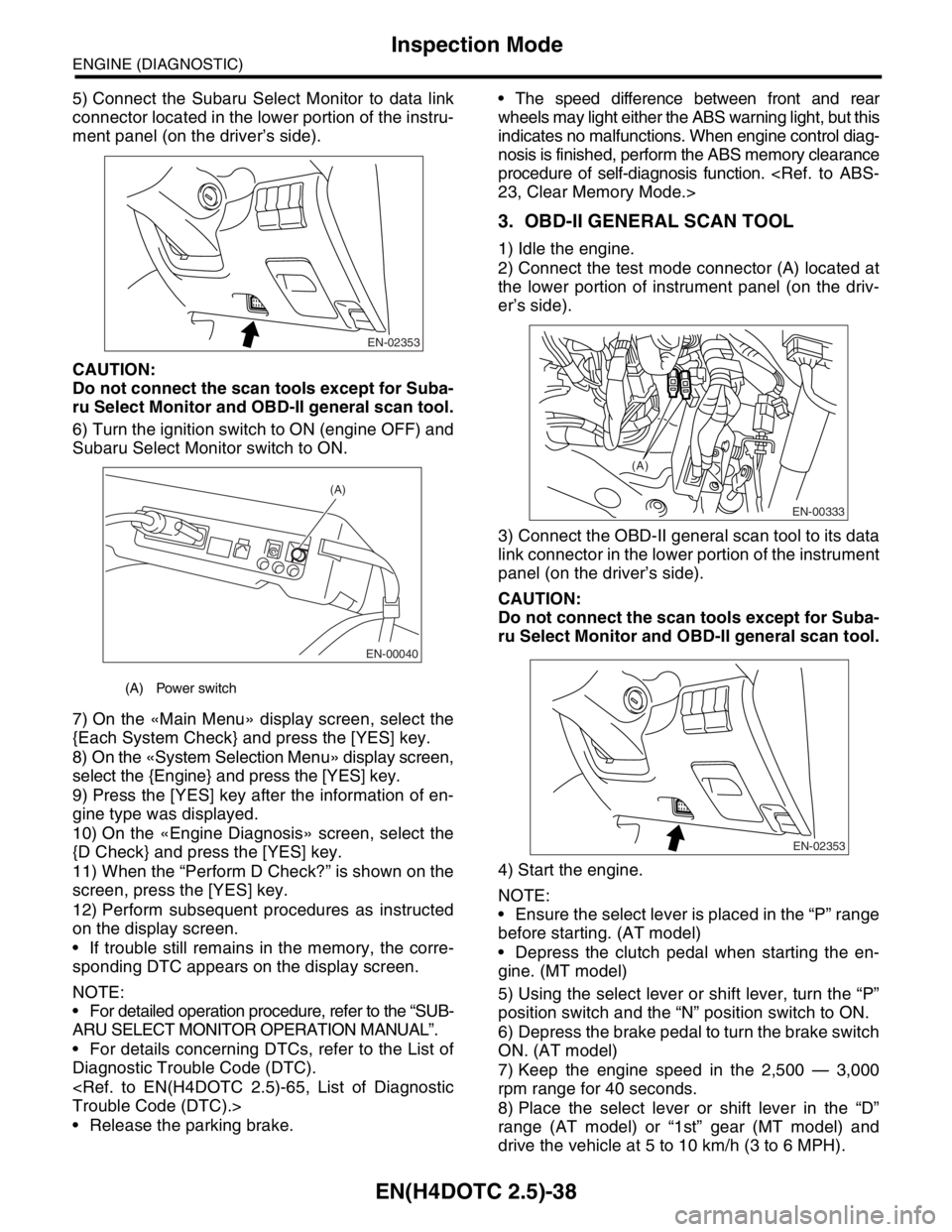
5) Connect the Subaru Select Monitor to data link
connector located in the lower portion of the instru-
ment panel (on the driver’s side).
CAUTION:
Do not connect the scan tools except for Suba-
ru Select Monitor and OBD-II general scan tool.
6) Turn the ignition switch to ON (engine OFF) and
Subaru Select Monitor switch to ON.
7) On the «Main Menu» display screen, select the
{Each System Check} and press the [YES] key.
8) On the «System Selection Menu» display screen,
select the {Engine} and press the [YES] key.
9) Press the [YES] key after the information of en-
gine type was displayed.
10) On the «Engine Diagnosis» screen, select the
{D Check} and press the [YES] key.
11) When the “Perform D Check?” is shown on the
screen, press the [YES] key.
12) Perform subsequent procedures as instructed
on the display screen.
If trouble still remains in the memory, the corre-
sponding DTC appears on the display screen.
NOTE:
For detailed operation procedure, refer to the “SUB-
ARU SELECT MONITOR OPERATION MANUAL”.
For details concerning DTCs, refer to the List of
Diagnostic Trouble Code (DTC).
Release the parking brake. The speed difference between front and rear
wheels may light either the ABS warning light, but this
indicates no malfunctions. When engine control diag-
nosis is finished, perform the ABS memory clearance
procedure of self-diagnosis function.
3. OBD-II GENERAL SCAN TOOL
1) Idle the engine.
2) Connect the test mode connector (A) located at
the lower portion of instrument panel (on the driv-
er’s side).
3) Connect the OBD-II general scan tool to its data
link connector in the lower portion of the instrument
panel (on the driver’s side).
CAUTION:
Do not connect the scan tools except for Suba-
ru Select Monitor and OBD-II general scan tool.
4) Start the engine.
NOTE:
Ensure the select lever is placed in the “P” range
before starting. (AT model)
Depress the clutch pedal when starting the en-
gine. (MT model)
5) Using the select lever or shift lever, turn the “P”
position switch and the “N” position switch to ON.
6) Depress the brake pedal to turn the brake switch
ON. (AT model)
7) Keep the engine speed in the 2,500 — 3,000
rpm range for 40 seconds.
8) Place the select lever or shift lever in the “D”
range (AT model) or “1st” gear (MT model) and
drive the vehicle at 5 to 10 km/h (3 to 6 MPH).
(A) Power switch
EN-02353
EN-00040
(A)
EN-00333
(A)
EN-02353
Page 2063 of 2870

EN(H4DOTC 2.5)-39
ENGINE (DIAGNOSTIC)
Inspection Mode
NOTE:
On AWD vehicles, release the parking brake.
The speed difference between front and rear
wheels may light either the ABS warning light, but
this indicates no malfunctions. When engine con-
trol diagnosis is finished, perform the ABS memory
clearance procedure of self-diagnosis function.
9) Using the OBD-II general scan tool, check
DTC(s) and record the result(s).
NOTE:
For detailed operation procedures, refer to the
OBD-II General Scan Tool Operation Manual.
For details concerning DTCs, refer to the List of
Diagnostic Trouble Code (DTC).