torque SUBARU FORESTER 2004 Service Repair Manual
[x] Cancel search | Manufacturer: SUBARU, Model Year: 2004, Model line: FORESTER, Model: SUBARU FORESTER 2004Pages: 2870, PDF Size: 38.67 MB
Page 1080 of 2870

SC(H4SO)-5
STARTING/CHARGING SYSTEM
General Description
C: CAUTION
Wear working clothing, including a cap, protec-
tive goggles, and protective shoes during opera-
tion.
Remove contamination including dirt and corro-
sion before removal, installation or disassembly.
Keep the disassembled parts in order and pro-
tect them from dust or dirt.
Before removal, installation or disassembly, be
sure to clarify the failure. Avoid unnecessary re-
moval, installation, disassembly, and replacement.
Be careful not to burn yourself, because each
part in the vehicle is hot after running.
Be sure to tighten fasteners including bolts and
nuts to the specified torque.
Place shop jacks or rigid racks at the specified
points.
Before disconnecting electrical connectors of
sensors or units, be sure to disconnect the ground
cable from battery.
Page 1081 of 2870
SC(H4SO)-6
STARTING/CHARGING SYSTEM
Starter
2. Starter
A: REMOVAL
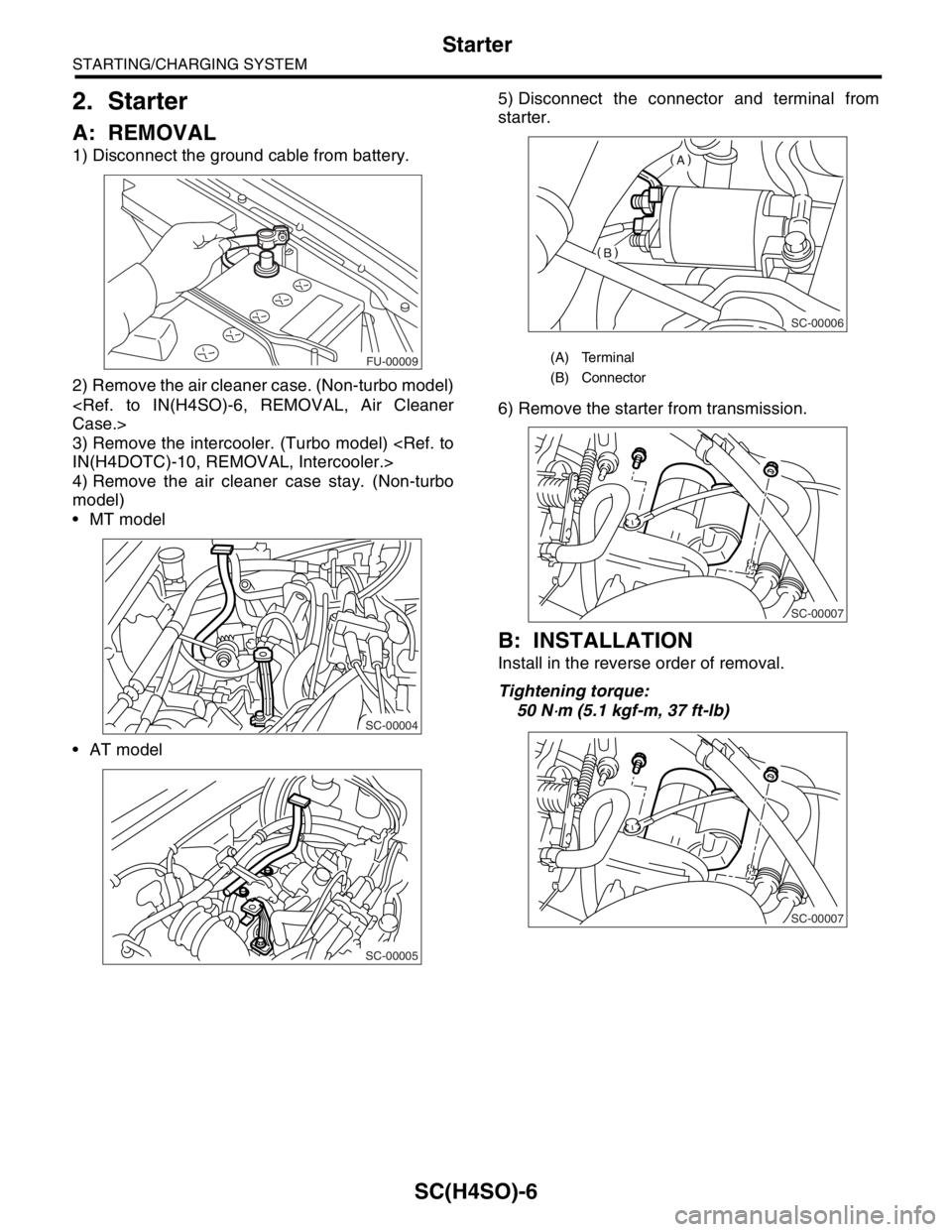
1) Disconnect the ground cable from battery.
2) Remove the air cleaner case. (Non-turbo model)
3) Remove the intercooler. (Turbo model)
4) Remove the air cleaner case stay. (Non-turbo
model)
MT model
AT model5) Disconnect the connector and terminal from
starter.
6) Remove the starter from transmission.
B: INSTALLATION
Install in the reverse order of removal.
Tightening torque:
50 N
⋅m (5.1 kgf-m, 37 ft-lb)
FU-00009
SC-00004
SC-00005
(A) Terminal
(B) Connector
SC-00006
SC-00007
SC-00007
Page 1088 of 2870
SC(H4SO)-13
STARTING/CHARGING SYSTEM
Starter
7. PINION GAP
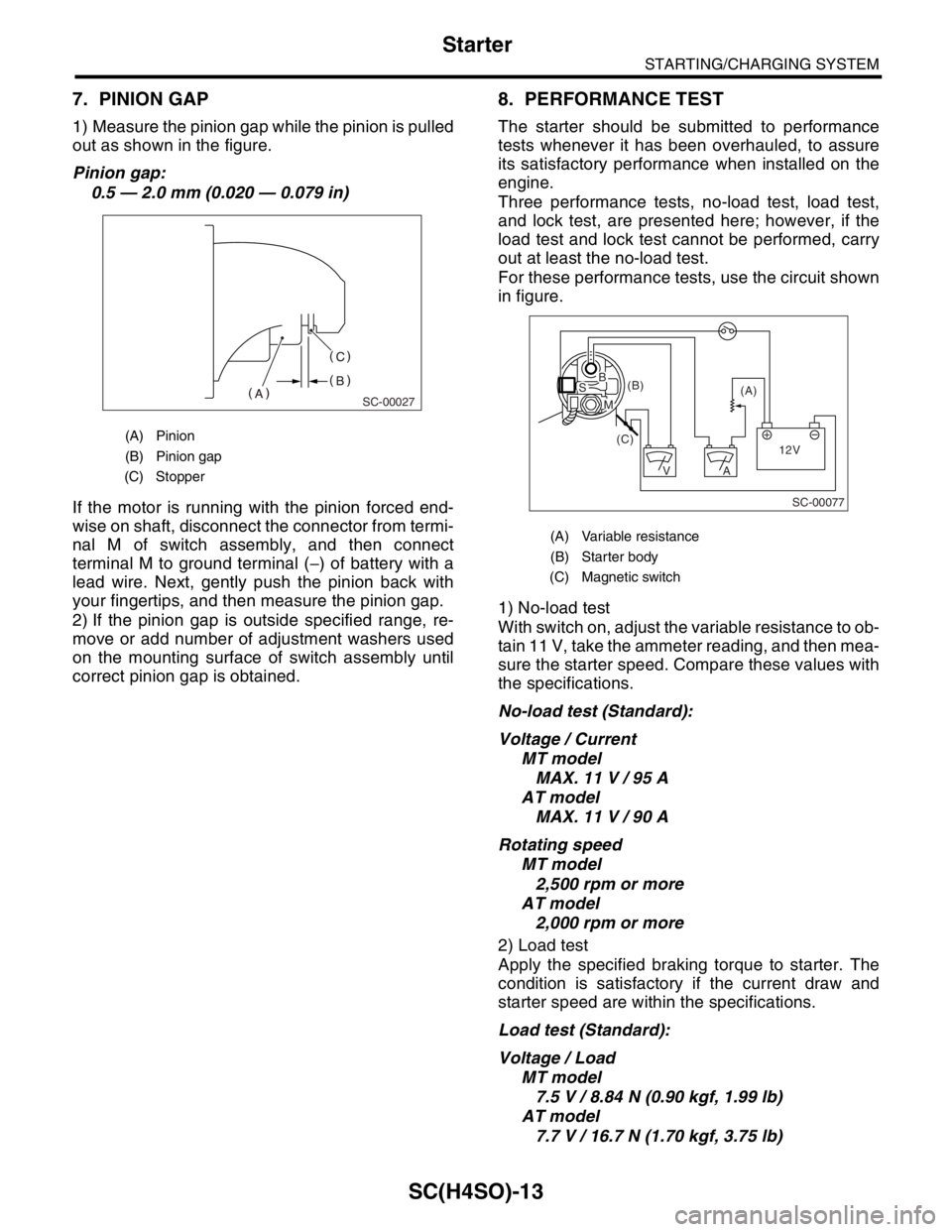
1) Measure the pinion gap while the pinion is pulled
out as shown in the figure.
Pinion gap:
0.5 — 2.0 mm (0.020 — 0.079 in)
If the motor is running with the pinion forced end-
wise on shaft, disconnect the connector from termi-
nal M of switch assembly, and then connect
terminal M to ground terminal (−) of battery with a
lead wire. Next, gently push the pinion back with
your fingertips, and then measure the pinion gap.
2) If the pinion gap is outside specified range, re-
move or add number of adjustment washers used
on the mounting surface of switch assembly until
correct pinion gap is obtained.
8. PERFORMANCE TEST
The starter should be submitted to performance
tests whenever it has been overhauled, to assure
its satisfactory performance when installed on the
engine.
Three performance tests, no-load test, load test,
and lock test, are presented here; however, if the
load test and lock test cannot be performed, carry
out at least the no-load test.
For these performance tests, use the circuit shown
in figure.
1) No-load test
With switch on, adjust the variable resistance to ob-
tain 11 V, take the ammeter reading, and then mea-
sure the starter speed. Compare these values with
the specifications.
No-load test (Standard):
Voltage / Current
MT model
MAX. 11 V / 95 A
AT model
MAX. 11 V / 90 A
Rotating speed
MT model
2,500 rpm or more
AT model
2,000 rpm or more
2) Load test
Apply the specified braking torque to starter. The
condition is satisfactory if the current draw and
starter speed are within the specifications.
Load test (Standard):
Voltage / Load
MT model
7.5 V / 8.84 N (0.90 kgf, 1.99 lb)
AT model
7.7 V / 16.7 N (1.70 kgf, 3.75 lb)
(A) Pinion
(B) Pinion gap
(C) Stopper
SC-00027
(A) Variable resistance
(B) Starter body
(C) Magnetic switch
SC-00077
(A) (B)
(C)
12V +
AV
BS
M
Page 1089 of 2870

SC(H4SO)-14
STARTING/CHARGING SYSTEM
Starter
Current / Speed
MT model
300 A / 870 rpm or more
AT model
400 A / 710 rpm or more
3) Lock test
With the starter stalled, or not rotating, measure the
torque developed and current draw when the volt-
age is adjusted to the specified voltage.
Lock test (Standard):
Voltage / Current
MT model
4 V / 680 A or less
AT model
3.5 V / 960 A or less
Torque
MT model
17.0 N (1.73 kgf, 3.82 lb) or more
AT model
31.0 N (3.16 kgf, 6.97 lb) or more
Page 1096 of 2870
SC(H4SO)-21
STARTING/CHARGING SYSTEM
Battery
4. Battery
A: REMOVAL
1) Disconnect the positive (+) cable after discon-
necting the ground (−) cable of battery.
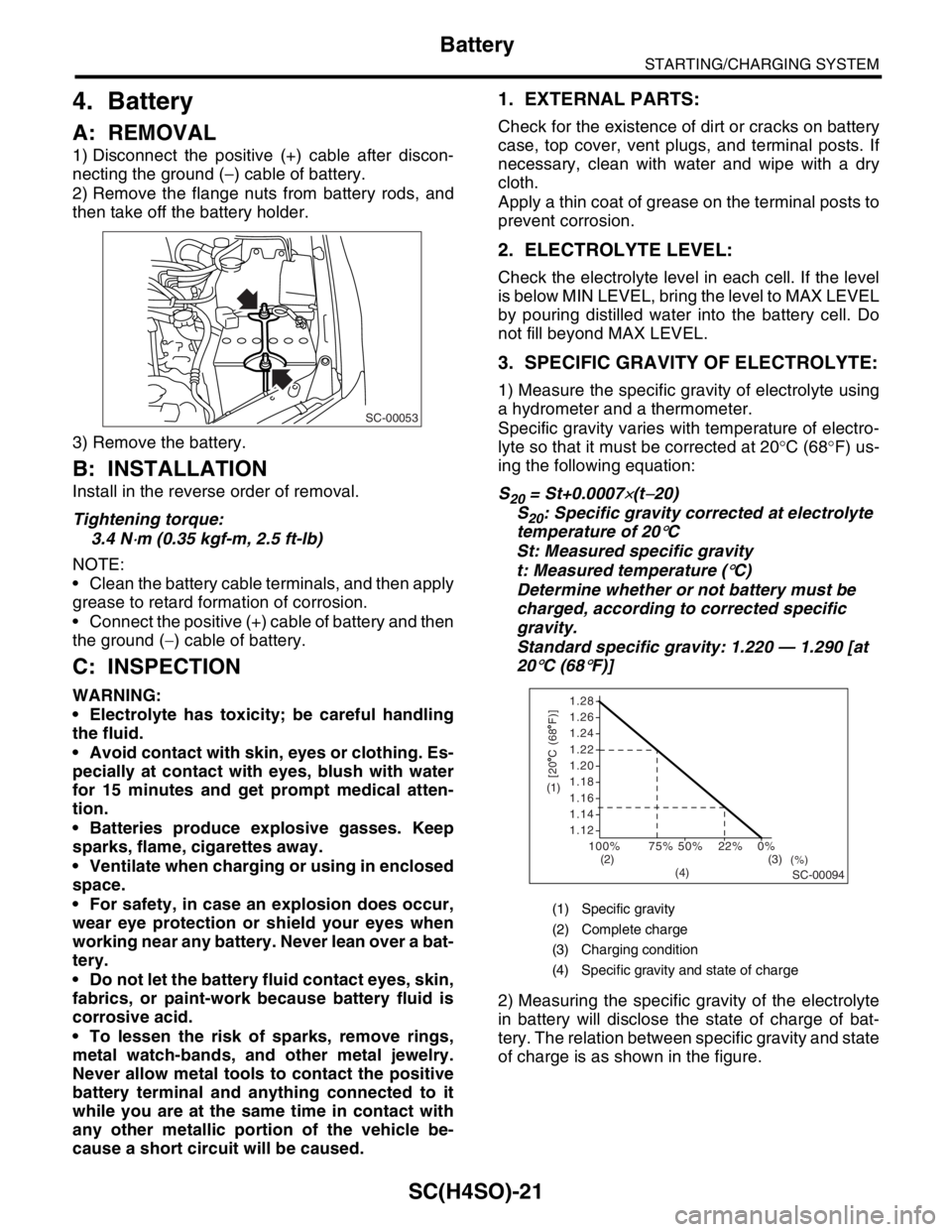
2) Remove the flange nuts from battery rods, and
then take off the battery holder.
3) Remove the battery.
B: INSTALLATION
Install in the reverse order of removal.
Tightening torque:
3.4 N
⋅m (0.35 kgf-m, 2.5 ft-lb)
NOTE:
Clean the battery cable terminals, and then apply
grease to retard formation of corrosion.
Connect the positive (+) cable of battery and then
the ground (−) cable of battery.
C: INSPECTION
WARNING:
Electrolyte has toxicity; be careful handling
the fluid.
Avoid contact with skin, eyes or clothing. Es-
pecially at contact with eyes, blush with water
for 15 minutes and get prompt medical atten-
tion.
Batteries produce explosive gasses. Keep
sparks, flame, cigarettes away.
Ventilate when charging or using in enclosed
space.
For safety, in case an explosion does occur,
wear eye protection or shield your eyes when
working near any battery. Never lean over a bat-
tery.
Do not let the battery fluid contact eyes, skin,
fabrics, or paint-work because battery fluid is
corrosive acid.
To lessen the risk of sparks, remove rings,
metal watch-bands, and other metal jewelry.
Never allow metal tools to contact the positive
battery terminal and anything connected to it
while you are at the same time in contact with
any other metallic portion of the vehicle be-
cause a short circuit will be caused.
1. EXTERNAL PARTS:
Check for the existence of dirt or cracks on battery
case, top cover, vent plugs, and terminal posts. If
necessary, clean with water and wipe with a dry
cloth.
Apply a thin coat of grease on the terminal posts to
prevent corrosion.
2. ELECTROLYTE LEVEL:
Check the electrolyte level in each cell. If the level
is below MIN LEVEL, bring the level to MAX LEVEL
by pouring distilled water into the battery cell. Do
not fill beyond MAX LEVEL.
3. SPECIFIC GRAVITY OF ELECTROLYTE:
1) Measure the specific gravity of electrolyte using
a hydrometer and a thermometer.
Specific gravity varies with temperature of electro-
lyte so that it must be corrected at 20°C (68°F) us-
ing the following equation:
S
20 = St+0.0007×(t−20)
S
20: Specific gravity corrected at electrolyte
temperature of 20
°C
St: Measured specific gravity
t: Measured temperature (
°C)
Determine whether or not battery must be
charged, according to corrected specific
gravity.
Standard specific gravity: 1.220 — 1.290 [at
20
°C (68°F)]
2) Measuring the specific gravity of the electrolyte
in battery will disclose the state of charge of bat-
tery. The relation between specific gravity and state
of charge is as shown in the figure.
SC-00053
(1) Specific gravity
(2) Complete charge
(3) Charging condition
(4) Specific gravity and state of charge
1.28
1.26
1.24
1.22
1.20
1.18
1.16
1.14
1.12
100%
(%)75% 50% 22% 0%
SC-00094
[20 C (68 F)](1)
(2) (3)
(4)
Page 1117 of 2870
EN(H4SO)-19
ENGINE (DIAGNOSTIC)
Electrical Component Location
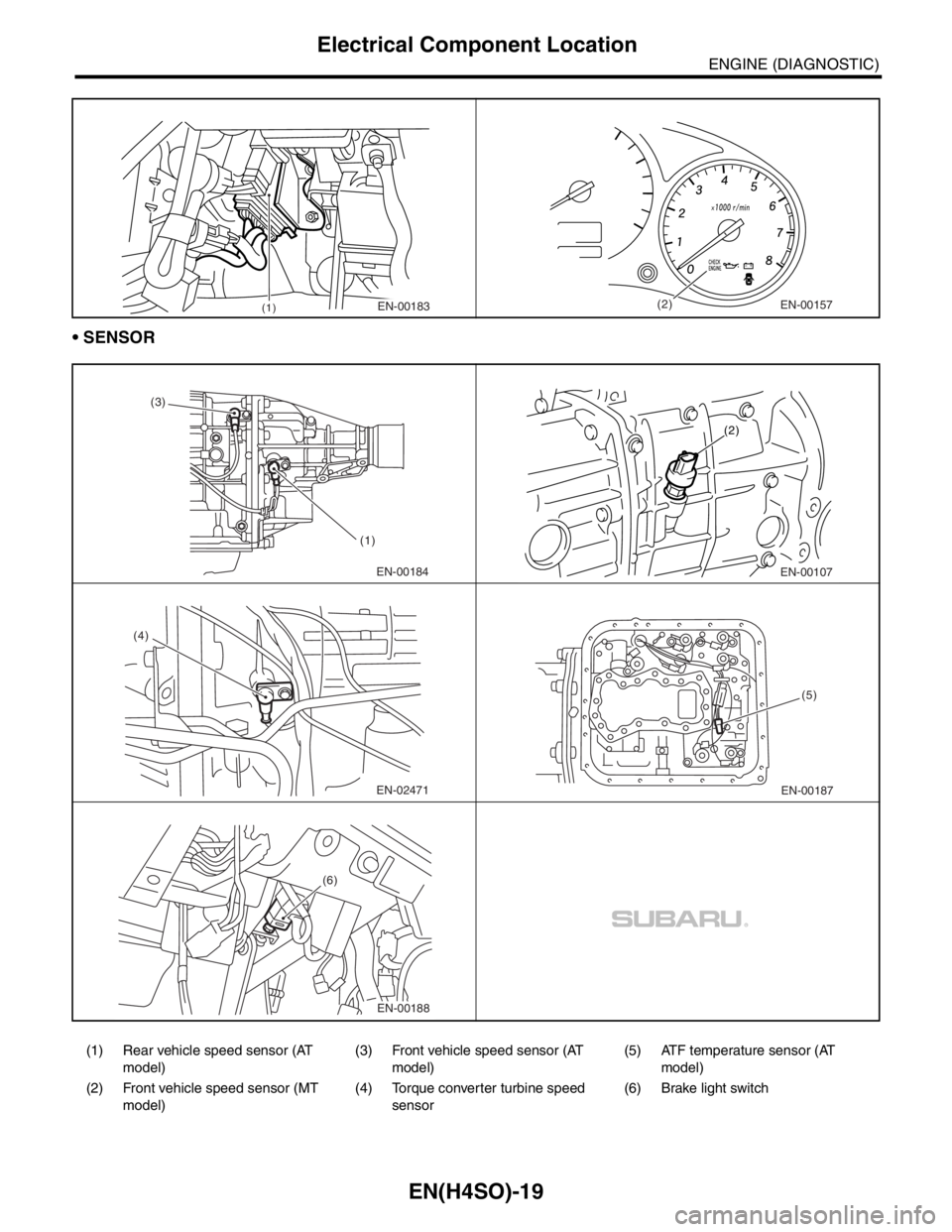
SENSOR
(1) Rear vehicle speed sensor (AT
model)(3) Front vehicle speed sensor (AT
model)(5) ATF temperature sensor (AT
model)
(2) Front vehicle speed sensor (MT
model)(4) Torque converter turbine speed
sensor(6) Brake light switch
(1)EN-00183(2)EN-00157
EN-00184 (3)
(1)EN-00107 (2)
EN-02471 (4)EN-00187(5)
EN-00188 (6)
Page 1120 of 2870

EN(H4SO)-22
ENGINE (DIAGNOSTIC)
Engine Control Module (ECM) I/O Signal
A/C switch B136 11ON: 10 — 13
OFF: 0ON: 12 — 14
OFF: 0—
Ignition switch B136 10 10 — 13 12 — 14 —
Neutral
Po si ti o n
SwitchMT B136 21ON: 12±0.5
OFF: 0Switch is ON when gear is in
neutral position.
AT B136 21ON: 0
OFF: 12±0.5Switch is ON when shifted into
“P” or “N” range.
Test Mode Connector B136 3 5 5 When connected: 0
Knock
sensorSignal B135 16 2.8 2.8 —
Shield B135 27 0 0 —
Back-up power supply B135 9 10 — 13 12 — 14 Ignition switch “OFF”: 10 — 13
Control module power
supplyB135 1 10 — 13 12 — 14 —
B135 2 10 — 13 12 — 14 —
Sensor power supply B135 3 5 5 —
Ignition
control#1, #2 B134 33 0 1 — 3.4 Waveform
#3, #4 B134 32 0 1 — 3.4 Waveform
Fuel injec-
tor#1 B134 34 10 — 13 1 — 14 Waveform
#2 B134 23 10 — 13 1 — 14 Waveform
#3 B134 22 10 — 13 1 — 14 Waveform
#4 B134 8 10 — 13 1 — 14 Waveform
Idle air
control
solenoid
valveSignal 1 B134 20 — 1 — 13 Waveform
Signal 2 B134 6 — 1 — 13 Waveform
Signal 3 B134 5 — 1 — 13 Waveform
Signal 4 B134 19 — 1 — 13 Waveform
Pow er
supplyB135 2 10 — 13 12 — 14 —
Fuel pump relay control B134 2ON: 0.5, or less
OFF: 10 — 130.5, or less —
A/C relay control B134 9ON: 0.5, or less
OFF: 10 — 13ON: 0.5, or less
OFF: 12 — 14—
Heater cock solenoid B134 11 10 — 13 12 — 14 —
Radiator fan relay 1 con-
trolB134 14ON: 0.5, or less
OFF: 10 — 13ON: 0.5, or less
OFF: 12 — 14—
Radiator fan relay 2 con-
trolB134 13ON: 0.5, or less
OFF: 10 — 13ON: 0.5, or less
OFF: 12 — 14Model with A/C
Self-shutoff control B136 12 10 — 13 12 — 14 —
Malfunction indicator
lightB134 28 — —Light “ON”: 1, or less
Light “OFF”: 10 — 14
Engine speed output B134 10 — 0 — 13, or more Waveform
Torque control 1 signal B136 1 5 5 —
Torque control 2 signal B136 18 5 5 —
Torque control cut signal B136 15 8 8 —
Purge control solenoid
valveB134 29ON: 1, or less
OFF: 10 — 13ON: 1, or less
OFF: 12 — 14—
Fuel level sensor B135 25 0.12 — 4.75 0.12 — 4.75 —
EGR valveSignal 1 B134 18 0 or 10 — 13 0 or 10 — 13 —
Signal 2 B134 17 0 or 10 — 13 0 or 10 — 13 —
Signal 3 B134 16 0 or 10 — 13 0 or 10 — 13 —
Signal 4 B134 15 0 or 10 — 13 0 or 10 — 13 —
AT diagnosis input sig-
nalB137 19Less than 1←→
More than 4Less than 1←→
More than 4Wavefor m DESCRIPTION Connector No. Terminal No.Signal (V)
NOTE
Ignition SW ON
(engine OFF)Engine ON
(Idling)
Page 1128 of 2870
![SUBARU FORESTER 2004 Service Repair Manual EN(H4SO)-30
ENGINE (DIAGNOSTIC)
Subaru Select Monitor
4. READ CURRENT DATA FOR ENGINE. (NORMAL MODE)
1) On the «Main Menu» display screen, select the {Each System Check} and press the [YES] key.
2)](/img/17/57426/w960_57426-1127.png "SUBARU FORESTER 2004 Service Repair Manual EN(H4SO)-30
ENGINE (DIAGNOSTIC)
Subaru Select Monitor
4. READ CURRENT DATA FOR ENGINE. (NORMAL MODE)
1) On the «Main Menu» display screen, select the {Each System Check} and press the [YES] key.
2)")
EN(H4SO)-30
ENGINE (DIAGNOSTIC)
Subaru Select Monitor
4. READ CURRENT DATA FOR ENGINE. (NORMAL MODE)
1) On the «Main Menu» display screen, select the {Each System Check} and press the [YES] key.
2) On the «System Selection Menu» display screen, select the {Engine} and press the [YES] key.
3) Press the [YES] key after the information of engine type was displayed.
4) On the «Engine Diagnosis» display screen, select the {Current Data Display/Save}, and then press the
[YES] key.
5) On the «Data Display Menu» display screen, select the {Data Display} and press the [YES] key.
6) Using the scroll key, scroll the display screen up or down until the desired data is shown.
A list of the support data is shown in the following table.
Description Display Unit of measure
Battery voltage Battery Voltage V
Vehicle speed signal Meter vehicle speed km/h or MPH
Engine speed signal Engine speed rpm
Engine coolant temperature signal Engine coolant temperature°C or (°F)
Ignition timing signal Ignition timing deg
Throttle position signal Amount of intake air %
Throttle position signal Throttle Sensor Voltage V
Injection pulse width Fuel injection pulse width ms
Idle air control signal ISC Steps STEP
Engine load data Engine load %
Front oxygen (A/F) sensor resistance A/F sensor resistance value 1 ohm
Front oxygen (A/F) sensor output signal A/F sensor current value 1 —
Rear oxygen sensor output signalRear oxygen sensor voltage
valueV
Short term fuel trim A/F Compensation 1 %
Knock sensor signal Knock Correction deg
Atmospheric absolute pressure signal Atmospheric pressure mmHg, kPa, inHg or psi
Intake manifold relative pressure signal Mani. Relative Pressure mmHg, kPa, inHg or psi
Intake manifold absolute pressure signalIntake manifold absolute pres-
suremmHg, kPa, inHg or psi
A/F correction (short term fuel trim) by rear oxygen sensor A/F Compensation 3 %
Long term whole fuel trim A/F learning 1 %
Front oxygen (A/F) sensor heater current Front O2 heater current value A
Rear oxygen sensor heater current Rear O2 heater current value A
Canister purge control solenoid valve duty ratio CPC Valve Duty Ratio %
Fuel level signal Fuel level voltage V
Intake air temperature signal Intake air temperature°C or (°F)
Learned ignition timing Ignition learning value deg
EGR signal EGR Steps STEP
Ignition switch signal Ignition SW ON or OFF
Test mode connector signal Test mode signal ON or OFF
Neutral position switch signal Neutral SW ON or OFF
Air conditioning switch signal A/C SW ON or OFF
Air conditioning compressor signal A/C Compressor Signal ON or OFF
Radiator main fan relay signal Radiator fan relay 1 ON or OFF
Fuel pump relay signal Fuel pump relay ON or OFF
Knocking signal Knock signal ON or OFF
Radiator sub fan relay signal Radiator fan relay 2 ON or OFF
Power steering switch signal Power steering SW input signal ON or OFF
Engine torque control signal #1 AT coordinate request signal 1 ON or OFF
Engine torque control signal #2 AT coordinate request signal 2 ON or OFF
Page 1129 of 2870

EN(H4SO)-31
ENGINE (DIAGNOSTIC)
Subaru Select Monitor
NOTE:
For detailed operation procedure, refer to the “SUBARU SELECT MONITOR OPERATION MANUAL”.
Engine torque control permission signalAT coordinate permission sig-
nalON or OFF
Rear oxygen sensor rich signal Rear O2 monitor ON or OFF
Starter switch signal Starter SW ON or OFF
Idle switch signal Soft idle SW ON or OFF
Crankshaft position sensor signal Crankshaft position signal ON or OFF
Camshaft position sensor signal Camshaft position signal ON or OFF
Rear defogger switch signal Rear defogger SW ON or OFF
Blower fan switch signal Blower fan SW ON or OFF
Small light switch signal Light SW ON or OFF
AT vehicle ID signal AT/MT identification terminal AT or MT
A/C middle pressure switch signal A/C middle pressure SW ON or OFFDescription Display Unit of measure
Page 1132 of 2870
![SUBARU FORESTER 2004 Service Repair Manual EN(H4SO)-34
ENGINE (DIAGNOSTIC)
Subaru Select Monitor
7. LED OPERATION MODE FOR ENGINE
1) On the «Main Menu» display screen, select the {Each System Check} and press the [YES] key.
2) On the «Syste](/img/17/57426/w960_57426-1131.png "SUBARU FORESTER 2004 Service Repair Manual EN(H4SO)-34
ENGINE (DIAGNOSTIC)
Subaru Select Monitor
7. LED OPERATION MODE FOR ENGINE
1) On the «Main Menu» display screen, select the {Each System Check} and press the [YES] key.
2) On the «Syste")
EN(H4SO)-34
ENGINE (DIAGNOSTIC)
Subaru Select Monitor
7. LED OPERATION MODE FOR ENGINE
1) On the «Main Menu» display screen, select the {Each System Check} and press the [YES] key.
2) On the «System Selection Menu» display screen, select the {Engine} and press the [YES] key.
3) Press the [YES] key after the information of engine type was displayed.
4) On the «Engine Diagnosis» display screen, select the {Current Data Display/Save}, and then press the
[YES] key.
5) On the «Data Display Menu» display screen, select the {Data & LED Display} and press the [YES] key.
6) Using the scroll key, scroll the display screen up or down until the desired data is shown.
A list of the support data is shown in the following table.
NOTE:
For detailed operation procedure, refer to the “SUBARU SELECT MONITOR OPERATION MANUAL”.
Description Display Message LED “ON” requirements
Ignition switch signal Ignition SW ON or OFF When ignition switch is ON
Test mode connector signal Test mode signal ON or OFF When test mode connector is connected.
Neutral position switch signal Neutral SW ON or OFF When neutral position signal is entered.
Air conditioning switch signal A/C SW ON or OFF When air conditioning switch is ON
Air conditioning relay signal A/C Compressor Relay ON or OFF When air conditioning relay is in function.
Radiator main fan relay signal Radiator fan relay 1 ON or OFF When radiator main fan relay is in function.
Fuel pump relay signal Fuel pump relay ON or OFF When fuel pump relay is in function.
Knocking signal Knock signal ON or OFF When knocking signal is input.
Radiator sub fan relay signal Radiator fan relay 2 ON or OFF When radiator sub fan relay is in function.
Engine torque control signal #1 AT coordinate request signal 1 ON or OFFWhen engine torque control signal 1 is
entered
Engine torque control signal #2 AT coordinate request signal 2 ON or OFFWhen engine torque control signal 2 is
entered
Engine torque control permission
signalAT coordinate permission sig-
nalON or OFFWhen engine torque control permission sig-
nal is entered.
Front oxygen (A/F) sensor rich sig-
nalFront O2 Rich Signal #1 ON or OFFWhen front oxygen (A/F) sensor mixture ratio
is rich.
Rear oxygen sensor rich signal RrO2 monitor ON or OFFWhen rear oxygen sensor mixture ratio is
rich.
Starter switch signal Starter SW ON or OFF When starter switch signal is entered.
Idle switch signal Idle Switch Signal ON or OFF When idle switch signal is entered.
Crankshaft position sensor signal Crankshaft position signal ON or OFFWhen crankshaft position sensor signal is
input.
Camshaft position sensor signal Camshaft position signal ON or OFFWhen camshaft position sensor signal is
entered.